
X99 PR9-H White
3.9Editor score
Cost effective server mainboard
Solid capacitor power design
Includes I/O shield bracket
Discover the top Lga 3 X99 Motherboard options for Xeon and Core i7 CPUs. This guide compares ten reliable models for performance and value.
Finding the right Lga 3 X99 Motherboard is crucial for building a powerful workstation or gaming rig. These boards support high-core CPUs and offer robust expansion slots for serious users.
We compared ten top models based on socket compatibility, memory capacity, storage options, and build quality. Our analysis focuses on stability, feature sets, and overall value for money.
Each pick highlights key strengths and potential trade-offs to help you choose wisely. Note that prices and availability change frequently, so check current listings before purchasing.
3.9Editor score

3.7Editor score

4.1Editor score
This section provides a side-by-side look at all ten models to help you quickly identify key differences in specs and features.



The MACHINIST X99 V9S is a robust motherboard designed for heavy workloads and multi-threaded tasks. With a rating that reflects user experiences, it stands out for its extensive CPU support including the Xeon E5 series. Its standout qualities lie in the rich connectivity options and power delivery system.
We may earn a commission when you buy through this link, at no additional cost to you.
This board supports Intel Xeon E5 V3 V4 series and Core i7 processors, allowing for significant processing power in a single package. The four-channel DDR4 slots enable up to 128GB of memory, which is essential for virtualization or rendering. The three NVME M.2 slots provide ample space for high-speed storage configurations without cluttering the PCIe lanes.
While it offers great features, users should be aware that the package does not include a user manual or a CR2032 battery. This means you might need to download guides online and purchase a battery separately. Additionally, ensuring proper seating of memory and CPU power connections is vital for boot success.
Who should buy it? This board is ideal for builders seeking a high-performance workstation on a budget. It offers server-grade capabilities at a consumer price point. If you need a board that handles ECC memory and multiple storage drives, this is a solid recommendation to consider for your next build.
The inclusion of three NVME M.2 slots allows for a RAID setup or separate OS and media drives without using PCIe cards.
The six-phase power supply combined with VRM cooling ensures that high-core CPUs run stably even under sustained load conditions.
We may earn a commission when you buy through this link, at no additional cost to you.
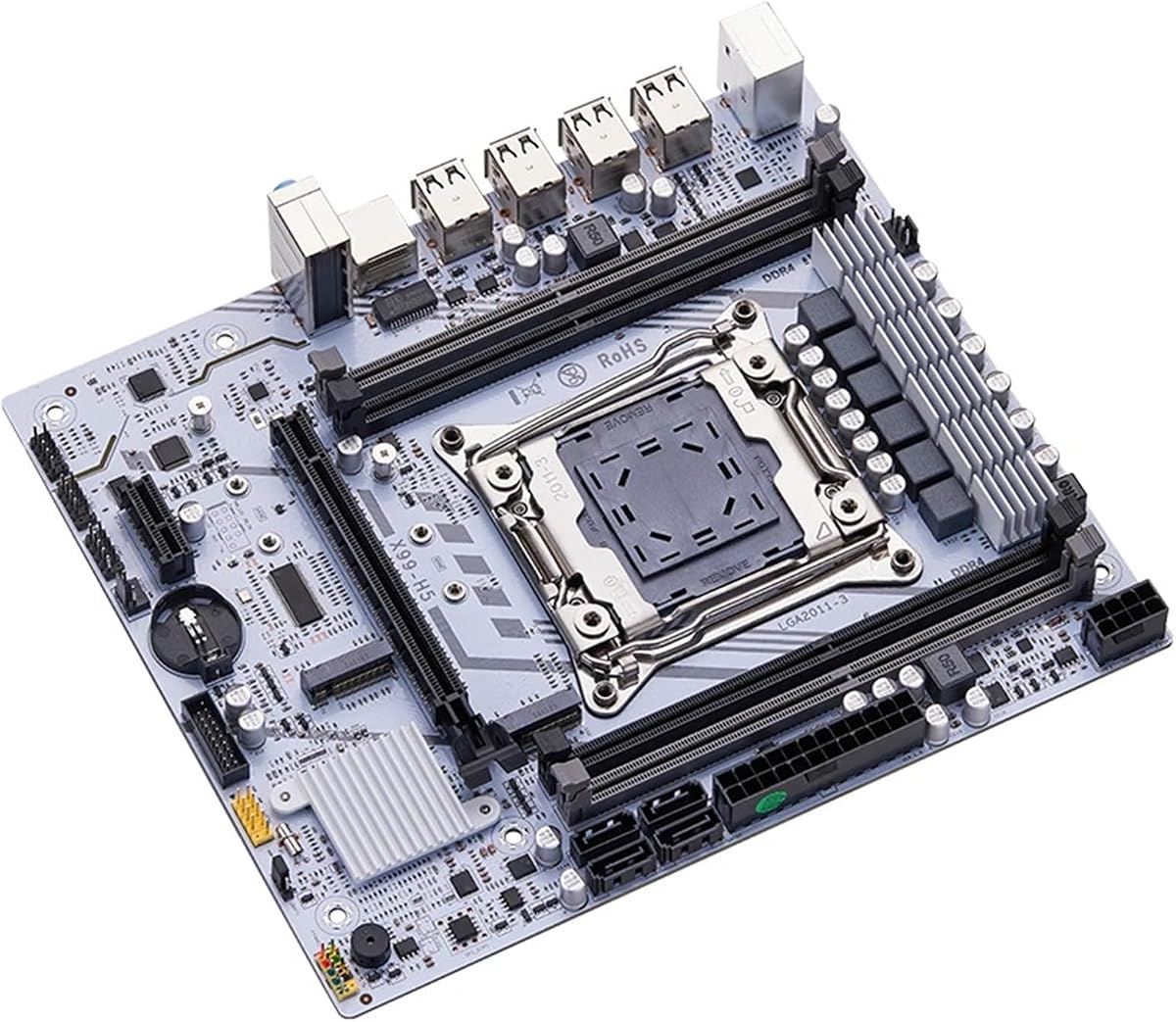
The X99 PR9-H White offers a clean look and reliable performance at an attractive price point. It supports a wide range of CPUs including i7 and Xeon E5 series. Its rating suggests it delivers good value for those building a server or workstation on a tight budget.
We may earn a commission when you buy through this link, at no additional cost to you.
Key strengths include the six-layer PCB design and full solid capacitor usage which contribute to a stable power supply for the CPU. The board features a Realtek 8111H LAN port and ALC897 audio codec for basic network and sound needs. The included pre-assembled I/O shield simplifies the installation process significantly.
Trade-offs involve the lack of a physical user manual and battery in the box. You will need to find the manual online and buy a battery yourself. Also, ensure your case supports M-ATX and that you follow the tips provided for troubleshooting power issues if they arise.
This board is perfect for hobbyists or small office setups needing reliable performance without high costs. It supports up to 128GB of DDR4 memory which is great for virtual machines. If you prioritize cost savings and solid build quality, this is a strong choice for your project.
The pre-assembled I/O shield and CPU cooler bracket reduce installation time and make DIY assembly more accessible for beginners.
Using full solid capacitors and optimized circuit layouts ensures longevity and consistent performance even during extended use.
We may earn a commission when you buy through this link, at no additional cost to you.
The ASUS X99-E WS/USB 3.1 is a workstation-grade board designed for professional users requiring high-end graphics and connectivity. With a high rating, it reflects superior build quality and features. It stands out for its ability to handle multiple GPUs and fast USB standards.
We may earn a commission when you buy through this link, at no additional cost to you.
Its standout qualities include support for four-way PCI-E Gen3 x16 links enabling SLI or CrossFireX setups for rendering or gaming. The built-in USB 3.1 offers twice the speed of USB 3.0 for faster data transfers. The 5-Way Optimization feature simplifies system tuning with one-click performance enhancements.
While premium, this board commands a higher price and its EATX form factor requires a larger case. However, the investment pays off in stability and speed. The inclusion of a Q Code Logger and Dr. Power LED aids in easy maintenance and troubleshooting of complex power or boot issues.
Who should buy it? Professionals in video editing, 3D modeling, or scientific computing will benefit most. If you need a board that supports multiple GPUs and fast storage alongside USB 3.1 this is a top-tier option. It is a reliable choice for those prioritizing performance and brand reputation over cost.
Supporting up to four graphics cards allows for massive rendering power and multi-monitor setups essential for professional creative workflows.
Onboard M.2 x4 support plus Thunderbolt II card compatibility offers flexible and fast storage solutions for large media files.
We may earn a commission when you buy through this link, at no additional cost to you.
The ASUS X99-A is a versatile ATX motherboard designed for Intel Core i7 processors. It provides solid performance for gaming and productivity tasks. Its rating reflects consistent reliability and feature-rich design typical of ASUS products in this generation.
We may earn a commission when you buy through this link, at no additional cost to you.
Key strengths include the OC Socket which helps drive 8-core CPU performance beyond standard expectations. The Dual Intelligent Processors 5 enable 5-Way Optimization for simplified system tuning. It also features PCIe 3.0 x4 M.2 and SATA Express for flexible storage integration.
Trade-offs include older USB standards compared to newer boards and potentially limited PCIe lane availability. However, the Crystal Sound 2 and Intel Gigabit Ethernet ensure good audio and network performance. If you value brand reliability and system management features this board remains a viable option.
Who should buy it? Gamers and enthusiasts who want a balance of features and price. It supports high-speed DDR4 memory and offers good expansion slots. If you are upgrading an existing system or building a new one with i7 5th/6th gen CPUs this board is worth considering for stable performance.
The 5-Way Optimization feature allows users to tune performance and cooling with a single click ensuring stable system operation.
Crystal Sound 2 technology provides immersive audio quality for gaming and multimedia consumption without needing external sound cards.
We may earn a commission when you buy through this link, at no additional cost to you.
This X99 Dual CPU board is built for extreme multi-threaded workloads by supporting two LGA 2011-3 processors. While it lacks a public rating, its design suggests it is intended for heavy server or workstation use. It offers substantial memory capacity and connectivity options.
We may earn a commission when you buy through this link, at no additional cost to you.
Key strengths include the eight DDR4 slots allowing up to 256GB of RAM in total if using 32GB sticks per channel. The integration of RTL8111H gigabit nics and six SATA3.0 interfaces ensures robust networking and storage capabilities. The dual CPU design is ideal for rendering or virtualization tasks.
Trade-offs involve the likely large size and complexity of BIOS setup. There is no mention of a rating so buyers should expect community-based feedback. Ensure you have compatible CPUs and a case that fits the motherboard dimensions before purchasing to avoid compatibility issues during assembly.
Who should buy it? Users building a high-end rendering farm or server need maximum cores and RAM. If you require dual processor power and extensive storage connectivity this board meets those needs. Check community forums for specific BIOS tips as support documentation may vary.
Eight DIMM slots allow for extensive RAM capacity suitable for database servers or large-scale virtualization environments.
Supporting two Xeon E5 series processors provides unmatched multi-core processing power for parallel computing tasks.
We may earn a commission when you buy through this link, at no additional cost to you.
The Tangxi X99 Gaming board brings a compact M-ATX design to the X99 platform. While its rating is lower than others it offers four-channel memory and modern storage options. It targets users who want DDR4 performance in a smaller footprint.
We may earn a commission when you buy through this link, at no additional cost to you.
Key strengths include the four channel DDR4 slots supporting up to 128GB and frequencies up to 3200MHz. The M.2 NVME interface ensures fast storage speeds. The eight layer PCB design aims to provide stable power delivery and signal integrity for demanding CPUs and GPUs.
Trade-offs include a lower overall rating which may indicate quality control issues. The I/O interface is somewhat limited with only two USB 3.0 ports. Users should check specific BIOS versions for compatibility with their CPUs. It is a budget option but requires careful verification of parts before building.
Who should buy it? Builders looking for a smaller case option with high memory bandwidth. If you need four channel RAM and NVME support in M-ATX this board is worth a look. Ensure you research recent user reviews to understand potential quirks before making a purchase decision.
The M-ATX design allows for smaller workstation builds while still supporting quad channel memory for bandwidth intensive tasks.
NVME M.2 support ensures that your system drive can operate at high speeds reducing boot and load times significantly.
We may earn a commission when you buy through this link, at no additional cost to you.
This X99 dual CPU board focuses on memory capacity and expansion. It supports eight DDR4 DIMM slots which allows for significant RAM. Its low rating suggests potential reliability concerns. It is targeted at users needing maximum memory for server applications.
We may earn a commission when you buy through this link, at no additional cost to you.
Key strengths include support for two processors and up to 256GB of memory if using large modules. The board offers two PCIe X16 slots which are useful for dual GPU setups. It also features a 6 channel sound chip for basic audio needs.
Trade-offs involve the lower user rating indicating potential quality or BIOS issues. You should verify compatibility with specific E5 CPUs carefully. Ensure you have sufficient power supply for two CPUs as they consume significant energy. Check community forums for known issues before buying.
Who should buy it? Users with specific needs for dual processor memory and who accept the risks of lower ratings. If you require a server board with eight memory slots on a budget this might work. Prioritize checking return policies and community feedback to mitigate potential risks.
Eight memory slots provide a clear path for upgrading RAM capacity as your workload demands increase over time.
Dual PCIe X16 slots allow for adding multiple expansion cards or GPUs depending on your workflow requirements.
We may earn a commission when you buy through this link, at no additional cost to you.
This X99 board stands out for supporting both DDR3 and DDR4 memory which offers flexibility for upgrades. It has dual M.2 NVME slots for fast storage. It lacks a public rating but describes itself as having stable high performance materials. It is priced higher than some other options.
We may earn a commission when you buy through this link, at no additional cost to you.
Key strengths include the memory support flexibility which can save costs by using older DDR3 kits. The Core Boost design optimizes power for more cores. Passive heatsinks help keep the chipset cool without noise from fans which is useful for silent builds.
Trade-offs include a higher price for a board without a clear rating. Users should verify that both memory types work as advertised for their specific CPUs. Ensure you have the correct BIOS version installed. The higher cost may not be justified without strong user reviews or brand support.
Who should buy it? Users who have DDR3 RAM they want to reuse or need flexible upgrade paths. If you want a dual NVME setup with passive cooling this board has those features. Check current community feedback before buying to ensure you get a reliable unit.
Supporting both DDR3 and DDR4 allows you to repurpose existing memory and lower overall build costs significantly.
Passive chipset heatsinks reduce fan noise creating a quieter working environment for office or home server setups.
We may earn a commission when you buy through this link, at no additional cost to you.
This X99 M-ATX motherboard is designed for users seeking a compact and affordable option. It supports DDR4 and NVME storage essential for modern systems. It lacks a public rating and detailed specs beyond core connectivity. It targets budget builds requiring essential performance features.
We may earn a commission when you buy through this link, at no additional cost to you.
Key strengths include its size and support for modern CPUs and memory. The PCIe 3.0 16X slot allows for graphics cards. M.2 NVME support ensures you can use fast SSDs for your system drive. It is a straightforward board without extra frills.
Trade-offs involve the lack of detailed documentation and user feedback. Verify that the BIOS supports your specific CPU before purchase. You may need to update the BIOS first which requires a working CPU and memory. Check compatibility lists carefully to avoid issues during initial setup.
Who should buy it? Users needing a small form factor system with standard performance. If you want a basic board for light workstation or gaming tasks this fits the bill. Verify specs closely and prepare for potential BIOS updates to ensure smooth operation.
The M-ATX form factor fits well in small cases for home labs or compact workstation builds saving space.
Standard PCIe and NVME slots ensure you can add a dedicated GPU and fast storage for a responsive system.
We may earn a commission when you buy through this link, at no additional cost to you.
The E5 MR9A V1.0 is an ATX motherboard supporting Xeon E5 V3 V4 CPUs. It highlights solid power cooling and safety protections. It lacks a public rating and detailed specs but aims to provide a stable base for workstation builds. It targets office and gaming scenarios.
We may earn a commission when you buy through this link, at no additional cost to you.
Key strengths include solid power supply design ensuring stable temperatures under load. It supports M.2 NVME SSDs and USB3.0 for connectivity. Multiple safety protections add reliability for office and home use. The board claims smooth multitasking with high frequency memory support.
Trade-offs involve the lack of detailed specs and user reviews. Verify the BIOS version and CPU compatibility list before purchasing. Ensure you have sufficient cooling as solid power supplies may run warm. Check return policies to mitigate risks given the lack of community feedback.
Who should buy it? Users needing a reliable ATX board for mixed office and work use. If you value safety protections and solid power delivery this board may suit your needs. Research current forum discussions to gather real world experiences before making a final purchase decision.
Solid power supply and cooling ensure low temperatures under full load maintaining system stability for long work sessions.
Complete external interfaces and USB3.0 support provide convenient connections for various peripherals and storage devices.
We may earn a commission when you buy through this link, at no additional cost to you.
Selecting the right Lga 3 X99 Motherboard involves considering several critical factors to ensure compatibility and performance.
Ensure the board explicitly supports your chosen Intel Xeon E5 or Core i7 processor. Check BIOS compatibility for older CPUs as updates may be required.
Matching the socket LGA 2011-3 is essential but verify specific model support lists to avoid hardware incompatibility.
Look for boards that support the DDR4 capacity you need for your tasks. Some boards support ECC memory while others may not.
Check how many DIMM slots are available to plan for future upgrades without replacing the motherboard.
Modern boards offer M.2 NVME slots for fast storage. Verify the number of these slots and their PCIe lane allocation.
SATA ports are also important for connecting additional hard drives or SSDs for mass storage.
ATX and M-ATX are common sizes. Measure your case to ensure the motherboard fits physically.
Consider expansion requirements when choosing between ATX and smaller variants to ensure you have enough PCIe slots.
A robust VRM design is critical for high-core CPUs. Look for boards with solid capacitors and sufficient power phases.
Check if the board includes VRM cooling solutions to maintain stability under sustained workloads.
Gigabit Ethernet is standard on most boards. Some models may offer multiple ports for specific networking needs.
If wireless is needed, ensure the board has a slot or built-in support for WiFi modules to avoid adapter clutter.
Count the rear USB ports and headers available for front panel connections. USB 3.0 and above are preferred for faster transfers.
Ensure you have enough ports for your keyboard, mouse, storage, and other peripherals to avoid relying on hubs.
Established brands typically offer better support and BIOS updates. Check the warranty policy to understand coverage for defects.
Community feedback on reliability and troubleshooting tools should influence your decision to ensure long term satisfaction.
Install the board on standoffs to avoid electrical shorts and secure all power connectors including the 24-pin and CPU power. Ensure RAM is seated firmly in slots with correct channel pairing.
Clear the CMOS if you encounter boot issues by using the jumper or removing the battery briefly. Install the latest BIOS version before connecting critical peripherals to maximize compatibility.
Monitor temperatures regularly using BIOS or software tools to detect cooling issues early. Keep the system free of dust to maintain airflow and prevent overheating over time.
Yes most X99 boards support the Xeon E5 2680 v4 but you may need a BIOS update. Check the specific CPU support list on the seller page before buying. Ensure your motherboard has updated firmware to recognize V4 series processors properly.
Most X99 boards require DDR4 RAM only but some specific models support both DDR3 and DDR4. Check the product details carefully to confirm memory type compatibility. Mixing DDR3 and DDR4 on a single board is generally not possible.
For older Core i7 CPUs like the 5960X you might need to update the BIOS for full compatibility. Use the seller provided manual or download files from their support page. This ensures the board recognizes the CPU features correctly.
Not all X99 boards support ECC memory. Server boards and specific workstation models are more likely to support it. Check the product description for ECC or RECC support before purchasing to avoid wasting money on incompatible RAM.
Most boards support PCIe 3.0 x4 M.2 speeds offering up to 3200MB/s or more. Verify if your board uses full x4 lanes to ensure maximum SSD performance. Some may limit speed to x2 if sharing bandwidth with SATA ports.
Standard boards support one or two GPUs while premium models support up to four. Check PCIe slot layout and lane allocation to avoid bottlenecks. Ensure your power supply has enough wattage for multiple graphics cards.
Choosing the right Lga 3 X99 Motherboard depends on your specific needs for processing power and storage. The top picks offer strong performance for a range of workloads and budgets.
Prioritize boards that support your CPU and memory requirements while offering the connectivity you need. Check reviews for reliability and BIOS support to ensure a smooth build experience.
Remember that prices and stock fluctuate regularly so check current listings before buying. Always verify specs with the latest information to avoid compatibility issues with your components.