
ASRock B550M-HDV Socket AM4 Micro-ATX Motherboard
4.5Editor score
Supports AMD Ryzen 3000 to 5000 series
Features PCIe 4.0 x16 slot support
Includes six USB 3.2 Gen1 ports
This guide compares the top low power motherboards for NAS, home servers, and energy efficient desktops. We evaluate specs, connectivity, and value.
Finding the right low power motherboard is essential for building efficient home servers, network storage devices, or compact desktop PCs. These boards balance performance with energy savings to reduce electricity costs over time.
We compared ten real products based on processor efficiency, connectivity options, and build quality. Each entry highlights key specs like network ports, storage slots, and power requirements to help you decide.
Each pick shows specific strengths for different use cases like virtualization or media streaming. Prices and availability change frequently so verify current details before making your final purchasing decision online.
4.5Editor score

4.5Editor score
4.0Editor score
The following table provides a side-by-side overview of all ten motherboards. It highlights core specifications such as processor type, memory support, and storage connectivity to streamline your comparison process.





This motherboard stands out for its integrated Celeron N5105 processor and impressive networking capabilities. It has a 4.5 rating for solid performance in home server tasks.
We may earn a commission when you buy through this link, at no additional cost to you.
The four 2.5GbE ports make it ideal for network storage and firewall appliances. It also supports up to 32GB of DDR4 memory and includes dual M.2 NVMe slots.
While the first boot may take minutes to read memory, the stable network performance offsets this minor inconvenience. The 4K HDMI and DisplayPort outputs add versatility.
Anyone building a dedicated NAS or media center should consider this board. Its combination of power efficiency and connectivity offers great value for specialized builds.
The inclusion of four i226 2.5GbE ports provides secure and stable connections for professional appliances.
This mini-ITX board features a high-density moisture-proof fiber circuit for reliable operation in various environments.
We may earn a commission when you buy through this link, at no additional cost to you.
This is a legacy board featuring an integrated J1800 processor and DDR3 memory support. It holds a 4.0 rating for basic utility applications.
We may earn a commission when you buy through this link, at no additional cost to you.
It offers essential ports like HDMI and DVI-D for display needs. The board includes two SATA 2 ports and supports up to 16GB of RAM.
Users should note that SATA 2 limits storage speeds compared to modern standards. However, for simple kiosks or light office use, it remains functional.
Buyers looking for the lowest cost entry point into PC assembly might find this useful. It is best suited for projects where speed is not critical.
This board uses a legacy platform to keep costs low for entry-level computing requirements.
It includes essential ports like USB 3.0 and HDMI for connecting peripherals and monitors.
We may earn a commission when you buy through this link, at no additional cost to you.
This board supports AMD Ryzen 5000 series processors with a solid AM4 socket. It has a 4.4 rating for reliable performance in budget builds.
We may earn a commission when you buy through this link, at no additional cost to you.
Key features include a digital 3+3 VRM design and chipset heatsinks for thermal management. It also offers dual M.2 slots and PCIe 4.0 support.
While the power phase is basic, it handles standard Ryzen CPUs well. The lack of high-speed USB 3.2 Gen 2 might limit some future expansion needs.
Home users wanting a low power desktop or light workstation should look at this option. It balances cost and modern AM4 compatibility effectively.
Supports a wide range of AMD processors from 3000 to 5000 series for flexible upgrades.
Enhanced thermal armor helps dissipate heat efficiently from the chipset during operation.
We may earn a commission when you buy through this link, at no additional cost to you.
This micro-ATX motherboard focuses on performance with Core Boost technology and memory overclocking. It holds a 4.4 rating for stability in daily tasks.
We may earn a commission when you buy through this link, at no additional cost to you.
It features a dedicated M.2 Gen4 slot for ultra-fast storage speeds alongside a Gen3 option. The system also supports AI cooling adjustments based on temperature.
While it lacks wireless capabilities, the wired gigabit connection is reliable for local networks. Users might find the audio features basic for high fidelity needs.
Gamers or builders needing fast NVMe storage should consider this board. It offers a solid balance of performance features at a competitive price point.
Includes a direct M.2 Gen4 slot for high-speed NVMe SSD installations.
AI cooling technology adjusts fan settings automatically to maintain optimal system temperatures.
We may earn a commission when you buy through this link, at no additional cost to you.
This board integrates the Intel J4125 quad core processor for lightweight computing. It has a 3.4 rating suggesting mixed user experiences with reliability.
We may earn a commission when you buy through this link, at no additional cost to you.
It supports DDR4 memory and includes an M.2 Key E slot for WiFi cards. The design uses Super Alloy components for durability in standard operations.
The PCIe 2.0 limitation might restrict bandwidth for newer graphics or network cards. Users should verify BIOS compatibility before installation to avoid issues.
Those building a low power media server or router may find this adequate. The included CPU reduces initial hardware costs significantly.
Uses ASRock Super Alloy components to ensure long-term reliability and stability.
The M.2 Key E slot allows for wireless networking modules to be added easily.
We may earn a commission when you buy through this link, at no additional cost to you.
This board offers wide AMD AM4 support with a focus on affordability. It holds a 4.5 rating for reliable daily connectivity and stability.
We may earn a commission when you buy through this link, at no additional cost to you.
It features three video outputs including HDMI and DVI-D for flexible display setups. The Hyper M.2 slot supports PCIe 4.0 speeds for fast storage.
The 6 Power Phase design ensures stable power delivery for supported processors. Users might miss dedicated WiFi but wired options are sufficient for most homes.
Budget conscious builders wanting modern features without high costs should choose this. It remains a strong contender for entry level AM4 systems.
Offers three video outputs including D-Sub for compatibility with older monitors.
Full Spike Protection on ports guards against electrical surges during usage.
We may earn a commission when you buy through this link, at no additional cost to you.
This Mini-ITX board is designed for small form factor builds with robust power delivery. It has a 4.4 rating for stable performance in compact cases.
We may earn a commission when you buy through this link, at no additional cost to you.
It includes Intel Dual Band WiFi and Bluetooth along with direct 6 phase digital PWM. The board supports NVMe PCIe 3.0 and offers three display interfaces.
Users will appreciate the Q-Flash Plus feature for BIOS updates without a CPU installed. However, the limited memory slots restrict high RAM capacity setups.
Home theater PC enthusiasts needing wireless connectivity will find this board useful. It balances size constraints with essential premium features effectively.
Integrated Intel dual band WiFi and Bluetooth ensure wireless networking and device pairing.
Q-Flash Plus allows BIOS updates without needing a processor installed first.
We may earn a commission when you buy through this link, at no additional cost to you.
This motherboard stands out with its 5.0 rating for reliability and Wi-Fi 6E support. It is a strong choice for wireless connected home systems.
We may earn a commission when you buy through this link, at no additional cost to you.
It offers 4 slots for DDR4 memory supporting up to 128GB capacity. The board includes eight USB 3.2 Gen1 ports for extensive peripheral connectivity.
While it lacks a Gen4 M.2 slot, the 8 phase power design ensures stable delivery. Users must verify chassis compatibility as the micro-ATX size requires specific cases.
Anyone needing fast wireless networking and high memory capacity should look here. The audio codec provides immersive sound for multimedia tasks.
The included Wi-Fi 6E supports 6GHz band for low latency gaming and streaming.
Realtek ALC1220 HD Audio delivers immersive sound for entertainment setups.
We may earn a commission when you buy through this link, at no additional cost to you.
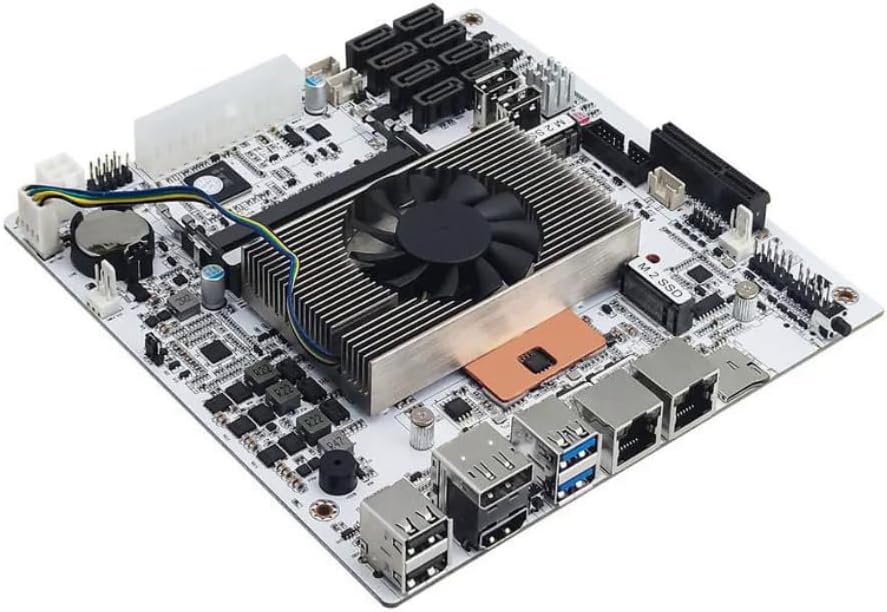
This board offers exceptional storage capacity with eight SATA ports and dual M.2 slots. It has a 4.1 rating for reliable industrial performance in specialized builds.
We may earn a commission when you buy through this link, at no additional cost to you.
The U-series quad core processor delivers 8 threads for efficient virtualization and multitasking. It supports dual 2.5GbE ports for high speed network transfers.
Users should be aware of potential sleep mode issues reported in notes. However, the dual cooling fan included helps maintain stable operating temperatures.
Anyone building a home server or firewall appliance will benefit from this design. The connectivity options exceed most standard consumer motherboards.
Features eight SATA ports plus NVMe slots for massive data storage needs.
Constructed with a 6-layer moisture resistant PCB for reliable industrial usage.
We may earn a commission when you buy through this link, at no additional cost to you.
This motherboard is designed specifically for NAS builds with an Intel Core i5 processor. It holds a high rating for enterprise level storage and virtualization needs.
We may earn a commission when you buy through this link, at no additional cost to you.
It features 8 SATA 3.0 ports and dual 2.5GbE controllers for high bandwidth. The board supports virtualization passthrough for running virtual machines efficiently.
Users should note the board does not support sleep mode for 24/7 uptime. The included PCIe x4 slot allows for network or storage expansion.
Those building a premium home server or enterprise appliance will find this robust. It offers a complete solution for power efficient continuous operation.
Supports VT-x and VT-d for advanced virtual machine deployment and passthrough.
Low TDP CPU ensures the system runs efficiently 24/7 without overheating.
We may earn a commission when you buy through this link, at no additional cost to you.
Choosing the right low power motherboard requires understanding your specific workload needs. This section breaks down the key factors to consider before purchasing.
Many low power boards come with integrated CPUs like the Celeron N5105. This saves cost but limits future upgrades. Check if the TDP aligns with your cooling requirements.
Prioritize integrated CPUs if you need a dedicated server that does not need upgrades.
DDR4 support is standard but capacity matters for virtualization. Look for boards with at least two DIMM slots for dual channel performance. Some industrial boards limit speed to 2400MHz.
Ensure the board supports enough RAM for your specific workload.
Home servers often need multiple network ports for traffic separation. Boards with dual or quad 2.5GbE ports are ideal for firewall appliances. Standard Gigabit might suffice for simple NAS.
Select boards with extra LAN ports for better traffic management.
SATA port count determines drive capacity. Look for 6+ SATA ports if building an 8+ bay NAS. M.2 slots are essential for boot drives. Check if slots support PCIe 4.0.
Balance SATA ports with M.2 slots for a hybrid storage system.
Low power boards often need specific 24PIN + 4PIN connections. Check your power supply compatibility. Some boards require a clear CMOS button or specific startup steps.
Verify your power supply has the required connectors before buying.
Micro ATX and Mini ITX are common for compact builds. Ensure your case supports the motherboard size. Check rear port placement to avoid conflicts with case panels.
Measure your case depth to ensure the board fits.
Many boards include HDMI and DisplayPort for dual 4K support. If you plan to run multiple screens, check the DP version. HDMI 2.0 is standard for 60Hz refresh rates.
Verify video output compatibility with your monitor setup.
Ensure the board supports your chosen OS like Linux or Windows. Some older boards may have legacy BIOS options for specific virtualization setups. Check vendor lists for CPU support.
Always check the official CPU support list before purchasing.
Install the motherboard in a well ventilated case to ensure proper cooling. Connect the required power cables carefully as some industrial boards need 24PIN and 4PIN simultaneously.
Use compatible power supplies to avoid instability. Ensure your case has a clear CMOS button if the board requires BIOS resets during first boot.
Update your BIOS regularly to fix sleep mode bugs or add new CPU support. Keep the system clean to prevent dust accumulation on the PCB that might cause overheating.
Low power motherboards typically use integrated CPUs with low TDP ratings or have optimized voltage regulators. They often support DDR4 memory with lower voltage requirements. This design reduces heat and electricity consumption.
Only boards with AM4 sockets support Ryzen processors like the B550M models. Integrated CPU boards like the N5105 do not allow processor swaps. Check the socket type before buying.
Most standard ATX power supplies work but some require 24PIN and 4PIN connections. Industrial boards might need specific connectors. Always check the manual for power requirements.
Not all boards include WiFi. Some like the A520I AC have built-in modules. Others require a separate card. Check the specs to confirm wireless support before purchasing.
It depends on your drive count. If you need eight drives, look for boards with eight SATA ports. Some boards use chip extensions to provide extra connectivity. Check the expansion limitations.
Most low power boards are not designed for gaming due to weaker integrated graphics. They focus on stability and efficiency. Consider dedicated graphics cards for gaming performance.
The Celeron N5105 Industrial Motherboard NAS stands out for its powerful networking and storage options. The ASRock B550M-HDV remains a top budget choice for AMD users.
Prioritize your workload requirements such as virtualization or media streaming when selecting a board. Check connectivity needs like SATA count and network speed carefully.
Prices and availability change frequently so verify current details before making your final purchasing decision online. Always read the latest reviews to confirm compatibility with your specific case.