
Hyperkin Trooper 2 Premium
4.1Editor score
Classic retro feel
Ergonomic design
Durable construction
Discover the top Mac game joysticks for 2026. We compare flight sticks, arcade fighters, and wireless controllers optimized for macOS gaming performance.
Finding the right game joystick for your Mac can transform your gaming experience significantly. Whether you prefer flight simulators or classic arcade action, the right peripheral ensures precise control and immersive gameplay on your desktop or laptop.
We evaluated ten top-rated joysticks specifically for Mac compatibility and performance. Our comparison looks at build quality, connectivity options, button mapping capabilities, and overall value to help you find the perfect match for your setup and gaming preferences.
Each pick below highlights key strengths and ideal use cases for different types of players. Please note that availability and pricing can change quickly, so verify current details on the product pages before making your final purchase decision today.
4.1Editor score
4.6Editor score

4.0Editor score
The following table provides a side-by-side overview of all ten selected joysticks. Use this quick reference to compare key specifications and features at a glance before diving into the detailed reviews below.


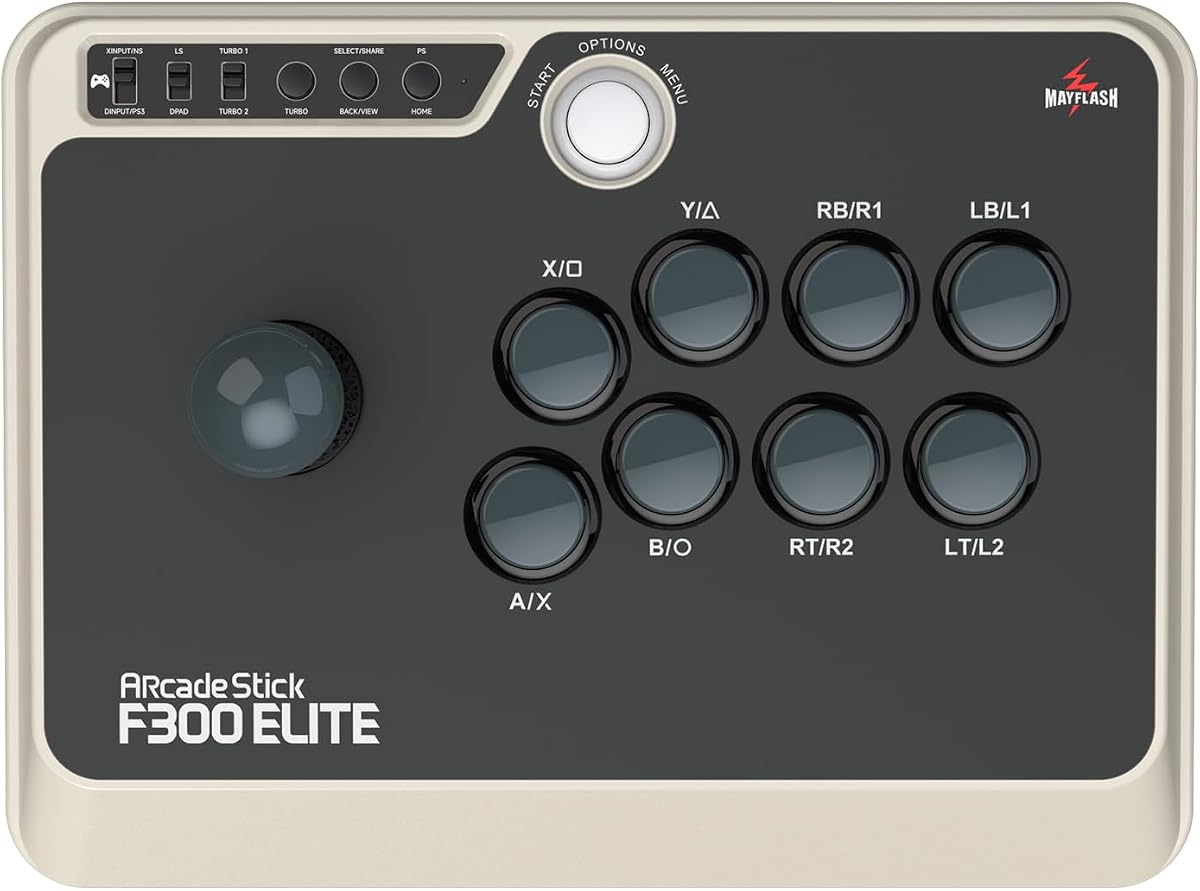
The MAYFLASH F300 Elite stands out as a top-tier choice for Mac users seeking arcade perfection. With a high rating from users, this stick delivers reliable performance for competitive gaming on macOS systems.
We may earn a commission when you buy through this link, at no additional cost to you.
Its use of premium Sanwa components ensures that every button press and joystick movement is crisp and accurate. The internal design allows enthusiasts to swap parts easily, tailoring the stick to their specific hand size and playstyle preferences.
While the price is higher than budget options, the durability and responsiveness justify the investment for serious players. The only minor trade-off is that PS5 compatibility requires an additional adapter, but this does not affect Mac performance.
If you prioritize precision and want a controller that can grow with your skills, this Elite model is highly recommended. It offers the perfect balance of plug-and-play convenience and deep customization for macOS arcade gaming.
The high-quality buttons and joystick ensure long-term durability and consistent tactile feedback during intense gaming sessions on your Mac.
The accessible internal platform lets you upgrade or change parts easily to suit your evolving gameplay needs and preferences.
We may earn a commission when you buy through this link, at no additional cost to you.
The Hyperkin Trooper 2 Premium offers an excellent entry point for Mac gamers wanting a classic arcade experience without breaking the bank. It combines nostalgic design with modern USB connectivity for reliable plug-and-play use.
We may earn a commission when you buy through this link, at no additional cost to you.
Its ergonomic corners and soft rubber grips provide comfort during long sessions, while the quiet joystick ensures smooth inputs. The mappable buttons add flexibility for various consoles and menu navigation needs.
Although it lacks wireless options or advanced features, the build quality is solid for the price. The long USB cable ensures you can reach your system comfortably, making it ideal for desktop setups.
For retro enthusiasts or casual players, this controller delivers authentic feel and function. It is a practical choice for anyone needing a straightforward joystick for Mac emulation and vintage gaming.
The design pays homage to original arcade machines, offering a nostalgic feel that enhances immersion in vintage games.
Chamfered corners and rubber grips reduce hand fatigue, allowing for extended play without discomfort or strain.
We may earn a commission when you buy through this link, at no additional cost to you.
The Logitech G X56 is a powerhouse for serious flight simulation enthusiasts using Mac systems. Despite higher requirements, it delivers military-grade precision and an immersive cockpit experience for complex flight scenarios.
We may earn a commission when you buy through this link, at no additional cost to you.
With over 189 programmable controls and adjustable spring options, you can tailor every movement to your exact flying style. The RGB lighting adds a professional touch that can match your entire gaming setup effectively.
The sheer number of controls means it takes up desk space and requires some software configuration to get right. However, once set up, the range of motion and input accuracy are unmatched in its class.
If you demand the highest level of control for simulators, this joystick is worth the investment. It transforms Mac flight gaming from casual play into a professional simulation experience.
16-bit axes and Hall-effect sensors ensure that every subtle movement is captured with exact accuracy for realistic flight control.
The throttle and joystick combine into one unit with twin throttles and lock mechanisms for total command over your aircraft.
We may earn a commission when you buy through this link, at no additional cost to you.
The Thrustmaster T-Flight Stick X provides a solid foundation for flight simulation on Mac platforms. Its ergonomic design and immediate recognition by systems make starting up your sim effortless.
We may earn a commission when you buy through this link, at no additional cost to you.
Adjustable resistance lets you fine-tune the stick tension to match your preference, while the weighted base keeps it planted during intense maneuvers. The integrated throttle and rudder twist offer essential flight controls in one package.
While some Mac users report compatibility variance depending on the game, the overall stability and control remain strong. The twelve reprogrammable buttons allow for useful customization without overwhelming complexity.
This stick is ideal for those starting their sim journey who want reliable performance without complex setup. It balances cost and features well for Mac flight enthusiasts seeking a dedicated control stick.
Tune the stick tension to match your flying style, ensuring precise control from gentle banking to intense dogfights.
Built-in throttle and rudder twist eliminate the need for separate pedals, saving desk space while maintaining full control.
We may earn a commission when you buy through this link, at no additional cost to you.
The abxylute C6 Wireless brings modern convenience to Mac gaming with its Hall Effect joysticks and wireless flexibility. Users appreciate the absence of drift and the high-speed polling rate for competitive play.
We may earn a commission when you buy through this link, at no additional cost to you.
Its compatibility spans Mac, Switch, and mobile, allowing seamless transitions between devices. The 1000Hz polling rate ensures minimal lag when using the wired or dongle mode for faster reactions.
While Bluetooth works well, the included dongle offers lower latency for serious gaming. The battery life supports long sessions, though the build feels slightly less premium than heavier controllers.
For Mac users seeking a versatile and drift-free option, this controller delivers strong value. It is perfect for those who want wireless freedom without sacrificing precision or battery longevity.
Magnetic sensors prevent physical wear and drift, ensuring consistent accuracy and a longer lifespan for the joystick.
The 1000Hz polling rate in wired and dongle modes provides ultra-low latency for competitive gaming scenarios.
We may earn a commission when you buy through this link, at no additional cost to you.
The MAYFLASH F300 Arcade is a versatile choice for Mac users interested in fighting games and retro titles. It balances affordability with quality components, making it a strong contender in the mid-range market.
We may earn a commission when you buy through this link, at no additional cost to you.
Its support for Sanwa buttons allows for customization without expensive upgrades. The XINPUT and DINPUT compatibility ensures it works seamlessly across various PC and Mac environments for easy integration.
While the basic design lacks some flair, the functionality is robust. The turbo functions add utility for action games, and the solid base keeps the stick steady during rapid inputs.
This model is perfect for gamers who want a reliable arcade stick without overspending. It serves as an excellent entry point for Mac fighting game enthusiasts looking for performance and value.
The ability to use or upgrade to genuine Sanwa parts enhances the feel and longevity of your arcade experience.
Seamlessly switch between Mac, Switch, and consoles, ensuring versatility for different gaming setups and genres.
We may earn a commission when you buy through this link, at no additional cost to you.
The Thrustmaster SimTask FarmStick targets a specific audience of farming simulation fans on Mac. While niche, its specialized controls deliver an immersive and efficient experience for agricultural gameplay.
We may earn a commission when you buy through this link, at no additional cost to you.
With Hall Effect sensors ensuring precision, the joystick provides smooth control for operating virtual tractors and machinery. The 33 programmable inputs allow you to manage complex operations without touching the keyboard.
The specialized design means it may not fit standard general gaming needs as well as universal sticks. However, for farming simulation, the tailored functionality offers unmatched comfort and workflow efficiency.
If you are deeply invested in farming sims, this device is a worthwhile upgrade. It brings a level of realism and convenience that standard controllers cannot match for this specific genre.
Magnetic sensors eliminate wear and drift, ensuring long-term accuracy for critical farming machinery controls.
Manage every function of your virtual farm with 33 inputs, reducing reliance on keyboard shortcuts during gameplay.
We may earn a commission when you buy through this link, at no additional cost to you.
The 8Bitdo Ultimate 2 Wireless delivers premium connectivity and feel for Mac gamers seeking a modern experience. Its high-quality joysticks and stable wireless connection make it a reliable option for general gaming.
We may earn a commission when you buy through this link, at no additional cost to you.
The unique trigger mode switch allows customization between linear and tactile feedback, adapting to different game genres. The included charging dock keeps the controller ready to use and adds a convenient touch to your setup.
While mapping software is needed for full customization, the default layout is well thought out. The 2.4G connection minimizes latency effectively for wireless performance on Mac systems.
This controller is an excellent choice for those who value build quality and wireless convenience. It offers a polished experience suitable for a wide range of Mac-compatible games and applications.
Switch between linear Hall Effect and tactile triggers to optimize control for racing or shooter games.
8BitDo Exclusive technology provides a rock-solid 2.4G connection with ultra-low latency for consistent gameplay.
We may earn a commission when you buy through this link, at no additional cost to you.
The Moonag Wireless PC Controller brings stylish RGB lighting and reliable performance to Mac gaming setups. Its Hall Effect joysticks ensure smooth control while the battery life supports extended play sessions.
We may earn a commission when you buy through this link, at no additional cost to you.
Programmable macros and turbo functions add versatility for competitive gaming, while the dual vibration provides immersive feedback. The ergonomic design reduces fatigue during long sessions, making it comfortable for daily use.
While the RGB lighting looks great, it can consume more battery power over time. The software allows some customization, though it is not as advanced as other high-end options on the market.
For gamers who value aesthetics and performance equally, this controller strikes a good balance. It offers a feature-rich experience at a competitive price point for Mac users seeking style and function.
Hall Effect sensors prevent stick drift and wear, ensuring precise control and a longer lifespan for your controller.
Enhance your gaming atmosphere with dynamic lighting that surrounds joysticks and buttons for visual immersion.
We may earn a commission when you buy through this link, at no additional cost to you.
The SPEEDLINK Competition PRO captures the nostalgia of classic arcade gaming for Mac users. Its unique design and digital controls offer a pure throwback experience for fans of retro titles.
We may earn a commission when you buy through this link, at no additional cost to you.
With built-in games included in the anniversary edition, it provides immediate entertainment without extra downloads. The layout mirrors original machines, appealing to those who prefer tactile switches over modern analog sticks.
While it lacks advanced features like turbo or wireless options, the focus on authenticity is its strength. The digital inputs ensure precise actions that are ideal for classic platformers and shooters.
This joystick is perfect for collectors or those seeking a dedicated retro device. It delivers a specific charm that modern controllers often lack for authentic vintage gaming on your Mac system.
The design is taken from original arcade machines, offering a look and feel that transports you back to the classics.
Includes a collection of twenty retro games, adding immediate value and nostalgia for vintage gaming enthusiasts.
We may earn a commission when you buy through this link, at no additional cost to you.
Selecting the right joystick for your Mac depends on your preferred game types and desired features. Use these factors to narrow down your options effectively.
Ensure the joystick explicitly supports macOS to avoid driver issues or functionality limitations. Check for USB or Bluetooth connectivity options that match your Mac hardware.
Verify the device is recognized by your operating system without needing complex software.
Choose between wired and wireless options based on your playstyle. Wired provides consistent input with no latency, while wireless offers freedom of movement.
Wireless models may require dongles or batteries, which should be considered for long-term use.
Look for designs that fit your hand size comfortably to reduce fatigue. Grips and weight distribution play a key role in prolonged usage.
Test the feel if possible to ensure it matches your physical preferences.
Count the number of programmable buttons to meet your game control needs. Some joysticks offer more customization than others for complex actions.
Ensure buttons are tactile and placed where you can reach them easily.
Check for high-quality materials like Hall Effect sensors that resist wear over time. This ensures longevity and consistent performance for your investment.
Read user reviews to gauge real-world lifespan and reliability.
Advanced mapping may require companion software on Mac. Ensure the software is user-friendly and supports your Mac version.
Some devices work out of the box without needing extra installation.
Decide if you need a generic controller or one specialized for flight or fighting games. Specialized sticks offer better precision for their niche but less versatility.
Choose based on your primary gaming focus to get the best experience.
Set a realistic budget that aligns with the features you need. Higher-priced models often offer better build quality and more customization options.
Balance cost with functionality to ensure value without overspending.
Start by connecting your joystick to your Mac via USB or Bluetooth settings. Ensure your Mac recognizes the device immediately before launching any games.
Calibrate your joystick in the system preferences if needed to align the center position with your expectations. Regularly update any drivers or software provided by the manufacturer.
Keep your device clean by wiping it down with a dry cloth to prevent dust buildup. Store it in a safe spot when not in use to protect buttons and sticks from damage.
Most of the listed options support macOS natively or through basic USB plug-and-play. Always verify the compatibility list in the product description to ensure your specific version is supported.
Wireless models offer convenience and reduce cable clutter, but wired options provide consistent input. Choose based on whether you prioritize mobility or low-latency performance.
Yes, many of these controllers work well with emulators on Mac. You may need to map the buttons within the emulator software to match the arcade or console layout.
Some advanced models include software for mapping keys on Mac. Basic plug-and-play units usually work without extra setup, but customization may require software installation.
Use a soft, dry cloth to wipe down the exterior. Avoid liquids and harsh chemicals to protect the electronic components and button mechanisms.
Hall Effect joysticks use magnetic sensors to avoid physical contact and wear. This prevents stick drift and extends the device's lifespan compared to traditional mechanical pots.
We have covered ten distinct options ranging from budget arcade sticks to premium flight systems. Each pick was evaluated on Mac compatibility and performance features to help you decide.
Prioritize connectivity and build quality to ensure your controller lasts and works smoothly with your Mac. Consider your specific game genre to select the right level of specialization.
Always check current availability on the product pages as details may change. Selecting the right joystick can significantly enhance your Mac gaming experience.