
TECKNET 2.4G Wireless Keyboard
4.4Editor score
Compact wireless design
12-month battery life
Quiet chocolate keycaps
This guide compares the top 10 lightweight keyboards for 2026, evaluating portability, battery life, and typing comfort to help you find the perfect portable
Finding a lightweight keyboard is essential for modern professionals and students who need portable typing solutions. These devices combine slim profiles with robust functionality to ensure you can work anywhere without sacrificing comfort or efficiency during long sessions.
We compared ten top-rated models based on design, connectivity, battery life, and typing experience. Our analysis covers wireless and wired options ranging from compact travel keyboards to full-size slim designs suitable for various workflows and environments.
Each pick highlights specific strengths like battery endurance, build quality, and multi-device support. Prices and availability fluctuate frequently so verify current details before purchasing to ensure you get the best value for your specific typing needs today.
4.4Editor score

4.4Editor score

4.3Editor score
This side-by-side comparison evaluates all ten lightweight keyboards across critical metrics including portability, connectivity options, battery performance, and key feel to help you identify the ideal model for your specific mobile or stationary typing requirements.





The GEODMAER 65% Gaming Keyboard offers a compact solution for users needing a lightweight footprint without sacrificing gaming features. With a 4.3 rating it stands out for its affordability and functional design suitable for both gaming and office tasks.
We may earn a commission when you buy through this link, at no additional cost to you.
This keyboard features a detachable Type-C cable for stable connectivity and low input latency essential for responsive gameplay. The 68-key layout saves significant desk space while retaining separate arrow keys and full functionality through media buttons and FN combinations.
Users receive a mechanical-like feel via membrane technology which reduces noise while maintaining tactile feedback. The durable UV-coated keycaps resist fading over time and the customizable LED backlight ensures visibility in dim environments without distracting glare.
This model suits gamers and professionals who prioritize desk space and budget over wireless convenience. It delivers reliable performance for daily typing and gaming sessions making it an excellent entry-level choice for compact setups.
The 65% layout removes the numpad to reduce footprint while keeping essential keys separate for intuitive navigation during intense work or gaming sessions.
With a 10 million keystroke lifespan and UV-coated keycaps this keyboard withstands heavy daily use without fading or degradation over time.
We may earn a commission when you buy through this link, at no additional cost to you.
The Logitech Pebble Keys 2 K380s combines style with practicality for mobile professionals who need reliable wireless connectivity. Its 4.3 rating reflects strong user satisfaction regarding its slim profile and effortless pairing capabilities across multiple devices.
We may earn a commission when you buy through this link, at no additional cost to you.
You can switch between three devices instantly using Easy-Switch buttons supporting Windows macOS iPadOS and ChromeOS seamlessly. The scooped round keys mimic a laptop typing experience ensuring comfort during extended sessions while the quiet operation keeps shared spaces peaceful.
Battery life is exceptional lasting up to three years on a single charge with auto-sleep modes conserving power when not in use. The design incorporates recycled plastic reducing environmental impact while maintaining durability and a modern aesthetic that complements various desk setups.
Ideal for students and commuters this keyboard balances portability with full-size functionality. Its long battery life and seamless multi-device switching make it a top choice for anyone needing a dependable and stylish lightweight typing companion.
Switch between three connected devices instantly with dedicated buttons eliminating the need for repeated pairing and streamlining your workflow across phones tablets and laptops.
Constructed with minimum 49 percent certified post-consumer recycled plastic this keyboard supports sustainability without compromising on build quality or performance.
We may earn a commission when you buy through this link, at no additional cost to you.
The Arteck 2.4G USB Wireless Keyboard delivers a premium feel with its stainless steel construction and ultra-slim profile. Rating 4.4 it appeals to users seeking a full-size experience without the bulk of traditional desktop keyboards.
We may earn a commission when you buy through this link, at no additional cost to you.
Its 6-month battery life on a single charge ensures uninterrupted productivity for daily tasks. The low-profile keys provide quiet and comfortable typing while the full-size layout including numeric keypad supports efficient data entry and spreadsheet work.
Setup is simple with the nano USB receiver ensuring a stable connection up to 32 feet. The included USB charging cable keeps you powered without needing disposable batteries making it a cost-effective and eco-friendly choice for office environments.
Perfect for stationary desks needing space savings this keyboard offers durability and comfort. Its combination of full-size keys rechargeable power and sleek design makes it a reliable choice for professionals prioritizing typing efficiency and aesthetics.
The heavy-duty stainless steel construction provides a rigid and premium feel while keeping the overall weight low for portability.
Enjoy six months of use on one charge based on standard daily usage reducing the need for frequent recharging or battery replacements.
We may earn a commission when you buy through this link, at no additional cost to you.
The ProtoArc XK01 Full-Size Foldable Keyboard bridges the gap between portability and full desktop functionality. With a 4.3 rating it is designed for frequent travelers who refuse to compromise on key layout or typing comfort.
We may earn a commission when you buy through this link, at no additional cost to you.
It features a tri-fold design that folds into a compact 8.46 x 4.68 inch profile while maintaining 105 full-size keys. Bluetooth 5.1 connects up to three devices allowing seamless switching between laptop tablet and phone without breaking workflow.
Quiet scissor-switch keys ensure discretion in coffee shops or open offices while aluminum hinges tested for 10,000 folds guarantee durability. The USB-C rechargeable battery offers up to 150 days of standby making it ready for any journey without constant charging.
Ideal for remote workers and students this keyboard offers rare full-size functionality in a foldable form. Its robust hinges and excellent battery life make it a top contender for those needing a reliable portable typing solution.
Retain all standard keys including a number pad and function row ensuring desktop-grade productivity even when working on the go.
Internal aluminum hinges tested for over 10000 folds ensure long-term reliability without risking damage during repeated setup and takedown.
We may earn a commission when you buy through this link, at no additional cost to you.
The TECKNET 2.4G Wireless Keyboard offers an affordable entry into wireless typing with a compact footprint ideal for mobile setups. Rated 4.4 it balances cost and performance effectively for users needing basic wireless functionality without premium pricing.
We may earn a commission when you buy through this link, at no additional cost to you.
Its chocolate keycap design delivers smooth and quiet typing reducing finger fatigue during long sessions. The dedicated media hotkeys allow quick access to volume and playback controls enhancing entertainment experiences on connected PCs or Smart TVs.
With a 12-month battery life and plug-and-play USB receiver it minimizes setup time and power concerns. The compact 11.5 inch size fits easily into bags while maintaining enough key spacing for accurate and comfortable input.
Best for budget-conscious users or secondary workspaces this keyboard provides reliable performance. Its long battery life and quiet operation make it a practical choice for home offices or travel where simplicity and cost matter most.
Measuring 11.5 inches wide and weighing just 10.4 ounces this keyboard is easy to carry anywhere while still providing essential typing keys.
Simply plug the USB receiver into any compatible device for instant connection without needing complex drivers or Bluetooth pairing steps.
We may earn a commission when you buy through this link, at no additional cost to you.
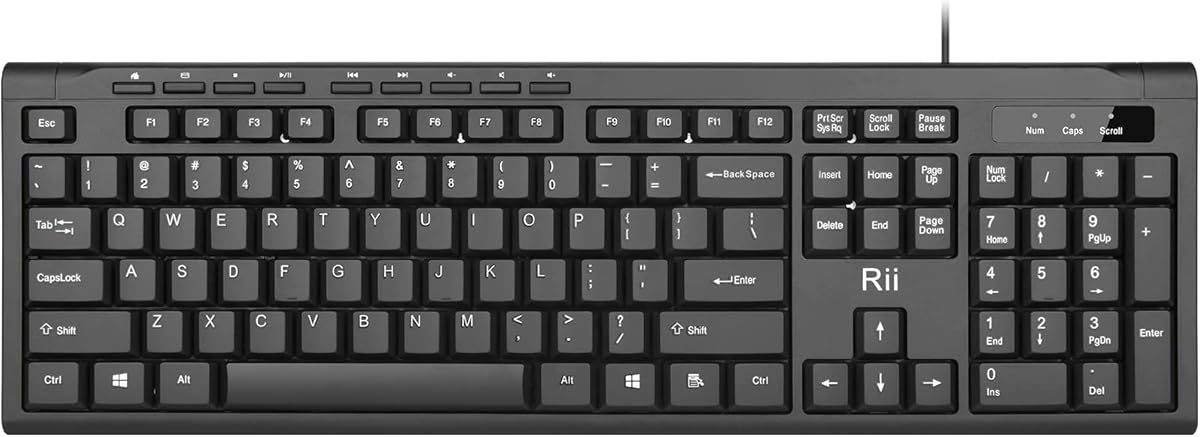
The Rii RK907 Ultra-Slim Compact USB Wired Keyboard excels in minimalism and reliability. Rated 4.5 it is a top pick for users seeking a straightforward lightweight solution for Mac or PC without unnecessary complexity or wireless issues.
We may earn a commission when you buy through this link, at no additional cost to you.
Low-profile keys offer a quiet and comfortable typing experience suitable for office environments. The splash-resistant design protects against accidental spills adding durability for everyday use while the plug-and-play USB connection ensures immediate compatibility with most systems.
This keyboard maintains a slim desktop-centric footprint ideal for tight workspaces where cable management is crucial. Its build quality and silent operation make it a dependable tool for professionals who value simplicity and consistent performance over advanced features.
Ideal for home offices or secondary setups this keyboard offers essential functionality at a low cost. Its quiet keys and durable design ensure long-term satisfaction for users needing a reliable wired typing companion.
The slim key design reduces noise levels significantly making it perfect for quiet environments or shared spaces without disturbing others.
Built with splash-resistant protection this keyboard withstands minor spills ensuring longevity and peace of mind during daily use.
We may earn a commission when you buy through this link, at no additional cost to you.
The Logitech MX Keys Mini combines minimalist design with smart features for a premium typing experience. Rated 4.4 it stands out for its smart illumination and multi-device capabilities making it a top choice for productivity-focused professionals.
We may earn a commission when you buy through this link, at no additional cost to you.
Smart backlighting automatically adjusts to lighting conditions and activates when hands approach ensuring visibility without waste. The minimalist layout pairs with up to three devices via Bluetooth Low Energy allowing seamless workflow transitions between work and personal computers.
Keycaps are shaped for fingertips enhancing comfort and accuracy during typing. A full recharge lasts up to 10 days with backlighting or five months without ensuring long-term usage without frequent charging needs while maintaining environmental responsibility.
Best for creatives and professionals needing precision and style this keyboard delivers quality and convenience. Its smart features and durable build justify the investment for users seeking a reliable and sophisticated wireless typing solution.
Built-in sensors detect your hands to light up keys automatically adjusting brightness to ambient conditions for optimal visibility and energy efficiency.
Pair with three devices simultaneously and switch seamlessly using dedicated buttons for efficient work across multiple systems without interruptions.
We may earn a commission when you buy through this link, at no additional cost to you.
The ProtoArc XK04 Foldable Compact Keyboard is designed specifically for mobile device users needing physical typing. Rated 4.4 it offers a pocket-sized solution optimized for phones and tablets making it ideal for messaging and notes on the go.
We may earn a commission when you buy through this link, at no additional cost to you.
Weighing just 7.8 ounces it folds into a small form with a premium PU leather cover protecting it from scratches in bags. Bluetooth 5.1 provides up to 33ft range allowing connection to three devices without needing cables or re-pairing constantly.
The compact layout fits easily on airplane trays and cafe tables enabling productivity in tight spaces. Auto-sleep standby lasts up to 150 days ensuring it is ready whenever you need to type without worrying about frequent battery checks.
Perfect for travelers and commuters this keyboard bridges the gap between touchscreens and physical typing. Its lightweight design and integrated protection make it a practical and stylish companion for mobile professionals.
Integrated PU leather cover shields the keyboard from scratches adding a premium look and allowing confident carrying in bags or briefcases.
Key layout designed for phones and tablets ensures comfortable typing while maintaining a small footprint ideal for portable usage scenarios.
We may earn a commission when you buy through this link, at no additional cost to you.
The Arteck 2.4G Wireless Steel Keyboard delivers an ultra-thin full-size experience perfect for modern desk setups. Rated 4.4 it combines stainless steel durability with a sleek 0.16-inch profile making it a standout for space-conscious users.
We may earn a commission when you buy through this link, at no additional cost to you.
Its low-profile keys provide quiet and comfortable typing reducing fatigue during extended work sessions. The stainless steel build ensures a heavy-duty feel that resists wear and tear while maintaining an elegant aesthetic that fits various office environments.
Setup is straightforward with the nano USB receiver ensuring stable connections up to 32 feet. The built-in rechargeable lithium battery lasts up to six months on a single charge reducing the need for disposable batteries and minimizing environmental waste.
Ideal for home offices needing a slim full-size keyboard this model offers quality and efficiency. Its combination of premium materials long battery life and comfortable typing makes it a reliable choice for daily productivity.
Measuring just 0.16 inches thick this keyboard maximizes desk space without sacrificing comfort or providing a professional appearance.
Constructed with stainless steel it offers a heavy-duty feel and high resistance to daily wear ensuring longevity and stability during use.
We may earn a commission when you buy through this link, at no additional cost to you.
The Logitech K400 Plus Wireless Touch TV Keyboard offers integrated control for home entertainment setups. Rated 4.4 it is designed to replace separate keyboards and mice for PC-connected TVs making it a convenient hub for living room productivity.
We may earn a commission when you buy through this link, at no additional cost to you.
The integrated touchpad allows for easy navigation without needing extra peripherals. Quiet keys and a wide wireless range up to 33ft ensure seamless control from the couch while the splash-resistant design protects against accidental spills in living spaces.
Battery life extends up to 18 months with an on/off button to conserve power during inactivity. This makes it a low-maintenance option for media consumption where reliability and ease of use are prioritized over complex typing features.
Perfect for home theater systems this keyboard simplifies remote control with typing capability. Its durability and long battery life make it a reliable and practical choice for anyone managing media from a living room setup.
Eliminate the need for a separate mouse with an integrated touchpad designed for easy navigation while watching media on connected TVs.
Splash-resistant design ensures resilience against spills and accidents common in casual living environments maintaining functionality over time.
We may earn a commission when you buy through this link, at no additional cost to you.
Selecting the right lightweight keyboard requires evaluating key factors like connectivity, battery life, and layout to match your specific mobility and typing needs.
Lightweight keyboards vary from ultra-slim fixed layouts to foldable designs. Consider weight and thickness if you plan to carry it daily versus just moving it between desks.
Look for compact or foldable profiles that fit your bag while ensuring the key layout remains comfortable for your typing style and work requirements.
Wireless options like Bluetooth provide freedom from cables but may have pairing complexities. Wired connections offer stability and lower latency which suits gaming or precise work.
Choose Bluetooth for multi-device switching or wired for stable connections depending on your device ports and usage scenarios.
Battery life ranges from weeks to years. Rechargeable models reduce waste and cost over time while AA battery models are easier to replace on the go.
Prioritize long battery duration or rechargeable options based on your access to power outlets and willingness to charge frequently.
Full-size layouts include number pads while compact ones save space. Ensure arrow keys and essential function keys are accessible for your workflow efficiency.
Select a layout that balances size with required keys to avoid workflow interruptions during tasks that depend on specific inputs.
Membrane switches are quiet and affordable while mechanical switches offer tactile feedback. Some keyboards mimic mechanical feel with low-profile scissor switches for comfort.
Choose quiet membrane or scissor switches for shared spaces or mechanical for tactile feedback depending on your noise tolerance and typing preferences.
Materials like stainless steel or aluminum provide durability while plastics keep weight down. Splash resistance adds protection against accidents in mobile or shared environments.
Prioritize sturdy materials and protective features if your keyboard will face frequent travel or potential spills during daily use.
Many lightweight keyboards support switching between multiple devices via Bluetooth. This feature is crucial for users managing phones tablets and laptops simultaneously.
Look for dedicated switch buttons and compatibility with different operating systems to streamline your workflow across devices seamlessly.
Prices vary widely based on features like backlighting smart illumination or touchpads. Determine which features enhance your productivity versus those you can skip.
Balance cost against essential features to ensure you get value without paying for unnecessary extras you won't use regularly.
Set up your keyboard by inserting the receiver or pairing via Bluetooth to your device. Ensure drivers are installed if required and test all keys to confirm proper connectivity before starting work.
Keep your keyboard clean by regularly wiping the keys with a soft damp cloth to remove dust and debris. Avoid liquid spills and store it in a protective sleeve when transporting to prevent scratches or physical damage.
Maintain battery health by turning off power when not in use and recharging fully before storage. Periodically check connection stability and update firmware if available to ensure optimal performance over time.
Many lightweight keyboards use durable materials like stainless steel or high-grade plastics designed for frequent travel and daily typing. Look for features like splash resistance or reinforced hinges to ensure long-term reliability.
Yes many modern lightweight keyboards support Bluetooth multi-device connectivity allowing you to switch between three devices instantly. This feature simplifies workflows across laptops tablets and phones without re-pairing.
Not necessarily. Many models feature low-profile scissor or membrane keys designed for comfort despite their slim design. Check key travel and feedback in reviews to ensure the typing experience suits your needs.
Turn off the keyboard when not in use and use power-saving modes like auto-sleep. For rechargeable models charge fully before long trips and avoid exposing the keyboard to extreme temperatures that degrade battery performance.
Membrane keyboards are quieter and lighter while mechanical ones provide tactile feedback. Some lightweight models mimic mechanical feel with low-profile switches to balance durability weight and typing experience effectively.
Foldable keyboards are excellent for short mobile tasks but may lack the stability of fixed boards. If you type for hours daily consider a slim fixed layout for better ergonomics and key support.
Most lightweight keyboards support major systems including Windows macOS Linux and ChromeOS. Verify compatibility before buying especially if you use unique OS configurations or require specific driver support for full functionality.
Lightweight keyboards offer portability space savings and easier transport for mobile users. They maintain essential functionality while reducing desk clutter making them ideal for commuters and remote workers who type on the go.
Whether you need the budget-friendly TECKNET or premium Logitech MX Keys Mini there is a lightweight keyboard for every typing need. The top picks balance portability with performance to ensure productivity wherever you work.
Prioritize battery life connectivity and layout size based on your daily workflow to maximize efficiency. A well-chosen keyboard can transform your typing experience without adding unnecessary bulk to your setup.
Always check current prices and availability before purchasing as deals fluctuate regularly. Verify the product details ensure you select the perfect model for your specific requirements today.