
RedThunder One Handed Gaming Keyboard RGB Backlit 35 Keys
4.4Editor score
35 Anti-Ghosting Keys
RGB Backlight Modes
Portable Ergonomic Design
Discover the top left handed gaming keyboards for 2026. We compare ergonomic layouts, magnetic switches, and customization to help you find the perfect setup.
Finding the right left handed gaming keyboard can transform your setup by improving ergonomics and performance. These devices are designed to reduce strain and give your mouse hand more space for precise movements during intense sessions.
We evaluated ten real products based on build quality, switch technology, layout design, and user feedback. Our analysis covers budget-friendly keypads and premium mechanical models with advanced features like Hall Effect sensors and customizable layouts.
Each pick includes detailed specs, pros, and cons to help you decide what fits your needs. Remember that product availability and pricing can change quickly, so check the latest details before making your final purchase decision.
4.4Editor score

4.6Editor score

4.3Editor score
This side-by-side comparison highlights the key specifications and unique features of each model. Whether you need a simple keypad or a full mechanical board with advanced sensors, this table helps you see the differences at a glance.


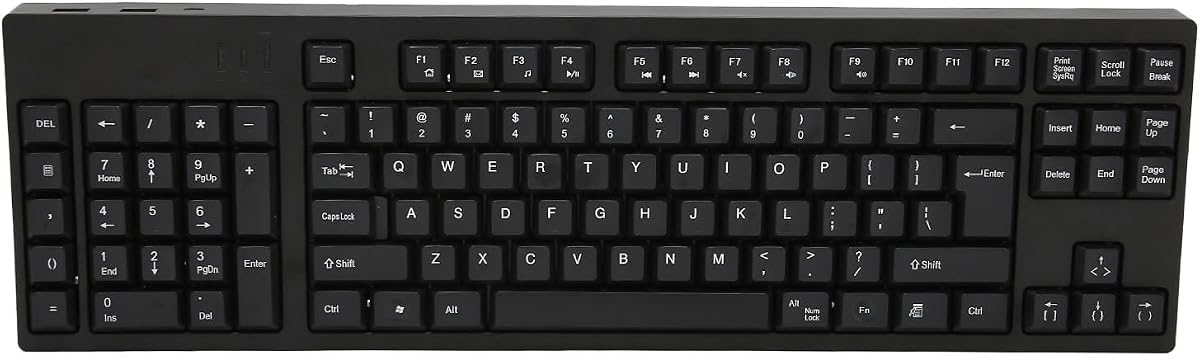
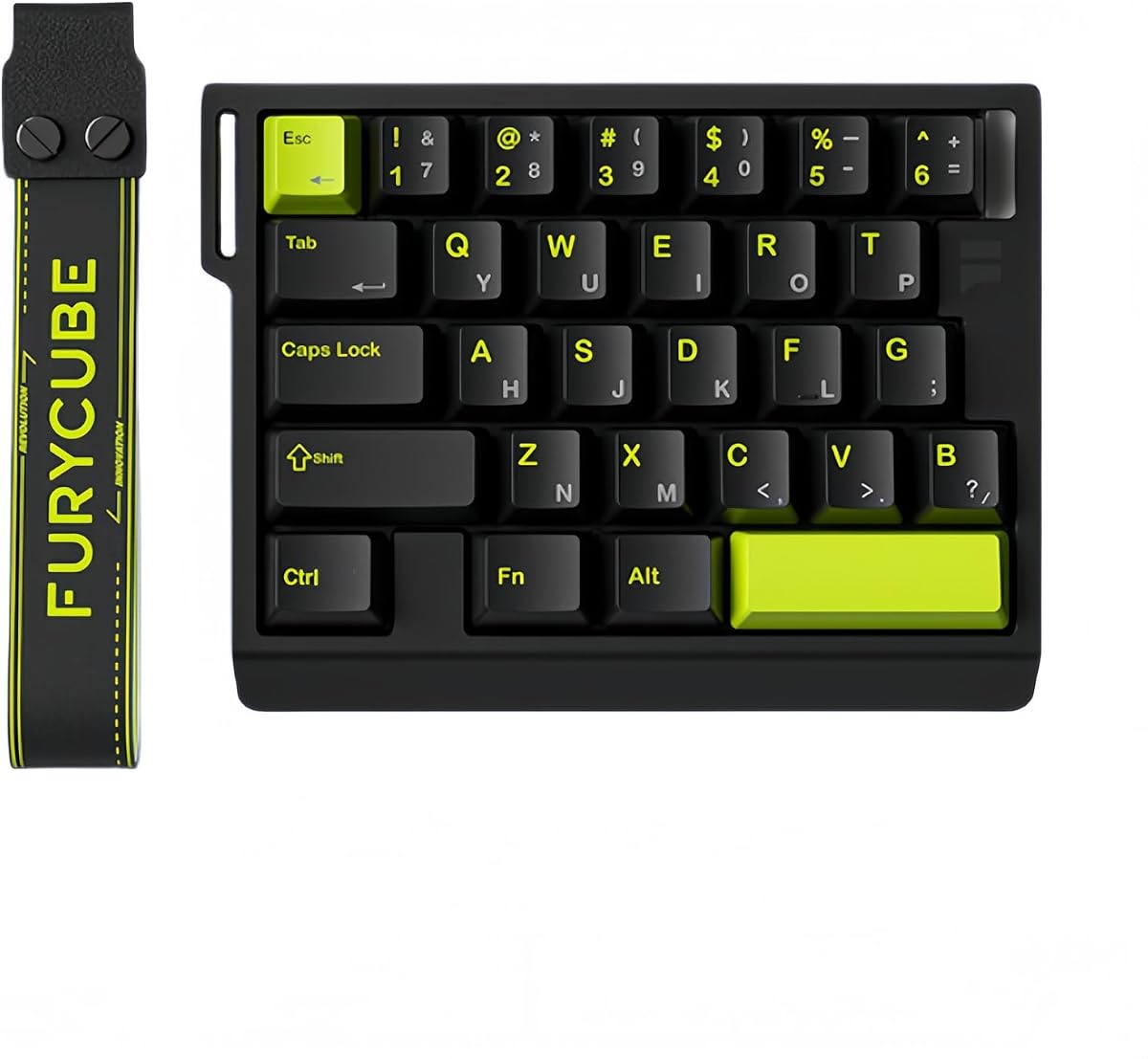

The RK ROYAL KLUDGE L98 stands out as the best overall choice for left-handed gamers seeking a full keyboard experience. With a 4.6 rating and thoughtful Southpaw design, it relocates the numpad to the left for better ergonomics.
We may earn a commission when you buy through this link, at no additional cost to you.
Its gasket structure and five sound-dampening layers deliver a premium typing feel with minimal noise. The massive 8000 mAh battery ensures up to 310 hours of use, making it ideal for extended gaming sessions without frequent charging.
While the unique layout may require a short adaptation period, the benefits for mouse space and comfort outweigh the learning curve. The hot-swappable PCB allows customization, appealing to enthusiasts who prefer specific switches.
Buy this if you want a complete mechanical keyboard that respects left-handed needs. It bridges the gap between standard boards and specialized keypads with reliability and performance.
Moving the numpad left frees right space for mouse movement, reducing shoulder strain during long gaming sessions.
With up to 310 hours off RGB, you can game for weeks on a single charge without worrying about power.
We may earn a commission when you buy through this link, at no additional cost to you.
The RedThunder One Handed Gaming Keyboard is the perfect budget pick for gamers wanting a dedicated keypad without breaking the bank. It scores 4.4 and features 35 anti-ghosting keys for reliable input.
We may earn a commission when you buy through this link, at no additional cost to you.
Its macro recording function lets you bind complex commands to single keys, enhancing gameplay efficiency. The ergonomic design includes a wrist rest to reduce fatigue during extended use.
Trade-offs include fewer keys than full boards and simpler software. However, for casual gamers or those needing extra space, this offers excellent value and basic functionality.
Choose this if you need a cost-effective solution for MMO or FPS shortcuts. It’s a solid entry point into one-handed gaming peripherals.
Recording macros without expensive software helps automate actions for better performance in competitive games.
Its portable size leaves room for mouse movement, crucial for high-precision aiming in fast-paced titles.
We may earn a commission when you buy through this link, at no additional cost to you.
The AZERON Gaming Keypad is a premium powerhouse for users seeking deep customization and advanced controls. Its Hall Effect thumbstick offers analog movement with no drift, a feature rarely found in this category.
We may earn a commission when you buy through this link, at no additional cost to you.
You can map 30 inputs as keyboard, mouse, or controller actions, and store layouts directly on the device. The 3D printed body ensures a perfect ergonomic fit tailored to your hand size.
Despite the steep price, the versatility justifies it for serious gamers or professionals needing precise input control. The software is powerful but requires time to master.
Invest in this if you demand top-tier adjustability and performance. It replaces your keyboard entirely for left-hand use while keeping the mouse on the right.
Hall Effect sensors ensure smooth, drift-free analog movement essential for precise in-game steering or camera control.
Replace parts or update software to keep your keypad current with the latest gaming trends and features.
We may earn a commission when you buy through this link, at no additional cost to you.
AZERON Keyzen combines mechanical switch feel with advanced analog control. Rated 4.6, it features Cherry MX switches for tactile feedback that gamers love, plus a 360 Hall-Effect joystick.
We may earn a commission when you buy through this link, at no additional cost to you.
With 32 fully mappable keys and multiple RGB profiles, it offers versatility for both gaming and productivity. The ergonomic design includes two palm rests for optimal comfort.
The complexity may deter simple users, but pros will appreciate the precision. It’s a top choice for those wanting a mechanical keypad experience.
Opt for this if you value switch quality and analog input. It provides the feel of a standard keyboard with specialized one-handed benefits.
Cherry MX switches deliver the reliable, satisfying tactile feedback that typists and gamers expect from high-end boards.
The joystick offers smooth, adjustable movement for games requiring nuanced directional input beyond standard keys.
We may earn a commission when you buy through this link, at no additional cost to you.
The AJAZZ AK029 is built specifically for competitive FPS gamers who demand speed. It achieves a near-zero 0.125ms latency with an 8KHz polling rate, ensuring every command registers instantly.
We may earn a commission when you buy through this link, at no additional cost to you.
Rapid Trigger and SOCD technologies allow for flawless rapid taps and counter-strafing, giving you an edge in fast-paced matches. The 29-key layout maximizes mouse space.
While limited to fewer keys, it covers essential gaming functions well. The aluminum build ensures durability during intense sessions.
This is the top pick for esports enthusiasts. It sacrifices general utility for pure performance and speed in shooting games.
With 8KHz polling, there is no delay between pressing a key and the game responding, critical for competitive play.
Keys reset immediately upon release, allowing for faster double-tapping and smoother strafing without waiting for a return point.
We may earn a commission when you buy through this link, at no additional cost to you.
This ergonomic keyboard focuses on health and productivity for office workers. It features a left numeric keypad and patented Natural_A keycaps designed to reduce carpal tunnel risk and shoulder strain.
We may earn a commission when you buy through this link, at no additional cost to you.
With eight multimedia hotkeys and compatibility across systems, it streamlines daily business tasks. The layout encourages a more neutral arm position during typing.
Gaming enthusiasts may find it lacking, but professionals who type extensively will appreciate the comfort. It addresses real ergonomic concerns effectively.
Buy this if you work long hours on a computer. It prioritizes your health over RGB lighting or mechanical switches.
The unique keycap shape aligns wrists naturally, lowering risk of repetitive strain injuries common in office settings.
Moving the numpad left is ideal for accountants and data entry roles requiring frequent number input with the left hand.
We may earn a commission when you buy through this link, at no additional cost to you.
Keychron C0 HE 8K brings premium magnetic switch tech to a wired keypad with easy web-based configuration. It’s ideal for multi-system users who hate installing drivers or extra software.
We may earn a commission when you buy through this link, at no additional cost to you.
The 35 programmable keys cover most gaming needs, while rapid trigger ensures instant actuation reset. RGB lighting and cross-platform support add versatility.
Some users might prefer offline tools, but the web interface simplifies initial setup. It’s a strong competitor in the mid-to-high range.
Choose this if you value convenience and platform flexibility. It balances performance with user-friendly configuration tools.
Configure your keyboard directly in a browser, saving disk space and avoiding compatibility issues across different operating systems.
Hall Effect switches allow fine-tuned actuation points, giving you control over how sensitive each key press becomes.
We may earn a commission when you buy through this link, at no additional cost to you.
This model offers a complete 109-key layout with the numpad on the left, catering to those who need every standard key. It holds a perfect 5.0 rating for reliable performance.
We may earn a commission when you buy through this link, at no additional cost to you.
The inclusion of extra USB ports adds utility for peripherals like mice or drives. Its ergonomic layout helps keep hands in a neutral position.
While the Micro USB connection is older tech, it ensures compatibility with standard PCs. It’s a robust choice for general computer work.
Perfect for users needing a full replacement for their standard keyboard. It delivers value without complex features.
Having all 109 keys ensures no workflow is interrupted by missing standard function keys found on smaller keypads.
Extra ports on the keyboard allow you to plug in devices without hunting for slots on your computer tower.
We may earn a commission when you buy through this link, at no additional cost to you.
The FKZ M30HE brings hot-swap capability to budget magnetic switches, allowing you to change switches without soldering. It supports adjustable actuation for personalized key feel.
We may earn a commission when you buy through this link, at no additional cost to you.
With 30 keys and 8KHz polling, it targets gamers who want precision without the premium price. The RGB lighting supports musical rhythms for fun visual effects.
It offers solid performance for its price point. The web driver provides customization without heavy software installation.
Buy this if you like experimenting with switch feels. It’s a great stepping stone into advanced gaming peripherals.
Easily swap out switches to change your keyboard’s feel without tools or soldering skills, making it future-proof.
Change how far you press to register a key, which helps in competitive play for faster or safer responses.
We may earn a commission when you buy through this link, at no additional cost to you.
The A4tech Ergonomic Left Handed Keyboard is engineered to improve posture and reduce strain on shoulders and wrists. It is highly rated for business users who type daily.
We may earn a commission when you buy through this link, at no additional cost to you.
Eight multimedia hotkeys streamline access to apps and functions, improving workflow efficiency. The ergonomic layout encourages a healthier typing position.
While not built for gaming, it serves well for general office tasks. The design prioritizes long-term comfort over flashy features.
This is the ideal choice for those suffering from discomfort. It offers a practical, ergonomic solution for everyday typing.
The keyboard layout positions hands to align with shoulders, reducing twisting and potential injury during long use.
Quick access to media controls saves time and keeps your workflow smooth without reaching for other tools.
We may earn a commission when you buy through this link, at no additional cost to you.
Selecting the right left-handed keyboard involves balancing ergonomics, features, and budget. This guide breaks down the essential factors to consider before you buy.
Decide between a full board with a left numpad or a compact keypad. Full boards offer more keys for productivity, while keypads save space for mouse movement.
Choose a form factor that matches your desk space and gaming style to ensure comfort during long sessions.
Look for Hall Effect or mechanical switches based on your need for precision. Hall Effect offers adjustable actuation and rapid reset, while mechanical provides classic tactile feedback.
Prioritize switches that match your sensitivity preferences to improve reaction times and typing accuracy.
Wireless keyboards provide freedom but add latency, while wired ones guarantee stability. Consider your gaming genre when choosing between these options.
Opt for wired connections for competitive play to avoid any potential lag or signal issues during critical moments.
Check if the keyboard supports macro recording and programmable keys. This allows you to automate complex tasks or bind multiple actions to single inputs.
Ensure software tools are user-friendly so you can map commands efficiently without technical hassle.
Materials like aluminum or ABS plastic affect durability. Ergonomic designs with wrist rests prevent fatigue and repetitive strain injuries.
Choose a build that feels sturdy and includes comfort features to protect your hands over time.
For wireless models, a large battery capacity means less frequent charging. Look for models with at least 100 hours of use.
Prioritize high capacity batteries to maintain uninterrupted gameplay without worrying about power levels.
Higher polling rates like 8KHz reduce input delay, crucial for competitive FPS. Lower latency ensures commands register instantly.
Select a model with high polling rates to gain a competitive edge in fast-paced titles.
Prices range from budget keypads to premium devices. Determine what features matter most to avoid overspending on unnecessary tech.
Balance cost with essential features to get the best performance within your price range.
Connect your keyboard using the appropriate cable or USB receiver. Ensure your operating system recognizes it before starting any configuration software.
Install drivers or use web configurators to map keys to your preferred actions. Test each key to confirm it registers correctly in your games or apps.
Clean the keys regularly with a soft brush or compressed air to prevent dust buildup. Check for updates on your software to maintain optimal performance.
Yes, they improve ergonomics by freeing up space for mouse movement. This setup can reduce shoulder strain and allow longer, more comfortable gaming sessions.
Adaptation takes some time but most users adjust within a week. Training your brain to locate new key positions helps build muscle memory effectively.
It is possible but not ideal since most games assume mouse on right. You can rebind keys but standard layouts are optimized for right-handed mice.
They are magnetic switches that allow adjustable actuation points. They offer fast reset times and precise control compared to traditional mechanical switches.
Modern wireless models offer low latency suitable for gaming. However, wired options still provide the most consistent response for competitive play.
Use compressed air to remove dust between keys and a soft cloth for surfaces. Avoid using water directly to prevent damage to internal components.
Most models support software RGB customization. You can change colors and effects per key to match your setup or game themes.
Yes, most models work with both operating systems. Check product specs for specific driver support to ensure full functionality.
The RK ROYAL KLUDGE L98 and RedThunder offer excellent options for different budgets. Whether you want full mechanical feel or compact speed, there is a fit for every player.
Prioritize ergonomics and latency to find a device that enhances your performance. The right setup can turn frustration into smooth, controlled gameplay.
Prices and availability change regularly so verify current offers before purchasing. Investing in the right hardware ensures you enjoy every session to the fullest.