
16 Inch Colorful Screen Rechargeable Doodle Board
4.5Editor score
Large sixteen inch display area
Rechargeable battery lasts months
Anti-lost stylus with rope
This guide compares the top LCD Writing Tablet for Kids Doodle Board options for 2026, focusing on screen size, durability, eye protection, and educational
Finding the right creative tool for young children can be challenging for parents today. LCD writing tablets offer a mess-free way for kids to doodle and learn without wasting paper. These digital boards combine fun with education, making them perfect for travel or home use.
We evaluated ten popular models based on screen size, battery life, durability, and ease of use. Each product was reviewed for its ability to inspire creativity while protecting little eyes from harmful blue light. Our selection includes options for toddlers and older kids alike.
Every pick highlights specific strengths like portability or rechargeable features to help you choose wisely. Note that prices and availability may change over time so check current listings before buying. We aim to provide clear insights for informed family purchasing decisions today.
4.5Editor score
4.5Editor score

4.5Editor score
This side-by-side comparison highlights key features across all ten selected products to help you find the perfect fit for your child needs and family lifestyle requirements.


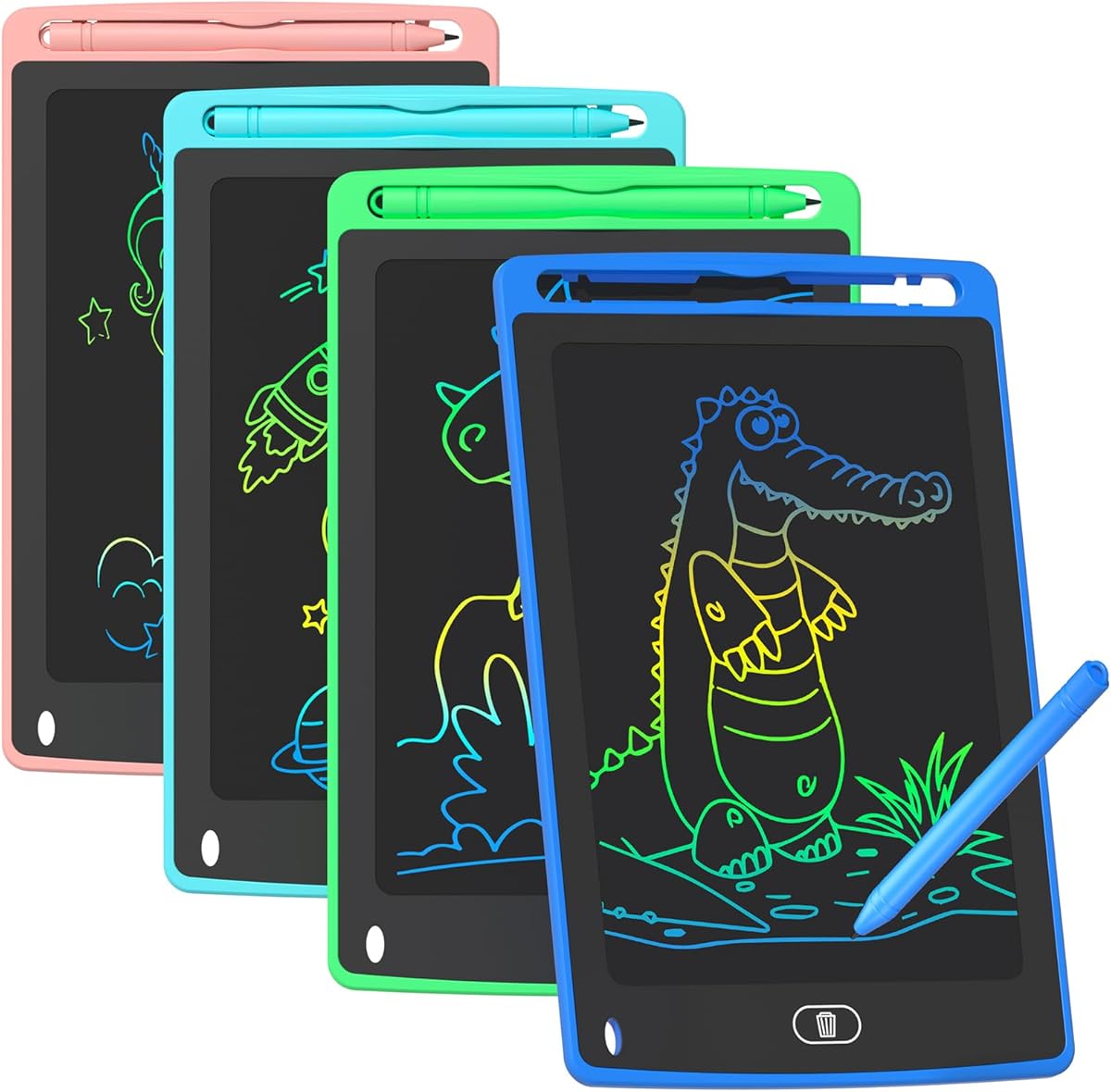
This four pack set stands out as a top choice for families with more than one child. It holds a strong four point five star rating due to its flexibility and ease of use. The liquid crystal technology ensures clear lines without any mess or ink stains.
We may earn a commission when you buy through this link, at no additional cost to you.
Each tablet in the pack features a pressure sensitive surface that allows kids to draw lines of varying thickness by adjusting how hard they press. The front erase button clears the screen instantly while the lock switch helps save favorite drawings. The pen fits snugly on top to prevent loss.
While the eight point five inch screen is smaller than some competitors it offers enough space for toddlers to express themselves freely. The only trade off is that it uses a button battery which needs occasional replacement but this is a minor issue for the price value.
Parents looking for a gift that works for siblings or playdates will love this option. It supports learning activities like math and spelling while keeping kids entertained on the go. We recommend it as a practical starter set for creative young minds.
The pack includes blue light blue green and pink boards to appeal to different preferences and encourage sharing.
Its lightweight build and included stylus make it perfect for car rides or restaurant waits without clutter.
We may earn a commission when you buy through this link, at no additional cost to you.
Kayoubi offers a huge fourteen point five inch screen that gives children ample room to sketch or write. With a four point five star rating it is praised for its size and eye friendly display. This model proves that budget options can still provide premium features.
We may earn a commission when you buy through this link, at no additional cost to you.
The large canvas supports detailed artwork without feeling cramped making it ideal for older kids who want to draw complex scenes. The single button erase clears everything in a flash and the lock key keeps art safe from accidental wiping. It uses no blue light so parents can reduce screentime guilt.
The only downsides are the single color choice and a shell that feels less rugged than others. However for the price it delivers excellent value for families needing more surface area for homework or doodling. It works well for ages three to eight and even older teens.
This tablet is perfect for those who want a big drawing space without spending much. It turns playtime into learning time without cluttering the home with paper. We suggest it for kids who feel limited by smaller screens.
The extra width and height let children draw full stories or characters without running out of space.
Designed with no glare or radiation it protects vision during long creative sessions at home or school.
We may earn a commission when you buy through this link, at no additional cost to you.
This model combines a huge sixteen inch screen with a rechargeable battery for top tier performance. It earns a four point five star rating for its durability and vibrant colors that stand out among competitors. The design ensures the stylus stays attached so it never gets lost.
We may earn a commission when you buy through this link, at no additional cost to you.
The upgraded USB charging means you avoid buying disposable batteries which saves money and protects the environment. The screen uses back lit LCD tech that is sixty percent brighter than others for vivid lines. Kids enjoy a smooth writing sense similar to paper thanks to pressure sensitive technology.
The price is higher but the build quality justifies it with an impact resistant shell and hidden battery to prevent swallowing risks. Charging is simple via Micro USB and the battery lasts months on one charge. This is a great choice for kids who draw frequently.
If you want a tablet that will last years without issues this is the one to pick. It balances size battery life and safety perfectly. We recommend it for families prioritizing long term value and creative freedom.
The enhanced LCD screen produces colors that pop making artwork more engaging and fun for young artists.
The internal battery and secure rope keep small parts away from kids reducing risks during play.
We may earn a commission when you buy through this link, at no additional cost to you.
KOKODI provides a larger drawing tablet designed to support growing creativity in children. It has a four point five star rating for its ease of use and educational benefits. The sixteen inch screen allows kids to focus on their creativity without feeling restricted.
We may earn a commission when you buy through this link, at no additional cost to you.
Pressing the erase button clears the screen in one second while the lock feature prevents accidental deletion. The battery is replaceable though it requires screws which makes it less accessible to young children. It saves paper and reduces waste making it a green choice.
The screen is non self illuminating so it protects eyes from harm during long play. While the screw access might be tricky for some it ensures safety from battery tampering. This tablet is great for both kids and adults taking notes.
Families who want to reduce paper waste will appreciate this eco friendly option. It is durable and easy to manage for daily use. We suggest it for households valuing sustainability and large screen real estate.
The quick erase function helps kids reset their canvas instantly so they can keep creating without waiting.
By avoiding blue light it offers a safer alternative to standard digital screens for developing vision.
We may earn a commission when you buy through this link, at no additional cost to you.
This rechargeable model shines for parents who need a reliable toy for long trips or daily use. It carries a four point five star rating for its durability and parent friendly features. The sixteen inch screen offers tons of space for imagination and fun.
We may earn a commission when you buy through this link, at no additional cost to you.
With up to nine months of playtime on one charge you rarely need to recharge it. Two styluses are included so parents and kids can share. The child safe ABS body keeps the battery sealed inside preventing access. It creates zero mess compared to paints or paper.
The only trade off is weight compared to smaller models but it remains portable in bags. The lock switch saves art and the erase button clears it quickly. It works for ages three to eight effectively.
This is a top pick for busy parents who want peace of mind. It keeps kids busy in cars or airports without cleanup. We recommend it for its convenience and shared creativity potential.
Having two pens means siblings can play together without fighting over who writes next.
No stains on walls or clothes means parents can relax while kids enjoy free creativity.
We may earn a commission when you buy through this link, at no additional cost to you.
BUKEBU offers a light and portable option for preschoolers on the go. It has a four point six star rating for its eye protection and durability. The ten point five inch screen is perfect for smaller hands to manage easily.
We may earn a commission when you buy through this link, at no additional cost to you.
The design uses non self-illuminating screen so there is no glare or radiation to harm eyes. It weighs only two hundred grams which makes it easy to carry in a bag. The rounded corners add drop resistance to protect against drops.
The battery is replaceable when it runs out which extends the life. The lock button on the side prevents accidental erasure. It supports learning skills like number counting and spelling at any time.
If you need a tablet that is easy for toddlers to handle this is ideal. It balances safety and weight well for young users. We suggest it for parents prioritizing eye health and portability.
The screen is tested to ensure it keeps kids away from chemical pigments and dust exposure.
Smooth edges prevent injury if the tablet is dropped or bumped during play.
We may earn a commission when you buy through this link, at no additional cost to you.
FLUESTON delivers a slim profile for families needing space savings. It holds a four point five star rating for its smooth feel and clear lines. The ten inch area is comfortable for preschoolers to write numbers or spell words.
We may earn a commission when you buy through this link, at no additional cost to you.
The design is only point two six inches thin and weighs six ounces so it fits easily in a bag. It uses highly sensitive pressure technology to mimic paper writing. There is no dust ink or glare to harm kids.
The CR2025 battery lasts up to twelve months but needs replacement. The magnetic drawing board feature adds fun. It serves as a memo board for adults too.
This option is great for those who want minimal bulk without losing quality. It supports creativity and safety effectively. We recommend it for travel light or tight storage.
The pressure sensitivity creates thick or thin lines just like a real pen for a natural feel.
It works as an office memo or kids board making it versatile for the whole family.
We may earn a commission when you buy through this link, at no additional cost to you.
This KOKODI model offers the largest screen at twenty inches for maximum freedom. It has a four point five star rating for its educational value and size. Kids can draw full pages without running out of room.
We may earn a commission when you buy through this link, at no additional cost to you.
The colorful screen engages toddlers with bright visuals that encourage exploration. It is fully erasable and reusable so paper waste is eliminated. The battery life supports long periods of use.
The size makes it heavy to carry but worth it for home use. It is best for stationary play rather than travel. Parents find it helpful for teaching skills.
Choose this if you want a canvas that rivals real paper. It is a strong tool for visual learners. We suggest it for families with space for it.
The twenty inch width allows for complex murals or group drawing projects.
Use it to teach letters numbers and shapes visually for better retention.
We may earn a commission when you buy through this link, at no additional cost to you.
ORSEN provides a reliable solution with a stylus lanyard that prevents loss. It has a four point six star rating for its bright screen and durability. The ten inch display is clear for viewing drawings.
We may earn a commission when you buy through this link, at no additional cost to you.
The stylus hangs on the board via a lanyard so it stays with the tablet. The battery lasts up to six months and is easy to change. It can be reused 100000 times reducing costs.
The case is anti-shock and durable for active use. It weighs only 150g making it portable. It helps develop hand eye coordination.
This model is perfect for parents who hate lost pens. It is secure and easy to manage. We recommend it for worry-free creativity.
The lanyard system ensures the pen is always right next to the board when needed.
The screen avoids glare while still providing clear colors for comfortable writing.
We may earn a commission when you buy through this link, at no additional cost to you.
KOKODI provides a balanced twelve inch screen with a lanyard for security. It has a four point six star rating for durability and ease of use. The waterproof shell makes it tough for kids.
We may earn a commission when you buy through this link, at no additional cost to you.
Kids can use the stylus anywhere due to the lanyard. The rounded corners provide drop resistance. It saves paper and works for teens taking notes too.
The battery lasts months but needs access for change. It is heavier than ten inch models. It is great for car trips or waiting rooms.
Choose this for a mix of size and safety. It supports learning well across ages. We suggest it for active families.
Spills or rain won't ruin the tablet so kids can play outdoors safely.
Older kids can use it as a draft pad for homework without wasting paper.
We may earn a commission when you buy through this link, at no additional cost to you.
Choosing the right tablet depends on screen size battery type and safety features. We break down the key factors to consider for your child needs.
Screen size determines how much space a child has to create. Ten inch screens are good for small hands but sixteen inch boards give more room for detailed work. Think about whether your child likes to make small notes or big pictures.
Pick a screen that matches the child age and intended use at home or in a bag.
Some tablets use disposable button batteries while others have rechargeable lithium batteries. Rechargeable options save money over time and reduce waste. Battery life can last months on one charge depending on usage.
Choose rechargeable for convenience or button batteries if you want to avoid cables.
Kids drop toys so look for ABS shells and rounded corners. Shock resistance ensures the device survives accidental falls. A sturdy build also protects the internal battery from damage.
Look for drop resistant claims and secure stylus attachments.
Many LCD boards do not emit blue light which is safer for developing eyes. Non self-illuminating screens reduce glare and strain. This makes them better than standard tablets for long sessions.
Ensure the product mentions no blue light or eye protection features.
Weight matters if you plan to take the tablet to school or on trips. Light models under 200 grams are easier for kids to carry. Compact sizes fit in backpacks or purses.
Prioritize lightweight options for travel or daily carry.
The erase button should clear the screen quickly to keep creativity flowing. A lock function saves artwork from accidental deletion. Some models offer side buttons for these controls.
Verify that both erase and lock are easily accessible to the child.
The pen should fit in a child hand and stay with the board. Lanyards or storage slots prevent loss. Smooth tips ensure they don't scratch the screen.
Check for included styluses and security features like ropes.
Prices vary from budget packs to premium models. Consider how many kids will use it and how long you need it. Higher price often means better battery life and size.
Balance features with what you can afford for your household.
To start use the stylus to draw on the screen. Press gently for thin lines or harder for thick ones. The pressure sensitive tech helps kids express creativity easily.
If you want to keep a drawing press the lock button to save it. This stops the erase button from clearing the screen. When you are ready to start over unlock it and press erase.
Keep the battery sealed and clean the screen with a dry cloth. Avoid water or harsh chemicals. Store the stylus in its slot to prevent loss. These steps extend the life of your tablet.
Yes most models are safe because they do not emit blue light or glare. They use reflective technology similar to paper reducing strain on developing eyes. This makes them a healthier alternative to standard screens.
Most batteries last from three to nine months on a single charge or installation. Rechargeable models often reach nine months of regular use. Check the product details for exact times.
Yes they work as long as the internal battery is charged. Rechargeable ones need a USB cable to charge but button battery ones run independently. This allows use anywhere without outlets.
Absolutely many parents and teachers use them for brainstorming or quick notes. The large screens support text writing just as well as drawing. They are great for meetings or lessons.
Most are designed for ages three to eight but younger or older kids can enjoy them too. The simple controls make them accessible for toddlers. Older kids use them for homework drafts.
Look for models with lanyards or built-in storage slots on the side. Some include anti-lost features like ropes that tie the pen to the board. This keeps the pen secure during play.
We reviewed ten excellent options ranging from small portable boards to massive canvases. The 4 Pack and 16 Inch Rechargeable models stand out for value and battery life. Each picks offers unique benefits for different needs.
Prioritize eye safety and battery type when making your choice. Rechargeable boards reduce waste while lock features save art. Consider screen size based on where you plan to use it.
Check current prices and availability before buying since deals change often. These tablets are perfect gifts for birthdays or school. Choose one that fits your family style today.