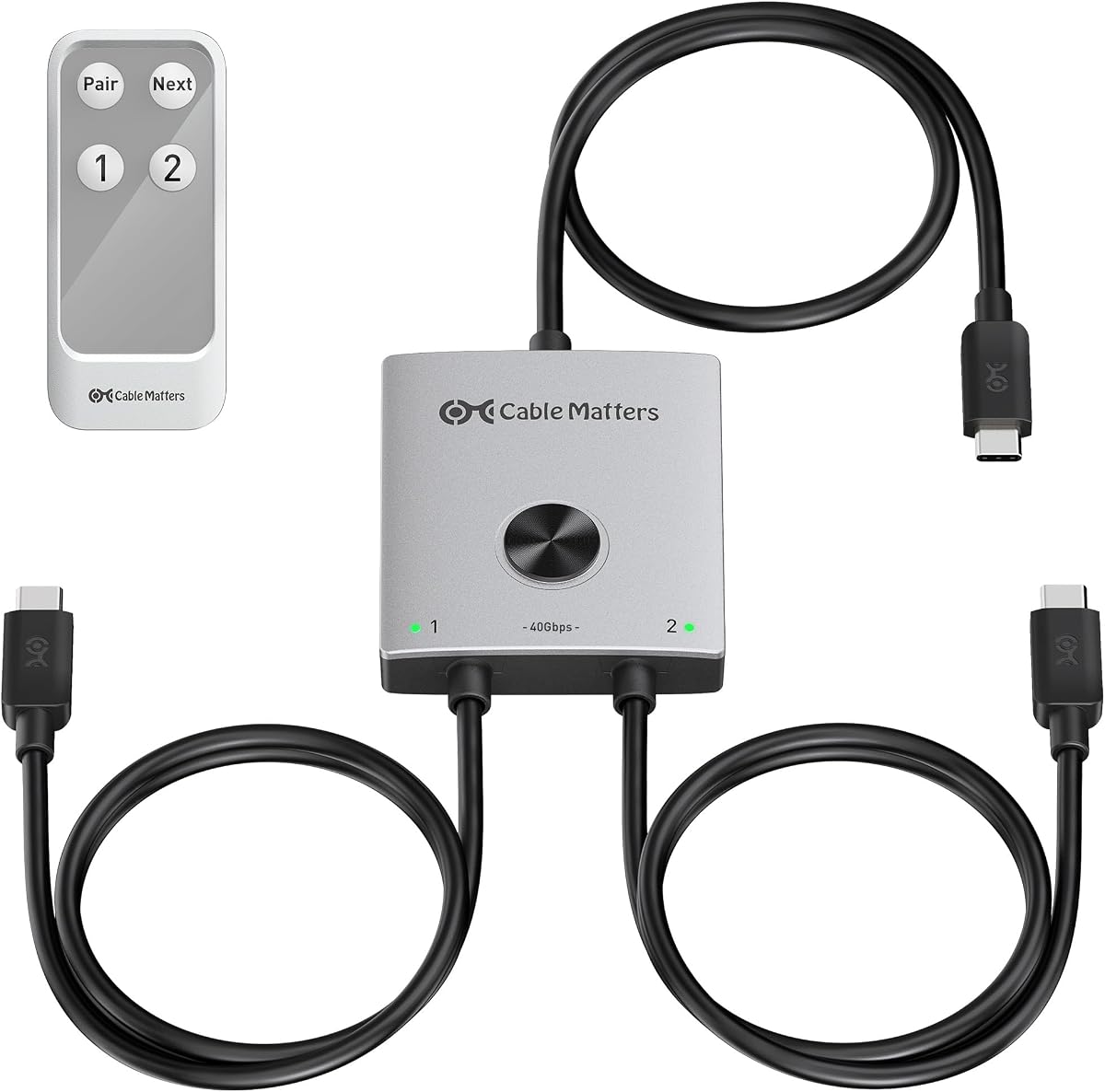
Cable Matters 40Gbps USB C KVM Switch for 2 Laptops
4.6Editor score
40Gbps data transfer speed
Thunderbolt 4 compatibility
140W power delivery pass-through
This guide compares the top 10 laptop with KVM support solutions for 2026, focusing on switching speed, video quality, and peripheral compatibility for
Finding the right laptop with KVM support can transform your workflow by allowing seamless switching between multiple systems on a single desk setup. Whether you manage work and personal devices or need to switch between different operating systems, a reliable KVM switch ensures efficiency and reduces cable clutter significantly.
We evaluated ten top-rated products based on video resolution support, USB data transfer speeds, and ease of integration with modern laptops. Our analysis covers everything from basic HDMI switches to advanced USB-C docking stations that support multi-monitor setups and high-speed peripheral sharing for demanding professional environments.
Each pick highlights specific strengths like 4K video output, fast charging capabilities, or multi-monitor expansion to help you find the perfect match for your needs. Please note that product availability and pricing may change over time, so verify current details before making your final purchase decision online today.
4.6Editor score

4.2Editor score

4.0Editor score
The following table provides a side-by-side comparison of all ten products, highlighting their core specifications, video capabilities, and USB features to help you quickly identify the best fit for your specific laptop setup requirements.


This KVM docking station earns our Editor's Choice for its ability to simplify dual laptop workflows with powerful 12-in-1 connectivity. It allows you to switch between two laptops on a single dual monitor setup effortlessly, saving desk space and reducing cable clutter significantly.
We may earn a commission when you buy through this link, at no additional cost to you.
The device supports 4K dual monitor output and includes 100W PD charging to keep your laptops powered while in use. Features like EDID emulation ensure you can switch between systems in just 2-3 seconds without losing display configuration settings or peripheral connections.
While it offers excellent performance for Windows laptops, macOS users should note that it only supports mirrored displays rather than extended modes. This limitation may restrict utility for those needing independent screen space across monitors on Mac systems.
We recommend this dock for professionals managing work and personal laptops simultaneously who need reliable 4K output and fast switching. It is an ideal solution for hybrid workspaces requiring a clean and efficient single desk setup for multiple machines.
Use the front button or remote to switch between laptops instantly without reconnecting cables or losing peripheral connections.
Access multiple USB ports Ethernet and card slots all in one device to replace separate hubs and adapters on your desk.
We may earn a commission when you buy through this link, at no additional cost to you.
This premium KVM switch stands out for its 40Gbps transfer bandwidth and support for high-resolution displays up to 8K@60Hz. It is designed specifically for USB4 and Thunderbolt 4 setups ensuring maximum performance for modern laptops and docking stations.
We may earn a commission when you buy through this link, at no additional cost to you.
The built-in cables and RF remote allow for line of sight free switching between two laptops on a shared dock. You can also benefit from 140W power delivery pass-through to keep your laptop charged without needing a separate power adapter during operation.
Compatibility is key here since docks with non-detachable host cables are not supported. You must ensure your dock has a detachable host cable to connect properly through this switch for full functionality and bandwidth utilization.
Buy this if you require the fastest possible data transfer and highest video quality for professional workflows like video editing or trading. It is an excellent choice for users with high-end Thunderbolt ecosystems looking to share a single monitor across multiple systems.
Experience near direct connection speeds when sharing external storage or peripherals between two laptops on a shared dock.
Switch devices wirelessly without pointing at the switch allowing for hidden placement or clutter-free desk setups.
We may earn a commission when you buy through this link, at no additional cost to you.
For users needing a simple and affordable way to share a single monitor between two computers this switch delivers solid performance. It supports 4K@60Hz and includes four USB 3.0 ports to share peripherals like keyboards and mice efficiently.
We may earn a commission when you buy through this link, at no additional cost to you.
The plug and play design requires no drivers or external power supply making installation incredibly straightforward. You can use the button on the device or the included wired remote to switch between computers quickly without leaving your desk.
While it lacks the multi-monitor capabilities of higher end models it is perfect for basic desktop or laptop setups where space is limited. The 4K support ensures you still get crisp visuals even on a budget friendly KVM solution.
We recommend this switch for home offices or students who need to switch between a laptop and desktop without spending much. It is a reliable budget option that covers all essential KVM functions without unnecessary extra features.
Place the remote button within reach to switch between computers instantly without having to reach for the main unit.
Works with Windows Linux Mac and gaming consoles allowing flexible sharing of one monitor across different systems.
We may earn a commission when you buy through this link, at no additional cost to you.
This hybrid switch is designed for offices where one person needs to manage multiple machines ranging from laptops to desktops. It accepts different video interfaces simultaneously allowing you to connect up to four computers to two monitors easily.
We may earn a commission when you buy through this link, at no additional cost to you.
With 100W Power Delivery you can charge your laptop through the switch while using it to share peripherals like mice and keyboards. The EDID emulator prevents display resets during switching keeping your windows and open apps in place.
Setup requires careful cable management since each desktop PC needs two video cables and a USB cable for full functionality. This ensures you have complete control over both video and peripheral sharing across all four connected systems.
Ideal for IT consultants or developers who switch between multiple test machines regularly this switch consolidates your desk setup. It offers high flexibility for mixed hardware environments where standardized video ports are not available on all devices.
Connect laptops via USB-C and desktops via HDMI or DisplayPort simultaneously to maximize compatibility across systems.
Keep your laptop powered without a separate wall outlet freeing up ports and reducing cable clutter on your desk.
We may earn a commission when you buy through this link, at no additional cost to you.
This docking station KVM switch lets you expand a single laptop screen into three external displays for massive productivity gains. It uses MST to drive dual 4K screens and one 1080P screen while allowing you to toggle between two laptops effortlessly.
We may earn a commission when you buy through this link, at no additional cost to you.
Four USB 3.1 Gen2 ports provide 10Gbps transfer speeds ensuring peripherals and external drives work without lag. The built-in 100W Power Delivery port charges your laptop directly so you do not need an extra power brick.
To get three screens you need a laptop that supports DP Alt Mode and has sufficient processing power. Mac users should note that only mirrored displays work on this device which might limit the utility for extended workflows.
Choose this if you need a third screen for multitasking and want to switch between work and personal laptops. It is great for data entry coding or trading setups where screen real estate is critical and space is limited.
Turn your laptop into a command center with three external screens all controlled from one dock and KVM unit.
Access fast USB 3.1 ports to connect drives printers and cameras that benefit from faster data rates.
We may earn a commission when you buy through this link, at no additional cost to you.
Designed for creatives and gamers this docking station supports up to 8K@60Hz on desktops and high refresh rates like 165Hz for smooth visuals. It combines a triple monitor KVM switch with full docking features including SD card and audio access.
We may earn a commission when you buy through this link, at no additional cost to you.
The shared Ethernet connection ensures that both computers stay online even when you switch control to the other system. This means background tasks like downloads or cloud sync continue uninterrupted on the non active machine while you work.
You can move large files fast with 10Gbps USB ports and enjoy gaming with FreeSync or G-Sync support. The wired remote lets you place the unit hidden away while keeping switching easy and accessible on your desk surface.
Pick this if you need professional grade video quality and high refresh rates for design or gaming work. It replaces multiple devices with one all in one station ideal for users who value performance and visual clarity.
Get incredibly sharp visuals for design and editing work with support for 8K resolution on desktop systems.
Keep both computers connected to the internet so you can download or sync data even when not using one.
We may earn a commission when you buy through this link, at no additional cost to you.
This docking station is highly rated for its ability to support 8K resolution and keep Ethernet connections active on both computers. It connects a USB C laptop and a desktop PC to three monitors allowing seamless switching between them.
We may earn a commission when you buy through this link, at no additional cost to you.
The 100W Power Delivery port charges your laptop while you use the dock so you do not need extra cables. USB ports support 10Gbps transfer speeds which is great for moving large project files quickly during your work.
You must provide HDMI and DisplayPort cables separately which is important to know before purchase. The high ratings suggest users appreciate the build quality and reliable performance of this switch for complex setups.
Ideal for users needing a professional setup with high resolution and multiple monitors this dock handles heavy loads well. It is perfect for offices where both a desktop and laptop need to be connected to one workstation.
Maintain internet connections on both machines so you can stay connected even while switching control.
Keep your laptop fully powered during use with the integrated 100W charging port on the dock.
We may earn a commission when you buy through this link, at no additional cost to you.
This dual monitor dock allows you to switch between two laptops on a single desk with a shared Ethernet connection. It supports 4K dual display output and includes 100W charging to power your laptop through a single USB C cable.
We may earn a commission when you buy through this link, at no additional cost to you.
The 11-in-1 design provides all common ports including USB 3.0 and an SD card slot for quick access to data. You can use the remote or front button to switch between your work and personal laptops quickly.
MacOS users will only get mirror mode on dual displays which limits use for extended work. However for Windows users it offers excellent versatility with fast switching and a robust port selection.
Great for hybrid workers who need two monitors and reliable internet access on both machines this unit simplifies your desk. It ensures you have all necessary ports without needing multiple separate hubs.
Use one Ethernet connection to provide internet to both laptops saving a port on each device.
Get up to 100W charging to keep your laptop battery full while using the dock for displays.
We may earn a commission when you buy through this link, at no additional cost to you.
This Displayport switch is built for gamers and power users who need high refresh rates up to 4K@120Hz and 8K support. It connects two computers to a single monitor using DP and includes four USB 3.0 ports for peripherals.
We may earn a commission when you buy through this link, at no additional cost to you.
You can switch using the wired remote to hide the switch unit away from view keeping your desk clean. The LED indicators show exactly which computer is active so you never make a mistake during switching.
An external power adapter ensures stable performance with USB devices that draw more power than a PC port can provide. This is important for using hard drives or high power webcams reliably.
Choose this if you want high resolution and refresh rates for gaming or video editing. It is a solid choice for DP setups where speed and clarity matter more than multi monitor support.
Experience smooth gameplay with support for high refresh rates like 120Hz or higher on compatible monitors.
Use the included controller to switch devices from a distance without reaching for the unit.
We may earn a commission when you buy through this link, at no additional cost to you.
This USB C switch is compact and portable making it easy to take to different desks or locations. It offers 20Gbps data transfer speeds and supports 140W PD charging to keep your devices powered while switching.
We may earn a commission when you buy through this link, at no additional cost to you.
The wireless remote allows line of sight free switching which is convenient for setups where the switch is hidden. It works with Thunderbolt 4 docks provided the pigtail length does not exceed 50cm for best performance.
While it is versatile it may have compatibility limits with certain docks like Dell ones. Always check your specific dock requirements to avoid issues with video output or data transfer speeds.
Best for travelers or mobile workers who need a reliable way to switch between laptops on the go. It balances speed and size well for those who do not need multi-monitor support but want fast data transfer.
Take your KVM setup anywhere with a small design that fits easily in a laptop bag.
Use the remote to switch devices without reaching for the switch unit or opening laptops.
We may earn a commission when you buy through this link, at no additional cost to you.
Selecting the right KVM switch involves evaluating video resolution USB data speeds and compatibility with your specific laptop ports.
Ensure the switch supports the maximum resolution and refresh rate your monitor and laptop can output. High-end switches support 4K@60Hz or 8K@60Hz which is vital for design work or gaming.
Look for models that support high refresh rates like 144Hz if you need smooth motion for gaming or detailed work.
Choose a switch with USB 3.0 or higher ports to ensure fast file transfers and responsive peripherals. Slower USB 2.0 switches can cause lag with keyboards and mice.
Prioritize switches with 10Gbps transfer speeds if you frequently use external drives or high-speed peripherals on your laptops.
For modern laptops with only USB-C ports a switch with Power Delivery pass-through is essential to charge your laptop while switching. Look for 60W or 100W charging support.
Higher wattage like 100W ensures your laptop stays fully charged even under heavy load when you are using multiple displays.
Decide if you need single monitor control or multi monitor support. Some switches allow two laptops to share two or three monitors simultaneously.
Multi monitor switches often use MST technology which allows multiple screens from one USB-C port on your laptop.
Most switches work with Windows but macOS has limitations especially regarding extended displays. Some devices only support mirror mode on Macs.
Check the product details carefully to confirm that your specific OS is supported for your intended display configuration.
Consider how you want to switch devices. Some units use buttons on the front while others include wired or wireless remotes for convenience.
Remotes allow you to place the switch out of sight and still switch easily from your keyboard or desk surface.
Some KVM switches include an Ethernet port that keeps both computers connected to the internet even when not in control.
This feature ensures downloads or updates continue on the non-active machine so you do not lose productivity while switching.
Advanced KVM switches often include SD card readers audio jacks and extra USB ports to replace separate docking stations.
A combined KVM and dock reduces cable clutter and simplifies your desk setup significantly compared to using two separate devices.
First connect your monitor or monitors to the video output ports on the KVM switch using high-quality HDMI or DisplayPort cables.
Next connect your laptops or computers to the video input ports and plug the USB cables into the switch and your computers for peripheral sharing.
Finally plug in the power adapter if required and press the button or use the remote to switch between devices. Keep the switch clean and dry to ensure longevity.
Most modern laptops use USB-C ports that support DisplayPort Alt Mode which works with most KVM switches. Ensure your cable supports video and data transfer to avoid signal issues.
Yes but macOS has limitations where extended dual displays may only work in mirror mode. Check your specific switch model to confirm support for extended displays on Mac.
This often happens due to driver detection issues or power limits. Ensure you use USB 3.0 cables and consider using an external power supply for high draw devices.
Some KVM switches use EDID emulation to keep the laptop connected. If your screen goes dark check the settings for EDID emulation on your switch or in your laptop settings.
Basic switches only share USB and video so your internet connection depends on the computer you are actively using. However switches with Ethernet ports keep both machines online simultaneously.
Yes many HDMI KVM switches support consoles like PS4 or Xbox allowing you to switch between gaming and computer use on one monitor easily.
Most modern switches are plug and play but some high-end docking stations might require firmware updates or driver installs for full functionality on Windows systems.
Flickering usually results from cable quality or insufficient power. Use shorter high quality HDMI or DisplayPort cables and ensure the external power adapter is connected properly.
The top picks in this guide offer excellent options for any setup from budget single monitor switches to high-end 8K docking stations with Ethernet support.
Prioritize features like Power Delivery and data speeds that match your most demanding tasks to ensure a smooth and efficient workflow across your laptops.
Always verify the current product details and prices before buying since these values can change frequently in the online marketplace.