
2pcs Keyboard Stands Mini Laptop Stand for Desk
4.6Editor score
Durable aluminum alloy construction
Prevents laptop overheating effectively
Compatible with most laptop models
Finding the right laptop kickstand can transform your daily workflow by improving posture and cooling efficiency. These small devices lift your screen to eye level, reducing neck strain during long work sessions.
We evaluated ten highly rated models based on stability, material quality, portability, and ease of installation. Each product was selected for its ability to enhance comfort without adding bulk to your setup.
Our list covers hidden adhesive risers, foldable metal stands, and versatile multi-device options. Keep in mind that product availability and specific features may vary over time as manufacturers update their designs.
4.6Editor score

4.6Editor score

4.7Editor score
As an Amazon Associate we earn from qualifying purchases.
The following table provides a side-by-side overview of all ten selected laptop kickstand models to help you compare their key specifications and features at a glance.
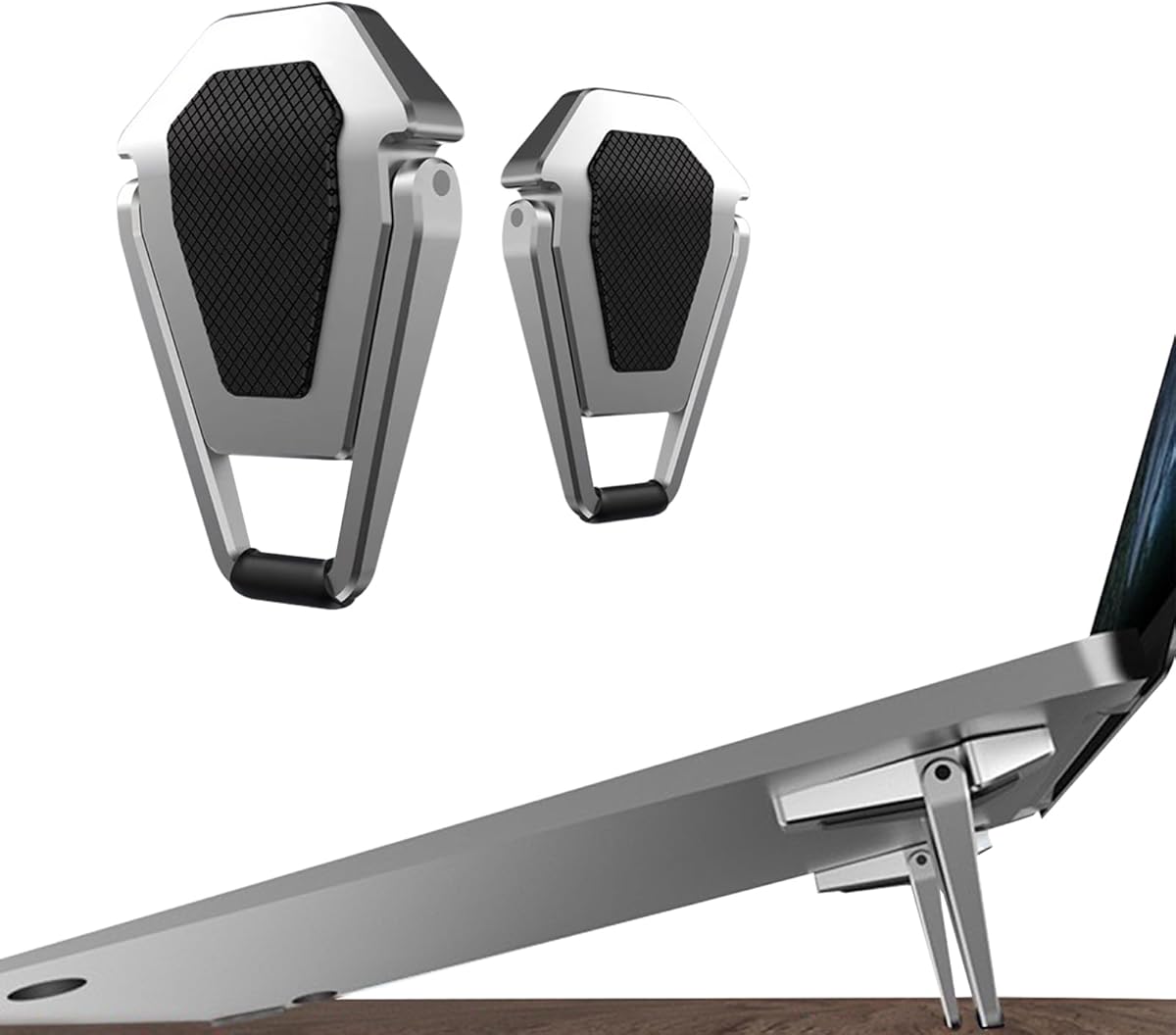



This budget-friendly option offers a simple solution for elevating your laptop to improve airflow and viewing angle. It holds a strong rating due to its reliable aluminum construction and ability to fit various device types.
We may earn a commission when you buy through this link, at no additional cost to you.
The stands are designed to prevent overheating by lifting the base off the desk surface. This passive cooling method is especially useful during long typing sessions or gaming marathons where heat buildup is a concern.
While the angle is fixed and cannot be adjusted, the design provides a comfortable tilt for most users. The adhesive pads are secure enough to hold the laptop without slipping on smooth desk surfaces.
Users seeking a low-cost way to improve their desk ergonomics will find this pair highly effective. It is ideal for students or professionals who need immediate relief from screen glare and neck strain.
The aluminum alloy acts as a thermal pad to help draw heat away from the laptop bottom during use.
Lifting the screen helps maintain a relaxed state by keeping your eyes at a more natural viewing level.
We may earn a commission when you buy through this link, at no additional cost to you.
This model focuses on portability with a tiny footprint that folds down to less than two inches. Its zinc alloy body ensures durability despite the minimal weight, making it perfect for frequent travelers.
We may earn a commission when you buy through this link, at no additional cost to you.
The stand offers an adjustable tilt from 15 to 25 degrees, giving users some control over their screen angle. This flexibility helps reduce neck strain while keeping the device cool through its open design.
Rubber pads on the base prevent slipping and protect your desk from scratches during use. The adhesive side attaches firmly to the laptop bottom without leaving residue if removed carefully.
Ideal for those who need a reliable kickstand that does not add bulk to a bag. It balances strength and lightness well for everyday use in offices or coffee shops.
Weighing just 24 grams it adds zero weight to your load while offering essential ergonomic support on the go.
The adjustable tilt range lets you find a sweet spot for typing or viewing without needing extra tools.
We may earn a commission when you buy through this link, at no additional cost to you.
The Hagibis stand stands out for its ability to switch between three different heights easily. This feature allows users to tailor the lift to their specific desk and laptop preferences for better ergonomics.
We may earn a commission when you buy through this link, at no additional cost to you.
Its open design promotes airflow to prevent overheating while the forward tilt aids heat dissipation. The double sticking surface solves common stability issues found in other adhesive models.
Compatibility with most laptops from 12 to 17 inches makes it a versatile choice for mixed device environments. The aluminum material also helps conduct heat away from the device bottom.
For users needing a bit more flexibility than basic feet offer this is a strong contender. It provides a solid balance of stability, cooling, and height customization.
The increased bottom sticking surface ensures the stand stays in place without falling off easily during typing.
Raising the bottom increases inclined design and air circulation to make heat dissipation easier for your device.
We may earn a commission when you buy through this link, at no additional cost to you.
This package includes a pair of stands plus a bonus privacy shield to protect your webcam when not in use. It is designed for users who value both ergonomics and digital security during remote work.
We may earn a commission when you buy through this link, at no additional cost to you.
The stand switches between two angles for casual browsing and ergonomic typing without needing tools. Its ABS plastic construction is tough enough to handle daily wear and heavy laptops up to 22 pounds.
Rapid heat dissipation is achieved by raising the laptop to increase air circulation under the chassis. The anti-slip silicone pads ensure the device stays put on the desk surface.
If you want a complete package that covers posture and privacy this option is convenient. It offers a smart combination of features at a competitive price point.
The included webcam cover helps protect both your physical health and digital security from digital snooping risks.
Ditch bulky stands that hog desk space with this low-profile design that keeps your setup airport security friendly.
We may earn a commission when you buy through this link, at no additional cost to you.
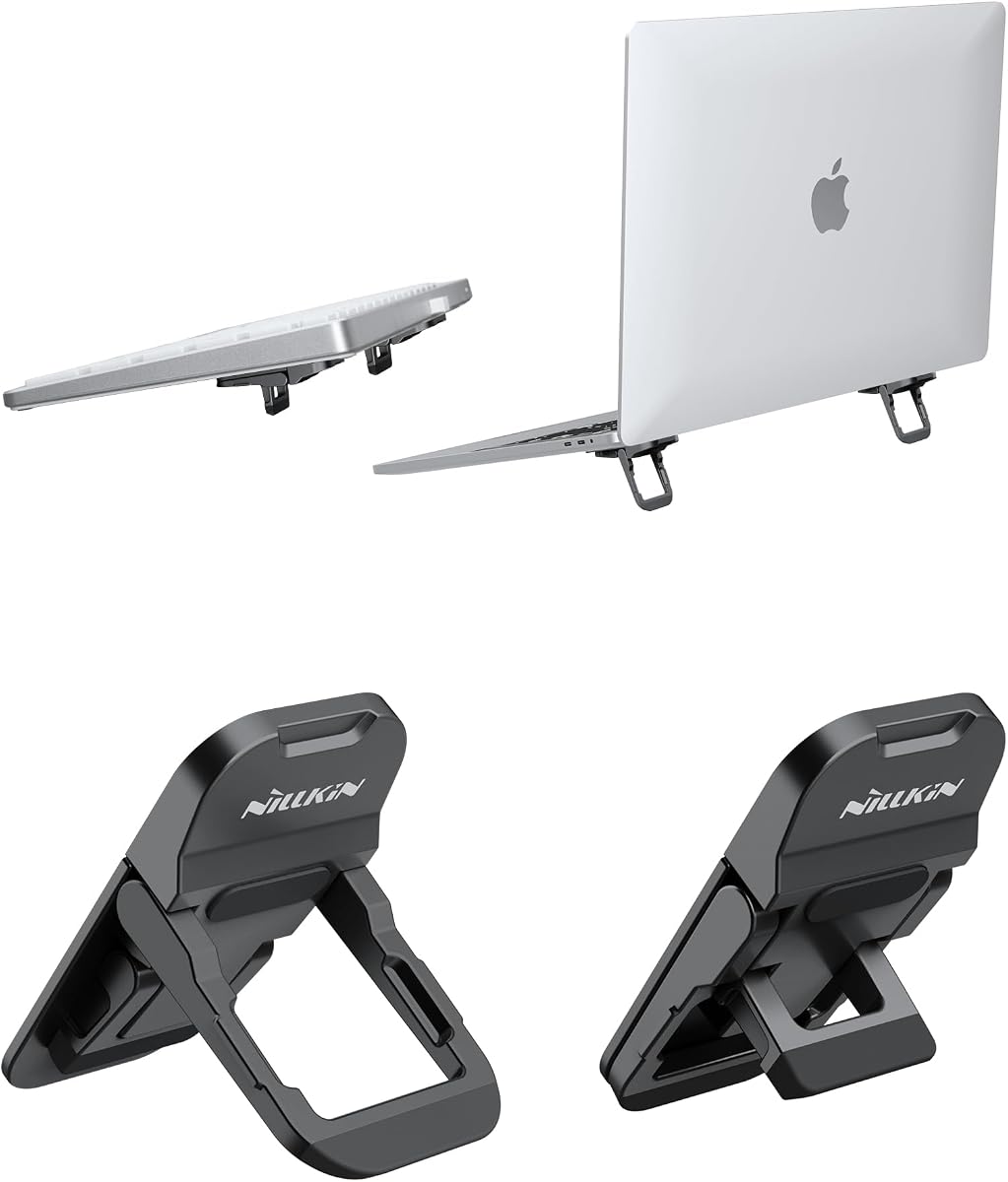
Nillkin offers a precise solution with three specific angles designed to reduce strain during typing or viewing. The zinc alloy construction ensures the stand remains sturdy even when the laptop is pushed.
We may earn a commission when you buy through this link, at no additional cost to you.
The adhesive is designed to be traceless so removal does not leave a sticky residue. For best stability it is recommended to let the stand sit for an hour after first application.
Anti-slip silicone pads keep the device stable on the stand while the open design enhances air circulation. This makes it suitable for both laptops and external keyboards.
For users who want specific angle options rather than a general lift this model is effective. It combines durability with a slim profile for easy travel.
Three precise angles help reduce neck and shoulder strain while improving typing comfort for long work or study sessions.
Nano seamless adhesive ensures firm adhesion without residue on your laptop bottom surface after use.
We may earn a commission when you buy through this link, at no additional cost to you.
This kit comes with extra tapes and anti-slip stickers for installation which simplifies the setup process. The stands are made of zinc alloy to ensure they do not break or deform over time.
We may earn a commission when you buy through this link, at no additional cost to you.
Their small size allows them to be stored in pockets or bags for easy transport. When folded they maintain a very compact profile that does not take up space.
Ergonomic improvements include better posture and reduced neck pressure when typing. The design also prevents the laptop from overheating by allowing air to flow underneath.
Users who need a reliable spare stand or a backup for travel will find this useful. It offers great value with the included accessories and durable build.
Coming with anti-slip stickers and double-sided tapes makes installation convenient and easy for daily use.
Small and foldable design means you can store them into bags or pockets and carry easily anywhere.
We may earn a commission when you buy through this link, at no additional cost to you.
This device serves multiple functions from a laptop riser to a tablet easel and phone holder. It replaces three bulky accessories with one sleek device for a portable office setup.
We may earn a commission when you buy through this link, at no additional cost to you.
The integrated magnetic core snaps onto MagSafe phones for a dual-screen experience without clamps. The aluminum frame holds heavy gaming laptops and iPads without wobbling or sagging.
Eight distinct height adjustment slots allow you to align the screen with your natural line of sight. This feature helps correct sitting posture and relieve neck strain effectively.
If you need a standalone stand that folds flat for travel this is a strong choice. It balances versatility and stability better than most adhesive options.
Seamlessly converts from a heavy-duty laptop riser to a sturdy tablet easel and magnetic desk phone holder.
Collapses down in just 3 seconds into a flat baton that slides effortlessly into briefcases or laptop sleeves.
We may earn a commission when you buy through this link, at no additional cost to you.
This model receives high praise for its quality materials and reliable performance. The zinc alloy and TPU construction ensures a sturdy and safe grip for your device.
We may earn a commission when you buy through this link, at no additional cost to you.
It provides three levels of height to ensure comfortable typing and viewing angles. The design is slim and travel-friendly so it fits easily into any tech bag.
Airflow is enhanced to ensure efficient heat dissipation during intensive tasks. Installation is quick with the adhesive backing and no tools are needed.
For those willing to pay more for superior build quality this stand delivers. It is a reliable choice for users who prioritize durability and style.
Made of high-quality zinc alloy metal and non-slip TPU for a reliable and durable grip.
Enhances airflow for efficient heat dissipation to keep your laptop running optimally.
We may earn a commission when you buy through this link, at no additional cost to you.
This stand features a built-in spring mechanism that pops up in a fraction of a second for use. It is designed to be so portable that it can be kept on your device permanently.
We may earn a commission when you buy through this link, at no additional cost to you.
The zinc alloy construction is solid and stylish while the anti-slip pads protect your desk. It helps maintain the comfort of using your laptop keyboard while enjoying a raised screen.
The adhesive is strong enough to keep the stand attached to the back of your laptop securely. This ensures it won't fall off during transport or daily handling.
Ideal for users who want a unique design that combines convenience with ergonomics. It offers a quick and easy way to improve screen height.
Thanks to the built-in springs the stand pops up instantly in just 0.1 seconds for immediate use.
Constructed from solid zinc alloy and equipped with anti-slip pads for a stable typing experience.
We may earn a commission when you buy through this link, at no additional cost to you.
This simple stand is designed to be slim and weightless while providing an immediate lift for your screen. It works with any device larger than 9 inches including tablets and phones.
We may earn a commission when you buy through this link, at no additional cost to you.
The 3M adhesive allows for smooth adhesion and removal without damaging the device. Soft slide prevention pads help prevent damages on the surface during use.
It is ideal for those who want a minimalistic solution to their ergonomic problems. The design does not add bulk to your setup.
While it lacks complex features it delivers on its promise of being a simple and effective stand. It is a good choice for casual users.
Quick installation and instant use without any added weight or bulk to your device setup.
Soft slide prevention pads prevent damages on the surface of your laptop or tablet.
We may earn a commission when you buy through this link, at no additional cost to you.
Selecting the right laptop kickstand depends on your specific needs regarding material, portability, and adjustability. This guide breaks down the key factors to help you make an informed decision.
Most stands are made from aluminum or zinc alloys which offer a balance of strength and heat dissipation. Plastic options are lighter but may not conduct heat as well as metals.
Look for premium metals like aluminum or zinc if you want durability and better thermal performance during long use sessions.
If you travel frequently, consider stands that fold down to a slim profile or are designed to stay attached to your device. Some models weigh less than an ounce and fit in a pocket.
Prioritize weight and folding capability if you move between locations daily to avoid adding unnecessary bulk.
Some stands offer fixed angles while others allow multiple height settings or adjustable tilts. Adjustable models provide better ergonomics for different tasks like typing versus browsing.
Choose a stand with adjustable levels if you need to switch between viewing modes often.
Adhesive stands rely on strong bonding to stay in place. Look for models using 3M or nano adhesive to ensure they do not fall off easily.
Ensure the adhesive is strong enough for your surface type and allows for residue-free removal if needed.
Effective kickstands should elevate your laptop to allow air to flow underneath. Open designs or metal bodies can help reduce overheating during intensive tasks.
Pick a stand with an open base to improve cooling and protect your device from heat damage.
Check the size limits to ensure the stand supports your laptop width and weight. Most models cover standard 12 to 17 inch devices but some have wider ranges.
Verify the weight capacity and size range to ensure it fits your specific device securely.
Clean the bottom of your laptop and the stand surface with a dry cloth before attaching the adhesive to ensure a strong bond. Press firmly for a minute to secure the stand in place.
Adjust the angle or height of your kickstand to match your eye level and typing posture. This helps prevent strain on your neck and back during long work sessions.
Regularly check the adhesive and stability of the stand to ensure it has not loosened over time. If the adhesive wears out, you may need to clean and replace it according to the manufacturer's instructions.
Most high-quality kickstands use soft silicone pads or adhesives that protect your device. Damage usually occurs only if the adhesive is very strong or the stand is not aligned properly. Always clean the surface before attaching to ensure safety.
Adhesive stands can often be reused if the adhesive remains sticky. However, repeated removal and reattachment may reduce the adhesive strength over time. It is best to follow the manufacturer's guidelines for reapplication.
Most laptop kickstands are designed to hold standard laptops up to 10 or 22 pounds. Heavier gaming laptops or desktop replacements may require a more robust stand with higher load capacity for safety.
Yes, lifting your laptop allows air to circulate underneath which can help reduce heat buildup. The effect is enhanced when the stand is made of metal or has an open design for airflow.
Many kickstands are universal and work with tablets, phones, and even keyboards. Just ensure the weight and size of your device fit within the stand's supported range for stability.
Use a gentle tool like a plastic card to lift the edge of the stand slowly. You can use warm air or adhesive remover if residue remains, but avoid harsh chemicals.
We reviewed ten standout models offering various features from budget-friendly adhesive feet to premium folding stands. Each option provides unique benefits depending on your need for portability, adjustability, or durability.
When selecting a kickstand, consider the balance between weight, material quality, and ease of use. A stand that fits your specific workflow will provide long-term ergonomic relief and better device cooling.
Prices and availability change frequently so please check the links for the latest details before purchasing. This guide aims to help you find a reliable solution to improve your digital workspace today.