
YBING Keyboard Case for Samsung Galaxy Tab A11 Plus & Galaxy Tab A9 Plus
4.5Editor score
7-color rainbow backlight
360-degree rotation support
Detachable magnetic keyboard
This expert guide compares the top 10 keyboards for the Samsung A11 tablet to help you choose the perfect accessory for productivity and protection.
Transform your Samsung A11 tablet into a powerful laptop with the right keyboard accessory. Finding the perfect match requires checking compatibility, build quality, and key features to ensure seamless daily use.
We compared ten leading keyboard cases designed specifically for the Galaxy Tab A11 Plus and A9 Plus models. Each option offers unique benefits like detachable designs, trackpads, or wireless mice to suit different needs.
Each pick highlights key specs, pros, and cons to help you decide quickly. Remember that availability and stock levels change often, so checking current listings ensures you get the right product for your setup.
4.5Editor score

4.3Editor score

4.6Editor score
Below is a side-by-side comparison of the top ten keyboard options for your Samsung A11 tablet. Each entry summarizes the most critical specifications to help you find the best fit for your workflow.




The Dexnor keyboard case stands out as a top choice for transforming your tablet into a laptop-like workstation. It delivers strong magnetic support and includes a multi-touch trackpad that makes navigation feel intuitive and responsive.
We may earn a commission when you buy through this link, at no additional cost to you.
Its ultra-light design weighs just 1.36lbs, making it perfect for users who carry their tablets daily. The rechargeable battery offers up to 720 hours of standby time and 200 hours of use without backlight, ensuring you stay productive.
While it does not feature a floating cantilever design, the 120-degree ergonomic angle provides solid comfort for most tasks. Users should note that the keyboard cannot be folded around to the back, which limits some viewing configurations.
Anyone looking for a reliable, lightweight keyboard case with robust battery life will find this model ideal. It balances protection and functionality well for students and professionals who need mobility.
The built-in trackpad supports multi-finger gestures for editing documents and browsing the web without touching the screen.
The case protects your tablet from drops and scratches while the built-in S Pen holder keeps your stylus safe and accessible.
We may earn a commission when you buy through this link, at no additional cost to you.
The TUNKARMOR keyboard case offers great flexibility with its detachable magnetic keyboard design. You can move the keyboard around or detach it entirely, giving you freedom to use your tablet in multiple configurations easily.
We may earn a commission when you buy through this link, at no additional cost to you.
Its ultra-thin keyboard attaches firmly to the case, turning your tablet into a mini laptop in seconds. The case also features anti-slip slots that let you adjust viewing angles for writing or watching videos comfortably.
A standout feature is the 360-degree full edge coverage with a honeycomb grid inner layer that cushions against overheating. This protective design extends your tablet's lifespan while keeping it safe from bumps and scratches.
This model is perfect for users who need a versatile case that adapts to different tasks quickly. The auto sleep wake function ensures battery life is saved whenever you close the lid.
Move and change the keyboard position at any time according to your preferences for typing or viewing.
The built-in pen holder makes carrying your stylus easy, and the anti-slip slots ensure stability at various angles.
We may earn a commission when you buy through this link, at no additional cost to you.
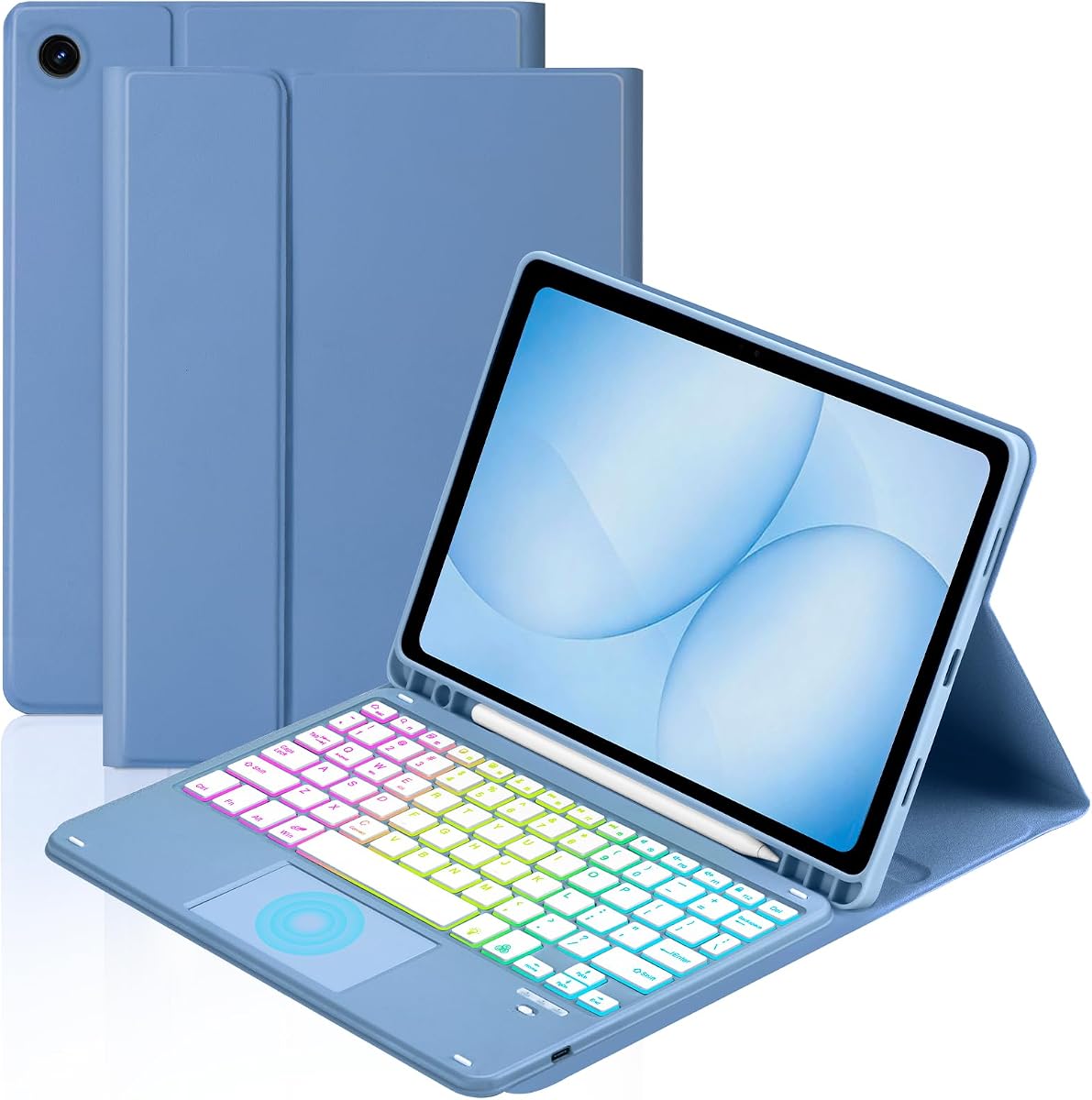
The YBING keyboard case delivers excellent value with its 7-color rainbow backlight and detachable keyboard design. Users can switch between rainbow and breathing light modes to match their mood or environment while typing in low light.
We may earn a commission when you buy through this link, at no additional cost to you.
Its premium PU leather construction includes 16 powerful magnets that ensure the keyboard stays firmly in place. The back cover rotates 360 degrees, allowing both horizontal and vertical positioning for reading or watching videos.
While the backlight adds style, it consumes more power, reducing usage time to about five hours with it on. However, you get over 80 hours of use with the backlight off, making it efficient for daily tasks.
This budget-friendly option suits users who want style and versatility without spending too much. It covers all essential needs like protection, rotation, and easy carrying thanks to its magnetic buckle.
The rainbow backlight modes provide visual appeal and help visibility in dark settings like dim cafes.
Strong magnetic adsorption keeps the keyboard from moving or falling, ensuring stability during typing.
We may earn a commission when you buy through this link, at no additional cost to you.
The Soke keyboard case is designed for versatility, supporting iOS, Android, and Windows systems seamlessly. Its rechargeable magnetic wireless keyboard connects via Bluetooth with a 10-meter operation distance for reliable use.
We may earn a commission when you buy through this link, at no additional cost to you.
With 7-color backlight options, you can switch to your favorite hue quickly using the dedicated buttons. The two non-slip grooves hold the tablet at stable 120 and 130-degree angles for comfortable typing and viewing.
While the product includes a clear user guide printed on the keyboard itself, users must note that the pen is not included. The auto sleep wake function works well to preserve battery life throughout the day.
This case is ideal for users who need cross-platform support and colorful backlighting. It provides a solid, functional setup that feels premium and adapts to different software environments.
Switch freely between iOS, Android, and Windows systems by pressing function keys for convenience.
Non-slip grooves provide stable 120 and 130-degree angles for comfortable use in various settings.
We may earn a commission when you buy through this link, at no additional cost to you.
This keyboard case stands out by including a rechargeable Bluetooth mouse alongside the keyboard and trackpad. It offers a complete workflow solution with multi-touch gestures that make managing apps and editing documents easier.
We may earn a commission when you buy through this link, at no additional cost to you.
The detachable magnetic keyboard features a 7-color rainbow backlight with constant, breathing, and off modes. Its minimalist design combined with vibrant lighting adds fun and ambiance to your daily workflow sessions.
Battery life is strong, with a Type-C cable that charges fully in 2–3 hours. While the keyboard is detachable, the mouse requires separate pairing, which may add a small setup step for new users.
If you want extra navigation options like a mouse and trackpad in one package, this model fits well. It is great for multitasking and detailed work without touching the screen directly.
The included Bluetooth mouse and trackpad provide precise control for documents and web browsing.
Type-C charging ensures hassle-free recharging with a 2–3 hour full charge cycle.
We may earn a commission when you buy through this link, at no additional cost to you.
Harvopu offers a high-endurance keyboard setup with a wireless mouse featuring 3-level DPI adjustment for precision control. The keyboard lasts up to 180 hours of continuous use on a single charge, making it great for long sessions.
We may earn a commission when you buy through this link, at no additional cost to you.
Its detachable multi-color backlit design lets you customize your typing environment with vibrant colors. The case actively repels stains and spills, keeping your device clean and looking new even after daily use.
While the mouse offers desktop-grade accuracy, adjusting the DPI may require a brief learning curve. The automatic sleep mode saves power effectively, ensuring your setup is always ready when you return.
This model is perfect for travelers and professionals who need reliability and easy maintenance. The long battery life and durable case make it a low-maintenance choice for daily productivity.
3-Level DPI adjustment allows switching sensitivity for graphic editing or fast browsing easily.
Stain-resistant case material wipes clean easily and protects against daily wear and spills.
We may earn a commission when you buy through this link, at no additional cost to you.
The TiMOVO keyboard case is built for efficiency, offering 7-color backlighting with three brightness levels to suit any environment. It features a detachable keyboard that stores away easily when not needed for a sleek portable carry.
We may earn a commission when you buy through this link, at no additional cost to you.
Battery performance is impressive with over 90 hours of work time and a 90-day standby life. Anti-slide design and thickened convex edges ensure your tablet stays protected from scratches and bumps throughout daily use.
While the sleep mode activates after 10 minutes to save power, the keyboard reconnects automatically when you press a key. This balance of energy saving and convenience works well for most intermittent usage patterns.
This option is ideal for students who need a reliable and compact keyboard solution. It combines long battery life with protective features that keep your tablet safe and ready.
Battery life extends to 90 hours with sleep mode ensuring your setup remains always ready.
The detachable keyboard can be stored away easily, making it simple to carry your tablet on the go.
We may earn a commission when you buy through this link, at no additional cost to you.
This MePadKey keyboard case focuses on navigation with its smart touchpad supporting multi-finger gestures up to four fingers. Users can switch apps with three-finger swipes or take screenshots with four-finger clicks for seamless control.
We may earn a commission when you buy through this link, at no additional cost to you.
The 7-color rainbow backlight adds style with breathing light mode switching. It includes multi-function shortcut keys for quick actions like copy, paste, and pause, improving workflow speed for any user.
While the design is functional and colorful, it does not include a pen or tablet in the box. The strong magnetic adsorption ensures the keyboard stays secure, and anti-slip grooves allow for comfortable angles.
If gesture control and shortcut efficiency are priorities, this keyboard fits those needs well. It is a versatile option for multitasking and media consumption on your Samsung A11.
Multi-finger gestures allow scrolling, zooming, and switching apps quickly without touching the screen.
Function keys enable fast access to copy, paste, and media controls for improved efficiency.
We may earn a commission when you buy through this link, at no additional cost to you.
This MePadKey premium version features a 360-degree rotating case that keeps your tablet secure with thickened convex edges. The buckle design prevents scraping or falling, while non-slip grooves help adjust favorite viewing angles.
We may earn a commission when you buy through this link, at no additional cost to you.
It includes a detachable keyboard with rainbow backlight and multi-finger gestures like screenshots and app switching. The system switch keys allow easy changes between three operating systems for versatile use.
The pen holder keeps your stylus secure and accessible, though the pen itself is not included. With a detachable keyboard and magnetic adsorption, this case balances flexibility with solid protection daily.
If you need a rotating case with gesture controls and system support, this model is a strong choice. It suits users who frequently switch between tasks and device modes.
360-degree rotation with thickened edges ensures your tablet is protected from scratches and bumps.
Switch between systems easily using function keys for convenience across different platforms.
We may earn a commission when you buy through this link, at no additional cost to you.
Supveco uses premium flexible silicone and TPU material to protect your tablet from shocks and scratches. The honeycomb grid pattern cushioning increases your tablet's lifespan and prevents overheating during extended use.
We may earn a commission when you buy through this link, at no additional cost to you.
Its magnetically detachable keyboard features automatic color changing backlit keys for a unique visual effect. The case holds the tablet securely with an adjustable stand for comfortable viewing or typing in landscape mode.
A 3.5-hour charge time may be longer than other options, but the energy-efficient battery lasts long. Pen holders and sleep wake functions round out a design focused on protection and usability.
This case suits users who prioritize material quality and visual appeal. It offers robust protection and smart features to keep your tablet safe and functional.
Honeycomb grid pattern protects against overheating and extends device lifespan significantly.
Backlit keys change colors automatically for an enjoyable visual experience during use.
We may earn a commission when you buy through this link, at no additional cost to you.
Selecting the right keyboard requires evaluating build quality, connectivity, and additional features. This guide walks you through essential factors to consider before buying.
Always confirm your tablet model number before buying. Many cases work only with specific 11-inch A11 Plus or A9 Plus models.
Check settings for SM-X codes to avoid buying the wrong size keyboard or case for your device.
Choose between Bluetooth or wired connections. Bluetooth offers more flexibility but requires pairing and battery charging.
Wireless keyboards let you detach them for easier use, while wired options may be simpler but less mobile.
Battery performance varies widely between models. Some offer days of standby, others only hours with backlight on.
Check battery specs and recharge times to ensure the keyboard lasts through your typical work or study sessions.
Backlights improve visibility in low light. Look for 7-color options and adjustable brightness levels.
Be aware that bright backlighting uses more power, so consider usage habits before choosing color modes.
Full edge coverage and honeycomb cushioning protect against drops and overheating.
Select a design with sturdy materials and magnetic closures to keep your tablet safe while portable.
Features like touchpads, mice, and stylus holders add versatility to your workflow.
Choose based on whether you need precise navigation, extra storage, or multi-system support.
Auto sleep wake functions help save battery by putting your tablet to sleep when the lid closes.
This feature extends usage time and reduces power drain during inactive periods.
Lightweight cases make carrying easier. Check weights like 1.36lbs to avoid added bulk.
Slim designs help you travel without feeling weighed down by your tablet setup.
Connect the keyboard to your tablet by following the manufacturer’s pairing instructions. Ensure the magnetic case is properly aligned to lock the keyboard securely to your device.
Use the auto sleep wake function by closing the lid when you are finished. This preserves battery life and prepares your tablet for quick wake-up later.
Clean the case with a soft, dry cloth to remove dust and marks. Avoid liquids near the keyboard to prevent damage to electronics and maintain optimal performance.
Many models support iOS, Android, and Windows. Check the product details for system compatibility before buying to ensure it works with your tablet.
Yes, several models feature detachable magnetic keyboards. This allows you to use the tablet separately or carry the keyboard elsewhere as needed.
No, the S Pen is usually not included. Most cases include a holder to store your pen securely, but you must supply it separately.
Battery life varies by model and usage. Standby can reach 720 hours, while active use with backlight on ranges from 5 to 10 hours.
No, most cases are designed specifically for the A11 Plus or A9 Plus 11-inch models. Always check your tablet model number before purchasing to ensure a perfect fit.
Use a dry, soft cloth to wipe keys and case surfaces. Avoid water or harsh chemicals to protect the electronics and maintain the device's condition.
You now have ten solid keyboard options for your Samsung A11 tablet, each offering unique strengths like battery life or navigation features. Select the model that fits your workflow and budget needs best.
Consider what matters most to you, whether it is portability, extra navigation, or long-lasting power. Prioritizing these needs ensures you get the best value from your purchase.
Remember to verify current availability before buying, as stock and shipping details may change. Checking current listings will help you secure the best deal for your setup today.