
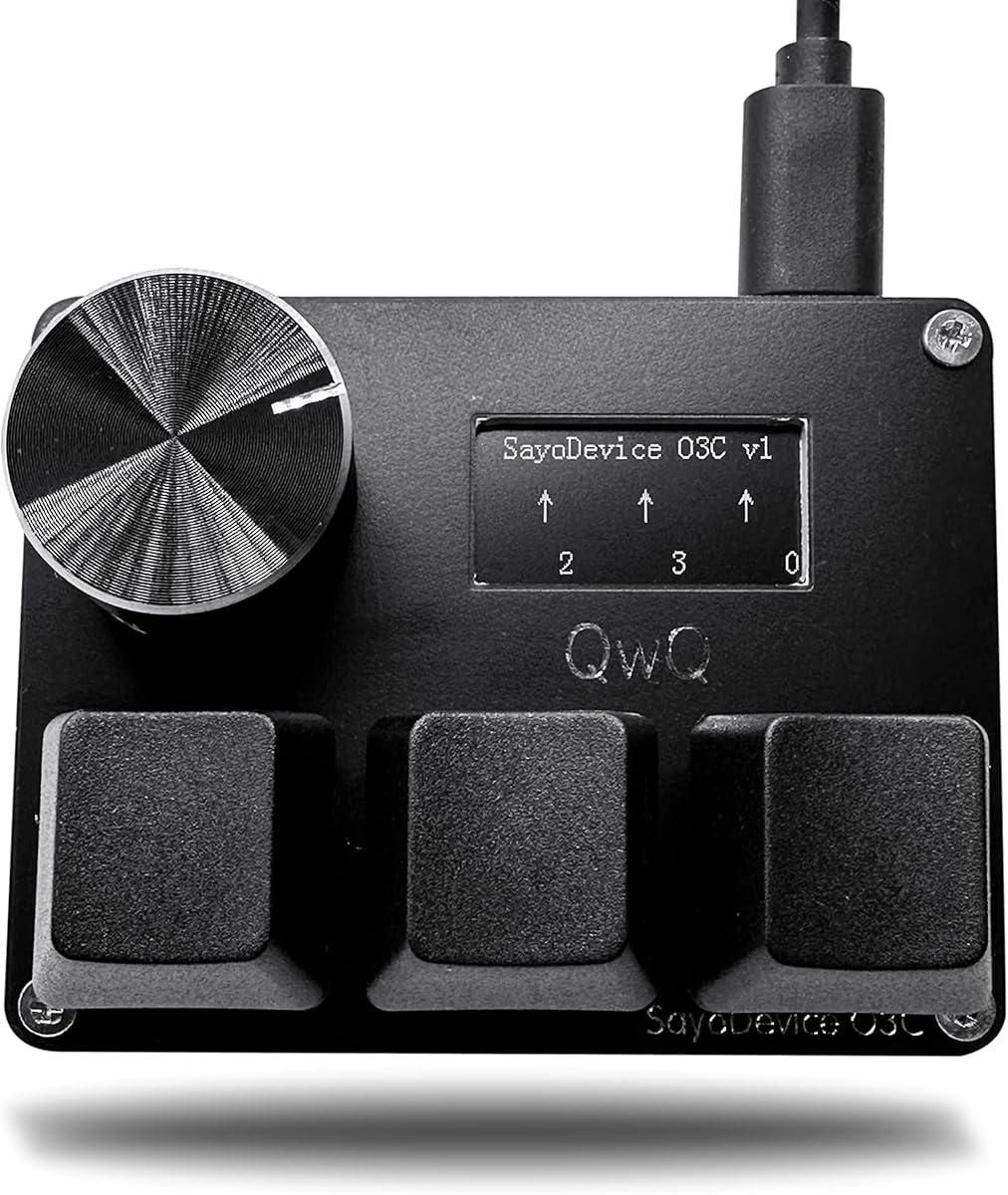
KPXOS OSU3X Custom Gaming Keyboard
3.4Editor score
Adjustable trigger distance
Plug and play setup
Minimalist design layout
This guide compares the top ten keyboards optimized for Geometry Dash players featuring rapid trigger magnetic switches and customizable layouts for peak
Finding the right keyboard for Geometry Dash can transform your gaming experience from frustrating to flawless. These rhythm-based platformers demand precise timing and rapid inputs that standard keyboards often struggle to deliver consistently.
We evaluated ten specialized gaming keyboards focusing on features like rapid trigger technology magnetic switches and compact layouts. Each model was selected for its ability to support the intense key presses required in high-level gameplay.
Each review highlights key strengths and potential trade-offs to help you make an informed decision. Keep in mind that prices and availability can change so always check the current listing before purchasing your new gear.
3.4Editor score
4.7Editor score

4.2Editor score
The following table provides a side-by-side overview of all ten keyboards evaluated in this guide. Use this quick reference to compare key specifications and features at a glance.







This keyboard stands out as a top choice for rhythm gamers due to its specialized Hall magnetic switches and rapid trigger technology. With a solid 4.7 rating it delivers the responsiveness needed for tight Geometry Dash timings.
We may earn a commission when you buy through this link, at no additional cost to you.
The standout feature is the 0.96 inch IPS color screen which displays real-time key counts and status updates. This visual feedback helps players monitor their input accuracy during intense sessions. The customizable knob allows quick access to media controls or song lists without interrupting gameplay.
While the rapid trigger technology offers incredible speed some users may need to recalibrate the keys after firmware updates. The compact mini keypad design saves space but requires adaptation if you are used to full-sized keyboards. These trade-offs are acceptable given the performance benefits.
Competitive players seeking precision and feedback should consider this keyboard highly. The combination of speed customization and durability makes it a strong recommendation for anyone serious about mastering Geometry Dash levels.
Rapid trigger technology resets keys immediately upon release allowing for faster key presses and complex combos.
The IPS screen shows key travel data helping players track their performance and input consistency in real time.
We may earn a commission when you buy through this link, at no additional cost to you.
This keyboard offers an affordable entry point into magnetic switch technology with its budget-friendly price and rapid trigger capabilities. It is designed specifically for rhythm games and includes features like adjustable trigger distance for personalized sensitivity.
We may earn a commission when you buy through this link, at no additional cost to you.
Key strengths include the ability to calibrate each key independently down to 0.05mm for precise control. The display provides real-time visual feedback on key travel which aids in learning and improvement. The startup screen can be personalized via software adding a touch of individuality.
However the lower average rating suggests some variability in build quality or software experience compared to premium options. Users might find the feature set less extensive than higher priced models. Despite this it remains a viable option for those prioritizing cost.
If you are new to magnetic keyboards or want to test rapid trigger without a large investment this is a practical choice. It delivers core functionality needed for Geometry Dash while keeping expenses low for budget-conscious gamers.
Users can set the trigger point per key allowing for fine-tuned sensitivity that matches their personal play style.
Offering core magnetic switch performance at a lower price point makes this accessible for a wider audience of players.
We may earn a commission when you buy through this link, at no additional cost to you.
This model shares similar high-performance traits with the top-ranked variant including Hall magnetic switches and a rapid trigger mechanism. It maintains a 4.7 rating due to its reliable response times and specialized layout for rhythm games.
We may earn a commission when you buy through this link, at no additional cost to you.
Features include a 0.96 inch IPS color screen with visible key range and button counting for real-time feedback. The knob can be customized for scrolling song lists or other shortcuts which enhances workflow efficiency. Hotswap capability allows for easy switch replacement without soldering.
The main difference from the top pick is minor branding or configuration variations rather than core functionality. Some users might find the need for calibration before first use a slight hurdle. Otherwise it remains a robust option for serious players.
Gamers looking for a proven rapid trigger keyboard with solid feedback features will appreciate this model. It balances performance and usability effectively making it a reliable choice for Geometry Dash enthusiasts.
The hotswap design lets you change switches easily to experiment with different tactile feels without technical work.
Setting the knob to scroll through lists or control media adds convenience without interrupting your gaming session.
We may earn a commission when you buy through this link, at no additional cost to you.
This keyboard is designed with professional game magnetic switches that support a wide range of trigger release settings. It allows users to adjust actuation from 0 to 4000mm which is ideal for customizing to different finger strengths and game styles.
We may earn a commission when you buy through this link, at no additional cost to you.
The inclusion of custom animations on the screen adds a visual layer that can track status or key counts in real time. Professional switches ensure consistent actuation without physical contact reducing wear over time. Calibration is straightforward with a simple click process for accuracy.
Some users might find the lack of additional layout options limiting if they need arrow keys or number pads. Firmware updates may occasionally require recalibration which adds a small maintenance step. These issues are minor compared to the performance gains.
Players seeking precise control over trigger points will find this keyboard highly adaptable. The combination of professional switches and visual feedback makes it a strong contender for competitive Geometry Dash players.
Adjusting the release point allows for fine-tuned control over when a key resets for faster rapid inputs.
Custom animations help you see key counts and status instantly which aids in tracking performance during play.
We may earn a commission when you buy through this link, at no additional cost to you.
The Aula WIN60 HE offers a compact 60% layout that saves desk space while including magnetic switches and rapid trigger capabilities. It is designed for gamers who value speed and portability with a 8000Hz polling rate for instant response.
We may earn a commission when you buy through this link, at no additional cost to you.
A key feature is the web-based driver which allows key mapping and RGB customization without bulky software downloads. This makes setup convenient across different devices as long as you have an internet connection. The RGB lighting enhances the visual appeal of any setup.
The compact size means no dedicated arrow keys which some users may miss for navigation tasks. The web driver is limited to Windows systems which restricts compatibility for macOS users. These constraints are manageable for dedicated gaming setups.
If you need a portable and fast keyboard for gaming this model delivers strong performance. The space-saving design and high polling rate make it well-suited for focused Geometry Dash sessions without cluttering your desk.
Accessing settings via a web browser eliminates the need to install heavy software on your computer.
An 8000Hz polling rate ensures minimal latency for fast-paced inputs required in competitive games.
We may earn a commission when you buy through this link, at no additional cost to you.
This keyboard combines wireless freedom with advanced features like a 1.14 inch TFT screen and a customizable rotary knob. It supports triple mode connectivity including wired 2.4G wireless and Bluetooth for maximum versatility across devices.
We may earn a commission when you buy through this link, at no additional cost to you.
The hot-swappable PCB allows for easy switch changes without soldering which extends the keyboard's lifespan and customization options. With an 8000mAh battery it offers long usage time even with RGB lighting active. The PBT keycaps resist wear and provide a comfortable typing feel.
The higher price point and complex software requirements might be challenging for casual users. Setting up the driver and screen customizations takes more effort than simpler models. However the feature set justifies the cost for power users.
If you value wireless connectivity and a rich set of customization options this model is an excellent choice. It brings high-end features to a keyboard that can serve both gaming and productivity needs seamlessly.
Switching between wired Bluetooth and wireless modes lets you connect to multiple devices without changing cables.
The large battery capacity ensures long hours of use without frequent recharging even with backlighting enabled.
We may earn a commission when you buy through this link, at no additional cost to you.
The WIN68 HE offers advanced gaming features like DKS and SOCD that enhance control and input accuracy during intense sessions. With rapid trigger technology and an 8000Hz polling rate it delivers lightning-fast response times for competitive play.
We may earn a commission when you buy through this link, at no additional cost to you.
Actuation can be adjusted down to 0.01mm allowing for extreme precision in key triggers. The compact layout with arrow keys maximizes desk space while retaining essential functions. The gasket structure provides a quiet and satisfying typing feel.
Users must use a web-based driver for customization which may limit offline adjustments. Wireless options are not available which restricts movement to a wired setup. These limitations are minor given the performance benefits it provides.
Gamers who demand precision and advanced controls will find this keyboard highly capable. The combination of adjustable actuation and advanced gaming modes makes it a powerful tool for mastering fast-paced games.
These modes help resolve key conflicts and ensure accurate input registration for complex gaming commands.
The gasket design absorbs vibrations to reduce noise and improve typing comfort during long gaming sessions.
We may earn a commission when you buy through this link, at no additional cost to you.
This keyboard focuses on speed with an industry-leading 8000Hz polling rate and fast trigger mode for instant response times. It uses hall effect magnetic switches to offer adjustable actuation points per key for a personalized experience.
We may earn a commission when you buy through this link, at no additional cost to you.
The web driver provides comprehensive customization for RT SOCD DKS and RGB lighting without heavy software downloads. With an adjustable actuation range of 0.02mm to 3.44mm you can fine-tune sensitivity to your exact preference. The compact design saves desk space significantly.
Mac users may face limitations since the driver does not support macOS systems. The wired nature may limit flexibility compared to wireless alternatives. These constraints are minor for those primarily using Windows for gaming.
If speed and precision are your priority this model delivers strong performance for competitive play. The adjustable actuation and web driver make it a flexible option for tailored gaming setups.
Optimized for rapid inputs this mode reduces latency to help you react quickly in high-stakes gameplay moments.
Setting individual actuation points allows you to optimize specific keys for better performance in your favorite games.
We may earn a commission when you buy through this link, at no additional cost to you.
This keyboard emphasizes visual feedback with an IPS screen that shows key travel and status in real time. It is designed for rhythm games and offers precise calibration for each key to ensure consistent performance.
We may earn a commission when you buy through this link, at no additional cost to you.
The plug and play setup makes initial use straightforward without needing complex driver installation immediately. Adjustable trigger distance lets you customize sensitivity to match your play style. The clean white design fits well with modern setups.
A lower rating suggests some users have experienced reliability issues or inconsistencies with performance. The feature set is basic compared to more advanced models on the market. It serves well as a simple entry point however.
Players looking for a straightforward keyboard with visual feedback may find this option appealing. It provides the core tools needed for Geometry Dash without overwhelming complexity or high cost.
Seeing key travel data helps you understand input accuracy and adjust your technique for better scores.
Basic connectivity options allow you to start using the keyboard quickly without extensive software setup steps.
We may earn a commission when you buy through this link, at no additional cost to you.
This keypad focuses on simplicity and speed with magnetic switches and rapid trigger technology for fast inputs. It includes a customizable boot interface that displays key travel and status for better player awareness.
We may earn a commission when you buy through this link, at no additional cost to you.
The calibration process is simple and can be done individually for each key. It supports multiple languages and comes with a long 2m cable for flexible placement. The knob can be set to scroll song lists or other controls easily.
Some users find the software features basic compared to more advanced keyboards. The lower rating indicates potential consistency issues in production. Still it remains a viable budget option for specific use cases.
If you need a simple and functional keypad for rhythm games this model covers the basics well. It offers essential rapid trigger capabilities without unnecessary complexity or high costs.
Personalizing the startup screen allows you to display relevant info or IDs for better user identification.
The included 2 meter cable ensures flexibility in desk setup without needing to purchase extensions separately.
We may earn a commission when you buy through this link, at no additional cost to you.
Selecting the right keyboard involves considering several technical factors that impact gameplay performance and comfort. This guide outlines the key aspects you should evaluate.
Rapid trigger technology allows keys to reset immediately upon release rather than waiting for a fixed reset point. This feature is crucial for rhythm games because it enables faster repeated presses and more accurate timing which are essential for high-speed levels in Geometry Dash.
Look for keyboards that explicitly mention rapid trigger support to ensure you can execute complex inputs with minimal delay.
Hall effect switches use magnets to detect key presses instead of physical contacts. This design reduces wear and tear and provides more consistent actuation over time. They often allow for adjustable actuation points which lets you customize how far you need to press a key.
Prioritize magnetic switches for durability and the ability to fine-tune key sensitivity to your personal playing style.
Polling rate determines how often the keyboard reports data to the computer. Higher polling rates like 8000Hz reduce input latency significantly which is vital for fast-paced gaming. Lower latency means your inputs are registered instantly without lag.
Choose a keyboard with a high polling rate to ensure your actions are registered as quickly as possible.
Customization options allow you to remap keys create macros and adjust RGB lighting to suit your needs. Macros can automate complex sequences which saves time and effort during gameplay. Customization also helps personalize your setup for better ergonomics.
Look for software or drivers that support key remapping and macro creation to enhance your workflow efficiency.
Layout size affects desk space usage and accessibility of keys. Compact layouts like 60% or mini keypads save space but may lack arrow keys or function rows. Choose a layout that fits your desk and ensures you have access to necessary navigation keys.
Decide between full-sized and compact models based on your available space and need for specific key clusters.
Software quality impacts how easily you can customize settings like actuation points and RGB effects. Some keyboards offer web-based drivers that do not require installation while others need downloadable software. Compatibility with your operating system is also critical.
Check for web-based or user-friendly drivers to ensure hassle-free customization and system compatibility.
Durability determines how long the keyboard will last under heavy use. Features like hot-swappable switches allow you to replace keys without soldering which extends the keyboard lifespan. Look for robust materials and good feedback from other users about reliability.
Opt for keyboards with solid construction and hotswap support to maintain performance over time.
Some keyboards include screens or LEDs that show key travel or status updates. Visual feedback helps you track your input accuracy during play which can improve your learning curve. It adds an extra layer of interaction to your gaming setup.
Consider models with screens or status indicators if you want to monitor your performance in real time.
To begin using your new keyboard ensure you connect it properly via USB and install any required drivers. Calibrate the magnetic switches if necessary to set the desired actuation points for your gameplay style. This initial setup ensures optimal performance from the start.
Regularly clean the keys and surface to prevent dust buildup that can affect switch movement. Use compressed air or a soft cloth to maintain the keyboard in good condition. For hot-swappable models replace switches if they become worn or less responsive over time.
Keep your firmware updated through the official software to benefit from performance improvements and bug fixes. Adjust RGB settings and macro profiles to match your preferences and enhance your gaming experience. Proper maintenance will extend the lifespan of your keyboard significantly.
A suitable keyboard for Geometry Dash features rapid trigger technology and magnetic switches for fast and precise inputs. These technologies reduce latency and allow for quick repeated presses which are essential for mastering high-speed levels. Compact layouts can also help free up desk space for mouse movement.
Rapid trigger technology allows keys to reset immediately upon release rather than waiting for a fixed reset point. This enables players to perform faster repeated inputs with greater accuracy. It significantly reduces the delay between pressing and resetting a key during intense gameplay.
Magnetic switches use magnets to detect key presses which reduces physical wear and tear compared to mechanical switches. They offer adjustable actuation points and typically provide more consistent performance over time. This makes them ideal for players who need precision and durability.
Many keyboards offer web-based drivers that allow customization without installing heavy software. However some models may require downloadable software for advanced features like macro programming. Check product details to confirm software needs for your operating system.
Yes many magnetic keyboards allow you to adjust actuation points for each key individually. This customization lets you set how far you need to press a key to register an input. Fine-tuning actuation can improve comfort and responsiveness to your playing style.
A high polling rate such as 8000Hz means the keyboard reports inputs more frequently to the computer. This reduces input latency ensuring your actions are registered instantly during gameplay. Lower latency is crucial for competitive games where every millisecond counts.
Choosing the right keyboard for Geometry Dash involves balancing speed precision and customization features to match your play style. The top picks offer rapid trigger technology and magnetic switches that deliver the responsiveness needed for high-level gameplay.
Consider factors like polling rate layout and software compatibility before making your final decision. Investing in a quality keyboard can significantly improve your accuracy and enjoyment during gaming sessions.
Remember that prices and availability may change so verify current listings before purchasing. With the right keyboard you can enhance your experience and tackle even the most challenging levels with confidence.