
Redragon S101-3 PRO Gaming Keyboard and Mouse
4.5Editor score
Full-size RGB backlit keyboard
Five dedicated macro keys
Includes high-precision mouse
Discover the top keyboard for Fortnite setups in 2026. This guide compares mechanical, membrane, and compact options for speed and customization.
Finding the right keyboard for Fortnite can make a huge difference in your gameplay. Whether you prefer mechanical switches for precision or budget options for value, the right tool helps you build and edit faster.
We compared ten top-rated keyboards based on switch type, response time, and customization. Each product was evaluated for its suitability in high-speed battle royale matches where every millisecond counts.
Each pick below highlights key features, pros, and cons to help you decide. Keep in mind that prices and availability change often, so check current listings before purchasing your new gaming gear.
4.5Editor score
4.5Editor score

4.5Editor score
This side-by-side comparison highlights the key specifications and features of each keyboard to help you find the perfect match for your Fortnite setup and budget.






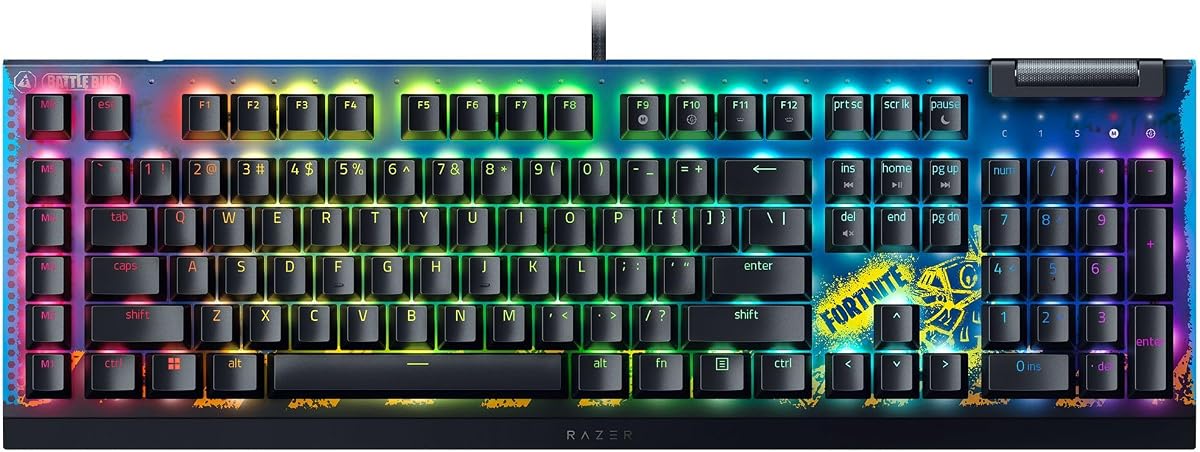
The Razer BlackWidow V4 X is a top-tier option for Fortnite players seeking speed and precision. Its yellow mechanical switches offer rapid inputs with minimal force, ensuring you react instantly during builds.
We may earn a commission when you buy through this link, at no additional cost to you.
With six dedicated macro keys, you can program complex commands for editing or building combos. The Chroma RGB lighting allows for personalized effects, and the sound dampeners keep noise low during late sessions.
While the price is higher than budget models, the build quality and performance justify the cost. The doubleshot ABS keycaps ensure legends stay clear even after intense use, offering long-term reliability.
If you want a reliable keyboard that balances performance with customization, this is an excellent choice. It suits competitive players who value speed and want a polished gaming experience.
The yellow linear switches provide zero distance between actuation and reset, enabling rapid-fire inputs essential for fast building in Fortnite.
Six dedicated macro keys and over 16.8 million RGB colors let you tailor the keyboard to your unique playstyle and setup.
We may earn a commission when you buy through this link, at no additional cost to you.
The SteelSeries Apex 3 offers a balance of durability and comfort at an affordable price. Its IP32 water resistance protects against spills, making it a practical choice for long gaming sessions.
We may earn a commission when you buy through this link, at no additional cost to you.
The whisper quiet switches ensure minimal noise while maintaining low friction for smooth inputs. The magnetic wrist rest adds comfort during marathon matches, and the RGB illumination enhances your setup.
Though it lacks mechanical switches, the membrane design provides reliable performance for casual gamers. The multimedia controls allow easy volume adjustments without interrupting gameplay.
This keyboard is ideal for players who want a durable, comfortable option without breaking the bank. It delivers solid performance for Fortnite and general use.
IP32 water resistance and a magnetic wrist rest ensure the keyboard withstands accidental spills and provides comfort during long sessions.
Whisper quiet switches deliver nearly silent use with low friction for smooth keypresses that won't disturb others around you.
We may earn a commission when you buy through this link, at no additional cost to you.
The Redragon S101-3 PRO delivers premium features at a budget-friendly price. It includes a full-size RGB keyboard and a high-precision mouse, perfect for gamers upgrading from basic peripherals.
We may earn a commission when you buy through this link, at no additional cost to you.
With five dedicated macro keys, you can record complex command sequences for competitive play. The quiet membrane switches are ideal for shared spaces, and the anti-ghosting ensures every press registers.
The ergonomic wrist rest reduces fatigue, and the software lets you customize colors and DPI settings easily. The hardware saves your preferences, so settings remain after restarts.
This is an excellent choice for students or budget-conscious players. It offers reliable performance and durability, making it a trusted kit for both gaming and work.
Five dedicated macro keys and intuitive software allow you to customize colors, brightness, and command sequences for any game.
Soft-touch membrane keys and an ergonomic wrist rest provide comfort during long sessions, while the design ensures reliable performance.
We may earn a commission when you buy through this link, at no additional cost to you.
The GEODMAER 65% Gaming Keyboard is designed for gamers who need a compact setup. Its ultra-compact design saves desktop space while keeping essential keys for gaming and office use.
We may earn a commission when you buy through this link, at no additional cost to you.
The wired Type-C connection ensures a stable, low-latency link to your PC. It features 26-key anti-ghosting and separate arrow keys, making it functional for fast-paced games like Fortnite.
Though it uses membrane switches, the mechanical feel mimics a responsive typing experience without the high price. The LED backlit keys are clear in the dark, aiding visibility during night sessions.
This keyboard is a great portable option for travelers or students. It offers reliable performance and ease of carry, perfect for those needing a budget-friendly compact solution.
The 65% design saves up to 40% of desk space, allowing more room for mouse movements during intense gaming sessions.
UV-coated keycaps prevent fading, and two-color injection molding ensures characters remain visible even in low-light conditions.
We may earn a commission when you buy through this link, at no additional cost to you.
The Aula WIN60 HE stands out with advanced Hall Effect magnetic switches. It delivers an 8000Hz polling rate, providing unmatched speed and precision for competitive Fortnite matches.
We may earn a commission when you buy through this link, at no additional cost to you.
The rapid trigger mode with a low RT step distance enables lightning-fast shooting and complex combos. This performance gives you a distinct edge in high-stakes moments against opponents.
Its web-based driver allows easy customization without bulky software. You can remap keys and adjust RGB lighting from any device, ensuring seamless personalization for your workflow.
If you demand top-tier speed and precision, this keyboard is worth the investment. It suits competitive players who need reliable, ultra-fast input for intense gaming.
Hall Effect magnetic switches offer precise actuation without physical contact, eliminating wear and tear while boosting speed.
The web-based driver lets you remap keys and customize RGB lighting easily without needing complex software downloads.
We may earn a commission when you buy through this link, at no additional cost to you.
The AULA F75 Pro Wireless combines flexibility with high-end customization. It supports Bluetooth, 2.4GHz, and USB-C connections, allowing seamless switching between multiple devices.
We may earn a commission when you buy through this link, at no additional cost to you.
Hot-swappable switches enable DIY modifications without soldering. The pre-lubricated stabilizers and Reaper switches offer a smooth typing feel and fast response for exciting game action.
The multi-function knob adjusts brightness or volume, while side-printed PBT keycaps ensure durability and stylish aesthetics. The RGB lighting supports music effects for an immersive setup.
This keyboard suits gamers who want wireless freedom and customizability. It balances professional build quality with features that enhance both gaming and productivity.
Tri-mode connection lets you connect up to five devices and switch effortlessly for gaming or work on PC or mobile.
Side-printed PBT keycaps and hot-swappable switches provide durability and a customizable typing experience for any user.
We may earn a commission when you buy through this link, at no additional cost to you.
The AULA WIN68 HE offers industry-leading speed with an 8000Hz polling rate and adjustable actuation points. This allows you to personalize each key to your specific keystroke habits for precision.
We may earn a commission when you buy through this link, at no additional cost to you.
The magnetic switches enable fast trigger mode, giving you an edge in competitive games. The 60% design saves desk space while retaining essential keys like arrows and functions.
A professional web driver provides one-stop management for customization without extra downloads. RGB lighting offers 16.8 million colors and preset effects to match your setup atmosphere.
Ideal for coders and gamers needing ultra-fast response, this keyboard delivers efficiency. It is a solid choice for those seeking speed and reliability in a compact form.
Each key can be adjusted to units as small as 0.1 mm for ultra-precise actuation tailored to your style.
The web driver allows key mapping and RGB customization directly through a browser without needing bulk software.
We may earn a commission when you buy through this link, at no additional cost to you.
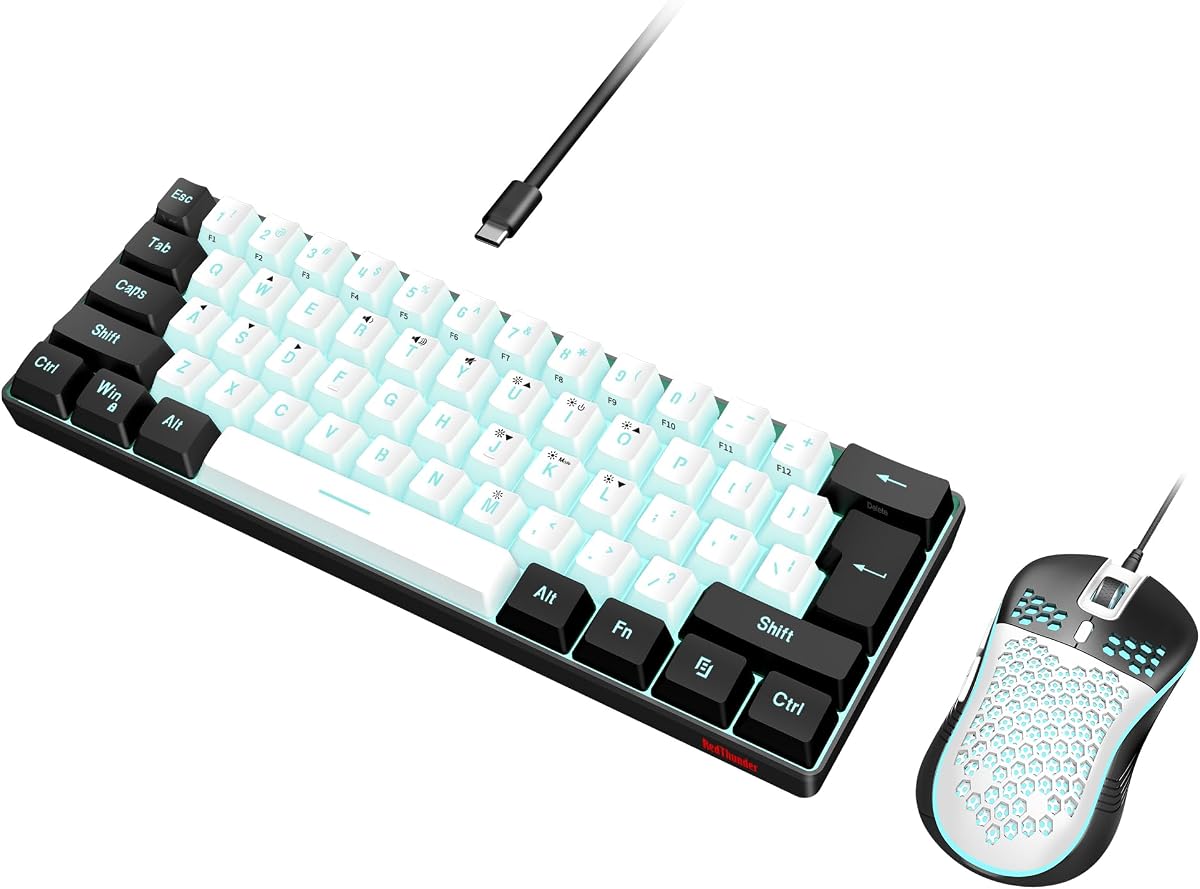
The RedThunder 60% Gaming Keyboard and Mouse Combo offers a clean and organized desktop setup. Its ultra-compact layout leaves more space for mouse movements, ideal for FPS gamers.
We may earn a commission when you buy through this link, at no additional cost to you.
The keyboard features water-resistant protection and durable USB cables to prevent spills damage. The lightweight honeycomb mouse ensures comfort and flexibility during long gaming sessions.
RGB lighting modes and brightness adjustments let you customize the look of your setup. The combo provides a practical, budget-friendly solution for gamers needing essential peripherals.
This set suits players who value minimalism and affordability. It delivers reliable performance and durability, making it a good entry-level option for new gamers.
The 60% compact layout creates a neat desktop and more room for mouse movements during intense gaming sessions.
Water-resistant keys and a lightweight honeycomb mouse provide durability and flexibility without adding fatigue.
We may earn a commission when you buy through this link, at no additional cost to you.
The Logitech G PRO Mechanical TKL is built for esports athletes who require competition-level speed. Its GX Blue click switches deliver an audible tactile click that confirms each keypress.
We may earn a commission when you buy through this link, at no additional cost to you.
The ultra-portable tenkeyless design frees up space for mouse movement and is easy to transport. LIGHTSYNC technology lets you program static lighting patterns stored in onboard memory.
Detachable cables with a three-pronged design ensure secure connections and easy packing. Three-step angle adjustment and rubber feet provide stability during intense gameplay moments.
This keyboard is ideal for serious competitive players needing reliability. It balances performance with portability, making it a top choice for tournament use and home setups.
Built with esports athletes in mind, it offers the speed and precision needed for high-stakes tournament play.
The compact tenkeyless design and detachable cables make it easy to pack and transport to tournaments anywhere.
We may earn a commission when you buy through this link, at no additional cost to you.
The ATTACK SHARK X68 HE RT features adjustable Hall Effect magnetic switches with rapid trigger functions. It allows binding four functions to one key based on different pressing degrees for flexibility.
We may earn a commission when you buy through this link, at no additional cost to you.
With an 8000Hz polling rate and 0.01mm RT accuracy, this keyboard ensures ultra-fast response. The top mount structure and PORON layers enhance stability and typing smoothness.
PBT double shot keycaps offer durability and clear letters, while RGB LEDs provide immersive lighting. A web driver enables easy customization of macros and actuation points.
This keyboard is perfect for players needing ultra-responsive controls. It suits FPS and rhythm game enthusiasts seeking precision and speed for a competitive advantage.
The rapid trigger function enables true 0.01mm accuracy for ultra-fast keystrokes ideal for rhythm and FPS games.
Top mount structure with PORON layers and PBT keycaps ensure a stable, quiet, and durable typing experience.
We may earn a commission when you buy through this link, at no additional cost to you.
Choosing the right keyboard involves considering switch type, layout, response time, and build quality to match your gameplay style and budget.
Switch type determines how your keyboard feels and reacts. Mechanical switches offer durability and tactile feedback while membrane switches provide a quieter experience at a lower cost.
For Fortnite, mechanical switches are preferred for their speed but consider membrane if you need budget options or quieter operation.
Response time measures how quickly a keypress registers. Faster polling rates and lower latency ensure that your commands execute instantly which is crucial in fast-paced gaming.
Look for keyboards with high polling rates and rapid trigger modes if competitive performance is your top priority.
Keyboard layouts range from full-size to compact 60 percent designs. Larger layouts include number pads while compact layouts save desk space for more mouse movement.
Choose a layout that fits your desk and playstyle ensuring all necessary keys are accessible without feeling cramped.
Customization options like macro keys and RGB lighting allow you to tailor your keyboard to your workflow. Macros can automate complex commands enhancing efficiency in matches.
Opt for models with programmable keys and intuitive software if you want to personalize your setup and gain a tactical edge.
Durability ensures your keyboard withstands intense gaming over time. Water resistance and high-quality keycaps help protect against spills and wear from frequent use.
Invest in keyboards with robust materials and protective features to extend their lifespan and maintain performance.
Budget determines what features you can access. High-end models offer advanced technologies while budget options provide basic functionality with fewer extras.
Balance cost with the features you truly need to get the best value for your investment without overspending.
Ensure your keyboard works seamlessly with your system. Most keyboards support Windows and macOS but wireless models may have specific requirements for connectivity.
Check compatibility details before purchasing to avoid issues with software or connection to your gaming setup.
Ergonomic features like wrist rests and adjustable angles improve comfort during long sessions. Proper support helps reduce fatigue and strain on your hands.
Prioritize keyboards with ergonomic designs to maintain comfort and health during extended gaming marathons.
To maximize performance, connect your keyboard to a USB port and install any required software. Use the settings to adjust key bindings and lighting effects to suit your playstyle.
Regular cleaning keeps your keyboard responsive. Use compressed air to remove dust from key switches and wipe surfaces with a soft cloth to prevent buildup.
Store your keyboard properly when not in use to avoid damage. If using a wireless model, recharge the battery regularly to maintain reliable connectivity during gaming.
Mechanical linear switches are often best for Fortnite due to their speed and low actuation force. They allow rapid inputs without tactile bumps that can slow down keypresses.
Macro keys allow you to execute complex commands with a single press. You can program them for building or editing combos giving you a competitive edge in fast matches.
Compact keyboards save desk space allowing more room for mouse movements. This can be beneficial for FPS games like Fortnite where large mouse sweeps are common.
RGB lighting is mostly aesthetic but can help you locate keys in low light. It does not affect performance but enhances the overall look of your gaming setup.
Yes, membrane keyboards work for competitive Fortnite though they lack the speed of mechanical switches. They are budget-friendly and can suffice for casual players.
Choose a keyboard with water-resistant design to protect against accidental spills. Also avoid drinks near your setup to prevent liquid damage to sensitive components.
Wireless keyboards offer a cleaner setup without cable clutter. However, wired models usually provide lower latency which may be preferable for competitive gaming.
It is recommended to clean your keyboard every few weeks. Dust and debris can accumulate affecting performance and comfort during typing or gaming sessions.
We have reviewed ten top keyboards ranging from budget combos to premium competitive models. Each option offers unique strengths suited to different player needs and budgets.
Prioritize features like switch type and response time to ensure your keyboard supports your fast-paced Fortnite gameplay. Customization and durability are also key considerations for long-term use.
Check current prices and availability before buying as these details can change. With the right keyboard you can enhance your gaming experience and build to your full potential.