
2 in 2 Out USB 3.0 Switch
4.6Editor score
USB 3.0 5Gbps speed
One-button switch with LED
Plug and play setup
This guide compares the top 10 keyboard and mouse switch for 2 computers to help you share peripherals efficiently between dual workstations.
Managing multiple computers often means dealing with tangled cables and duplicated peripherals. A keyboard and mouse switch for 2 computers solves this by letting you share devices seamlessly. It streamlines your workflow and reduces desk clutter effectively.
We evaluated ten top-rated USB and KVM switches based on compatibility, speed, and ease of use. Our comparison highlights models that support USB 3.0, offer reliable switching, and work across Windows, Mac, and Linux systems without driver hassles.
Each pick below shows specific strengths like port counts, power options, and build quality. Prices fluctuate frequently on marketplaces, so verify current listings before purchasing. These insights help you choose the right switch for your dual-PC setup today.
4.6Editor score

4.0Editor score

4.3Editor score
The following table provides a side-by-side view of all ten products we reviewed. Each entry lists key specifications and links to the official product page so you can quickly assess which switch fits your specific port and speed requirements.


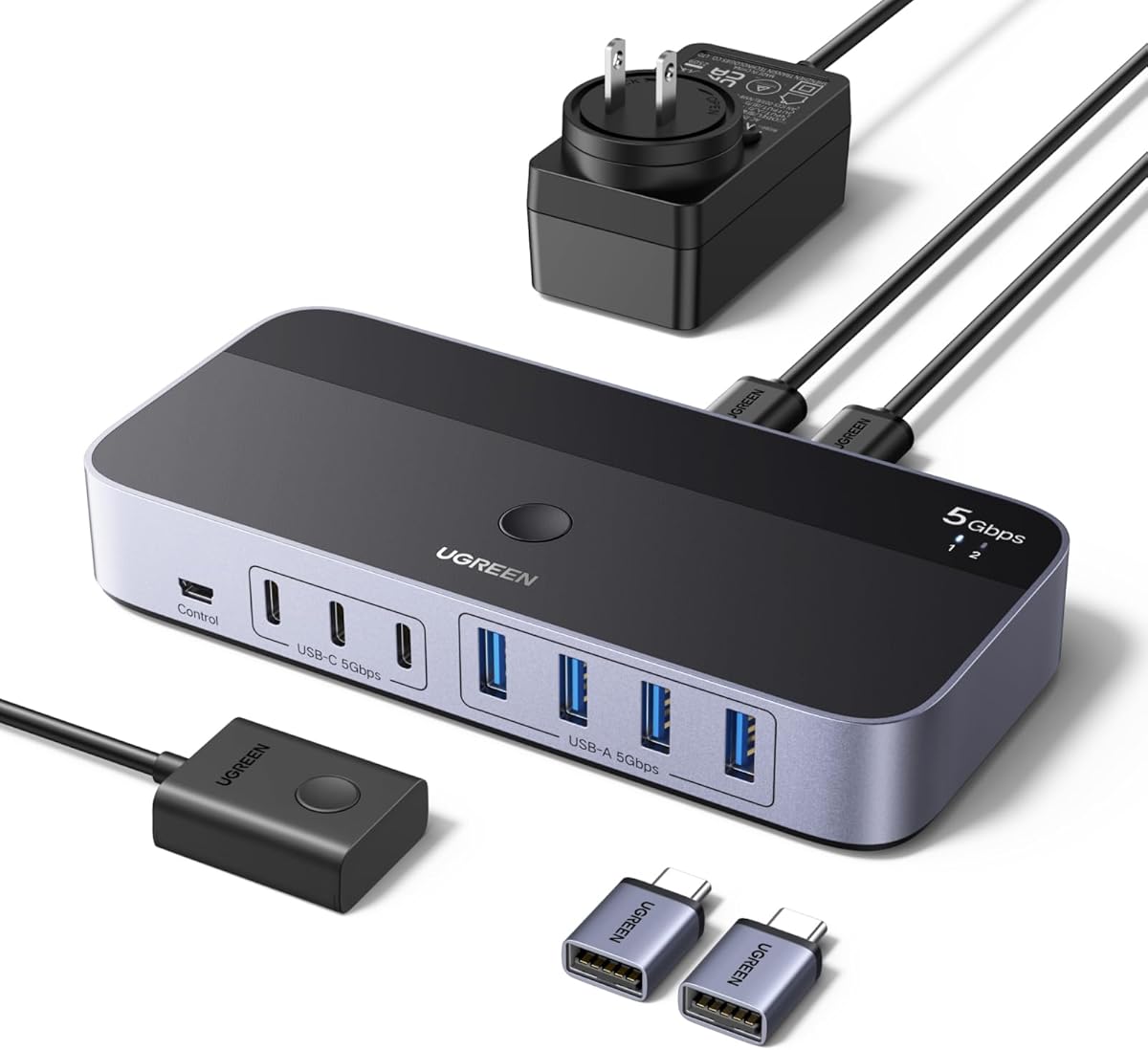

This UGREEN USB 3.0 switch is a versatile hub designed for sharing peripherals between two computers. With a 4.0 rating and robust build quality, it stands out for its ability to handle various device types without complex configuration. It supports both USB-C and USB-A ports, making it adaptable to modern and legacy setups.
We may earn a commission when you buy through this link, at no additional cost to you.
The standout feature is its dual switching capability via an external controller or a built-in button. This flexibility allows you to keep the unit hidden while maintaining quick access. Data transfer speeds reach up to 5Gbps, ensuring file movements are swift. The optional USB-C power port helps maintain stability when connecting high-demand devices like hard drives.
While it excels at data sharing, it is not a KVM switch for monitors. Users needing video switching will need a different solution. The power adapter is sold separately, which might inconvenience some buyers. However, the included cables and broad OS compatibility make it a strong choice for productivity-focused workflows.
This switch is ideal for professionals managing dual workstations who prioritize peripheral sharing. If you need to share keyboards, mice, and printers efficiently, this model delivers reliable performance. Its sturdy design and flexible connectivity options ensure it remains useful as your hardware evolves over time.
You can switch using the physical button or hide the unit and use the external controller to maintain a clean desk layout.
USB 3.0 technology enables transfers up to 5Gbps, significantly speeding up file sharing between your two computers.
We may earn a commission when you buy through this link, at no additional cost to you.
The BENFEI USB 3.0 switch offers an accessible entry point for users needing basic peripheral sharing. It supports four USB 3.0 ports for connecting keyboards, mice, and other accessories between two computers. Its 4.1 rating reflects consistent performance and ease of use across various operating systems.
We may earn a commission when you buy through this link, at no additional cost to you.
Key strengths include a clear LED indicator that shows which computer is active, simplifying workflow transitions. The unit supports up to 5Gbps data transfer, making file sharing efficient. A dedicated power slot allows connecting external power for high-consumption devices, ensuring stable operation without overloading the USB ports.
Users should note that specific USB-A to USB-A cables are required for proper connection, which may limit flexibility. The power adapter is also not included, requiring a separate purchase for power-hungry devices. Despite these minor constraints, the 18-month warranty provides peace of mind for long-term use.
This switch is best suited for home offices or light business setups where budget is a priority. It handles standard peripherals well and avoids driver installation hassles. If you need a reliable way to share devices without spending much, this BENFEI model is a solid candidate to consider.
The LED lights up to show which computer currently controls the shared devices, reducing confusion during switching.
BENFEI provides an 18-month unconditional warranty, ensuring customer support is available if issues arise.
We may earn a commission when you buy through this link, at no additional cost to you.
This 2 in 2 Out USB 3.0 switch is a compact solution tailored for simple dual-PC setups. With an impressive 4.6 rating, users appreciate its straightforward design and reliable performance. It allows two computers to share two USB devices like keyboards and mice without requiring extra hubs.
We may earn a commission when you buy through this link, at no additional cost to you.
The one-button switch with an LED indicator makes toggling between systems intuitive. The aluminum alloy shell aids heat dissipation, enhancing longevity during extended use. Included USB 3.0 cables mean you can start using it immediately after unboxing, adding to its convenience and user-friendly appeal.
The main limitation is the two-port restriction, which may not suffice if you need to share more than two devices. It also lacks advanced features like external controllers or power slots. However, for basic mouse and keyboard sharing, its simplicity and solid build quality justify the lower price point.
This switch is perfect for home users with two PCs who only need basic peripheral sharing. It avoids unnecessary complexity and delivers exactly what is promised. If you want a no-fuss, cost-effective way to share a keyboard and mouse, this model offers excellent value and reliability.
No drivers are required; simply connect the devices and start switching between your computers instantly.
The aluminum alloy housing ensures better heat dissipation and a sturdy build compared to plastic alternatives.
We may earn a commission when you buy through this link, at no additional cost to you.
The UGREEN 2 in 2 Out switch is a streamlined option for those needing minimal port access. Its compact design fits easily on small desks, and the 4.1 rating indicates reliable everyday performance. It focuses on core functionality like keyboard and mouse sharing without extra complexity or bulk.
We may earn a commission when you buy through this link, at no additional cost to you.
Performance-wise, it supports 5Gbps transfer speeds, ensuring efficient file sharing when needed. The driver-free plug-and-play feature works across Windows, Mac, and Linux, saving setup time. Included cables simplify the initial installation, allowing you to connect devices directly from the box.
A limitation is the lack of an external power port, which might affect stability with high-power peripherals. The two-port limit means it cannot support more than two shared devices. For basic needs, these constraints are acceptable, and the simplicity often outweighs the missing features.
Choose this switch if you have a clean desk and need simple sharing capabilities. It is well-suited for light office use where additional ports or advanced switching options are not critical. The UGREEN brand reputation for quality adds confidence to this compact and functional solution.
Setup takes seconds; just plug in the devices and press the button to switch systems without installing software.
Its small footprint keeps your workspace tidy, making it ideal for home offices or limited desk areas.
We may earn a commission when you buy through this link, at no additional cost to you.
The Hearvo USB 3.0 HDMI KVM switch stands out by combining peripheral and video sharing. It is a premium choice for users who want to share both monitors and USB devices. The 4.0 rating reflects solid performance in managing dual computers with a single screen setup.
We may earn a commission when you buy through this link, at no additional cost to you.
It supports 4K resolution at 60Hz, ensuring crisp visuals for productivity or media tasks. The unit includes four USB 3.0 ports for peripherals like keyboards and printers. A wired remote switch allows easy access without reaching behind your monitor, streamlining workflow transitions effectively.
The price is higher than USB-only switches since it includes HDMI capabilities. If video switching isn't needed, a simpler model may be more cost-effective. However, for those who want to reduce screen clutter while maintaining high-quality video output, this integrated solution is worth the investment.
This KVM switch is best for advanced users managing dual PCs with one high-resolution display. It eliminates the need for separate HDMI and USB switches. If you value desk space and visual clarity while sharing a full setup, this Hearvo model delivers comprehensive control and convenience.
Supporting 4K@60Hz ensures your monitors display sharp images without lag or quality loss.
The included wired remote lets you switch computers easily from your desk without touching the switch itself.
We may earn a commission when you buy through this link, at no additional cost to you.
This UGREEN USB Switch Selector is designed for users who need reliable USB 2.0 connectivity. With a 4.4 rating, it offers stable performance for older devices or low-bandwidth peripherals. The design focuses on simplicity, allowing easy swapping between two computers using a single button press.
We may earn a commission when you buy through this link, at no additional cost to you.
It includes an LED indicator to show which computer is active, reducing confusion. The optional micro USB power port helps maintain stability with devices that draw more power, such as external drives. This feature ensures consistent operation even with multiple devices connected simultaneously.
The main drawback is the USB 2.0 limitation, which caps data transfer speeds. For users with modern high-speed USB 3.0 needs, this may be a bottleneck. However, for basic peripherals like keyboards and mice, the speed difference is negligible. The build quality remains robust despite the older standard.
This switch is ideal for environments with legacy hardware or basic sharing needs. If you do not require fast file transfers, the reliability and simplicity make it a strong choice. It is a cost-effective way to share devices without needing a full system upgrade.
Designed for stable connections with older devices that do not require high-speed data transfer capabilities.
The micro USB port allows you to connect external power for better stability with high-demand devices.
We may earn a commission when you buy through this link, at no additional cost to you.
This UGREEN USB 3.0 switch provides a balanced mix of speed and usability. With a 4.3 rating, it is praised for consistent performance across multiple device types. It supports four USB ports, making it versatile for sharing peripherals like keyboards, mice, and printers efficiently.
We may earn a commission when you buy through this link, at no additional cost to you.
It delivers up to 5Gbps data transfer, ideal for moving large files between computers. The optional USB-C power port ensures stability when connecting high-power devices like hard drives. The one-button switch with an LED indicator keeps the operation simple and intuitive for daily workflows.
One consideration is that the power adapter is sold separately, which may require an extra purchase. The design is straightforward, lacking advanced features like remote controllers. Despite this, the combination of speed and reliability makes it a dependable choice for most shared setups.
This switch is best for general office use where consistent performance is key. It handles multiple devices well without needing extra hubs. If you need a reliable way to share four USB devices between two computers, this UGREEN model delivers strong value and stability.
The switch supports up to 5Gbps data transfer, significantly improving file sharing efficiency between computers.
A USB-C power port allows for stable operation with high-power devices that need extra energy.
We may earn a commission when you buy through this link, at no additional cost to you.
This UGREEN 2-in 7-Out switch offers exceptional versatility for users with many devices. With a 4.3 rating, it stands out for its ability to handle seven ports, including both USB-A and USB-C types. The included power adapter ensures reliable operation even with multiple high-power peripherals connected.
We may earn a commission when you buy through this link, at no additional cost to you.
It delivers 5Gbps data transfer speeds, keeping file sharing efficient. The external controller allows you to switch between computers easily without reaching for the unit itself. This feature keeps your desk tidy and makes the device accessible during busy work sessions.
The switch is larger and more expensive than models with fewer ports. For setups that do not need seven ports, this may be overkill. However, for power users who need extensive device sharing, the flexibility and included accessories justify the cost and space requirements.
Choose this switch if you have numerous USB devices and want to avoid buying multiple hubs. It simplifies complex setups by consolidating connections into one unit. If you need maximum flexibility and power, this UGREEN model is a comprehensive and well-built solution.
With seven ports, this switch supports extensive device sharing without requiring additional hubs or cables.
The package includes an external controller and power adapter, ensuring you have everything needed for setup.
We may earn a commission when you buy through this link, at no additional cost to you.
This USB Switch 2 in 2 Out is a basic option for simple peripheral sharing. With a 4.2 rating, it is valued for its straightforward functionality and ease of use. It allows two computers to share two USB devices without requiring complex setup or additional hardware.
We may earn a commission when you buy through this link, at no additional cost to you.
The single push button with LED indicator makes switching between systems intuitive. It includes two USB cables, allowing immediate setup. The unit is powered directly by the computer's USB ports, meaning no external power supply is needed for basic devices.
The limitation is the two-port constraint and basic construction quality. It may not suit complex setups or power-hungry devices. For simple keyboard and mouse sharing, however, it offers a cost-effective solution. Its simplicity reduces potential points of failure.
This switch is best for users with minimal sharing needs on a budget. If you want to share just a mouse and keyboard without extra features, this model works well. It is a practical choice for light home office use where simplicity is preferred.
No drivers are required; just plug in the devices and cables to start sharing between your computers.
The switch draws power directly from the computer's USB port, reducing cable clutter on your desk.
We may earn a commission when you buy through this link, at no additional cost to you.
This UGREEN USB 3.2 switch offers top-tier speed for users needing fast file transfers. With a 4.3 rating, it excels in performance thanks to 10Gbps speeds. It supports seven ports and includes a power adapter to ensure stable operation with multiple connected devices.
We may earn a commission when you buy through this link, at no additional cost to you.
The switch handles both USB-C and USB-A types, making it suitable for modern and older peripherals. It allows transferring files significantly faster than standard USB 3.0 switches. The included power adapter ensures that high-demand devices remain stable during use.
The higher price and larger footprint make it a significant investment. For average users, standard USB 3.0 models may suffice. However, professionals dealing with large datasets will appreciate the speed and port capacity. It represents the pinnacle of USB switching performance available.
This switch is best for power users who need speed and connectivity flexibility. If you work with large files frequently and have many devices to share, this model delivers unmatched efficiency. It is a premium choice for those prioritizing performance and extensive connectivity options.
This switch supports up to 10Gbps, allowing you to transfer files significantly faster than standard switches.
With seven ports including USB-C and USB-A, it accommodates a wide range of peripherals without extra hubs.
We may earn a commission when you buy through this link, at no additional cost to you.
Selecting the right switch involves evaluating your port needs, speed requirements, and budget. This guide breaks down the key factors to help you narrow down the options effectively.
Determine how many devices you need to share. Some switches offer two ports while others offer seven. Also check if you need USB-C support for modern peripherals.
Choose a port count that exceeds your current needs slightly to allow for future additions.
USB 3.0 switches offer up to 5Gbps, while newer models offer up to 10Gbps. For basic peripherals like keyboards, speed is less critical than for storage devices.
Opt for USB 3.0 or higher to ensure future-proofing and faster file transfers between systems.
Some switches use a physical button, while others offer an external controller or remote. Consider where you want the unit to sit relative to your workspace.
An external controller is useful if you want to hide the switch to reduce cable clutter on your desk.
Certain devices like external hard drives require extra power. Some switches have an optional power port to support these high-demand peripherals.
Ensure the switch supports external power if you plan to connect multiple high-power devices simultaneously.
Most switches work with Windows, Mac, and Linux via plug-and-play. Verify driver-free support if you use multiple operating systems.
Select a model explicitly listed as compatible with all your systems to avoid setup issues.
Metal cases dissipate heat better than plastic. If you use the switch frequently, a sturdy build will improve longevity.
Look for models with aluminum alloys for better durability during continuous daily use.
Most USB switches do not support video. If you also need to share a monitor, you need a KVM switch with HDMI ports.
Confirm whether you need a video KVM switch or a standard USB peripheral switch.
A longer warranty period indicates the manufacturer stands by the product quality. Check the included support options.
Choose brands offering at least a one-year warranty for peace of mind.
Start by connecting your devices to the switch ports and linking the switch to both computers using the included USB cables. Ensure all connections are secure before powering on.
Press the button or use the remote to switch between computers. The LED indicator will show which system is currently active. Test typing on your keyboard to confirm the correct system is selected.
Keep the switch clean by wiping it with a soft dry cloth. Avoid exposing it to liquids or dust. If you need to move it, disconnect all cables first to prevent damage to the ports.
Not exactly. A USB switch shares only peripherals like keyboards and printers. A KVM switch shares both peripherals and monitors. If you need to share a screen, you need a KVM switch.
Most switches we reviewed are compatible with macOS. They use standard USB protocols that work without drivers. Always check the product details for specific OS listings.
USB 3.0 switches handle standard speeds well. For very fast SSDs, models with 10Gbps support are better to avoid bottlenecks during large file transfers.
Use a switch with an external power port. Connect a compatible USB power source to the dedicated port to ensure devices remain stable during operation.
No, they are plug-and-play devices. They work across systems without installing extra software. This simplifies setup and keeps your system clean.
These models support only two computers. For three or more, you need a 3-way switch or a docking station. Check the port count before purchasing.
We reviewed ten switches ranging from budget USB options to premium 10Gbps models. The UGREEN 2-in 7-Out USB 3.2 switch leads in speed, while the 2 in 2 Out USB 3.0 Switch offers the best budget value.
Prioritize port count and speed based on your actual needs. If you only need basic keyboard sharing, a simple two-port model suffices. For extensive setups, look for external power support and higher port counts.
Prices can fluctuate so check current listings before buying. The right switch can transform your dual-computer workflow by keeping your desk organized. With these options, you can share devices efficiently regardless of your budget.