
MINISFORUM NAB9S
4.5Editor score
Quad screen display support
Dual 2.5G Ethernet
Tool-free expansion
This guide compares the top Intel Core i9 Mini PC models for 2026 evaluating performance and connectivity to help you choose the best compact desktop for your
The Intel Core i9 Mini PC represents the pinnacle of compact computing power today. These tiny devices pack flagship performance into a footprint smaller than a book. They redefine what is possible with small form factor desktops for professionals and enthusiasts alike.
We evaluated ten leading models based on processor speed and thermal management. We also considered expandability and connectivity options. Our analysis focuses on real-world performance for creative work and demanding multitasking environments.
Each pick highlights specific strengths for different use cases. Prices vary based on configuration and availability. Check current listings for the most accurate pricing and stock information before making your final purchase decision.
4.5Editor score

4.5Editor score
4.6Editor score
This side-by-side comparison highlights the key specifications of each model to help you find the right balance of power and price.


The MINISFORUM M1-1390 is a powerhouse mini PC rated highly by users. It delivers flagship level performance in a tiny chassis ideal for home or office use.
We may earn a commission when you buy through this link, at no additional cost to you.
Its 24-core processor handles heavy multitasking with ease. The hybrid architecture ensures efficiency during everyday tasks while providing bursts of power when needed.
While it uses DDR4 RAM the performance remains strong. The cooling system works hard but noise levels are manageable for most environments.
This unit is perfect for professionals needing desktop power without bulk. It excels in design work and media playback thanks to its display options.
With 24 cores and 32 threads this PC cuts through complex tasks.
Connect up to three 4K monitors for an immersive workspace setup.
We may earn a commission when you buy through this link, at no additional cost to you.
The Beelink GTi13 offers advanced features like Thunderbolt 4 and DDR5 memory. It stands out for users needing fast data transfer rates.
We may earn a commission when you buy through this link, at no additional cost to you.
Its unique AI voice features allow for hands-on control in home or office settings. The fingerprint sensor adds an extra layer of security for sensitive work.
Dust-proof design helps maintain long-term performance. However the premium price reflects these advanced capabilities.
Best suited for tech enthusiasts wanting maximum connectivity options.
Thunderbolt 4 allows for rapid data transfer and charging capabilities.
Built-in AI voice recognition simplifies device interaction significantly.
We may earn a commission when you buy through this link, at no additional cost to you.
KAMRUI Hyper H2 features the latest 14th Gen processor for cutting-edge speed. It is designed to handle demanding gaming and creative workloads.
We may earn a commission when you buy through this link, at no additional cost to you.
The cooling system uses dual copper pipes to maintain stability. Users report smooth operation even under heavy multi-tasking loads.
Its compact size saves desk space significantly. Connectivity options cover most peripheral needs without adapters.
This model is ideal for gamers needing portable power.
The 5.8GHz boost clock ensures fast single-core application response.
Advanced heat pipes prevent throttling during intensive use sessions.
We may earn a commission when you buy through this link, at no additional cost to you.
The NAB9S offers a great entry point into high-end mini PCs. It balances performance with a very accessible price point.
We may earn a commission when you buy through this link, at no additional cost to you.
Dual Ethernet ports allow for network redundancy or advanced setup. This is rare in standard consumer mini PCs.
The cooling system handles heat well during long tasks. It supports four displays making it perfect for trading.
Choose this if you need a multi-screen setup on a budget.
Dual ports enable advanced routing or dual WAN configurations.
Tool-free design makes adding storage drives easy.
We may earn a commission when you buy through this link, at no additional cost to you.
This model is built for business and heavy compute tasks. It includes enterprise features like SFP+ ports for high speed networking.
We may earn a commission when you buy through this link, at no additional cost to you.
The PCIe x16 slot allows adding a GPU later. This makes it future proof for graphics needs.
It supports U.2 drives for massive storage capacity. The build quality matches workstation standards.
Best for servers or high-end creative workstations.
SFP+ ports support direct fiber connections for data centers.
Adds dedicated graphics power for rendering tasks.
We may earn a commission when you buy through this link, at no additional cost to you.
GEEKOM IT13 MAX focuses on local AI processing. It handles tasks locally for privacy and speed.
We may earn a commission when you buy through this link, at no additional cost to you.
Cooling is extremely quiet making it perfect for libraries. It runs Linux natively which developers love.
The unit is designed for stable 24/7 operation. Its warranty reflects high confidence in reliability.
Ideal for researchers needing privacy and low noise.
NPUs speed up machine learning tasks locally.
Fan noise is minimal for shared spaces.
We may earn a commission when you buy through this link, at no additional cost to you.
This barebone version allows full control over components. You choose RAM and OS to fit your needs.
We may earn a commission when you buy through this link, at no additional cost to you.
It supports discrete graphics cards for heavy graphics. Network ports are top tier for data transfer.
Assembly is straightforward for tech savvy users. It saves cost by avoiding pre-installed parts.
Best for builders wanting specific hardware configurations.
Choose exact RAM size and speed needed.
Add dedicated graphics for CAD work.
We may earn a commission when you buy through this link, at no additional cost to you.
The XT13 Pro offers 2TB storage out of the box. This is rare for mini PCs in this range.
We may earn a commission when you buy through this link, at no additional cost to you.
It includes a three year warranty for peace of mind. Local support is provided for repairs.
Performance is solid for general use and light gaming. The chassis is simple but functional.
Great for those wanting storage capacity included.
Two terabytes hold vast media libraries.
Three years of coverage exceeds standard offers.
We may earn a commission when you buy through this link, at no additional cost to you.
GT13 MAX supports up to four displays. It is built for complex visual workflows.
We may earn a commission when you buy through this link, at no additional cost to you.
Wi-Fi 7 ensures fastest possible network speeds. AI features keep data private on device.
The chassis resists scratches for office environments. It is robust for daily handling.
Best for multi-screen setups and privacy needs.
Supports new standard for ultra-fast wireless.
AI tasks run locally without cloud upload.
We may earn a commission when you buy through this link, at no additional cost to you.
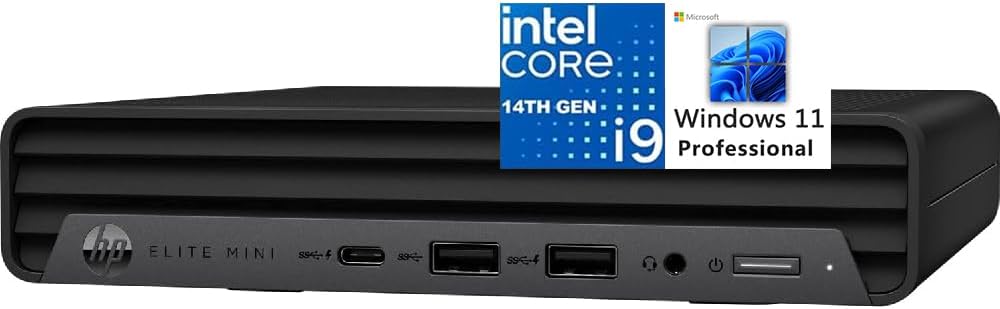
HP Elite Mini 800 G9 is designed for business use. It features a 14th Gen T version for efficiency.
We may earn a commission when you buy through this link, at no additional cost to you.
It is exceptionally quiet for office environments. Windows 11 Pro offers advanced business security.
The kit includes keyboard and mouse. It is a complete solution for deployment.
Best for enterprises needing reliability and support.
Pro edition offers full encryption features.
Thermal design minimizes noise in offices.
We may earn a commission when you buy through this link, at no additional cost to you.
Selecting the right Intel Core i9 Mini PC requires understanding your performance needs and budget limits. This guide outlines key factors to consider.
The core count and thread count of the i9 processor determine multitasking power. Look for models with hybrid architectures that balance speed and efficiency for daily tasks.
Prioritize models with more cores if you run virtual machines or heavy rendering.
RAM speed and capacity are critical for system responsiveness. DDR5 is faster than DDR4 and will benefit data-heavy applications significantly.
Ensure the system allows upgrades since 16GB is the minimum for modern workloads.
PCIe 4.0 SSDs provide fast boot times and rapid file access. Larger capacities like 1TB or 2TB are essential if you store local media or large projects.
Choose a model with multiple M.2 slots for future storage expansion without losing space.
Mini PCs pack heat into small spaces. Effective cooling prevents throttling and ensures stable performance during long tasks.
Check reviews for noise levels and heat dissipation before buying a model.
Ports like Thunderbolt 4 or USB4 allow fast data transfer and external GPU support. Dual Ethernet or Wi-Fi 7 options improve network speed.
Confirm the available video outputs match your monitor setup requirements.
Some units offer PCIe slots for graphics cards or network adapters. This flexibility extends the life of the device for future upgrades.
Consider a model with open slots if you plan to add hardware later.
Business grade models often offer better warranty terms than consumer ones. A three year warranty provides peace of mind for investment.
Look for brands with accessible local technical support channels.
Place the mini PC in a well-ventilated area to ensure airflow. Avoid enclosed cabinets where heat can build up quickly.
Clean dust regularly from vents using compressed air. Dust clogs cooling systems and reduces component lifespan significantly.
Update drivers and BIOS regularly for stability and security. Manufacturers release patches that improve performance over time.
Yes these Mini PCs are powerful enough for 4K video editing tasks. The multi-core processors allow smooth rendering and fast export speeds.
Most models come with Windows 11 or 10 pre-installed. Barebone versions require you to install the OS yourself.
Many Mini PCs are quieter due to lower heat output. However high performance models can still generate fan noise under load.
They support standard HDMI and DisplayPort monitors. Check port specs to ensure compatibility with your specific display resolution.
Many models allow RAM upgrades using SO-DIMM slots. Some soldered versions do not allow upgrades so check specs first.
Some models with USB4 or Thunderbolt support external GPUs. Others with PCIe slots allow direct internal graphics expansion options.
The MINISFORUM M1-1390 offers the best overall balance of power and price for most users today.
Prioritize RAM and storage upgrades to extend the life of your compact desktop setup.
Check current listings for the most accurate pricing and stock information before buying.