
Silverstone Technology GD09
4.5Editor score
358mm cabinet depth
Faux aluminum styling
Quick access filters
This guide compares the top Htpc Media Cases for home theater builds, focusing on cooling, noise, design, and compatibility for your next project.
Choosing the right Htpc Media Case is essential for building a silent, efficient, and aesthetically pleasing home theater computer. These cases are designed to fit seamlessly into living room cabinets while providing adequate airflow for high-performance components. A good case balances form and function, ensuring your system stays cool without generating excess noise during movie nights or gaming sessions.
We compared ten leading models based on airflow design, motherboard compatibility, drive bay flexibility, and build quality. Each product was evaluated for its ability to support modern hardware while maintaining a compact footprint suitable for home entertainment setups. Our analysis focuses on real-world usability and the specific features that matter most to HTPC enthusiasts and home cinema builders.
Each pick highlights unique strengths such as retro styling, USB-C integration, or superior cooling solutions. Whether you need a budget-friendly option or a premium chassis with advanced features, this list covers the full spectrum of available choices. Prices and availability change frequently, so verify details on the product pages before making your final purchase decision.
4.5Editor score

4.5Editor score

4.7Editor score
The following table provides a side-by-side comparison of all ten Htpc Media Cases. Each entry highlights key specifications to help you quickly identify the model that best fits your specific build requirements and aesthetic preferences.



The Silverstone Technology Grandia 11 stands out as a top contender for HTPC builds. With a 4.5 rating, it offers a robust chassis that balances performance and aesthetics. Its stereo-shaped design allows it to blend into home entertainment systems while supporting modern ATX motherboards and liquid cooling solutions.
We may earn a commission when you buy through this link, at no additional cost to you.
Key strengths include the positive air pressure design which ensures superior cooling and dust prevention. The 240mm radiator support makes it one of the few compact cases capable of handling advanced cooling. Adjustable LED indicators add a touch of customization, and the fully meshed front panel maximizes air intake for thermal efficiency.
While the price is higher than budget options, the build quality justifies the cost. The shortened chassis provides a large surface area for intake without compromising depth. Trade-offs include weight, but this adds stability. It is an excellent choice for those needing performance without sacrificing living room style.
Buyers seeking a high-performance HTPC should consider this model. It supports SSI-CEB and Micro-ATX boards effectively. The combination of cooling capability and compact footprint makes it ideal for powerful media centers. We recommend it for users prioritizing thermal management and premium design.
The positive air pressure design reduces noise while keeping components cool during extended use.
Support for SSI-CEB and ATX boards ensures flexibility for various system configurations.
We may earn a commission when you buy through this link, at no additional cost to you.
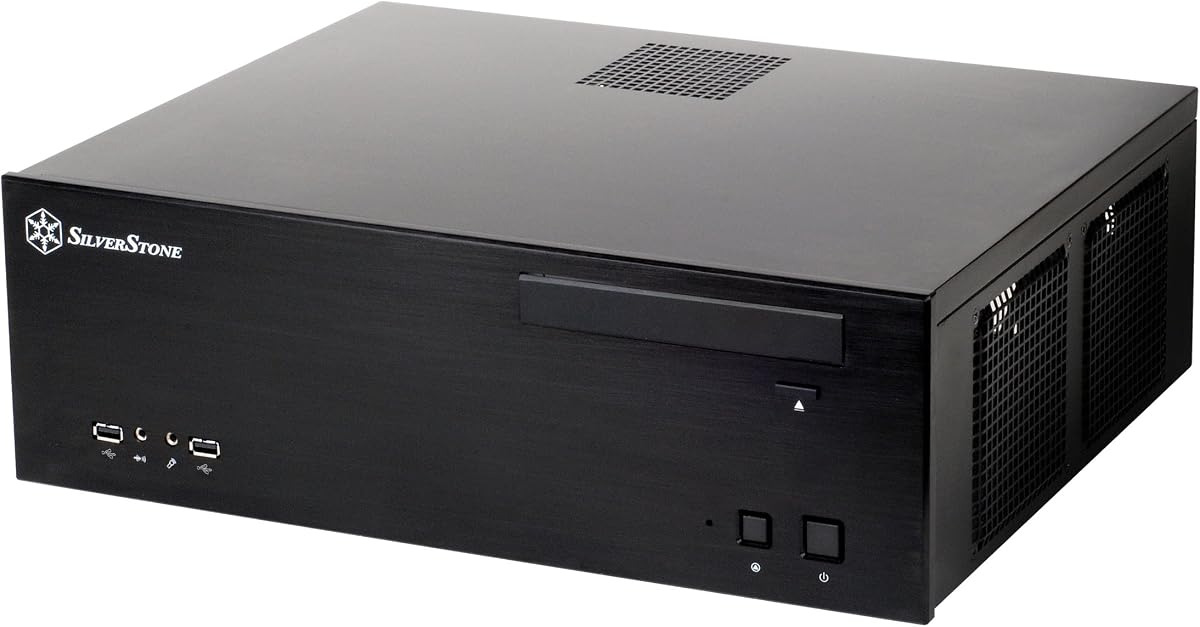
The Silverstone Technology GD09 offers excellent value for HTPC builders on a budget. Rated 4.5 stars, it provides a faux aluminum design that looks premium without the high cost. It supports ATX and Micro-ATX motherboards, making it versatile for many standard home theater PC configurations.
We may earn a commission when you buy through this link, at no additional cost to you.
Its incredible 358mm depth is a standout feature, allowing it to fit comfortably inside standard home theater cabinets. The positive air pressure design ensures excellent cooling and dust prevention. Quick access filters make maintenance easy, and the support for SilverStone RA02 rackmount ears adds utility for professional setups.
While it lacks advanced liquid cooling support, it handles air cooling well. The faux aluminum finish is durable and stylish. Some users might find the drive cage limitations restrictive, but for standard storage needs, it is sufficient. This model is ideal for budget-conscious buyers who want style and functionality.
We recommend this case for those prioritizing depth and aesthetics. It fits seamlessly into living room furniture. The balance of price and features makes it a top budget choice. Ensure you check power supply compatibility before purchase.
The 358mm depth ensures the case fits deep into media cabinets without protruding.
Faux aluminum design provides a high-end look at a fraction of the price.
We may earn a commission when you buy through this link, at no additional cost to you.
The Silverstone Technology ML03B is a compact Micro-ATX case ideal for smaller setups. With a 4.2 rating, it supports up to four 80mm fans for targeted cooling. The aluminum and steel construction offers durability while keeping weight low. It is designed specifically for low-profile expansion cards.
We may earn a commission when you buy through this link, at no additional cost to you.
Drive cages with multi-purpose mounts eliminate the need for adapters, simplifying installation. Cable routing is straightforward, making building easier for beginners. It supports standard PS2 ATX power supplies, which are widely available. The black finish provides a neutral look suitable for various media centers.
Limitations include the lack of ATX support, restricting upgrade paths. The small size can make component clearance tight. However, for basic media playback systems, it is efficient. The build quality is solid for the price point. It suits users with limited space requirements.
This case is best for small, quiet systems. Prioritize low-profile components for compatibility. It is a reliable option for dedicated HTPC builds. Check dimensions against your intended location carefully.
Multi-purpose drive mounts reduce the need for additional adapters during setup.
Compact size allows placement in tight spaces without compromising thermal performance.
We may earn a commission when you buy through this link, at no additional cost to you.
The Silverstone Technology GD09B-C updates a classic design with modern connectivity. It includes a USB Type-C front port, a feature absent in previous versions. With a 4.3 rating, it supports ATX and Micro-ATX boards while maintaining the faux aluminum aesthetic. The positive air pressure design remains a key strength.
We may earn a commission when you buy through this link, at no additional cost to you.
Quick access filters are included to prevent dust buildup. Support for SilverStone RA02 rackmount ears enhances versatility. The chassis offers excellent cooling and quietness. It fits well in home theater cabinets due to its depth. The USB-C port is essential for newer peripheral devices.
While the interior remains compact, it is sufficient for most home theater components. The design is less aggressive than newer cases. Some might find the airflow standard but not exceptional. It bridges the gap between classic style and modern connectivity effectively.
Buyers needing USB-C connectivity should choose this model. It suits users who prefer the GD09 design. Check motherboard headers for USB-C compatibility. It is a solid upgrade over older variants.
The addition of a front USB Type-C port enhances compatibility with newer devices.
Positive air pressure maintains efficient airflow without excessive noise levels.
We may earn a commission when you buy through this link, at no additional cost to you.
The Silverstone Technology FLP01 brings a unique retro-inspired look to modern builds. With a 4.7 rating, it is highly rated by users for design and functionality. The floppy disk-style optical drive bay cover is a distinctive touch. It supports 5.25, 3.5, and 2.5 drives universally.
We may earn a commission when you buy through this link, at no additional cost to you.
Equipped with a USB Type-C port, it balances vintage aesthetics with modern needs. The positive air pressure design ensures superior cooling and quieter operation. Quick-access filters make maintenance easy. The build quality feels premium, justifying its higher price point. It stands out as a conversation piece in any room.
Trade-offs include cost and potential limited stock due to its niche appeal. The retro elements might not suit all tastes. However, for enthusiasts seeking style, it is unmatched. The cooling performance is excellent for its form factor. It is an investment in unique design.
We recommend this for style-focused HTPC builds. Ensure you appreciate the retro theme. It is best for visible living room installations. Verify stock availability before ordering.
Retro floppy drive styling adds a unique character to standard media center setups.
Universal drive cage supports multiple drive formats without needing additional adapters.
We may earn a commission when you buy through this link, at no additional cost to you.
The SilverStone Technology GD08B supports E-ATX motherboards, making it ideal for powerful systems. With a 4.2 rating, it offers impressive storage capacity of up to twelve drive bays. The aluminum front panel provides premium styling. It supports expansion cards up to 13.6 inches, offering versatility.
We may earn a commission when you buy through this link, at no additional cost to you.
Positive air pressure design ensures excellent cooling. Quick access filters prevent dust buildup. An LED indicator with adjustable brightness helps visualize status. The chassis allows for custom fan configurations. This makes it suitable for high-performance home servers or media centers requiring massive storage.
The size might be too large for standard cabinets. Weight can make installation difficult. However, the expansion capabilities are unmatched. It is best for users who prioritize storage and performance. The aluminum finish looks great in home theater rooms.
Choose this for large-scale builds. Ensure your space accommodates the depth. It is a powerhouse for data storage needs. Check power supply requirements carefully.
Twelve drive bays provide extensive storage options for media libraries and backups.
E-ATX support enables use of high-performance server and enthusiast-class components.
We may earn a commission when you buy through this link, at no additional cost to you.
The Silverstone Technology ML04B-C offers a compact Micro-ATX design with USB Type-C. Rated 4.0, it balances cost and features well. The aluminum front door adds style to the steel body. It supports up to four 80mm fans for adequate cooling.
We may earn a commission when you buy through this link, at no additional cost to you.
Drive cages with multi-purpose mounts eliminate adapter needs. It supports standard PS2 power supplies. Cable routing is designed for easy installation. The front door design is sleek. It is a solid option for mid-range HTPC builds that need modern connectivity.
It is limited to Micro-ATX, restricting CPU and GPU options. Cooling is standard but not exceptional. For basic media tasks, it is reliable. The build quality is adequate for the price. It suits users with specific size constraints.
This is best for small, modern systems. Check USB-C motherboard headers. It is a good alternative to the ML03. Verify power supply dimensions before building.
Micro-ATX support ensures a smaller footprint without sacrificing connectivity options.
USB Type-C port allows fast data transfer and connectivity to modern devices.
We may earn a commission when you buy through this link, at no additional cost to you.
The SilverStone Technology GD09B Alt is a classic aluminum HTPC case. With a 4.3 rating, it supports ATX and SSI-CEB motherboards. The incredible 358mm depth ensures it fits inside home theater cabinets. It supports expansion cards up to 12.2 inches for GPU needs.
We may earn a commission when you buy through this link, at no additional cost to you.
Positive air pressure design ensures quiet operation. Quick access filters are included for easy maintenance. The aluminum styling is timeless. It is known for reliable thermal performance. Users appreciate the simplicity and effectiveness of the design. It is a workhorse for basic home theaters.
It lacks modern ports like USB-C. Storage options may be limited compared to newer models. However, it remains stable and functional. The build quality is durable. It is a safe choice for traditional HTPC enthusiasts.
Buyers seeking simplicity should choose this model. Verify GPU length compatibility. It is best for air-cooled builds. Check current availability before purchasing.
Positive air pressure maintains consistent cooling without excessive noise levels.
358mm depth ensures the case sits flush inside standard entertainment furniture.
We may earn a commission when you buy through this link, at no additional cost to you.
The Silverstone Technology GD04B-3.0 offers three silent 120mm fans included. With a 4.0 rating, it is a solid entry-level option. The aluminum front panel provides premium styling. It features 323mm depth for cabinet fitting. The USB 3.0 ports are standard for this generation.
We may earn a commission when you buy through this link, at no additional cost to you.
Positive air pressure design ensures excellent cooling and quietness. Cable routing is designed for easy installation. The SECC body offers durability. It is cost-effective for basic builds. Users appreciate the included fans, reducing initial setup costs.
The design is older and lacks modern USB-C. Thermal performance is adequate but not top-tier. It is a budget choice for traditional setups. The build quality is acceptable for the price. It suits users who prioritize simplicity.
Buyers on a budget should consider this model. Verify USB 3.0 needs. It is best for basic media playback. Check dimensions against your cabinet.
Three silent 120mm fans come included, saving money on initial setup costs.
Thick aluminum front panel provides a durable and stylish finish for living rooms.
We may earn a commission when you buy through this link, at no additional cost to you.
The SilverStone Technology GD06B-USA features two front USB 3.0 ports and hot-swap bays. With a 4.1 rating, it is excellent for frequent drive swaps. The aluminum front panel provides premium styling. It supports 4x 3.5 hard drives and 2.5 SSDs. The 340mm depth fits comfortably in cabinets.
We may earn a commission when you buy through this link, at no additional cost to you.
Positive air pressure design ensures excellent cooling. Three silent 120mm fans are included. Cable routing is designed for easy installation. It supports expansion cards up to 11 inches. The hot-swap feature is a standout for data centers.
It lacks modern USB-C connectivity. Micro-ATX limits component choice. However, for storage needs, it is efficient. The build quality is solid. It is a great choice for NAS-like HTPC builds.
Buyers needing drive flexibility should choose this. Verify motherboard headers. It is best for media servers. Check power supply compatibility.
Front hot-swap bays allow quick drive changes without opening the case.
Three silent 120mm fans are included to ensure adequate airflow out of the box.
We may earn a commission when you buy through this link, at no additional cost to you.
Selecting the right Htpc Media Case requires considering size, cooling, and features that match your build needs. This guide outlines the most important factors to ensure a successful home theater PC.
Ensure the case supports your motherboard size, whether ATX, Micro-ATX, or Mini-ITX. Compatibility issues can lead to clearance problems or unused features.
Verify support for SSI-CEB or E-ATX if using larger boards for server-like setups.
Look for positive air pressure designs that prevent dust while ensuring efficient cooling. Radiator support is essential for liquid cooling users.
Check fan sizes and quantities to maintain quiet operation in living spaces.
Evaluate the number and type of drive bays available for hard drives and SSDs. Hot-swap capabilities offer convenience for frequent data swaps.
Multi-purpose mounts can simplify installation without needing additional adapters.
Modern USB-C ports are essential for connecting newer peripherals. Ensure front ports match your motherboard headers.
USB 3.0 or higher speeds are necessary for fast data transfer speeds.
Cabinet depth is crucial; cases under 350mm fit better in standard media centers. Ensure clearance for GPUs and PSUs.
Measure your intended location before finalizing the purchase to avoid fit issues.
Aluminum front panels provide a premium look but may cost more. Steel bodies are durable but heavier. Consider aesthetic preferences.
Check filter accessibility to ensure easy maintenance and dust prevention.
Confirm support for standard ATX PSUs or low-profile options. Some cases have specific mounting requirements.
Cable routing features can help manage power cables effectively for better airflow.
Prices vary significantly based on features like USB-C, fans, and build materials. Balance cost with your performance needs.
Avoid overspending on unnecessary features if basic functionality meets your requirements.
Install components carefully, ensuring cables are routed through designated channels. Use the included filters to maintain a clean interior environment. Verify that fans are oriented for positive air pressure.
Regularly clean filters and intake vents to prevent dust buildup. Dust can reduce cooling efficiency and increase noise levels. Check that all panels are securely fitted to prevent vibrations.
Place the case in a ventilated area with clearance from walls. Avoid enclosing it in tight spaces. Periodically check drive connections and LED indicators for system status.
The Silverstone GD09 is ideal due to its 358mm depth. It fits comfortably in standard media cabinets. It supports ATX boards while maintaining a compact footprint.
Yes, the Grandia 11 supports 240mm radiators. Most cases support standard air cooling. Check radiator clearance before purchasing to ensure compatibility.
The GD08B model supports E-ATX boards. Most standard HTPC cases support ATX or Micro-ATX. Verify motherboard dimensions against case specs.
Positive air pressure pushes air out through rear/top vents. This prevents dust from entering through unfiltered gaps. It improves cooling efficiency and cleanliness.
The GD09B-C and ML04B-C include USB Type-C ports. Others may require adapters. Check motherboard headers for USB-C support.
The Grandia 11 offers the best cooling. It supports radiators and has mesh panels. Most models rely on air cooling with standard fans.
The GD06B-USA supports front hot-swap drive bays. Most other models require opening the case. Check specific model specs for drive features.
This guide highlights the top Htpc Media Cases ranging from budget options to premium models. The Grandia 11 stands out for performance, while the GD09 offers excellent value.
Prioritize depth and cooling when selecting your case. Modern connectivity like USB-C is a key consideration for new builds.
Verify current prices and availability before making a final decision. Always check motherboard and component compatibility.