
Redragon K585 Wired One-Handed RGB Gaming Keypad
4.4Editor score
Hot-swappable switches
USB pass-through port
Seven macro keys
This guide compares the top gaming keypads of October 2026 based on key switches, customization, ergonomics, and performance for FPS, MOBA, and creative
Gaming keypads offer specialized control for players seeking efficiency and comfort during intense sessions. These compact devices replace traditional keyboards with programmable keys and ergonomic layouts designed for one-handed operation. Whether you dominate competitive shooters or manage complex MMO rotations, the right keypad enhances your workflow significantly.
We evaluated ten leading models using rigorous criteria including switch quality, macro capabilities, build durability, and software flexibility. Our analysis focuses on real-world performance across various gaming genres and creative tasks. Each product was selected based on user feedback, technical specifications, and overall value proposition in the current market landscape.
Every recommendation highlights specific strengths and ideal use cases to help you find the perfect match for your setup. Note that availability and pricing may fluctuate over time due to market dynamics. Always verify the latest details before making your final purchase decision to ensure you get the best deal available today.
4.4Editor score

4.3Editor score

4.3Editor score
The following table provides a side-by-side comparison of all ten models we analyzed. It highlights key specifications to help you quickly identify which device meets your specific needs for performance, comfort, and customization.




The Razer Tartarus V2 stands out as a top-tier gaming keypad with a solid 4.3 rating. It offers 32 programmable keys designed for seamless integration into various game genres and creative workflows. Its mecha-membrane switches provide a tactile feel that balances comfort with responsiveness during extended play sessions.
We may earn a commission when you buy through this link, at no additional cost to you.
One of its standout features is the integrated thumbpad, which allows for natural movement controls similar to console gaming. The device also supports Razer Chroma, enabling synchronization with over 30 partner ecosystems and games. This deep customization ensures that lighting and macros align perfectly with your current activity or environment.
While highly capable, users should note that the switch type is a hybrid rather than full mechanical, which might appeal differently to enthusiasts seeking distinct tactile bumps. Additionally, the software ecosystem relies on proprietary apps that require installation. These trade-offs are acceptable given the device's ergonomic design and robust feature set for most gamers.
This keypad is ideal for players who prioritize comfort and ecosystem integration over raw mechanical feedback. It suits both casual gamers and professionals seeking efficient macro execution. If you value a polished experience with extensive customization options, the Tartarus V2 remains a strong recommendation for your setup.
The 8-way directional thumbpad mimics console controls for intuitive movement without needing to reach for standard keys. This design reduces hand strain and improves reaction times in fast-paced scenarios.
Individual keys support 16.8 million colors, allowing you to create lighting schemes that react to specific in-game events or match your entire desktop setup visually.
We may earn a commission when you buy through this link, at no additional cost to you.
The Redragon K585 delivers exceptional value with a 4.4 rating and features typically found in higher-priced units. Its 42-key layout provides ample space for complex macro sequences essential for MOBA and MMO players. The device stands out by allowing switch swaps without soldering, giving users the freedom to customize the feel of their keys.
We may earn a commission when you buy through this link, at no additional cost to you.
Beyond gaming, the USB pass-through port keeps your desk organized by letting you plug peripherals directly into the keypad. The detachable magnetic wrist rest adds comfort during long sessions while maintaining a small footprint when needed. RGB lighting supports vibrant modes to match your desktop aesthetic effectively.
Some users might find the software interface less intuitive compared to competitors, requiring a learning curve for advanced features. Additionally, the wired connection limits placement flexibility compared to wireless models. However, these limitations are minor given the device's build quality and affordability, making it a top choice for budget-conscious gamers.
This model is perfect for those who want to experiment with switch types without breaking the bank. It suits players who need dedicated macro keys and reliable performance. If you seek a versatile and affordable one-handed solution, the K585 is a highly recommended entry point into gaming keypads.
The upgraded socket design accepts most 3-pin or 5-pin switches, allowing you to change the tactile feel of your keypad without any soldering tools or technical expertise.
With seven onboard macro keys and robust software, you can record complex command sequences and assign them to specific buttons for instant execution during gameplay.
We may earn a commission when you buy through this link, at no additional cost to you.
The Redragon K585 PRO brings the convenience of wireless connectivity to the gaming keypad category with a 4.2 rating. It maintains the 42-key layout and hot-swap capabilities of its wired counterpart while allowing untethered placement on your desk. The battery supports 15 to 20 hours of continuous play, sufficient for most daily gaming sessions.
We may earn a commission when you buy through this link, at no additional cost to you.
Its design keeps essential commands within reach without cluttering your workspace with extra cables. The magnetic wrist rest can be removed easily if you prefer a smaller surface area for mouse movement. RGB effects remain vibrant, ensuring the device blends seamlessly with the rest of your battlestation lighting.
Wireless performance can sometimes introduce minimal latency compared to wired connections, which might matter in highly competitive titles. The need to recharge the battery adds a maintenance step that wired models avoid. Despite these points, the convenience of a cable-free setup makes it a strong contender for those prioritizing a clean desk.
This device is best suited for gamers who want the flexibility of wireless without sacrificing programmability. It works well for MMO players and those with larger desks where cable management is tricky. If you value a tidy setup and solid build quality, the K585 PRO is a worthy investment for your gaming station.
Supporting both Bluetooth and 2.4GHz connectivity, this keypad lets you place it anywhere on your desk for optimal ergonomics without worrying about cable length.
The internal battery delivers 15 to 20 hours of play on a single charge, ensuring you stay gaming through long sessions without frequent interruptions for recharging.
We may earn a commission when you buy through this link, at no additional cost to you.
The AZERON Cyborg II is a premium gaming keypad with a 4.3 rating that redefines one-handed control through its Hall Effect thumbstick. It supports analog movement in compatible games and allows users to map directional zones precisely. The device features 30 mappable inputs connected individually to avoid matrix limitations found in standard keyboards.
We may earn a commission when you buy through this link, at no additional cost to you.
Its 3D printed design ensures a customized fit for hands ranging from 6.3 to 7.5 inches, offering unparalleled comfort for right-handed users. The software enables deep customization including dead zones and sensitivity adjustments. This level of control is ideal for genres like FPS and RPGs where precise movement is crucial.
The high price reflects the advanced technology and custom build quality, which may not suit all budgets. Some users with smaller hands might find the medium-sized keypad less comfortable despite its adjustability. However, for those seeking professional-grade control and ergonomic precision, these trade-offs are often justified by the performance gains.
This keypad is designed for serious gamers and creators who demand the highest level of input flexibility. It excels in complex scenarios requiring both keyboard and mouse-like precision from one hand. If you want a unique, ergonomic tool that adapts to your style, the AZERON Cyborg II stands out as a top-tier choice.
The thumbstick eliminates drift and supports 360-degree analog movement, enabling smoother character control similar to console gamepads but integrated directly into your keypad setup.
Store up to six layouts directly on the keypad and access extensive software options to tailor sensitivity, macros, and lighting profiles to match your exact playstyle and game genres.
We may earn a commission when you buy through this link, at no additional cost to you.
The RedThunder One Handed Gaming Keyboard offers a portable solution with a 4.4 rating ideal for travel or limited desk space. Its 35 keys include anti-ghosting technology to ensure every input registers accurately during fast gameplay. The device supports macro recording through simple key combinations, removing the need for complex software installation.
We may earn a commission when you buy through this link, at no additional cost to you.
RGB backlighting provides seven color options and modes to enhance visual appeal without distracting from gameplay. The ergonomic wrist rest helps reduce fatigue during extended sessions, making it comfortable for long-term use. Its small size ensures it can be easily packed for LAN parties or business trips without taking up much luggage space.
Users may find the limited key count restricts complex macro setups compared to 42-key models. The driver-free design means customization is limited to onboard controls rather than deep software tweaks. Despite these constraints, the balance of features and portability makes it an excellent choice for casual gamers and travelers.
This model is best for those who need a simple, reliable keypad that works out of the box. It suits casual players who want basic macro functions and portability. If you value ease of use and a small footprint over advanced customization, the RedThunder keypad is a practical and affordable option.
With no driver required, the keypad works immediately upon connection to any compatible operating system, saving time and reducing setup complexity for immediate gaming sessions.
The portable form factor allows you to take your gaming setup anywhere, ensuring consistent performance and control whether you are at home, work, or traveling with your gear.
We may earn a commission when you buy through this link, at no additional cost to you.
The Keychron C0 HE is engineered for high-level FPS gameplay with a 4.2 rating and an 8K polling rate. Its Hall Effect magnetic switches enable rapid trigger technology for instant key resets, providing a competitive edge in titles like Valorant and CS2. The web-based configurator allows deep customization without installing heavy software on your machine.
We may earn a commission when you buy through this link, at no additional cost to you.
Actuation points can be adjusted with 0.01 mm precision to match your preferred sensitivity and response speed. This level of control ensures that inputs are detected based on real-time key travel rather than fixed points. The per-key RGB lighting adds visual flair while keeping the layout efficient for essential commands.
Users focused on console or casual play might not fully utilize the high-end polling rates offered here. The requirement for a wired connection might be a drawback for those preferring wireless setups. However, for competitive players seeking the lowest possible latency and precise control, these features are essential rather than optional.
This keypad is perfect for FPS enthusiasts who need every millisecond to count during matches. It also supports creative workflows with quick access to editing shortcuts and macros. If you prioritize performance and cross-platform flexibility over wireless freedom, the Keychron C0 HE is a strong investment for your rig.
Instant key reset on lift-off eliminates delay, allowing for rapid counter-strafing and movement sequences critical for maintaining advantage in competitive first-person shooter matches.
A browser-based tool handles key mapping and lighting settings, making it easy to switch between Windows and macOS systems without needing to install or manage local driver software.
We may earn a commission when you buy through this link, at no additional cost to you.
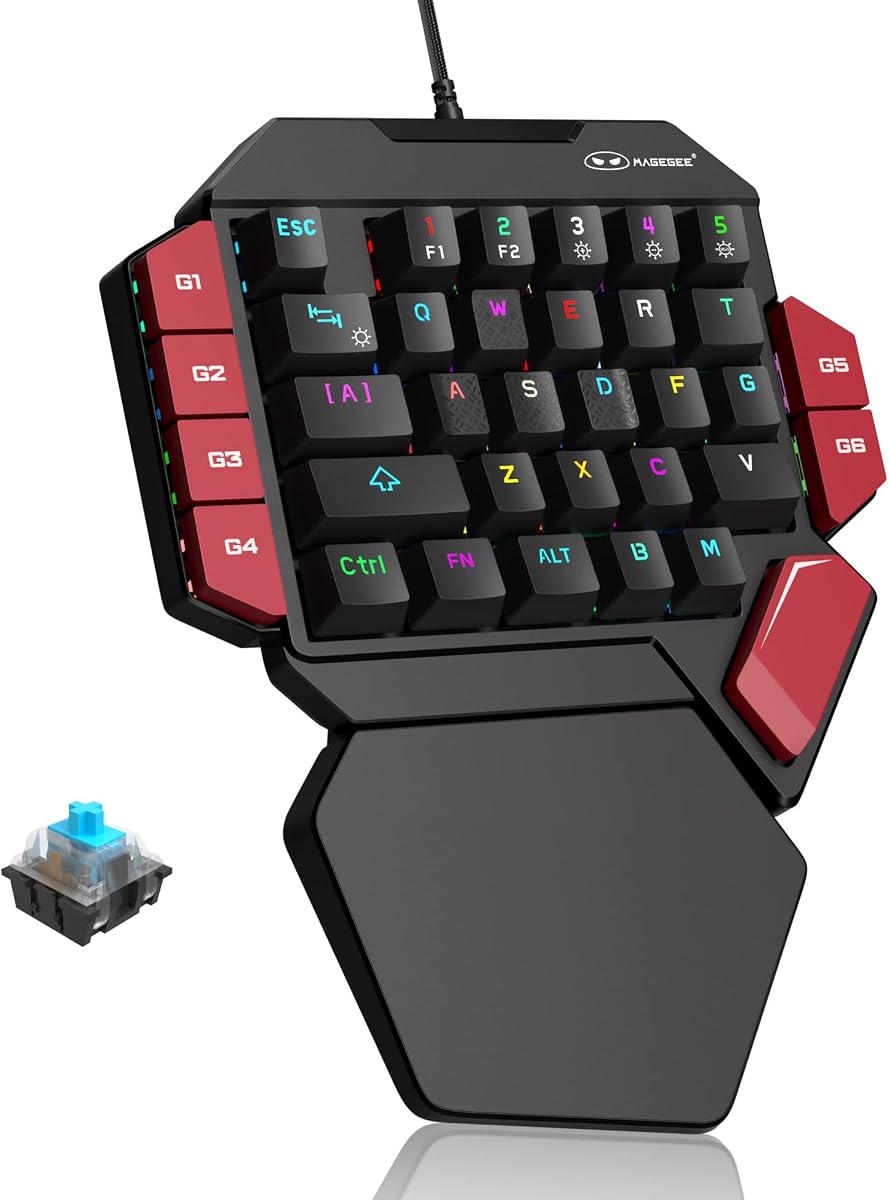
The MageGee One Handed Professional Gaming Keyboard provides tactile feedback with a 4.3 rating and full mechanical blue switches. Every key offers a distinct click and paragraph feel ideal for both gaming and typing tasks. Six dedicated macro keys allow for easy recording and execution of complex sequences without external tools.
We may earn a commission when you buy through this link, at no additional cost to you.
The wrist rest design reduces hand fatigue during long gaming sessions by providing consistent support. RGB lighting modes can be customized through shortcuts to match your preferred brightness and color scheme. The device connects via USB with no driver required, ensuring compatibility with a wide range of operating systems and setups.
The loud click of blue switches may disturb others in shared spaces, requiring consideration before purchase. Additionally, the RGB customization is limited to hardware shortcuts rather than advanced software profiles. Despite these drawbacks, the mechanical quality and straightforward operation make it a reliable choice for many users.
This model suits gamers who prefer traditional mechanical feedback and want a simple, plug-and-play solution. It is also good for typists who need a compact keypad for efficient entry. If you value tactile clicks and durability over silent operation, the MageGee keypad offers solid value and performance.
Every keypress delivers a crisp click and strong tactile bump, ensuring precise input registration that benefits both fast gaming and detailed typing tasks equally.
Six dedicated macro keys let you record and assign complex command sequences directly on the device, enabling quick execution without needing additional software or system resources.
We may earn a commission when you buy through this link, at no additional cost to you.
The AJAZZ AK029 saves 60 percent of desk space with a 4.5 rating and a compact 29-key layout. It uses Bingyu Hall Effect switches with zero dead zone and no debounce delay for consistent tournament-grade performance. The 8KHz polling rate ensures minimal latency, making it suitable for high-stakes FPS matches and competitive play.
We may earn a commission when you buy through this link, at no additional cost to you.
Its web-based driver allows full customization without installation, saving your profiles directly to onboard memory. The aluminum-reinforced build and gasket mount design provide stability and a slightly cushioned feel. RGB lighting supports 20 modes to keep your setup visually engaging without sacrificing the device's sleek design or functionality.
The reduced key count means users must adapt to fewer keys for complex macros or shortcuts. The lack of wireless limits placement flexibility compared to other modern models. However, the focus on space efficiency and raw performance makes it ideal for those who prioritize mouse movement space above all else.
This keypad is perfect for gamers who need maximum room for their mouse to move freely. It also serves video editors who want a compact control surface for quick shortcuts. If you value a clean, efficient desk setup with premium build quality, the AK029 is an excellent tool for your workflow.
By reducing the layout to 29 keys, the device frees up significant desk space for low-sensitivity mouse movements, enhancing precision during competitive gameplay scenarios significantly.
Profiles and settings are saved on the device itself through a browser interface, allowing seamless transition between computers without losing your customized layouts or RGB preferences.
We may earn a commission when you buy through this link, at no additional cost to you.
The Razer Tartarus V2 offers a familiar design with a 4.2 rating and 32 programmable keys tailored for immersive gameplay. Its mecha-membrane switches provide a soft cushioned experience that reduces fatigue compared to standard mechanical keys. The Chroma RGB system allows for extensive visual customization across multiple devices and partners in your ecosystem.
We may earn a commission when you buy through this link, at no additional cost to you.
The ergonomic thumbpad ensures that movement controls remain accessible without shifting your hand position. This layout is consistent across many gaming titles, making it easy to adapt for different genres and workflows. The build quality reflects Razer's reputation for durability and reliability in high-performance peripherals.
Users may find the cost higher than similar models from other brands. The lack of wireless support means cable management remains a consideration for desk organization. Despite these factors, the comfort and integration make it a trusted choice for those already invested in the Razer hardware ecosystem.
This model is best for gamers who prioritize comfort and brand consistency over advanced mechanical features. It works well for long sessions where hand strain is a concern. If you value a refined ergonomic design and ecosystem sync, the Tartarus V2 provides a reliable and comfortable experience for your gaming setup.
The thumbpad allows natural directional control similar to console joysticks, reducing hand movement and increasing comfort during long gameplay sessions.
Lighting effects sync with popular games and partner devices, creating an immersive visual environment that enhances the overall gaming atmosphere on your desk.
We may earn a commission when you buy through this link, at no additional cost to you.
The Redragon RM104 blends gaming and productivity features with a 4.4 rating and a multifunction smart control knob. It supports tri-mode wireless connectivity for seamless switching between Bluetooth and 2.4GHz connections. The knob allows quick audio adjustments and RGB cycling, making it a versatile tool for both work and play environments.
We may earn a commission when you buy through this link, at no additional cost to you.
With a 4000mAh battery, the device provides extended use without frequent charging interruptions. The software supports deep customization for macros and key remapping to suit your unique workflow needs. Its anti-ghosting technology ensures accurate inputs during rapid typing or gaming sequences on supported operating systems.
The integrated knob adds bulk that may not fit all compact setups. While flexible, it is larger than typical 35-key models and might require more desk space. However, the added functionality and battery capacity offer significant value for users needing a hybrid solution for diverse tasks.
This keyboard is ideal for streamers and users who need quick access to volume and lighting controls. It works well for those who want wireless freedom with robust programming options. If you value convenience and battery life over a minimalist layout, the RM104 is a practical choice for your setup.
Rotate to adjust volume, press to mute, or hold to cycle RGB modes, giving you instant control over audio and lighting without interrupting your workflow.
Switching between Bluetooth and 2.4GHz wireless ensures clean desk aesthetics while maintaining reliable connectivity across different devices and operating systems.
We may earn a commission when you buy through this link, at no additional cost to you.
Selecting the right gaming keypad depends on several critical factors ranging from switch type to connectivity options. This guide outlines the key considerations to help you make an informed decision based on your unique gaming and productivity needs.
Gaming keypads come with mechanical, membrane, or hybrid switches. Mechanical switches offer tactile feedback and durability but can be loud. Membrane switches are quieter and softer, ideal for long sessions. Hybrid options like mecha-membrane try to balance comfort with response. Consider whether you prefer clicky feedback or a quieter, smoother experience.
Always check if the switches are hot-swappable so you can upgrade or change them later without replacing the whole unit.
The number of keys impacts how many macros and functions you can bind. Models range from 29 to 42 keys. More keys mean greater customization but take up more space. Layouts often include thumbpads or specialized macro sections. Choose a layout that fits your desk size and the complexity of your typical workflows.
Smaller layouts save space for mouse movement, which is vital for FPS players, while larger layouts support complex MMO setups.
Wired models ensure zero latency and constant power, making them ideal for competitive gaming. Wireless options provide desk flexibility and cleaner setups but require charging. Some devices offer hybrid connectivity via Bluetooth or 2.4GHz. Decide if you prioritize absolute performance or a cable-free environment for your setup.
Check battery life on wireless models to ensure they last through your longest gaming sessions without interruptions.
Software quality varies by brand, affecting how easily you can program macros and lighting. Some devices allow on-board memory so settings travel with the keypad. Web-based configurators are emerging as user-friendly alternatives to heavy software installations. Evaluate if you need deep customization or if simple onboard controls suffice.
Strong software support is essential for advanced macros, while onboard memory helps switch computers without losing your layout.
Comfort is critical for long gaming sessions. Look for wrist rests, adjustable feet, and compact footprints. Build quality materials like aluminum plates enhance stability and durability. Some brands offer specialized designs like the AZERON thumbstick for unique ergonomic needs. Ensure the device fits your hand size and posture preferences.
A comfortable device reduces fatigue and strain, improving both your comfort and performance over time.
Prices vary widely based on features and brand reputation. Budget options may lack wireless or advanced switches but still offer great value. Premium models bring unique tech like Hall Effect switches or analog thumbsticks. Determine your spending limit and prioritize features that directly impact your gameplay experience.
Investing in durable features often pays off in the long run compared to cheaper models that wear out quickly.
Ensure the keypad works with your operating system and any existing hardware ecosystem. Some brands integrate with software like Razer Chroma for broader lighting synchronization. Check user reviews for software bugs or driver issues. Good customer support can be a deciding factor when technical problems arise.
Adequate compatibility ensures seamless integration with your current gaming station and software tools.
Lighting can be purely aesthetic or functional with reactive profiles. Some devices allow per-key customization while others offer zone-based effects. RGB modes may sync with games or hardware. Consider if lighting helps you identify keys in low light or if it is just a visual preference.
Functional lighting can improve reaction times, while aesthetic lighting enhances your desktop ambiance.
Begin by connecting the keypad to your PC using the provided USB cable or establishing a wireless connection. Follow the manufacturer's guide to install any necessary drivers or web software. Configure your primary keys and macros to match your favorite games or applications. Start with basic bindings before advancing to complex sequences.
Maintain the device by cleaning keys regularly with a soft brush or compressed air to prevent dust buildup. Avoid liquid spills and store the device in a cool dry place when not in use. For wireless models, keep the battery charged to ensure optimal performance and longevity of the internal components.
Update your firmware or software regularly to benefit from the latest features and security patches. Customize RGB lighting to match your environment and reduce eye strain during night sessions. Periodically review your macros to ensure they remain efficient and relevant to your evolving gameplay style.
Gaming keypads excel in genres like MMOs and MOBAs where complex macros are essential. They also offer advantages in competitive FPS games by freeing up space for mouse movement. However, they are not ideal for players who need full keyboard access for typing or specific shortcuts.
Many modern models are compatible with macOS, but you should verify specific driver support before purchasing. Some devices offer web-based configurators that work cross-platform without needing local software. Always check the system compatibility list to ensure seamless integration with your Mac setup.
Most models come with software or onboard keys for macro recording. Press the designated macro key, record your input sequence, and save it to the key. Some devices store profiles directly on the keypad, allowing you to switch setups without changing software.
Modern wireless technologies like 2.4GHz offer very low latency comparable to wired connections. However, competitive players might still prefer wired options to eliminate any risk of interference. Battery levels can also affect wireless performance, so keep your device charged for best results.
Some premium models support hot-swappable switches, letting you change the feel without soldering. Most standard keypads come with fixed switches. If customization is important, look for devices specifically mentioning hot-swap capabilities before buying.
Many models include detachable wrist rests for comfort during long sessions. Others may offer separate accessories or ergonomic designs that support the wrist naturally. Check product details to confirm if a wrist rest is included or available as an add-on.
Quality keypads often last several years with proper care. Mechanical switches typically offer millions of keystrokes before failure. Environmental factors like dust and spills can impact lifespan, so regular cleaning helps maintain performance over time.
Yes, many users utilize keypads for video editing and productivity workflows. Programmable keys can speed up complex software commands. The ergonomic design can also help reduce fatigue during long work sessions.
We have explored ten top-tier gaming keypads ranging from budget-friendly options to premium ergonomic models. Each device offers unique strengths whether you need rapid trigger switches, wireless flexibility, or analog thumbpads. Your ideal choice depends on the specific genres you play and your desk setup constraints.
Prioritize switch type and macro capabilities based on your gameplay style. Competitive players should focus on polling rates and low latency, while casual gamers might prefer comfort and RGB aesthetics. Ensure the device supports your operating system and offers reliable software for customization needs.
Prices and availability change frequently, so check current offers before finalizing your purchase. Investing in a quality keypad can enhance both your performance and comfort during gaming sessions. Keep this guide handy as you evaluate options to find the perfect partner for your setup.