
ARCTIC Case Fan Hub
4.7Editor score
10-fold PWM distribution
Direct SATA power input
Compact and lightweight design
This comprehensive guide compares the top 10 fan control hub for PC options to help you optimize cooling and cable management for your custom build.
Building a custom PC often involves multiple cooling fans that require organized control. A quality fan control hub for PC simplifies wiring and ensures efficient thermal performance across your entire system.
We evaluated ten top-rated hubs based on port count, power delivery, and ease of installation. Each product offers unique features for managing airflow and lighting sync without cluttering your case.
Every pick highlights key specifications and real-world benefits for different build needs. Prices fluctuate frequently so verify current listings before purchasing to secure the best value available.
4.7Editor score

4.7Editor score
4.6Editor score
The following table provides a side-by-side overview of all ten selected hubs highlighting their core specifications and key capabilities for informed decision-making.


This ARCTIC Fan Controller stands out as the top choice for builders needing precise thermal management across multiple fans. It offers independent control for each port ensuring optimal airflow without unnecessary complexity.
We may earn a commission when you buy through this link, at no additional cost to you.
The controller supports up to 10 ports with individual PWM capabilities allowing every fan to operate at its ideal speed. Native driver support for Windows and Linux ensures compatibility with most monitoring software.
While it provides robust performance the requirement for a SATA power connection may be a consideration for smaller builds. The magnetic mounting option simplifies installation inside most standard chassis cases.
Anyone seeking maximum flexibility and clean cable management should prioritize this controller. It delivers superior performance for high-end custom builds needing reliable and scalable fan control solutions.
Every port can be controlled separately allowing customized cooling profiles for different zones inside your case.
Centralized control eliminates the need for multiple Y-splitters keeping your case interior organized and tidy.
We may earn a commission when you buy through this link, at no additional cost to you.
The ARCTIC Case Fan Hub delivers exceptional value for budget-conscious builders needing to expand fan headers. It expands your system by adding nine more slots beyond your motherboard limits.
We may earn a commission when you buy through this link, at no additional cost to you.
All connected fans receive synchronous PWM signal ensuring consistent operation across the board. The external SATA power supply prevents voltage loss and guarantees smooth operation even under load.
While lacking individual port control it excels at basic expansion and cable management. The compact dimensions allow flexible placement within the case without obstructing other components.
Ideal for entry-level builds or simple cooling upgrades this hub offers reliable performance at a fraction of advanced controllers cost.
Get maximum fan capacity without breaking the bank thanks to its efficient and cost-effective design.
Every fan moves in unison maintaining balanced airflow throughout your chassis for consistent cooling.
We may earn a commission when you buy through this link, at no additional cost to you.
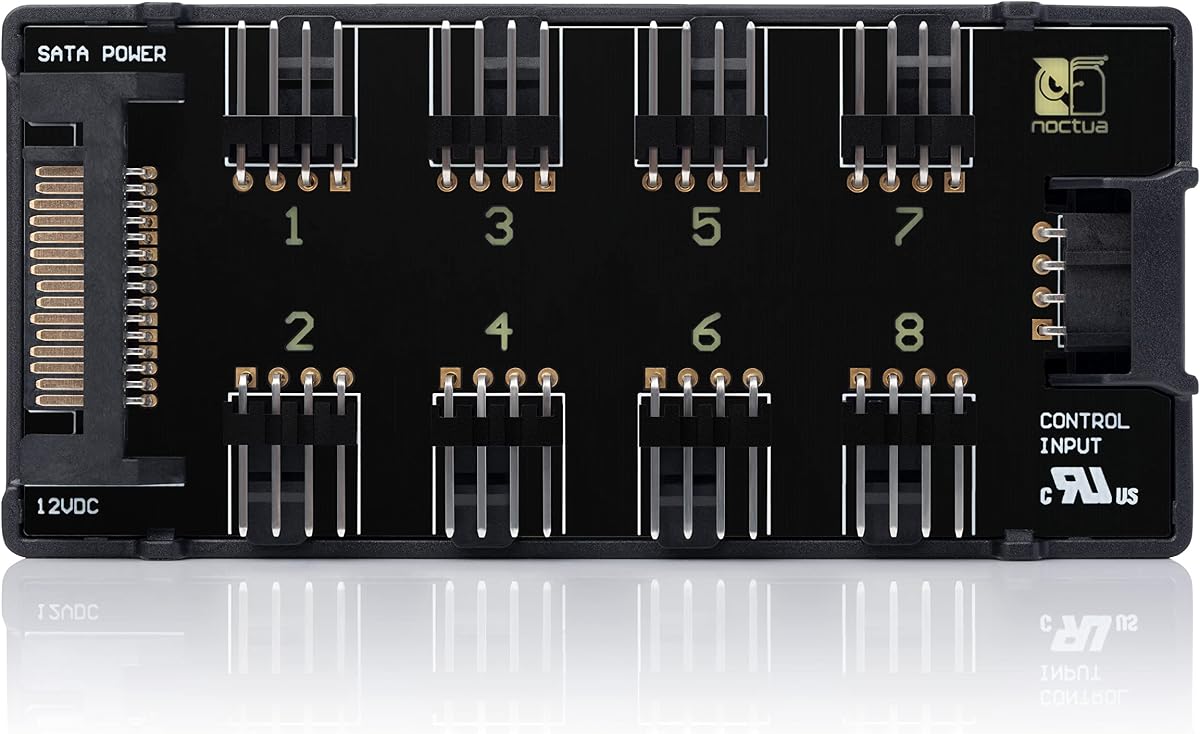
The Noctua NA-FH1 is engineered for builders who prioritize safety and reliability in their cooling setup. It features safety fuses protecting against overcurrent and short circuits effectively.
We may earn a commission when you buy through this link, at no additional cost to you.
Both SATA and 4-pin inputs can be used simultaneously offering flexible power delivery for mixed fan setups. The magnetic mounting system makes installation secure and easily adjustable within your case.
Although it carries a higher price the inclusion of a six-year warranty reflects its premium build quality. This hub ensures peace of mind for critical cooling tasks in demanding environments.
Best suited for high-end systems where component protection and long-term durability are essential for system longevity.
Integrated short circuit fuses protect your components from electrical issues ensuring safe operation.
Four strong magnets allow quick and stable attachment to any steel surface inside your case.
We may earn a commission when you buy through this link, at no additional cost to you.
This Thermalright hub combines fan control with ARGB lighting synchronization in a single compact unit. It supports eight groups of fans and light bars for comprehensive management.
We may earn a commission when you buy through this link, at no additional cost to you.
The strong double-sided sticker provides reliable adhesion to chassis surfaces while ensuring neat cable routing. It maintains stable output under high load via direct SATA power transmission.
Note that this device expands interfaces but does not independently adjust speeds or lighting colors. Users must connect to motherboard headers for full control functionality.
It is an excellent choice for builders looking to consolidate RGB and fan wiring into one organized hub.
Synchronize ARGB light bars with fan colors using the integrated 5V 3pin interface.
Use the built-in strong double-sided sticker for easy and firm mounting inside the case.
We may earn a commission when you buy through this link, at no additional cost to you.
The Thermalright X12 offers substantial capacity for extensive cooling setups with up to twelve fan groups. It manages both ARGB lighting and PWM fan interfaces efficiently within a small footprint.
We may earn a commission when you buy through this link, at no additional cost to you.
Stable output is maintained through direct SATA power transmission even during high load scenarios. The white casing blends well with light-themed builds providing aesthetic appeal.
Users should note that this hub acts as an interface expander rather than a standalone controller. Motherboard headers remain necessary for full speed and lighting adjustments.
Ideal for cases requiring extensive fan counts and integrated lighting management without clutter.
Support up to twelve fan groups to cool large cases with multiple high-performance units.
The white housing complements light-colored builds maintaining a clean and professional look.
We may earn a commission when you buy through this link, at no additional cost to you.
This upHere hub distinguishes itself with an included RF remote for quick RGB changes without opening your case. It manages nine PWM fans and ARGB devices in a single compact unit.
We may earn a commission when you buy through this link, at no additional cost to you.
The magnetic mounting allows flexible placement on any iron surface inside your chassis. A front-facing RGB panel syncs with your fans offering easy color and effect customization.
While the remote adds convenience the hub itself does not independently adjust fan speeds. It provides a reliable power source for stable performance under full load.
Perfect for users wanting simple RGB control and efficient power distribution in custom builds.
Change RGB colors and effects quickly using the included RF remote without opening your case.
SATA power ensures reliable performance even when all connected fans and lights are running.
We may earn a commission when you buy through this link, at no additional cost to you.
The Thermalright Integrated Fan Hub supports up to ten groups of fans for extensive cooling needs. It ensures stable output via direct SATA power transmission even under high load.
We may earn a commission when you buy through this link, at no additional cost to you.
Multi line management keeps cables orderly while the strong double-sided sticker secures the hub easily. The compact body allows installation in tight spaces without obstructing airflow.
This hub expands interface availability but does not independently control fan speeds. Motherboard headers are still required for speed readings and adjustments.
Recommended for large builds needing reliable fan distribution and neat cable management.
Small body ensures flexible installation even in cases with limited available space.
Direct SATA input prevents voltage drop ensuring all fans receive consistent power.
We may earn a commission when you buy through this link, at no additional cost to you.
The Thermalright X8 hub supports both ARGB lighting and PWM fan connections effectively. It allows eight lighting connectors and fan power connectors on each side for tidy cables.
We may earn a commission when you buy through this link, at no additional cost to you.
Installation is simplified by strong double-sided stickers allowing flexible placement within the chassis. Stable output is maintained through direct SATA power supply under high load conditions.
While this hub does not adjust speeds it provides essential expansion for lighting and fan interfaces. It ensures your motherboard headers are not overloaded while managing multiple devices.
Ideal for builders needing a balanced solution for both cooling and lighting management.
Supports both ARGB fans and PWM fans simultaneously for complete system management.
Strong double-sided stickers provide secure attachment to any smooth case surface.
We may earn a commission when you buy through this link, at no additional cost to you.
The J-10 Pro supports up to ten fan groups with both RF remote and chassis key control options. It simplifies cable management with magnetic suction mounting inside the case.
We may earn a commission when you buy through this link, at no additional cost to you.
SATA power input ensures stable operation without voltage loss making fans efficient. It supports ARGB lighting synchronization but does not independently adjust speeds.
While ideal for lighting control users must rely on motherboard headers for fan speed adjustments. The compact size keeps internal wiring tidy without occupying much room.
Recommended for users prioritizing lighting convenience alongside basic fan distribution.
Choose between RF remote or chassis key to manage lighting preferences easily.
Small dimensions ensure the hub fits neatly inside any standard PC chassis.
We may earn a commission when you buy through this link, at no additional cost to you.
The Thermalright HUB×8 provides stable output for up to eight groups of fans using direct SATA power. Its compact design with engraved logo ensures a professional look inside your case.
We may earn a commission when you buy through this link, at no additional cost to you.
It supports both ARGB lighting and PWM fan interfaces for synchronized control through motherboard headers. Strong double-sided stickers allow convenient installation in any suitable chassis position.
This hub expands connectivity effectively but does not adjust fan speeds or lighting colors independently. Users must connect to the correct motherboard interfaces to avoid damage.
A solid standard option for reliable fan expansion and lighting synchronization in mid-range builds.
Direct SATA power ensures all fans receive consistent voltage even under heavy loads.
The compact black casing with engraved logo complements modern build aesthetics.
We may earn a commission when you buy through this link, at no additional cost to you.
Selecting the right hub requires evaluating port count power requirements and control features. This guide outlines key factors to ensure your cooling setup performs efficiently and looks tidy.
Determine how many fans you plan to connect to avoid running out of connections. Ensure the hub supports both PWM and ARGB protocols if you have mixed fan types.
Select a hub with enough ports to cover all your fans plus any future expansions you might want.
Hubs typically draw power from SATA connectors or directly from motherboard headers. Check that your power supply has available SATA power cables for direct powered hubs.
Direct SATA power reduces voltage loss and ensures all fans receive consistent power.
Decide whether you need individual port control or synchronous fan operation. Some controllers offer individual PWM speed adjustments for precise thermal management.
Synchronous hubs are simpler but less flexible for complex cooling setups with zones.
If you use ARGB fans confirm the hub supports 5V 3pin addressable RGB. Ensure correct polarity to avoid damaging your lighting components.
Verify that lighting sync features align with your motherboard software ecosystem.
Look for magnetic mounting or adhesive options to secure the hub inside the case. Magnetic mounts offer flexibility while adhesives provide a permanent solution.
Ensure the chosen mounting method fits your case interior space constraints.
Safety features like short circuit protection are vital for protecting your components from electrical faults. Higher-end hubs often include safety fuses and robust housings.
Check manufacturer warranties to gauge reliability and support options for your purchase.
Advanced controllers often require specific drivers for full functionality on Windows or Linux. Ensure compatibility with your operating system to avoid software conflicts.
Check for native support with popular monitoring apps like HWInfo or OpenHardwareMonitor.
Basic hubs offer simple expansion at lower prices while advanced controllers cost more. Balance your budget against the need for individual control versus basic fan distribution.
Invest in better build quality if you plan to keep the hub for multiple system upgrades.
Install the hub inside your case using the provided magnetic or adhesive mounting options. Ensure it is secured firmly to prevent movement during system maintenance or vibration.
Connect the SATA power cable directly to your power supply to ensure stable power delivery. This step is critical for maintaining consistent fan speeds under heavy loads.
Route fan cables to the hub and connect the single PWM cable to your motherboard header. Verify polarity for any ARGB connections to prevent damage to your lighting.
Yes, they allow you to optimize fan speeds for efficient cooling at lower RPM. By distributing airflow effectively the overall acoustic profile of your system improves.
Some hubs support both separately but ensure your device has distinct ports. Check the specifications to confirm compatibility with your specific fan types.
Most hubs require SATA power to handle high fan loads safely. Motherboard headers alone may not provide sufficient current for multiple fans.
Connecting 12V RGB to a 5V hub will likely damage your lighting components. Always verify the voltage ratings before making connections to prevent hardware failure.
Basic hubs do not need drivers as they pass signals directly from the motherboard. Advanced controllers with individual control may require specific software support.
Often the first slot or a red-marked interface reports RPM to the motherboard. Check the manual for specific instructions on your hub model.
The top picks offer diverse solutions ranging from simple expansion to advanced individual control. Each hub brings unique benefits tailored to different build complexity levels.
Consider your cooling requirements and cable management needs before deciding on a model. Prioritize safety features like short circuit protection for long-term reliability.
Always check current product listings to confirm specifications and pricing details. Prices fluctuate regularly so staying updated helps you secure the best deal.