
HDMI Media Player, Black Mini 1080p Full-HD Ultra HDMI Digital Media Player
4.1Editor score
Affordable price point for basic needs
Compatible with USB drives and SD cards
Includes remote control for easy navigation
This guide compares the top ten external hard drive media players for home and commercial use, evaluating playback quality, storage options, and connectivity
External hard drive media players provide a reliable way to access local files without relying on internet connections. These devices connect to your television or monitor to play videos, music, and photos directly from USB drives or internal hard drives. They are perfect for users who want offline access to their media library.
We evaluated ten popular models to find the best options for different needs. Our comparison focuses on video resolution support, format compatibility, and ease of use. We also considered factors like build quality, connectivity options, and additional features such as digital signage capabilities.
Each selection in this list highlights specific strengths for various use cases. You will find detailed reviews explaining performance, pros, and cons for every product. Please note that availability and pricing can change, so always check the current listing before purchasing.
4.1Editor score
4.3Editor score

3.5Editor score
This table provides a side-by-side overview of the top ten external hard drive media players currently available. It highlights key specifications such as resolution support, storage compatibility, and unique features to help you make an informed decision quickly.


The Micca 4K stands out as a top contender for external hard drive media players with its impressive 4K capabilities. It earns a high rating due to its ability to play sharp and clear video files from USB drives or MicroSD cards. Users appreciate its compact size and intuitive interface that makes it easy to set up.
We may earn a commission when you buy through this link, at no additional cost to you.
This device offers extensive media format support including MKV MP4 AVI and MOV files. It handles up to 4096×2304 resolution at 30fps which ensures smooth playback on modern TVs. The dual USB and MicroSD reader allows you to connect large storage drives easily.
While the Micca 4K is powerful it does lack some advanced connectivity options. It relies on external storage so you must purchase drives separately. Additionally the remote is not included in the package which may be a minor inconvenience for some buyers.
For those seeking a reliable way to stream local files this player is an excellent choice. It is suitable for home entertainment as well as simple commercial displays. We recommend it for anyone needing offline access to high quality media files.
The device supports a wide range of video and audio formats ensuring compatibility with most existing media libraries.
Built-in features like automatic playback and looping make it ideal for creating custom welcome screens or menu boards.
We may earn a commission when you buy through this link, at no additional cost to you.
This Mini Portable Media player offers an affordable entry point into the world of external hard drive media players. It receives positive feedback for its compact design which fits easily into the palm of your hand. The aluminum alloy material ensures durability during travel or daily use.
We may earn a commission when you buy through this link, at no additional cost to you.
The player supports Full HD 1080p video playback at 60Hz for smooth motion and clear images. It is compatible with most video formats like RM AVI MKV and MP4. You can connect external storage devices via USB to access your movies or photos.
While it is a budget-friendly option it lacks support for 4K resolution. This might be a drawback for users with newer high definition televisions. Additionally certain file types like VPR are not supported which requires file conversion.
This unit is perfect for travelers or those with older TVs who want simple media access. The included remote control makes navigation easy even for non technical users. We suggest it for basic home entertainment needs.
The compact size and durable aluminum body make it easy to carry on trips without sacrificing performance.
With HDMI and AV outputs this player works with both modern digital displays and older analog televisions.
We may earn a commission when you buy through this link, at no additional cost to you.
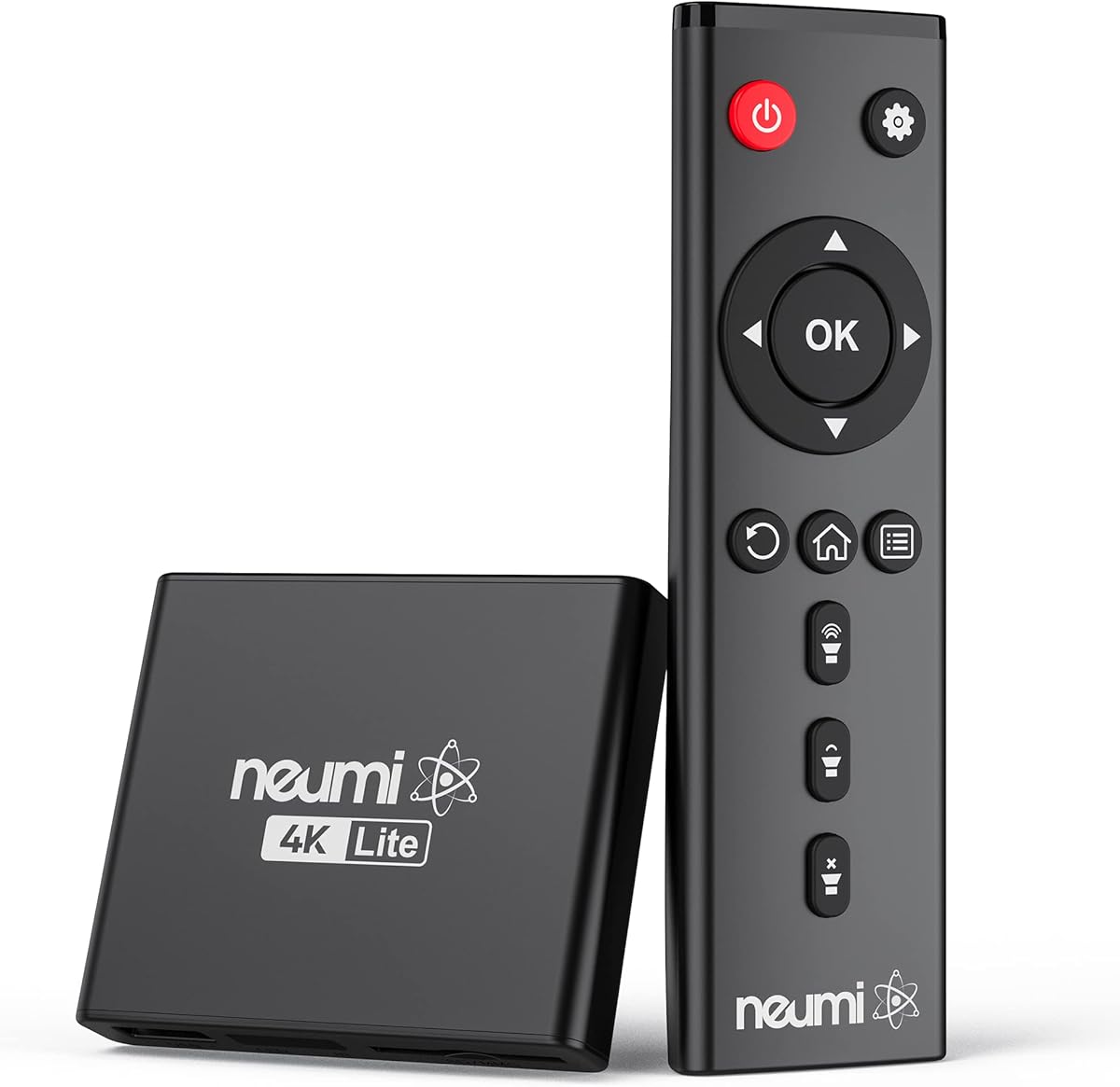
The NEUMI Atom 4K Lite distinguishes itself with unique trigger sensor input capabilities. This feature allows users to create interactive displays by playing different videos based on external triggers. It earns a high rating for its combination of power and compact design.
We may earn a commission when you buy through this link, at no additional cost to you.
Video quality is exceptional with support for up to 2160p at 60Hz via HDMI. The device handles modern codecs like H.265 HEVC ensuring efficient playback of high resolution files. It also feeds digital surround sound to home theater receivers.
A minor downside is that the push-button and motion sensors are sold separately which adds to the cost. Without them the interactive features are unavailable. Additionally you must provide your own USB drives or SD cards as it does not include storage.
This player is ideal for art galleries or museums needing on-demand content. It is also great for home setups requiring a small but powerful device. We recommend it for users looking for advanced features in a small form factor.
The trigger input allows for dynamic content switching based on motion or button presses.
Its size is smaller than a deck of playing cards allowing it to fit discreetly behind any screen.
We may earn a commission when you buy through this link, at no additional cost to you.
The ACEMAX player is designed for commercial use with its robust offline capabilities. It combines a media player with a hard drive enclosure offering a complete solution for digital signage. This makes it a strong candidate for professional environments.
We may earn a commission when you buy through this link, at no additional cost to you.
It supports up to 4K at 60Hz video output which ensures smooth and sharp visuals. The metal enclosure helps dissipate heat during long playback sessions maintaining performance over time. You can also use USB drives or microSD cards for storage.
One limitation is that the hard drive is not included so you must buy one separately. Also the infrared remote requires a clear line of sight which limits placement options in some setups. Users should check media specifications before purchasing.
For retail displays or lobby videos this device provides reliable unattended operation. The resume and loop features make it easy to manage content without constant supervision. We recommend it for business owners needing a dedicated display system.
The aluminum enclosure actively dissipates heat preventing overheating during extended playback periods.
Automatic start and looping ensure your content runs continuously without manual intervention.
We may earn a commission when you buy through this link, at no additional cost to you.
This player offers significant connectivity advantages with its dual USB ports and surround sound support. It allows you to connect multiple devices though only one reads at a time. The inclusion of 7.1 audio output makes it great for home theater setups.
We may earn a commission when you buy through this link, at no additional cost to you.
It supports 4K video at 30Hz and handles H.265 decoding to load files faster. You can also connect a mouse or keyboard to operate the interface which adds versatility. It even reads PPT documents for presentations.
The dual ports are useful for quick switching but you cannot read both simultaneously. Also displaying PPT files may require an external flipper for the best experience. These are minor trade-offs for the high level of connectivity offered.
Ideal for home entertainment systems this player provides rich audio and video options. It is suitable for anyone needing to present slides or stream high quality content. We suggest it for users with existing surround sound systems.
HDMI output supports up to 7.1 surround sound delivering an immersive audio experience.
Connecting a mouse or keyboard makes navigation more intuitive for complex menus.
We may earn a commission when you buy through this link, at no additional cost to you.
This device stands out for its broad compatibility with various media files and codecs. It supports direct decoding of Blu ray content which is a unique feature for this category. Users appreciate the inclusion of cables that allow connection to older displays.
We may earn a commission when you buy through this link, at no additional cost to you.
The player supports up to 4K at 30Hz and uses powerful H.265 decoding chips. It also offers multiple output interfaces including Fiber and VGA making it versatile for different setups. You can load content from USB or SD cards easily.
To work correctly Blu ray files must be placed in the first level file directory. This can be inconvenient if your library is deeply organized. Also it relies on external drives which means you must manage storage separately.
For advertising or multimedia playback this player offers excellent versatility. It handles most common formats found on the market today. We recommend it for users needing flexible connection options and broad format support.
Supports H.265 H.264 and other standard codecs for smooth playback of modern files.
Beyond HDMI you can use Fiber or VGA to connect to a wider range of display devices.
We may earn a commission when you buy through this link, at no additional cost to you.
While not a media player this drive is an essential companion for your setup. It offers high capacity storage that can hold thousands of videos or photos. The SuperSpeed USB 3.2 interface ensures fast file transfer speeds.
We may earn a commission when you buy through this link, at no additional cost to you.
It works seamlessly with most external hard drive media players when connected via USB. The compact design makes it easy to carry and use with different devices. It is known for reliability and ease of use.
Because it is just a storage device you need a separate player to view content. It does not have any built-in decoding capabilities. This limitation means you must pair it with a dedicated media unit.
For anyone building a media library this drive provides reliable storage. It is suitable for backing up data and connecting to various systems. We suggest it as a reliable partner for any media player setup.
SuperSpeed USB 3.2 Gen 1 ensures fast file transfers saving time during data moves.
Works with both Windows and Mac systems for broad accessibility and easy setup.
We may earn a commission when you buy through this link, at no additional cost to you.
This unit combines a media player and a hard drive enclosure into one cohesive device. It offers excellent stability and performance for both home and commercial applications. The 5.0 rating reflects its ability to handle demanding playback tasks.
We may earn a commission when you buy through this link, at no additional cost to you.
It supports up to 4K at 60Hz which ensures smooth video playback. The Type-C cable allows you to transfer data to laptops easily. This dual functionality saves space and simplifies setup.
A drawback is that the hard drive itself is not included. You must purchase a compatible SATA drive separately. This means additional steps before the device is fully functional.
For office media displays or home theater use this device is highly effective. It handles various file formats and supports auto loop features. We recommend it for those wanting an all-in-one storage solution.
Combining player and enclosure reduces cable clutter and simplifies hardware setup.
The included Type-C cable makes it easy to transfer files to a laptop quickly.
We may earn a commission when you buy through this link, at no additional cost to you.
This player is optimized for commercial digital signage with features like auto-play and resume. It supports high resolution playback making it suitable for high traffic areas. The inclusion of a hard drive enclosure adds convenience.
We may earn a commission when you buy through this link, at no additional cost to you.
It delivers smooth 4K video at 60Hz ensuring professional quality visuals. The Type-C cable lets you modify data on the HDD directly. This makes management easy for businesses running displays.
You need to purchase AA batteries for the remote separately. Also the device does not have a built-in battery for mobile use. These requirements limit portability but are acceptable for fixed installations.
Ideal for restaurant menus or lobby videos this player provides steady operation. The one-year warranty offers peace of mind for business users. We suggest it for commercial environments needing reliable displays.
The loop function ensures content runs continuously without interruption or user input.
A one-year warranty provides support for businesses using this for professional displays.
We may earn a commission when you buy through this link, at no additional cost to you.
This versatile solution supports configurable video rotation for flexible installation in tight spaces. It is designed for dynamic displays such as museum exhibits or fitness facilities. The compact size makes it easy to hide away.
We may earn a commission when you buy through this link, at no additional cost to you.
It handles a wide range of formats including MKV MP4 and MOV files. The resume feature allows playback to continue from where it stopped. This ensures users do not miss content when returning to the display.
The device has a lower rating than others which may indicate mixed user experiences. It also requires a constant power source as there is no internal battery. These factors should be considered before purchase.
For custom digital signage this player offers useful flexibility. We recommend it for users who need specific installation angles or features. It is a strong candidate for diverse display projects.
Video rotation settings allow you to mount the player in various orientations easily.
Resume functionality lets content pick up from where it left off for continuity.
We may earn a commission when you buy through this link, at no additional cost to you.
Choosing the right player requires considering resolution support storage options and additional features needed for your specific use case.
Video resolution support determines how sharp your content will appear on your display. Look for players that support 4K if you have a high definition TV. For older TVs 1080p may suffice but 4K provides better future proofing.
Ensure the player supports your target resolution at the desired refresh rate for smooth motion.
Storage compatibility refers to what external drives the player can read via USB or SD card. Check the maximum capacity supported and file system compatibility like FAT32 or NTFS. Some players also support internal drives via SATA enclosures.
Verify file system support to ensure your drives are recognized by the device.
Media format support covers the types of video and audio files the player can decode. Look for support of common formats like MKV MP4 AVI and MOV. Also check for H.265 codec support for efficient playback of modern files.
Wide format support minimizes the need to convert files before transferring them.
Connectivity options include HDMI AV and sometimes optical outputs. HDMI is standard for modern TVs while AV is useful for older sets. Some models include USB ports for keyboards or mice to improve navigation.
Select ports that match your display capabilities to ensure proper audio and video output.
Digital signage features such as auto loop and resume are vital for commercial use. These allow content to play continuously without manual intervention. Some players also include rotation settings for different display orientations.
Check for looping and auto-play features if using the device for business displays.
Build quality affects durability and heat dissipation during long playback sessions. Metal enclosures are generally better than plastic for heat management. Also check power requirements to ensure compatibility with your available outlets.
Choose a durable build and power supply that suits your intended environment.
First connect the media player to your TV using an HDMI cable. Ensure the player is powered on and your TV is set to the correct input source to see the menu.
Next insert your external storage drive into the USB port. Navigate through the menu using the remote to select the files you wish to play.
Lastly keep the player in a well ventilated area to prevent overheating. Avoid touching internal components and clean the exterior with a soft cloth to maintain performance.
Most players support up to 8TB via USB hard drives but check specific model specs for limits. Some SD card slots may support up to 1TB. Always verify file system compatibility before connecting large drives.
Yes most USB 3.0 devices can run without external power as they draw from the player. Ensure your drive is not power hungry to avoid connection issues during playback.
Some advanced models support direct Blu ray ISO files. However many players cannot play proprietary Blu ray formats directly. Check product details for specific ISO support before purchase.
Most players support FAT32 exFAT and NTFS file systems. This ensures compatibility with drives formatted on Windows or Mac. Check your device documentation for specific system requirements.
No these players are designed for offline playback from local storage. They do not have built-in Wi-Fi for streaming apps. You must copy content to a USB drive to play it.
Most models include a remote control but some budget options may require you to purchase one separately. Always check the product description to confirm what is included in the box.
Yes several models offer auto loop and resume features ideal for signage. Look for commercial-grade players to ensure they can run 24/7 without overheating.
Many support 7.1 surround sound via HDMI output. Check specs for optical or AV output options if using external speakers for enhanced audio.
In conclusion the Micca 4K and NEUMI Atom offer excellent balance of performance and features for most users. For commercial use models with auto loop and 4K 60Hz support are ideal.
When selecting a player prioritize resolution support and storage compatibility to match your library. Also consider build quality and power requirements for your specific environment.
Always verify current pricing and availability before purchasing to get the best deal. We hope this guide helps you find the perfect device for your needs.