
Sonnet Breakaway Box 850 T5
4.5Editor score
850W Power Supply
Triple wide GPU support
Built-in Thunderbolt 5 Dock
This guide compares the top ten Egpu Enclosures for Thunderbolt and USB4 systems, detailing performance, compatibility, power, and connectivity features for
Choosing the right external graphics solution can transform your laptop into a desktop powerhouse. Whether you need more power for gaming or professional creative work, an Egpu Enclosure provides the necessary interface and power supply to run full-sized desktop GPUs.
We have analyzed the latest models available in November 2026, focusing on Thunderbolt 5 and USB4 compatibility. Our comparison looks at bandwidth capabilities, power delivery, physical dimensions, and the ease of installation to help you find the perfect match.
Each pick below highlights specific strengths like AI optimization or compact design. Please note that product availability and pricing can fluctuate over time. Always check the latest vendor details before making your final purchase decision for your specific setup needs.
4.5Editor score

4.0Editor score

3.9Editor score
The following table provides a side-by-side comparison of all ten selected external GPU enclosures. It highlights key specifications such as interface type, power supply wattage, and unique features to help you make an informed decision quickly.


The Razer Core X V2 stands out as a top choice for users seeking maximum performance. With Thunderbolt 5 support, it offers up to 80 Gbps of bandwidth ensuring that your GPU runs at near-native speeds. The enclosure is built to handle massive graphics cards up to four slots wide.
We may earn a commission when you buy through this link, at no additional cost to you.
Its 140W USB-C power delivery is a significant upgrade for charging high-performance laptops while the GPU is active. The internal 120mm fan actively cools the components, allowing sustained performance during long gaming sessions or rendering tasks. The chassis is modular and easy to swap components.
While it is a robust solution, users should be aware of its size and weight. It is not the most portable option but it is perfect for a desk setup. Also note that Mac devices with M1 chips or later do not support eGPUs with this unit.
If you need a reliable enclosure that supports the latest high-end GPUs and offers excellent connectivity the Razer Core X V2 is a strong recommendation. It balances power capacity with speed to deliver a premium desktop-like experience on your laptop.
Thunderbolt 5 delivers 80 Gbps which allows for smoother gameplay and faster creative workflows compared to previous generations.
The 140W USB-C PD ensures your laptop stays charged even under heavy load while connected to the enclosure.
We may earn a commission when you buy through this link, at no additional cost to you.
The Sonnet Breakaway Box 850 T5 is engineered for professional workflows that demand raw power. It features an impressive 850W power supply capable of running the most power-hungry graphics cards available today. This makes it ideal for AI training 3D rendering or high-end gaming.
We may earn a commission when you buy through this link, at no additional cost to you.
In addition to GPU power it includes a built-in Thunderbolt 5 dock. This provides extra connectivity like USB-A ports and Ethernet which reduces the need for separate hubs. The cooling fan is temperature-controlled ensuring silent operation during light loads and maximum airflow during intense tasks.
The only notable drawback is the premium price tag which may not be necessary for casual users. It is also designed specifically for Windows 11 systems so Mac users should look elsewhere. However for Windows workstations this is a top-tier solution.
Choose the Sonnet Breakaway Box 850 T5 if you need maximum power headroom and integrated docking features. It future-proofs your setup for the next generation of graphics cards while providing a clean desk setup.
An 850W supply ensures you can run top tier GPUs without worrying about power limits or throttling.
Additional USB and Ethernet ports mean you can connect peripherals directly to the enclosure without extra cables.
We may earn a commission when you buy through this link, at no additional cost to you.
For users on a tight budget this Mini eGPU Enclosure offers a functional solution at a very accessible price. It supports Thunderbolt 3 4 and USB4 standards providing a reliable connection for most modern laptops. The compact size makes it easy to store or transport.
We may earn a commission when you buy through this link, at no additional cost to you.
It is designed to work with various power supply sizes including SFX ATX and Flex allowing you to reuse existing units or choose a specific size. The JHL7440 controller ensures stable data transfer which is critical for gaming and rendering applications.
Potential buyers should note that it does not include a power supply or graphics card. You will need to source these separately which adds to the total cost and setup time. Also check your system compatibility before purchasing as it has specific requirements.
This enclosure is perfect for enthusiasts who want to experiment with eGPUs without a large upfront investment. It delivers solid performance for its price and offers enough flexibility for a variety of desktop graphics cards.
Low upfront cost allows you to try external graphics without breaking the bank or committing to expensive hardware.
The small footprint makes it easy to carry between locations or store away when not in use.
We may earn a commission when you buy through this link, at no additional cost to you.
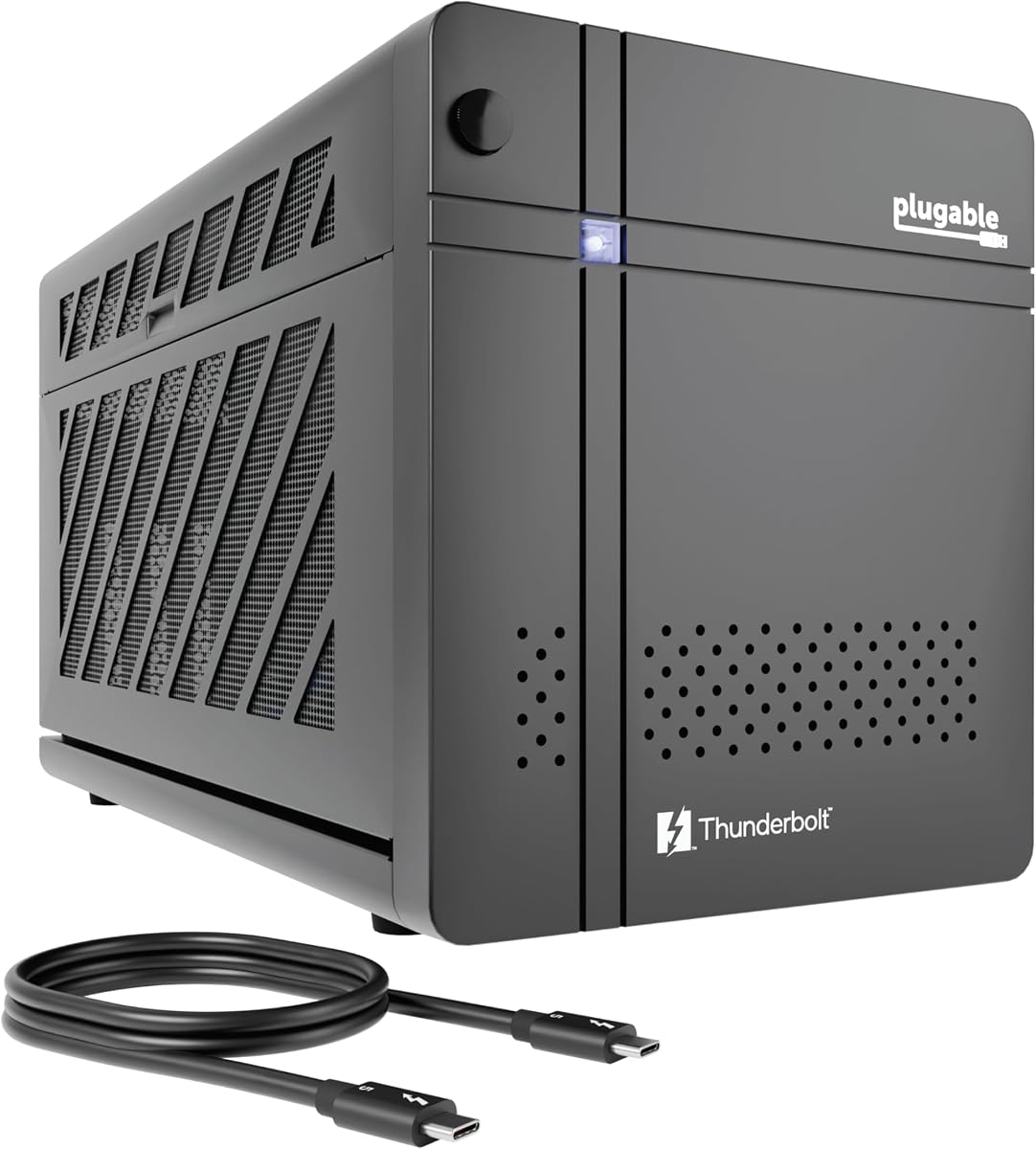
The Plugable Thunderbolt 5 AI Enclosure is designed for users who need secure offline processing for large language models. It allows you to run models like Llama 3 without sending data to the cloud ensuring maximum privacy. This is ideal for researchers and developers working with sensitive data.
We may earn a commission when you buy through this link, at no additional cost to you.
It comes with a robust 850W ATX 3.1 PSU ready to handle high-end NVIDIA or AMD GPUs. The Thunderbolt 5 interface ensures you get the fastest possible data transfer which is crucial for AI inference speeds. TAA compliance makes it suitable for government procurement.
While it is powerful it is not designed for gaming or general creative work as a primary use case. Mac users will find it incompatible so this is strictly for Windows 11 systems. However for its niche purpose it is an exceptional tool.
Choose this if privacy is your main concern and you need local AI computing power. The lifetime support and high build quality add significant value to this specialized enclosure.
Run models offline to ensure your data never leaves your local network or personal computer perimeter.
The 850W PSU meets the demands of tomorrow's GPUs ensuring you won't need to upgrade power quickly.
We may earn a commission when you buy through this link, at no additional cost to you.
This External GPU Enclosure is built for mobility and ease of use. It includes a 240W power supply and a custom carrying case making it a complete kit. The aluminum shell is lightweight yet durable ensuring your hardware stays protected during travel.
We may earn a commission when you buy through this link, at no additional cost to you.
It supports Thunderbolt 4 3 and USB4 protocols so it works with a wide range of laptops. The 85W PD charging ensures your laptop stays powered while you use the external graphics. This makes it great for commuters who need performance on the go.
Keep in mind that it has size limits for graphics cards. It supports cards up to 205mm in length so it will not fit large high-end GPUs. Also the 240W power supply may not be enough for the most demanding cards.
For users who need a portable solution for moderate gaming or editing this is an excellent choice. It balances portability with power delivery to offer a reliable experience without the bulk of larger enclosures.
Everything is included in the box so you can set up anywhere without hunting for extra parts or cables.
Get charging and graphics power through a single cable connection to reduce clutter at your desk.
We may earn a commission when you buy through this link, at no additional cost to you.
The ANQ-L336 Mini is specifically optimized for handheld gaming consoles like the ROG Ally X. It supports 85W PD pass-through which enables Turbo Mode on these devices. This makes it a great partner for portable gaming setups.
We may earn a commission when you buy through this link, at no additional cost to you.
It works with Windows Linux and macOS providing broad compatibility across different platforms. The enclosure supports various power supply sizes including SFX and Flex allowing you to choose what fits your needs. It also includes a USB-A port for extra peripherals.
While it is great for handhelds it uses Thunderbolt 3 or 4 which is slower than the new Thunderbolt 5. Also some newer NVIDIA 50 series GPUs have limited support. This may limit its lifespan for high-end desktop gaming.
If you play on a handheld console this enclosure is a top choice for expanding your graphics capabilities. It offers a smooth experience for portable gaming and flexible power options for various setups.
Specifically tuned for devices like ROG Ally X ensuring maximum performance from your portable gaming rig.
Works seamlessly with Linux macOS and Windows so you can use it with any laptop you own.
We may earn a commission when you buy through this link, at no additional cost to you.
The VK-Y900 is designed for users who want to use a standard ATX power supply. This gives you flexibility to choose a high wattage PSU that fits your specific GPU needs. The ENIG PCB coating ensures long-term conductivity and resistance to oxidation.
We may earn a commission when you buy through this link, at no additional cost to you.
It supports a wide range of GPUs from NVIDIA and AMD including future models. The 85W PD pass-through keeps your laptop charged while you use the external graphics. It also includes dual Thunderbolt ports for connecting other devices.
This enclosure requires more DIY knowledge than plug-and-play solutions. You need to source an ATX power supply which adds steps to setup. It is less polished than premium units but offers great value for custom builds.
Choose this if you are comfortable building custom PC components and want a flexible solution. It offers solid connectivity and power handling for a reasonable price.
Use your own ATX PSU to match the exact power needs of your graphics card.
ENIG plating ensures the circuitry stays reliable even after long periods of use.
We may earn a commission when you buy through this link, at no additional cost to you.
The Sonnet Breakaway Box 750ex is a solid choice for those with older Thunderbolt 3 systems. It offers a 750W power supply capable of running most desktop graphics cards. It works with both Mac and Windows making it versatile for different labs.
We may earn a commission when you buy through this link, at no additional cost to you.
It includes extra USB ports and Ethernet allowing you to connect peripherals directly to the enclosure. The build quality is reliable and it has a long reputation in the industry. It is a great option if you already own a TB3 laptop.
Thunderbolt 3 offers lower bandwidth than newer standards which may limit GPU performance in high-end scenarios. Also note that Mac M1 chips are not compatible with eGPUs. This limits its use for newer Apple devices.
If you have a Thunderbolt 3 setup this is a reliable upgrade path. It provides ample power and connectivity for a stable experience with older hardware.
Works with both macOS and Windows allowing shared use across different machine types.
Additional USB and Ethernet ports mean fewer dongles and a cleaner desk.
We may earn a commission when you buy through this link, at no additional cost to you.
The MINISFORUM DEG2 offers a unique hybrid approach with both USB4 V2 and OCuLink interfaces. This allows for high-speed 80Gbps transfers and even higher raw speed via OCuLink on supported devices. It includes an M.2 NVMe slot to store AI models directly on the dock.
We may earn a commission when you buy through this link, at no additional cost to you.
A hardware switch lets you toggle between docking mode and pure GPU mode instantly. The built-in re-drive booster stabilizes signals for high-bandwidth tasks like LLM inference. It supports both ATX and SFX power supplies for flexibility.
OCuLink is a newer standard that requires a host port which limits compatibility. If your device does not support it you will be limited to USB4 speeds. The setup requires careful checking of hardware specs.
This enclosure is ideal for tinkerers who want the fastest possible connection and built-in storage. It offers a future-proof solution for developers and enthusiasts pushing the limits of performance.
Switch between Thunderbolt and OCuLink to find the right balance of speed and features.
Store AI models locally on the dock to save bandwidth and speed up project loading.
We may earn a commission when you buy through this link, at no additional cost to you.
This External eGPU Enclosure comes as a complete kit with a 240W power supply and a carrying case. It is ready to use out of the box without hunting for extra components. The aluminum shell is durable and sleek for everyday use.
We may earn a commission when you buy through this link, at no additional cost to you.
It supports Thunderbolt 4 3 and USB4 which covers most modern laptops. The 85W PD charging ensures your device stays powered during use. The package includes all necessary cables for a simple single-cable setup.
It is designed for smaller graphics cards up to 205mm so it may not fit large desktop GPUs. The 240W power supply is enough for mid-range cards but not top-tier ones. This limits its use for heavy gamers.
For a simple and complete solution this is a great starting point. It removes the guesswork and provides a portable way to boost your laptop graphics performance.
Everything you need is included to set up quickly without buying extra parts.
Anodized aluminum casing looks professional and protects your components well.
We may earn a commission when you buy through this link, at no additional cost to you.
Selecting the right enclosure depends on your system interface power needs and physical space. This guide breaks down the critical factors to consider before making a purchase.
Check if your laptop supports Thunderbolt 3 Thunderbolt 4 Thunderbolt 5 or USB4. Some enclosures are strictly compatible with specific versions. Ensure your port supports eGPU protocols to avoid connection issues.
Always verify your system specs against the enclosure requirements before buying.
Your graphics card needs sufficient power. High-end cards may require 750W or more while mid-range cards need less. If the enclosure does not include a PSU ensure you can source a compatible one like ATX or SFX.
Match the PSU wattage to your GPU requirements to prevent instability.
Enclosures vary in size. Some support only single slot cards while others take four. Check the maximum length width and height supported. Also consider the footprint on your desk if you plan to keep it visible.
Measure your GPU and desk space to ensure a proper fit.
Active cooling fans are vital for long sessions. Look for variable speed fans that adjust based on temperature. Good airflow prevents overheating which can throttle performance during rendering or gaming.
Ensure the fan is quiet enough for your working environment.
Many enclosures act as docks with extra USB or Ethernet ports. This reduces the need for separate hubs. Check if it supports power delivery charging your laptop while using the GPU.
Additional ports simplify your cable management on the desk.
Most enclosures support Windows and Linux. However Mac support varies especially for newer Apple Silicon chips. Confirm compatibility with your operating system to avoid driver issues or failure to boot.
Windows systems generally have the broadest support for eGPUs.
If you move your setup often look for lightweight aluminum enclosures with a carrying case. Build quality ensures protection against bumps. However heavy steel chassis offers better cooling for stationary use.
Choose a design that matches your need for mobility.
Check the warranty terms offered by the manufacturer. Reliable brands provide technical support for connectivity or driver issues. This peace of mind is valuable if you face setup challenges.
Look for vendors with responsive customer service teams.
Start by installing the graphics card into the enclosure following the tool-free instructions. Connect the power supply securely to both the GPU and the enclosure. Ensure all cables are properly seated before turning on the power.
Connect the enclosure to your laptop using the provided Thunderbolt cable. Install the necessary drivers for your GPU model before launching games or creative apps. Restart your system if prompted to complete the setup process.
Keep the enclosure in a well-ventilated area to prevent overheating. Regularly clean dust from the fan and vents using compressed air. Check connections periodically to ensure they remain secure during transport or use.
No, your laptop must have a Thunderbolt or USB4 port that supports eGPU protocols. Some basic laptops do not have this feature. Always check your laptop manual or specifications before purchasing an enclosure.
Most enclosures do not include a graphics card unless specified. You need to purchase a compatible PCIe GPU separately. Ensure the card fits within the size limits of your chosen enclosure.
Yes, connecting a desktop GPU significantly boosts frame rates in games. The improvement depends on the GPU strength and connection speed. Thunderbolt 5 offers the best performance compared to older standards.
Many older Intel Macs support eGPUs but Apple Silicon M1 and later do not. Windows systems have broader compatibility. Always verify Mac support if you are using an Apple device.
It depends on your GPU. High-end cards may need 750W or more. Some enclosures include a PSU while others allow you to connect your own. Ensure the PSU wattage matches your GPU requirements.
Yes, many enclosures are compatible with Linux. Ensure you have the correct drivers for your GPU and interface. Linux support is often good but may require manual configuration.
We have reviewed ten excellent Egpu Enclosures catering to different needs from budget builds to high-performance AI setups. The Razer Core X V2 and Sonnet Breakaway Box lead in power and speed for most users.
Prioritize interface compatibility and power supply needs before looking at price. If you need privacy for AI models consider the Plugable Thunderbolt 5 AI. For portability the Mini models offer great value.
Always verify your system specs and current prices before buying. Deals change frequently so checking the vendor ensures you get the best option for your setup today.