
MINISFORUM DEG1 Docking Station
4.5Editor score
OCuLink 4i interface included
Compact and portable design
Compatible with ATX SFX PSUs
This guide compares the top egpu docks for laptops and mini PCs, evaluating bandwidth, compatibility, and features to help you choose the right external GPU
External GPU docks transform modest laptops into powerful workstations by connecting desktop graphics cards. They are essential for gaming, 3D rendering, and AI tasks requiring extra graphics performance.
We compared ten leading egpu docks based on interface speed, power support, and build quality. Our analysis covers Thunderbolt, OCuLink, and hybrid models to find the best options for every setup.
Each pick shows key specs, pros, and cons to help you decide. Note that prices and availability change frequently, so verify current details before purchasing your next external GPU enclosure.
4.5Editor score

4.4Editor score

4.8Editor score
The following table provides a side-by-side comparison of all ten egpu docks. It highlights key specifications to help you quickly identify the right model for your graphics card and host device needs.




The MINISFORUM DEG2 stands out as a top-tier egpu dock with versatile connectivity options. It offers both USB4 V2 and OCuLink support, allowing users to switch between Thunderbolt 5 speeds and direct PCIe bandwidth easily. The included M.2 NVMe slot adds significant value by letting you store large AI models directly on the dock.
We may earn a commission when you buy through this link, at no additional cost to you.
This dock excels in providing a stable connection for high-bandwidth tasks. Its built-in re-drive signal booster minimizes latency, which is crucial for AI inference and 8K rendering. The ability to switch modes without swapping cables ensures a smooth workflow when moving between different host devices or operating systems.
While it requires an external power supply, the support for universal ATX and SFX units gives users flexibility to choose their preferred wattage. The modular design allows for easy upgrades to the GPU or power components. However, potential buyers should note that the unit does not work with specific MINISFORUM mini PCs like the MS-02.
For professionals needing a robust external graphics solution, the DEG2 is an excellent choice. It balances high-speed data transfer with practical features like onboard storage. Whether you are a gamer or a content creator, this dock provides the versatility to future-proof your laptop setup with a desktop-class graphics card.
Physical toggle switch allows instant mode changes between TB5 and OCuLink without software tweaks or cable swaps.
M.2 slot allows direct storage of project files on the dock, reducing file transfers and improving workflow efficiency.
We may earn a commission when you buy through this link, at no additional cost to you.
The second MINISFORUM DEG2 model offers similar high-end features with a strong focus on versatility. It supports both OCuLink and TBT5 interfaces, giving users the freedom to choose the best connection for their specific device. This dual capability ensures that the dock remains useful even as new laptop standards emerge.
We may earn a commission when you buy through this link, at no additional cost to you.
Performance-wise, this dock is designed to handle heavy graphics tasks efficiently. The internal M.2 storage slot helps streamline workflows by keeping project files close to the GPU. The signal optimization features ensure stable interoperability across different cables and host devices, reducing the risk of connection dropouts during critical tasks.
The auto-on feature syncs power with your host device, creating a seamless desktop-like experience. This removes the need for manual startups and enhances productivity. The rich connectivity, including USB 3.2 and LAN ports, makes it a comprehensive hub for your workspace, though you will need to source a compatible ATX or SFX power supply separately.
This dock is ideal for users who want a plug-and-play ecosystem without compromising on performance. It is perfect for those who need to switch between different hosts or require robust connectivity options. For anyone building a versatile eGPU setup, this model delivers the reliability and features needed for modern computing demands.
Includes multiple USB ports and a 2.5G LAN port, enhancing the dock's utility as a central hub for peripherals.
Modular support for ATX and SFX power supplies allows for easy component upgrades and future scalability.
We may earn a commission when you buy through this link, at no additional cost to you.
The Razer Core X V2 brings a premium brand touch to the egpu dock market with robust build quality. It features ultra-fast Thunderbolt 5 performance, ensuring smooth operation for demanding creative apps and games. The design supports NVIDIA and AMD desktop graphics cards up to four slots wide, offering significant flexibility for powerful GPUs.
We may earn a commission when you buy through this link, at no additional cost to you.
Build quality is a standout feature with its vented steel chassis and active cooling system. The built-in 120mm fan ramps up automatically during heavy loads to maintain performance without excessive noise. Setup is straightforward, requiring just a Thunderbolt 5 cable to connect, making it a user-friendly option for those less experienced with hardware mods.
While it offers a modular design for easy GPU and PSU swaps, buyers should note that both components are sold separately. Additionally, Mac users with M1 or later chips should be aware that eGPU support is not available for their systems. These limitations are minor compared to the performance and durability benefits for Windows users.
This enclosure is perfect for gamers and creators who want a reliable and polished external graphics solution. Its seamless integration with Windows 11 laptops and USB 4 devices ensures you get maximum performance with minimal hassle. If you prioritize build quality and brand reliability, the Razer Core X V2 is a top contender in the high-end category.
Built-in fan ramps up during heavy loads to maintain maximum performance and thermal stability for your GPU.
Tool-free installation with thumbscrews allows for easy GPU and power supply changes without professional help.
We may earn a commission when you buy through this link, at no additional cost to you.
The MINISFORUM DEG1 is an ideal choice for those seeking portability without sacrificing performance. It measures just 14 cm in length, making it easy to slip into a backpack for on-the-go computing. The OCuLink 4i interface supports data rates up to 64Gbps, ensuring smooth graphics processing for gaming and professional tasks.
We may earn a commission when you buy through this link, at no additional cost to you.
One of its key features is the smart startup function with a Force Power On LED. This allows for one-click switching between startup modes, ensuring stable system operation without manual adjustments. The design also includes a high-quality signal amplifier chip to enhance the transmission stability and overall user experience significantly.
While it is compact, it still supports standard ATX and SFX power supplies, giving you flexibility in power options. The OCulink connector has a fixed locking mechanism to prevent accidental damage during plugging. However, users must note that the interface does not support hot plugging, requiring a system shutdown before unplugging.
This dock is perfect for travelers or those with limited desk space who still need a desktop-class GPU. Its balance of size and performance makes it a strong budget-friendly contender. Whether you are a student or a professional on the move, the DEG1 offers a convenient way to upgrade your laptop's graphics capabilities anywhere.
At 14 cm long and 2 cm high, it fits easily into bags, allowing you to upgrade performance anywhere.
Fixed locking interface prevents forced plugging from damaging the port, adding durability to your setup.
We may earn a commission when you buy through this link, at no additional cost to you.
This PCIe 4.0 eGPU DOCK offers a straightforward solution for connecting desktop GPUs to laptops via OCuLink. The package includes a high-quality SFF-8611 cable designed with a flat architecture to minimize interference and prevent port damage. Its focus on simple connectivity makes it a practical choice for users prioritizing raw performance over extra features.
We may earn a commission when you buy through this link, at no additional cost to you.
The enclosure features a detachable design on both ends, enhancing portability and storage convenience. Gold-plated contacts on the PCB board ensure superior conductivity, reducing resistance that could cause system crashes. Clear LED indicators provide real-time monitoring of the device status, which is helpful for troubleshooting connection issues quickly.
It supports standard ATX power supplies and fits graphics cards of various sizes without length restrictions. The ultra-thin cable is an aesthetic improvement over rigid traditional cables, offering better desk management. However, users must remember that the OCulink interface does not support hot plugging, requiring system shutdown before cable removal.
For those who need a no-frills, high-performance enclosure, this model delivers solid value. It is particularly suitable for gaming and rendering tasks where bandwidth stability is key. If you prefer a setup that is easy to manage and does not require complex configurations, this dock provides the essential performance needed for external GPU expansion.
Ultra-thin flexible cable architecture minimizes interference and eliminates port damage risks from rigid cables.
Gold-plated contacts ensure superior conductivity and reduce oxidation to maintain a stable connection.
We may earn a commission when you buy through this link, at no additional cost to you.
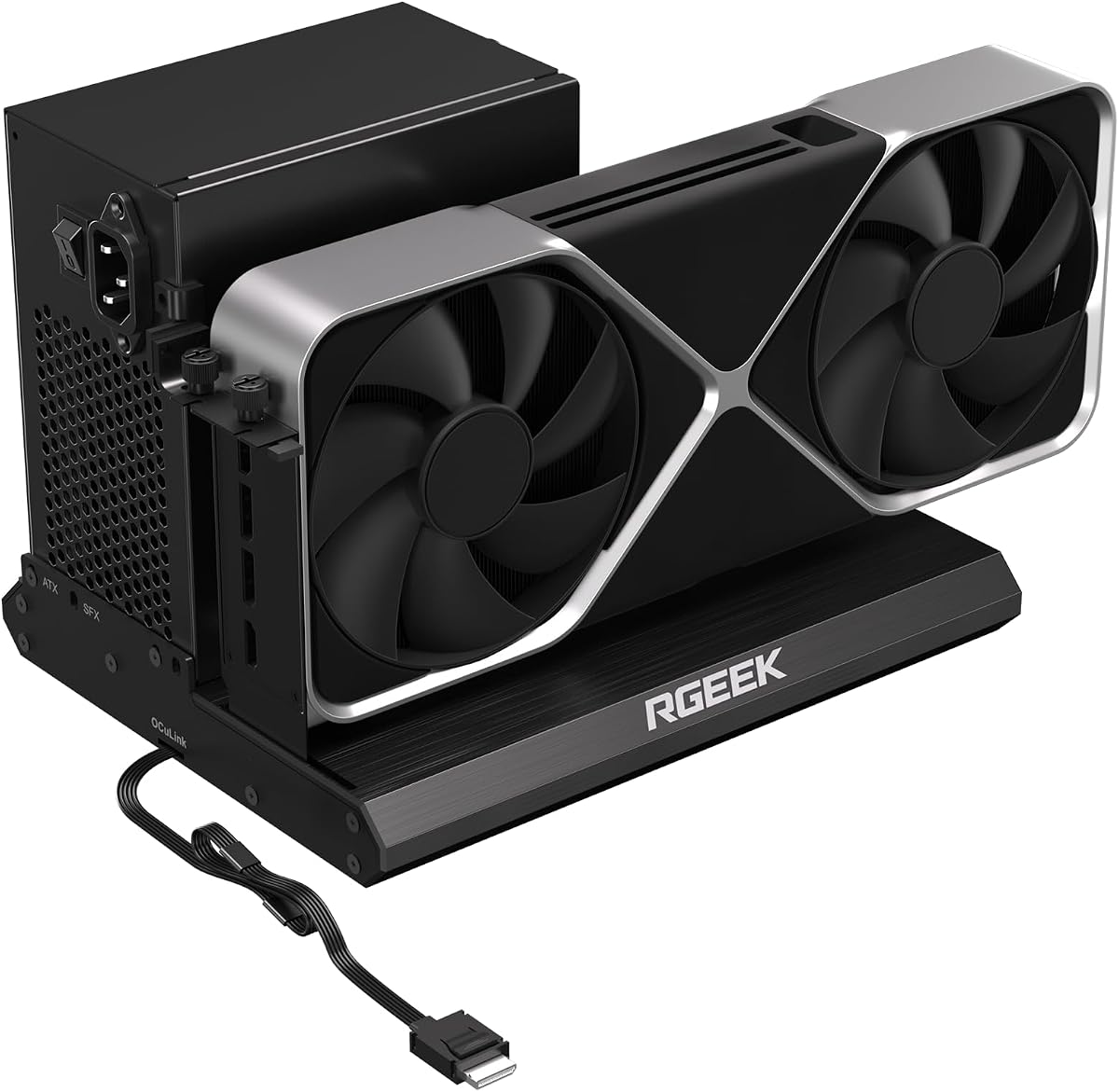
The RGEEK OCuLink eGPU Dock stands out by offering support for PCIe 5.0 x4 bandwidth. With speeds up to 128Gbps, it is a future-proof choice for users planning to upgrade to next-generation graphics cards. The full aluminum construction provides excellent heat dissipation, ensuring that the dock remains cool during intensive tasks.
We may earn a commission when you buy through this link, at no additional cost to you.
This dock supports a wide range of GPU sizes and power supplies including ATX, SFX, and SFX-L. The factory-soldered cable design avoids extra adapters and minimizes signal loss. It is compatible with mainstream NVIDIA and AMD graphics cards, making it versatile for gaming and professional tasks like 3D modeling or rendering.
To reach full PCIe 5.0 speeds, you will need an M.2 slot or a specific adapter, which are not included. This requirement might be a minor hurdle for some users but offers flexibility for those who already have the components. Installation is straightforward, with a uniform I/O layout that keeps desktop wiring neat and organized.
For enthusiasts looking to maximize bandwidth, this dock is an excellent investment. It is designed for performance and durability, offering a reliable connection for your external graphics card. If you are preparing for the future of GPU technology, the RGEEK dock provides the infrastructure needed to handle higher performance standards.
Full aluminum material ensures great heat dissipation and sturdy durability for consistent performance.
Supports PCIe 5.0 standards, ensuring your setup is ready for next-gen graphics cards and bandwidth demands.
We may earn a commission when you buy through this link, at no additional cost to you.
The UGREEN LinkStation eGPU Dock is designed for enthusiasts who need maximum flexibility and performance. It offers dual-channel connectivity with both OCuLink and USB4 ports, giving you the option for low latency or universal compatibility. The semi-open all-aluminum chassis ensures efficient cooling and a sleek look on your desk.
We may earn a commission when you buy through this link, at no additional cost to you.
A standout feature is the removable top cover, which allows you to install oversized GPUs up to 370mm in length. This design freedom means you can fit even high-end graphics cards without adapters. The integrated cable storage compartment keeps your setup tidy, adding a practical touch to the overall design.
The built-in fan delivers quiet operation, far quieter than competitors using noisy server-style PSUs. It supports direct plug-and-play with 12V-2×6 connectors, ensuring you do not need extra cables for modern RTX 40 and 50 series cards. The signal booster ensures stable transmission for 4K gaming and intensive AI workloads.
For users who value both performance and build quality, this dock is an excellent choice. It provides the versatility to connect different types of GPUs and systems with ease. Whether you are gaming or creating content, the LinkStation offers the reliable and quiet environment needed for a high-performance desktop experience.
Semi-open aluminum chassis and ATX 3.1 PSU fan deliver efficient cooling and true library-quiet operation.
Integrated cable storage compartment keeps your setup clean and organized for a focused workspace.
We may earn a commission when you buy through this link, at no additional cost to you.
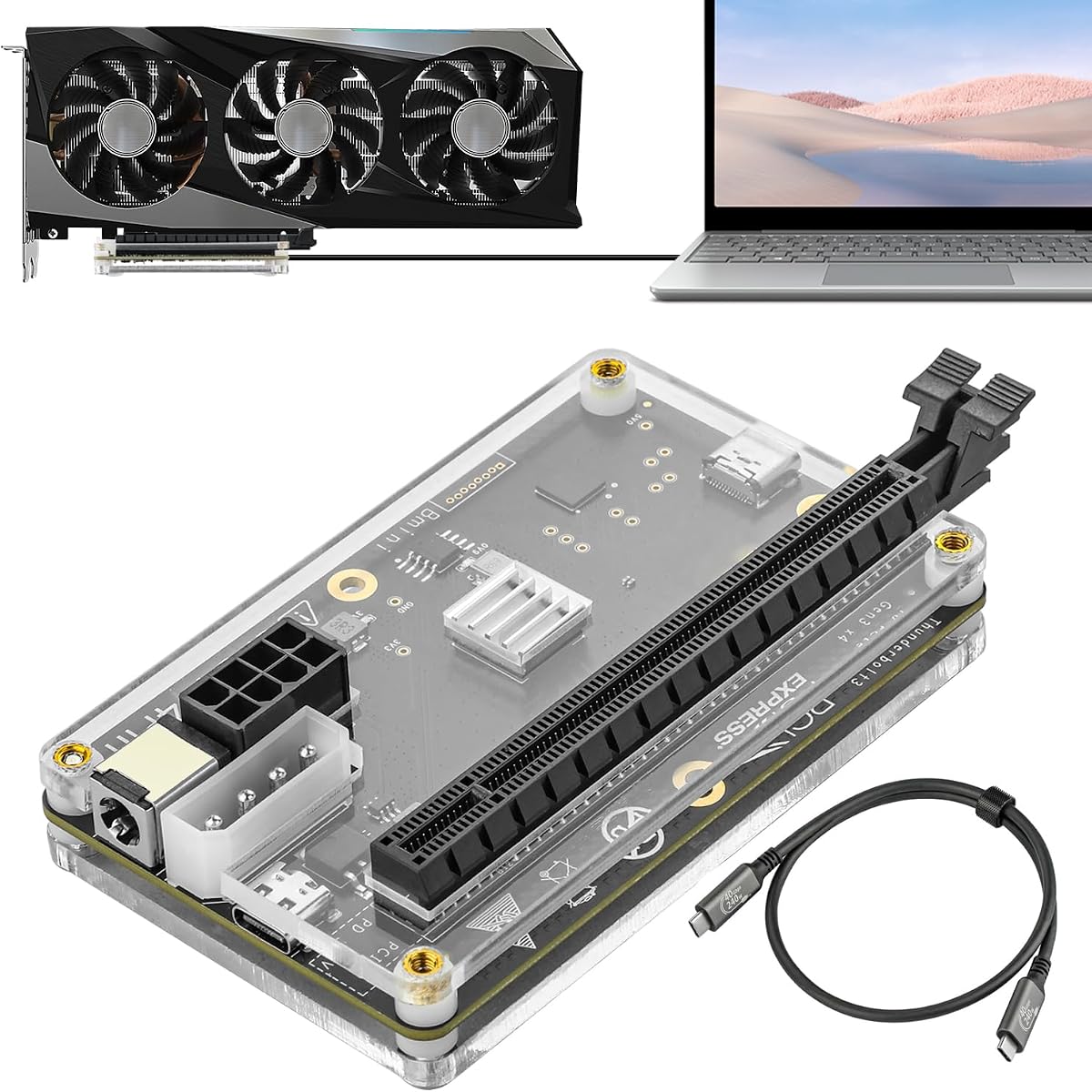
This PCIE 3.0 eGPU DOCK offers a budget-friendly way to connect external GPUs to laptops and consoles. It supports a variety of power input options, including PD and Molex, making it versatile for different setups. The included Thunderbolt 4 cable ensures a stable connection for Windows laptops and consoles with TB4 ports.
We may earn a commission when you buy through this link, at no additional cost to you.
While it uses a JHL6340 controller with speeds around 22Gbps, it is sufficient for graphics work and gaming. The flexibility in power options is a key advantage, allowing you to choose a supply that matches your needs. It supports mainstream NVIDIA and AMD GPUs, though it is not recommended for Intel graphics cards.
The setup is straightforward, requiring only a standard Thunderbolt cable and a compatible power source. However, the lower bandwidth of PCIe 3.0 means it may not support the latest high-end GPUs as efficiently as newer docks. This makes it a better choice for budget-conscious users or those with older hardware.
For anyone looking for a simple entry into the world of external graphics, this dock provides a solid foundation. It is easy to install and works well for basic gaming and creative tasks. If you need a low-cost solution without complex requirements, this model offers good value for its specific use cases.
Four power input options allow you to choose a compatible supply that fits your current power setup.
JHL6340 controller delivers stable performance for graphics work and video editing tasks.
We may earn a commission when you buy through this link, at no additional cost to you.
This MINISFORUM DEG2 model is engineered to ensure seamless interoperability across diverse cables and host devices. It offers dual-mode freedom with a physical toggle to switch between OCuLink and TBT5 without software tweaks. The inclusion of a 2.5G LAN port adds a practical networking feature for stable wired connections.
We may earn a commission when you buy through this link, at no additional cost to you.
The dock supports full-size GPUs and is compatible with both ATX and SFX power supplies. Its signal-optimized design minimizes degradation, drops, and connectivity errors. The integrated M.2 slot allows for fast GPU access to stored files, streamlining workflows for rendering and AI tasks on a single GPU.
While the performance rating is lower than other models, the feature set remains robust for most users. It eliminates manual startups by syncing power with your host device, delivering a seamless desktop-like operation. However, potential buyers should verify compatibility with their specific mini PC models before purchase.
For those needing a versatile hub with multiple ports, this dock is a viable option. It balances performance with practical features that enhance productivity and entertainment. If you need a setup that supports both high-speed data and networking, this model provides the necessary tools for a complete external GPU experience.
The 2.5G LAN port ensures stable wired network connections without relying on Wi-Fi for file transfers.
Engineered design minimizes signal degradation and connectivity errors across diverse host devices.
We may earn a commission when you buy through this link, at no additional cost to you.
This external eGPU dock is built with an officially certified JHL7440 controller module for reliable performance. It supports the latest RTX 50 series GPUs and is designed for AI training and inference tasks. The dock offers 40Gbps speed with 85W PD charging, providing enough power for most laptops while functioning as a multi-port hub.
We may earn a commission when you buy through this link, at no additional cost to you.
Features include a USB A port and a daisy chain port, allowing you to attach external devices as needed. It is compatible with NUCs, laptops, and gaming machines featuring USB4 or Thunderbolt 3/4 interfaces. However, users must ensure their device has a compatible port before purchase to avoid connection issues.
The dock does not include an ATX power supply or graphics card, so you will need to provide these separately. There is also a warning against inserting CPU cables into the PCIe-8PIN port to prevent power-off protection issues. While simple, these notes highlight the need for careful setup to ensure proper operation.
For users seeking a straightforward Thunderbolt solution with hub capabilities, this dock is a practical choice. It offers good performance for gaming and AI tasks without requiring a complex setup. If you need a versatile hub that also boosts your graphics power, this model provides the essential features to meet those needs.
Built-in USB A and daisy chain ports allow attachment of external devices without additional hubs.
Controller supports local deployment of deep learning models, making it suitable for AI inference tasks.
We may earn a commission when you buy through this link, at no additional cost to you.
Choosing the right egpu dock involves understanding interface speeds, power requirements, and compatibility with your specific laptop or mini PC.
The interface determines how fast your GPU communicates with your computer. Thunderbolt 5 offers speeds up to 80Gbps, while OCuLink supports up to 128Gbps in PCIe 5.0 configurations. Higher bandwidth means less performance loss and smoother gameplay or rendering.
Look for USB4 V2 or OCuLink docks to minimize bottlenecks. Thunderbolt 4 remains a strong choice for general use, but newer interfaces are essential for high-end RTX 50 series cards.
Most egpu docks require a separate ATX or SFX power supply to run desktop graphics cards. Check whether the dock supports both types or just one. SFX units are smaller, which is better for portable setups, while ATX units offer more power options.
Ensure the dock supports your preferred power connector type to avoid needing adapters. A modular design allows you to upgrade your power supply later as your GPU needs grow.
Not all docks can fit large graphics cards. Some are limited to 2 or 3 slots, while others support up to 4 slots or 370mm in length. If you plan to use a massive card like an RTX 4090, verify the dimensions carefully.
Choose a dock with a removable cover or open design to accommodate oversized cards. This ensures your future GPU upgrades will still fit your current enclosure.
Beyond GPU connection, a good dock should offer useful peripheral ports. Look for USB 3.2 ports, 2.5G LAN, or M.2 storage slots to expand your setup. Some models include a daisy chain port to connect multiple devices.
A rich port selection reduces the need for additional hubs on your desk. This makes your workspace cleaner and more efficient for daily use.
Aluminum chassis provide better heat dissipation and durability compared to plastic options. A well-ventilated case with active cooling ensures your GPU and dock do not overheat during long gaming or rendering sessions.
Invest in a dock with a sturdy build to protect your expensive components. Active cooling fans should operate quietly to maintain a peaceful workspace.
Check if the dock works with your specific host device. Some docks do not support Apple Silicon Macs or certain mini PC models. Also, verify if hot plugging is supported if you plan to connect and disconnect frequently.
Ensure compatibility with your GPU model, especially for the latest RTX 50 series. A compatible dock ensures a stable connection without driver headaches or performance drops.
Always turn off your laptop or mini PC before plugging in the OCuLink cable if your dock does not support hot plugging. Connect the power supply first, then the graphics card, and finally the data cable to your computer.
Install the latest drivers for your graphics card and the dock's controller before launching any games or applications. This ensures stable performance and prevents crashes during heavy workloads.
Keep the dock in a well-ventilated area to prevent overheating. Regularly clean dust from the ventilation holes to maintain effective cooling and prolong the life of your external GPU setup.
Generally no, Apple Silicon Macs do not support external GPUs via Thunderbolt or OCuLink. You must use Intel-based Macs or Windows laptops to utilize these docks. Always check your device's compatibility before buying.
It depends on the interface and dock. Thunderbolt supports hot plugging, but OCuLink usually requires a shutdown before unplugging. Check the product description to see if hot plugging is supported.
No, most egpu docks do not include a graphics card or power supply. You must purchase those separately and install them into the enclosure yourself. This gives you more control over your setup's performance.
Thunderbolt offers universal compatibility and hot plugging, while OCuLink provides higher bandwidth with less latency. Thunderbolt is better for general use, but OCuLink is ideal for high-performance gaming and rendering.
Most docks require a standard ATX or SFX power supply. Ensure the dock supports your preferred type and that your power supply has the correct wattage for your graphics card.
Compact docks like the MINISFORUM DEG1 are great for mini PCs due to their small size. However, ensure your mini PC has a compatible OCuLink or Thunderbolt port to connect.
The MINISFORUM DEG2 stands out as our top pick for its versatile connectivity and integrated storage. The Razer Core X V2 offers premium build quality, while the MINISFORUM DEG1 is an excellent budget option for portable use.
When choosing a dock, prioritize interface speed and GPU compatibility to ensure your setup remains future-proof. Consider your power needs and whether you require extra ports like LAN or storage.
Remember that prices and stock fluctuate frequently, so verify current details before purchasing. Whether you are a gamer or a creative professional, the right egpu dock can transform your laptop into a powerful desktop workstation.