
TobenONE DisplayLink Docking Station
4.4Editor score
18 total ports
120W power adapter
Quad display capable
This guide compares the top docking stations for 3 monitors to help you find the best multi-display adapter for your laptop workstation needs.
Finding the right docking station for 3 monitors can transform your laptop into a powerful desktop workstation. Whether you are a developer or designer, having multiple screens boosts productivity significantly.
We evaluated ten top-rated models based on port variety, display support, charging speed, and build quality. Our goal is to help you find the perfect hub for your specific workflow and budget.
Each pick below highlights unique strengths and potential limitations. Please note that availability and pricing can fluctuate, so always check the latest details before making your final purchase decision.
4.4Editor score

4.4Editor score

4.3Editor score
The following table provides a quick side-by-side comparison of all ten selected docking stations. Reviewing these specifications will help you identify which model best aligns with your hardware requirements and usage scenarios.


This Plugable unit stands out as a top choice for professionals needing reliable triple monitor support. With a solid 4.4 rating from users, it offers a robust 13-in-1 expansion that simplifies complex setups effectively.
We may earn a commission when you buy through this link, at no additional cost to you.
Its DisplayLink technology ensures stable extended displays even on systems with limited native video output. The inclusion of 100W USB-C charging means your laptop remains powered while you work on multiple screens simultaneously.
While it requires driver installation for full functionality, the performance benefits outweigh the setup effort for most users. The device is designed to meet enterprise deployment demands with strong compliance standards.
If you need a dependable docking station for 3 monitors that offers lifetime support and consistent performance, this model is an excellent investment for any serious workstation setup today.
DisplayLink allows for multiple extended displays even on laptops that typically support only one external screen.
The 100W charging capability ensures your laptop stays powered even when running multiple peripherals and monitors.
We may earn a commission when you buy through this link, at no additional cost to you.
The TobenONE DisplayLink docking station offers an impressive array of ports for power users who need maximum connectivity. It supports up to four displays and includes a robust 120W power adapter for heavy workloads.
We may earn a commission when you buy through this link, at no additional cost to you.
Its DisplayLink engine allows for seamless extended desktops across multiple screens on various operating systems. This makes it ideal for stock traders or developers who require expansive screen real estate for multitasking.
While it requires downloading specific drivers and does not support Linux systems, the performance and flexibility are unmatched in its class. The inclusion of the power adapter adds significant value for setup convenience.
If you want the ultimate docking station for 3 monitors with extra expansion options and strong power delivery, this model provides a premium experience worth considering.
Eighteen ports including USB, HDMI, and DP give you extensive options for all your peripherals.
The included 120W adapter ensures the dock and laptop receive ample power without extra purchases.
We may earn a commission when you buy through this link, at no additional cost to you.
For those seeking affordability without sacrificing core functionality, this HoDo docking station offers a compelling entry point. It provides multiple video outputs including HDMI and DisplayPort for flexible monitor configurations.
We may earn a commission when you buy through this link, at no additional cost to you.
The 100W Power Delivery port ensures your laptop charges quickly even while connected to external displays. This makes it suitable for users who need basic triple monitor support without breaking the bank.
While it may not match the higher-end models in terms of resolution or port count, it delivers reliable performance for standard office tasks. The compact design fits well on smaller desks where space is limited.
If budget is your primary concern and you need a functional docking station for 3 monitors, this model offers excellent value and solid performance for everyday work.
This model provides essential multi-monitor connectivity at a price point accessible to most users.
Support for HDMI and DisplayPort allows you to mix and match different monitor types easily.
We may earn a commission when you buy through this link, at no additional cost to you.
This Selore station brings unique smart features to the multi-monitor setup world with its integrated weather display screen. It offers extensive connectivity options suitable for those who need robust data transfer capabilities.
We may earn a commission when you buy through this link, at no additional cost to you.
The inclusion of multiple HDMI and DisplayPort outputs allows for flexible triple display configurations on Windows systems. High-speed USB ports ensure rapid file transfers alongside your extended monitor setup.
Users should note that Mac support is limited to mirroring, and the power adapter is sold separately. However, the privacy mode and smart weather display add convenient daily value for many users.
If you want a docking station for 3 monitors with creative smart features and fast data transfer, this model is a strong contender for Windows users.
The built-in screen shows weather and time without needing to unlock your phone or computer.
10Gbps USB-C ports ensure large files move quickly without bottlenecking your workflow.
We may earn a commission when you buy through this link, at no additional cost to you.
This TobenONE model maximizes connectivity with an impressive 18 ports designed to keep your desk clutter-free. It supports triple 4K displays allowing for high-resolution multitasking environments.
We may earn a commission when you buy through this link, at no additional cost to you.
The abundance of USB ports means you can connect numerous peripherals without needing additional hubs. This makes it ideal for offices where multiple devices need to be connected simultaneously.
While it is not recommended for Mac users and requires a separate power adapter, its expansion capabilities are significant. It is particularly suited for Chrome OS and Windows laptops needing extensive connectivity.
If you need a docking station for 3 monitors that offers maximum peripheral connections and high-res display support, this model serves that purpose effectively.
With 18 ports you can connect almost every peripheral you own to your laptop at once.
Support for triple 4K ensures sharp visuals for detailed work across all your screens.
We may earn a commission when you buy through this link, at no additional cost to you.
Designed with hybrid teams in mind, this Plugable unit delivers enterprise-grade reliability for office environments. It provides stable networking and video output for professionals working from various locations.
We may earn a commission when you buy through this link, at no additional cost to you.
The triple HDMI support allows you to extend your workspace across three monitors seamlessly. It is optimized for environments that require dependable connectivity and easy device management.
While it may not support Linux systems and comes at a higher price point, the reliability and support are key assets. IT departments often prefer this model for its deployment-friendly features.
If you are setting up a professional workspace needing a stable docking station for 3 monitors, this model offers the reliability you need.
Built for office use this dock ensures consistent performance for business critical tasks.
Three HDMI ports give you straightforward connectivity for common modern monitors.
We may earn a commission when you buy through this link, at no additional cost to you.
With a high user rating of 4.5 this Acer model delivers solid performance and value for workstation users. It includes a robust 110W adapter ensuring your laptop stays powered under heavy loads.
We may earn a commission when you buy through this link, at no additional cost to you.
The sleek aluminum body dissipates heat efficiently which is crucial for prolonged use during intense tasks. Connectivity options include multiple video ports and high-speed data transfer capabilities.
Mac users should note that extended displays are limited due to system constraints. However for Windows users this dock offers a premium feel and reliable performance for the price.
If you want a well-rated docking station for 3 monitors with a power adapter included, this Acer model is an excellent choice.
The aluminum construction helps keep the device cool during long working sessions.
Having the adapter in the box saves you from buying one separately later on.
We may earn a commission when you buy through this link, at no additional cost to you.
This Selore hub offers driverless operation for a hassle-free setup experience on compatible laptops. It features high-speed data transfer that ensures large files move quickly between connected devices.
We may earn a commission when you buy through this link, at no additional cost to you.
The one-touch screen control button allows you to switch display modes effortlessly without digging into system settings. This convenience is especially useful for users who switch between mirror and extend modes often.
While it is best suited for Windows laptops and lacks HDMI pass-through support, its speed and ease of use stand out. The compact design makes it easy to transport between locations.
If you want a portable docking station for 3 monitors that offers fast data and simple controls, this model is a great option.
Plug and play functionality means you can start using it immediately without installing software.
10Gbps ports provide the bandwidth needed for quick file transfers and media editing.
We may earn a commission when you buy through this link, at no additional cost to you.
This Plugable model brings advanced 2.5GbE Ethernet to the workstation setup providing faster network speeds than standard gigabit ports. It is designed to drive extended displays efficiently on Windows and ChromeOS laptops.
We may earn a commission when you buy through this link, at no additional cost to you.
The 100W charging and dedicated USB-C charge-only port ensure your devices remain powered throughout the day. Driverless functionality on supported operating systems simplifies the connection process significantly.
While it is not recommended for Mac users, the performance on Windows is robust and versatile. The multiple USB ports allow for simultaneous connections without sacrificing speed.
If you need a docking station for 3 monitors with fast networking and reliable charging, this model offers strong technical capabilities.
2.5GbE Ethernet ensures you get faster internet speeds and lower latency for tasks.
The extra USB-C charge port lets you charge accessories alongside your laptop.
We may earn a commission when you buy through this link, at no additional cost to you.
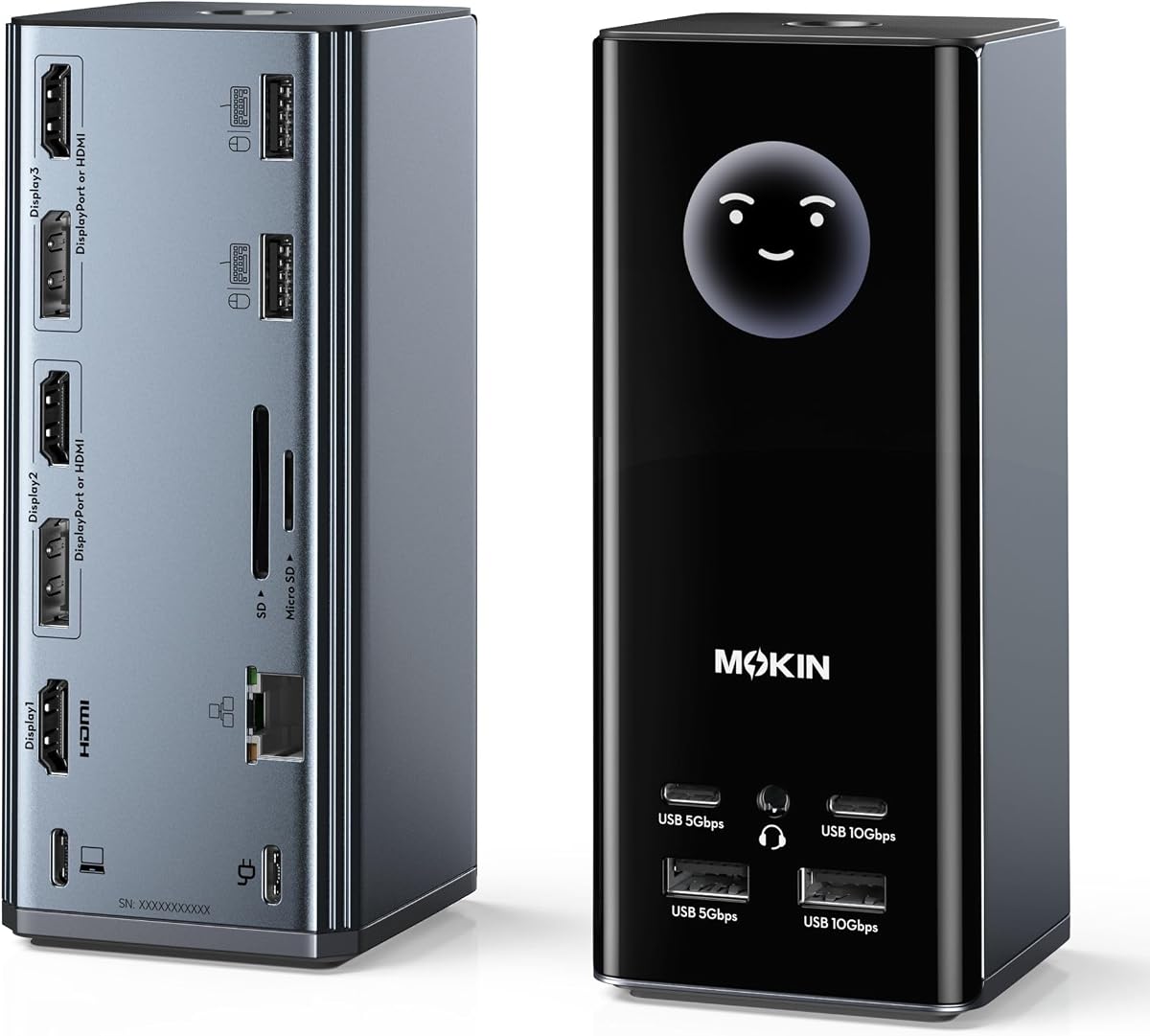
This MOKiN docking station brings visual intelligence to your workspace with real-time status monitoring. It shows charging wattage and port status so you can keep track of your setup easily.
We may earn a commission when you buy through this link, at no additional cost to you.
The weather display feature syncs with local data providing useful information at a glance. High-speed data transfer ports ensure your file movements remain efficient during multitasking sessions.
Privacy protection features let you lock screens instantly which is helpful for shared workspaces. However it requires a high wattage adapter for full performance which is not included.
If you want a docking station for 3 monitors with smart features and monitoring capabilities, this model adds a unique touch to your desk.
The LCD screen shows you exactly what is connected and charging at any moment.
A double tap button allows you to turn off screens quickly to protect data.
We may earn a commission when you buy through this link, at no additional cost to you.
Choosing the right docking station involves considering several technical factors that impact your daily workflow. This section outlines the key aspects you should evaluate before making a purchase decision.
The most critical factor is ensuring the docking station supports the number of monitors and resolutions you need. Check if it uses MST for Windows or DisplayLink for broader compatibility especially on Mac systems.
Always verify that the specific ports match your monitor inputs to avoid needing extra adapters.
Your docking station must provide enough wattage to charge your laptop while powering other devices. Look for models with at least 100W power delivery if you have a high-performance laptop.
Ensure the included or recommended power adapter meets these requirements to prevent undercharging.
A good docking station should offer a mix of USB-A, USB-C, and legacy ports like HDMI or VGA. The number of ports determines how many peripherals you can connect without using separate hubs.
Prioritize models that offer high-speed USB 3.1 or Thunderbolt ports for fast data transfer needs.
Since docking stations handle significant data and power loads, thermal management is essential. Look for aluminum bodies or designs that dissipate heat effectively to ensure longevity.
A sturdy build also protects against damage from frequent cable plugging and unplugging.
Not all docking stations work equally well across Windows, macOS, and ChromeOS. Some rely on specific drivers that may not be available or fully supported on every system.
Check reviews and product descriptions to confirm compatibility with your specific laptop model.
A tidy workspace contributes to better productivity and fewer accidental disconnections. Look for docks that organize cables or have vertical designs to save desk space.
Models with rubberized bases prevent slipping when cables are moved or adjusted.
Electronic peripherals can occasionally fail or have compatibility issues. A manufacturer that offers reliable support and a solid warranty can save you significant time and effort.
Look for brands that provide direct contact channels for troubleshooting assistance.
Prices vary significantly based on features and build quality. Determine which features are essential for you versus optional to stay within your financial limits.
Consider the long-term value of a slightly more expensive model that meets all your needs.
Start by connecting the power adapter to the docking station before attaching any peripherals. This ensures the dock has enough energy to drive your monitors and charge your laptop simultaneously.
Connect your monitors using the appropriate HDMI or DisplayPort cables and plug your laptop into the USB-C port. Make sure your laptop settings are configured to extend displays rather than mirror them.
Periodically check cable connections and clean the ports to prevent dust buildup. Keeping the dock on a flat stable surface helps with heat dissipation and prevents accidental cable disconnections.
Not all laptops support three external displays natively. You need a USB-C port that supports DisplayPort Alt Mode or a DisplayLink enabled dock to drive multiple screens effectively.
Yes using a compatible power adapter is crucial for stability. Check the required wattage in the product description and ensure your adapter meets or exceeds that specification.
MacOS often limits external display support due to hardware constraints. Using a DisplayLink dock allows you to extend displays but you must install the necessary drivers first.
MST splits the video signal for Windows systems while DisplayLink uses software to create multiple displays. DisplayLink is better for Mac or laptops with limited video output support.
Most modern docking stations support Power Delivery which charges your laptop while you use peripherals. Ensure the dock provides enough wattage for your specific laptop model.
Visit the manufacturer's website to download the latest drivers for your operating system. Keeping drivers updated ensures compatibility and improves performance over time.
We have reviewed ten excellent docking stations ranging from budget-friendly options to premium models. Each choice offers unique strengths depending on your specific workflow and hardware.
Prioritize compatibility with your laptop model and ensure the dock supports the resolution and port types you need. Power delivery and build quality are also essential factors to consider.
Remember to verify current availability and check the latest user reviews before purchasing. This ensures you get the best value and performance for your workstation setup.