
ewnol Dockable Case for Nintendo Switch 2
4.4Editor score
Ergonomic grip design
Includes screen protectors
Full function access
This guide compares the best dockable Switch 2 cases for protection and grip. Find top rated hard shells with kickstand support and Joy-Con release features.
Finding the right dockable Switch 2 case ensures your console stays protected during travel and daily use. A good case must balance durability with seamless docking capabilities so you never have to remove it to play on TV.
We compared ten top-rated protective shells based on build quality, ergonomic design, and compatibility with the official dock. Each product was evaluated for its ability to protect against drops while maintaining access to ports and buttons.
Each pick highlights specific strengths like quick release mechanisms or included accessories. Prices and availability change frequently so always verify the latest details before purchasing your preferred Switch 2 protection today.
4.4Editor score

4.6Editor score

5.0Editor score
This side by side comparison highlights the key specifications and features of every dockable case on our list. Review the table to quickly identify which model offers the best fit for your specific gaming needs.



The SUPCASE for Nintendo Switch 2 Case stands out as the top choice for gamers seeking reliable protection without sacrificing functionality. It holds a strong rating of 4.6 stars from users who appreciate its robust build and thoughtful design features.
We may earn a commission when you buy through this link, at no additional cost to you.
This case features a seamless dock compatible design that allows you to slide your console into the official dock without removing the shell. The foldable Joy Cons coverage mechanism protects controllers from vibration while keeping them firmly connected during intense gameplay.
While the protection is excellent, users should note that this case is not compatible with the Switch 2 kickstand function. The weight balanced construction adds to the durability but makes it slightly heavier than ultra thin alternatives.
If you prioritize military-grade protection and want a case that feels professional in hand, this SUPCASE model is the ideal pick. It balances durability with style ensuring your Switch 2 stays safe during daily adventures.
Engineered to U.S. military-grade standards this shockproof case delivers defense against drops impacts and scratches for long-term reliability.
A revolutionary hinge mechanism enables Joy Con controllers to be quickly assembled and disassembled while keeping them securely connected.
We may earn a commission when you buy through this link, at no additional cost to you.
The Dockable Blue Case offers a unique pop-up mechanism that lets you release Joy-Cons in one second without prying or scratching the shell. This feature alone makes it a favorite for multiplayer gamers who need to swap controllers frequently.
We may earn a commission when you buy through this link, at no additional cost to you.
Its seamless dock and kickstand compatibility ensure you can switch between handheld and TV modes effortlessly. The anti-fingerprint carbon fiber grip provides a premium mechanical stripe texture that elevates the look of your console while preventing slips.
Some users might find the one-piece shell design less flexible compared to split designs but it adds to the durability. The carbon fiber texture is stylish but may collect dust over time depending on your usage environment.
Choose this case if you value speed and style. The hidden spring-latch button design solves the hassle of removing entire shells just to play multiplayer or motion games on the go.
Press the +/- buttons on the back to detach Joy-Cons in one second without prying or scratching the shell.
The carbon fiber textured grip solves daily pain points like slippery surfaces while bringing a premium look.
We may earn a commission when you buy through this link, at no additional cost to you.
This SUPCASE model includes a foldable aluminum stand that adjusts from 30 to 90 degrees allowing hands-free tabletop gaming anywhere. It holds a 4.5 rating for its ability to protect the console while offering versatile viewing angles.
We may earn a commission when you buy through this link, at no additional cost to you.
The dock in case on feature lets you move between portable play and TV mode without removing the shell. The built-in hollow aluminum-alloy stand avoids overheating and provides a stable base for desk or tray table gaming.
While the stand is a huge plus it does add a small amount of bulk compared to slim hard shells. Users should also be careful to flip the hinge gently when releasing Joy-Cons to avoid damage to the controllers.
If you game frequently in tabletop mode this case is a strong choice. It combines everyday impact protection with a balanced weight and an adjustable stand for maximum versatility.
Open the built-in hollow aluminum-alloy stand to set your preferred viewing angle then fold it flush into the back when ready to go.
The precision dock-compatible fit is designed for smooth docking so you never have to strip off the shell for TV mode.
We may earn a commission when you buy through this link, at no additional cost to you.
Belkin brings its reputation for quality with an ergonomic grip case designed for all-day play. The textured non-slip grip supports long sessions without fatigue and works seamlessly with the official dock.
We may earn a commission when you buy through this link, at no additional cost to you.
This grip case allows you to remove Joy-Cons without taking off the entire shell. It is also sustainably made with a minimum 75% recycled plastic materials and comes with a 2-year coverage for peace of mind.
The rating is slightly lower than other models which may indicate mixed user experiences with fit or comfort. The focus on sustainability is a strong plus but those seeking maximum protection might look elsewhere.
Choose this case if you prioritize comfort and eco-friendly materials. It is a reliable option for casual gamers who want a comfortable hold without excessive bulk.
The comfortable textured non-slip gaming grip supports long sessions without fatigue and enhances handheld control.
Our Gaming Grip is made with a minimum 75% recycled plastic materials ensuring a reduced environmental footprint.
We may earn a commission when you buy through this link, at no additional cost to you.
FASTSNAIL offers an all-in-one solution with a 10,000mAh power bank attached via a magnetic ring. This is ideal for travel or marathon gaming sessions where charging access is limited during outdoor activities.
We may earn a commission when you buy through this link, at no additional cost to you.
The case includes a dual-layer protection system with a TPU inner frame and a PC hard shell. It also features 12 built-in silicone game card slots which solve the problem of carrying your favorite game cards securely.
You need to remove the front cover and power bank before docking which adds a step to your routine. The power bank and console do not support wireless charging requiring a data cable connection for power.
If you need extended battery life and game card storage this case is perfect. It turns your console into a self-sufficient gaming station wherever you go.
This Switch 2 protective case comes with a 10,000mAh power bank allowing you to enjoy extended gaming sessions without any hassle.
The front cover features 12 built-in silicone game card slots so you never have to worry about how to carry your favorite games cards.
We may earn a commission when you buy through this link, at no additional cost to you.
PlayVital uses a split design with separate covers for the console and Joy-Cons which makes installation and removal very fast. This design allows for easy access to ports and buttons without removing the entire shell.
We may earn a commission when you buy through this link, at no additional cost to you.
The kit includes a foldable stand that replaces the built-in kickstand along with thumb grip caps for better control. The hard shell resists scratches and drops keeping your Switch 2 safe in backpacks or travel bags.
The raised support on the bottom of Joycon grips improves handheld comfort and reduces fatigue. Some users may find the yellow color shows wear over time but the durability remains solid.
This case is great for those who want a complete kit with accessories. The split design ensures you can customize your grip and protect your console efficiently.
Separate covers for console and Joycons allow fast installation and removal for easy use.
Includes 1 dockable Switch 2 case 2 Joycon grip covers 2 thumbstick caps and 1 foldable stand.
We may earn a commission when you buy through this link, at no additional cost to you.
FYOUNG offers a starter kit that includes a separate hard case for controllers and two tempered glass screen protectors. This all-in-one package ensures your console and accessories are protected from drops and scratches.
We may earn a commission when you buy through this link, at no additional cost to you.
The ultra-slim separable case adds minimal bulk allowing the Switch 2 to fit easily into most carrying cases. The matte finish on the PC hard shell offers reliable protection against bumps and shocks.
Color variations may occur due to screen settings so the actual product color should be considered final. The included thumb grips improve control and prevent joystick wear during intense gaming sessions.
For budget-conscious buyers this bundle provides excellent value. You get everything you need to guard your new Switch 2 in one practical package.
Upgarde dockable hard protective case a separate hard case for controllers and 2x tempered glass screen protectors.
The included 2-pack of high-definition tempered glass screen protectors delivers crystal-clear clarity and superior scratch resistance.
We may earn a commission when you buy through this link, at no additional cost to you.
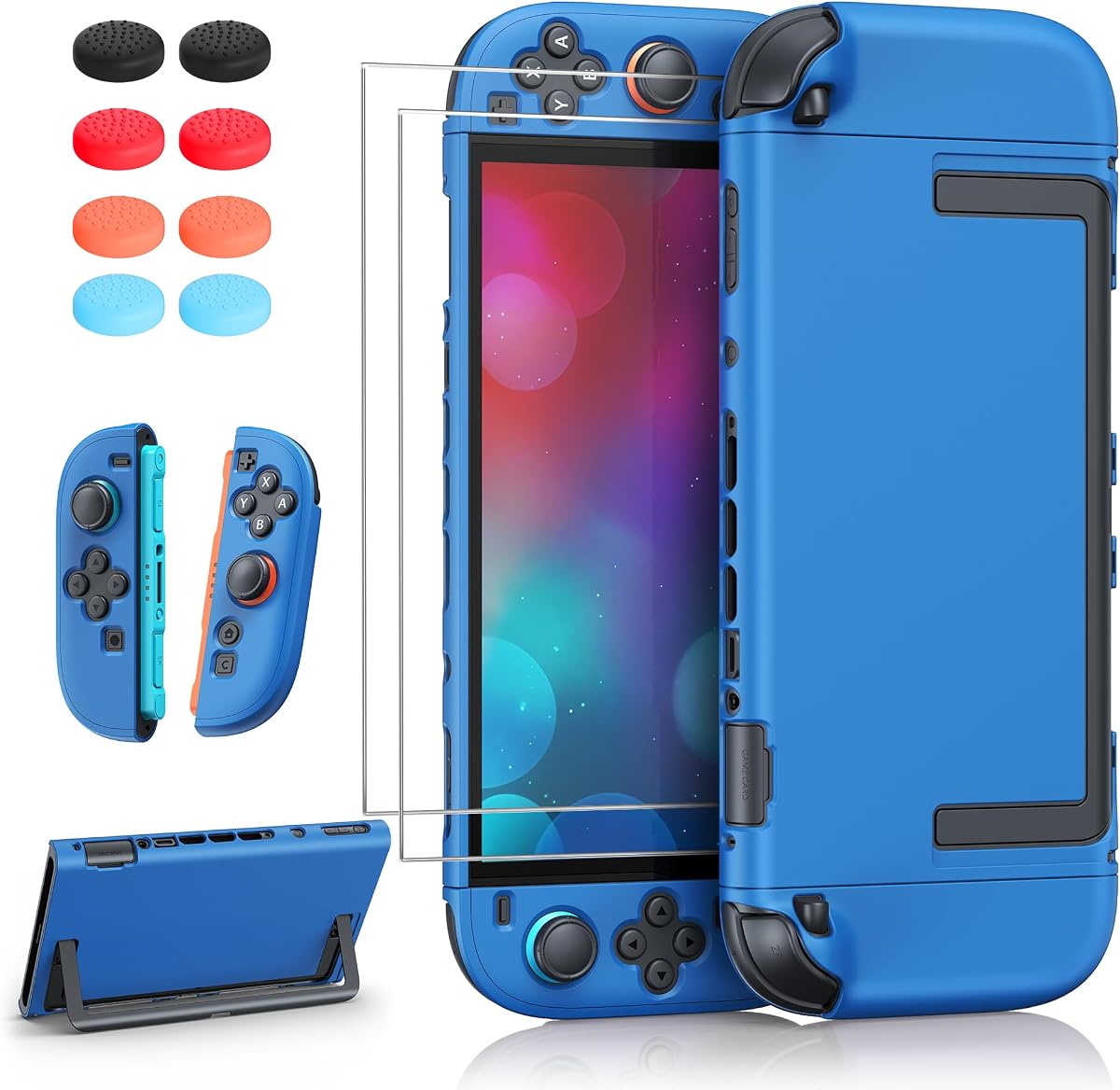
ewnol delivers a reliable dockable case with a full accessory set including screen protectors and thumb caps. It is designed to place the console directly into the dock without removing the case for convenience.
We may earn a commission when you buy through this link, at no additional cost to you.
The ergonomic grip design improves hand support during long gaming sessions. Both Joycon controllers can be easily removed without taking off the entire case making gameplay more convenient.
Some users report the docking may feel a bit tight but this is by design to prevent wobbling and ensure a secure hold. The lightweight yet reliable defense against drops keeps your console safe.
This is an excellent budget option for those who want a complete package without spending much. The inclusion of screen protectors and thumb caps adds significant value.
Package includes 1 Nintendo Switch 2 grip 2 tempered glass screen protectors 1 positioning frame and 4 joystick caps.
The dockable design allows you to place the console directly into the Switch 2 dock without removing the case.
We may earn a commission when you buy through this link, at no additional cost to you.
This PlayVital case offers a matcha green color with matching silicone button toppers for a cohesive aesthetic. It is a perfect pick for gamers who want protection that looks playful and stylish.
We may earn a commission when you buy through this link, at no additional cost to you.
The set includes a console back shell grip covers thumb caps and silicone button toppers. The design is easy to clean and reassemble ideal for playful daily protection that stays fresh.
While it is not as heavy-duty as military-grade cases it resists scratches and bumps well. The split structure makes handheld and docked play seamless without removing the shell.
Choose this if you want a cute and practical option. The solid color coordination creates a clean mix-and-match look that stands out.
Multiple solid colors with matching silicone button toppers for a clean mix-and-match look.
Set includes console back shell 1 pair of grip covers 2 thumb caps 1 kickstand sticker and 2 silicone button toppers.
We may earn a commission when you buy through this link, at no additional cost to you.
Mumba Fortress offers a 360-degree protection solution with a durable front cover that shields the screen and buttons. With a perfect 5.0 rating it stands out for its comprehensive security and premium build quality.
We may earn a commission when you buy through this link, at no additional cost to you.
The detachable front cover means you can dock your console without removing the rear shell. It also includes an adjustable aluminum alloy kickstand and 6 locking game card slots for travel readiness.
The price is higher than other options but you get military-grade drop protection and a full coverage design. The one-piece anti-wobble Joy-Con design ensures your controllers stay securely connected.
If you want the best protection available this case is worth the investment. It is designed for anyone who wants to carry and prop up their Switch 2 securely on the go.
True 360 degree coverage from front to back that fully shields the screen Joy-Con buttons Z-triggers and thumbsticks.
Simply detach the front cover to dock your Switch 2 the rear shell stays on maintaining full protection.
We may earn a commission when you buy through this link, at no additional cost to you.
Choosing the right dockable Switch 2 case depends on your gaming habits and protection needs. This guide covers key factors to consider before making your purchase.
Ensure the case is explicitly labeled as dock compatible so you can slide your console into the TV dock without removing it. Look for precise cutouts around the connectors and vents to avoid interference.
A good dockable case allows you to switch between portable play and TV mode instantly without taking the shell off.
Consider how easy it is to remove or detach the Joy-Cons for multiplayer games or separate handheld use. Some cases have buttons that release them quickly while others require removing the whole grip.
Quick-release mechanisms save time and frustration during game sessions when you need to share controllers.
Look for textured grips or ergonomic contours that fit naturally in your hands. A comfortable grip prevents fatigue during long gaming sessions and reduces the risk of dropping the console.
Cases with anti-slip surfaces or raised supports for your palms will improve control and stability.
Durable materials like PC and TPU provide impact protection and resist scratches. Hard shells are rigid while soft layers absorb shock to protect your device from drops.
Premium materials also resist yellowing and fingerprint smudges to keep your case looking new.
If you plan to use tabletop mode frequently check that the case does not block the built-in kickstand or offers its own stand. Some cases allow the console stand to function freely.
A sturdy stand with adjustable angles helps you position the console comfortably on desks or trays.
Some bundles come with screen protectors thumb caps or card holders that add value. Extra accessories can save you money and ensure your entire system is protected.
Check if screen protectors or additional covers are included to avoid buying them separately.
Install the case by aligning the console carefully with the shell opening. Press the edges gently until they click into place ensuring all ports and buttons are accessible.
Clean the case regularly with a soft cloth to remove dust and dirt. Avoid using harsh chemicals that might damage the texture or material of the shell.
When docking your console ensure the case does not hinder the connection. If you notice resistance remove the case to check for debris or misalignment.
Yes most dockable cases are designed to allow you to place the console in the dock without removing the shell. Look for models that explicitly state seamless dock compatibility to ensure smooth usage.
Some cases may interfere with the kickstand while others are designed to be compatible. Check the product description for kickstand compatibility before buying if you need tabletop play.
Many cases include a quick-release mechanism or split design to make Joy-Con removal easy without prying the entire shell off. This is useful for multiplayer gaming or separate controller use.
Most cases feature shock-absorbing materials like TPU and hard shells that protect against bumps and drops. Military-grade standards indicate higher levels of durability and protection.
A front cover adds 360-degree protection by shielding the screen and buttons from scratches and dust. Some designs allow the cover to be detached for docking while keeping the rear shell on.
Lightweight cases add minimal bulk while heavy-duty ones like those with power banks or metal stands will add more weight. Consider your tolerance for weight before purchasing.
Our top picks include the SUPCASE model for its military-grade protection and seamless docking features. These models stand out for their ability to balance durability with convenience.
Prioritize ergonomics and Joy-Con access to ensure your case feels comfortable and usable in all modes. Consider whether you need extra features like stands or power banks.
Remember that prices and stock can change so check the current offers on the product links provided for the best deal today.