
100W USB C Desktop Power Grommet, Double-Side 4 USB 5 Outlets (15Amp)
4.6Editor score
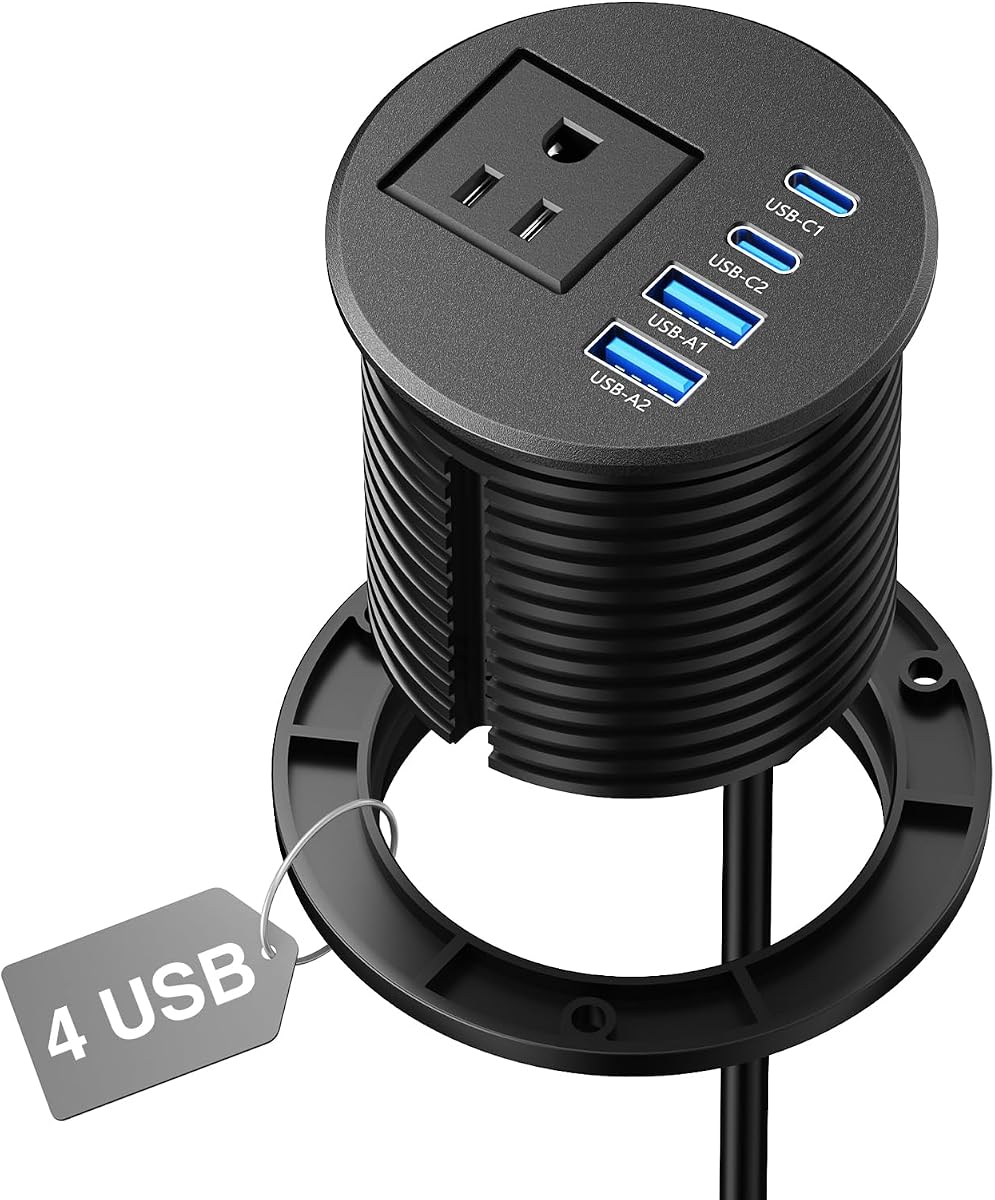
100W GaN USB C output
Dual side power access
Fits 4 inch standard hole
Modern workspaces demand clean power solutions that blend seamlessly into furniture. Desk grommets with USB C offer a sleek way to charge devices without cluttering your desktop with bulky adapters or tangled cords.
We evaluated ten leading models based on power output, installation requirements, safety certifications, and overall build quality. Our analysis covers everything from compact two-inch holes to larger three-inch setups with high wattage delivery.
Each pick highlights specific strengths like fast charging speeds, dual AC outlets, or retractable cables. Keep in mind that prices and availability change frequently, so verify current listings before making your final purchase decision.
4.6Editor score

4.5Editor score

4.5Editor score
As an Amazon Associate we earn from qualifying purchases.
The following table provides a side-by-side comparison of all ten models to help you quickly identify key differences in power output, hole size requirements, and port configurations for your specific desk setup.


This grommet stands out for its powerful 65W USB C port which supports fast charging for most modern laptops. It earned a strong 4.5 star rating from users who appreciate its ability to replace bulky desk adapters with a clean integrated solution.
We may earn a commission when you buy through this link, at no additional cost to you.
The unit includes two AC outlets alongside four USB ports allowing you to power a monitor and charge a phone simultaneously. Its surface mount design keeps the outlet nearly flush with your desktop reducing visual clutter and improving workspace ergonomics significantly.
Installation requires a three inch hole which may be larger than standard cable cutouts but the benefit is worth the effort for high power needs. The included six foot flat plug cord fits easily behind desks without getting caught or creating trip hazards.
This model is ideal for professionals who need reliable power for high demand devices like laptops and monitors directly from their desk surface. If you value speed and organization over minimal installation work this is our top recommendation for 2026.
The 65W USB C port supports PD 3.0 and QC 3.0 protocols ensuring rapid charging for notebooks and tablets without needing a separate power brick.
With 1200 joules of surge protection built into the fireproof plastic housing your connected devices receive extra safety against power spikes and electrical surges.
We may earn a commission when you buy through this link, at no additional cost to you.
For users needing maximum power this grommet delivers an industry leading 100W USB C output via GaN technology. It received a 4.6 star rating for its robust build and ability to handle multiple high wattage devices simultaneously without performance drops or overheating.
We may earn a commission when you buy through this link, at no additional cost to you.
The double sided design allows power access from both sides of the desk making it versatile for shared workspaces or L shaped tables. It includes five outlets split across top and bottom faces providing ample connectivity for complex multi monitor setups.
Installation demands a full four inch hole which is significantly larger than most options but this accommodates the dual sided internal structure. The fire resistant PC and aluminum shell ensures durability and safety during continuous heavy use in professional environments.
Choose this model if you require top tier power capabilities and have the desk space to support a larger cutout. It is perfect for power users who refuse to compromise on speed or connectivity options in their home office setup.
Gallium Nitride GaN allows the grommet to deliver 100W in a compact form factor while running cooler than traditional silicon based chargers.
Power outlets on both the top and bottom faces mean users on either side of a desk can plug in devices without reaching across surfaces.
We may earn a commission when you buy through this link, at no additional cost to you.
This budget friendly option provides essential power and fast charging without breaking the bank. Users rated it 4.5 stars for delivering reliable performance for phones and tablets while maintaining a clean aesthetic that blends into office furniture seamlessly.
We may earn a commission when you buy through this link, at no additional cost to you.
It features one AC outlet and two USB C ports alongside a USB A port covering most common device types. The 2.5 inch hole requirement makes it compatible with many standard desk cutouts found in existing office furniture without needing custom drilling.
The 20W output is sufficient for phones and tablets but not laptops making it best for lighter usage scenarios. The included locking ring ensures a secure fit once installed preventing the unit from wobbling or shifting during daily use.
If you need a simple cost effective solution for charging mobile devices this grommet delivers excellent value. It is particularly well suited for conference rooms where multiple users need occasional charging access without complex power setups.
Supporting PD 3.0 and QC 3.0 ensures your compatible devices charge at their maximum safe speed without wasting energy or generating excess heat.
The 2.5 inch hole size is common in many desks so you can often use existing cable management holes instead of drilling new ones.
We may earn a commission when you buy through this link, at no additional cost to you.
With a stellar 4.8 star rating this grommet excels at mobile charging needs with dual 20W USB C ports. Customers love its compact profile and how seamlessly it integrates into desks to eliminate the clutter of wall adapters on the surface.
We may earn a commission when you buy through this link, at no additional cost to you.
The layout includes two USB C ports and two USB A ports ensuring you can charge multiple phones or tablets at once. It maintains a low profile flush mount design that keeps plugs low and prevents snagging on your desk surface.
Note that the USB C ports are limited to 20W which is perfect for phones but insufficient for laptop charging. For users who primarily need to charge handheld devices this model offers the best balance of size and performance.
This is an excellent choice for home offices or gaming desks where keeping the surface clean is a priority. It provides just enough power for daily mobile needs without the complexity or cost of higher wattage systems.
Having two dedicated USB C ports allows you to charge two modern devices simultaneously without needing extra hubs or adapters.
The 4.8 star rating reflects consistent quality and reliable performance reported by real users over time.
We may earn a commission when you buy through this link, at no additional cost to you.
This model is ideal for desks with limited space needing only a two inch cutout. It achieved a 4.7 star rating for its reliable 20W charging capability and certified safety standards that users trust for daily office environments.
We may earn a commission when you buy through this link, at no additional cost to you.
It features a single AC outlet and USB ports sufficient for powering a lamp while charging a phone or tablet. The compact round design ensures it does not interfere with your desk edge or prevent proper clearance for other accessories.
The ETL certification provides added peace of mind regarding electrical safety and build quality standards. While it lacks high power features the reliability and small footprint make it a strong contender for constrained workspaces.
Choose this if your desk already has a small cable management hole you want to repurpose. It transforms unused gaps into functional power points without requiring extensive modifications to your existing furniture setup.
The two inch hole requirement makes it the smallest option available allowing installation on narrow desks or side tables.
ETL certification ensures the unit meets rigorous safety standards for electrical components and fire resistance.
We may earn a commission when you buy through this link, at no additional cost to you.
Designed for fast laptop charging this unit delivers 65W through its USB C port. While it holds a 4.1 star rating it remains a solid option for users needing more power than standard 20W models in a compact desktop solution.
We may earn a commission when you buy through this link, at no additional cost to you.
The outlet includes two AC plugs and two USB A ports alongside the USB C option. Its minimalist surface mount design helps hide plugs from view reducing visual clutter while keeping cables neatly managed under the desk surface.
Surge protection is included to safeguard connected devices from unexpected power spikes which is critical for expensive electronics. The extra long 6.6 ft cord provides flexibility in positioning the grommet on larger desks or workstations.
If you need laptop charging capability but want to avoid the cost of premium high wattage models this is a middle ground solution. It balances power needs with affordability for home office users.
The 65W USB C port supports PD 3.0 allowing it to charge most ultrabooks and consumer laptops efficiently without a separate charger.
A 6.6 foot extension cord offers more reach for positioning power access points on larger desks without stretching the main power line.
We may earn a commission when you buy through this link, at no additional cost to you.
This grommet features a slim 5mm raised profile that keeps plugs tucked neatly below the desktop surface. Users rated it 4.7 stars for maintaining a smooth wipeable countertop that avoids visual clutter from exposed adapters.
We may earn a commission when you buy through this link, at no additional cost to you.
It provides one AC outlet and three USB ports including two USB C options for simultaneous device charging. The installation process is straightforward requiring only a standard two inch hole and tightening the included locking collar securely.
The design prioritizes aesthetics by ensuring plugs sit flush enough to avoid catching on sleeves or arms. The 6 foot 18 AWG cord ensures enough slack to reach a nearby wall outlet without tension or strain.
Ideal for design conscious users this model brings power access to your desk while preserving a sleek appearance. It suits environments like conference tables where a polished look is more important than high power output.
The 5mm raised profile ensures plugs stay hidden and the surface remains smooth for writing or placing items comfortably.
No electrician is required for installation making it a quick weekend upgrade for any existing desk with a hole.
We may earn a commission when you buy through this link, at no additional cost to you.
This unit stands out for offering eight USB ports alongside two AC outlets for extensive connectivity. It earned a 4.6 star rating for accommodating multiple devices without needing extra power strips under your desk.
We may earn a commission when you buy through this link, at no additional cost to you.
It features four USB C and four USB A ports allowing you to charge many accessories simultaneously. The 3.15 inch hole is larger than average but justified by the high port density and capacity to serve shared workstations.
The AC output supports up to 15A ensuring it can handle standard household devices safely. Its robust design helps keep your workspace tidy by centralizing all charging needs into one recessed location.
Best for shared desks or classrooms this model ensures everyone has access to charging without competing for ports. It is a practical solution for environments where device counts are high and cable management is critical.
With four USB C and four USB A ports you can connect a wide variety of devices without needing external hubs.
Two AC outlets allow you to power small appliances or desk accessories directly from the grommet.
We may earn a commission when you buy through this link, at no additional cost to you.
Unique among this list this grommet includes built-in retractable USB C cables extending up to 2.2 feet. This design eliminates the need for separate charging cables on your desktop keeping the surface clean and organized effectively.
We may earn a commission when you buy through this link, at no additional cost to you.
It features two AC outlets and three USB ports including the retractable option. The 35W USB C output supports fast charging for phones and smaller tablets while the retractable feature keeps cords tucked away when not in use.
Installation requires a 3.25 inch hole but the trade-off is minimal cable clutter once set up. The 45 degree flat plug saves space behind the desk allowing more room for other power adapters or devices.
Best for users who hate visible cords this model keeps your desk pristine while providing accessible power. It is particularly useful for minimalist setups where cable management is a top priority for productivity.
The built-in retractable cables extend and retract smoothly providing power when needed and hiding away to reduce clutter.
A 45 degree flat plug ensures the main cord sits flush against the wall avoiding interference with other items.
We may earn a commission when you buy through this link, at no additional cost to you.
Offering two units per pack this product provides value for multi desk setups or dual workstation offices. It holds a 4.6 star rating for delivering reliable power and charging performance across multiple locations simultaneously.
We may earn a commission when you buy through this link, at no additional cost to you.
Each grommet features two AC outlets and three USB ports including fast charging USB C support. The 6.5 foot cord provides ample reach for typical desk arrangements while maintaining safety standards with ETL listing.
The flush mount design ensures outlets stay hidden and secure once installed. Users appreciate the simplicity of installing two outlets at once to cover different zones in their workspace or shared office environment.
Ideal for households with multiple workspaces this set allows consistent power access across rooms. It is a cost effective way to upgrade several desks without buying individual units separately for each location.
Receiving two units in one package makes it economical to upgrade multiple desks or workstations simultaneously.
ETL listing and over voltage protection ensure each unit meets strict safety requirements for home and office use.
We may earn a commission when you buy through this link, at no additional cost to you.
Choosing the right desk grommet requires considering several factors including power needs, hole size, and safety features. This section breaks down the key elements to evaluate before making your purchase.
USB C power delivery ranges from 20W for phones to 100W for laptops. Determine what devices you need to charge directly from your desk. Higher wattage requires more robust internal components and may cost more but ensures future proofing.
Prioritize 65W or higher if you plan to charge a laptop. For mobile devices only 20W is usually sufficient and saves money.
Models require holes from 2 inches to 4 inches. Check your existing desk cutout before purchasing. Drilling a new hole is possible but requires precision tools and planning to avoid damaging your furniture.
If you have a standard 2.5 inch hole most compact models will fit. Larger 3 or 4 inch units offer more ports but need significant space.
Some grommets include one AC outlet while others offer two. Consider if you need to plug in larger accessories like monitors or speakers alongside your USB devices.
Two outlets provide more flexibility but take up more internal space which might limit USB port count.
Look for built-in surge protection measured in joules to protect your electronics. ETL or UL certification indicates the unit meets independent safety testing standards.
Always choose models with recognized safety certifications to reduce fire or electrical risks in your office.
Most units come with 6 to 6.6 foot cords. Measure the distance to your nearest wall outlet to ensure the cord reaches without tension.
Longer cords provide flexibility but ensure the cord is rated for 18 AWG or higher for safety.
Flush mount designs keep the surface smooth and prevent snagging. Some models have raised profiles which might interfere with writing or placing items.
Select a low profile model if you need a clean surface for productivity tasks.
Dual side units allow access from both sides of the desk which is useful for shared workspaces. Single side units are simpler and cost less.
Choose dual side if you have an L shaped desk or multiple users sharing the space.
Prices vary significantly based on power output and features. Balance your budget with the features you actually need.
Check warranty terms before buying to ensure support if the unit fails within a year.
Ensure your desk hole is clean and free of debris before inserting the grommet. Align the unit correctly so the locking ring sits flush against the underside of the desk for stability.
Plug the main cord into a grounded wall outlet and avoid overloading the AC sockets with high power appliances. Keep the USB ports clean by occasionally wiping them with a dry cloth to prevent dust buildup.
Avoid bending or kinking the power cord behind the desk to prevent internal wire damage. Regularly check the locking ring to ensure it remains tight and does not wobble over time.
Installation on glass is not recommended as the locking ring relies on a solid wooden or composite surface to secure the unit. If you have a glass desk you may need a custom reinforcement plate underneath to distribute the pressure safely.
Yes models with 65W or higher USB C output support MacBook charging. Check the specific wattage rating to ensure it matches your laptop requirements for reliable performance.
You typically need a drill with a hole saw matching the grommet size and a screwdriver to tighten the locking ring. Some existing desk holes may allow installation without drilling.
Most models with ETL or UL certification include grounding features. Verify the specific product details to ensure it meets your safety requirements.
Yes if the countertop is made of wood or a solid material that can be drilled. Ensure the thickness allows the locking ring to engage properly.
PD (Power Delivery) and QC (Quick Charge) are both fast charging standards. PD is common on USB C devices while QC is often used on older USB A chargers. Many units support both.
Most provide 125V at 15A (1500W total) which is standard for household outlets. Do not exceed this total wattage to avoid tripping the circuit.
Painting is not recommended as it may block ports or interfere with heat dissipation. If color matching is necessary choose a model that fits your desk aesthetics.
We reviewed ten excellent models ranging from budget 20W options to premium 100W solutions. The Recessed Power Grommet 65W stands out as the best overall choice for its balance of power and design.
Prioritize hole size and wattage requirements before comparing brands. If you need laptop charging look for 65W or higher while mobile users can save with 20W models.
Remember that prices and availability can change quickly. Check current listings on Amazon to confirm the latest offers before finalizing your order for your next project.