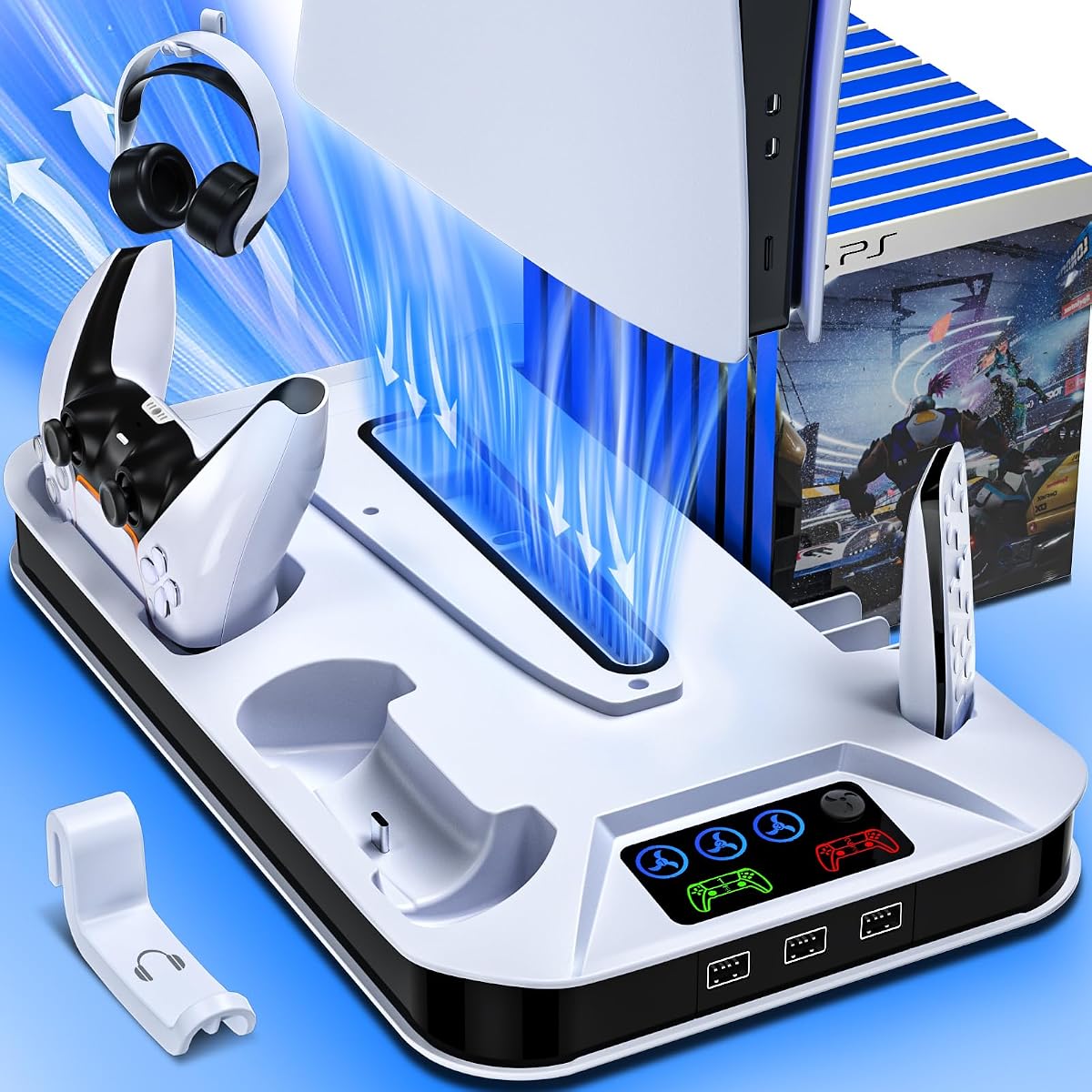
PS5 Slim Pro Cooling Station
4.4Editor score
3 Speed Turbo Fan
Dual Controller Charging
3 USB Hubs Included
This guide compares the top cooling stands for PS5 console to help you choose the best accessory for temperature control and charging.
Keeping your PlayStation 5 cool during long gaming sessions is essential for performance and longevity. A quality cooling stand helps dissipate heat while organizing your controllers and accessories neatly on your desk or shelf.
We evaluated ten top-rated cooling stations based on fan performance, charging speed, compatibility with PS5 models, and overall build quality. Our comparison highlights the best options for vertical and horizontal setups to suit your space.
Each pick showcases key features like fan speeds, USB hubs, and LED indicators to help you decide quickly. Note that product availability and pricing may change over time so check current details before purchasing.
4.4Editor score

4.4Editor score

4.5Editor score
Below is a detailed side-by-side comparison of all ten cooling stands evaluated in this guide to help you find the right fit for your PS5 setup.


This vertical stand combines cooling and charging at an excellent value with a 4.4 rating. It uses a high efficiency turbo fan to dissipate heat from the bottom of your console effectively.
We may earn a commission when you buy through this link, at no additional cost to you.
The cooling system includes three speed settings to match your workload. It also offers two controller charging docks with LED indicators and three extra USB ports for other accessories.
While it lacks support for Edge controllers the standard charging dock works well. The panel adapter ensures a clean fit across Slim Standard and Pro models.
This stand is ideal for budget conscious gamers seeking reliable cooling and organization. It keeps your setup neat while protecting your hardware from overheating.
The turbo fan moves air quickly to reduce console temperature during long gaming sessions.
Charge two controllers simultaneously with fast charging support and clear status lights.
We may earn a commission when you buy through this link, at no additional cost to you.
If you prefer a horizontal setup this stand offers compatibility with all PS5 models including Edge controllers. It features a scalable design that adjusts to fit different console versions snugly.
We may earn a commission when you buy through this link, at no additional cost to you.
A high performance turbo fan provides three speed settings for customized cooling. The integrated charging dock ensures your controllers stay ready for action without extra cables.
Installation is straightforward with included EVA foam and screws. However it lacks USB ports for charging additional devices beyond the controllers.
This option is best for users prioritizing horizontal aesthetics and Edge controller support. It simplifies your desk layout while maintaining strong cooling performance.
The scalable design adapts to Disc Digital and Pro models for a seamless look.
Charges both standard and Edge controllers securely with a push design dock.
We may earn a commission when you buy through this link, at no additional cost to you.
This upgraded stand introduces a temperature probe that adjusts fan speed automatically. It also supports Edge controllers and features vibrant RGB lighting for a dynamic gaming atmosphere.
We may earn a commission when you buy through this link, at no additional cost to you.
You can switch between manual and auto modes easily. The fan remembers your last setting while the controller docks charge fully in just 2.5 hours with clear LED status.
RGB lighting adds visual flair but can be dimmed or turned off via long press. Some users might find the control scheme slightly complex initially.
For those seeking smart features and style this stand delivers great value. It balances intelligent cooling with customizable aesthetics for an immersive setup.
Built in sensors monitor heat and adjust fan speed without manual input.
Nine RGB lighting modes let you customize your desk environment visually.
We may earn a commission when you buy through this link, at no additional cost to you.
With a clean white finish this stand matches the PS5 aesthetic beautifully. It offers essential cooling via a turbo fan and includes a headset holder for organized storage.
We may earn a commission when you buy through this link, at no additional cost to you.
Charging is supported for two controllers with LED indicators. Three USB hubs allow you to charge other devices simultaneously while the smart chip prevents overcharging risks.
Non slip pads ensure stability and the safety screw secures the console firmly. While it lacks Edge controller support it covers most standard use cases effectively.
This stand is perfect for users who value design and safety features. It keeps your console protected and your accessories neatly arranged.
Smart protective chips safeguard controllers from overcurrent and overheating.
Integrated USB hubs reduce cable clutter by consolidating charging points.
We may earn a commission when you buy through this link, at no additional cost to you.
This stand focuses on stability with a safety screw and non slip pads. It supports Edge controllers and includes a media remote slot for easy access.
We may earn a commission when you buy through this link, at no additional cost to you.
Three fan speeds let you adjust cooling power as needed. The design is straightforward without flashy lights which appeals to minimalists.
Memory function saves your preferred fan speed after restarts. It charges controllers efficiently and provides USB ports for additional accessories.
Ideal for users who prioritize reliability over extra features this stand performs well. It keeps your console secure and cool during all types of sessions.
A safety screw prevents accidental tipping or sliding on smooth surfaces.
Dedicated slots for remotes keep frequently used items within reach.
We may earn a commission when you buy through this link, at no additional cost to you.
This stand brings a unique honeycomb lighting pattern with nine distinct modes. It also features auto temperature control to simplify cooling management during play.
We may earn a commission when you buy through this link, at no additional cost to you.
Two controllers charge in 2.5 hours with blue and red status LEDs. The memory function ensures your settings persist after power cycles.
Edge controllers are supported for those using premium accessories. However the lights might be too bright for dark rooms without dimming.
Great for users who want both intelligence and style this stand delivers. It combines automatic cooling with visual appeal effectively.
Honeycomb pattern LEDs add a modern touch to your gaming desk.
Temperature sensors adjust fan speed to maintain optimal console temps.
We may earn a commission when you buy through this link, at no additional cost to you.
Another horizontal option this kit supports Edge controllers and scales to fit any PS5 model. Setup is simple with no tools required thanks to included screws and foam.
We may earn a commission when you buy through this link, at no additional cost to you.
The fan offers three speeds for targeted cooling. It charges controllers directly from the console cable and fits your desk neatly.
While it lacks USB ports the integration simplifies your setup. It keeps cables organized and controllers ready for action.
Choose this if you have limited vertical space or prefer horizontal layouts. It balances form and function effectively for most users.
Horizontal orientation saves vertical space in compact living rooms.
The docking mechanism securely holds both standard and Edge models.
We may earn a commission when you buy through this link, at no additional cost to you.
This premium stand features a touchscreen for precise speed control and auto mode. It includes a large turbo fan and stops charging at 70% to preserve battery life.
We may earn a commission when you buy through this link, at no additional cost to you.
It holds up to 14 game discs and includes slots for headsets and remotes. The smart chip ensures your controllers stay safe during overnight charging.
The build quality and feature density justify the higher cost. It offers comprehensive organization beyond simple cooling.
Best for users wanting top tier control and storage this stand shines. It protects your investment while maximizing accessibility.
Smart chips halt charge at 70% to extend controller battery lifespan.
Multiple slots organize discs and accessories efficiently for easy access.
We may earn a commission when you buy through this link, at no additional cost to you.
This stand highlights a stunning RGB ring light with eight vibrant colors. It offers silent cooling with three speed settings and USB hub ports for extra devices.
We may earn a commission when you buy through this link, at no additional cost to you.
Charging is fast at three hours with clear status LEDs. It keeps your desk tidy by housing discs and controllers in one place.
While it lacks auto fan modes the manual options work well. The lighting adds personality to your gaming area.
Ideal for style focused setups this stand looks great while performing. It balances aesthetics and utility effectively for casual users.
Silent turbo fan maintains low noise during intensive gaming sessions.
Ring lights create a cool atmosphere that enhances your setup.
We may earn a commission when you buy through this link, at no additional cost to you.
This stand supports Type C charging and keeps cables concealed for a tidy look. It includes USB hubs and a headset holder along with a reliable cooling fan.
We may earn a commission when you buy through this link, at no additional cost to you.
It charges controllers in three hours with LED status lights. The durable build ensures stability during daily use.
No Edge controller support limits compatibility slightly. However it covers most standard use cases well.
Choose this if you need versatile charging and durability. It provides a clean solution for managing console heat and accessories.
Type C port allows charging a wider range of modern devices.
Hidden cables reduce visual clutter on your desk or shelf.
We may earn a commission when you buy through this link, at no additional cost to you.
Choosing the right cooling stand involves evaluating fan performance compatibility and organization features to ensure your console stays cool.
Look for stands with multiple speed settings so you can balance cooling power and noise. Turbo fans that blow air from the bottom are most effective for the PS5 design.
Adjustable fans allow you to switch between quiet operation for casual play and high power for long sessions.
Ensure the stand supports your specific model whether Slim Standard or Pro. Some stands include adapters or screws for a secure fit.
Compatibility ensures stability and proper airflow for all console versions.
Dual docks let you charge both controllers at once which reduces downtime between sessions. Check if it supports Edge controllers if you own one.
Fast charging with clear LED status helps you stay prepared for play.
Stands with USB hubs allow you to charge headsets cameras and other accessories without extra cables. This keeps your desk organized and reduces clutter.
More ports mean greater convenience for managing your full setup.
Decide between vertical and horizontal layouts based on your space preferences. Horizontal stands may save vertical height while vertical stands look sleek.
Your desk space and aesthetic preferences should guide this choice.
Look for stands with non slip pads and safety screws to prevent sliding or tipping. Sturdy materials ensure longevity and daily use without shaking.
A stable base protects your console from accidental damage.
Some stands include auto fan control based on temperature or RGB lighting for style. Touchscreens and memory functions simplify usage over time.
These extras add value for users who want advanced control.
Features like headset slots game disc holders and media remote slots help keep accessories organized. This saves time and space during setup.
Good organization enhances your overall gaming experience.
Connect the cooling stand to your console or power adapter and secure the PS5 with the included screw. Make sure the vent is clear to allow proper airflow.
Use the fan speed button to adjust cooling based on your gaming needs. Switch to high speed during intense sessions and lower speeds for quieter use.
Regularly clean dust from the fan vents using a soft brush or compressed air. Keep cables tidy and inspect connections to ensure long lasting performance.
Yes cooling stands improve airflow and help dissipate heat more effectively than a flat surface. They keep your PS5 running smoothly during extended play sessions.
Most modern stands are designed to fit PS5 Slim Standard and Pro models. Some include adapters or screws to ensure a secure fit across versions.
Many stands draw power from the console via a USB cable while others use wall adapters. Check the product details for your preferred power option.
Some stands support Edge controllers while others only work with standard DualSense models. Look for specific Edge compatibility if you own one.
Quality fans are designed to be quiet even at high speeds. You can usually adjust fan speed to balance noise and cooling as needed.
Many models include headset holders USB ports and disc slots to organize your setup. This keeps everything in one place and reduces clutter on your desk.
We found strong options across different price points with reliable cooling and charging features. The Tokluck and white models offer smart features while others prioritize simplicity.
Prioritize fan performance and compatibility with your console model when choosing. Additional features like USB hubs or RGB lighting add convenience depending on your needs.
Check current availability and pricing before buying since details may change. A good stand protects your console and keeps your gaming area neat.