
Gwolves Skoll Mini SK-S Black
4.4Editor score
16000 DPI 3389 sensor
50 grams ultralight weight
Honeycomb ergonomic design
This guide compares the top claw grip gaming mouse for small hands based on ergonomics, sensor quality, weight, and wireless performance for competitive gaming.
Finding the right claw grip gaming mouse for small hands can transform your gaming performance and comfort. A well designed ergonomic shape supports your palm while leaving fingers free for precise clicking during intense sessions.
We compared ten top rated models focusing on sensor accuracy, build quality, weight distribution, and grip compatibility. Each product was evaluated based on user feedback and technical specifications relevant to claw gamers with smaller hands.
Every pick highlights key strengths and trade offs to help you choose confidently. Product availability and pricing may vary over time so always check current listings before making your final purchase decision.
4.4Editor score

4.6Editor score
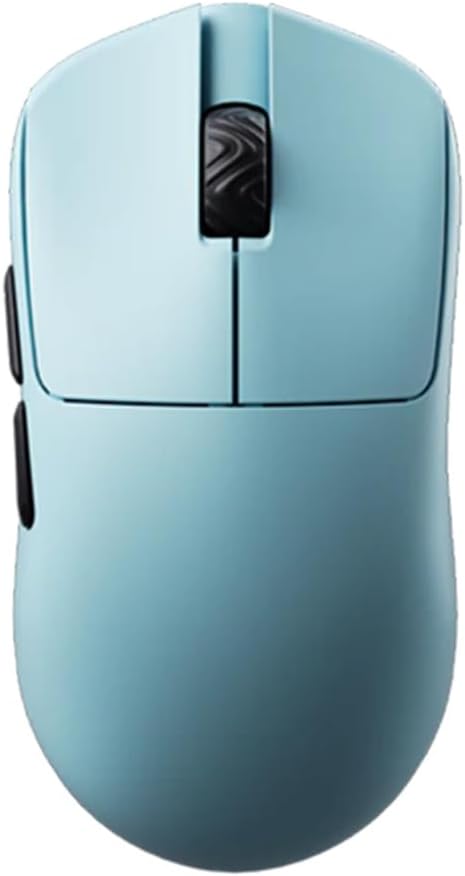
4.6Editor score
The following comparison table highlights key specifications and features across all ten selected models to help you quickly identify which mouse fits your hand size and gaming style best.


The Gwolves Skoll Mini SK-S Black ranks as a top budget option for claw gamers seeking ultralight performance without breaking the bank. Its 50 gram weight and 3389 sensor deliver reliable tracking for competitive play.
We may earn a commission when you buy through this link, at no additional cost to you.
Its honeycomb shell significantly reduces mass while maintaining structural rigidity. The ergonomic contour supports the palm and fingers perfectly for claw grip styles common among small handed users.
While the open design might gather dust over time, regular cleaning keeps it performing smoothly. Software support is basic but sufficient for most users who prioritize hardware over customization.
If you need an affordable mouse with proven sensor tech and claw friendly ergonomics, this model is a strong choice worth considering for value driven gamers.
The honeycomb pattern slashes weight while maintaining durability for extended gaming sessions without compromising structural integrity or comfort.
The shape naturally supports the palm and fingertips allowing for secure control during intense moments without causing strain or fatigue over time.
We may earn a commission when you buy through this link, at no additional cost to you.
The Lamzu Atlantis Mini Champion Edition stands out as our editor's choice for its exceptional blend of ultralight build and top tier sensor performance ideal for small handed claw users.
We may earn a commission when you buy through this link, at no additional cost to you.
Equipped with the PAW3950 sensor it offers unmatched precision and speed. The optical switches ensure durable tactile feedback while the symmetrical design accommodates various grip styles comfortably.
Although it comes at a premium price the build quality and wireless performance justify the cost for serious competitors. The 8K compatible dongle ensures minimal latency during critical moments.
For players seeking flagship features in a compact wireless form this mouse delivers a seamless experience that enhances accuracy and reduces wrist strain significantly over long sessions.
This sensor provides 30000 DPI accuracy and 750 IPS tracking speed ensuring responsive movement even at extreme speeds without acceleration or jitter issues.
Powered by Nordic 52840 MCU it delivers fast response times and energy efficiency with up to 8K polling rate support for competitive esports use.
We may earn a commission when you buy through this link, at no additional cost to you.
The Bloody V7 offers a solid wired alternative for claw gamers who prefer physical buttons and reliable tracking over wireless convenience or ultralight designs.
We may earn a commission when you buy through this link, at no additional cost to you.
Its eight programmable buttons support macros and shortcuts making it versatile for both gaming and productivity tasks. The rubberized coating provides a secure grip even during sweaty sessions.
While it lacks the cutting edge sensor of premium wireless mice its optical sensor delivers consistent performance for casual to moderate competitive play at a lower cost.
If you value customization and tactile feedback without needing wireless freedom this model serves well as a dependable daily driver for small handed claw users on a budget.
Eight fully programmable buttons allow users to assign complex macros or shortcuts enhancing gameplay efficiency without requiring additional keyboard inputs constantly.
The shape is specifically designed to support claw grip styles reducing finger fatigue and ensuring natural hand positioning during extended usage periods.
We may earn a commission when you buy through this link, at no additional cost to you.
The Pulsar X3 LHD Crazylight is a remarkable find for left handed claw gamers seeking an ultralight form factor with flagship sensor performance and hybrid ergonomic support.
We may earn a commission when you buy through this link, at no additional cost to you.
Weighing just 43 grams it feels nearly weightless during rapid movements. The hybrid ergonomic shape blends palm and claw support for lasting comfort even during marathon gaming sessions.
Its XS-1 sensor delivers high precision tracking while DOT skates ensure smooth gliding across various surfaces. This combination makes it ideal for precision focused competitive players.
Although designed for lefties its build quality and feature set make it a standout choice for those struggling to find lightweight options that fit smaller left handed palms perfectly.
The unique shape balances palm support with claw agility allowing users to switch grip styles without losing stability or comfort during intense gameplay.
Optical switches minimize unintended double clicks while offering swift pinpoint responses that enhance click consistency during rapid fire situations reliably.
We may earn a commission when you buy through this link, at no additional cost to you.
The Pulsar X2H mini Wireless offers a balanced wireless experience with its symmetrical shape tailored for aggressive claw grips and reliable PAW3395 sensor performance.
We may earn a commission when you buy through this link, at no additional cost to you.
Its upgraded internal structure ensures shell rigidity and satisfying clicks without rattling. The optical switches minimize accidental double clicks while providing instant actuation for precise input.
Battery life reaches 100 hours at 1000Hz polling making it suitable for extended use without frequent charging. This model is ideal for those seeking consistent wireless performance.
While available as renewed units it still provides flagship features at a competitive entry point. It remains a strong contender for small handed users prioritizing shape and battery longevity.
The higher rear hump and narrower waist provide improved stability for claw users offering better control over quick directional changes during competitive play.
Powered by a Nordic MCU it delivers efficient processing that extends battery life while maintaining blazing fast data transmission for lag free wireless gaming.
We may earn a commission when you buy through this link, at no additional cost to you.
The Corsair IRONCLAW Wireless SE emphasizes programmability and long battery life with its ten programmable buttons and 285 hours of runtime for marathon sessions.
We may earn a commission when you buy through this link, at no additional cost to you.
Its asymmetric ergonomic shape is optimized for right handed palm users but may not suit all claw grips. The MARKSMAN sensor ensures precise tracking across different surface types.
Customizable RGB lighting and iCUE software allow deep personalization making it a strong choice for productivity and gaming hybrid setups. However weight may cause fatigue during fast play.
For users needing extensive customization options and battery longevity this model fits well though claw focused players might prefer lighter symmetrical alternatives for high speed competitive gaming.
Ten programmable buttons let you map complex macros and keybinds enhancing productivity and in game performance through efficient input management and setup.
Surface calibration adapts the sensor performance to different mousepad materials ensuring consistent tracking accuracy regardless of your gaming surface texture or type.
We may earn a commission when you buy through this link, at no additional cost to you.
The V8 Gaming Mouse stands out with an ultra lightweight 36g frame and flagship PAW3950 sensor making it an excellent choice for competitive claw and fingertip gamers alike.
We may earn a commission when you buy through this link, at no additional cost to you.
Its symmetrical shape accommodates various hand sizes and grip styles while the included 8K dongle ensures minimal latency for high speed tracking. Web based drivers simplify setup without extra software.
Optical switches provide faster response times than mechanical alternatives which improves click consistency during rapid fire exchanges. The lightweight shell reduces strain during extended usage periods significantly.
If you need an affordable yet powerful wireless option with 8K readiness and top tier sensor tech this mouse delivers performance that rivals more expensive models in its class.
Adjust settings without installing software through the web driver which saves storage and simplifies configuration for quick access to your preferred DPI and polling rates.
Kailh optical switches offer near zero debounce delay for instant actuation ensuring every click registers accurately without unintended double clicks or missed inputs.
We may earn a commission when you buy through this link, at no additional cost to you.
The Pulsar X2H Wireless White provides a symmetrical wireless option with an elevated hump for aggressive claw grips and reliable PAW3395 sensor performance for consistent gameplay.
We may earn a commission when you buy through this link, at no additional cost to you.
Its symmetrical shell design supports fingertip and claw styles equally making it versatile for different hand preferences. The wireless module ensures 1ms latency for responsive movement.
Battery life extends to 100 hours at full polling speed which is impressive for a compact mouse. The internal structure ensures rigidity and smooth wheel rotation without rattling.
For players prioritizing wireless freedom and ergonomic support this mouse balances weight and performance well. It remains a reliable pick for competitive sessions requiring precision and comfort.
A more slender waist improves stability for aggressive claw grips allowing faster movements without accidental palm contact or loss of control during gameplay.
Integrated Motion Sync ensures sensor data aligns with polling intervals reducing jitter and improving tracking consistency during rapid directional changes on any surface.
We may earn a commission when you buy through this link, at no additional cost to you.
The V6 Gaming Mouse combines a no hole sealed body with ultralight 40g weight and the PAW3950 sensor offering a premium blend of durability and high speed competitive performance.
We may earn a commission when you buy through this link, at no additional cost to you.
Its concave buttons fit fingers naturally improving click positioning and consistency. The symmetrical shape supports both claw and palm grips effectively for small handed players seeking comfort.
A stable 2.4GHz wireless connection ensures lag free movement while the web based driver simplifies adjustments. The inclusion of an 8K dongle boosts performance for demanding users.
For those avoiding honeycomb dust traps but still needing top tier sensor speed this model is ideal. It offers reliable wireless responsiveness and ergonomic comfort for long sessions.
The sealed shell prevents dust and debris from entering the internals while maintaining a lightweight build for consistent long term performance without maintenance issues.
Main buttons are slightly concave to match finger curvature providing clear click positioning and improved consistency during rapid or repeated clicks under pressure.
We may earn a commission when you buy through this link, at no additional cost to you.
The BenQ Zowie S2-C is a professional esports mouse designed for small hands offering driverless simplicity and a paracord cable for unrestricted movement during competitive matches.
We may earn a commission when you buy through this link, at no additional cost to you.
Its symmetrical shape supports palm and claw grip styles with a shorter design that suits smaller palms. The 3360 sensor delivers consistent tracking without software configuration needs.
The included paracord cable reduces drag significantly ensuring freedom of movement on any surface. A 24-step scroll wheel allows precise DPI changes without opening software or menus.
For players who prefer plug and play reliability over customization this model excels. It is ideal for small handed claw users seeking a proven design with long term durability.
No software installation is required allowing immediate use with onboard profiles for DPI and polling rates that suit your setup instantly and efficiently.
The flexible paracord cable minimizes drag and pull during movement ensuring smooth handling and reducing strain on the wrist during intense gaming sessions.
We may earn a commission when you buy through this link, at no additional cost to you.
Selecting the right gaming mouse involves evaluating ergonomics, sensor quality, and weight to match your hand size and play style. This section breaks down the key factors to consider.
For small hands, a compact and symmetrical or ergonomic shape ensures the palm and fingers rest comfortably without stretching. Claw grip requires a mouse that supports the base of the palm while leaving fingertips exposed for precision clicking. Avoid oversized models that force your fingers into unnatural positions.
Look for models specifically marketed as mini or small size with shorter lengths and narrower widths. This ensures your hand controls the mouse without needing to extend fingers excessively.
The sensor determines tracking precision and responsiveness during rapid movements. High DPI sensors like the PAW3950 or 3395 allow flexible scaling without jitter. For competitive play, consistent tracking without acceleration is more important than maximum DPI numbers.
Prioritize models with flagship sensors and adjustable polling rates to match your setup. Ensure the sensor supports your preferred DPI range for both aiming and general navigation tasks.
Lighter mice reduce wrist strain and enable faster flicks. Ultra lightweight models range between 35 to 60 grams. For claw grip, balance is key; a rear weighted mouse can help stabilize hand movement without adding fatigue during sessions.
Consider whether you prefer a hollow honeycomb shell or a solid sealed design. Honeycomb shells reduce weight but may collect dust while sealed shells offer durability and a cleaner aesthetic.
Wireless mice now match wired performance with 1ms latency and stable connections. This freedom is essential for players who dislike cable drag. However, wired mice often provide longer battery life and lower maintenance over time.
Check the battery life and charging methods. For competitive play, ensure the wireless dongle supports high polling rates. If you prefer simplicity, a wired option eliminates charging concerns entirely.
Optical switches offer faster response and higher durability than mechanical switches. They reduce the risk of double clicking caused by contact wear. For aggressive clicking styles, optical switches ensure consistent actuation over millions of cycles.
Look for dust-proof encoders and sturdy scroll mechanisms. The tactile feedback should feel satisfying without excessive effort. Consistent click feel helps maintain accuracy during critical moments.
Software enables DPI adjustments and macro programming. Some players prefer web-based drivers to avoid installing heavy apps. Others need extensive macro support for productivity and gaming integration.
Choose a model that balances simplicity with necessary controls. If you rarely change settings, a plug-and-play model saves time. If you adjust DPI frequently, ensure the buttons or software make this easy.
Claw grip requires a mouse that supports the palm base while freeing the fingers. Symmetrical shapes often work best for this style. Ensure the height is not too high to strain the wrist or too low for support.
Check user reviews from small-handed claw gamers to confirm real-world comfort. Ergonomic features like a curved back or raised hump can significantly improve control and reduce fatigue.
Prices vary widely depending on features like wireless tech, optical switches, and sensor grade. Determine which features matter most to your performance and comfort needs before shopping.
Budget models often provide solid performance without premium extras like 8K polling. High-end models justify costs through durability and wireless efficiency. Choose based on your usage patterns and financial comfort.
Proper grip technique maximizes comfort and performance. Position your palm at the rear of the mouse while curving your fingers naturally. Avoid pressing too hard on buttons to reduce fatigue over time.
Clean the mouse regularly using a soft microfiber cloth to remove dust and oils. For honeycomb models, use compressed air to clear debris from internal surfaces. This keeps sensors and switches functioning optimally.
Store the mouse in a cool dry place away from direct sunlight. Avoid bending cables excessively if you use a wired model. For wireless mice, charge fully before long sessions to ensure consistent performance.
A claw grip gaming mouse supports the palm at the base while leaving fingers arched and free for clicking. This allows faster reactions and precise movements. The shape must fit small hands comfortably to avoid strain during extended use.
Yes, modern wireless mice offer 1ms latency matching wired performance. They eliminate cable drag which helps claw movements. Look for lightweight designs and good battery life to maintain control during competitive sessions.
Measure your hand length from wrist to fingertip. For claw grip, a shorter mouse allows better finger arching. Check product dimensions labeled as small or mini. Try ergonomic reviews from similar users for accurate fit.
DPI preference depends on playstyle and monitor resolution. Most small handed players use 400 to 1600 DPI for balance. Ensure the mouse allows easy switching. A high max DPI is useful but not strictly required.
Honeycomb shells reduce weight effectively but can collect dust over time. They remain durable if cleaned regularly. For hygiene-focused users, sealed designs offer a cleaner alternative. Both types work well for competitive play.
Optical switches last longer and offer faster response than mechanical ones. They reduce double click issues caused by contact wear. For frequent clickers, optical switches ensure consistent performance over millions of actuation cycles reliably.
This guide highlighted ten top models ranging from budget-friendly to premium wireless options. Each offers unique strengths in sensor tech, ergonomics, and design suitable for small handed claw users.
Prioritize comfort and sensor consistency over flashy features. Lightweight builds and ergonomic shapes reduce fatigue allowing longer productive sessions. Match your choice to your grip style and typical gaming duration for best results.
Remember that prices and stock vary. Always check current listings before purchasing. The ideal mouse is the one that feels natural and improves your confidence in every click.