
4K Vlogging Camera Pocket Digital Camera
4.4Editor score
4K Video Recording
330 Degree Rotating Lens
Built-in WiFi Transfer
This guide compares the top cameras for social media content creation in October 2026, evaluating features like resolution, portability, and audio for creators.
Creating high-quality social media content requires the right tools to capture attention and engage audiences effectively. A dedicated camera offers superior image quality and control compared to standard smartphone options for many creators.
We have analyzed the latest models available in the market to determine which devices offer the best balance of performance and usability. Our evaluation focuses on video resolution, stabilization, ease of use, and connectivity features essential for modern platforms.
Each selection in this list highlights specific strengths that cater to different content styles and skill levels. Please note that product availability and specific offers may vary so checking current listings is recommended before making a purchase decision.
4.4Editor score

4.5Editor score

4.3Editor score
This side-by-side comparison highlights the key specifications and unique selling points of each camera model to help you find the perfect fit for your content creation needs.


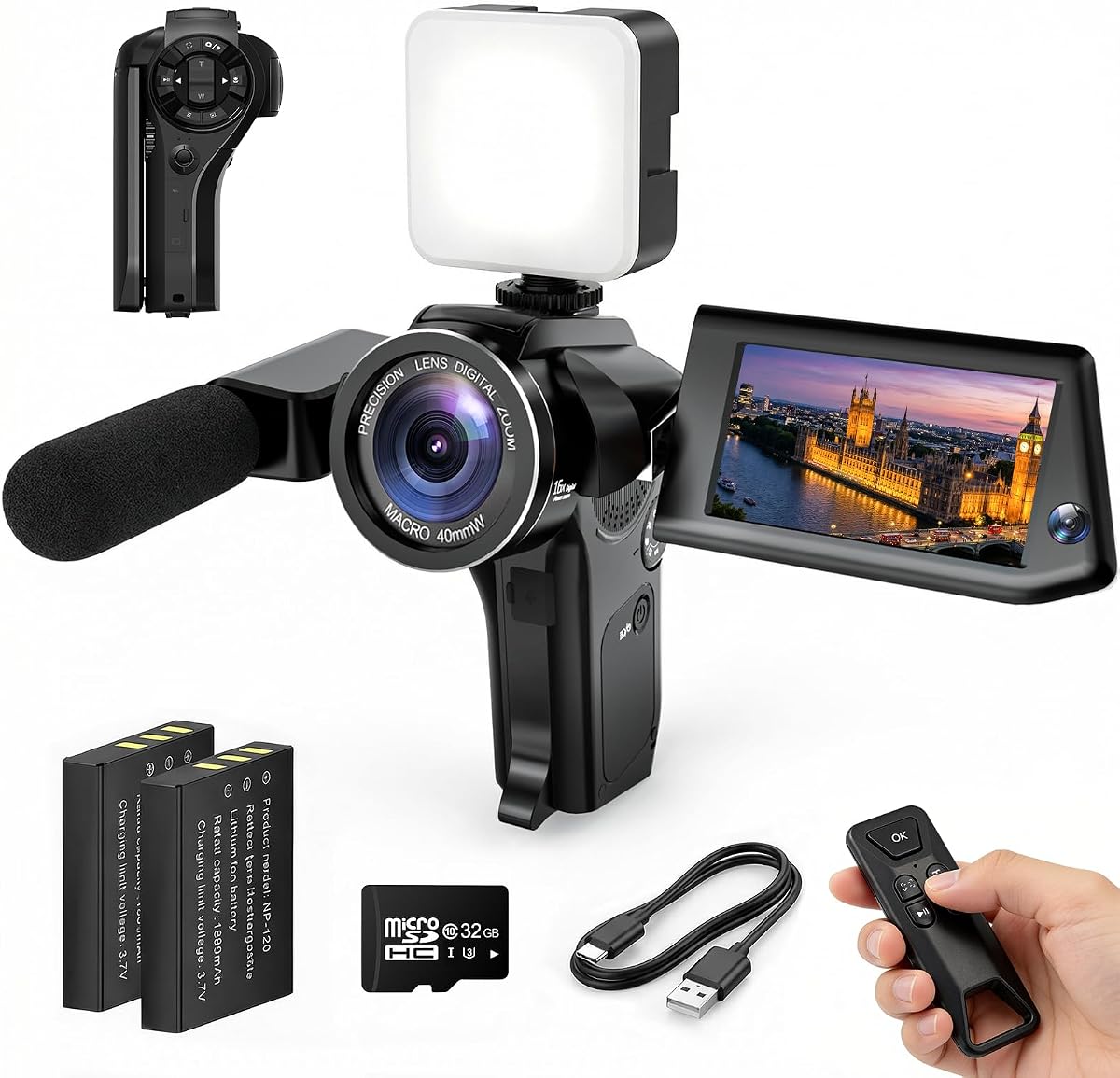


This camera is designed specifically for beginners and first-time content creators who want to produce high-quality videos without a steep learning curve. With a rating of 4.4 stars it has received positive feedback for its ease of use and value proposition.
We may earn a commission when you buy through this link, at no additional cost to you.
The 4K video resolution ensures that your content looks sharp and professional on platforms like YouTube and TikTok. The unique 330 degree rotating lens allows you to frame yourself easily for vlogs without needing to adjust the camera constantly.
While it lacks advanced stabilization found in higher-end models it is sufficient for static shots and slow walking vlogs. The included accessories like the tripod and SD card mean you can start creating immediately without additional purchases.
This camera is ideal for students or hobbyists starting their social media journey. It offers a balance of features and simplicity that makes capturing daily moments and travel vlogs accessible to everyone.
The interface is intuitive allowing users to focus on content rather than technical settings. This ensures that beginners can produce good results from the very first video.
Built-in WiFi allows for quick transfer of files to smartphones. This speeds up the editing and posting process which is crucial for maintaining a consistent social media schedule.
We may earn a commission when you buy through this link, at no additional cost to you.
The DJI Osmo Pocket 3 stands out as a top choice for serious creators who need professional grade footage in a compact form factor. Its high rating reflects its reliability and performance in various shooting conditions.
We may earn a commission when you buy through this link, at no additional cost to you.
The 1-inch CMOS sensor captures stunning detail and dynamic range making it suitable for both indoor and outdoor shooting. The 3-axis mechanical stabilization ensures smooth footage even when walking or moving quickly.
ActiveTrack 6.0 keeps you in focus automatically which is perfect for solo vloggers. The rotating screen makes it easy to switch between vertical and horizontal formats for different social media platforms.
This camera is best suited for creators who prioritize image quality and portability. While it is an investment the results it delivers are comparable to much larger and heavier camera systems.
The larger sensor size compared to typical pocket cameras allows for better low light performance and depth of field. This gives your videos a more cinematic and professional look.
Support for D-Log M color mode provides flexibility for post-production color grading. This is essential for creators who want to maintain a consistent aesthetic across their content.
We may earn a commission when you buy through this link, at no additional cost to you.
This camera offers an impressive array of features including 8K video recording and infrared night vision. It appeals to users who want a versatile device that can handle different lighting conditions and creative requirements.
We may earn a commission when you buy through this link, at no additional cost to you.
The 88MP photo resolution allows for detailed still images that can be cropped or printed without losing quality. The external microphone support ensures clear audio which is often the missing link in consumer camera videos.
IR night vision provides the ability to record in dark environments which is useful for camping or low light travel vlogs. The included stabilizer and remote control add value and convenience to the setup.
It is a strong choice for creators who want high resolution and versatility without breaking the bank. The webcam mode also makes it suitable for online teaching or streaming when connected to a computer.
IR night vision allows for creative shots in the dark. This feature adds a unique dimension to your content that standard cameras cannot capture.
External microphone support means you can upgrade your audio separately. Good audio is critical for retaining viewer attention on social media platforms.
We may earn a commission when you buy through this link, at no additional cost to you.
This camera focuses heavily on high resolution stills and video with a 3.5 inch flip screen. It is a solid option for those who want to share both photos and videos on social media from one device.
We may earn a commission when you buy through this link, at no additional cost to you.
The 96MP capability allows for detailed prints and cropping flexibility. The flip screen makes framing vlogs and selfies much easier compared to fixed screen models.
HDR imaging helps in handling high contrast scenes like landscapes with bright skies. This ensures details are visible in both shadows and highlights which improves overall image quality.
Suitable for users who prioritize still photography alongside video. The inclusion of two batteries ensures you can shoot for longer periods without worrying about power.
High resolution photos ensure your content looks crisp on high definition screens. This is important for platforms where image quality drives engagement.
The flip screen is a vital tool for vloggers. It allows you to see yourself in real time ensuring you are framed correctly.
We may earn a commission when you buy through this link, at no additional cost to you.
This mini camcorder is designed for simplicity and portability. It fits easily into a pocket making it ideal for capturing spontaneous moments during travel or daily life.
We may earn a commission when you buy through this link, at no additional cost to you.
The seven-hour battery life is a standout feature allowing for extended recording sessions without needing to charge. This is useful for long vlogs or events where you cannot plug into power.
While the image quality is not comparable to 4K dedicated cameras it is sufficient for casual sharing. The manual rotation of the lens allows for flexible framing but requires effort.
Best for users who want a backup camera or a device for kids to use. It removes technical barriers and focuses purely on capturing memories quickly.
One-button recording allows you to start filming instantly. In social media capturing the moment quickly is often more important than technical perfection.
Long battery life reduces the risk of missing a moment due to power loss. This reliability makes it a practical tool for outdoor adventures.
We may earn a commission when you buy through this link, at no additional cost to you.
Similar to the first entry this camera offers 4K recording with a focus on ease of use. The 330 degree rotating lens is its defining feature for self-recording scenarios.
We may earn a commission when you buy through this link, at no additional cost to you.
The wide-angle lens helps capture more of the scene which is useful for travel vlogs. The WiFi capability ensures you can share content quickly via your smartphone.
It comes with a travel bag and mini tripod making it a complete kit. This reduces the need to buy extra items and simplifies the packing process.
Recommended for travelers who need a reliable light camera. It balances resolution with convenience making it a strong contender for social media vlogs.
Lightweight design ensures it does not add significant weight to your luggage. This allows you to carry more for your trip while still capturing content.
Direct transfer to mobile devices speeds up the workflow. Quick posting helps maintain audience engagement with timely content.
We may earn a commission when you buy through this link, at no additional cost to you.
This camera distinguishes itself with a Picture-in-Picture mode. This allows you to record the scene and your reaction simultaneously which is perfect for tutorials and reviews.
We may earn a commission when you buy through this link, at no additional cost to you.
The perfect rating suggests high satisfaction with this specific feature. It adds a personal touch to videos that is hard to replicate with standard camera setups.
The flip screen is essential for framing when using the PiP mode. WiFi connectivity ensures easy sharing of these complex files to social media platforms.
Ideal for creators who focus on reviews or family memories. It captures the emotion of the moment alongside the action which enhances storytelling.
Showing your reaction helps viewers connect with the content on a deeper level. This is key for building a loyal audience on social media.
Capturing both the event and your joy makes for timeless memories. This camera is built specifically for those who value emotional connection.
We may earn a commission when you buy through this link, at no additional cost to you.
This kit transforms your smartphone into a professional setup. It includes all necessary accessories to improve stability lighting and audio without needing a dedicated camera.
We may earn a commission when you buy through this link, at no additional cost to you.
The wireless microphone ensures clear sound which is often overlooked by beginners. The RGB fill light allows you to control the mood and quality of your video lighting.
The flexible tripod adds creative angles that are not possible with standard stands. This versatility is crucial for engaging content that stands out in feeds.
Perfect for those who already have a high quality smartphone. It is an efficient way to upgrade your production value without buying new hardware.
Clear sound is essential for retaining viewers. A dedicated wireless mic eliminates the noise issues common with built-in phone microphones.
Proper lighting makes a significant difference in video quality. The RGB light helps you look your best even in poor environments.
We may earn a commission when you buy through this link, at no additional cost to you.
The key feature here is the automatic face tracking capability. This ensures you remain in focus and center frame even as you move around during recording.
We may earn a commission when you buy through this link, at no additional cost to you.
Gesture control allows you to start and stop recording without touching the phone. This adds a layer of convenience that is ideal for solo creators.
The dual wireless microphones offer excellent sound isolation and quality. This is important for interviews or situations where you need to capture ambient sound.
Great for live streaming and dynamic presentations. The height of the stand ensures you can shoot from an ergonomic angle without bending.
Gesture control enables natural movement while recording. This removes the barrier of physical interaction with the device allowing for fluid performance.
Dual mics allow for capturing multiple voices or separate narration. This expands the range of content you can produce with a single setup.
We may earn a commission when you buy through this link, at no additional cost to you.
While primarily a webcam this device is excellent for live social media streaming from a desk. It offers full HD quality which is standard for most platforms.
We may earn a commission when you buy through this link, at no additional cost to you.
Auto Light Balance adjusts to your environment ensuring you look bright and visible. This is a critical feature for indoor streaming where lighting may change.
The privacy slide provides physical security when you are not broadcasting. This peace of mind is essential for creators who work from home.
Best for streamers who need a reliable stationary camera. It integrates easily with streaming software and ensures consistent output without technical issues.
Consistency is key for live broadcasting. A webcam that connects reliably and maintains settings allows you to focus on your content.
Full HD resolution ensures your face is clear to viewers. Clear visuals build trust and professionalism with your audience.
We may earn a commission when you buy through this link, at no additional cost to you.
Selecting the right camera involves balancing various features to match your specific content needs and budget constraints. This guide breaks down the critical factors to consider.
Video resolution determines the clarity of your footage. Higher resolutions like 4K or 8K allow for sharper details and more flexibility in cropping during editing. However ensure that your editing workflow can handle larger files.
Look for cameras that support high resolutions to ensure your content remains relevant as platforms upgrade their quality standards.
Stabilization prevents shaky footage which is crucial for handheld shooting. Optical or digital stabilization helps smooth out movements during walking vlogs or action sequences.
Choose a model with robust stabilization if you plan to shoot on the go to maintain professional looking results.
Many social media videos are shot indoors or in varying light conditions. A camera with good low light performance will produce less grainy footage in dim environments.
Prioritize models with larger sensors or specific low light modes to ensure consistent quality throughout the day.
Audio quality is just as important as video quality. Cameras that support external microphones allow for clear sound which is vital for keeping viewers engaged.
Ensure the camera has a dedicated input or strong built-in audio features to handle sound recording effectively.
Modern creators need to transfer content quickly to mobile devices. WiFi or Bluetooth connectivity simplifies the process of getting footage to editing apps on your phone.
Select cameras with seamless connectivity options to streamline your posting workflow and save time.
Extended recording sessions require reliable battery power. Cameras with long battery life reduce the need for frequent charging which is essential for travel or events.
Consider models that allow for charging while recording or include spare batteries to maximize uptime.
A user-friendly interface allows you to focus on creativity rather than technical settings. Features like auto focus and flip screens make vlogging significantly easier.
Beginners should prioritize intuitive controls to avoid frustration and improve production speed.
Social media often requires capturing moments on the go. A lightweight and compact camera ensures you can carry it everywhere without it becoming a burden.
Check the dimensions and weight of the camera to ensure it fits your lifestyle and carrying preferences.
Before starting your first recording session familiarize yourself with the camera's settings. Spend time adjusting the focus and exposure to ensure you get the best results in your typical environment.
Keep your lens clean by using a microfiber cloth to remove dust and fingerprints. This simple step prevents blurry spots and ensures your footage remains sharp throughout your shoot.
Store your camera in a dry and cool place when not in use. Using a protective case or pouch prevents damage from bumps and moisture during transport.
While smartphones are capable a dedicated camera often provides better control and image quality. For serious creators investing in a dedicated camera can significantly improve production value and audience retention.
4K video ensures your content looks sharp on modern displays and allows for flexible cropping. Many platforms support 4K upload which helps future-proof your content as technology advances.
Audio is critical as viewers often prioritize sound over video quality. Poor audio can cause viewers to stop watching. using external microphones helps maintain engagement and clarity.
Most modern cameras allow you to transfer photos and videos to your smartphone. This integration helps with quick editing and sharing which is essential for social media workflows.
Beginners should look for cameras with intuitive controls and automated features. Models that offer flip screens and built-in WiFi make the learning process easier and more enjoyable.
Many cameras now include digital stabilization features that help smooth out shakes. Using a tripod or stable surface also helps reduce unwanted movement during recording.
The right camera for you depends on your specific goals and budget. Whether you choose a budget-friendly option or a professional model the key is to find a tool that fits your workflow.
Focus on features that directly impact your content such as video quality and audio capabilities. Prioritizing these aspects ensures your social media posts stand out and engage your audience effectively.
Remember to check current availability and specific offers before purchasing. Staying informed about the latest deals can help you get the best value for your investment.