
ASRock DeskMini X300 2.5G Series Mini PC
4.2Editor score
Ultra compact 1.92L form
AM4 AM AM4 Ryzen
Triple display support
This guide compares the top barebone PCs with AMD processors for performance and value across gaming and work.
Barebone PCs with AMD processors offer a flexible foundation for building custom desktop systems tailored to specific needs and budgets.
We evaluated ten leading models based on processor power, expandability, connectivity, cooling efficiency, and overall value for diverse use cases.
Each pick highlights key strengths and tradeoffs to help you choose wisely while keeping in mind that product availability and pricing may change.
4.2Editor score

4.0Editor score

3.1Editor score
This side-by-side comparison highlights the core specifications and strengths of each barebone AMD mini PC to simplify your selection.





This barebone PC offers exceptional flexibility with the Ryzen 7 PRO 8845HS and Radeon 780M iGPU delivering solid everyday and light gaming performance.
We may earn a commission when you buy through this link, at no additional cost to you.
Its standout OCuLink port enables external GPU connections with minimal latency while dual USB4 and dual 2.5G LAN ports ensure versatile connectivity.
The aluminum chassis balances durability with cooling efficiency though the barebone setup requires additional investment for RAM and storage before use.
Ideal for enthusiasts and professionals seeking a compact system with expandable GPU and networking capabilities that adapt to evolving workloads.
The 8 core 16 thread design with up to 5.1GHz turbo clock provides strong multitasking and creative workload performance.
OCuLink delivers near PCIe performance for external graphics which is rare in mini PCs and ideal for advanced gaming or rendering.
We may earn a commission when you buy through this link, at no additional cost to you.
The GEM12+ excels at multi-display setups with support for four 4K outputs and a dedicated OCuLink port for external GPUs.
We may earn a commission when you buy through this link, at no additional cost to you.
Its vapor chamber cooling ensures stable performance under heavy loads while three BIOS modes let you balance noise and power consumption.
Note that OCuLink does not support hot-swapping so plan GPU connections before powering the system on and off for safety.
Best suited for users needing multiple screens and GPU expansion without sacrificing the compact footprint of a mini PC system.
With 64Gbps OCuLink you can attach high-performance GPUs like the RTX 4070 or 4080 with minimal latency.
Combine HDMI 2.1 dual USB4 and DP 1.4 to drive four 4K screens simultaneously for immersive productivity or media.
We may earn a commission when you buy through this link, at no additional cost to you.
This PRO variant adds fingerprint recognition for quick secure access and includes a customizable built-in display for monitoring system stats.
We may earn a commission when you buy through this link, at no additional cost to you.
OCuLink support enables external GPUs while quad 4K output and DDR5 memory provide flexibility for modern workflows and entertainment.
As with other barebone options you must supply RAM SSD and operating system separately but the system grows with your needs.
Choose this model if security and custom monitoring are priorities alongside powerful compute and GPU expansion in a compact chassis.
Built-in fingerprint recognition simplifies login without complicated passwords enabling quicker and safer access to your device.
Dedicated software lets you monitor CPU GPU and RAM data and set personalized background images on the display.
We may earn a commission when you buy through this link, at no additional cost to you.
Unlike most mini PCs the DeskMeet X300 includes a full PCIe x16 slot allowing full size graphics cards for serious gaming or workloads.
We may earn a commission when you buy through this link, at no additional cost to you.
Its included 500W power supply and support for desktop Ryzen AM4 CPUs make it a versatile foundation for custom builds.
While not the smallest option it delivers desktop-level expandability while maintaining a compact footprint compared to standard towers.
Best for users who need discrete GPU power and maximum component choice without sacrificing too much space.
A 3.0 x16 slot allows full size graphics cards for gaming or rendering unlike most mini PCs that rely on integrated graphics.
The included PSU supports higher wattage components reducing the need for external power bricks in your setup.
We may earn a commission when you buy through this link, at no additional cost to you.
This model supports triple 8K display outputs and includes OCuLink for external GPUs making it great for high resolution workflows.
We may earn a commission when you buy through this link, at no additional cost to you.
Full-blood USB4 with PD input and output adds flexible power options while DDR5 memory ensures smooth multitasking and rendering.
OCuLink requires one M.2 slot and the adapter plate and it is not hot-swappable which may limit frequent GPU changes.
Choose this for professional use with multiple high-resolution monitors and moderate GPU needs in a compact form.
HDMI 2.1 USB4 and DP 1.4 let you connect three independent displays for collaborative work or immersive multimedia.
OCuLink provides PCIe4.0 x4 speeds for external GPUs which surpasses Thunderbolt and USB4 for performance.
We may earn a commission when you buy through this link, at no additional cost to you.
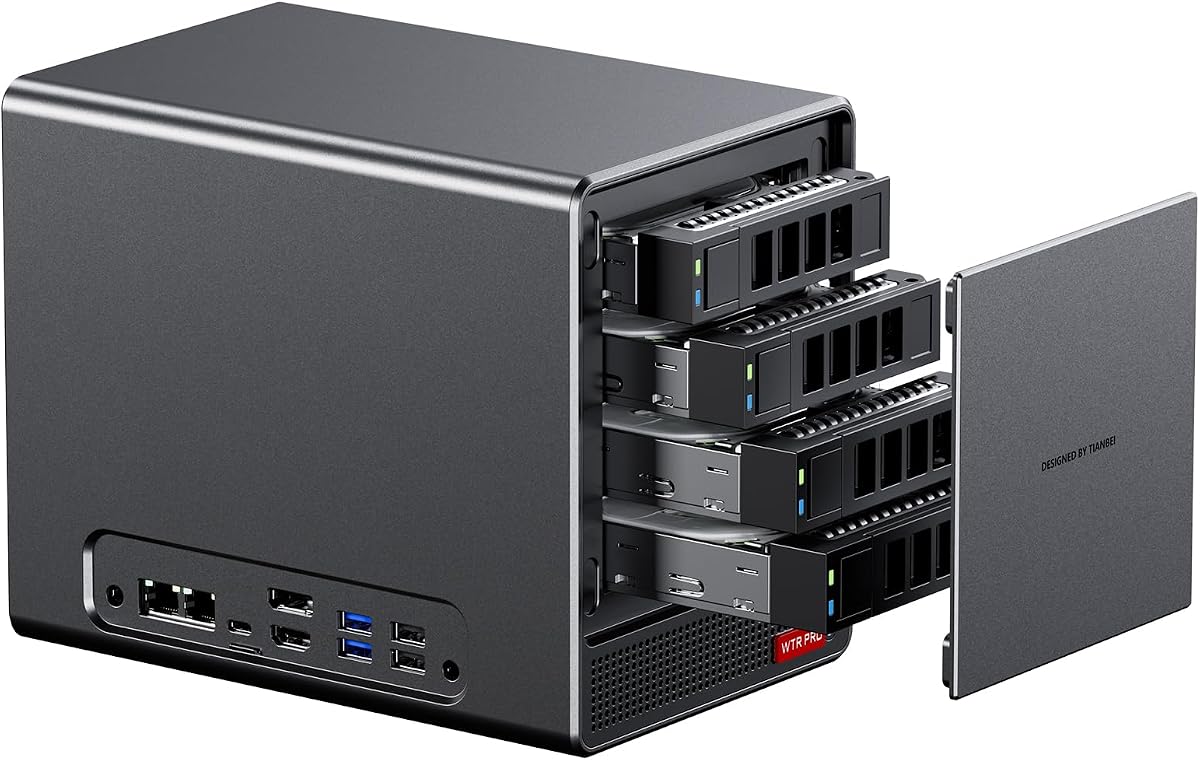
Built for storage and networking this system offers four SATA bays plus two M.2 NVMe slots for massive expandability.
We may earn a commission when you buy through this link, at no additional cost to you.
Its low power usage between 15W and 25W makes it ideal for 24/7 soft routing NAS or home server applications.
Triple 4K outputs allow multi-screen monitoring while dustproof design and intelligent fan control ensure stable long-term operation.
Best for users seeking a dedicated home server or media storage solution with minimal power draw and noise.
With four 3.5 SATA bays and two M.2 slots you can build a robust storage array up to 96TB total.
Through-the-wall construction with a 12CM fan keeps temperatures low and operation silent for continuous use.
We may earn a commission when you buy through this link, at no additional cost to you.
Measuring just 1.92 liters this is one of the smallest full barebone kits available with support for many Ryzen desktop CPUs.
We may earn a commission when you buy through this link, at no additional cost to you.
It supports triple displays via HDMI DP and VGA plus includes storage options and a wireless ready slot for versatility.
Limited to DDR4 memory and modest power headroom it suits lightweight workloads office use or compact home setups.
Pick this when space is at a premium and you want a desktop CPU in a tiny chassis.
A complete barebone kit for building an incredibly space-saving desktop PC measuring just 1.92 liters in volume.
Supports Ryzen 5000 4000 3000 and 2000 series CPUs up to 65W for flexible performance options.
We may earn a commission when you buy through this link, at no additional cost to you.
This premium mini PC features the Ryzen AI 300 Series with a dedicated NPU delivering up to 50 TOPS for AI workloads.
We may earn a commission when you buy through this link, at no additional cost to you.
Its toolless 0.6L chassis supports Wi-Fi 7 and four 4K displays while maintaining eco-conscious durability and 24/7 reliability.
As a barebone option it requires DIY assembly but offers sleek design and next-level AI performance for forward-looking tasks.
Choose this for professional or home office use where AI acceleration and connectivity standards matter most.
Cutting-edge XDNA2 NPU with up to 50 TOPS delivers responsive dynamic computing for AI enhanced workflows.
Radeon 800M graphics support up to four 4K displays for stunning visual clarity across monitors.
We may earn a commission when you buy through this link, at no additional cost to you.
With four SATA and two M.2 bays this NAS-focused mini PC offers up to 96TB of storage flexibility for home labs or servers.
We may earn a commission when you buy through this link, at no additional cost to you.
Dual 2.5G LAN and low power usage between 15W and 25W make it energy-efficient for always-on roles.
Linux users may need a simple udev rule to prevent SATA speed reductions under load which is noted in documentation.
Best for storage servers or virtualization where maximum capacity and network performance are key.
Supports 4 SATA drives and 2 M.2 NVMe slots enabling massive storage flexibility up to 96TB.
Dual 2.5G LAN plus multiple USB and display ports ensure flexible connections for servers and peripherals.
We may earn a commission when you buy through this link, at no additional cost to you.
Tool-free access makes component upgrades quick and easy in this slim chassis featuring Ryzen 200 Series CPUs.
We may earn a commission when you buy through this link, at no additional cost to you.
It supports Wi-Fi 7 and dual 2.5G LAN plus delivers four 4K displays for productivity and media applications.
While not the latest Ryzen generation the efficient design and connectivity make it a solid choice for compact workstations.
Ideal for users who value toolless assembly and modern connectivity standards.
Tool-free design allows quick access and easy component upgrades without hassle for streamlined maintenance.
Enjoy ultrafast connectivity with Wi-Fi 7 and Bluetooth 5.4 plus dual 2.5G LANs.
We may earn a commission when you buy through this link, at no additional cost to you.
Choosing the right barebone AMD mini PC depends on balancing CPU power, expandability, connectivity, and cooling for your use case.
Look for recent Ryzen PRO or Ryzen 7000/8000 series CPUs for strong single-thread and multi-thread performance. More cores help with multitasking and rendering.
Confirm how many DDR5 or DDR4 slots are available and whether M.2 slots support PCIe 4.0. Higher capacities future-proof your system for demanding workloads.
Check for OCuLink or Thunderbolt ports if you plan to use an eGPU. OCuLink delivers near native PCIe performance and is ideal for gaming or professional graphics.
Prioritize USB4 or USB 3.2 Gen2 for fast data transfers and ensure enough video outputs for your monitor setup. Ethernet and Wi-Fi standards affect network speed.
Efficient cooling systems like vapor chambers or heat pipes help maintain sustained performance without throttling. Consider fan noise for office or home use.
Energy-saving designs reduce power costs and heat output. Lower wattage CPUs and power-efficient architectures are beneficial for always-on systems like servers.
Verify that your chosen OS supports the hardware especially for Wi-Fi and chipsets. Most barebone units require manual OS installation and driver setup.
Metal chassis and recycled materials often signal better longevity. Check warranty length and support availability from the manufacturer for long-term reliability.
Install compatible RAM and storage drives carefully using anti-static precautions before powering the unit for the first time.
Use updated drivers for chipset networking and graphics to ensure stability and unlock full performance potential.
Keep vents clear and clean dust periodically to maintain cooling efficiency especially in multi-tasking or 24/7 scenarios.
Most barebone models do not include an OS so you must install Windows Linux or another system yourself. Some sellers offer keys separately.
Only units with PCIe slots or OCuLink support allow dedicated GPUs. Most rely on integrated Radeon graphics but OCuLink offers eGPU options.
Newer models use DDR5 SO-DIMM up to 5600MHz while older AM4 models use DDR4 up to 3200MHz. Check motherboard specs for compatibility.
OCuLink generally provides lower latency and near full PCIe performance. Thunderbolt is more ubiquitous but suffers higher overhead in many cases.
Yes especially NAS-focused models with low power use and robust cooling. Ensure proper ventilation and use reliable power sources.
Many models support 2 to 4 displays via HDMI DisplayPort and USB4. Verify output counts and resolutions before planning multi-screen setups.
Use USB or built-in tools provided by the manufacturer. Follow official instructions carefully to avoid issues during updates.
Light gaming works well with integrated Radeon graphics. For AAA titles use OCuLink or PCIe GPUs where supported or consider larger mini towers.
Our top selections balance raw performance expandability and smart connectivity for varied needs from gaming to home servers.
Prioritize CPU generation GPU support and cooling when building a long-lasting system that grows with your workloads.
Check current stock and shipping details before ordering since models and bundles can change frequently on major retailers.