
Pankia Box Physical Click Keyboard Auto Clicker Mouse Jigglier Game Assistance Hang Up Artifact
3.2Editor score
Adjustable clicking arm parts
Supports keyboard and mouse
Simple setup without software
This guide compares the top ten automated keyboard clicker tools for gamers and professionals needing reliable hardware assist and prevent inactivity efficientl
Automated keyboard clickers are specialized hardware tools designed to simulate physical keystrokes and mouse clicks without manual intervention. These devices help users keep systems active during idle periods or automate repetitive tasks safely without software conflicts on modern operating systems.
We evaluated ten top-rated hardware clickers based on build quality, customization options, and compatibility across devices. Our assessment focuses on physical durability, speed settings, and ease of use for diverse applications ranging from gaming to routine office maintenance.
Each pick highlights key features and realistic use cases to help you find the right fit for your setup. Please note that pricing and availability fluctuate frequently so verify current offers before making your final purchase decision today.
3.2Editor score

4.0Editor score

4.3Editor score
This table provides a side-by-side comparison of all ten hardware clickers to help you identify the most suitable device for your specific requirements and budget constraints.




This Physical Keyboard Clicker stands out as our top pick due to its exceptional programmability and versatile speed controls that cater to both casual and power users seeking precision automation.
We may earn a commission when you buy through this link, at no additional cost to you.
It offers high customization allowing you to define loop times intervals and random ranges which ensures your clicking patterns look organic and reduce the risk of detection during online activities or gaming sessions.
The main trade-off involves careful attention to speed limits as exceeding five clicks per second can cause heat damage but this is a reasonable caution for preserving device longevity during extended usage.
Anyone needing a robust physical tool for repetitive tasks without software dependencies should choose this model as it delivers consistent performance and reliability for game assistance and activity keeping needs.
You can define loop times and random ranges to create unique patterns that mimic human behavior effectively during long running tasks.
Each of the three ports allows separate speed adjustments so you can tailor click rates precisely for different keys or mouse interactions.
We may earn a commission when you buy through this link, at no additional cost to you.
The Pankia Auto Keyboard Clicker is an ideal budget choice for users who need basic automatic clicking without complex software setup or advanced programming capabilities.
We may earn a commission when you buy through this link, at no additional cost to you.
It provides fifteen distinct random speeds across three ports giving you enough variety to handle standard tasks while keeping the interface simple and accessible for non technical users.
While it lacks advanced timing features found in pricier models its core function of physical clicking remains effective for keeping systems active or automating simple repetitive sequences reliably.
Buyers on a tight budget seeking a straightforward solution should start with this model as it offers solid value and reliability for fundamental keyboard automation tasks.
You can choose from fifteen different random speeds across three ports to match your specific task requirements easily.
Pressing the button for three seconds starts the device while indicator lights show the current mode clearly without confusing menus.
We may earn a commission when you buy through this link, at no additional cost to you.
This premium Auto Keyboard Clicker delivers top tier performance with adjustable height and a wide random time range ensuring it fits any keyboard while mimicking natural human click patterns accurately.
We may earn a commission when you buy through this link, at no additional cost to you.
The rubberized cover protects your keys from damage and reduces noise making it suitable for shared spaces while the lack of programming simplifies setup for immediate use without technical hurdles.
It is priced higher than basic models but the superior build quality and flexibility make it a worthwhile investment for users who prioritize durability and adaptability in their hardware tools.
Those seeking a high quality reliable tool for long term use should invest in this model as it combines safety convenience and precise control for optimal automation results today.
The device can be adjusted to fit different heights of keyboards ensuring a secure and stable connection on any surface.
Set random click times between zero point one seconds and nine seconds to create realistic and unpredictable clicking patterns easily.
We may earn a commission when you buy through this link, at no additional cost to you.
This ABC tool is distinguished by its digital display and complex logic groups allowing users to construct highly specific click sequences with precise timing and execution rules.
We may earn a commission when you buy through this link, at no additional cost to you.
It supports combining fixed and random times with press durations offering deep customization that can meet niche requirements for automated testing or specific application interactions without software.
However the complexity of its settings may overwhelm casual users who prefer simpler interfaces and the device relies on USB power which can limit portability compared to battery alternatives.
Advanced users needing precise control over timing logic should consider this model as it offers unmatched flexibility for constructing intricate automated tasks with physical hardware reliability.
The built-in digital display clearly shows click speed numbers and timing parameters for instant feedback on current settings.
Adjust the travel distance and direction of the click head to target specific keys or mouse areas accurately.
We may earn a commission when you buy through this link, at no additional cost to you.
This Physical Click Auto Keyboard tool ensures your system stays active by using random intervals that closely mimic human activity to prevent offline status on various online platforms effectively.
We may earn a commission when you buy through this link, at no additional cost to you.
Its physical design means no software installation is required which enhances security and performance consistency across different environments while the low noise motor keeps your workspace quiet during operation.
While the interface is basic compared to programmable units the core function of random clicking and durability makes it a trustworthy choice for keeping games or sessions running smoothly.
Users seeking a secure hardware solution for preventing inactivity should choose this model as it delivers reliable performance without compromising system integrity or user privacy.
Customize clicking with random intervals to mimic human activity more closely enhancing the effectiveness of the tool.
Unlike software solutions this physical clicker works independently of your computer software ensuring consistent performance without risk.
We may earn a commission when you buy through this link, at no additional cost to you.
The Pankia Box offers a standard solution for automated clicking with three ports allowing independent speed adjustments to accommodate different keys or simultaneous interactions on your keyboard.
We may earn a commission when you buy through this link, at no additional cost to you.
It features an adjustable clicking arm with three parts for better positioning and ensures your screen stays active without manual input making it suitable for general gaming and office assistance.
Users must avoid exceeding five clicks per second to prevent heat damage which limits its suitability for high speed tasks but for typical use it performs adequately.
Those looking for a straightforward clicker with adjustable speeds should consider this model as it provides essential features for keeping devices active reliably and affordably.
All three ports can adjust the speed separately allowing different click rates to meet various specific needs.
This device supports most keyboards and mice making it suitable for a variety of clicking applications efficiently.
We may earn a commission when you buy through this link, at no additional cost to you.
This clicking arm serves as a modular component designed to replace or extend the capabilities of the Pankia Box unit for users needing extra positioning flexibility for their setup.
We may earn a commission when you buy through this link, at no additional cost to you.
It features three adjustable parts that make it easier to reach specific keys on the keyboard but cannot function independently without the main controller box for power and timing.
Buyers should be aware that this is not a standalone device so it is strictly for those who already own the compatible Pankia Box system or need a spare part for repairs.
If you need to adjust your clicking reach or replace a damaged component this arm provides the physical utility required to maintain your existing automated system effectively.
This clicking arm works only with the Pankia Box unit providing modular flexibility for your existing setup.
The arm has three adjusting parts making it easier to click on the keyboard at specific angles.
We may earn a commission when you buy through this link, at no additional cost to you.
These keyboard clickers are mechanical switches designed for replacement or custom 3D printed projects providing a satisfying tactile feedback with durability exceeding fifty million cycles for long term use.
We may earn a commission when you buy through this link, at no additional cost to you.
They feature waterproof and dustproof construction ensuring reliability in varied environments and are ideal for enthusiasts building custom clickers or repairing gaming keyboards needing consistent clicky action.
Since these are components rather than complete automated devices you will need technical skills to install them into a functional unit which limits their use to DIY builders and repairers.
Enthusiasts looking to build custom clickers or replace worn switches should consider these as they deliver premium quality and tactile feedback for your custom mechanical projects.
Mechanical keyboard switches produce a satisfying clicking and tactile feedback enabling precise keystrokes and stress relief.
These keyboard clickers are waterproof and dustproof durable with a service life of up to fifty million cycles.
We may earn a commission when you buy through this link, at no additional cost to you.
This 2-pack provides portable fidget tools with one silent and one clicky key for users who want tactile stress relief without the noise of standard mechanical keyboards during office work.
We may earn a commission when you buy through this link, at no additional cost to you.
Each unit features a compact keychain design allowing easy carrying during commutes or travel making it convenient to manage stress or focus without relying on larger stationary devices.
While these do not automate clicks for a computer they excel at providing satisfying mechanical feedback for hands that need constant movement and are perfect for shared work environments.
Anyone needing discreet stress relief during work or travel should choose these fidget clickers as they offer versatile sound profiles and portable convenience for daily use.
The pink 4-key fidget is quiet for discreet pressing while the green one delivers audible feedback when sound is welcome.
Each includes a keychain clip for carrying on keys or bags during commutes and travel.
We may earn a commission when you buy through this link, at no additional cost to you.
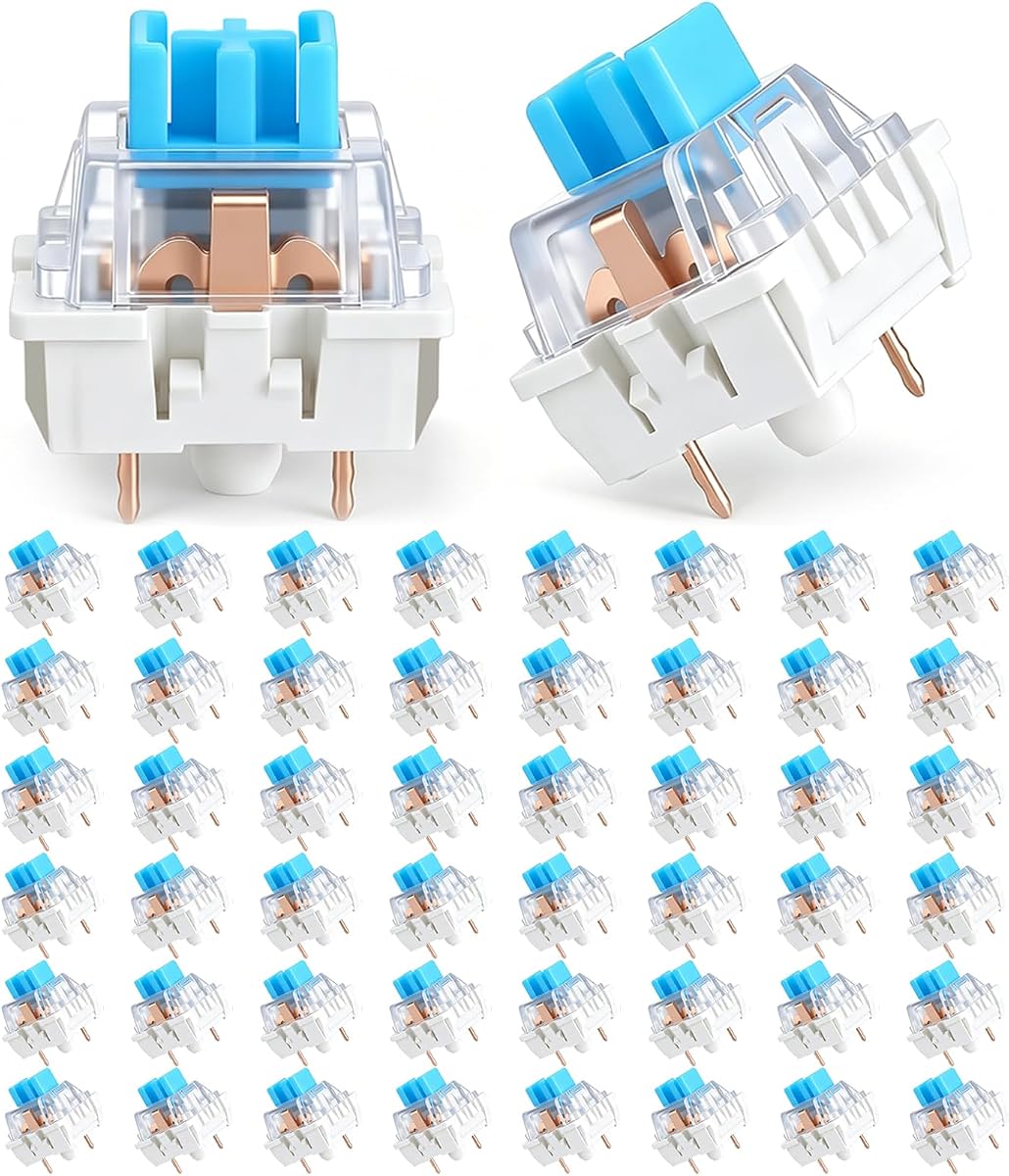
This 108-piece pack of blue switches delivers a pronounced tactile click with an eighty million cycle service life making it an excellent choice for custom keyboard builds and DIY fidget projects.
We may earn a commission when you buy through this link, at no additional cost to you.
The switches are waterproof and made with high quality materials ensuring durability while the loud sound helps reduce stress for enthusiasts though it may disturb others in quiet environments.
Since these are components rather than automated devices they require assembly and are best suited for builders who want premium tactile feel or anxiety reducing tools for their desk.
Keyboard enthusiasts and DIY builders should choose this kit for its premium quality and long service life providing excellent tactile feedback for custom mechanical or fidget projects.
The distinct tactile feedback provides a pronounced click sensation featuring a crisp and audible mechanical sound.
Blue switches have a satisfying click sound and can be used as fingertip clickers to relieve stress and anxiety.
We may earn a commission when you buy through this link, at no additional cost to you.
Selecting the right hardware clicker depends on your specific needs for customization durability and ease of use across different tasks and environments.
Advanced users often require detailed control over timing intervals and randomization to ensure clicking patterns mimic human behavior effectively. Look for devices that offer adjustable loop times rest periods and independent port controls to meet these needs.
Since these devices engage in repetitive physical motion the materials used for the clicking arm and motor should be robust. Check for sturdy constructions that can withstand extended use without wear or heat damage.
Ensure the clicker works with your specific keyboard or mouse setup. Devices with multiple adjustable ports allow for simultaneous actions or targeting different keys without manual repositioning.
Some models offer digital displays and buttons for direct settings while others rely on complex menus. Choose a interface that matches your technical comfort level to avoid frustration during setup.
Continuous operation can generate heat so verify if the device includes safety warnings or limits for maximum click speeds. Proper thermal management protects both the device and your keyboard.
Most clickers rely on USB power but some may include battery options. Consider how portable you need the device to be and whether a USB cable will fit your workspace layout.
If you work in a shared environment look for models with low noise motors or rubberized covers that reduce sound. Quiet operation ensures you do not disturb colleagues or family members.
Prices range from budget-friendly to premium depending on features. Balance the cost against the features you actually need to avoid overspending on capabilities you may never use.
Begin by positioning the clicking arm securely over the target key or mouse button ensuring it has enough clearance to move freely without obstruction.
Connect the device to a USB port and adjust the settings to your desired speed or interval before starting the automated process.
Regularly inspect the clicking arm for wear and clean the surface to prevent dust buildup which may affect performance or cause overheating.
Yes because they are physical devices they do not rely on software drivers and work with any operating system as long as the USB connection is recognized by the computer.
Hardware clickers generally mimic manual inputs but some strict anti-cheat systems may still detect rapid repetitive patterns. It is important to use randomization features to minimize risks.
Absolutely these tools are useful for keeping computers active during downloads testing software scripts or automating repetitive office tasks that require consistent input.
Avoid setting click speeds too high as exceeding the manufacturers recommended limit can cause heat buildup. Allow the device to rest periodically to maintain its health.
Most include rubberized covers to protect keys but using excessive force or speed can cause wear. Adjust the height and pressure to ensure gentle and safe operation.
No most hardware clickers are plug and play devices that work directly via USB without requiring any installation or additional software configuration on your machine.
The Physical Keyboard Clicker and Pankia options offer strong value depending on your need for programmability versus simplicity and affordability.
Prioritize build quality and safety features to ensure your device lasts through extended use without risking your hardware or system performance.
Prices and availability change frequently so confirm the latest offers and specs before making your final purchase decision.