
US Online Passport photo prints
4.7Editor score
Fast shipping within 24 hours
Includes cut to exact size
Professional photo review service
Finding the right way to create compliant photos at home saves time and money. Whether you need a printer system or a print service, quality matters for official documents.
We evaluated ten distinct solutions ranging from dedicated hardware systems to convenient online print services. Each option was assessed for ease of use, output quality, and compliance with standards.
Each pick highlights specific strengths like portability, professional results, or cost efficiency. Note that prices and availability change frequently, so verify details before purchasing.
4.7Editor score

4.6Editor score

3.1Editor score
As an Amazon Associate we earn from qualifying purchases.
This table provides a side-by-side overview of the ten selected solutions. It highlights key specifications and features to help you compare options quickly and make an informed decision for your specific document needs.




This system ranks as a top choice for those wanting a complete hardware solution. With a 4.6 rating, it is preconfigured to work straight out of the box for US passports.
We may earn a commission when you buy through this link, at no additional cost to you.
The inclusion of a 2×2 tabletop passport cutter makes the process seamless. You can transfer images from the included camera via SD card or USB for quick printing.
The main trade-off is the price point compared to simple print services. However, the ability to print on demand saves money over time for frequent users.
This is ideal for offices or households needing regular compliant photos. It balances ease of use with professional output quality effectively.
The system requires minimal setup. You can start capturing and printing compliant images immediately after unboxing.
Everything needed from camera to cutter is provided. This removes the guesswork of buying separate components.
We may earn a commission when you buy through this link, at no additional cost to you.
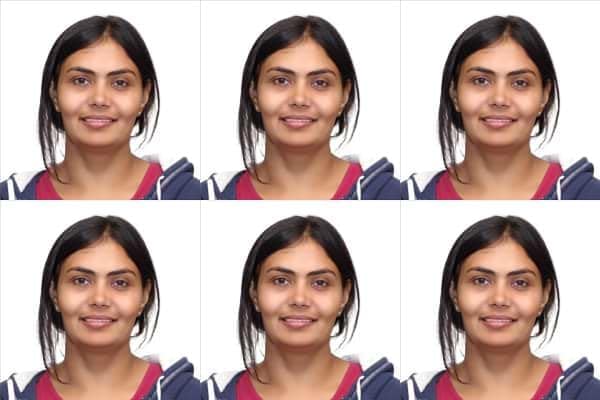
For those seeking a low-cost digital solution, this service offers excellent value. It boasts a 4.7 rating for its clear instructions and fast delivery.
We may earn a commission when you buy through this link, at no additional cost to you.
You take a photo against a plain wall and upload it. The team reviews and posts your prints within 24 hours in cut or sheet formats.
The cost is significantly lower than hardware systems. While you rely on mail delivery, the convenience often outweighs the wait time.
This is perfect for individual applications needing quick compliance. The detailed guidelines ensure high success rates for uploads.
Payments trigger immediate processing. Your photos are posted within 24 hours of approval.
Experts check your image before printing. This reduces rejection risks from common mistakes.
We may earn a commission when you buy through this link, at no additional cost to you.
This system targets professionals needing versatile output options. It includes a wireless LCD console for easy control. The system supports a vast range of international sizes.
We may earn a commission when you buy through this link, at no additional cost to you.
The gallery feature allows viewing past six images for quick reprints. This saves time when handling multiple clients or variations.
It is expensive compared to consumer models. Some users find the interface complex or the hardware heavy for home use.
Ideal for small businesses or high-volume needs. The versatility justifies the cost for commercial applications.
Supports domestic and foreign sizes. This versatility makes it suitable for travel agencies.
The console helps manage images easily. It reduces operator errors significantly.
We may earn a commission when you buy through this link, at no additional cost to you.
This system leverages devices you likely own. It works with iPhone and Android. The printer is preprogrammed to handle 2×2 cuts automatically.
We may earn a commission when you buy through this link, at no additional cost to you.
Wireless connectivity means you can print from your phone. It includes paper and ink for over 100 prints.
You must buy your own smartphone. While convenient, the setup can take longer than a dedicated camera system.
Great for families needing occasional photos. It avoids the need for a separate camera unit.
Works with iOS and Android. You do not need a dedicated camera.
Paper and ink come with it. Start printing immediately after setup.
We may earn a commission when you buy through this link, at no additional cost to you.
A slightly more affordable version of the top pick. It is preconfigured for US passports. The rating stands at 4.1 from verified purchasers.
We may earn a commission when you buy through this link, at no additional cost to you.
Transfer images via SD or USB from the included camera. It lacks some advanced wireless features found in higher-end models.
The cost is a key advantage. However, reliability might vary slightly more than top-rated competitors.
Suitable for budget-conscious buyers needing a printer. It covers basic US passport needs well.
Offers a lower price point. Ideal for occasional home printing needs.
Uses USB and SD transfer. Reliable but not wireless.
We may earn a commission when you buy through this link, at no additional cost to you.
Upload your photo for professional preparation. The service reviews and sizes the image. It prints on high-quality glossy paper.
We may earn a commission when you buy through this link, at no additional cost to you.
Photos are neatly cut and inspected before shipping. They arrive securely packaged to stay clean.
There is no visible user rating yet. This is a newer option but the process is standard.
Use this if you prefer mail-in services. It ensures your photo meets strict US specs.
Experts adjust and crop your photo. This ensures compliance with government standards.
Glossy paper ensures clear results. It maintains sharpness for scanning.
We may earn a commission when you buy through this link, at no additional cost to you.
This service offers same-day options at drugstores. You can get a sheet for unlimited copies. It handles the process efficiently.
We may earn a commission when you buy through this link, at no additional cost to you.
You can add 4 or 10 photos to your order. The sheet allows you to print more if needed.
Availability depends on local stores. It is convenient but less controlled than direct printing.
Good for urgent needs with local stores. It bridges the gap between home and in-store.
Pick up at local drugstores. Great for last-minute requirements.
Get a sheet for self-printing. Useful for multiple forms.
We may earn a commission when you buy through this link, at no additional cost to you.
This option offers flexibility with 8 pieces. It holds a 4.5 rating for value. Lighting advice is provided for best results.
We may earn a commission when you buy through this link, at no additional cost to you.
It works for Visa and Immigration applications. The service is designed to handle various document types.
You still need to manage lighting yourself. The guidance helps minimize shadow issues effectively.
Best for bulk needs on a budget. It is cost-effective for families with multiple applicants.
Suitable for visa and work photos. It is not limited to passports.
Instructions help avoid shadows. Follow to ensure clear facial contrast.
We may earn a commission when you buy through this link, at no additional cost to you.
This service offers same-day shipping options. It holds a perfect 5.0 rating for speed. It allows 6 pieces per pack.
We may earn a commission when you buy through this link, at no additional cost to you.
Use it for ID, Visa, or Immigration needs. The process is described as easy and fast.
You must upload an image first. Shipping is fast but you need internet access.
Ideal for urgent applications needing speed. The perfect rating suggests high customer satisfaction.
Orders ship same day. This helps with urgent deadlines.
Valid for multiple application types. It serves general ID needs.
We may earn a commission when you buy through this link, at no additional cost to you.
This light box helps capture clear product photos. It has 120 dimmable LEDs. The CRI is over 95 for true colors.
We may earn a commission when you buy through this link, at no additional cost to you.
It is useful for taking uniform photos for home use. You can use it to take consistent passport images against neutral backdrops.
It is not a dedicated printer system. You still need editing software or a service.
Best for improving photo quality before upload. It is a helpful tool for home shooters.
Even illumination reduces shadows. This helps capture clear facial features.
Includes 8 backdrops. You can select a plain background easily.
We may earn a commission when you buy through this link, at no additional cost to you.
Choosing the right solution depends on your needs. Consider speed, volume, and budget.
Decide between buying a printer or using an online service. Hardware costs more upfront but allows unlimited prints. Services are cheap and simple for occasional use.
Look for high-resolution output. The product must meet strict standards. Glossy paper often provides better longevity.
Check if the system is plug and play. Some require specific cables or drivers. Preconfigured systems are easier for beginners.
Consider how fast you need the photos. Printers give immediate results. Mail services take days. Evaluate your deadlines.
Ensure the system works with your camera. Many support SD cards. Some use specific apps. Check before buying.
Calculate the cost per print. Hardware includes ink costs. Services charge per photo. Compare for long-term needs.
Check if the service guarantees acceptance. Some offer refunds if rejected. Printers rely on you for compliance.
If you travel often, a portable solution helps. Light boxes are easy to carry. Large printers stay home.
For printers, follow the setup guide. Load paper correctly. Avoid dust to prevent jams.
For services, upload a clear image. Use neutral light. Select correct size options.
Store ink cartridges sealed. Keep devices in cool places. Clean lenses regularly.
Standard US passport photos are 2×2 inches. The face must occupy a specific portion. Ensure you follow exact spacing rules for compliance.
Yes, many systems allow this. Use a plain wall and steady hands. Check lighting to avoid shadows on the face.
Costs vary widely. Printers range from hundreds to thousands. Online services are often under twenty dollars per print.
Most systems use high-quality glossy paper. Avoid standard office paper as it often fails. Check compatibility before buying.
Some services offer 24-hour shipping. Others may take a few days. Plan accordingly before submitting your application.
Plain light colors like white or cream are standard. Avoid patterns or dark tones. Consistency helps with compliance.
We highlighted top options like the Passport Photo Printer System and US Online Prints. These cover both hardware and service needs effectively.
Prioritize speed if you are in a rush. Choose printers for volume. Select services for single use.
Verify current prices and availability on the site. Solutions evolve, so check the latest offers before deciding.