
ASUS ROG Tessen Mobile Gaming Controller
4.1Editor score
Ultra-Portable Foldable Design
Zero-Latency Wired USB-C
Programmable Rear Paddles
Discover the best ASUS ROG Ally Controller options for PC and Xbox gaming. We compare top models like the Raikiri II and Tessen for performance, features, and
Finding the right controller can transform your handheld gaming experience. Whether you play on PC or a dedicated device, responsive inputs and ergonomic design matter. This guide explores top picks to help you choose wisely.
We analyzed ten controllers based on connectivity, build quality, and unique features. Each option offers distinct advantages for different play styles. Our comparison highlights key specs to simplify your decision process.
Each review details pros, cons, and ideal use cases. Prices and availability change often, so check current listings before buying. Your perfect match depends on specific needs and budget preferences.
4.1Editor score

3.9Editor score

4.0Editor score
Here is a side-by-side look at all ten controllers. Compare their unique specs to find the perfect fit for your gaming setup and personal preferences easily.


The ASUS ROG Raikiri II is a versatile wireless gaming controller designed for PC and Xbox platforms. It features a strong rating and offers advanced connectivity options for seamless gameplay across devices.
We may earn a commission when you buy through this link, at no additional cost to you.
Its standout features include anti-drift TMR joysticks and dual-mode triggers for customized input. The ultra-low latency 2.4GHz RF mode ensures responsive control during intense gaming sessions.
While the rating is moderate, the build quality and customization options justify its position. Users may find the price point high but value the included protective case and charging stand.
This controller is ideal for gamers seeking reliable performance and comfort. It suits those who play on multiple systems and need robust battery life for extended use.
Use low-latency 2.4GHz RF, Bluetooth, or wired USB-C for flexible play on PC and ROG Xbox Ally.
Includes a portable protective case that supports charging while inside, plus a charging stand.
We may earn a commission when you buy through this link, at no additional cost to you.
The ROG Raikiri II Pro is a high-end PC controller built for competitive gaming. It boasts a strong rating and advanced features like an 8K sampling rate and hot-swappable joysticks.
We may earn a commission when you buy through this link, at no additional cost to you.
Key strengths include a full color display for customizing profiles and extensive rear buttons. These allow quick access to commands without lifting fingers from the face buttons.
The main trade-off is the higher price, which reflects its premium features. However, competitive players may find the enhanced responsiveness and battery life worth the investment.
Buy this if you need top-tier performance and deep customization. It is best for PC gamers who value speed and flexibility in their control setup.
ROG SpeedNova technology provides extremely responsive control and low latency for improved gaming performance.
Customize key features such as profile changes and joystick calibration directly on the device.
We may earn a commission when you buy through this link, at no additional cost to you.
The ASUS ROG Tessen is a foldable mobile controller made exclusively for Android phones. It offers a high rating and console-grade controls in a pocket-sized package for on-the-go gaming.
We may earn a commission when you buy through this link, at no additional cost to you.
Its design ensures secure phone holding and zero-latency responsiveness via wired USB-C. Programmable rear paddles and Aura RGB lighting enhance the experience further.
Since it is wired and Android-only, it limits versatility compared to others. Yet, for mobile gaming specifically, its portability and fast charging make it a great budget choice.
Choose this if you play mobile games frequently and want a dedicated controller. It is perfect for fans of titles like Warzone Mobile and Minecraft.
Easily folds for pocket-sized portability and securely holds your phone in landscape orientation.
Features console-grade sticks and analog triggers for fine-tuned control and comfortable extended gameplay.
We may earn a commission when you buy through this link, at no additional cost to you.
This controller features a built-in OLED display for unique animations and profile switching. It is designed for PC and Xbox users seeking visual customization and high-quality audio.
We may earn a commission when you buy through this link, at no additional cost to you.
Its OLED screen and ESS DAC provide immersive audio and visual indicators. The tri-mode connectivity ensures you can play via Bluetooth, wired, or 2.4GHz RF.
The rating is average, possibly due to software or comfort factors. Still, the premium sound and visual elements make it a distinct choice for multimedia gaming.
Ideal for those who value aesthetic customization and sound quality. It suits PC players who want to personalize their gaming setup deeply.
Create a unique look with customizable animations and view status indicators easily.
Built-in ESS DAC for immersive audio plus 3.5mm earphone jack and mute button.
We may earn a commission when you buy through this link, at no additional cost to you.
The ROG Raikiri Pro offers up to 48 hours of battery life for nonstop gaming. It is equipped with an OLED display and versatile connectivity for PC and Xbox.
We may earn a commission when you buy through this link, at no additional cost to you.
Key features include step triggers and an ESS DAC for immersive audio. You can customize buttons and joystick sensitivity via Armoury Crate software.
The rating is lower, which may concern some buyers. However, the battery longevity and display features remain strong selling points for long sessions.
Buy if you prioritize battery endurance and custom visuals. This is great for travelers who game for hours without easy access to power.
Up to 48-hour battery life enables nonstop gaming without interruption.
Use low-latency 2.4 GHz RF, Bluetooth, or wired USB-C to play on PC.
We may earn a commission when you buy through this link, at no additional cost to you.
This renewed controller offers the features of the premium Raikiri Pro at a lower cost. It is tested and certified to work like new with limited signs of wear.
We may earn a commission when you buy through this link, at no additional cost to you.
It includes a built-in OLED display and tri-mode connectivity for flexibility. The refurbishing process ensures functionality through testing and inspection.
While there is no rating, the 90-day warranty provides peace of mind. The condition may vary slightly but functionality is assured by the refurbishment.
Select this if you want premium features affordably. It suits budget-conscious gamers who trust certified refurbishment programs.
This Renewed product is tested and certified to look and work like new.
The product comes with 90-day warranty for added security.
We may earn a commission when you buy through this link, at no additional cost to you.
The ROG Xbox Ally is a full handheld gaming system, not just a controller. It features a high rating and powerful hardware for native Xbox and PC gaming.
We may earn a commission when you buy through this link, at no additional cost to you.
Its 120Hz display and Ryzen Z2 A processor deliver console-caliber performance. The device supports fast charging and includes Xbox Game Pass Premium.
It is expensive because it is a complete system rather than an accessory. However, it offers unmatched convenience and progress syncing for Xbox players.
Buy this if you want a premium handheld experience. It is best for dedicated gamers seeking high performance and broad game access.
From fast-paced battles to chill exploration, the Xbox Ally features 120Hz display with FreeSync Premium.
3 months of Xbox Game Pass Premium included to play 200+ games on the ROG Xbox Ally.
We may earn a commission when you buy through this link, at no additional cost to you.
This renewed version of the Raikiri II provides the same wireless features at a lower cost. It is certified to work properly for Xbox and PC gaming.
We may earn a commission when you buy through this link, at no additional cost to you.
Key features include anti-slip grip and TMR joysticks for accuracy. The 2.4GHz RF ensures low latency during wireless play.
While no rating is provided, the 50-hour battery life and travel case add value. Condition may vary but functionality is tested.
Ideal for budget-conscious buyers needing reliable wireless performance. It suits casual gamers who want longevity without premium costs.
More accurate while consuming less power versus Hall Effect joysticks with exceptional anti-drift performance.
Up to 50 hours of 2.4GHz wireless play on a single charge.
We may earn a commission when you buy through this link, at no additional cost to you.
The CRKD NEO S is a wireless controller with collectible designs for platforms like ROG Ally. It features a high rating and Hall Effect sensors for precise control.
We may earn a commission when you buy through this link, at no additional cost to you.
Its designs are limited and customizable via a mobile app. Adjustable trigger sensitivity and swappable tops allow personalization.
It lacks direct ROG branding but offers strong functionality. Collectors may prefer the unique aesthetic over standard controller designs.
Choose this if you value design and customization. It suits multi-platform players who enjoy collecting unique gaming accessories.
Hall Effect sensor thumbsticks means no stick drift while guaranteeing precise and responsive control.
All designs are limited and collectible. Pairing with our mobile companion App allows you to customize.
We may earn a commission when you buy through this link, at no additional cost to you.
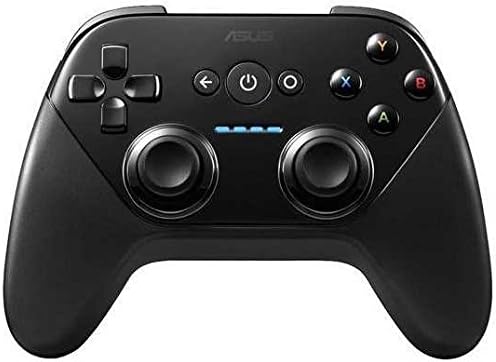
The ASUS TV500BG is a wireless gamepad designed for Android TV and Windows. It offers accurate control and integration with Google Play Games for tracking progress.
We may earn a commission when you buy through this link, at no additional cost to you.
Key strengths include compatibility with Android Lollipop and Windows systems. It is built for stunning 3D visuals on HDTVs.
As an older model, it lacks modern features like RGB or OLED. However, it remains a solid budget option for TV gaming.
Ideal for casual users who game on a large screen. It suits those seeking a simple, reliable wireless controller for Android.
Engineered for accurate control in Android TV and PC games.
Track your progress and earn achievements across your Android phone, tablet, and TV.
We may earn a commission when you buy through this link, at no additional cost to you.
Choosing the right controller depends on your platform, comfort, and budget. Consider these factors to match your gaming needs effectively.
Look for controllers with Bluetooth, 2.4GHz RF, or wired USB-C. Tri-mode options offer flexibility across devices like PC, Xbox, and mobile.
Prioritize low-latency wireless modes to ensure responsive gameplay without lag during competitive sessions.
Controllers with Hall Effect or TMR joysticks prevent drift issues common in standard pots. This ensures accuracy and longevity over time.
Check if joysticks are swappable or adjustable to maintain precision and replace parts if needed.
Dual-mode triggers allow switching between short travel for shooting and long travel for racing. Adjustable dead zones enhance customization via software.
Choose step triggers if you need distinct feedback for different actions within the same game.
Wireless controllers vary widely in battery duration, from 30 to 80 hours. Extended life reduces frequent charging interruptions.
Consider if the controller supports pass-through charging to keep playing while plugged in.
Ergonomic handles and textured grips prevent fatigue during long sessions. Materials like skin-friendly coatings add to comfort.
Look for lightweight yet durable designs that fit your hand size comfortably.
Rear buttons and paddles let you remap inputs for faster commands. Software tools like Armoury Crate allow detailed adjustments.
Controllers with displays offer profile switching and status checks for enhanced control.
Ensure the controller is certified for your specific system like Xbox or PC. Some models work only on Android or specific devices.
Cross-platform support increases value if you game on multiple devices regularly.
Premium controllers cost more but offer advanced features like OLED screens. Budget options often sacrifice extras for core functionality.
Balance your budget with the features that matter most to your gaming style.
Connect your controller via USB-C for wired play or 2.4GHz for wireless. Pair Bluetooth settings on your PC or console to enable seamless gaming.
Use the Armoury Crate app to remap buttons and adjust sensitivity. Install updates regularly to fix bugs and improve performance.
Store your controller in a protective case to prevent damage. Clean joysticks and buttons with a soft cloth to maintain accuracy and comfort.
The ASUS ROG Raikiri II is widely considered the best due to its tri-mode connectivity and TMR joysticks. It balances performance, features, and compatibility for PC and Xbox.
Many ASUS controllers like the Raikiri II are certified for Xbox via USB-C and 2.4GHz. Always check product details to ensure full support for your console.
Controllers with TMR or Hall Effect joysticks resist drift better. Ensure firmware is updated via Armoury Crate and recalibrate sticks in the software settings.
Some models like the ROG Tessen are designed for Android phones. Others may work via Bluetooth but require specific app support for full functionality.
Yes, most new ROG controllers come with a standard manufacturer warranty. Renewed products typically include a 90-day warranty for added security.
Battery life varies from 30 hours on the Raikiri II to 79 hours on the Pro model. Turning off RGB and vibration can extend battery duration significantly.
We highlighted top options like the ROG Raikiri II and Tessen for their performance and versatility. Each pick serves different needs from competitive to mobile gaming.
Prioritize connectivity and joystick technology based on your play style. Features like triggers and rear buttons add value for customization.
Always verify current prices and availability before purchasing. Your ideal controller depends on specific requirements and budget constraints.