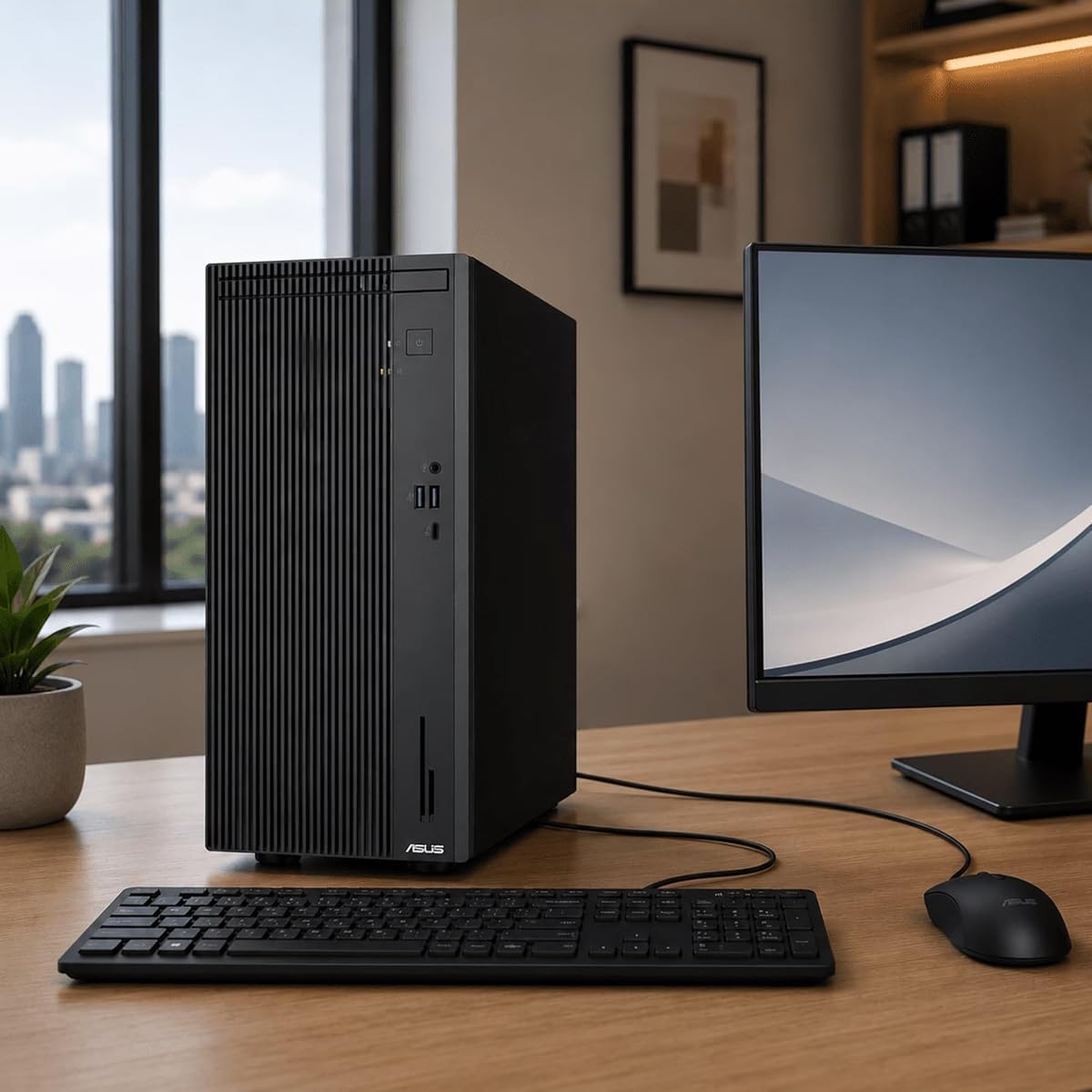
ASUS V500 Business Tower
5.0Editor score
Intel Core i7-13620H Processor
16GB DDR5 RAM Included
1TB Storage Capacity Total
This guide compares the top ten ASUS Desktop PC models available in October 2026 for business, gaming, and productivity needs.
Finding the right ASUS Desktop PC can significantly boost your productivity and entertainment experience. Whether you need a reliable machine for office work or a powerful rig for gaming, ASUS offers diverse options tailored to every user.
We evaluated ten distinct models based on processor performance, memory capacity, storage speed, and connectivity features. Our analysis focuses on real-world usability, upgrade potential, and overall value to help you make an informed decision.
Each pick highlights specific strengths like multitasking power or gaming capability. Prices and availability change frequently so check current listings before purchasing to ensure you get the best deal available today for your needs.
5.0Editor score

4.7Editor score

4.2Editor score
The following table provides a side-by-side comparison of all ten models to help you quickly identify the right system for your specific performance requirements and budget constraints.


The ASUS V500 Business Tower stands out as a highly capable system for those seeking reliable performance without breaking the bank. With a perfect rating from users, it delivers consistent speed for daily office tasks and light content creation needs.
We may earn a commission when you buy through this link, at no additional cost to you.
Powered by a 10-core Intel Core i7 processor, this desktop handles multitasking effortlessly. The 16GB of DDR5 RAM ensures smooth switching between applications while the 1TB storage combination provides ample space for documents and media files.
While the chassis is simple and lacks flashy aesthetics, this simplicity contributes to its lower cost. The inclusion of essential connectivity options like HDMI and DisplayPort makes it versatile for various monitor setups in work environments.
This machine is ideal for small businesses or home offices that need a workhorse computer. It balances performance and cost effectively making it a top recommendation for budget-conscious buyers needing professional capabilities.
The Intel Core i7-13620H provides 10 cores and 16 threads ensuring that heavy workloads run smoothly without system lag or slowdowns during critical work hours.
Utilizing DDR5 RAM allows for faster data throughput compared to older standards which helps applications launch quickly and remain responsive even when multiple programs are open simultaneously.
We may earn a commission when you buy through this link, at no additional cost to you.
The ASUS ROG G700 Gaming Desktop is our top pick for enthusiasts who want a balanced machine for both high-end gaming and professional content creation. It combines the latest Intel Core Ultra technology with robust graphics capabilities.
We may earn a commission when you buy through this link, at no additional cost to you.
At the heart of this system lies the Intel Core Ultra 7 265F processor which offers exceptional multitasking speeds. Combined with 32GB of DDR5 RAM it handles demanding software suites and AAA gaming titles with ease.
The NVIDIA GeForce RTX 5060 graphics card delivers smooth visuals at 1080p and 1440p resolutions. This ensures immersive gaming experiences with ray tracing enabled while also supporting creative tasks like video editing efficiently.
While it comes with a higher price tag than standard desktops the performance per dollar is excellent. It is perfect for gamers who want a ready-to-use PC without needing to build one from individual components themselves.
An advanced air cooled thermal design keeps internal temperatures stable even under heavy gaming loads ensuring long term reliability and consistent peak performance without thermal throttling issues.
The inclusion of an RGB keyboard and mouse means you have everything needed to start playing immediately. This all in one approach adds value and simplifies the setup process for new users.
We may earn a commission when you buy through this link, at no additional cost to you.
The ASUS ROG GM700 (2025) represents the pinnacle of gaming desktop performance with top tier AMD components. It is designed for users who demand the absolute best frame rates and productivity speed available today.
We may earn a commission when you buy through this link, at no additional cost to you.
Powered by the AMD Ryzen 7 9800X3D processor this system offers unparalleled processing power for both gaming and complex rendering tasks. The 32GB of DDR5 RAM ensures that memory hungry applications run smoothly without bottlenecks.
Graphics performance is boosted by the AMD Radeon RX 9070 XT Prime OC GPU. This card handles modern titles at high resolutions while offering advanced features like enhanced ray tracing for realistic visual effects in games.
This desktop is best suited for serious gamers and professional creators who need maximum performance. The large storage capacity allows for an extensive library of games and projects without needing external drives constantly.
The AMD Ryzen 7 9800X3D leverages cutting edge architecture to deliver blazing fast performance. It ensures that you stay ahead of the curve with future proof computing capabilities for years to come.
With 2TB of PCIe Gen 4.0 SSD storage load times are nearly instantaneous. This massive space means you can keep your entire game library installed locally and access files instantly whenever you need them.
We may earn a commission when you buy through this link, at no additional cost to you.
The ASUS S501MER Desktop PC brings the latest 14th Gen Intel Core i7 processor to a compact and affordable form factor. It serves as a reliable choice for general computing needs and light creative work.
We may earn a commission when you buy through this link, at no additional cost to you.
Featuring 16GB of DDR5 RAM this system ensures smooth multitasking for daily applications. The 1TB PCIe SSD provides quick boot times and fast file access which improves overall system responsiveness significantly for users.
Connectivity is a strong point with Wi-Fi 6E support offering faster wireless speeds. This ensures a stable connection for video calls and cloud uploads without needing to rely on a wired Ethernet connection.
This model is suitable for students or home users who need a powerful machine for schoolwork and browsing. It offers a balanced mix of performance and size making it easy to fit on any desk.
The Intel Core i7-14700 delivers strong single core performance for everyday tasks. It handles web browsing and office work with ease while also supporting light photo editing workflows efficiently.
The motherboard includes expansion slots allowing for future upgrades. Users can add more storage or even a graphics card later if their needs change and they want more gaming capability.
We may earn a commission when you buy through this link, at no additional cost to you.
The ASUS V500 Home & Business Desktop stands out with its generous 32GB of RAM making it ideal for heavy multitaskers. It handles complex spreadsheets and multiple applications simultaneously without any slowdown.
We may earn a commission when you buy through this link, at no additional cost to you.
Powered by the Intel Core i7-13620H processor it delivers efficient performance for business applications. The integrated graphics allow for smooth 4K streaming and clear visuals for everyday computing needs effectively.
Connectivity is robust with DisplayPort and HDMI ports supporting 4K displays. This dual monitor support is perfect for professionals who need to compare documents or monitor multiple data streams at once.
This system is perfect for home offices that require a workstation capable of handling various tasks. The high memory count ensures that the system remains responsive even when running demanding software applications.
Having 32GB of RAM allows you to keep many applications open without reloading. This is particularly useful for multitasking workflows where you switch between different software tools frequently during the day.
The support for 4K resolution on connected monitors provides sharp image quality. This helps reduce eye strain during long work sessions and ensures text and graphics are displayed with high clarity.
We may earn a commission when you buy through this link, at no additional cost to you.
The ASUS ROG G700 (2026) Gaming Desktop PC offers cutting edge hardware for serious gamers. It features the latest NVIDIA RTX 5070 graphics card designed to handle the most demanding modern titles effortlessly.
We may earn a commission when you buy through this link, at no additional cost to you.
Equipped with an Intel Core Ultra 7 265KF processor this system provides robust processing power for gaming and streaming. The 16GB DDR5 RAM supports smooth gameplay though heavy multitasking might benefit from more memory.
Advanced thermals are ensured by a quad-fan system and a 240mm liquid cooler. This keeps the internal components cool under load maintaining stable performance and extending the lifespan of the system overall.
This desktop is perfect for gamers who want high frame rates and ray tracing capabilities. The design supports triple-slot GPUs making it a future-proof choice for those planning to upgrade graphics cards later.
The liquid cooler and quad-fan setup prevent thermal throttling during intense gaming sessions. This ensures that the processor and graphics card can run at peak speeds without overheating risks.
The dual-glass chassis showcases the internal components beautifully with Aura Sync RGB lighting. It adds a premium aesthetic to any gaming room while maintaining excellent airflow for cooling purposes.
We may earn a commission when you buy through this link, at no additional cost to you.
The ASUS V500 Bundle includes practical accessories like an A-DATA 64GB USB Flash Drive for easy data transfer. It is aimed at business users who need a secure and reliable environment for daily work tasks.
We may earn a commission when you buy through this link, at no additional cost to you.
Running Windows 11 Pro it offers advanced security features and system management tools. This makes it suitable for professional environments where data protection and network connectivity are critical requirements.
The Intel Core i7-13620H processor provides responsive performance for productivity software. Combined with 16GB of DDR5 RAM it handles office applications and video calls smoothly without unnecessary lag or delays.
This desktop is best for small businesses needing a cost-effective solution with essential upgrades. The included bundle items add convenience making it a ready-to-go system for immediate use in any office.
Windows 11 Pro brings enhanced security and domain joining capabilities. These features help protect sensitive business data and simplify IT management in larger organizational structures.
The inclusion of a high speed USB flash drive is a nice touch for quick data backups. It adds practical value to the package without requiring separate purchases immediately upon setup.
We may earn a commission when you buy through this link, at no additional cost to you.
The ASUS ROG Strix G700 is a powerhouse workstation designed for users who need extreme computing power. It boasts 128GB of DDR5 RAM which is rare for standard desktop PCs and perfect for virtual machines.
We may earn a commission when you buy through this link, at no additional cost to you.
Powered by the Core Ultra 9 285K processor it delivers up to 6.00GHz speeds. This ensures that even the most demanding rendering tasks and simulations run in record time without bottlenecks.
Storage is massive with 11TB total capacity combining SSD and HDD for both speed and bulk storage. This allows you to store thousands of games and massive video projects locally on the machine.
This machine is ideal for professional video editors and data scientists. It is designed for those who cannot afford any slowdown and need a system that can handle multiple heavy workloads simultaneously.
With 128GB of RAM you can run multiple virtual machines or edit 8K video without lag. This level of memory ensures that your workflow is uninterrupted by system resource constraints.
The 11TB of storage lets you keep all your work files and games on one drive. You get the speed of SSD for active projects and the bulk of HDD for archiving files.
We may earn a commission when you buy through this link, at no additional cost to you.
The ASUS V500 64GB variant offers a massive memory upgrade suitable for heavy multitasking needs. With 64GB of RAM it can handle large datasets and multiple applications without running out of system resources.
We may earn a commission when you buy through this link, at no additional cost to you.
It uses the Intel Core i7-13620H processor which provides stable performance for business applications. The 1TB PCIe SSD ensures that loading times are quick and file transfers are efficient for daily use.
This desktop supports dual 4K monitors making it excellent for multi-screen productivity setups. Users can have their email on one screen and work on the other without compromising on visual clarity.
It is best suited for data analysts and content creators who need more memory than standard PCs provide. The high memory capacity ensures smooth operation even when running memory intensive tools.
The 64GB of RAM allows for smooth multitasking with many applications open. This is especially useful for professionals who work with large files and need to switch between tasks often.
Support for dual 4K monitors enhances productivity by providing more screen real estate. It allows for better workflow management when working on complex documents or coding projects.
We may earn a commission when you buy through this link, at no additional cost to you.
The ASUS Business Desktop Computer is a compact tower designed for efficiency in modern office environments. It balances performance and space making it easy to fit on crowded desks in corporate offices.
We may earn a commission when you buy through this link, at no additional cost to you.
Running on Windows 11 Pro it provides enhanced security features for business use. The Intel Core i7-13620H ensures that daily tasks are handled quickly and efficiently without any unnecessary delays.
With 16GB of DDR5 memory and a 1TB SSD it delivers fast boot times and quick file access. This speed helps workers get started with their day quickly and stay productive throughout.
This unit is ideal for general office tasks and administrative work. It offers the professional tools needed for business operations without the extra cost of gaming features that are not required.
The small tower design helps save valuable desk space in busy offices. This compact form factor ensures that the computer does not get in the way of paperwork or other office tools.
Windows 11 Pro includes features like BitLocker to protect sensitive company data. These security tools help ensure that your business information remains safe from unauthorized access and threats.
We may earn a commission when you buy through this link, at no additional cost to you.
Selecting the right desktop involves analyzing your specific needs for processing power, memory, and graphics capabilities.
The processor is the brain of your computer and determines how fast tasks are completed. For general office work a standard Intel Core i7 is sufficient while heavy gaming or video editing benefits from newer Core Ultra or Ryzen processors.
Look for higher core counts if you often run multiple applications at once to ensure smooth system responsiveness.
RAM allows your system to handle multiple programs simultaneously without slowing down. 16GB is a good baseline for most users but 32GB or more is recommended for professional content creation and heavy multitasking.
Choose a system with expandable RAM slots if you plan to upgrade your memory in the future as you need more power.
Modern SSDs provide much faster boot times and file transfers compared to traditional hard drives. A PCIe NVMe SSD is the standard for performance and ensures your system feels snappy during daily use.
Prioritize SSDs over hard drives for your main operating system drive to maximize overall system speed.
Integrated graphics are enough for office tasks and media consumption but dedicated GPUs are necessary for gaming and rendering. Models with RTX or Radeon cards will deliver smooth visuals at higher resolutions.
Check the graphics card model carefully if you plan to play modern games or use video editing software.
Ensure the desktop has enough USB ports and video outputs for your monitors and peripherals. Features like Wi-Fi 6 and Ethernet are important for reliable internet connections in any environment.
Having multiple HDMI or DisplayPort outputs is useful if you want to set up a multi-monitor workspace.
Windows 11 Home is standard for most users but Windows 11 Pro offers better security and network features. Business users often benefit from Pro features like BitLocker and Remote Desktop capabilities.
Choose the OS version that matches your security needs and whether you need advanced management tools.
Some desktops allow you to upgrade components later which extends the life of your machine. Look for models with accessible panels and available slots for adding more storage or RAM.
If you plan to keep your desktop for several years choose a model that supports future hardware upgrades.
The physical size and cooling solution affect how quiet and cool your computer stays. Larger cases usually offer better airflow which is important for high performance gaming PCs.
Consider the noise levels and size of the case to ensure it fits your workspace and budget needs.
Always connect your desktop to a surge protector to prevent damage from power spikes. Proper electrical protection ensures the longevity of your internal components like the motherboard and hard drives.
Keep the intake vents clear of dust and objects to maintain proper airflow. Regularly cleaning the vents with compressed air helps prevent overheating and keeps the system running quietly.
Update your drivers and operating system regularly to ensure security and performance. Keeping software up to date helps fix bugs and improve compatibility with new programs and games.
For gaming the ASUS ROG G700 and GM700 series are the best choices due to their dedicated graphics cards. They support modern AAA titles and provide smooth frame rates at high resolutions with advanced visual features.
Most of the business and gaming models include slots for memory upgrades. Always check the specific product page for the maximum supported RAM and available slots before purchasing to ensure upgrade compatibility.
Generally these desktops are sold as towers without monitors included. You will need to provide your own display and cables although the units typically come with keyboard and mouse accessories.
Windows 11 Pro offers advanced security features like BitLocker encryption and remote desktop support. It is better for business environments but Home is sufficient for personal use and typical gaming needs.
For general use 512GB to 1TB is usually enough for documents and apps. If you install many games or store large video files consider models with 2TB or more storage capacity.
Most ASUS desktops come with a standard one year manufacturer warranty. Extended protection plans are often available for purchase to cover mechanical or electrical failures beyond the initial period.
Yes models with at least 32GB of RAM and a dedicated GPU are suitable for video editing. The Intel Core i7 and Ultra processors handle rendering tasks well with the right memory configuration.
Many of these towers include HDMI and DisplayPort outputs for dual monitor setups. Always verify the number of video ports on the specific model to ensure it fits your workspace needs.
The ASUS lineup offers a wide range of desktops suitable for every type of user from casual office workers to hardcore gamers. Our top picks highlight the best balance of performance and value available in November 2026.
Prioritize the components that matter most to your workflow such as processor speed or memory capacity. Understanding your specific needs will help you avoid overspending on features you do not use regularly.
Prices and availability fluctuate so always check the current listings before making your final decision. Ensure the model you select meets your current requirements and allows for future growth in your computing needs.