
Canon PIXMA TR4720
3.9Editor score
Affordable entry price point
Compact design for small spaces
Built-in fax functionality included
This guide compares the best all in one printer with fax options for home and office use based on speed, features, and reliability.
Finding the right all in one printer with fax can streamline your workflow significantly. These devices combine printing, scanning, copying, and faxing into a single unit, saving space and money. Whether you run a home office or a small business, having reliable communication tools is essential for professional operations.
We evaluated ten top models based on print speed, connectivity, ink costs, and fax capabilities. Our analysis focuses on real-world performance and user feedback to ensure you get a machine that meets your daily needs. Each product offers unique strengths depending on your specific workload and budget requirements.
Each pick highlights key features and potential drawbacks to help you decide quickly. Prices fluctuate often so check current listings before purchasing to ensure you get the best value available today. Read on to discover which model fits your office setup and communication needs perfectly.
3.9Editor score

4.0Editor score

4.3Editor score
The following table compares all ten models side by side to highlight key specifications and differences in performance and features.






The HP OfficeJet Pro 9125 stands out as a top contender for office environments needing robust fax and print capabilities. With a rating of 3.9 stars it balances speed and functionality well. Its AI capabilities ensure documents look professional without manual tweaking which saves valuable time.
We may earn a commission when you buy through this link, at no additional cost to you.
Printing speeds reach up to 22 ppm for black documents making it efficient for moderate workloads. The 2.7 inch touchscreen provides intuitive navigation similar to a smartphone interface. Dual band Wi-Fi ensures stable connectivity so remote printing works smoothly without interruptions.
While the Instant Ink trial is generous the reliance on HP chips can limit third party cartridge options. This ensures quality but may increase long term costs if not managed carefully. The recycled plastic design helps offset environmental concerns slightly.
This model is ideal for small businesses that need color output and reliable faxing. If you value security and AI features over raw ink savings this printer delivers strong performance. It remains a solid investment for professional document management needs.
HP AI removes unwanted content from web pages ensuring clean professional prints without wasted paper.
Wolf Pro Security helps protect your network from cyber threats keeping sensitive data safe during transmission.
We may earn a commission when you buy through this link, at no additional cost to you.
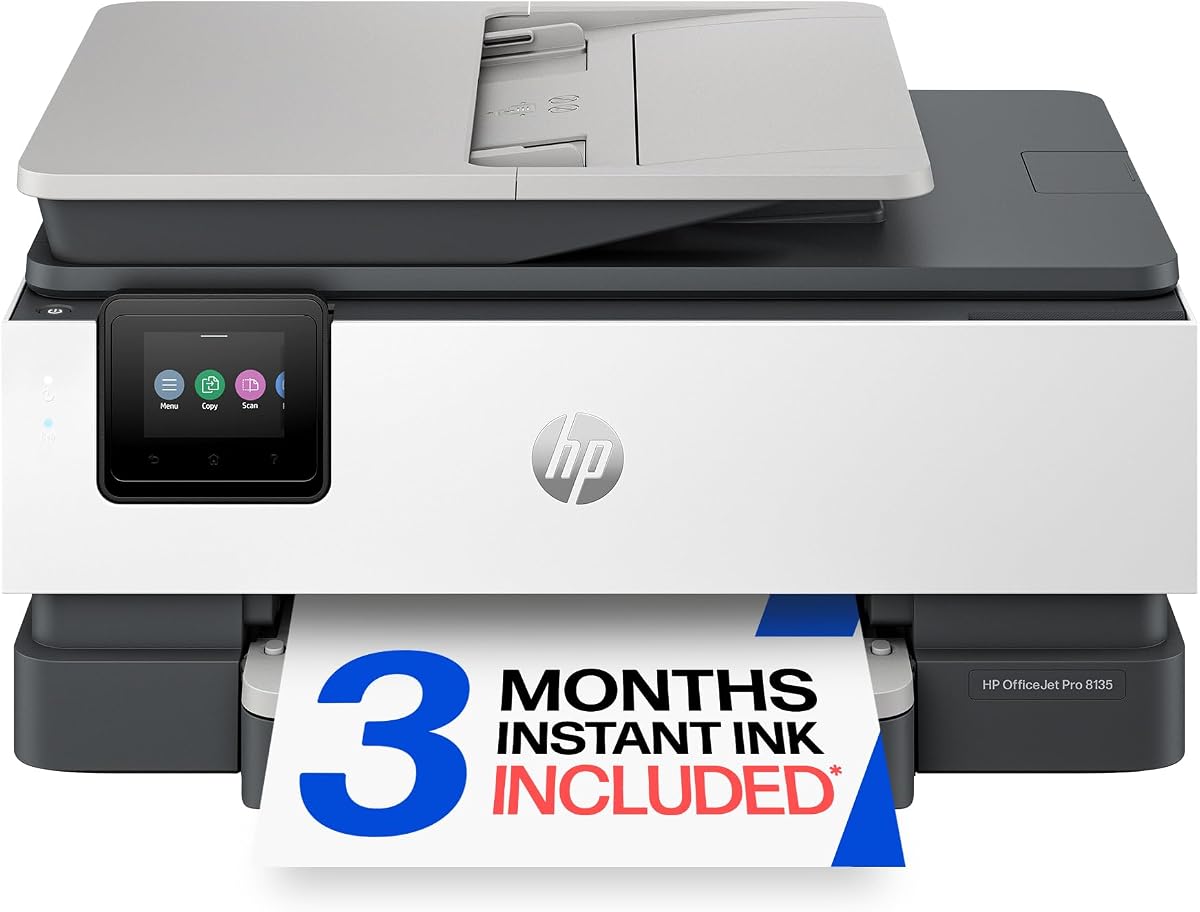
The HP OfficeJet Pro 8135 is tailored for home offices needing reliable fax and print functions. It offers a solid 3.9 star rating reflecting consistent performance in daily tasks. The design focuses on ease of use for non technical users who need professional results.
We may earn a commission when you buy through this link, at no additional cost to you.
Print speeds of 20 ppm black ensure documents are ready quickly without long waits. The touchscreen interface is simple enough for family members to share the device effectively. HP app integration allows printing from smartphones which adds convenience for busy schedules.
Color printing is slightly slower at 10 ppm which is acceptable for occasional marketing materials. The Essential Security feature protects home networks though it is less robust than Pro versions. Sustainability efforts with recycled plastic show environmental awareness in manufacturing.
Choose this if you need a dependable home office workhorse with fax capabilities. It balances cost and features well for most residential users. The instant ink trial helps manage costs initially before the subscription begins.
The phone like interface makes setup and operation intuitive for all family members regardless of tech skills.
Print and fax directly from your smartphone using the HP app for remote access anywhere.
We may earn a commission when you buy through this link, at no additional cost to you.
The Epson EcoTank ET-4800 replaces cartridges with high capacity tanks for long term savings. Rated 3.8 stars it appeals to users prioritizing ink costs over speed. The Supertank system is unique for fax and print setups needing heavy document volume.
We may earn a commission when you buy through this link, at no additional cost to you.
Refilling is easy with EcoFit bottles reducing spills and mess. Micro Piezo Heat-Free Technology preserves print head life while ensuring sharp text. The flatbed scanner supports various document types without issues.
Print speeds are slower than HP models which may impact high volume workflows. The initial investment is higher but pays off over time with lower ink costs. This model reduces waste significantly compared to cartridge based systems.
Select this if you print frequently and want to avoid frequent cartridge changes. The fax function works reliably within the all in one setup. It is an eco friendly choice for cost conscious buyers.
High capacity tanks eliminate the need for expensive cartridges saving money over the device lifetime.
Reducing cartridge waste helps protect the environment by keeping plastic out of landfills effectively.
We may earn a commission when you buy through this link, at no additional cost to you.
The HP OfficeJet Pro 8125 offers essential fax and print features at a lower price point. Its 3.9 rating indicates reliability for budget conscious buyers. It strips some premium features but keeps core functionality for home office tasks.
We may earn a commission when you buy through this link, at no additional cost to you.
Speeds match the 8135 with 20 ppm black printing. The touchscreen is smaller but functional for basic navigation. AI tools help format emails and web pages efficiently saving manual adjustment time.
The lack of duplex fax might matter for heavy fax users. Security features are present but less robust than Pro versions. Still it covers all basic all in one needs including faxing.
This is a smart pick for entry level home offices. It delivers core performance without breaking the bank. Verify fax requirements before buying to ensure it meets specific needs.
HP AI optimizes print layouts removing unnecessary margins and content for cleaner results.
Built in security helps protect your data during wireless transmission to the printer safely.
We may earn a commission when you buy through this link, at no additional cost to you.
The HP Smart Tank 7603 focuses on long term ink savings with three years included. It holds a 3.9 rating for its balance of cost and convenience. This model is perfect for users tired of buying cartridges constantly.
We may earn a commission when you buy through this link, at no additional cost to you.
Refilling is mess free using HP bottles that drain cleanly into tanks. Up to 8000 color pages per box reduce refill frequency significantly. The fax function works smoothly within this all in one package.
Speeds are moderate so high volume users might find it slow. The initial cost is higher but offset by ink savings. It supports borderless printing for photos which adds versatility.
Choose this if you want to minimize ink costs over time. It offers reliable faxing and scanning alongside printing. Ideal for home offices needing consistent output without interruptions.
Included ink lasts up to three years reducing supply purchases for standard home office workloads.
Easy access refill system prevents spills and ensures clean operation when adding ink to tanks.
We may earn a commission when you buy through this link, at no additional cost to you.
The HP OfficeJet Pro 9135 leads in speed with 25 ppm black printing. Its 4.0 rating reflects user satisfaction with performance and reliability. This model suits offices needing quick turnaround on color documents and faxes.
We may earn a commission when you buy through this link, at no additional cost to you.
Dual 250 sheet trays reduce refills for high volume tasks. The 4.3 inch touchscreen offers clear navigation and settings. AI tools ensure precise formatting which reduces errors in output.
Wolf Pro Security keeps network data safe from threats. The Instant Ink trial helps manage costs initially. While expensive it justifies the speed and capacity for busy offices.
Pick this for professional environments requiring speed and capacity. It handles faxing and scanning efficiently too. Best for users needing top tier performance without compromises.
Two input trays allow larger paper loads reducing downtime and refills during busy work periods.
Advanced security measures protect sensitive business data from unauthorized access during transmission.
We may earn a commission when you buy through this link, at no additional cost to you.
The Canon PIXMA TR4720 is the most affordable all in one with fax. Rated 3.9 it fits tight budgets without sacrificing core functions. Its design prioritizes simplicity for casual home users needing occasional faxes.
We may earn a commission when you buy through this link, at no additional cost to you.
At roughly 8.8 ipm it is slower but adequate for low volume needs. The auto document feeder streamlines scanning and faxing multi page docs. Alexa integration sends low ink alerts automatically which is convenient.
Paper capacity is limited to 100 sheets which means frequent refills. Print quality is decent for basic documents though photos may lack vibrancy. It is energy efficient with low power consumption.
This is the top pick for budget buyers needing a fax. It covers essential tasks without complexity. Just ensure your volume needs match the speed limitations before purchase.
Alexa notifies you when ink is low and can reorder supplies automatically without manual intervention.
Small footprint fits easily on desktops or shelves in small home offices without cluttering space.
We may earn a commission when you buy through this link, at no additional cost to you.
The Canon PIXMA TR8620a delivers solid photo quality alongside faxing. Its 4.0 rating highlights satisfaction with versatility and print quality. This model bridges home office needs with creative tasks like printing photos.
We may earn a commission when you buy through this link, at no additional cost to you.
Print speeds of 15 ppm are decent for mixed use. The SD card slot allows direct printing without computers. Voice control via Alexa simplifies operation further for busy users.
Fax features are reliable though not as advanced as HP Pro models. Paper capacity is robust enough for standard workloads. Energy Star rating keeps power use low.
Choose this for home offices needing photo printing and fax. It balances cost and quality well. Ideal for creative users who also need document management.
SD card slot lets you print photos directly from camera cards without connecting to a computer.
Use voice commands with Alexa to manage print jobs and check status hands free easily.
We may earn a commission when you buy through this link, at no additional cost to you.
The HP OfficeJet Pro 8139 stands out with a one year Instant Ink trial. With a 4.0 rating it is reliable for home office fax needs. Extended trial helps users test costs before committing to subscriptions.
We may earn a commission when you buy through this link, at no additional cost to you.
Print speeds of 20 ppm black ensure documents print quickly. AI tools help layout emails and pages professionally. Security features protect data during wireless transmission safely.
After the trial a monthly fee applies which should be considered. Paper capacity is standard at 225 sheets. The touchscreen simplifies operation for users of all skill levels.
This is great for those wanting to test Ink delivery risk free. It handles faxing and scanning effectively. Best for users planning to use Ink services long term.
One year trial lets you test Instant Ink benefits before deciding on long term subscription plans.
Easy navigation makes setup and daily use simple for all users without technical training.
We may earn a commission when you buy through this link, at no additional cost to you.
The Brother MFC-L2820DW offers laser speed with fax capabilities. Rated 4.3 it is the fastest option on this list. Monochrome output suits offices needing black and white documents only.
We may earn a commission when you buy through this link, at no additional cost to you.
Print speeds of 36 ppm are unmatched by inkjets. The 50 page auto feeder streamlines scanning and faxing. Dual band Wi-Fi ensures stable connection for large offices.
Refresh subscription helps manage toner costs effectively. Toner is durable for high volume work. Color is not available so photo tasks are limited.
Choose this for high volume text document offices. Faxing is fast and reliable. Best for users prioritizing speed and efficiency over color.
36 pages per minute ensures even large document batches print quickly without waiting long times.
Refresh trial helps manage toner costs automatically keeping you stocked without manual reordering work.
We may earn a commission when you buy through this link, at no additional cost to you.
Selecting the right printer involves weighing speed, ink costs, and connectivity options against your specific fax and print needs.
Consider how many pages you print daily. Laser printers like the Brother MFC-L2820DW offer higher speeds for busy offices while inkjets suit lower volume tasks. Ensure the model can handle your peak workloads without slowing down.
Look for ppm ratings in both black and color to match your typical document types.
Cartridge printers often have higher long term costs. Tank systems like EcoTank or Smart Tank reduce cost per page significantly. Check if a trial subscription is included to test the service.
Budget for recurring ink or toner purchases to avoid unexpected expenses later.
Ensure the fax feature meets your needs such as speed dial or digital faxing. Some models send faxes via phone line while others use internet fax. Check if duplex faxing is supported.
Verify that the model includes an auto document feeder for multi page faxing.
Wi-Fi and dual band support are essential for wireless printing from multiple devices. Ethernet ports add stability for office networks. USB connectivity allows direct computer connection.
Check for mobile app compatibility to print from smartphones or tablets easily.
Input tray capacity affects how often you need to refill paper. Look for 200+ sheets for busy workloads. Auto document feeders help with scanning and faxing documents quickly.
Duplex printing saves paper by automatically printing on both sides of the page.
HP Wolf security and similar features protect sensitive documents from cyber threats. Look for encryption during transmission and secure authentication. This is critical for offices handling confidential client data.
Ensure the device supports network security protocols to prevent unauthorized access.
Larger touchscreens improve usability for navigation and settings. Phone like interfaces make setup easier for all users. Check if the screen supports color for better visibility.
A clear interface reduces errors and speeds up routine tasks like faxing.
Duty cycle ratings indicate how many pages a printer can handle per month. Higher cycles mean better longevity for frequent use. Check warranty length and support options before buying.
Reliable support ensures you can resolve issues quickly without significant downtime.
Set up the machine on a stable surface with good ventilation. Connect it to your network using Wi-Fi or Ethernet and download the manufacturer app. Use the touchscreen to run initial alignment and test prints.
Load paper carefully into the tray and ensure the guides fit snugly. Keep the auto document feeder clean from dust and debris to prevent jamming. Clean the glass scanner surface regularly for clear images.
Check ink levels weekly and refill tanks before they run empty to avoid print head damage. Update firmware via the manufacturer app to maintain performance and security. Schedule monthly test faxes to ensure the line is working properly.
Not all models support digital faxing via email or internet. Most use traditional phone lines. Check specs for fax-over-IP features if you need internet based fax options. Standard models work with phone lines directly.
The laser model listed is monochrome only. Laser color printers exist but cost more and are not included here. If color is essential choose an inkjet or Supertank model instead. Black only suits document heavy workflows.
Instant Ink monitors ink levels and delivers cartridges before you run out. Costs vary based on page usage rather than individual cartridges. Trials are included with HP models to test the service. You can cancel anytime after the trial period.
Faxing remains essential in legal medical and government sectors. Even with email fax laws require transmission copies. An all in one fax printer ensures compliance and convenience. It serves as a backup for critical document transfers.
The Canon PIXMA TR4720 offers the best balance of cost and compact size for home use. It covers fax printing and scanning without taking much space. The HP 8135 is also great if you want HP features at a moderate price point.
The Brother MFC-L2820DW handles high volume best with 36 ppm laser speed. Its duty cycle supports heavy workloads without slowdown. For color high volume consider the HP 9135 with dual trays. Both reduce refill frequency significantly.
HP models include Wolf Security for network protection and data safety. Brother offers secure connect options. Ensure you update firmware regularly to patch vulnerabilities. Security varies by model so check features before buying.
Yes all models support mobile printing via apps or AirPrint. Some include smart reorders with Alexa. Download the specific app to manage print fax and scan tasks remotely. Most support iOS and Android platforms easily.
We highlighted ten solid options ranging from budget friendly to high performance laser models. The HP 9125 and 9135 excel for offices needing speed and color. The Canon TR4720 fits tight budgets while the Brother MFC-L2820DW leads in volume.
Prioritize speed and ink costs based on how much you print weekly. Ensure fax features meet your industry standards for compliance. Check connectivity options to match your office network setup effectively.
Always verify current prices and stock before ordering as these fluctuate regularly. Subscriptions and trials may change so review terms carefully. Selecting the right model ensures smooth fax and print operations for years.