
Rosewill VNW 550W
4.6Editor score
80 PLUS White Certified
Compact 140mm chassis
Low noise FDB fan
This guide compares the top 550W power supply units for PCs, covering efficiency, reliability, noise, and features to help you choose the right PSU.
Selecting a reliable power supply is crucial for system stability. A 550W unit offers enough headroom for mid-range builds while keeping energy costs low. This guide helps you find the best fit.
We evaluated ten top models based on efficiency ratings, build quality, and safety features. Each product was analyzed for fan noise, cable management, and overall value to ensure a fair comparison for buyers.
Each pick highlights specific strengths like silent operation or modular designs. Prices fluctuate often, so verify current deals before purchasing to ensure you get the best value for your specific setup needs.
4.6Editor score

4.6Editor score

4.8Editor score
The following table provides a side-by-side overview of all ten products reviewed. Compare key specifications and ratings to quickly identify which power supply matches your build requirements.



The NovaMist Misting Fan offers a straightforward solution for basic power needs. With an 80 PLUS Bronze certification, it delivers stable power efficiently. Its low noise fan ensures that your system runs without disturbance.
We may earn a commission when you buy through this link, at no additional cost to you.
This unit guarantees long-term reliability through a five-year limited warranty. This coverage is rare in budget segments and signals confidence from the manufacturer. The design prioritizes operational stability over flashy features.
Trade-offs include a lack of modular cables or advanced voltage rails. However, for simple builds needing a dependable source, these limitations are acceptable. The focus remains on core performance and value.
Ideal for budget-conscious builders or office PCs where silent operation matters. The warranty coverage adds significant value. Choose this if you need a basic, reliable power supply without extra complexity.
The Bronze certification ensures you get solid energy conversion rates.
The five-year warranty protects your investment against premature failures.
We may earn a commission when you buy through this link, at no additional cost to you.
The Rosewill VNW 550W stands out for its compact build ready chassis. This design flexibility allows integration into smaller form factors without sacrificing core performance. It uses an active PFC design to maintain efficiency.
We may earn a commission when you buy through this link, at no additional cost to you.
Voltage delivery is stable thanks to the advanced DC-DC high amperage rail. This ensures your components receive clean power even under load. The safety shield includes five protections to guard against surges and shorts.
While the non-modular design adds cable clutter, the price point offsets this. White certification is entry-level but sufficient for basic tasks. It balances cost and safety features well for entry-level builds.
Perfect for budget gamers or office setups needing a reliable small PSU. The thermal control and safety features are key strengths. Choose this if you prioritize safety and size over high efficiency.
The smaller chassis enables flexible small-form-factor integration in tight cases.
The five-protection suite ensures complete system security during operation.
We may earn a commission when you buy through this link, at no additional cost to you.
The LIAN LI RB550 brings ATX 3.1 platform readiness to the 550W category. This future-proofing is vital as new GPUs demand better power standards. It maintains Bronze efficiency but delivers stable output for modern gaming PCs.
We may earn a commission when you buy through this link, at no additional cost to you.
Cable management is greatly simplified by integrated routing channels on the housing. Velcro straps help tuck excess lengths for a cleaner backside layout. This attention to detail improves airflow and aesthetics significantly.
The large 135mm hydraulic-bearing fan keeps noise low during typical use. While not fully modular, the routing system mitigates clutter. The warranty adds confidence to the investment in modern standards.
Ideal for builders planning upgrades to ATX 3.1 hardware soon. The cable management and future readiness are standout features. Select this if you need a stable foundation for modern components.
Built to ATX 3.1 standard for PCIe 5.1 readiness and future GPUs.
Built-in routing channels help you tuck excess cable length for cleanliness.
We may earn a commission when you buy through this link, at no additional cost to you.
ASRock delivers consistent performance with the Challenger 550W. It supports mid-range CPUs and GPUs efficiently thanks to a 45.9A rail. The ATX 2.52 compliance ensures stability for modern power requirements.
We may earn a commission when you buy through this link, at no additional cost to you.
The Golf-Blade fan design optimizes airflow and reduces noise effectively. Comprehensive protections like OVP and SCP safeguard your components. A 5-year warranty backs the longevity of this unit.
Trade-offs include a fixed cable setup that requires careful routing. However, the power excursion tolerance handles spikes well. This makes it suitable for productivity and light gaming systems.
Best for standard ATX cases needing reliable mid-range power. The fan design and protection suite add value. Choose this for a dependable solution without premium pricing.
Delivers 550W with 45.9A on +12V rail for stable system performance.
Includes OCP, SCP, OVP, UVP, OTP, and OPP protection features.
We may earn a commission when you buy through this link, at no additional cost to you.
The Thermaltake Smart 500W provides continuous output with a focus on quiet operation. The 120mm cooling fan ensures temperatures stay managed without noise. Compliance with Intel standards ensures broad compatibility.
We may earn a commission when you buy through this link, at no additional cost to you.
Industry-grade protections like OPP and SCP offer safety for your system. High quality components contribute to its 100,000 hour MTBF. This reliability is a strong selling point for daily users.
While 500W is slightly less than 550W it suits many systems well. The white certification keeps costs down effectively. It is a great choice for office or home PCs.
Ideal for those prioritizing quiet operation over high efficiency. The active PFC helps reduce energy costs. Select this for a balance of reliability and price.
Equipped with a powerful ultra quiet cooling fan for silent operation.
Active Power Factor Correction improves efficiency and energy usage.
We may earn a commission when you buy through this link, at no additional cost to you.
The MONTECH Century II 550W offers premium features like full modularity. This allows for a cleaner build and better airflow. ATX 3.1 compatibility ensures it works with the latest GPUs.
We may earn a commission when you buy through this link, at no additional cost to you.
Gold certification means high efficiency which saves on electricity. Japanese capacitors provide reliable components. The 10-year warranty is a strong signal of confidence in quality.
The zero RPM mode keeps fans off during light loads. This maintains silence while cooling efficiently under load. It is a premium choice for quality builders.
Best for those who value cable management and high efficiency. The long warranty adds value. Choose this for a modern high performance power supply.
Fully modular design allows for clean cable management and airflow.
80 Plus Gold certified for superior energy conversion.
We may earn a commission when you buy through this link, at no additional cost to you.
The MSI MAG A550BN is a reliable choice for standard systems. Bronze efficiency ensures decent power conversion rates. It fits standard ATX cases without issues.
We may earn a commission when you buy through this link, at no additional cost to you.
This unit focuses on stable output for gaming or work. The reliability is backed by MSI's reputation. It handles daily loads well without overheating.
While not feature-rich it is dependable for the price. The lack of modular cables may limit airflow. However for it delivers what it promises consistently.
Ideal for simple builds that need consistent power. Choose this for a proven track record in efficiency. Select for standard cases and general use.
Standard ATX size fits most mid-tower and full-tower cases.
Stable 550W output for everyday gaming and creator PCs.
We may earn a commission when you buy through this link, at no additional cost to you.
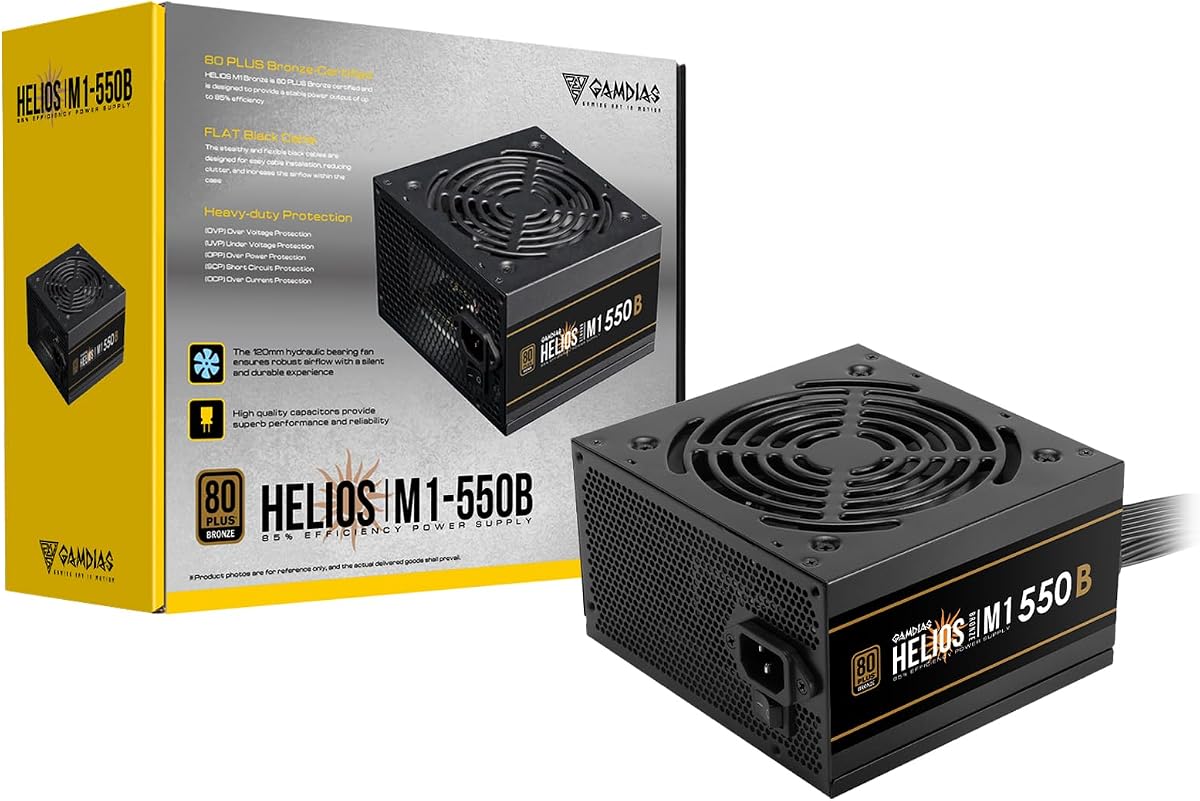
GAMDIAS Helios M1-550B offers an efficient solution with Bronze certification. Active PFC technology helps reduce power waste effectively. The silent mode switch allows for quieter operation.
We may earn a commission when you buy through this link, at no additional cost to you.
Its high temperature resilience means it can handle heat well. This is useful in enclosed cases. The capacitors are high quality ensuring reliability.
While fan noise may rise under load the silent mode helps. The design is functional without unnecessary features. It is a good value for general computing.
Best for those needing a solid power source for a desktop. The silent switch adds control. Choose this for balanced performance and cost.
GAMDIAS ECO fan speed control system adjusts speed with power loading.
High quality capacitors provide superb performance and reliability.
We may earn a commission when you buy through this link, at no additional cost to you.
The be quiet! Pure Power 12 is a high-end option for quiet systems. Gold efficiency lowers power consumption and costs. It supports next-gen GPUs with PCIe 5.1.
We may earn a commission when you buy through this link, at no additional cost to you.
German engineering ensures robust performance and safety. The fan blades are optimized for quiet cooling. Black sleeved cables enhance airflow and installation.
While expensive it delivers exceptional quality and stability. Future proofing makes it a smart long-term investment. Ideal for enthusiasts who value silence and efficiency.
Best for premium builds needing reliability. The ATX 3.1 support is a major plus. Select this for top-tier performance and design.
ATX 3.1 PSU supports PCIe 5.1 for next-gen GPUs.
Temperature-controlled fan with optimized blades ensures quiet cooling.
We may earn a commission when you buy through this link, at no additional cost to you.
The Silverstone Extreme 550Rz is designed for SFX cases. Its compact size allows for powerful builds in small form factors. Gold certification ensures high efficiency.
We may earn a commission when you buy through this link, at no additional cost to you.
Modular design with flat cables enhances airflow. Smart deactivation keeps noise low. It is built for high-end small PCs.
While the price is higher the features justify it. The 24/7 output rating is robust. This is perfect for ITX enthusiasts.
Ideal for compact cases needing power. The SFX form factor is a major benefit. Choose this for small builds with high efficiency.
Standard SFX form factor size compliant with SFX12V 4.1 standard.
Rated for 24/7 continuous output at 40 degrees operating temperature.
We may earn a commission when you buy through this link, at no additional cost to you.
Selecting a power supply requires understanding efficiency, form factor, and compatibility. This section breaks down key factors to help you make an informed decision.
Efficiency ratings like Bronze or Gold indicate how much power is wasted as heat. Higher ratings save electricity and reduce heat output which keeps your system cooler. This is vital for long term performance.
Look for at least Bronze certification to ensure energy savings. Gold ratings offer even better efficiency but cost more.
Your case size dictates the PSU form factor. Standard ATX fits most cases while SFX is for smaller builds. Ensure the dimensions match your case specifications before purchasing.
Always verify case compatibility charts to avoid fit issues. Standard ATX is safest for most users.
Modular PSUs let you connect only needed cables reducing clutter. Non-modular units have fixed cables that can restrict airflow. This impacts cooling and aesthetics significantly.
If budget allows choose fully modular for cleaner builds. Semi-modular is a middle ground.
A longer warranty often reflects better component quality. Five years is standard but ten years indicates premium build. It protects your investment against sudden failures.
Prioritize units with at least five years warranty. This ensures peace of mind.
Modern PSUs use a single +12V rail for stable power delivery. Multiple rails can cause issues with high draw components like GPUs. Look for strong 12V rail capacity.
Check the amperage on the 12V rail to match your GPU needs. Strong rails prevent shutdowns.
Safety features like OVP and SCP protect against surges and shorts. These are critical for system longevity. Always ensure the unit has comprehensive protection.
Verify the protection list includes voltage and short circuit safety. This prevents hardware damage.
Fan design impacts noise during operation. Larger fans spin slower and are quieter. Look for silent fan technology or zero RPM modes.
Prioritize low noise models for home or office setups. Silent fans reduce distraction.
Standards like ATX 3.1 support new hardware like PCIe 5.1 GPUs. Older standards may not handle transient spikes. Newer standards ensure compatibility.
Select a unit with ATX 3.1 support if planning upgrades. This avoids early obsolescence.
Install the PSU in the case with the fan facing downward if possible. This allows it to draw cool air from the floor. Secure it with four screws to prevent vibration.
Connect cables carefully ensuring all connections are seated fully. Avoid forcing connectors as this can damage pins. Route cables behind the tray for airflow.
Clean dust from the PSU vents regularly to prevent overheating. Use compressed air to blow out debris from the fan. Ensure vents are never blocked by fabric or walls.
Yes, a 550W PSU is typically sufficient for mid-range gaming rigs. It supports most modern GPUs when paired with efficient CPUs. Ensure your specific GPU wattage requirements are met.
Gold PSUs have higher efficiency ratings meaning less power is wasted as heat. This reduces electricity bills and keeps the system cooler. Bronze is a cost-effective entry level option.
Modular PSUs offer better cable management and airflow which reduces clutter. They are usually more expensive but improve the build process. If budget allows modular is the better choice.
Check your case specifications for supported PSU sizes. Most cases support standard ATX. Measure the dimensions to ensure clearance in small cases.
Standard warranties range from three to five years. Premium units often offer ten years. A longer warranty usually indicates better quality components.
A PSU does not directly increase speed but unstable power can cause crashes. A high-quality unit ensures consistent voltage delivery for stable operation. This is essential for reliable performance.
ATX 3.1 units are future-proof for new high power GPUs. They handle transient spikes better than older standards. Worth the investment for new builds planning upgrades.
PSUs often last five to ten years depending on load and quality. If you hear unusual noises or system restarts it might need replacement. Regular maintenance helps extend life.
We reviewed ten top models ranging from budget Bronze to premium Gold units. Each offers unique features like modularity or ATX 3.1 support. The Rosewill VNW and LIAN LI RB550 stand out for value.
Prioritize efficiency and safety features for a stable system. Modular designs and warranty lengths often signal long-term reliability. Choose a unit that matches your case and hardware needs.
Prices fluctuate frequently so verify current deals before purchasing. Use the comparison table to find the best fit. Check current prices to ensure you get the best value.