
TCL 55" T7 4K QLED Google TV with 144Hz Gaming
4.3Editor score
120Hz Panel Refresh Rate
QLED Quantum Dot Technology
4 HDMI Inputs including eARC
Finding the right display for next-generation gaming requires specific technical capabilities beyond standard television functionality. A 120Hz refresh rate ensures smooth motion during fast-paced action sequences and competitive multiplayer matches without distracting blur or lag.
Our team analyzed ten leading models currently available on the market to identify which screens deliver the most responsive performance for PlayStation and Xbox users. We evaluated panel technologies, input lag specifications, and high dynamic range support to provide accurate recommendations for every budget.
Each selection in this guide highlights specific strengths ranging from budget-friendly options to premium displays with advanced local dimming. Please note that pricing fluctuates frequently so verify current costs before finalizing your purchase decision to ensure you get the best value.
4.3Editor score

4.6Editor score
4.5Editor score
As an Amazon Associate we earn from qualifying purchases.
This side-by-side comparison details the key specifications and performance attributes of each selected television model to help you make an informed decision based on your specific gaming and viewing requirements.


The Hisense 65" U7 Mini-LED stands out as the premier choice for gamers seeking high performance without the premium price tag. With a native 165Hz refresh rate and impressive local dimming zones it delivers fluid motion and deep contrast essential for next-gen consoles.
We may earn a commission when you buy through this link, at no additional cost to you.
Its anti-reflection coating ensures visibility even in well-lit living rooms while the HI-QLED technology produces vibrant accurate colors across the entire screen. Gamers benefit from variable refresh rate support which eliminates screen tearing during intense gameplay sessions.
While the panel does not match OLED in black levels in typical room lighting the performance remains competitive. The smart platform is responsive though occasional software glitches may require rebooting to restore optimal streaming functionality.
This television is ideal for households that need a large display capable of handling both movies and sports. Anyone prioritizing high brightness and refresh rates over perfect black levels will find this model exceeds expectations in every category.
The 3000 nits peak brightness allows HDR content to pop even in sunny environments without losing detail in shadows or highlights.
With VRR and ALLM support the TV automatically switches to game mode reducing input lag to near instantaneous response times.
We may earn a commission when you buy through this link, at no additional cost to you.
Samsung continues to lead in smart TV integration with the M70H Series offering a centralized hub for cloud and local gaming. The Mini LED processor ensures high contrast and vivid colors that enhance visual fidelity across all content types.
We may earn a commission when you buy through this link, at no additional cost to you.
Gamers appreciate the GAMING HUB which aggregates titles from multiple sources into a single interface. The MOTION XCELERATOR feature helps maintain clarity during sports and action sequences although some motion blur may still be noticeable.
The TV supports extensive streaming options reducing the need for external devices. However the operating system occasionally lags when switching between heavy applications which can interrupt the viewing experience.
Ideal for users who want an all-in-one entertainment solution this model balances performance and features well. It suits casual gamers who also consume a lot of video content regularly.
The Gaming Hub aggregates apps and games allowing quick switching between different services without needing external consoles.
Advanced color technology delivers true-to-life hues making scenes appear vibrant and realistic on the 4K panel.
We may earn a commission when you buy through this link, at no additional cost to you.
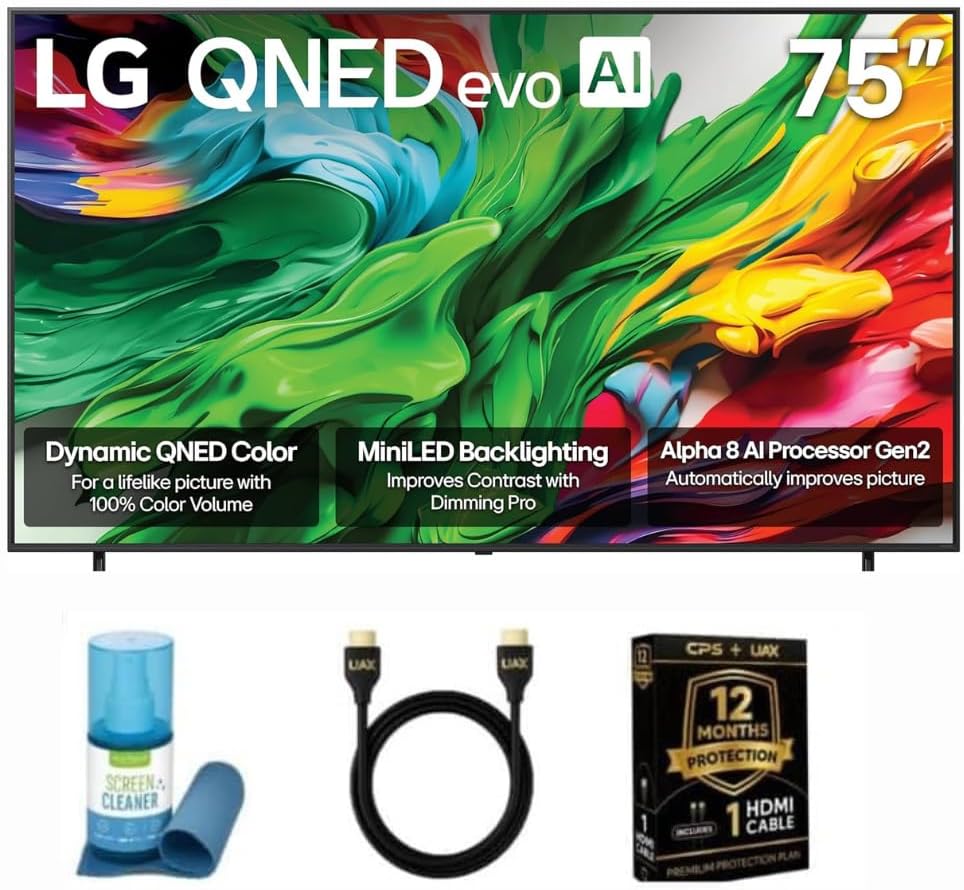
The LG QNED85A represents a high-end option blending Quantum Dot color with MiniLED precision for stunning visual results. The α8 AI Processor optimizes images in real time ensuring every scene looks its best regardless of source quality.
We may earn a commission when you buy through this link, at no additional cost to you.
Gaming features are robust with full HDMI 2.1 support enabling 4K at 120Hz without compromise. The webOS interface is intuitive and stable providing access to major apps with minimal setup time.
While the cost is significant the build quality and performance justify the investment for enthusiasts. The remote control is functional but lacks backlighting making navigation difficult in dark rooms.
This model suits buyers seeking top-tier picture quality and reliable smart features. It is particularly strong for mixed use involving high fidelity movies and competitive gaming sessions.
The α8 Processor analyzes content frame by frame to adjust contrast and color automatically for the best visual outcome.
Multiple HDMI 2.1 ports ensure future-proofing for next-gen consoles supporting high frame rates and enhanced audio return.
We may earn a commission when you buy through this link, at no additional cost to you.
Sony TVs are renowned for their picture processing and the BRAVIA 3 II continues this legacy with specific optimizations for PlayStation 5. The XR Processor ensures accurate colors and sharp details making games and movies look exceptional.
We may earn a commission when you buy through this link, at no additional cost to you.
Gamers benefit from Auto HDR Tone Mapping which adjusts contrast settings dynamically to match the console output. The anti-glare coating reduces reflections significantly improving visibility in bright living spaces.
Despite these strengths the peak brightness is lower than some competitors limiting HDR impact. The smart interface relies on Google TV which is capable but sometimes cluttered with content suggestions.
This TV is a top choice for PlayStation owners seeking optimized performance. It excels in color accuracy and motion handling but may not satisfy users prioritizing sheer brightness.
Exclusive features like Auto Genre Picture Mode tune settings automatically to match PS5 gameplay for the best visual result.
The special screen coating minimizes reflections from windows and lights ensuring a clear view in any lighting condition.
We may earn a commission when you buy through this link, at no additional cost to you.
The TCL T7 offers an impressive refresh rate at a budget-friendly price making it accessible for casual gamers. The QLED panel delivers vibrant colors and adequate brightness for indoor viewing environments.
We may earn a commission when you buy through this link, at no additional cost to you.
Support for 120Hz ensures smooth gameplay on compatible consoles though input lag is slightly higher than premium models. The integrated Dolby Atmos audio provides decent sound but lacks depth for cinematic experiences.
While it lacks advanced local dimming the contrast is sufficient for general entertainment. The Google TV platform is reliable and offers a wide range of streaming options and voice control features.
This TV is ideal for first-time console owners or those on a tight budget. It balances cost and performance effectively without sacrificing essential gaming features.
Getting a 120Hz panel at this price point is rare and makes it a strong contender for budget-conscious gamers.
Google TV integrates apps seamlessly and offers a clean interface for navigating streaming services easily.
We may earn a commission when you buy through this link, at no additional cost to you.
The QM6K series combines MiniLED backlighting with Quantum Dot color for a bright and vibrant viewing experience. It is designed to deliver high performance at a mid-range price point suitable for many households.
We may earn a commission when you buy through this link, at no additional cost to you.
With a native 144Hz refresh rate this TV handles fast motion exceptionally well. The HALO CONTROL SYSTEM minimizes blooming around bright objects preserving detail in dark scenes.
While the brightness is impressive it struggles slightly in very bright rooms due to reflections. The Google TV interface is fast and responsive making navigation between apps effortless.
This model is perfect for gamers who need better picture quality than entry-level TVs. It delivers excellent contrast and speed without the cost of premium OLED panels.
MiniLED technology provides deeper blacks and brighter highlights making HDR content more impactful and visually striking.
The 144Hz rate ensures ultra-smooth motion which is essential for competitive shooters and fast-paced racing games.
We may earn a commission when you buy through this link, at no additional cost to you.
For those seeking a massive viewing area the F8D offers a 75-inch panel at an accessible price. It supports high refresh rates and features Fire TV for a familiar streaming interface.
We may earn a commission when you buy through this link, at no additional cost to you.
The Game Accelerator 288 ensures fluid motion and responsive gameplay suitable for next-gen titles. Brightness is generally good but uniformity can vary across the screen in dark scenes.
Color accuracy is decent for general viewing but lacks the precision of higher-end models. The built-in audio is enhanced by Dolby Atmos but still benefits from an external sound system.
This TV is a great choice for home theater setups prioritizing screen real estate. It delivers a big picture experience with sufficient gaming features for casual players.
A 75-inch display creates a cinematic effect ideal for watching movies and immersive gaming experiences.
Integration with Alexa allows easy voice control and seamless access to streaming content apps.
We may earn a commission when you buy through this link, at no additional cost to you.
The Q7 series brings Full Array Local Dimming to the budget segment ensuring better contrast than edge-lit alternatives. It supports 120Hz input and offers decent color reproduction for the price.
We may earn a commission when you buy through this link, at no additional cost to you.
Gamers can utilize the Game Accelerator for smoother motion though it is not a native high refresh rate for all content. The motion handling is improved but still shows some blur during rapid movements.
Brightness is adequate for controlled lighting conditions but struggles in very bright rooms. The smart TV interface is responsive though occasional software updates are needed to maintain stability.
This TV is a smart choice for budget builders seeking quality performance. It delivers reliable gaming features and good contrast without breaking the bank.
Having local dimming zones at this price point improves black levels and contrast significantly compared to standard LED TVs.
Motion enhancement technology ensures gameplay looks smooth and fluid even if the content is not native high refresh.
We may earn a commission when you buy through this link, at no additional cost to you.
Roku TVs focus on simplicity and ease of use making them ideal for users who want a hassle-free setup. The Pro Series introduces MiniLED technology for improved brightness and contrast over standard LED panels.
We may earn a commission when you buy through this link, at no additional cost to you.
The 120Hz refresh rate supports fluid gaming and sports viewing without significant motion blur. Freesync Premium Pro ensures compatibility with multiple console and PC platforms.
Sound quality is surprisingly good for a flat panel but still benefits from external speakers. The interface is clean and intuitive but lacks advanced picture calibration options.
This model suits users who prioritize simplicity and solid performance. It is a reliable choice for general entertainment and casual gaming.
The remote finder feature and simple setup process make this TV incredibly easy to use for all ages.
MiniLED backlighting allows for bright highlights and deep shadows enhancing overall visual depth.
We may earn a commission when you buy through this link, at no additional cost to you.
OLED technology delivers perfect blacks and infinite contrast which is unmatched for movie watching. The Roku interface remains simple and responsive providing quick access to favorite apps.
We may earn a commission when you buy through this link, at no additional cost to you.
Gaming benefits from near-instantaneous response times ideal for competitive play. The 120Hz rate ensures smooth motion though HDR impact is limited by lower brightness.
OLED panels are susceptible to burn-in with static content which requires careful usage. The TV is best suited for dark rooms and varied content viewing.
This model is great for cinematic enthusiasts prioritizing picture quality. It offers a premium OLED experience in a user-friendly package.
OLED pixels light individually creating true black levels that enhance depth and color vibrancy significantly.
Near instant response time eliminates ghosting and blur making fast action look crisp and fluid.
We may earn a commission when you buy through this link, at no additional cost to you.
Choosing the right display involves evaluating several technical factors that impact performance and longevity. This guide breaks down the essential specifications to consider before making your purchase.
A 120Hz refresh rate allows the screen to update images 120 times per second resulting in smoother motion and reduced blur during fast action. Ensure the TV supports native 120Hz and not just interpolated motion to guarantee compatibility with PS5 and Xbox Series X.
Look for native refresh rates that match your console output to avoid input lag and ensure consistent performance.
VRR technology synchronizes the TV refresh rate with the console frame rate preventing screen tearing and stuttering. Check for HDMI 2.1 ports that support FreeSync and G-Sync for the best gaming experience.
Prioritize models with full HDMI 2.1 compliance to ensure VRR functions correctly across different games.
Input lag is the delay between pressing a button and seeing the action on screen. Competitive gaming requires input lag under 15ms in game mode which most modern TVs now achieve reliably.
Test input lag claims or reviews to ensure the TV responds instantly to controller inputs.
LED and MiniLED panels offer high brightness and durability while OLED provides perfect blacks and infinite contrast. Consider your viewing environment as bright rooms benefit from LED brightness and dark rooms suit OLED contrast.
Choose panel technology that suits your room lighting and viewing priorities for the best visual experience.
High Dynamic Range formats like Dolby Vision and HDR10+ improve color and contrast for a more cinematic look. Ensure the TV supports the HDR formats your consoles and streaming services use for optimal quality.
Select TVs with support for multiple HDR formats to ensure wide compatibility with content sources.
Local dimming adjusts brightness of specific screen zones to improve contrast and reduce blooming around bright objects. More zones generally mean better black levels and sharper images in dark scenes.
Prioritize models with many local dimming zones for better contrast and image clarity.
The TV operating system determines how easy it is to access apps and services. Google TV and webOS are popular choices that offer fast performance and intuitive interfaces.
Ensure the smart platform has the apps you need and offers a smooth user experience.
Multiple HDMI 2.1 ports allow connecting consoles soundbars and PCs without sacrificing features like 120Hz and VRR. Verify the number of ports before buying to avoid needing external switches.
Confirm sufficient HDMI 2.1 ports are available to connect all your gaming devices simultaneously.
To maximize the performance of your new television start by configuring the game mode settings in the input menu. This disables unnecessary image processing that can introduce input lag ensuring your controller commands are transmitted instantly.
Regularly update the TV software to benefit from the latest performance patches and app improvements. Most devices offer auto-update options that keep the system secure and stable without requiring manual intervention.
Avoid displaying static images for extended periods as this can lead to burn-in on OLED screens. Use screen savers or enable pixel shifting features to protect the panel and extend its lifespan significantly.
Not necessarily. Some manufacturers use 120Hz refresh rates on panels but limit HDMI bandwidth. Check the specs for HDMI 2.1 compliance to support 4K at 120Hz and VRR.
While not mandatory VRR significantly reduces screen tearing and stuttering. It enhances visual smoothness making it highly recommended for any console gamer seeking a quality experience.
Yes provided the TV has enough HDMI 2.1 ports. If not use an HDMI 2.1 switch to connect multiple devices without losing high refresh rate capabilities.
Enable Game Mode in the picture settings. This disables post-processing features that delay image rendering ensuring your controls feel responsive.
Modern OLED TVs are safer due to pixel shifting and auto brightness limiting. Avoid static HUDs for long periods to prevent burn-in and enjoy perfect blacks.
Yes HDR games look more vibrant with higher brightness. However too much glare can be distracting in bright rooms.
The Hisense U7 stands out as our top pick offering exceptional brightness and refresh rates at a competitive price. For those seeking a premium experience the LG QNED85A delivers unparalleled image quality and processing power.
Gamers should prioritize refresh rate and VRR support when making their selection to ensure smooth gameplay. Balancing these features with brightness and contrast will result in a satisfying home theater experience.
Prices fluctuate regularly so checking current listings is essential before purchasing. Stay informed about upcoming deals to maximize the value of your investment in high-performance gaming display.