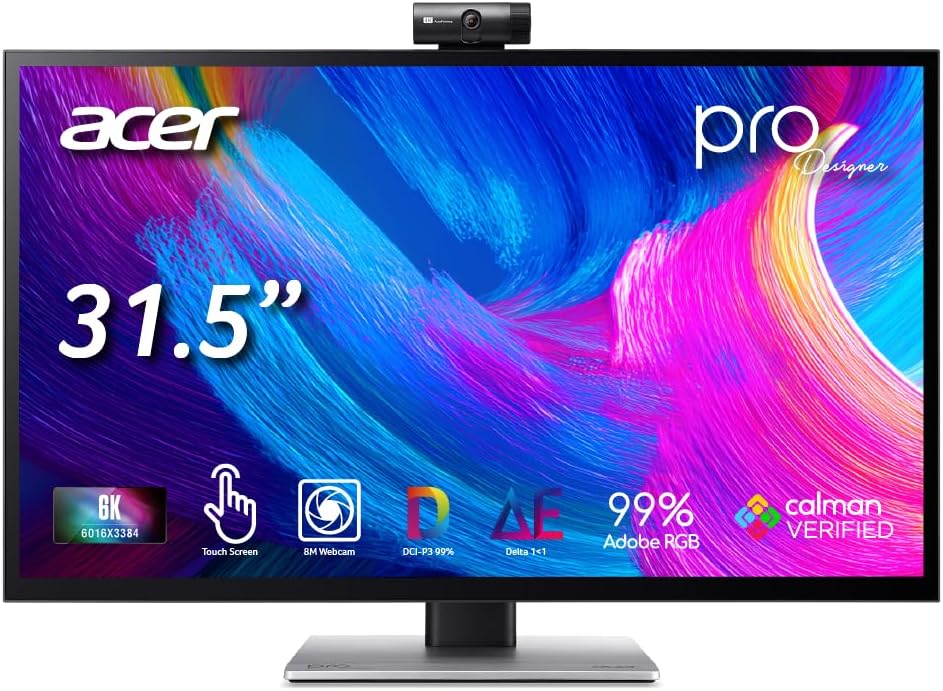
Acer ProDesigner PE320QXT
4.0Editor score
Touch and Stylus Support
DisplayHDR 600
Built-in Webcam and Mic
The world of professional displays has evolved significantly with the introduction of 6K resolution screens. These monitors offer unparalleled clarity and screen real estate for creatives, developers, and power users who demand the highest fidelity in their visual work.
We have analyzed ten leading 6K monitors available in the market today. Our comparison focuses on critical aspects such as color gamut coverage, connectivity options, refresh rates, and ergonomic features to ensure you find the perfect fit for your setup.
Each pick in this list highlights specific strengths tailored to different needs. Whether you need touch functionality, gaming performance, or pure productivity, you will find detailed insights here. Keep in mind that pricing and availability can change frequently.
4.0Editor score

3.9Editor score

3.7Editor score
As an Amazon Associate we earn from qualifying purchases.
The following table provides a side-by-side look at the key specifications and features of each 6K monitor. This overview helps you quickly identify which model aligns best with your specific technical requirements and budget constraints.


The ASUS ProArt PA32QCV stands out as a top-tier choice for professionals seeking high fidelity visuals. With a 31.5-inch 6K display and factory calibration, it delivers reliable color performance right out of the box. Its versatile connectivity makes it a hub for modern workflows.
We may earn a commission when you buy through this link, at no additional cost to you.
Color accuracy is a standout strength here, boasting 98 percent DCI-P3 coverage and Calman verification. The Intelligent Light Sync Technology ensures consistent performance regardless of ambient conditions. Additionally, the Auto KVM switch simplifies managing multiple devices with a single peripheral set.
While the refresh rate is standard at 60Hz, this monitor is optimized for static content creation rather than fast-paced gaming. The price reflects its professional capabilities, but the included Adobe Creative Cloud subscription adds tangible value to the purchase for creatives.
This monitor is ideal for graphic designers and video editors who prioritize color integrity. If you need a display that integrates seamlessly with Mac workflows and offers robust port options, the ProArt PA32QCV is a strong recommendation.
Calman Verified factory calibration ensures Delta E less than 2 for professional grade color consistency across all tasks.
The M Model-P3 Color Preset Mode matches MacBook displays for a seamless workflow across Apple devices.
We may earn a commission when you buy through this link, at no additional cost to you.
The Dell 52-Inch 6K Monitor offers a cinematic viewing experience with its expansive curved screen. It combines high resolution with a 120Hz refresh rate, making it suitable for both productivity and light gaming. The IPS Black panel provides deep blacks and vibrant colors.
We may earn a commission when you buy through this link, at no additional cost to you.
Productivity is enhanced by the Thunderbolt Hub capabilities allowing up to 140W of power delivery to connected laptops. Picture-by-Picture and KVM support facilitate efficient multi-PC workflows. The TÜV certified eye comfort features reduce strain during long work sessions.
The sheer size of this monitor requires significant desk space, which may not suit smaller offices. While the refresh rate is impressive for a productivity screen, gaming performance is secondary to its focus on visual fidelity and workflow efficiency.
Consider this monitor if you need an all-in-one hub for a high-end workstation. The immersive display and powerful connectivity make it a premium choice for users who demand the best in screen real estate and performance.
The 52-inch 21:9 aspect ratio provides exceptional detail and screen real estate for expansive productivity.
Connect and charge devices up to 140W via Thunderbolt 4 with a streamlined multi-port setup.
We may earn a commission when you buy through this link, at no additional cost to you.
The G32P delivers a robust display for creative professionals who require high contrast and accurate color. Its 32-inch 6K resolution combined with 99 percent DCI-P3 coverage ensures vivid visuals. The honeycomb cooling design adds to its premium build quality.
We may earn a commission when you buy through this link, at no additional cost to you.
With 500-nit brightness and HDR support, this monitor handles bright highlights and deep blacks effectively. The ergonomic stand allows for tilt, swivel, pivot, and height adjustments to suit various working positions. The anti-glare coating helps minimize eye fatigue.
The glossy screen may show reflections in bright environments, which could be distracting for some users. Connectivity is functional but lacks some advanced hub features found in other models. However, the visual quality remains a strong point for content creation.
This monitor is a great fit for video editors and photographers focused on HDR workflows. If you value build quality and color accuracy over extensive connectivity options, the G32P offers a compelling package.
Delivers deeper blacks and brighter highlights for immersive gaming and HDR content experiences.
CNC-machined aluminum body with honeycomb cooling ensures durability and sleek aesthetics.
We may earn a commission when you buy through this link, at no additional cost to you.
Samsung's Odyssey G8 introduces 6K gaming with a unique Dual Mode feature. You can enjoy 6K at 165Hz for visuals or switch to 3K at 330Hz for speed. This flexibility caters to gamers who want both fidelity and performance in one display.
We may earn a commission when you buy through this link, at no additional cost to you.
The Fast IPS panel ensures vivid colors across the entire screen while minimizing motion blur. NVIDIA G-SYNC and AMD FreeSync Premium compatibility reduces screen tearing for smooth gameplay. The ergonomic stand supports height adjustment for comfortable positioning.
While the gaming specs are impressive, this monitor is less optimized for static creative work compared to others. The rating suggests mixed user experiences, possibly due to firmware or specific hardware variations. However, the technical features are forward-looking.
This monitor is a strong option for gamers who value resolution and refresh rate. If you want to future-proof your setup with 6K gaming capabilities and high refresh rates, the G8 is worth exploring.
Switch between 6K at 165Hz for visuals and 3K at 330Hz for lightning-fast action.
Near-instant 1ms response time and G-SYNC compatibility reduce lag and tearing.
We may earn a commission when you buy through this link, at no additional cost to you.
The Acer ProDesigner PE320QXT bridges the gap between monitors and creative tablets. Its 31.5-inch 6K touch display allows direct interaction with your work. With factory calibration to Delta E less than 1, it offers exceptional color precision for professional tasks.
We may earn a commission when you buy through this link, at no additional cost to you.
You can sketch, annotate, and retouch directly on the screen using MPP 2.0 styluses. The built-in 8MP webcam and 4-mic array simplify video calls without extra peripherals. DisplayHDR 600 certification ensures you preview HDR content accurately.
The stylus is not included, which adds to the cost for those needing drawing tools immediately. The touch functionality is excellent but may consume more power or generate heat compared to standard monitors. Still, the workflow efficiency is unmatched.
Ideal for designers and architects who need to interact with their screens directly. If you want an all-in-one solution for creation and communication, the PE320QXT provides a premium and versatile experience.
10-point touch and MPP 2.0 stylus let you create and annotate directly on the screen.
Built-in 8MP webcam and 4-mic array remove the need for extra hardware during calls.
We may earn a commission when you buy through this link, at no additional cost to you.
The G32X impresses with its minimalist aesthetic and high user satisfaction. It delivers a 32-inch 6K display with excellent color accuracy and ergonomic adjustability. The anti-glare screen and low blue light mode protect eyes during extended use.
We may earn a commission when you buy through this link, at no additional cost to you.
Connectivity includes a high-speed port capable of 100W charging. This allows single-cable setups for many laptops. The universal mount compatibility supports third-party arms for flexible positioning. Its 5.0 rating indicates strong user approval.
While it lacks some advanced gaming or touch features, it excels as a reliable productivity display. The focus on eye comfort and design makes it suitable for office environments. It is a solid choice for clean setup enthusiasts.
Consider this monitor if you value simplicity and visual clarity. For those seeking a dependable display without unnecessary bloat, the G32X provides an excellent balance of function and form.
A perfect 5.0 star rating reflects consistent user satisfaction with build and performance.
Multi-layer anti-reflective coating and low blue light minimize fatigue over long periods.
We may earn a commission when you buy through this link, at no additional cost to you.
The Dell U5226KW focuses on connectivity with dual Thunderbolt 4 ports and 140W power delivery. Its 52-inch curved display offers a wide field of view. The remote control adds convenience for media playback and settings adjustment.
We may earn a commission when you buy through this link, at no additional cost to you.
Dell Color Management software helps maintain accurate visuals across different workflows. The IPS Black panel improves contrast for better blacks and shadows. This monitor serves well as a central hub for multiple laptops or workstations.
The resolution is slightly unique at 6144×2560 which might require scaling adjustments in some apps. User ratings vary, suggesting potential setup complexities. However, the hardware specs are robust for power users who need extensive ports.
This display is recommended for IT professionals or multi-machine setups. If you need a powerful hub with high power delivery and extensive connectivity, the U5226KW delivers the necessary features.
140W Power Delivery ensures fast charging for laptops and devices connected via Thunderbolt.
Included remote control enhances usability for media viewing and quick setting changes.
We may earn a commission when you buy through this link, at no additional cost to you.
The LG UltraFine evo 32U990A-S features cutting-edge Thunderbolt 5 connectivity for data transfer up to 80 Gbps. Its Nano IPS Black technology offers better contrast and color accuracy. This is a future-proof choice for high-speed data workflows.
We may earn a commission when you buy through this link, at no additional cost to you.
With built-in speakers and KVM functionality, it simplifies desk clutter and multi-device control. The DisplayHDR 600 certification ensures reliable HDR performance for creative work. Users appreciate the bundle accessories like cable ties and cleaning kits.
The high cost and niche connectivity may limit its appeal to general consumers. It is best suited for professionals working with large files or requiring the latest interface speeds. The bundle value adds to its practicality for studios.
This monitor is a top pick for tech-savvy users prioritizing speed and color. If you need Thunderbolt 5 capabilities and professional features, the LG UltraFine evo stands out as a leader.
Thunderbolt 5 delivers up to 80 Gbps data transfer and 96 W charging over one cable.
Nano IPS Black provides 98 percent DCI-P3 coverage for true-to-life visuals.
We may earn a commission when you buy through this link, at no additional cost to you.
The Dell UltraSharp U3224KB comes bundled with a two-year enhanced protection pack providing extra peace of mind. It offers a standard 6K resolution suitable for general office tasks and viewing. The LED backlight ensures visual efficiency.
We may earn a commission when you buy through this link, at no additional cost to you.
With 450 nit brightness and fast response time, it handles dynamic content reasonably well. USB Type-C allows quick data transmission for convenience. The included cables simplify setup. It is designed for maximum dependability in professional settings.
Compared to specialized creative monitors, its specs are more generic. The protection pack is a significant value-add for businesses concerned with longevity. However, it may not meet the high-end requirements of color-critical work.
This monitor is a solid choice for corporate environments needing reliability. If you value a good warranty bundle and dependable performance, the U3224KB bundle offers practical benefits.
2 Year Premium Extended Service Protection Plan ensures long-term dependability.
USB Type-C allows quick transmission of data at a higher rate for convenience.
We may earn a commission when you buy through this link, at no additional cost to you.
For budget-conscious buyers, the renewed Dell U5226KW WOST offers the same features without the stand. It provides a massive 52-inch curved 6K experience. The VESA mount compatibility allows flexible integration with existing arms.
We may earn a commission when you buy through this link, at no additional cost to you.
Despite being renewed, the 120Hz refresh rate and Thunderbolt 4 Hub support remain intact. This option reduces costs while keeping high-end specs. It is suitable for users who already have a mount solution in place.
Buying renewed means accepting potential cosmetic imperfections or limited warranty terms compared to new units. It requires verifying compatibility with existing mounts. But it delivers premium performance at a reduced investment.
This is a smart choice for those prioritizing specs over packaging. If you need a 52-inch 6K monitor and have your own stand, the WOST renewed version offers significant savings.
Renewed option reduces cost while retaining 6K UHD and 120Hz capabilities.
VESA MOUNT ONLY allows seamless integration with existing monitor arms.
We may earn a commission when you buy through this link, at no additional cost to you.
Choosing the right 6K monitor involves balancing resolution, color accuracy, connectivity, and budget. This guide breaks down the key factors you should consider to make an informed decision.
6K monitors typically range from 31.5 to 52 inches. Larger screens offer more real estate but require more desk space. Smaller 6K screens provide higher pixel density for sharper text.
Look for a size that fits your desk and viewing distance while meeting your clarity needs.
Professional creatives need wide color gamut coverage such as 98 percent DCI-P3 or Adobe RGB. Factory calibration to Delta E less than 2 ensures accurate colors out of the box.
Prioritize Calman verified models if you work in print or video production.
Modern workflows require versatile ports. Thunderbolt 4 or 5 allows high-speed data transfer and charging. HDMI 2.1 and DisplayPort 2.1 support higher resolutions and refresh rates.
Ensure the monitor has enough USB ports or hubs for your peripherals.
Standard productivity monitors often come at 60Hz, but gaming or fast-motion work benefits from 120Hz or higher. Response times around 1ms reduce motion blur.
Choose higher refresh rates if you need smooth scrolling or gaming performance.
An ergonomic stand with tilt, swivel, pivot, and height adjustment helps prevent strain. Universal VESA mounts offer flexibility for custom setups.
Look for models that allow easy adjustment to your preferred working position.
Features like touch support, built-in webcams, or KVM switches can simplify your setup. HDR capabilities are important for viewing or editing HDR content.
Decide if these extras justify the added cost for your specific workflow.
A solid warranty like 3 to 5 years protects your investment. Bundled protection plans add extra peace of mind.
Check the warranty terms and registration requirements before purchasing.
Prices vary widely based on features and size. Determine your must-have features to narrow down options within your budget.
Consider bundled accessories and subscription offers when evaluating total value.
Start by connecting the monitor to a compatible graphics source that supports 6K output. Use high-quality cables like certified Thunderbolt or HDMI to ensure signal stability.
Install the manufacturer's software to calibrate colors and adjust settings like brightness or KVM switching. This ensures you get the most out of the display's capabilities.
Keep the screen clean with a soft microfiber cloth and avoid harsh chemicals. Regularly update drivers and firmware to maintain performance and fix bugs.
Not all computers support 6K. You need a modern graphics card or processor with Thunderbolt or HDMI 2.1 support. Check your device specifications to confirm compatibility.
Yes, 6K offers more pixels and sharper detail, which is ideal for editing and multitasking. However, it requires more hardware power. If you work with large files, 6K is a significant upgrade.
Many 6K monitors support high refresh rates suitable for gaming. Models like the Samsung Odyssey G8 are designed with gaming in mind. Ensure your GPU can handle the resolution for smooth performance.
Use Thunderbolt 4 or 5 cables for best results with Mac and modern PCs. HDMI 2.1 cables work for consoles. Avoid lower version cables to prevent signal drops.
6K monitors are generally more expensive than standard models. Prices range based on size and features. Some models offer value bundles or subsidies like Creative Cloud to offset costs.
Use built-in software or hardware calibrators. Factory calibration reduces the need for adjustments. Professional tools ensure accuracy for color-critical tasks.
We have reviewed ten top 6K monitors that excel in different areas. From the versatile ASUS ProArt PA32QCV to the immersive Dell 52-inch models, there is something for every professional.
Prioritize features that align with your primary tasks. If color accuracy matters, look for wide gamut coverage. For productivity, consider screen real estate and connectivity.
Prices and offers change regularly. Check current availability and deals to find the best value for your needs before making a purchase decision.