
HP OmniBook 3 17 inch FHD Laptop AMD Ryzen 5 8GB RAM 512GB SSD Silver
5.0Editor score
WiFi 7 connectivity
17.3 inch display
12 hours battery life
Discover the best laptop with WiFi 7 for speed and efficiency. This guide compares top models from HP, Apple, Dell, and more to help you choose.
Finding a laptop with WiFi 7 ensures you stay connected with the latest wireless technology. These devices offer faster speeds and lower latency for seamless streaming and productivity.
We compared ten top models based on performance, display quality, and connectivity features. Our analysis focuses on real-world usability for students, professionals, and creative users.
Each pick highlights key strengths and trade-offs to match your needs. Note that availability and configurations may change over time, so verify details before buying.
5.0Editor score

5.0Editor score

4.7Editor score
This side-by-side comparison highlights key specifications and features across ten leading models. It helps you identify which device aligns best with your performance and connectivity requirements.




This HP OmniBook 3 laptop stands out as an affordable entry into WiFi 7 technology. With a perfect rating, it delivers solid performance for everyday tasks while offering future proof connectivity.
We may earn a commission when you buy through this link, at no additional cost to you.
The 17.3 inch Full HD IPS display provides ample screen real estate for productivity and media consumption. Its 62.5 percent sRGB color gamut ensures vivid visuals for streaming and work applications.
While the 8GB RAM is sufficient for general use, power users might find it limiting for heavy workloads. However, the battery life compensates for this by offering up to 12 hours on a single charge.
Ideal for students and remote professionals, this device balances cost and capability. The integrated Windows AI Copilot enhances productivity, making it a strong choice for budget conscious buyers.
The 17.3 inch anti glare screen with 300 nits brightness ensures comfortable viewing even in well lit environments.
WiFi 7 provides up to 3x faster speeds than previous standards for seamless streaming and video conferencing.
We may earn a commission when you buy through this link, at no additional cost to you.
The HP OmniBook 3 with Intel Core Ultra 7 offers robust performance for business tasks. It features modern specs like DDR5 RAM and ample storage for extensive file libraries.
We may earn a commission when you buy through this link, at no additional cost to you.
Its 17.3 inch IPS display delivers sharp visuals for multitasking and presentations. The inclusion of a backlit keyboard and numeric keypad enhances usability for long work sessions.
AI features help streamline workflows and improve responsiveness during demanding applications. While the rating is not listed, the hardware suggests reliable performance for professional environments.
This model suits users needing more storage and memory than budget options. The design focuses on efficiency and comfort for daily productivity tasks.
16GB DDR5 RAM ensures smooth operation across multiple applications without noticeable slowdowns.
1TB PCIe SSD provides quick file access and room for extensive media and project files.
We may earn a commission when you buy through this link, at no additional cost to you.
The HP OmniBook 7 is a top tier laptop designed for demanding work and creative tasks. With 32GB RAM and a powerful NPU, it handles complex AI workflows with ease.
We may earn a commission when you buy through this link, at no additional cost to you.
Its 17.3 inch touchscreen display offers 400 nits brightness for crisp visuals in any lighting. Thunderbolt 4 ports enable ultra fast data transfer and versatile docking options.
The 6-cell battery supports extended productivity without frequent charging. While expensive, the performance and features justify the investment for professionals.
Ideal for users needing maximum memory and connectivity. This model balances high performance with user friendly design.
Up to 47 TOPS NPU delivers smarter workflows and faster content creation directly on device.
Thunderbolt 4 allows for 40Gbps data transfer and supports high speed external displays.
We may earn a commission when you buy through this link, at no additional cost to you.
The Acer Aspire 14 offers a compact AI powered laptop with modern features. Its 14 inch WUXGA display provides sharp visuals in a portable form factor.
We may earn a commission when you buy through this link, at no additional cost to you.
With up to 22 hours of battery life and efficient AI processing, it suits mobile users. The durable aluminum chassis and 180 degree hinge add versatility.
While it uses Wi-Fi 6E, the overall performance remains strong for daily tasks. The Copilot+ features enhance search and content interaction capabilities.
Best for students or professionals needing portability without sacrificing performance. Its design supports both work and creative pursuits effectively.
Measured under specific video playback scenarios, battery life ensures sustained productivity without charging.
AcerSense and Windows AI tools streamline settings and optimize video presence effortlessly.
We may earn a commission when you buy through this link, at no additional cost to you.
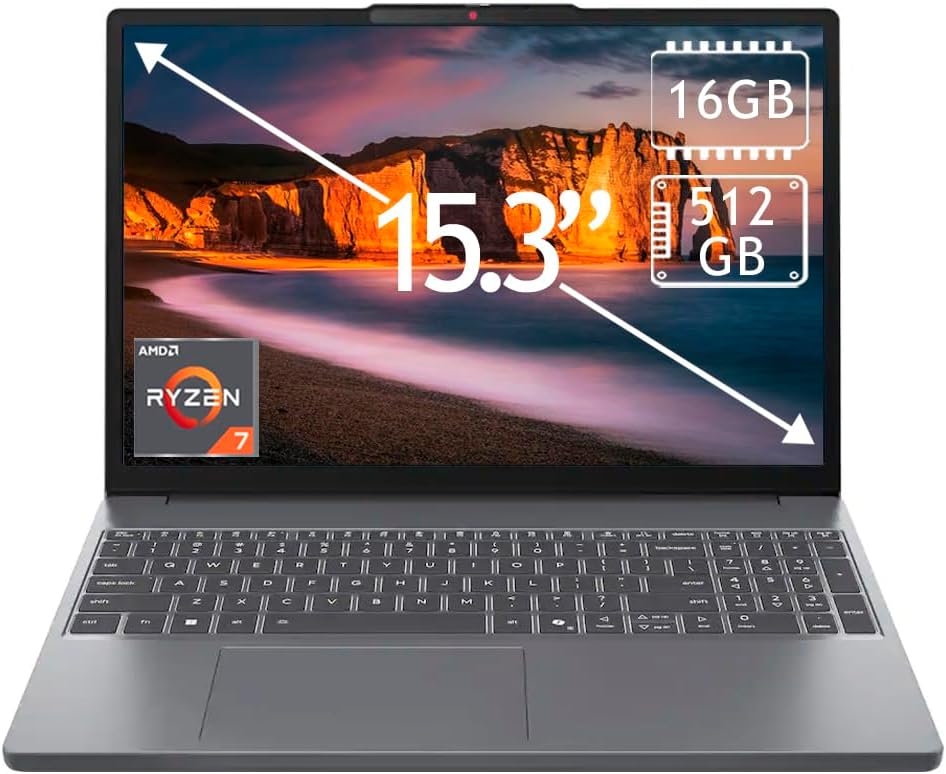
The Lenovo IdeaPad Slim 3 features a vibrant 2K touchscreen for interactive use. Powered by Ryzen 7, it delivers smooth performance for everyday computing.
We may earn a commission when you buy through this link, at no additional cost to you.
The 16GB DDR5 RAM supports efficient multitasking across multiple applications. Its Full HD webcam and modern design make it suitable for hybrid work.
While lacking WiFi 7, its connectivity remains reliable for standard tasks. The rating reflects strong user satisfaction with performance and display.
Ideal for users prioritizing touch input and screen quality. It balances value with modern processing capabilities.
The 2K touchscreen allows for intuitive navigation and precise control in Windows apps.
Ryzen 7 processor ensures fast responsiveness for productivity and daily tasks.
We may earn a commission when you buy through this link, at no additional cost to you.
The Dell 16 Plus is a professional laptop with powerful AI and WiFi 7. Its Core Ultra 9 processor supports demanding digital content creation.
We may earn a commission when you buy through this link, at no additional cost to you.
The 32GB memory ensures stability during heavy workloads. With a 16 inch display and FHD+ webcam, it enhances remote collaboration.
Ports include Thunderbolt 4 and HDMI 2.1 for versatile connectivity. The design prioritizes durability and productivity for business users.
Suits professionals needing high performance and modern connectivity. It offers a premium experience with reliable AI features.
Supports up to 48 TOPS for AI features like Microsoft Studio Effects during video calls.
Intel vPro Platform ensures IT security and remote manageability for enterprise needs.
We may earn a commission when you buy through this link, at no additional cost to you.
This HP 15.6 laptop focuses on memory and storage for multitasking. With 32GB RAM, it handles multiple applications smoothly without lag.
We may earn a commission when you buy through this link, at no additional cost to you.
The Full HD touchscreen provides clear visuals for daily tasks. Windows 11 Pro adds security and productivity tools for professional use.
While it uses Wi-Fi 6, the internal specs support heavy workloads. The battery life and weight make it easy to carry.
Best for users needing high memory at a mid-range price. Its design prioritizes workflow efficiency over premium features.
32GB RAM allows for seamless switching between Excel, video meetings, and cloud apps.
Windows 11 Pro offers enhanced security features for business environments.
We may earn a commission when you buy through this link, at no additional cost to you.
The Acer Aspire Go 15 offers reliable performance for home and office use. Its 15.6 inch display provides comfortable viewing angles for work.
We may earn a commission when you buy through this link, at no additional cost to you.
Equipped with 16GB memory and 512GB storage, it handles daily tasks efficiently. The lightweight chassis ensures portability throughout the day.
While it lacks WiFi 7, it remains a strong choice for standard connectivity. The rating reflects solid value and performance.
Ideal for students and casual users needing a budget friendly laptop. Its design supports efficient daily productivity.
Ryzen 7 processor balances power and efficiency for extended use.
Full HD IPS display delivers vibrant colors and wide viewing angles.
We may earn a commission when you buy through this link, at no additional cost to you.
The MacBook Air 2026 delivers exceptional performance and battery life in a portable design. Its M5 chip powers AI features and creative workflows seamlessly.
We may earn a commission when you buy through this link, at no additional cost to you.
The Liquid Retina display offers rich colors and sharp text for content creation. With 12 hours of battery life, it supports all day use without a charger.
MagSafe charging and Thunderbolt 4 provide versatile connectivity options. The rating highlights its superior build and efficiency.
Best for users needing top tier performance and battery. It combines premium features with macOS security.
Apple Intelligence helps write and manage tasks while protecting user privacy.
Up to 18 hours of battery life ensures uninterrupted productivity during travel.
We may earn a commission when you buy through this link, at no additional cost to you.
This Acer Aspire Go 15 focuses on AI accessibility and efficiency. With a Copilot Key, users can access generative AI assistance quickly.
We may earn a commission when you buy through this link, at no additional cost to you.
The Ryzen 7 processor and Gen4 SSD ensure fast boot times and smooth multitasking. Its display reduces blue light to lessen eye strain.
While not a WiFi 7 model, it offers strong value for Windows users. The design supports daily productivity with intuitive controls.
Suits users needing affordable AI tools and reliable performance. It balances cost with modern software features.
Single touch Copilot Key provides centralized generative AI assistance across apps.
Acer BluelightShield lowers blue light levels to protect eyes during long use.
We may earn a commission when you buy through this link, at no additional cost to you.
Choosing a laptop with WiFi 7 requires evaluating performance, display quality, and connectivity to match your workflow needs.
Processors like Intel Core Ultra and AMD Ryzen 7 provide the power needed for AI tasks and multitasking. Look for modern generations to ensure longevity.
Prioritize newer chips with higher core counts for demanding applications.
At least 16GB RAM ensures smooth multitasking, while 512GB SSD offers adequate storage. Power users may need 32GB for heavy workloads.
Opt for DDR5 RAM and Gen4 SSDs for faster data transfer speeds.
Full HD IPS displays provide clear visuals with wide viewing angles. Touchscreens add versatility for creative tasks and navigation.
Select a panel with good brightness (300+ nits) for varied environments.
WiFi 7 ensures fast internet speeds, but ensure the device has necessary ports like Thunderbolt 4. HDMI 2.1 supports high resolution external monitors.
Check for USB-C and USB-A ports to match your peripherals.
Long battery life is crucial for mobility. Look for devices offering 10+ hours to stay productive throughout the day.
Efficient processors help maximize battery usage during standard tasks.
Lightweight designs and durable materials like aluminum enhance portability. Consider weight and dimensions if you travel frequently.
A sturdy build protects the device during daily use and transport.
Modern laptops include AI assistants like Windows Copilot or Apple Intelligence for enhanced productivity. These features streamline workflows and improve security.
Verify if the device supports AI-specific capabilities on-device.
Determine your budget range to find models that balance cost and performance. Premium devices offer better longevity but at higher price points.
Focus on essential features that directly support your work or study needs.
Start by configuring your network settings to take advantage of WiFi 7 speeds. Ensure your router supports the latest standards for optimal performance.
Keep your software and drivers updated regularly. This ensures security patches and performance improvements are applied to your system.
Maintain your laptop by cleaning vents and avoiding extreme temperatures. Proper care extends battery life and hardware longevity.
WiFi 7 offers significantly faster speeds and lower latency compared to previous standards. This improves streaming quality and video conferencing reliability.
Yes, to fully utilize WiFi 7 speeds you need a compatible router. Older routers may still work but with reduced performance.
Intel Core Ultra and AMD Ryzen AI series processors include dedicated NPUs for AI. These provide efficient on-device AI processing.
16GB RAM is sufficient for general productivity and multitasking. Heavy users may prefer 32GB for complex creative workloads.
Adjust brightness, close unused apps, and keep software updated. Using power-saving modes can also help extend battery runtime.
Touchscreens allow intuitive navigation and are useful for creative work. However, they may consume more battery than non-touch displays.
The HP OmniBook 3 offers a budget friendly entry point while the MacBook Air provides premium efficiency. For power users, the HP OmniBook 7 delivers top tier AI performance.
Prioritize memory and processor speed based on your specific workload needs. Reliable connectivity ensures seamless collaboration and media consumption.
Always check current availability and confirm specs before purchasing to ensure the device meets your requirements today.