
Excel/Word/Power Point/Windows Mouse pad
4.7Editor score
Includes over 200 shortcuts
27.6 by 11.8 inches size
Waterproof and stitched edges
Finding the right Excel cheat sheet desk pad can transform how you work with spreadsheets daily. These large mouse pads provide quick access to essential shortcuts and formulas without breaking your flow. Whether you are an accountant or a student, having references under your fingertips saves time.
We compared ten popular options based on size, print clarity, surface smoothness, and edge durability. Each product offers unique layouts and features designed to boost efficiency. Our analysis focuses on real-world usability for office and home setups.
Each pick highlights specific strengths like waterproofing or ergonomic exercises. Prices vary by retailer so check current listings before buying. These pads range from compact portable sizes to massive desk coverage for ultimate comfort and reference access.
4.7Editor score

4.9Editor score

4.6Editor score
As an Amazon Associate we earn from qualifying purchases.
This table compares key specifications across all ten products to help you find the right size and features for your workspace needs quickly.


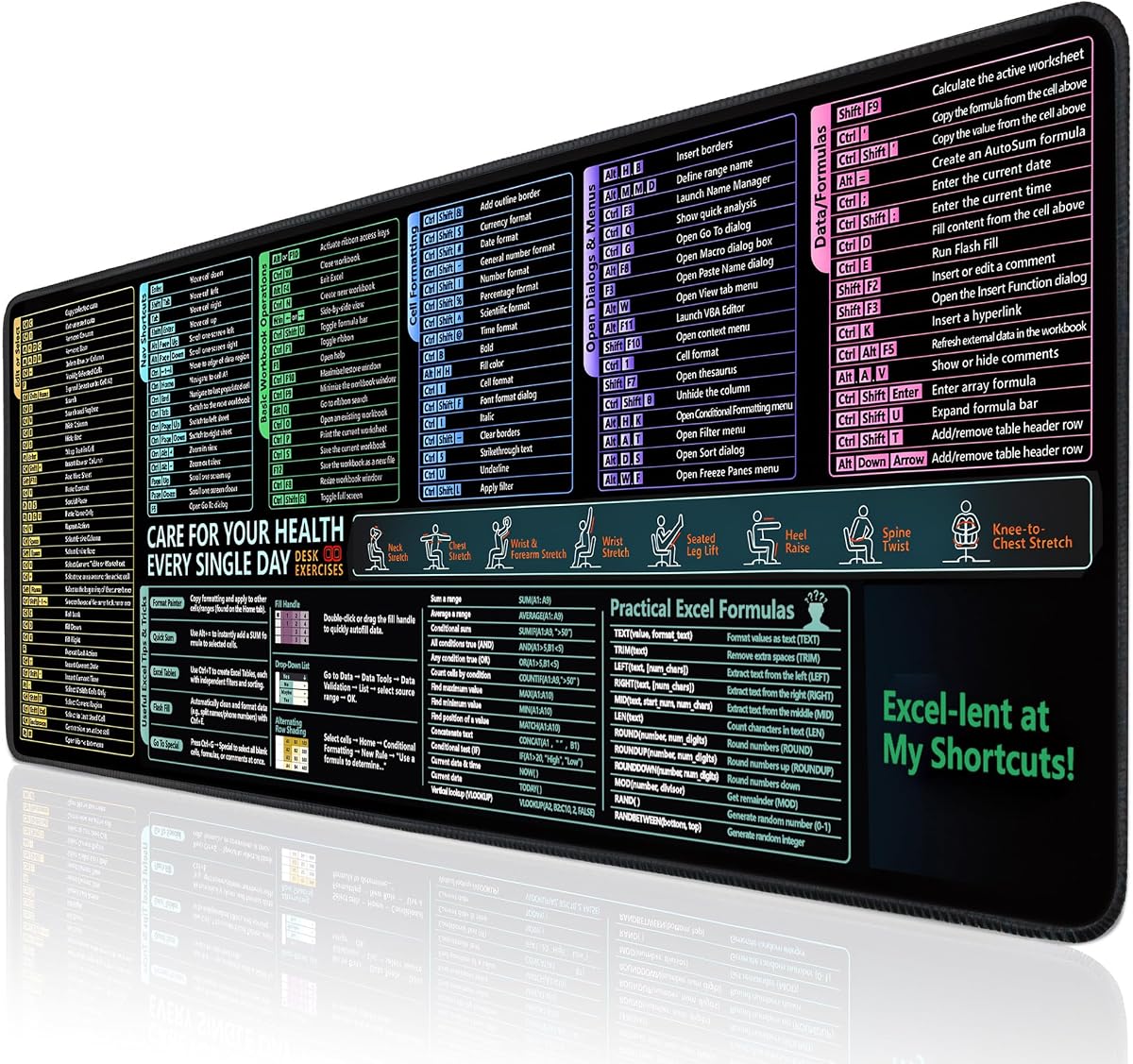


This Pixiecube desk pad stands out as a top contender with its comprehensive shortcut collection and unique desk exercise diagrams. Rated highly by users, it combines functionality with a touch of humor to make your workspace more engaging and efficient.
We may earn a commission when you buy through this link, at no additional cost to you.
The organization is excellent with clearly defined sections for navigation, selection, formatting, and functions. The micro-weave fabric ensures smooth mouse tracking while the 2mm thickness provides comfort for long typing sessions. The water-resistant surface handles spills easily.
While the price is slightly higher than some budget options, the durability from UV-resistant inks and stitched edges justifies the cost. The large size may overwhelm very small desks, so measure your workspace before purchasing to ensure it fits well.
Ideal for professionals and students who want more than just shortcuts on their desk. The unique addition of stretch diagrams helps reduce strain during long work days making this a thoughtful and practical investment for your productivity setup.
The built-in diagrams offer quick ways to stretch your hands and wrists helping you recharge without leaving your workspace.
UV-resistant inks ensure the graphics remain bright and crisp over time resisting fading from sunlight or cleaning.
We may earn a commission when you buy through this link, at no additional cost to you.
This mouse pad offers exceptional value by including over 200 shortcut keys for Excel, Word, PowerPoint, and Windows. It serves as a reliable reference tool that helps users work faster without needing to search online constantly.
We may earn a commission when you buy through this link, at no additional cost to you.
The smooth fabric top ensures accurate mouse movement while the waterproof layer protects against coffee spills or accidents. Reinforced stitched edges prevent fraying ensuring the pad lasts through daily office use without looking worn out quickly.
The main trade-off is the slightly smaller size compared to full XL mats which might limit space for large keyboards. However, the clear organization and affordability make it a top choice for budget-conscious buyers needing quick reference access.
Perfect for students or professionals who need a compact yet powerful tool. The multi-software coverage makes it versatile for various tasks ensuring you have the right commands handy regardless of which Office app you are using today.
Grouped shortcuts across multiple apps reduce context switching helping you maintain focus on your primary tasks efficiently.
Despite the low price, the reinforced edges and waterproof surface provide long lasting performance comparable to pricier options.
We may earn a commission when you buy through this link, at no additional cost to you.
This XL size pad focuses on deep functionality with 9 major Excel function modules that include meanings for common commands. It is an ideal choice for users who need to understand formulas rather than just memorize hotkeys for their workflow.
We may earn a commission when you buy through this link, at no additional cost to you.
The advanced inkjet technology ensures bright and clear graphics without the odor often found in traditional printing. The high-quality waterproof cloth provides a silky smooth feel for your mouse while remaining easy to clean after spills or dust.
While the rating is slightly lower than top competitors, the functional focus on formulas offers unique value for data analysts. The double seam technology ensures longevity though the edge design is less rugged than some other options on the list.
Recommended for users prioritizing detailed reference over aesthetics. The large size accommodates full keyboards and mice comfortably making it a practical addition to any desk where deep spreadsheet work is a daily requirement for success.
Including meanings for functions helps users learn logic behind commands rather than just rote memorization of keys.
The waterproof cloth top offers a smooth glide that reduces friction during intense data entry sessions.
We may earn a commission when you buy through this link, at no additional cost to you.
This XL giant desk pad offers an expansive workspace with a sleek leather surface that elevates the look of any office. It is designed for professionals who value aesthetics alongside functionality wanting a tool that looks as good as it works.
We may earn a commission when you buy through this link, at no additional cost to you.
The anti-slip base made of premium natural rubber keeps the pad firmly in place even during vigorous typing or mouse movements. The spill-repellent surface makes maintenance effortless as you can simply wipe away daily spills to keep it looking new.
The higher price point reflects the premium materials used but may not fit every budget. Some users prefer fabric textures over leather for mouse comfort though the smooth surface still allows for accurate tracking during standard office tasks.
Ideal for executives or consultants wanting to impress clients with a polished desk setup. The massive size covers the entire desk providing ample space for a laptop and keyboard while keeping essential shortcuts visible and accessible at all times.
The leather-like surface adds a sophisticated touch that blends well with high-end office furniture and setups.
At 35.5 by 15.7 inches this pad covers most desks entirely protecting the surface underneath from scratches.
We may earn a commission when you buy through this link, at no additional cost to you.
This pad distinguishes itself by compiling 12 types of common skills across both Excel and Word. It is a versatile tool for users who switch between applications often needing a single reference sheet that covers multiple Microsoft Office programs efficiently.
We may earn a commission when you buy through this link, at no additional cost to you.
The large XL size provides enough room for both keyboard and mouse allowing for a comfortable workflow without clutter. High-quality inkjet technology ensures the bright graphics remain clear and the waterproof cloth helps keep the surface clean from daily spills.
While it lacks unique features like desk exercises, the comprehensive skill coverage makes it a practical choice for general office use. The double seam technology ensures the edges stay intact preventing fraying even after months of heavy daily use and cleaning.
Suitable for administrative staff or students dealing with multiple document types. The focus on practical tips helps streamline tasks across apps making it a reliable daily companion for those who need quick guidance on standard office operations.
Having both Excel and Word shortcuts on one pad reduces the need to swap mats or search for separate guides.
Double seam technology ensures the edges hold up well against regular wear and tear in busy work environments.
We may earn a commission when you buy through this link, at no additional cost to you.
This pad bridges the gap between office utility and gaming performance with its high-quality buttery-smooth rubber base. It delivers lag-free accurate tracking that suits both professional data entry and casual gaming needs equally well on your desk.
We may earn a commission when you buy through this link, at no additional cost to you.
Thermal transfer printing ensures vivid colors and crisp details that remain legible through daily use and cleaning. The precision-stitched edges lock the shape preventing curling which is a common issue with cheaper mats that degrade quickly over time.
The 7-zone layout covers essential sections like Navigation and Formatting clearly but is standard size for most setups. While marketed as gaming-ready the primary function remains a productivity tool making it a great versatile choice for mixed-use workspaces.
Perfect for professionals who also play games after work or students needing one pad for both study and leisure. The focus on preventing fraying ensures a long life giving you reliable reference access without constant replacement needs.
Designed to perform well with gaming mice while retaining enough reference value for spreadsheet productivity work.
Precision-stitched edges prevent the common issue of corner lifting that can ruin mouse tracking on other mats.
We may earn a commission when you buy through this link, at no additional cost to you.
With a near-perfect rating this pad offers color-coded hotkeys and practical spreadsheet functions that are easy to read at a glance. The inclusion of desk stretch diagrams shows a unique commitment to user health and comfort during long sitting hours.
We may earn a commission when you buy through this link, at no additional cost to you.
The thermal transfer printing technology ensures sharp high-contrast text that does not fade or blur over months of use. A 2 mm soft-smooth surface cushions wrists and protects the table from scratches while keeping the pad firmly in place with rubber backing.
While the price is slightly above the most basic options, the durability and thoughtful design features provide excellent value. The stain-resistant surface handles spills easily ensuring the pad maintains its professional look despite daily coffee or ink exposure.
Ideal for finance students or accountants who value both performance and ergonomics. The combination of learning aids and physical comfort makes it a standout choice for those wanting to improve skills and reduce strain simultaneously.
Sharp text ensures commands are readable even under varying lighting conditions or with aging eyes.
The built-in stretch diagrams encourage movement breaks to prevent stiffness during extended data entry sessions.
We may earn a commission when you buy through this link, at no additional cost to you.
This pad delivers a clean straightforward layout of frequently used shortcuts designed to reduce search time during data entry. It focuses on the essentials without unnecessary clutter making it a reliable tool for professionals who value efficiency above all.
We may earn a commission when you buy through this link, at no additional cost to you.
The water-resistant surface allows for easy maintenance as spills can be wiped clean instantly without leaving marks. Reinforced stitched edges prevent fraying ensuring the mat stays intact while the rubber backing keeps it stable during heavy typing or mouse use.
The standard size fits most desks without overwhelming them though it might feel small for those with large keyboard setups. While it lacks extra features like exercises, its solid construction and clear print make it a practical daily choice.
Best for users wanting a no-nonsense reference mat that gets the job done. The focus on productivity and ease of cleaning ensures it remains a functional asset in busy office environments where spills and wear are common daily occurrences.
By focusing only on essential shortcuts the design avoids clutter helping users find information faster.
The water-resistant top allows for quick clean ups ensuring the pad stays looking professional day after day.
We may earn a commission when you buy through this link, at no additional cost to you.
This XL pad offers massive dimensions that cover most desks entirely protecting the surface underneath while providing plenty of room for devices. The lycra surface ensures comfortable glide and accurate control making it a solid option for precision work or gaming.
We may earn a commission when you buy through this link, at no additional cost to you.
The flexible rubber base allows it to be rolled up for easy transport or storage when not in use. High-quality stitching ensures the edges resist deformation while the material is washable allowing for thorough cleaning to remove dust or grime.
While it is one of the largest options available, users should ensure their desk can accommodate the extra space comfortably. The focus on size and glide makes it great for setups with multiple monitors or large mechanical keyboards.
Ideal for users with large desks who want maximum coverage and smooth tracking. The ability to roll it up adds convenience for travelers or those needing to pack their workspace away frequently keeping the reference visible until needed.
The giant size provides unmatched workspace protection and room for full-size peripherals to move freely.
The ability to roll up the pad makes storage easy for users with limited space or travel needs.
We may earn a commission when you buy through this link, at no additional cost to you.
This compact option is unique for its portable design fitting easily into bags or laptop cases for users on the go. It covers shortcuts for Excel, Word, PowerPoint, and Windows making it ideal for students or professionals working from multiple locations.
We may earn a commission when you buy through this link, at no additional cost to you.
The finely-textured surface ensures precise mouse control despite the smaller footprint keeping accuracy high during use. It features stitched edges to reduce fraying and a water-resistant fabric that allows for easy cleaning of dust or accidental spills.
The main limitation is the small size which may feel cramped for full keyboards but works well with laptops. However, for travelers needing quick reference without bulk this pad offers a perfect balance of utility and portability.
Best for mobile professionals or students needing a lightweight solution. The multi-software guide ensures you have essential commands handy regardless of your location providing consistent support for productivity across different work environments and setups.
Designed to fit in bags without bulk making it perfect for remote work and travel scenarios where space matters.
Covers a wide range of office apps ensuring you never face a shortcut barrier no matter which program you use.
We may earn a commission when you buy through this link, at no additional cost to you.
Choosing the right desk pad requires evaluating size, layout, durability, and surface texture to ensure it meets your specific work needs effectively.
Consider your desk space and keyboard size when selecting dimensions. XL pads like 31.5 by 11.8 inches offer ample room for both mouse and keyboard whereas smaller portable ones suit laptops.
Ensure the pad covers enough area to prevent accidental slips without overwhelming your workspace or limiting other tools.
Look for clearly organized sections that group shortcuts logically by function or application. High-contrast printing ensures text is readable even in low-light office environments.
A well-structured layout reduces eye strain and helps you find specific commands quickly without confusion or searching.
Surface texture affects mouse tracking speed and comfort. Smooth fabric provides fast tracking while woven textures offer more control for precision work.
Choose a surface that matches your mouse type and personal preference for glide and tactile feedback during long sessions.
Stitched edges prevent fraying which is crucial for maintaining shape over time. Reinforced stitching ensures the pad stays flat without curling at the corners.
High-quality materials resist tearing and wear ensuring your investment lasts through daily use and cleaning routines.
A non-slip rubber base keeps the pad firmly in place during typing or movement. This prevents shifting which can interrupt workflow or cause frustration.
Check for natural rubber bases that grip well to wooden or glass desks to ensure consistent stability every day.
Spills are common in offices so a waterproof or water-resistant surface is essential. This feature allows for quick wiping and easy maintenance.
Choose materials that do not absorb liquids quickly to protect your desk and keep the pad looking clean and professional.
Some pads offer extras like desk exercise diagrams or multi-software coverage. These features add value for specific users wanting ergonomics or broader app support.
Decide if you need standard shortcuts or specialized tools like stretch guides to enhance your daily workflow and comfort.
Designs range from professional leather looks to colorful prints. Choose a style that fits your office decor while remaining easy to read.
Clear visuals and professional finishes help maintain a tidy workspace appearance that reflects well on your desk environment.
Place the pad on a flat surface and align it so the shortcut section is visible to you. Ensure the non-slip base grips the desk firmly to prevent movement during typing.
Wipe the surface weekly with a damp cloth to remove dust and spills. Avoid harsh chemicals that might damage the printed shortcuts or fade the colors over time.
Store it flat if not in use to maintain shape and prevent creases. If portable, roll it carefully without bending the edges too sharply to avoid cracking.
Yes, most excel cheat sheet desk pads are compatible with wireless mice. The micro-weave or lycra surfaces provide smooth tracking required for optical and laser sensors.
Use a soft damp cloth to wipe the surface gently. Avoid abrasive scrubbers that might scratch the inks. Let it air dry before using again.
Many options serve as gaming mouse pads with smooth surfaces for tracking. Some even feature stitched edges for durability during vigorous play sessions.
Most general shortcuts like copy and paste work across versions. Specific functions may vary slightly so check if your version matches the printed list.
Quality pads with stitched edges resist curling. Check for reinforced seams to ensure the edges stay flat and in place over time.
Some pads offer soft surfaces for wrist comfort. Others focus on speed so check thickness and fabric texture based on your ergonomic needs.
Thermal transfer or UV-resistant inks ensure longevity. With proper care, the graphics remain legible for months or even years of use.
Many vendors offer bulk discounts for office supplies. Contact customer service on the product page for pricing on large orders.
The Pixiecube Excel Cheat Sheet Desk Pad and the Excel/Word/Power Point/Windows Mouse pad top our list for offering unique features and value. Each provides a distinct approach to productivity whether you need extra software coverage or desk exercises.
Prioritize size and durability when making your decision. A large pad with stitched edges offers comfort and longevity that smaller cheaper options may lack in daily office environments.
Remember to check current listings for the most accurate availability. These tools are essential for mastering shortcuts quickly so invest in one that fits your workspace and style needs.