
EZ AD Digital Signage Player
4.1Editor score
Free plan with content tools
4K content support
Easy HDMI plug-and-play
Digital menu displays transform how businesses communicate with customers by replacing static signs with dynamic content that can update in real time. Choosing the right system requires evaluating brightness, connectivity, and content management tools to ensure reliable operation in high traffic environments.
We analyzed ten leading models based on their screen quality, operating system capabilities, and ease of use for daily business operations. Our comparison focuses on commercial-grade durability, remote management features, and the flexibility to adapt content for different times of day or seasonal promotions.
Each pick in this list highlights specific strengths like budget friendly pricing, large screen formats, or advanced Android integration for streamlined content delivery. Please note that pricing and availability fluctuate frequently, so verify current details before making your final purchasing decision.
4.1Editor score

3.8Editor score

3.4Editor score
As an Amazon Associate we earn from qualifying purchases.
The following table provides a side-by-side technical comparison of all ten digital menu display options to help you identify the best fit for your specific business layout and operational needs.


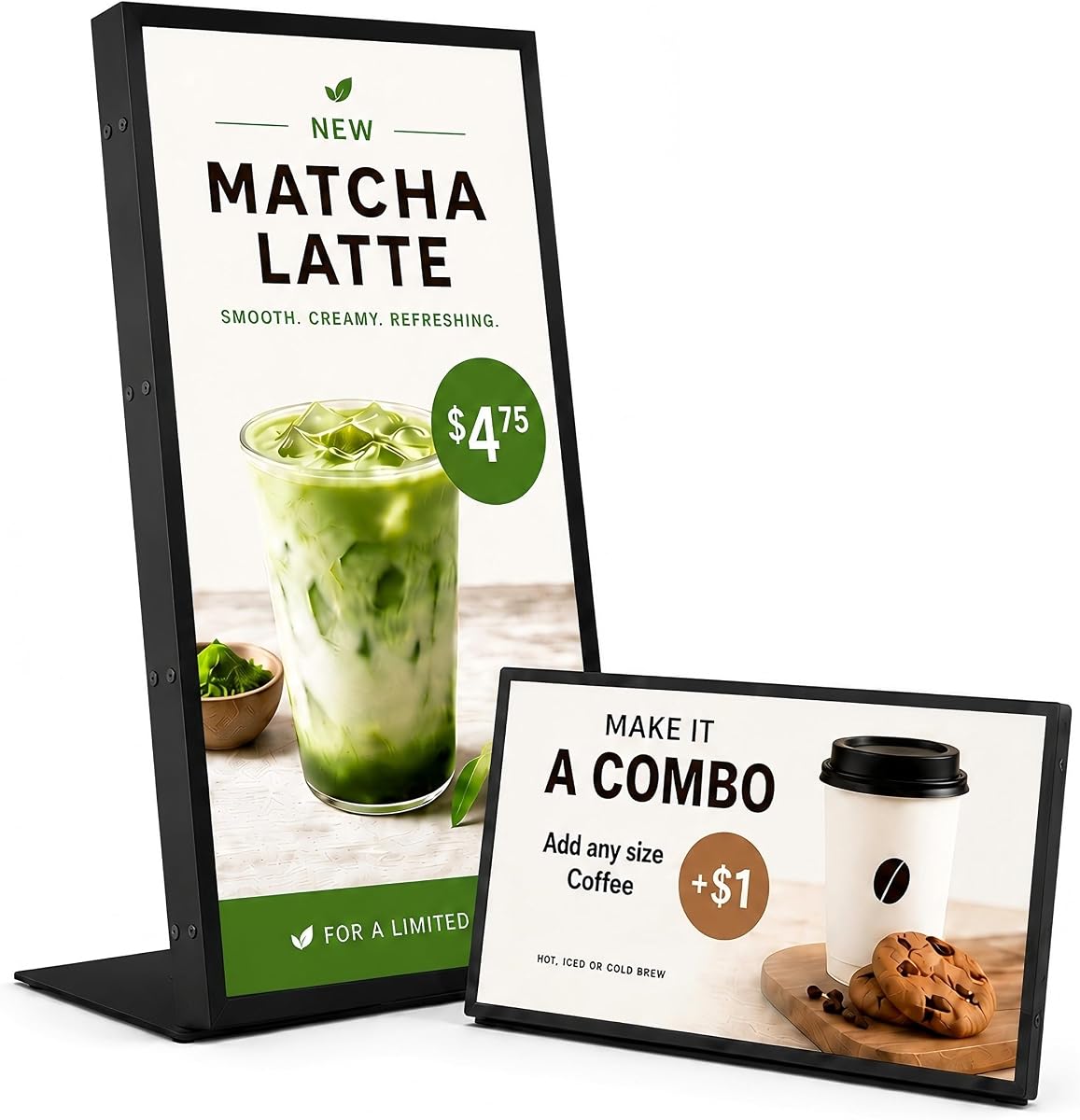


This 18.5 inch digital signage display combines commercial grade brightness with a robust Android 12 operating system to deliver reliable performance for cafes and retail counters. Its standout quality is the inclusion of a lifetime free content management system that allows remote updates without extra subscription fees.
We may earn a commission when you buy through this link, at no additional cost to you.
The 700 nits brightness ensures menus remain clearly visible even in well lit environments, while the 32GB storage provides ample space for local content caching. You can manage multiple displays from a single dashboard using the cloud CMS to schedule daily rotations or emergency updates instantly.
While the resolution is 720P rather than Full HD, the wide viewing angle compensates by keeping text readable from different positions. The trade-off in resolution is acceptable for small to medium setups where cost efficiency and durability are prioritized over cinema quality visuals.
This unit is ideal for business owners seeking an all-in-one solution that simplifies content management and reduces hardware costs. With a three year warranty and reinforced packaging, it offers strong long term value for high traffic checkout or reception areas.
Unlike competitors charging monthly fees for cloud hosting, this model includes unlimited remote content updates at no extra cost to reduce ongoing operational expenses.
The desktop stand supports both landscape and portrait modes, allowing flexible placement on tight countertops without obstructing customer flow or staff workspaces.
We may earn a commission when you buy through this link, at no additional cost to you.
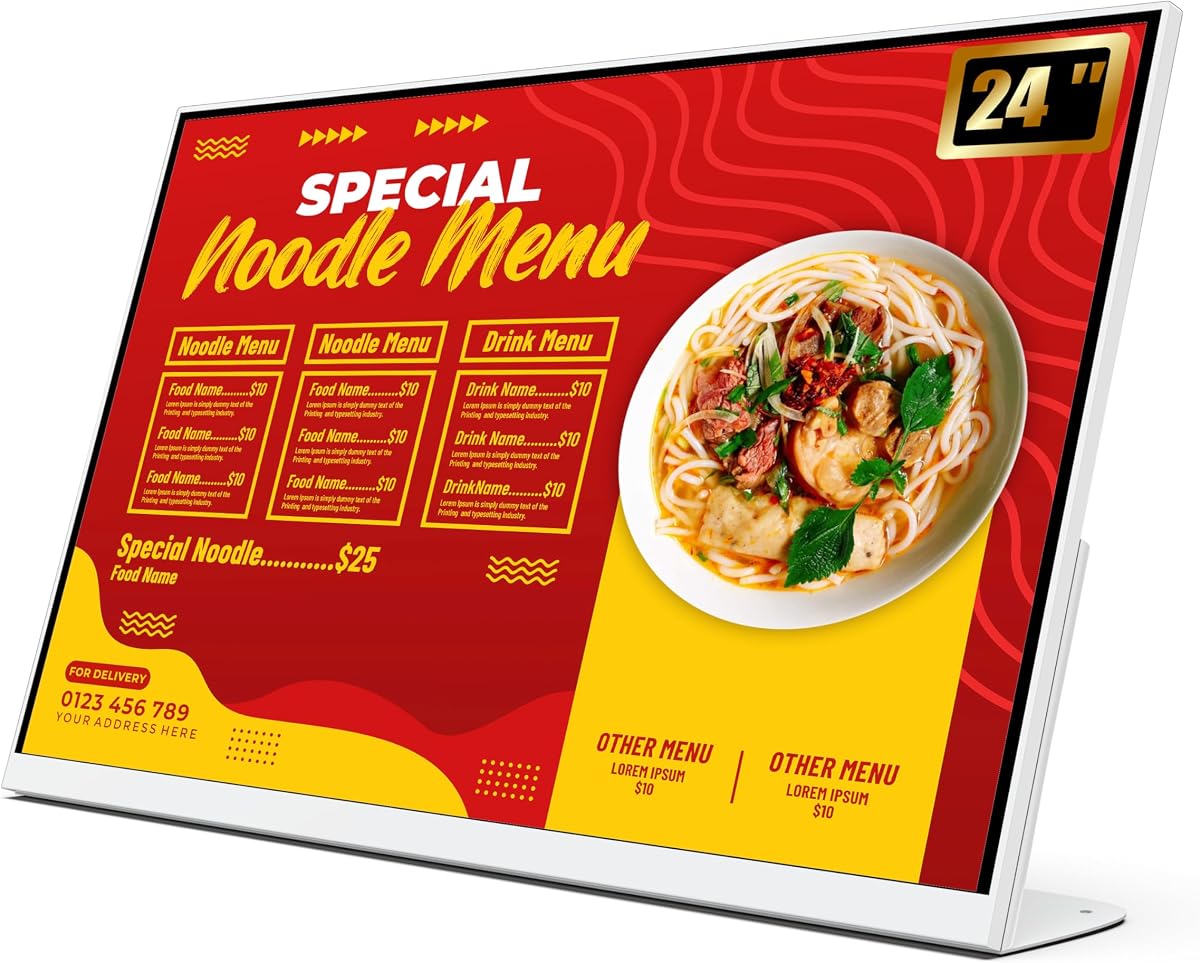
This 24 inch desktop board delivers Full HD visuals that restore vibrant product colors for milk tea shops and restaurants aiming to highlight menu items effectively. Its perfect rating suggests consistent satisfaction among users who value crisp text and high contrast imagery in their storefront displays.
We may earn a commission when you buy through this link, at no additional cost to you.
The Android system supports centralized content management through remote app installation and WiFi connectivity for effortless playlist changes without manual intervention at the store. You can schedule on-off times to save energy while ensuring promotional content plays precisely during peak customer hours.
The split screen capability allows simultaneous display of advertisements and main menu items which maximizes space on the counter and keeps customers engaged while they decide. This layout flexibility is particularly useful for retail counters needing to feature both daily specials and permanent offerings.
Businesses seeking a larger footprint than 18 inch models but still compact enough for tabletop placement will find this unit balances size and performance well. The sturdy carton packaging and heat dissipation design indicate reliability for daily continuous operation in commercial environments.
The FHD panel prioritizes color accuracy to make food and drink images appear appetizing and true to life which can increase perceived product value.
Content can be updated via USB app or PC remote giving IT managers options to choose the most convenient method based on their existing network setup.
We may earn a commission when you buy through this link, at no additional cost to you.
This 32 inch kiosk stands out for its mobility and large format visibility making it ideal for exhibitions trade shows or temporary promotional setups where equipment must be relocated. The IPS panel ensures the content remains visible from extreme angles which is critical in crowded public spaces.
We may earn a commission when you buy through this link, at no additional cost to you.
Integrated wheels and a foldable chassis allow staff to move the unit quickly between rooms or storage without needing external transport carts or heavy lifting equipment. This portability ensures you can deploy the display exactly where foot traffic is highest throughout the day.
The real-time CMS enables synchronous remote publishing which is vital for events where schedules change last minute and announcements need immediate dissemination to attendees. You can control power settings to align with event hours reducing energy consumption when the display is not needed.
With a three year warranty and professional technical support this model offers peace of mind for businesses that rely on the display for major marketing events. The investment is justified by the flexibility to use a single unit across multiple locations rather than purchasing several smaller screens.
Built-in wheels make transportation simple for temporary setups ensuring the display can be set up in minutes without complex assembly or additional hardware.
IPS technology maintains color consistency across the full 178-degree viewing angle so viewers from the side see the same brightness as those in front.
We may earn a commission when you buy through this link, at no additional cost to you.
This media player offers an entry point into digital signage without the upfront cost of dedicated hardware by allowing you to use existing TVs with an HDMI connection. The free plan supports all media formats and provides essential tools for creating slideshows and playlists without demanding a credit card.
We may earn a commission when you buy through this link, at no additional cost to you.
Access to a gallery of over 250,000 video options enables small businesses to enhance their displays with professional content even if they lack internal design teams. You can use the mobile app to manage these assets on the move ensuring menus are updated instantly during rush hours.
The template builder and YouTube loader simplify content creation by removing the need for complex editing software which saves time and resources for owners managing multiple locations. These tools help maintain a polished brand image while keeping the administrative workload minimal for busy staff.
While you must supply your own screen this flexibility often reduces total system cost significantly making it ideal for budget conscious startups. The device supports auto updates wirelessly so once you set the connection maintenance is automated and requires no physical access.
At a low price point this player eliminates high hardware costs by utilizing your existing TV turning old monitors into modern dynamic menu boards instantly.
The massive video gallery provides ready-made visual assets for common businesses reducing the time needed to create original graphics or animations from scratch.
We may earn a commission when you buy through this link, at no additional cost to you.
This 10.1 inch unit introduces interactivity to the tabletop display allowing customers to tap or swipe to navigate menus and view detailed product information themselves. The compact structure keeps the footprint minimal making it suitable for crowded counters where every square inch of space is valuable for staff work.
We may earn a commission when you buy through this link, at no additional cost to you.
Management is straightforward with simple update methods for price lists and brand slides that can be handled through local file transfer or WiFi connections. The clear display ensures text remains legible at close range which is essential for tabletop units positioned directly in front of seated customers.
While the size limits the amount of information you can show at once the focused approach reduces clutter and directs attention to the most important offers or items. This simplicity often leads to faster decision making for customers as they are not overwhelmed by excessive visual data.
Ideal for reception desks retail shelves or clinic notices where personal interaction is key this device bridges the gap between passive signage and active kiosk use. The touch capability enhances user engagement without requiring complex software installation or network integration beyond basic connectivity.
Its compact form factor ensures it fits on narrow shelves or cramped desks without blocking essential workspace or impeding staff movement during busy shifts.
Tap and swipe controls invite customers to explore content at their own pace increasing engagement and potential sales through personalized information discovery.
We may earn a commission when you buy through this link, at no additional cost to you.
This 18.5 inch display is engineered for rugged daily use with a tempered glass front panel and metal housing that resist scratches and impact in busy checkout areas. The Full HD resolution provides sharper text than lower resolution models which improves readability and maintains a professional brand appearance.
We may earn a commission when you buy through this link, at no additional cost to you.
The inclusion of both landscape and portrait stands gives you the flexibility to match existing counter layouts or promotional posters without needing custom mounts. This adaptability means you can repurpose the unit for different marketing campaigns or store designs as your visual merchandising strategy evolves.
Remote CMS publishing allows you to schedule content changes in advance so that specific promotions appear automatically at the right times without staff intervention during peak hours. This automation reduces human error and ensures that time sensitive messages are displayed consistently across all your locations.
High traffic environments like salons cafes or clinics benefit from the durable build which withstands accidental bumps and daily wear better than plastic consumer monitors. With three years of warranty coverage the long term cost of ownership is minimized compared to units with shorter support periods.
Tempered glass and metal housing protect the display from daily wear and tear ensuring consistent performance in high traffic checkout areas without damage.
Includes stands for both modes allowing easy adaptation to vertical posters or horizontal menus as needed for your specific counter layout.
We may earn a commission when you buy through this link, at no additional cost to you.
This 50 inch commercial screen sets a new standard for visibility with 1000 nits brightness that ensures content stands out even in very bright retail environments or sunlit windows. The ultra-narrow bezel design allows multiple units to be tiled seamlessly creating large video walls that dominate customer attention.
We may earn a commission when you buy through this link, at no additional cost to you.
4K UHD support delivers lossless crystal clear frames which are essential when displaying high resolution photography or detailed product specifications on a large canvas. Every frame remains sharp regardless of content type ensuring that your brand visuals look professional and detailed on a massive scale.
The multi-zone layout feature lets you divide the screen into interactive areas showing different types of content simultaneously like videos on top and text below. This segmentation helps organize complex information without clutter and allows dynamic scheduling for day parts like breakfast lunch and dinner menus.
While the size and power requirements are significant this model is unmatched for flagship stores or large lobbies where making a strong visual statement is paramount. The integrated Play Store provides immediate app access and Google services without requiring external hardware or complex network configurations.
4K resolution with ultra-narrow bezels ensures every detail is sharp and multiple screens blend seamlessly for large format impact.
Divide the screen into zones to show multiple message types simultaneously maximizing the value of the display real estate.
We may earn a commission when you buy through this link, at no additional cost to you.
This 29 inch model is designed with an ultra slim profile that supports gap-free wall mounting making it ideal for hallways or waiting areas where space is tight. The 2K resolution offers a balance between image quality and performance ensuring content remains sharp without overtaxing the system resources.
We may earn a commission when you buy through this link, at no additional cost to you.
Equipped with 32GB storage and 2GB RAM it handles multitasking efficiently allowing smooth transitions between applications without lag or playback interruptions. The pre-installed Google Play Store enables immediate access to apps and media sources without needing manual configuration upon first use.
Multi-zone design allows simultaneous presentation of videos countdowns and QR codes which keeps content dynamic and informs customers effectively in busy commercial settings. Auto scheduling for day parts ensures that the right menu appears at the right time reducing the manual workload for business owners.
The ultra-slim design minimizes visual clutter and maximizes viewing area which is essential in environments where aesthetics play a large role in customer experience. Despite mixed ratings the hardware specifications suggest a robust system capable of handling diverse display needs for large retail or office environments.
Ultra slim profile supports gap-free wall mounting for clean installations that save floor space and enhance room aesthetics.
32GB storage capacity holds thousands of images locally ensuring smooth multitasking and offline playback reliability.
We may earn a commission when you buy through this link, at no additional cost to you.
This player focuses heavily on content creation tools including an AI image enhancer and canvas designer that help users generate polished visuals without needing external software. Cloud control simplifies uploads and scheduling so you can manage content from anywhere while maintaining consistent branding across your locations.
We may earn a commission when you buy through this link, at no additional cost to you.
PowerPoint uploads are supported allowing you to convert existing presentation decks into digital display content quickly without recreating slides from scratch. This feature is particularly useful for businesses that already rely on standard office tools for internal or external communications.
The AI enhancements optimize image quality for display ensuring that photos look crisp and vibrant on the screen regardless of the source resolution. This capability helps maintain a professional look even when using user generated images or promotional assets created with basic tools.
With plug and play setup via HDMI and Wi-Fi you can have your system running within minutes of unboxing. While you must supply the display the advanced design tools included in the player provide a unique value for businesses looking to create custom visuals quickly.
AI image enhancer automatically improves visual quality ensuring every photo looks sharp and vibrant without needing advanced editing skills.
Directly import PowerPoint files to turn existing decks into dynamic digital displays quickly reducing content creation time significantly.
We may earn a commission when you buy through this link, at no additional cost to you.
Powered by a dedicated hexa-core CPU and 4GB RAM this player offers smooth multitasking and stable performance for high bandwidth video playback or multiple apps running simultaneously. The integration with a free cloud service simplifies management allowing you to control playlists and schedules from a central online dashboard.
We may earn a commission when you buy through this link, at no additional cost to you.
Custom baked Android OS includes a watchdog system that monitors operation to prevent crashes and automatically restore functionality if the system hangs. This ensures continuous playback without manual intervention which is critical for businesses running displays in public areas where downtime reduces brand visibility.
Support for both vertical and horizontal screen modes makes it versatile for different mounting configurations whether you are using portrait posters or landscape wide screens. The HDMI and Ethernet connectivity options ensure reliable network performance even in areas with weaker Wi-Fi signals.
While the local storage is 16GB the reliance on cloud caching ensures uninterrupted playback even if internet access is temporarily lost. With a 4.3 rating this model is well regarded for businesses that prioritize robust software management and hardware reliability over raw storage capacity.
Hexa-core CPU handles heavy content loads smoothly ensuring consistent playback performance without lag during complex playlist runs.
Built-in watchdog protection automatically recovers from software crashes ensuring uninterrupted display operation for reliable commercial use.
We may earn a commission when you buy through this link, at no additional cost to you.
Selecting the right digital menu display involves balancing technical specifications with operational needs to ensure your investment lasts and performs well.
Brightness measured in nits determines how visible your content is in different lighting conditions. For indoor counters with standard lighting 500 to 700 nits are usually sufficient while brighter retail windows or high ambient light areas may require 1000 nits to ensure text remains legible.
Choose a brightness level that matches your specific environment to avoid washed out visuals that reduce readability and customer engagement.
Android based systems offer greater flexibility for installing custom apps and integrating directly with your point of sale software. These players often allow offline content caching which ensures menus display correctly even if your network connection drops temporarily during service.
Prioritize systems with built-in Android capabilities if you need complex scheduling or direct local processing power rather than relying solely on a separate computer.
A robust CMS allows you to schedule playlists and update promotions remotely without visiting each location. Look for platforms that offer real-time synchronization and user-friendly interfaces so staff can make changes quickly during peak hours without technical assistance.
Ensure the CMS supports your preferred content types like video images and text so you can mix different media formats for dynamic storytelling.
Commercial displays are built to run 24/7 unlike consumer TVs which may overheat or degrade if left on for extended periods. Look for units with tempered glass fronts metal housings and heat dissipation technology to protect against physical damage and long term wear.
A strong warranty including multi-year coverage protects your investment against defects and ensures you have access to replacement parts when needed.
Multiple connection types such as HDMI Ethernet and USB allow you to integrate with existing hardware and manage content offline. USB slots are particularly useful for quick local updates without needing to log into a cloud account or manage complex network security.
Verify the device has the necessary ports for your current setup to avoid buying extra adapters or hubs that add unnecessary cost.
The physical dimensions of the display should fit your counter space or wall area without obstructing workflow or sightlines. Desktop models are ideal for tables or small counters while wall mounted units save floor space and allow you to place content at eye level for walking customers.
Consider the aspect ratio and orientation options to ensure the content looks natural whether displayed vertically or horizontally.
Consider ongoing fees for cloud hosting software licenses and support when calculating the total cost. Some providers charge monthly subscriptions for content management which can add up quickly over several years compared to one-time hardware purchases with built-in systems.
Prioritize solutions with free or one-time licensing to reduce recurring overhead and maintain better control over your marketing budget.
Responsive technical support and accessible documentation are vital when your display goes offline during business hours. Look for manufacturers offering clear contact channels and online troubleshooting guides to minimize downtime and keep operations running smoothly.
Verify the availability of spare parts and repair services to ensure long term reliability even if issues arise after the warranty period.
Start by mounting the unit securely using the provided brackets or stand to prevent tipping or accidental falls. Ensure all cables are connected properly and that the display is plugged into a surge protected power source to handle electrical fluctuations without damage.
Use the companion app or web portal to upload your content and create playlists that match your business hours. Set automatic start and stop times to conserve energy and extend the screen lifespan during closed periods.
Clean the screen regularly with a soft microfiber cloth and non-abrasive cleaner to maintain clarity. Keep vents clear of dust and debris to ensure proper airflow and prevent overheating during continuous operation.
Yes most models include cloud CMS features that let you upload and schedule content changes from a PC or smartphone. This means you can adjust prices or launch new promotions without visiting the store in person.
HD displays have a resolution of 720P or 1080P while 4K offers four times that pixel density for sharper text and images. 4K is better for large screens or close viewing distance but requires more storage and processing power.
Many units have built-in Android systems that run independently so you do not need a separate PC. However some players like media devices are designed to connect to existing TVs without internal operating systems.
Commercial grade displays are rated for around 50,000 hours of continuous use which equals roughly six years of daily operation. Proper ventilation and avoiding excessive brightness can help extend this lifespan further.
Most modern systems support split screen layouts where you can show video clips alongside static images or text blocks. This feature helps maximize engagement by presenting multiple types of content simultaneously.
Manufacturers typically offer email or phone support for troubleshooting and warranty claims. Check the specific warranty terms included with your purchase to understand the duration of coverage and how to contact support.
The top picks highlight diverse needs from the Editor's Choice 18.5 inch model to the Budget-friendly EZ AD Player and the Premium 50 inch display. Each unit offers unique strengths in brightness connectivity and content management that cater to specific business sizes and layouts.
Prioritize factors like durability brightness and remote management features to ensure your display operates reliably and enhances customer experience. Investing in a system with a strong warranty and free CMS tools can save significant costs and operational friction over time.
Prices and availability change frequently so verify current details before making your final purchasing decision. Always check the latest product specifications to ensure the display meets your specific technical and operational requirements for long term success.