
Air Mouse Remote MX3 Pro
3.8Editor score
2.4G wireless plug and play
Mini keyboard on back for typing
IR learning for universal control
This guide compares the top 10 air mouse for android tv box options featuring wireless connectivity and voice control for seamless smart home navigation.
Finding the right navigation tool for your smart setup can be challenging. An air mouse for android tv box offers intuitive motion control and keyboard input for effortless browsing and media playback.
We analyzed ten leading models based on connectivity, sensor precision, and compatibility. Each option supports wireless operation with unique features like voice search and infrared learning capabilities.
Every pick highlights specific strengths and ideal use cases. Please note that availability and pricing may change frequently so check current listings before making a final purchase decision today.
3.8Editor score

4.5Editor score
4.3Editor score
The following table provides a side-by-side comparison of all ten selected air mouse models highlighting their key specifications and unique features to help you choose quickly.


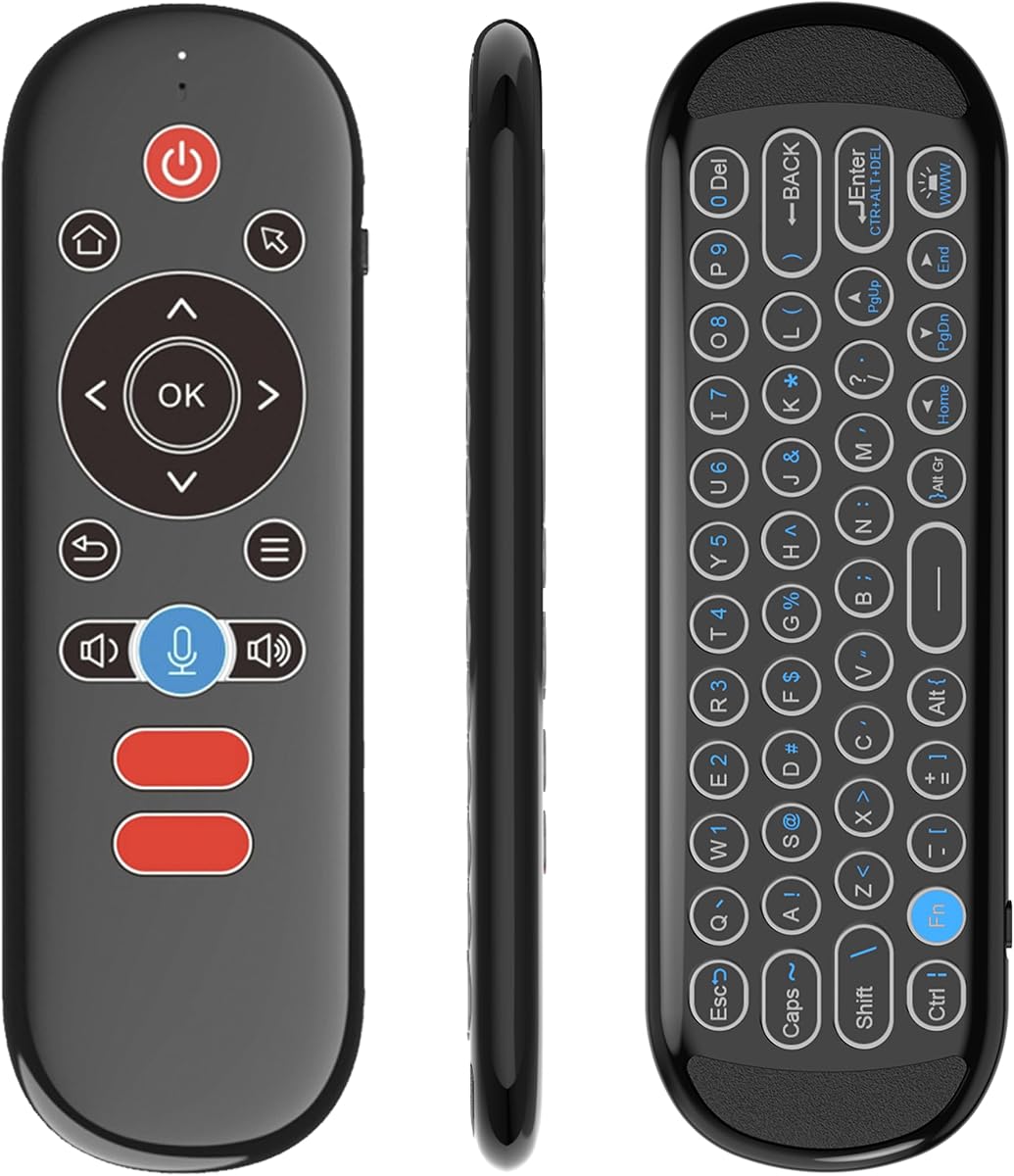
This air mouse for android tv box earns top honors with its versatile dual connectivity and robust feature set. Users appreciate the seamless transition between Bluetooth and wireless RF modes.
We may earn a commission when you buy through this link, at no additional cost to you.
The 6-axis gyroscope ensures smooth cursor movement while the voice control allows quick searches within supported apps. Its universal remote capabilities simplify setup by consolidating controls into one handheld unit.
While it lacks compatibility with Fire Stick and certain proprietary TVs the flexibility for Android devices is unmatched. The electronic manual ensures long-term support which is rare in this category.
Ideal for users wanting a premium universal controller without sacrificing ease of use. This model stands out as the most complete solution for modern smart home entertainment needs today.
Users can switch between Bluetooth and 2.4G RF to match their specific device requirements for maximum compatibility and stability.
The built-in assistant allows quick text input without typing making searching for shows significantly faster and more convenient.
We may earn a commission when you buy through this link, at no additional cost to you.
The BOXPUT BPR1S Plus offers a balanced mix of advanced features for users seeking high performance. Its full IR learning ensures broad compatibility across various Android smart TV ecosystems.
We may earn a commission when you buy through this link, at no additional cost to you.
Voice input works smoothly on supported devices allowing quick navigation without typing. The ability to switch between PC and standard modes adds significant utility for hybrid setups.
Users should note it is incompatible with Fire Stick and Roku which limits some use cases. However the stability of the RF connection makes it a strong contender for dedicated media centers.
This remote is best for those prioritizing control depth and cross-device functionality. Its design reflects a clear focus on user convenience and adaptability across different entertainment systems.
Switching between PC and standard modes allows the remote to adapt to different computing needs without requiring separate hardware.
Full button learning ensures you can control multiple devices with one remote simplifying your home theater setup significantly.
We may earn a commission when you buy through this link, at no additional cost to you.
This model stands out with its dual-sided rechargeable design and vibrant backlit keyboard making it ideal for nighttime viewing. The premium build quality reflects in its durable features and long battery life.
We may earn a commission when you buy through this link, at no additional cost to you.
Navigation is precise thanks to the 6-axis gyroscope and the keyboard allows effortless input for complex searches. Users will appreciate not needing batteries which reduces ongoing costs and waste over time.
While the price is higher than budget options the added convenience justifies the investment. The full keyboard makes it superior for tasks requiring frequent text entry or complex system configuration.
It suits users who value convenience and premium features over initial cost. This remote delivers a complete experience for those managing multiple devices and requiring constant input flexibility.
The built-in battery eliminates the need for disposable replacements ensuring consistent performance without interruption.
Bright LED keys allow easy typing in dim environments which is essential for comfortable late-night media consumption.
We may earn a commission when you buy through this link, at no additional cost to you.
The EASYTONE model offers significant value with its 3-in-1 design combining air mouse voice and IR learning. It is particularly effective for users seeking basic functionality without breaking the bank.
We may earn a commission when you buy through this link, at no additional cost to you.
The high-fidelity microphone supports voice input though it is limited to built-in search boxes rather than full app navigation. This restriction should be noted when comparing it to more advanced voice-enabled remotes.
Build quality is standard for the price range with a lightweight feel that some may find less sturdy. However its plug and play nature ensures quick setup for most users immediately.
Best for budget-conscious buyers needing reliable motion control and typing. It serves well as a secondary controller or entry-level air mouse for casual viewing environments.
This remote provides essential features at a low entry price making accessibility high for many users.
No drivers are needed just plug the receiver and start using it instantly for immediate convenience.
We may earn a commission when you buy through this link, at no additional cost to you.
This device is designed for visibility in dark environments thanks to its vibrant 7-color RGB backlight. Users appreciate the compact form factor which makes it easy to store and carry.
We may earn a commission when you buy through this link, at no additional cost to you.
The dual-mode support allows flexibility between Bluetooth and 2.4G RF ensuring broad compatibility across laptops and Android boxes. The rechargeable battery ensures you never run out of power during a movie.
Some users report limited compatibility with certain proprietary TV software which may affect full functionality. However for general navigation it performs well and provides reliable motion tracking.
It is ideal for users who value portability and visual appeal. The backlight feature specifically sets it apart for those who often use their media center in low-light conditions.
The customizable backlight ensures keys are visible even in pitch-black rooms which improves usability significantly.
Its compact size allows for easy transport making it great for travel or temporary setups.
We may earn a commission when you buy through this link, at no additional cost to you.
The Rii MX3 is a classic option known for its reliable performance and straightforward design. It combines wireless typing and motion control effectively making it a staple for many users.
We may earn a commission when you buy through this link, at no additional cost to you.
Its 6-axis somatosensory system ensures smooth cursor movement which is crucial for navigating complex menus. The IR learning feature allows control of basic TV functions though it is limited to five keys.
While it lacks modern extras like backlighting it delivers core functionality without unnecessary bloat. This simplicity often appeals to users who prefer a no-fuss setup for their entertainment centers.
Best for those needing a dependable and affordable controller. It remains a strong choice for anyone prioritizing function over flashy features in their media setup.
The straightforward design minimizes learning curves allowing users to start using it immediately without confusion.
The gyro system provides consistent tracking which is essential for comfortable long-term usage.
We may earn a commission when you buy through this link, at no additional cost to you.
This remote combines a backlit mini keyboard with motion control making it suitable for various systems including Windows and macOS. Its strong compatibility allows it to serve multiple roles in a tech setup.
We may earn a commission when you buy through this link, at no additional cost to you.
The backlight ensures easy typing in low light which is a practical feature for evening viewing. IR learning keys allow users to control common TV functions adding to its versatility as a central remote.
Users should note exclusions like major brand TVs which may limit its use in some homes. However for Android boxes and HTPCs it offers reliable performance and a good typing experience.
It suits users needing a cross-platform solution with typing capabilities. The balance of features makes it a solid investment for those managing diverse devices in their home office.
Compatibility with Windows and macOS makes it useful beyond just TV boxes increasing its utility as a general input tool.
The mini keyboard allows quick input of passwords and search terms without needing a full external keyboard.
We may earn a commission when you buy through this link, at no additional cost to you.
The G20S PRO features a simplified single-sided design aimed at ease of use. Its gyroscope core compensation helps reduce shake and tremor ensuring stable cursor movement during operation.
We may earn a commission when you buy through this link, at no additional cost to you.
Users can switch to Bluetooth mode easily by pressing specific buttons though it is mainly for Android systems. The durable buttons promise long-term reliability which is vital for daily usage.
The lack of current ratings means feedback is limited but the hardware features look promising. It appears designed for users who prioritize gesture control and physical durability over advanced software features.
Best for those wanting a simple and sturdy remote. Its design suggests a focus on fundamental functionality making it a solid option for standard media consumption needs.
The compensation algorithm reduces unwanted movements allowing for smoother and more accurate navigation on screen.
Permanent wear resisting buttons ensure the device stays functional even with heavy daily use over time.
We may earn a commission when you buy through this link, at no additional cost to you.
The Rock&Rown MX3 Pro supports a broad range of systems including Xbox and Raspberry Pi. This flexibility makes it a versatile choice for those managing diverse entertainment ecosystems.
We may earn a commission when you buy through this link, at no additional cost to you.
Its key learning function allows control of up to five TV keys simplifying device management. The motion sensor ensures smooth navigation which is essential for quick menu access.
Users must manually learn the power key to turn devices on or off which may be a slight hurdle. Despite this the overall utility and affordability make it a strong contender for casual users.
Ideal for those needing broad compatibility without high costs. It provides reliable functionality for anyone looking for a straightforward and effective input device for their box.
Support for Xbox and Raspberry Pi expands its use cases beyond typical TV boxes increasing its versatility.
At an entry price it delivers essential features effectively making it accessible for many users.
We may earn a commission when you buy through this link, at no additional cost to you.
This standard model offers a basic yet effective setup with its 2.4G wireless connectivity. It is ideal for users who need a reliable mouse and keyboard combo without advanced features.
We may earn a commission when you buy through this link, at no additional cost to you.
The built-in 6-axis somatosensory system allows intuitive cursor control which simplifies navigation. Its mini keyboard makes text entry easy while IR learning helps control basic functions from other remotes.
Without advanced features like backlighting or voice control it serves well as a secondary device. Users should be prepared for basic functionality that meets core needs efficiently.
It suits those looking for a simple and functional input tool. Its straightforward design ensures it gets the job done without unnecessary complications or setup hurdles.
No drivers are required just plug in and start using the device immediately for quick setup.
The back keyboard allows quick searches and inputs making it useful for basic navigation tasks.
We may earn a commission when you buy through this link, at no additional cost to you.
Choosing the right navigation tool depends on specific needs like typing frequency and device compatibility. This guide outlines key factors to consider before making your decision.
Bluetooth and 2.4G RF offer different advantages. RF provides stable connection with a USB dongle while Bluetooth reduces dongle clutter but requires pairing.
Choose RF for reliability or Bluetooth for minimal setup depending on your device ports.
Gyroscopes ensure smooth cursor movement. Look for 6-axis sensors for natural wrist control and reduced hand fatigue during extended use.
A precise sensor makes navigation significantly faster than traditional D-pad controls.
Mini keyboards vary in size and key spacing. Some feature backlighting for dark rooms while others are compact for portability.
Prioritize backlighting if you watch in low light or compact size for travel needs.
IR learning allows one remote to control multiple devices. Check if all buttons or only select ones can be programmed for better integration.
Full IR support simplifies setups by reducing the number of remotes needed.
Voice search speeds up text input. Ensure the remote supports your TV's voice assistant for seamless interaction.
This feature is essential for quick searching without typing manually.
Rechargeable batteries reduce waste and costs. Standard batteries are easier to replace but require ongoing purchases.
Rechargeable options are better for long-term sustainability and convenience.
Check compatibility with your specific TV or box model. Some remotes exclude Fire Stick or proprietary systems.
Verify support lists to ensure the remote works with your existing hardware.
Durability matters for daily use. Look for wear-resistant materials and ergonomic designs to prevent accidental drops.
A sturdy build ensures the remote lasts longer under heavy use.
To begin insert the USB receiver into your Android TV Box or Smart TV USB port. If using Bluetooth hold the pairing keys until the LED indicator blinks and connect via system settings.
Hold the remote like a wand and move your wrist to control the cursor. Use the keyboard for typing or the IR buttons to manage volume and power on connected devices.
For battery care recharge the device before it fully dies to extend battery life. Clean the exterior regularly with a dry cloth to prevent dust from affecting sensors.
Most Android-focused air mice do not support Amazon Fire Stick due to proprietary restrictions. Check compatibility lists before buying to avoid issues with specific models.
Hold the OK and Back keys simultaneously for three to five seconds until the light blinks. Then navigate to your TV settings to select the paired device.
Yes many models support PC use via a firmware switch. Ensure you update the firmware to PC mode for full keyboard functionality on computers.
Shaky movement may result from interference or sensor issues. Reset the connection by removing the USB receiver and pairing again or update firmware if needed.
Press and hold the learning key then press the button on your original remote you want to copy. Repeat this process for each desired function.
Voice search works only within supported apps. It may not function in third-party streaming apps that lack built-in voice integration for control.
This guide highlighted top picks including the BOXPUT Android Universal Remote for versatility and the 2.4G Dual Mode for premium typing needs. Each model offers unique strengths tailored to different setups.
Prioritize compatibility and connectivity types that match your specific TV or box. Features like voice control and backlighting can significantly enhance your overall user experience.
Always verify current listings and prices before purchasing as availability changes often. Selecting the right air mouse will transform how you navigate your entertainment system effectively.