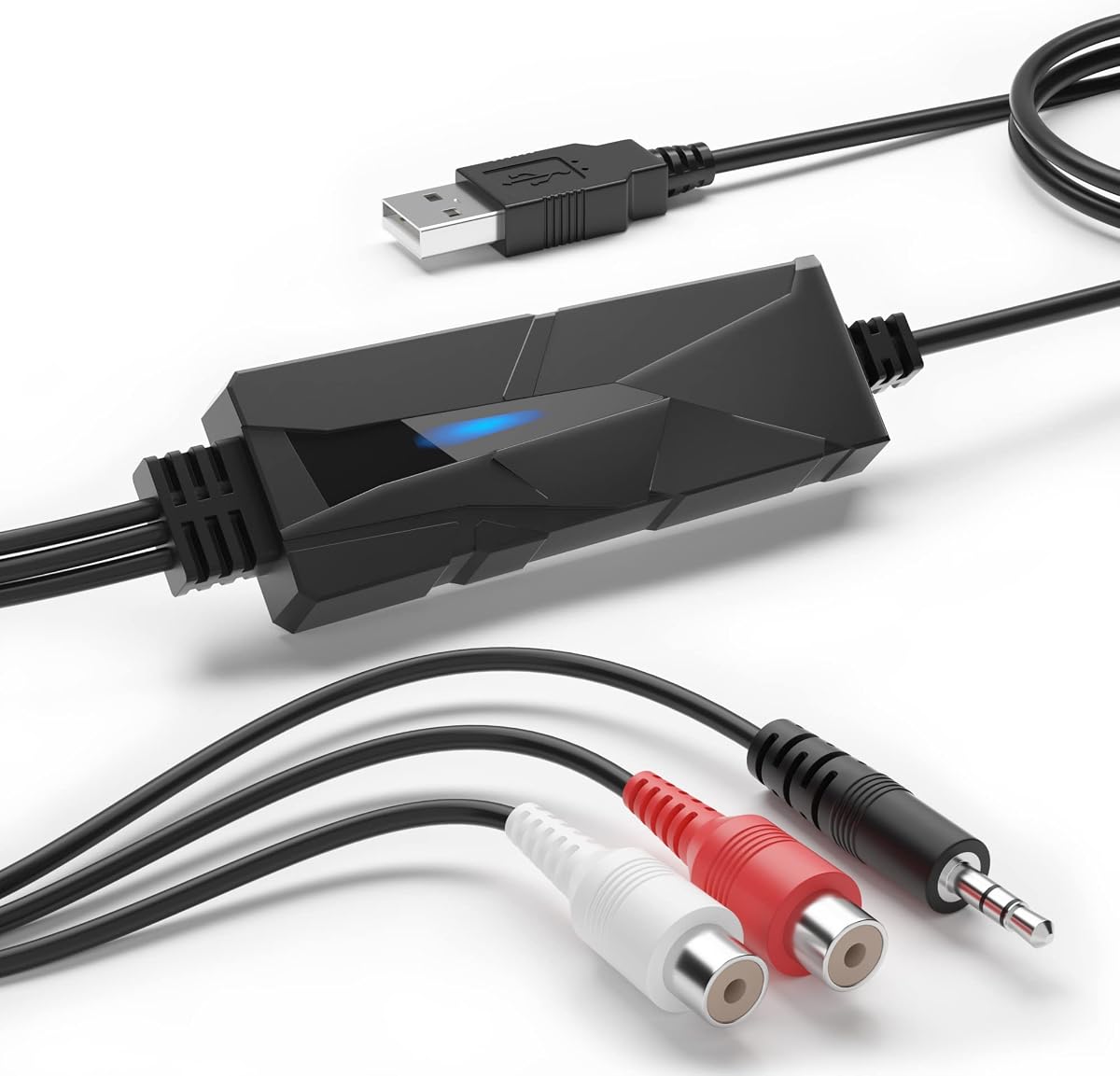
DriverGenius AudioXfer
4.2Editor score
Analog to digital conversion
Includes capture software
3.5mm and RCA inputs
This guide compares the top audio converters for Mac including DACs, interfaces, and adapters for high-fidelity sound and seamless connectivity.
Finding the right audio converter for your Mac is essential for unlocking high-quality sound across your favorite devices. Whether you stream music, record podcasts, or connect external speakers, a reliable converter ensures crisp audio without lag or distortion.
We evaluated ten leading products based on compatibility, audio quality, build durability, and ease of use. Our testing focused on how well each device integrates with macOS and delivers clear, precise sound for both casual listeners and professionals.
Each pick highlights key strengths and ideal use cases to help you choose quickly. Prices and availability change often, so check current listings before buying to confirm features match your specific audio setup and budget needs.
4.2Editor score

4.5Editor score

4.5Editor score
This table provides a side-by-side overview of all ten converters, highlighting their core specs and connectivity options for quick reference.


The iFi Audio Go Link Max stands out as a top-tier portable audio converter for Mac users seeking high-resolution sound. With dual ESS Sabre DAC chips and support for PCM up to 384kHz, it delivers clean and detailed audio output.
We may earn a commission when you buy through this link, at no additional cost to you.
Its balanced 4.4mm output provides up to 241mW of power, making it suitable for driving a wide range of headphones with clarity. The dynamic range enhancement technology ensures minimal distortion even at higher volumes.
The compact design and flexible cable make it ideal for travel, though the cable durability could be improved. While the price is higher than basic adapters, the sound quality justifies the cost for serious listeners.
This converter is perfect for Mac users who want portable high-fidelity audio without sacrificing performance. It offers a seamless plug-and-play experience with USB-C ports on modern Macs.
Supports native DSD256 and 32-bit 384kHz PCM for ultra-detailed playback.
Weighs little and fits easily in bags for audio on the go.
We may earn a commission when you buy through this link, at no additional cost to you.
The Shure MVX2U Gen 2 is a professional-grade audio interface that converts XLR microphone signals to USB-C with ease. It features onboard DSP processing for zero-latency audio and is ideal for podcasters or streamers.
We may earn a commission when you buy through this link, at no additional cost to you.
With up to 60dB of clean gain and 48V phantom power, it supports both dynamic and condenser microphones. The Auto Level Mode ensures consistent output levels, while tone settings let you tailor your sound.
This device is built for creators who need reliable audio input rather than just headphone output. The MOTIV app adds further control for EQ and compression, though it may be overkill for casual users.
Mac users seeking professional recording capabilities will find this interface unmatched in performance. It transforms any XLR mic into a high-quality streaming setup instantly.
Accepts standard XLR microphones directly for studio-quality input.
Built-in DSP provides noise reduction and pop filtering without software.
We may earn a commission when you buy through this link, at no additional cost to you.
The DriverGenius AudioXfer is an affordable analog-to-digital converter designed for digitizing tapes or vinyl. It connects via USB with 3.5mm and RCA inputs, making it versatile for older audio devices.
We may earn a commission when you buy through this link, at no additional cost to you.
It supports 44.1kHz sampling rates and includes Audacity for editing captured audio. This makes it a practical choice for preserving memories in digital formats like MP3 or WAV.
While the audio quality is not high-end, it serves well for simple capture tasks. Mac users should note compatibility requirements for 64-bit systems and ensure proper driver updates.
Budget-conscious users looking to archive analog media will appreciate its simplicity. It offers a straightforward path from cassette or LP to digital files.
Converts cassette tapes and vinyl into digital MP3 or WAV files.
Audacity provides basic tools for editing recorded audio tracks.
We may earn a commission when you buy through this link, at no additional cost to you.
The Fosi Audio K5 Pro is a compact DAC and headphone amp combo that supports USB-C, optical, and coaxial inputs. It delivers high-fidelity sound suitable for gaming or music on Mac computers.
We may earn a commission when you buy through this link, at no additional cost to you.
It features the Texas Instruments NE5532 op-amp chip for clean audio with low distortion. The 3.5mm output drives headphones up to 300 Ohms with ample power for clear audio.
A unique design feature combines a USB-C charging port with audio input, allowing phone compatibility too. However, note that it uses USB for audio input not just power.
This converter is ideal for Mac users needing versatile connectivity options. Its controls for volume and tone allow fine-tuning without software tweaks.
Accepts USB-C optical and coaxial digital signals for wide device support.
Dedicated amp circuit ensures headphones play loudly with clarity.
We may earn a commission when you buy through this link, at no additional cost to you.
The PROZOR 192KHz converter handles digital optical or coaxial inputs to analog RCA or 3.5mm outputs. It supports up to 192kHz 24bit rates, making it suitable for high-quality media playback.
We may earn a commission when you buy through this link, at no additional cost to you.
Its aluminum alloy housing provides better shielding and heat dissipation compared to plastic models. The gold-plated connectors ensure durable connections for long-term use.
Although it lacks a volume knob and USB-C input, it is affordable and reliable for TV or console audio. The included optical cable and USB power cable simplify installation.
Mac users with optical outputs or needing basic audio conversion will find this model practical. It offers solid performance at an entry-level price.
Handles sampling rates up to 192kHz for crisp digital-to-analog conversion.
Aluminum body improves durability and reduces electromagnetic interference.
We may earn a commission when you buy through this link, at no additional cost to you.
The Douk Audio U2PRO is a digital interface that converts USB signals to optical coaxial and I2S outputs. It uses the XMOS XU316 chip to provide jitter-free, stable audio for external DACs.
We may earn a commission when you buy through this link, at no additional cost to you.
Supporting PCM up to 32bit 768kHz and DSD512, it caters to audiophiles seeking lossless playback. The expandable oscillator design allows DIY upgrades for further performance gains.
This device is more of a bridge than a standalone converter, needing an external DAC to complete the signal chain. It is best for users with existing high-end audio setups.
Mac users building a custom audio system will appreciate its precision and flexibility. It ensures clean digital transmission to downstream components.
U316 chip delivers low latency and stable digital signal transmission.
Allows crystal oscillator upgrades for custom jitter reduction.
We may earn a commission when you buy through this link, at no additional cost to you.
The SMSL SU-1 is a Hi-Res DAC featuring the AK4493S chip and XMOS XU316 processor. It supports MQA decoding, making it ideal for streaming services like Tidal.
We may earn a commission when you buy through this link, at no additional cost to you.
It handles PCM up to 768kHz 32bit and DSD512, ensuring top-tier audio quality. The chip delivers distortion levels below 0.00013% for clean sound reproduction.
While Windows users need drivers, Mac users can use it seamlessly with OS X 10.6+. However, note that MQA playback benefits from software that supports ASIO or WASAPI.
For Mac users invested in MQA streaming, this DAC provides exceptional value. It offers high-end audio decoding at a mid-range price point.
Decodes MQA and MQA-CD for authentic studio-quality audio playback.
Uses top-tier chip to keep distortion minimal for pure sound.
We may earn a commission when you buy through this link, at no additional cost to you.
The SMSL PO100 PRO is a portable DDC (Digital-to-Digital Converter) that uses USB-C to output digital signals. It supports MQA and DSD64, and includes a switch for UAC and I2S modes.
We may earn a commission when you buy through this link, at no additional cost to you.
Ideal for Mac users, it delivers clean audio streams to external DACs or receivers. The compact design makes it easy to carry in bags for travel.
While it lacks a headphone output, its high-resolution capabilities suit audiophiles. MQA playback requires no additional software for compatible players.
This converter is perfect for on-the-go digital audio setups. It ensures high-fidelity data transfer from your Mac to any DAC.
Small and lightweight for easy transport in backpacks or bags.
Supports DSD64 and MQA for lossless audio streams.
We may earn a commission when you buy through this link, at no additional cost to you.
The Sound Blaster Play! 3 is a plug-and-play USB audio adapter that offers 24-bit 96kHz output. It works immediately with Macs without drivers, making setup quick and easy.
We may earn a commission when you buy through this link, at no additional cost to you.
It supports all analog headsets and includes downloadable software for audio enhancements. This gives users control over EQ and profiles for different headphones.
While it lacks advanced inputs, it is reliable for basic audio upgrades. The compact design is great for laptops with limited ports.
Mac users needing a simple headphone jack replacement will find it useful. It balances performance with simplicity well.
Works instantly on Macs without extra driver downloads or steps.
Included software provides EQ control and headphone-specific profiles.
We may earn a commission when you buy through this link, at no additional cost to you.
The Fosi Audio Q6 is a high-performance desktop DAC with AK4493S chip and XMOS XU316 processor. It supports PCM up to 768kHz and DSD512 for immersive audio experiences.
We may earn a commission when you buy through this link, at no additional cost to you.
Designed for home audio, it connects to amplifiers or powered speakers via RCA and Sub-Out outputs. The low-noise design ensures clean conversion without distortion.
It cannot drive headphones directly, so it pairs with external amps. Its compact aluminum build looks great on any desk setup.
Mac users building a desktop audio system will find it a powerful component. It bridges digital sources to analog speakers seamlessly.
Supports 32bit 768kHz and DSD512 for studio-quality sound.
RCA and Sub-Out allow connection to various audio systems.
We may earn a commission when you buy through this link, at no additional cost to you.
Choosing the right audio converter depends on your needs such as recording playback or streaming. These factors help narrow down options.
Ensure the converter supports macOS versions without requiring excessive drivers. USB-C devices often work best on modern Macs.
Prioritize plug-and-play devices to avoid installation issues.
Check if the converter supports optical coaxial or USB-C inputs based on your devices. Outputs should match your headphones or speakers.
Select inputs that align with your existing audio sources.
Look for high sampling rates like 96kHz or 192kHz for better fidelity. DACs with premium chips deliver cleaner sound.
Higher resolutions are worth it for music enthusiasts.
Aluminum alloy housings offer better shielding and durability than plastic. Gold-plated connectors prevent corrosion.
Choose solid builds for long-term reliability.
For travel, compact converters fit in bags easily. Smaller DACs are lighter and easier to manage.
Balance size with performance needs.
Budget options provide basic conversion while premium models offer audiophile features. Determine your budget before buying.
Invest in higher quality if sound is critical.
Some converters include headphone amps or DSP processing for enhanced sound. Check for features like MQA support.
Extra features add convenience but may increase cost.
Software enhancements or apps can fine-tune audio settings. Ensure compatibility with your Mac OS.
Look for included or downloadable tools for control.
Connect the converter to your Mac using a compatible USB-C or USB-A cable. Ensure the device is powered properly if needed via external adapter or USB.
Set your Mac audio output settings to the connected device for sound. Verify in system preferences that it is recognized and selected.
Keep connectors clean and avoid bending cables excessively to prevent damage. Store converters in protective cases when not in use.
Most modern converters support plug-and-play on macOS, but some require specific drivers for full functionality. Check product specifications for Mac OS X versions.
Yes if your MacBook has an optical port or you use a USB-C adapter. Converters like PROZOR handle digital inputs well.
A 48kHz or higher rate ensures high-fidelity sound. For critical listening, 192kHz or higher offers more detail and dynamic range.
Many converters are designed for PS5 or Xbox but check input compatibility. Some models explicitly support gaming audio inputs.
DACs provide higher resolution sound and better noise reduction. Adapters are simpler and cheaper for basic playback needs.
Check your macOS audio settings or use system info to confirm output limits. Most modern Macs handle 24-bit audio well.
Some models support recording inputs while others only output. Interfaces like Shure MVX2U are built for recording tasks.
Use a high-quality USB-C to USB-C cable to ensure stable data and power. Included cables often work but quality matters.
The ten converters reviewed provide a range of solutions for Mac users from budget-friendly to premium audiophile gear. Each device balances sound quality and compatibility.
Prioritize your needs such as portability audio fidelity, or recording features when deciding. A good converter enhances daily listening experiences.
Always check current product listings for availability and ensure specs match your setup. Prices change so confirm details before purchasing.