
Crucial P310 1TB SSD
4.7Editor score
Gen4 NVMe speeds up to 7100MBs
Compatible with laptops and desktops
Includes Acronis recovery software
Compare the top Crucial Internal NVME SSD options for laptops and desktops including Gen4 and Gen5 models with detailed specs and performance insights.
Finding the right storage solution can transform your computing experience. Crucial Internal NVME SSDs offer reliable speed and capacity for modern workloads. Whether you game or create, the right drive matters.
We analyzed performance metrics compatibility ratings and value across ten models. Each product brings unique strengths for different needs and budgets. Our list covers everything from budget friendly to high end options.
Each pick highlights key specs real world benefits and potential trade offs. Prices and stock change frequently so check current listings before buying. This guide helps you decide based on your specific requirements today.
4.7Editor score
4.8Editor score

4.6Editor score
This side by side comparison highlights the core specifications and use cases for each model. Review the table to quickly identify which drive fits your system and workload requirements best.


The Crucial P310 stands out as a top budget choice for users seeking Gen4 speeds. It delivers up to 7100MBs read performance making it ideal for daily tasks and gaming.
We may earn a commission when you buy through this link, at no additional cost to you.
Its compatibility spans laptops desktops and handheld consoles ensuring flexibility across devices. The included Acronis software adds value by simplifying cloning and recovery processes.
While it lacks a heatsink it manages thermal loads adequately in most cases. Users should consider active cooling for sustained high load workloads.
This drive is perfect for budget conscious buyers upgrading from Gen3 or SATA. It balances price and performance well for mainstream computing needs.
The P310 offers Gen4 speeds without premium pricing making it accessible to many users.
Works seamlessly across platforms including handheld gaming consoles for broad use cases.
We may earn a commission when you buy through this link, at no additional cost to you.
Designed with console gamers in mind this drive includes a heatsink to maintain stability. It meets the strict requirements for PlayStation 5 expansion seamlessly.
We may earn a commission when you buy through this link, at no additional cost to you.
The heatsink helps prevent thermal throttling during long gaming sessions. This ensures consistent performance when loading large AAA titles quickly.
While the price is slightly higher the added cooling solution justifies the cost for PS5 users. Desktop users may prefer the standard variant to save money.
If you own a PS5 this drive is a straightforward upgrade path. It offers reliable storage expansion without compatibility concerns.
Certified for PS5 use ensuring it fits and performs within the console specs.
Integrated heatsink keeps temperatures low during sustained gaming loads.
We may earn a commission when you buy through this link, at no additional cost to you.
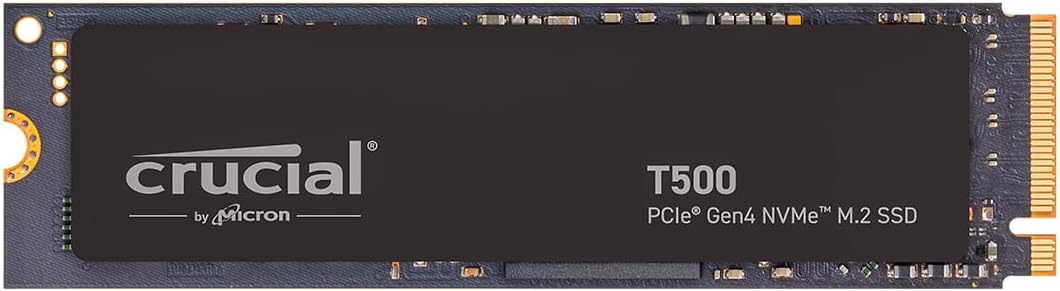
The T500 combines speed and reliability for creative professionals and gamers. Its TLC NAND ensures endurance and consistent performance under load.
We may earn a commission when you buy through this link, at no additional cost to you.
Adobe Creative Cloud inclusion adds immediate value for designers and editors. This bundle helps offset the higher drive cost for creative workflows.
DirectStorage support enables faster game loading on compatible systems. It bridges the gap between storage speed and real world application responsiveness.
Choose this drive if you prioritize speed and need creative software benefits. It excels in content creation and high end gaming scenarios.
Includes a free month of Adobe CC enhancing value for creative professionals.
TLC NAND delivers both high speeds and better longevity than QLC.
We may earn a commission when you buy through this link, at no additional cost to you.
This 2TB variant offers massive storage for media archives and game libraries. It maintains solid Gen4 speeds suitable for general workloads.
We may earn a commission when you buy through this link, at no additional cost to you.
At a competitive price point it delivers strong value for bulk storage needs. It is ideal for users filling up a main system drive.
Without a heatsink it may throttle in high ambient temperatures. Desktop users should ensure adequate case airflow for best results.
Consider this if capacity is your primary concern. It provides plenty of space for media and applications without premium costs.
2TB capacity supports large media libraries and extensive game installations.
Competitive pricing per gigabyte makes it attractive for bulk storage.
We may earn a commission when you buy through this link, at no additional cost to you.
The P510 brings Gen5 performance at a more accessible entry point. It reaches speeds up to 11000MBs which is double typical Gen4 limits.
We may earn a commission when you buy through this link, at no additional cost to you.
TLC NAND ensures this drive handles sustained writes better than QLC options. It is reliable for creative workloads and heavy gaming.
Users must have a Gen5 compatible motherboard to fully utilize the speed. It works in Gen4 slots but performance limits to Gen4 levels.
Ideal for future proofing systems with latest platforms. It balances new technology adoption with practical performance benefits.
Gen5 interface delivers twice the bandwidth of previous generations.
Compatible with Gen4 systems though limited to lower speeds.
We may earn a commission when you buy through this link, at no additional cost to you.
This drive offers top tier Gen5 performance for demanding workflows. It delivers speeds up to 14900MBs which is unmatched in this lineup.
We may earn a commission when you buy through this link, at no additional cost to you.
Security features like hardware encryption protect sensitive data effectively. This makes it suitable for professional and privacy conscious users.
High speeds generate heat so a heatsink is highly recommended. Proper cooling ensures sustained performance without thermal throttling.
Choose this if you need maximum speed and security. It is the best option for high end workstations and enthusiasts.
Hardware encryption protects data without impacting performance.
14900MBs read speed supports 8K video editing tasks.
We may earn a commission when you buy through this link, at no additional cost to you.
The E100 is a compact drive suited for smaller laptops or secondary storage. It offers solid Gen4 performance at a lower capacity point.
We may earn a commission when you buy through this link, at no additional cost to you.
Installation is straightforward for users upgrading older systems. The 480GB size works well for OS and essential applications.
Limited capacity means it may not suit large media libraries. Consider pairing it with a larger external drive for more storage.
Ideal for budget users needing a boot drive. Its compact size and ease of use make it a practical choice.
Small capacity fits easily into slim laptop chassis.
Suitable for running OS and core applications efficiently.
We may earn a commission when you buy through this link, at no additional cost to you.
This variant represents the QLC version of the popular P310 series. It offers standard Gen4 speeds with good capacity for general use.
We may earn a commission when you buy through this link, at no additional cost to you.
QLC NAND is cost effective but may wear faster under heavy writes. It suits read intensive workloads better than write intensive ones.
For typical consumer tasks it performs reliably and quietly. It is a solid option for those prioritizing price over endurance.
Select this if you need basic storage without extras. It delivers value for everyday computing and media storage.
QLC technology reduces costs while maintaining good speeds.
Suited for standard office and media consumption tasks.
We may earn a commission when you buy through this link, at no additional cost to you.
This drive combines T500 performance with a PS5 certified heatsink design. It ensures optimal thermal management during long console gaming sessions.
We may earn a commission when you buy through this link, at no additional cost to you.
TLC NAND provides better endurance compared to budget alternatives. The included Adobe bundle adds value for creative PS5 users.
Installation is straightforward with clear instructions for console use. The heatsink ensures stable performance without throttling.
Choose this for premium PS5 storage expansion. It offers reliability and features specifically tuned for console requirements.
Designed to meet specific PS5 expansion requirements and speeds.
Includes Adobe CC software for content creation tasks.
We may earn a commission when you buy through this link, at no additional cost to you.
The T700 delivers high end Gen5 performance for enthusiasts. It reaches speeds up to 11700MBs which supports heavy workloads.
We may earn a commission when you buy through this link, at no additional cost to you.
Designed for Intel and Ryzen platforms it offers broad compatibility. This ensures it fits well with latest generation motherboards.
Like other Gen5 drives it benefits from active cooling solutions. A heatsink is recommended to maintain speeds during long tasks.
Select this for future proof performance and speed. It is excellent for high end gaming and creative applications.
Works across Intel and AMD latest Gen platforms seamlessly.
Gen5 speeds prepare your system for upcoming applications.
We may earn a commission when you buy through this link, at no additional cost to you.
Selecting the right Crucial Internal NVME SSD depends on your workload and system compatibility. Below are key factors to consider.
NVMe drives come in Gen4 and Gen5 variants. Gen5 offers higher speeds but requires a compatible motherboard slot. Ensure your system supports the drive generation before buying.
Check your motherboard specs to confirm PCIe Gen4 or Gen5 slots are available for optimal performance.
Capacity needs vary by use case. 1TB is sufficient for most gamers and general users. 2TB models suit those with large media libraries or creative projects requiring more space.
Choose higher capacity if you store many large files to avoid running out of space quickly.
TLC NAND offers better endurance and sustained performance than QLC. For heavy write workloads TLC is preferred. QLC is cost effective for read intensive tasks.
Prioritize TLC for professional use and QLC for casual storage needs to balance cost and longevity.
High performance drives generate heat. Models with heatsinks maintain speeds better during sustained workloads. Desktop users should check case airflow and heatsink needs.
Use a heatsink or ensure airflow to prevent thermal throttling and performance drops over time.
Ensure the M.2 2280 form factor fits your device. Some drives are certified for specific consoles like PS5. Check compatibility with your laptop or desktop motherboard.
Verify physical slot size and platform support before purchasing to avoid installation issues.
Some models include Acronis cloning tools and Adobe Creative Cloud subscriptions. These add value for users needing easy migration or creative tools. Check what is included with the drive.
Look for software extras to simplify setup and reduce costs on essential applications.
Crucial typically offers limited warranties on SSDs. Longer warranty periods indicate higher confidence in durability. Check support policies and expected lifespan before purchase.
Opt for drives with longer warranties for better long term protection against failures.
Compare prices relative to capacity and speed. Budget models like P310 offer good value for general use. Premium models like T710 suit professionals needing top performance.
Choose based on your budget and performance needs to get the best return on investment.
Install the drive in an M.2 slot on your motherboard or console. Use the provided screw if needed to secure it firmly. Ensure the slot matches the drive size such as 2280.
After installation initialize the drive in your operating system. Format it to the preferred file system like NTFS or exFAT. Use Acronis tools if included to clone your existing data.
Maintain performance by keeping system drivers up to date. Avoid filling the drive to maximum capacity to ensure longevity. Use heatsinks if running in enclosed or high temperature environments.
Gen5 drives offer higher read and write speeds compared to Gen4 models. However Gen5 requires a compatible motherboard slot to reach full speed. Gen4 works in both Gen4 and Gen5 slots but may limit to lower speeds.
Specific models like the P310 Gaming PS5 and T500 PS5 are certified for PS5. They meet the required specs and include heatsinks for stability. Standard models may not fit or perform correctly in the console.
Yes most Crucial SSDs include a limited warranty period. The exact length varies by model but typically covers defects and failures. Check the product listing for specific warranty terms before buying.
TLC NAND provides better endurance and sustained write speeds than QLC. It is more reliable for heavy use and professional workloads. QLC is cheaper but may slow down during large data transfers.
Heatsinks are recommended for Gen5 drives and sustained workloads. They prevent thermal throttling and maintain consistent performance. Standard Gen4 models may not need one in well ventilated cases.
Most of these models support M.2 2280 slots found in modern laptops. Check your laptop specs to ensure NVMe support before installing. Some slim laptops may have size restrictions to consider.
Some models include Acronis cloning software for easy data migration. Certain premium models also offer Adobe Creative Cloud subscriptions for a limited time. Check the product details for included software.
Turn off your system and locate the M.2 slot. Insert the drive at an angle and secure it with a screw. Ensure the slot matches the drive size and interface type for compatibility.
Our top picks include the P310 for budget buyers the T500 for creatives and the T710 for premium performance. Each model addresses specific needs while maintaining reliable Micron quality.
Prioritize interface generation and capacity based on your current system. Consider thermal solutions if you run heavy workloads or use Gen5 speeds to ensure stability.
Prices and availability change so check current listings before purchasing. These drives offer excellent value for upgrading storage in 2026.