
MINISFORUM MS-S1 MAX
4.5Editor score
128GB LPDDR5x Unified Memory
Dual MS-S1 MAX Cluster Support
126 TOPS Total System Output
This guide compares the top ten dual GPU AI setups for local machine learning, offering detailed specs to help you choose the best configuration for your needs.
Building a powerful dual GPU AI setup is essential for researchers and developers needing massive computational power. These systems handle complex models and heavy workloads with efficiency.
We evaluated ten leading options based on performance, memory capacity, and software support. Our analysis covers everything from compact workstations to enterprise-grade servers.
Each pick highlights key strengths and potential limitations. Prices vary by region and retailer so verify current costs before purchasing your ideal AI hardware configuration.
4.5Editor score

4.8Editor score

5.0Editor score
The following table provides a side-by-side comparison of the top ten dual GPU AI setups available in November 2026. Review these specs to find the perfect match for your AI workload requirements.


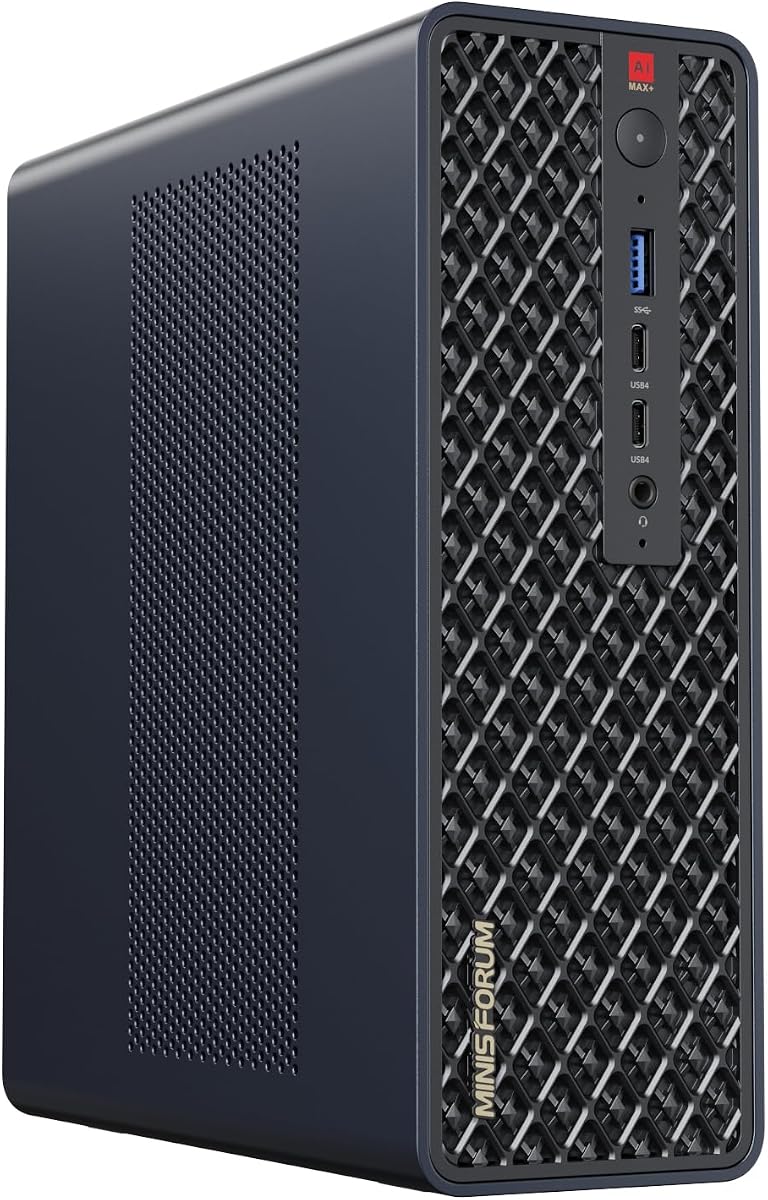
The MINISFORUM MS-S1 MAX is a compact AI workstation designed for local LLM inference and data science tasks. With a 4.5 rating it offers strong performance per watt in a tiny footprint. Its unified memory architecture is particularly notable for enabling large model loads without discrete GPU VRAM limits.
We may earn a commission when you buy through this link, at no additional cost to you.
This unit integrates the AMD Ryzen AI Max+ 395 APU delivering 126 TOPS of system performance. The 128GB LPDDR5x memory allows the CPU and GPU to share bandwidth efficiently. Users can cluster two units to run a 235B parameter model locally achieving over 10 tokens per second which is impressive for desktop hardware.
While the mini chassis limits internal expansion it offers a PCIe x16 slot for future upgrades. Thermal performance is managed by an aerospace-grade aluminum chassis and multiple heat pipes. This design keeps noise low even under continuous 130W loads making it suitable for office environments.
Researchers needing a small footprint without sacrificing AI capability should consider this system. It bridges the gap between traditional desktops and high-performance clusters. For developers prototyping large models this Mini AI Workstation provides a cost-effective entry point into powerful local inference.
The 128GB LPDDR5x unified memory ensures data transfers between CPU and GPU are rapid and seamless. This reduces latency significantly when processing large datasets or running complex multimodal models.
Multiple MS-S1 MAX units can be cascaded to form a distributed cluster. This feature allows organizations to scale AI computing power linearly without investing in massive server infrastructure.
We may earn a commission when you buy through this link, at no additional cost to you.
The APC ES620 is a powerhouse workstation tailored for demanding AI workloads and deep learning tasks. Rated highly for performance it features dual RTX 5090 GPUs providing immense parallel compute power. This system is ideal for those requiring local inference of 70B class models or larger without cloud dependency.
We may earn a commission when you buy through this link, at no additional cost to you.
Featuring the AMD Ryzen 9 9950X processor this workstation handles data preprocessing with ease. The 256GB DDR5 memory ensures smooth multitasking alongside GPU heavy tasks. With 8TB NVMe storage in RAID configuration users get fast data access to prevent bottlenecks during training sessions.
Thermal management is handled by a 360mm liquid cooling system maintaining stable temperatures under load. The 1600W power supply ensures sufficient energy for peak GPU usage. Cable management is custom built allowing for better airflow and aesthetics within the tower chassis.
Professionals building a home lab or small office cluster will find this unit exceptionally capable. It combines enterprise level specs with workstation convenience. Choosing this setup means investing in a reliable engine for generative AI and high performance computing projects.
Dual RTX 5090s with 64GB GDDR7 each provide 128GB VRAM. This capacity is crucial for running unquantized large language models entirely on hardware.
The 8TB NVMe storage configuration allows for rapid ingestion of training datasets. High speed SSDs are critical to keep GPUs fed with data efficiently.
We may earn a commission when you buy through this link, at no additional cost to you.
This ASUS dual EPYC server is the ultimate solution for enterprise AI clusters and heavy training workloads. With a perfect 5.0 rating it represents the pinnacle of local hardware capability. It accommodates up to eight high-end GPUs providing unmatched compute density in a standard 4U chassis.
We may earn a commission when you buy through this link, at no additional cost to you.
The dual AMD EPYC 9965 processors offer 192 Zen 5c cores for extreme multi-threading. Paired with 24-channel DDR5 ECC RDIMM memory this system ensures data integrity and speed. Storage is flexible with hot-swap U.2 slots supporting massive capacities for large scale datasets.
Designed for data center efficiency it includes redundant power supplies and advanced cooling. The toolless design simplifies upgrades reducing downtime during maintenance. Networking features include support for up to ten 200GbE NICs ensuring low latency communication across clusters.
For organizations running large language model training or complex simulations this server is the definitive choice. It eliminates the need for cloud rental costs by offering permanent on-prem power. Investing in this hardware secures long-term capability for advanced artificial intelligence development.
Built with redundant power supplies and enterprise grade components this system ensures 24/7 uptime. It is ready for critical workloads where downtime is unacceptable.
The chassis supports up to eight RTX PRO 6000 GPUs allowing teams to scale training clusters without buying separate machines. This density saves space and power.
We may earn a commission when you buy through this link, at no additional cost to you.
This graphics card offers a unique dual GPU design that brings combined VRAM and compute to consumer platforms. Rated 4.6 it provides an accessible route to running larger AI models without enterprise hardware. It effectively merges two Arc Pro B60 GPUs into a single PCIe card.
We may earn a commission when you buy through this link, at no additional cost to you.
With 48GB VRAM and 394 TOPS of combined performance it can run 70B class models efficiently. The PCIe 5.0 x8 + x8 interface ensures high bandwidth data transfer. It supports major frameworks like PyTorch and vLLM making it versatile for diverse development tasks.
Thermal management relies on a blower fan and vapor chamber design which suits server environments well. While it requires motherboard support for x16 bifurcation it works on standard consumer platforms. This feature significantly lowers the total cost for local LLM deployment.
Developers looking to maximize VRAM per dollar should evaluate this innovative card. It opens doors to running complex inference tasks locally at a fraction of typical costs. For budget conscious builders this card offers a solid entry into high performance AI computing.
Combining two GPUs into one card allows for massive VRAM availability on a single slot. This is critical for loading large models without swapping chunks to system RAM.
The PCIe 5.0 interface ensures compatibility with modern motherboards. It offers high bandwidth necessary for data-intensive AI workloads.
We may earn a commission when you buy through this link, at no additional cost to you.
The NVIDIA DGX Spark brings enterprise scale AI performance to a personal desk. This 2 pack offers up to 1 petaFLOP of AI performance enabling complex tasks locally. It is designed from the ground up to run the full NVIDIA AI software stack seamlessly.
We may earn a commission when you buy through this link, at no additional cost to you.
With 128GB unified memory per unit it can handle models up to 200 billion parameters at FP4. The Grace Blackwell architecture ensures efficient computing for fine-tuning and inference. Its compact design allows integration into existing lab setups without heavy infrastructure.
Setup is straightforward allowing users to focus on innovation rather than configuration. The software support accelerates time-to-solution for developers. This device serves as a bridge between cloud capabilities and local control offering better data privacy.
AI researchers needing immediate access to powerful compute resources will benefit greatly. It simplifies the workflow from prototyping to deployment. Choosing this setup means gaining a reliable desktop supercomputer for advanced AI experiments.
Seamless integration with NVIDIA AI software stacks accelerates development workflows. Users can leverage existing tools without compatibility hurdles.
Delivering 1 petaFLOP in a compact desktop form factor is unprecedented. It brings data center level capabilities to personal workstations.
We may earn a commission when you buy through this link, at no additional cost to you.
This workstation is tailored for data science and high performance computing tasks. Featuring a Ryzen Threadripper 9970X processor it offers 32 cores for parallel processing. The RTX 5090 GPU provides substantial speed for model training and inference within limits.
We may earn a commission when you buy through this link, at no additional cost to you.
Equipped with 128GB ECC memory the system ensures error correction for critical data. 4TB NVMe storage delivers fast access to datasets. Networking includes a 10GbE port for high-speed data transfer across networks or storage.
Thermal management uses a 360mm liquid cooler and PWM upgrade kit for stable performance. It is built to run demanding applications without overheating. The custom build ensures all components work harmoniously for reliable uptime.
Data analysts and researchers needing a robust desktop for processing large volumes of data should choose this. It balances core count with GPU power effectively. This setup is ideal for teams needing consistent and secure data handling.
ECC memory prevents data corruption during long processing runs. This is essential for scientific computing and financial modeling.
The 10GbE LAN port allows rapid movement of large datasets. It ensures the CPU stays fed with data efficiently.
We may earn a commission when you buy through this link, at no additional cost to you.
This workstation delivers massive multi-threaded power for training and rendering. The AMD EPYC 9965 processor provides 192 cores for complex workflows. Three RTX PRO 6000 GPUs offer 288GB VRAM enabling heavy generative AI tasks.
We may earn a commission when you buy through this link, at no additional cost to you.
With 768GB of DDR5 ECC RAM the system handles large datasets in memory. 2x 4TB Gen5 NVMe storage ensures rapid data access. The chassis is built for stability with a 2800W Titanium PSU for continuous operation.
Cooling is handled by a premium cooler keeping temperatures low under stress. It arrives turnkey with Windows 11 Pro and drivers ready to use. Support includes a 3-year warranty and US-based technical assistance.
Designers and engineers working with multi-million polygon assemblies will find this ideal. It combines CPU cores with GPU VRAM effectively. This setup offers a comprehensive solution for heavy local AI workloads.
The 288GB total VRAM allows running extremely large models without external storage. This capacity is rare in desktop workstation configurations.
The system arrives fully tested with Windows 11 Pro for Workstations. Users can begin development immediately without complex setup.
We may earn a commission when you buy through this link, at no additional cost to you.
This GPU offers an exceptional balance of performance and efficiency for workstations. With 96GB of GDDR7 memory it handles heavy local LLMs. It fits standard desktops allowing teams to scale without large servers.
We may earn a commission when you buy through this link, at no additional cost to you.
Delivering up to 3511 TOPS of AI performance it accelerates inference tasks. The Max-Q design caps power at 300W reducing cooling needs. It supports PCIe 5.0 x16 for maximum data throughput with host systems.
Thermal management is efficient making multi-GPU scaling viable for labs. It fits seamlessly into chassis designed for standard workstations. This flexibility allows easy upgrades of existing desktop machines.
Professionals needing a high VRAM GPU for local development should consider this. It reduces subscription overhead for cloud services. Choosing this card means investing in a versatile and powerful component for AI pipelines.
The 96GB GDDR7 memory eliminates VRAM bottlenecks. It supports running models that usually require enterprise cloud tiers.
Max-Q design ensures 300W power consumption despite high performance. This allows scaling multiple cards without needing massive power supplies.
We may earn a commission when you buy through this link, at no additional cost to you.
This workstation combines top-tier GPUs with a liquid cooled processor for reliability. It features two RTX PRO 6000 Blackwell GPUs offering 192GB total VRAM. This setup handles large models locally with high precision and speed.
We may earn a commission when you buy through this link, at no additional cost to you.
The AMD Ryzen 9 9950X CPU ensures fast data preprocessing. 256GB DDR5 memory supports smooth multitasking. 8TB NVMe storage in RAID provides redundancy and speed for datasets.
Liquid cooling maintains stable temperatures during continuous inference tasks. It comes fully tested and preloaded with Windows 11 Pro. Custom cable management ensures airflow is optimized for performance.
Organizations needing stable 24/7 operation for AI inference will appreciate this design. It removes the need for extensive manual tuning. Selecting this workstation ensures a reliable environment for critical data tasks.
Dual 96GB GPUs provide 192GB VRAM. This capacity is sufficient for large unquantized model inference tasks.
Liquid cooling prevents thermal throttling during long runs. This ensures consistent output speeds for production tasks.
We may earn a commission when you buy through this link, at no additional cost to you.
This mini workstation excels in compact multi-display workflows. Powered by Ryzen AI Max+ 395 it offers strong AI capabilities. It supports five 8K video outputs making it ideal for visualization.
We may earn a commission when you buy through this link, at no additional cost to you.
The Radeon 8060S graphics handle multimedia tasks efficiently. 128GB LPDDR5 RAM is unified for high bandwidth access. Networking includes dual 10G LAN ports and Wi-Fi 7 for fast data transfer.
Cooling is managed by a silent turbine fan design. It supports RAID 0 and 1 storage configurations for flexibility. This unit fits well in studio or office environments where space is limited.
Video editors and data visualization specialists will find this system highly versatile. It offers massive VRAM for integrated graphics without discrete cards. This setup is a great choice for compact multi-screen AI workstations.
Five 8K video outputs allow massive screen real estate. This is perfect for monitoring complex data or multi-tasking.
The 128GB LPDDR5 RAM is shared between CPU and GPU. This ensures smooth video editing and AI inference workflows.
We may earn a commission when you buy through this link, at no additional cost to you.
Selecting the right dual GPU setup requires balancing memory capacity, power needs, and software compatibility. This guide outlines the critical factors to consider before purchasing.
VRAM is the most critical metric for running local AI models. Aim for at least 48GB total VRAM to handle larger models like 70B or 110B parameters effectively.
Prioritize setups with unified memory or multi-GPU solutions that maximize available VRAM for inference.
Choose GPUs with the latest architecture like Blackwell or Ampere for better AI acceleration. Newer cards often support optimized libraries like CUDA and TensorRT.
Ensure the GPU supports mixed precision operations for faster training and inference speeds.
Dual GPU systems consume significant power often requiring 1000W or more supplies. Adequate cooling is essential to prevent thermal throttling during long tasks.
Liquid cooling or high airflow cases are recommended to maintain stable performance under sustained loads.
System RAM should be at least half the total VRAM capacity to handle data preprocessing efficiently. 64GB or higher is standard for professional workstations.
High speed NVMe SSDs are necessary to load large models and datasets without I/O bottlenecks.
Verify that your chosen hardware supports frameworks like PyTorch and TensorFlow. Compatibility with tools like vLLM or Ollama is vital for LLM deployments.
Check driver availability and community support for specific GPU models to avoid integration issues.
High speed networking like 10GbE or Thunderbolt is useful for transferring large datasets. Ensure the motherboard supports necessary PCIe lanes for multiple GPUs.
USB and HDMI options should match your peripheral requirements for multi-monitor setups or external devices.
Consider where the system will be placed. Workstations are large and require desk space while mini PCs save room but limit expansion.
Check physical dimensions against your workspace constraints to avoid fitting issues.
Set a budget that accounts for the total system including cooling and power. Upgradability allows you to add more GPUs or storage over time.
Investing in a modular platform ensures longevity and flexibility for growing AI needs.
Ensure your motherboard supports PCIe bifurcation if installing multiple GPUs. This allows full bandwidth for each card preventing performance loss.
Monitor temperatures regularly using system tools to detect early cooling issues. Keep fans free of dust to maintain optimal airflow.
Update GPU drivers and libraries frequently to benefit from performance optimizations and security patches.
For running 70B parameter models you need at least 48GB of VRAM. Larger models like 110B require 80GB or more. More VRAM allows for higher precision and context window sizes.
Yes but you must ensure the motherboard supports enough PCIe lanes and bifurcation. Proper power supply capacity and cooling are also essential for stable dual GPU operation.
PyTorch and TensorFlow are widely supported. Tools like vLLM for LLM serving and Ollama are optimized for high performance hardware and local deployment.
A high core count CPU helps with data preprocessing tasks. Threadripper or EPYC processors are ideal for heavy workloads but standard CPUs can suffice for pure inference.
Liquid cooling is highly recommended for sustained loads to prevent throttling. It ensures stable performance during long training or inference sessions compared to air cooling.
Use NVMe SSDs with RAID 0 for speed or RAID 1 for redundancy. High capacity is necessary for storing large training datasets locally without network lag.
We reviewed ten diverse options ranging from compact mini PCs to enterprise servers. Each offers unique advantages for specific local AI tasks.
Prioritize VRAM capacity and GPU architecture to ensure future-proofing for your projects. Power and cooling solutions should never be overlooked for stability.
Always verify current prices and availability before purchasing to ensure you get the best value for your specific requirements.