
Ai Pen Chat Gpt Pen Instant Ai Answers
5.0Editor score
Smarter studying with built-in GPT
Fast scanning with smart organization
All-in-one portable design
Modern scanning pens now integrate artificial intelligence to transform how we interact with printed text. These devices combine optical character recognition with conversational AI to deliver instant answers and translations on the go.
We evaluated ten leading models based on scanning accuracy, AI features, battery life, and ease of use. Our analysis focuses on how well each pen handles real-world tasks for students, professionals, and language learners.
Each pick highlights key strengths and ideal use cases to match your specific needs. Please note that product availability and pricing can change frequently on retailer websites.
5.0Editor score

3.3Editor score

4.0Editor score
As an Amazon Associate we earn from qualifying purchases.
The following table provides a side-by-side overview of key specifications for each device to help you quickly identify the model that fits your workflow.




The Scanmarker AI Pen stands out as a top choice for those seeking instant access to text information. With a rating reflecting varied user experiences, it offers compelling features like instant scan-to-text and text-to-speech capabilities.
We may earn a commission when you buy through this link, at no additional cost to you.
Its core strength lies in transforming printed words into readable digital content on a built-in screen within seconds. This reduces the need for manual typing and supports faster learning from textbooks and documents.
While the hardware offers portability and organization tools, the mixed rating suggests users should consider compatibility with specific file formats or connectivity before purchasing.
This device is ideal for students and professionals who prioritize quick information extraction and auditory support. We recommend it for those who value streamlined study workflows.
The pen captures key lines and sentences instantly turning reading into clean notes for homework and research.
Hear text read aloud clearly to stay focused and reduce reading fatigue during long study sessions.
We may earn a commission when you buy through this link, at no additional cost to you.
The NEWYES AI Pen is designed specifically to support readers with dyslexia and language learners. It combines AI tools like a dictionary and homework checker with robust translation capabilities.
We may earn a commission when you buy through this link, at no additional cost to you.
Its dyslexia-friendly design allows users to adjust reading speeds and choose accents which reduces stress during text processing. The 16GB storage ensures ample space for saved documents.
The pen requires Bluetooth syncing to transfer data to phones or computers which may add a step to the workflow. However this enables cloud-like access without extra software.
This pen is a strong contender for users needing accessible reading tools. It grows with learners from pre-readers to advanced levels making it a versatile educational investment.
Special font design reduces reading stress and makes text easier to process for users with challenges.
Translate between 112 languages instantly using printed text photo or voice input modes.
We may earn a commission when you buy through this link, at no additional cost to you.
The XNote Smart Pen offers a unique blend of traditional writing and modern AI digitalization. It syncs handwritten strokes to the XNote app via Bluetooth for seamless digitization.
We may earn a commission when you buy through this link, at no additional cost to you.
Key features include AI organization that summarizes lectures and auto-tags notes. The pen provides up to 17 hours of use on a single charge ensuring productivity throughout the day.
While the pen does not record audio directly the companion app combines audio and notes for complete records. Users must rely on the app for full transcription functionality.
This set is perfect for creatives and professionals who prefer paper but need digital archives. The starter plan includes unlimited access to core AI features making it a complete solution.
Enjoy the comfort of real pen and paper while every stroke is captured instantly and synced.
Go beyond digitization with summaries and keyword search that make studying faster.
We may earn a commission when you buy through this link, at no additional cost to you.
This translator pen is a highly rated tool for adult learners and those with dyslexia. It combines precise OCR scanning with real-time voice recording and translation features.
We may earn a commission when you buy through this link, at no additional cost to you.
The device supports 142 languages online and 10 offline making it useful for travel and cross-language business. Its 5MP camera handles photo text recognition effectively.
Offline capabilities are restricted to a small subset of languages which may limit utility in remote areas without internet access. However the online features are robust for most scenarios.
Ideal for travelers and students this pen simplifies document sorting and note excerpting. It replaces manual typing with efficient text extraction and audio recording capabilities.
Built-in precise OCR scanning and original text reading technology scans printed documents instantly.
Equipped with 5MP HD cameras to support high-definition photo text recognition and translation.
We may earn a commission when you buy through this link, at no additional cost to you.
The Ai Pen offers a budget-friendly entry into AI-powered scanning with built-in GPT answers. It features an HD touchscreen and supports over 150 languages for offline translation.
We may earn a commission when you buy through this link, at no additional cost to you.
Users can get instant answers for math and history which enhances studying effectiveness. The device also includes voice recording and file storage for comprehensive note-taking.
Accessing the full potential of ChatGPT integration typically requires an internet connection. Without it some advanced features may be limited compared to online usage.
This versatile pen is perfect for on-the-go professionals and students seeking affordable AI tools. It combines translation scanning and storage into a compact device for convenience.
Enhance your learning experience with the AI pen with chatgpt integration offering intelligent suggestions.
The pen gpt technology allows for quick text scanning across 60+ languages efficiently.
We may earn a commission when you buy through this link, at no additional cost to you.
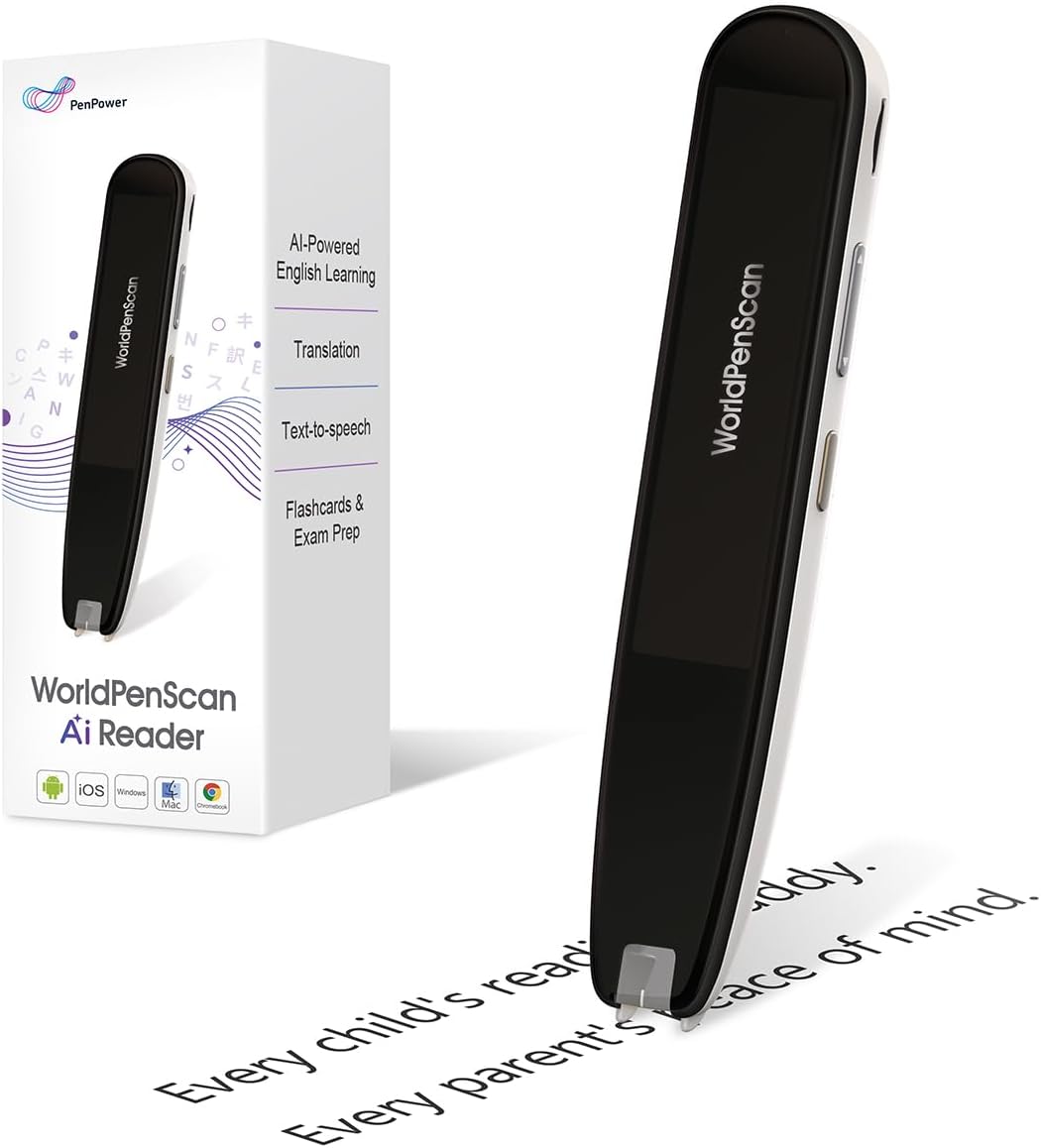
The WorldPenScan AI Reader is designed to help children build reading confidence. It offers quick AI explanations for difficult words without interrupting their reading flow.
We may earn a commission when you buy through this link, at no additional cost to you.
Scanned text syncs to an AI Reading Buddy for deeper learning insights and fun facts. Offline tools like text-to-speech support reading anywhere without internet.
Language support is limited to English Spanish and Chinese which reduces its utility for broader translation needs. However for these languages it provides excellent reading-level explanations.
This device is ideal for growing readers and ESL learners who need extra support. It encourages curiosity and strengthens comprehension effectively.
Tap Simplify for easier understanding reduce frustration and build the confidence to read independently.
Every scan automatically syncs to AI Reading Buddy for deeper learning and insights.
We may earn a commission when you buy through this link, at no additional cost to you.
The Pen Gpt focuses on bridging analog and digital learning with robust ChatGPT integration. It offers offline translation for over 50 languages to facilitate global communication.
We may earn a commission when you buy through this link, at no additional cost to you.
Users can record lectures and meetings with sync capabilities that pair audio with scanned notes. This supports efficient review and knowledge management for professionals.
The product lacks a user rating in the provided data so reliability and performance are based on claims. Buyers should verify recent user feedback before purchasing.
This tool is designed for professionals working across cultures or needing quick topic exploration. It combines voice recording and translation for a smart workflow.
Break language barriers with offline translation for over 50 languages on a vibrant HD touch.
Record lectures meetings or ideas with a single tap and sync wirelessly to devices.
We may earn a commission when you buy through this link, at no additional cost to you.
This smart pen notebook set transforms ideas into reality with voice commands and handwriting recognition. It supports AI voice transcription to convert spoken words into text efficiently.
We may earn a commission when you buy through this link, at no additional cost to you.
The app enables writing notes while activating voice transcription for editable Word documents. Users can erase markings and rewrite for repeated usage offering sustainability.
Like some other entries the product lacks a verified user rating so performance depends on software updates. Its features suggest a focus on meeting content and inspiration recording.
Ideal for meeting users this pen offers a streamlined way to capture and translate notes. It combines voice and handwriting for a comprehensive recording solution.
Transform your ideas into reality with simple verbal expressions and generate visuals in seconds.
The APP features handwriting recognition enabling you to write meeting notes while activating voice transcription.
We may earn a commission when you buy through this link, at no additional cost to you.
The Scanmarker Pal is a versatile translator and reading pen designed for language learners. It scans and translates text in over 100 languages with instant reading aloud.
We may earn a commission when you buy through this link, at no additional cost to you.
Text is highlighted on the screen to improve comprehension for those with reading challenges. Bluetooth headphone connectivity offers an immersive audio experience for listening.
Offline support covers only a few major languages which might restrict use in remote travel scenarios. For online use it offers robust multilingual mastery.
This device is perfect for travelers needing quick translations. Its portable design ensures it fits easily in pockets for on-the-go scanning.
Scan, translate, and have text read aloud while highlighted on the screen.
Lightweight and portable this advanced word translator pen is perfect for on-the-go use.
We may earn a commission when you buy through this link, at no additional cost to you.
This translation pen offers extensive language support with 142 languages and multiple scanning modes. It includes photo translation and a recorder for comprehensive information capture.
We may earn a commission when you buy through this link, at no additional cost to you.
Users can extract text excerpts synchronizing documents with phones for easy editing. The device supports various media functions like music and video players beyond translation.
The mixed rating suggests variability in OCR accuracy or interface usability. However the wide range of features makes it a versatile tool for diverse tasks.
Ideal for professionals and travelers this pen simplifies reading foreign texts and capturing documents. It combines scanning translation and media playback into a compact device.
Synchronizing scanned and translated documents with your phone for easy import and document editing.
As long as the camera is aimed at any text it can automatically translate foreign menus.
We may earn a commission when you buy through this link, at no additional cost to you.
Selecting the right AI scan pen involves balancing features like language support, AI integration, and battery life with your specific study or work needs.
Many modern pens now include direct access to AI models like ChatGPT. This allows users to ask questions about scanned text, get summaries, or receive instant answers for math and history without switching devices.
Prioritize models with robust AI chat features if you need deeper learning insights beyond simple scanning.
Check how many languages the pen supports both online and offline. High-end models may offer translation for over 100 languages while budget options might be limited to major ones.
For travelers, ensure offline capabilities include languages relevant to your destination.
The core function of any scan pen is optical character recognition. Accuracy ensures that scanned text matches the original document without errors, which is vital for study notes and research.
Look for devices with clear scanning indicators and high-resolution camera sensors for best results.
Text-to-speech features read scanned text aloud which aids auditory learners and those with dyslexia. Adjustable speeds and accents can significantly improve comprehension and reduce reading fatigue.
Ensure the device supports natural-sounding voices if audio learning is a priority for you.
Consider how you plan to save and share your scans. Bluetooth connectivity allows seamless syncing to smartphones or computers while built-in storage holds files offline.
Choose models with ample internal memory if you frequently work without internet access.
Since these devices are often used on the go, battery life is critical. Aim for models offering at least 10 hours of use on a single charge to last through a full day of classes or meetings.
Also consider the weight and dimensions to ensure it fits comfortably in your bag or pocket.
Specialized pens offer features like adjustable font sizes, reading aids, and simplified interfaces for dyslexic users. These can make reading and studying significantly less stressful.
If you or a family member has learning difficulties, verify specific accessibility tools are included.
Many AI pens rely on companion apps for full functionality like organizing notes or advanced AI interactions. Check app reviews to ensure the software is intuitive and compatible with your device.
A well-supported app enhances the pen's value by turning raw scans into usable digital files.
To get started, charge your pen fully and install the companion app on your smartphone. Pair the device via Bluetooth following the on-screen instructions to enable data syncing features.
When scanning, place the pen tip at the start of the text line and move it smoothly across the page. Hold the button down while scanning to ensure the device captures the text accurately.
Store the pen in a protective case to prevent scratches on the screen or lens. Regularly update the app and device firmware to access the latest AI features and security patches.
Many models offer offline translation for a limited set of languages and basic scanning functions. However, advanced features like AI chat and full translation often require an active internet connection.
Most pens are designed for printed text and may struggle with handwriting. Some high-end models with advanced OCR can handle neat handwriting but it is best to verify specs before purchasing.
After scanning, use the companion app to save the file in formats like PDF or TXT. Then share it directly to email, cloud storage, or note-taking apps on your device.
Yes, these pens are generally safe and designed for educational use. They help students stay engaged with reading and support accessibility without exposing them to inappropriate content.
Battery life varies by model but most offer between 10 to 17 hours of continuous use. Charging times usually range from 90 minutes to a few hours depending on the device.
Yes, many devices can scan and translate between multiple languages on the fly. This is useful for bilingual texts or travelers moving between different regions.
We have reviewed the top 10 AI scan pens with Chatgpt capabilities to help you make an informed decision. Each model offers unique strengths whether you need translation, dyslexia support, or digital note-taking.
When choosing, prioritize features that align with your primary use case such as language support or AI integration. Ensure the device fits your workflow for both home and on-the-go use.
Prices and availability can vary so always check the current listings on retailer websites before buying. The right pen can significantly enhance your learning and productivity.