This guide compares the top GPUs for DaVinci Resolve to help professionals and creators choose the best card for performance, memory, and color accuracy.
As an Amazon Associate we earn from qualifying purchases. We may earn a commission when you buy through links on this page, at no additional cost to you. Read our affiliate disclosure.As an Amazon Associate we earn from qualifying purchases.Purchases through our links may earn us a commission, at no extra cost to you. Read our affiliate disclosure.
Choosing the right GPU for DaVinci Resolve is critical for smooth playback, fast rendering, and accurate color grading. Professionals need hardware that handles high-resolution timelines and complex effects without stuttering or crashing during critical work.
We analyzed ten top GPUs based on architecture, VRAM capacity, cooling efficiency, and real-world performance in Resolve. Our list includes professional workstation cards and high-end consumer options tailored for creative workflows and demanding video editing tasks.
Each pick highlights specific strengths like AI acceleration, ray tracing support, or multi-monitor output. Prices and availability fluctuate frequently, so verify current stock and compatibility with your system before purchasing to ensure optimal performance.
Top 3 Picks for Best GPU for Davinci Resolve
Best Budget
NVD RTX PRO 6000 Blackwell Professional Workstation Edition Graphics Card for AI, Design, Simulation, Engineering – 96GB DDR7 ECC Memory – 4th Gen RT/5th Gen Tensor Core GPU – OEM Packaging
Top 10 Best GPU for Davinci Resolve in 2026 Compared
This side-by-side comparison evaluates key specifications and performance features across all ten selected graphics cards to help you find the ideal GPU for your specific DaVinci Resolve workflow needs.
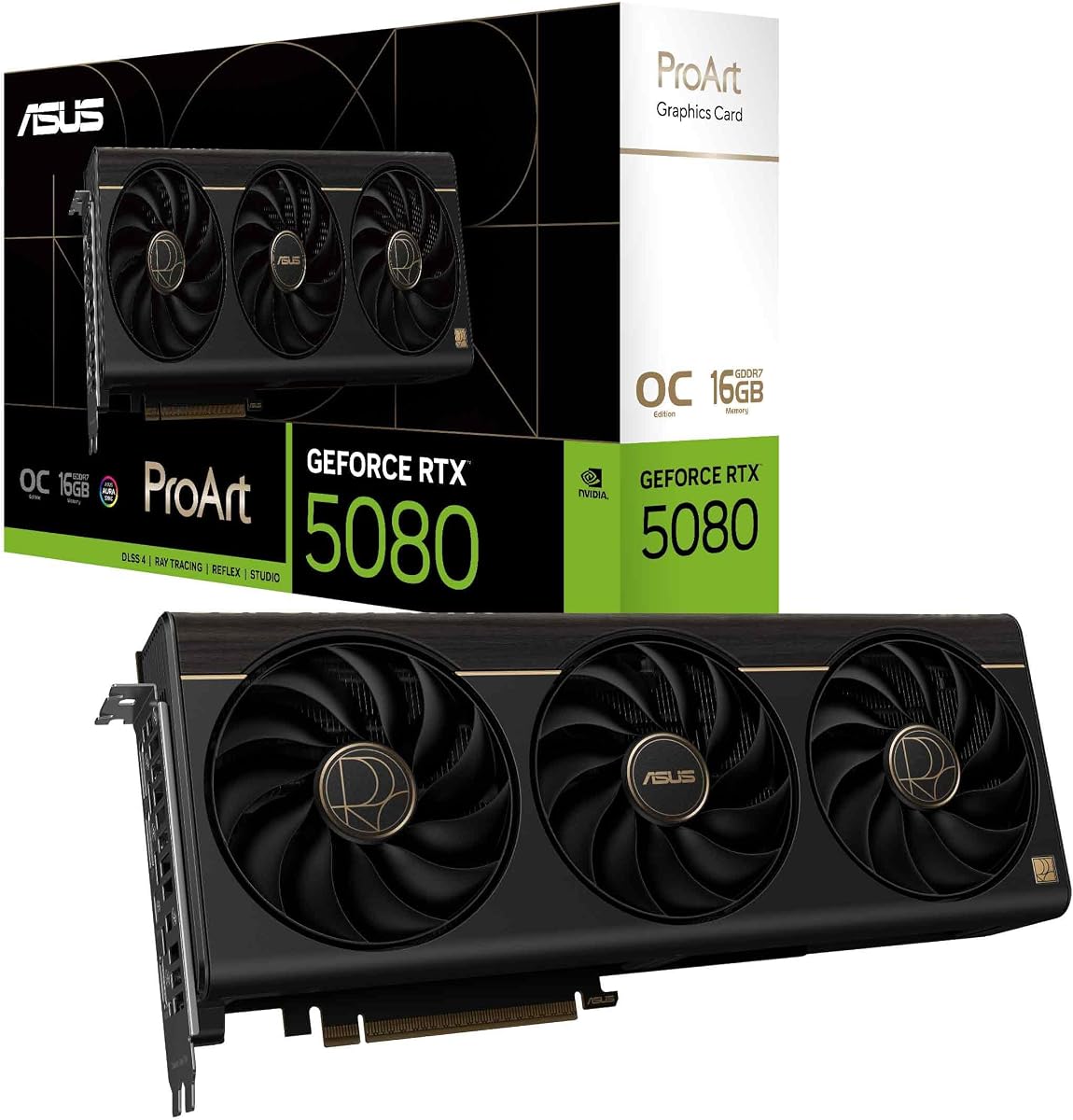
The ASUS ProArt RTX 5080 stands out as the top choice for DaVinci Resolve users seeking high performance without compromising on build quality. With a stellar 4.9 rating and powerful Blackwell architecture, it delivers exceptional speed and stability for complex editing tasks.
Pros
Excellent thermal performance
Integrated USB Type-C port
High AI processing power
Minimalist premium design
Auto-Extreme reliability
Cons
Premium pricing
Large physical size
We may earn a commission when you buy through this link, at no additional cost to you.
Its standout features include 1858 AI TOPS for accelerated effects and an integrated USB Type-C port that streamlines content creation workflows. The vapor chamber MaxContact heatsink ensures efficient heat transfer, maintaining optimal temperatures during extended rendering sessions.
While the price is higher than average, the trade-offs are minimal given its robust design and premium materials like the wood-patterned laminate trim. The phase-change thermal pads outlast traditional paste, ensuring long-term reliability under heavy workloads.
Professionals who prioritize thermal efficiency and AI performance should buy this card. It balances compatibility and performance perfectly, making it the final recommendation for high-end Resolve users.
AI-Powered Workflow Acceleration
With 1858 AI TOPS, this GPU handles AI-driven effects like Magic Mask and Face Refinement with remarkable speed.
Advanced Thermal Management
The MaxContact heatsink with vapor chamber and phase-change pads ensures the GPU stays cool during long grading sessions.
NVD RTX PRO 6000 Blackwell Professional Workstation Edition Graphics Card for AI, Design, Simulation, Engineering – 96GB DDR7 ECC Memory – 4th Gen RT/5th Gen Tensor Core GPU – OEM Packaging
96GB DDR7 ECC
5th Gen Tensor Cores
PCIe Gen 5
DisplayPort 2.1
The NVIDIA RTX PRO 6000 is a beast built for professional workstations handling massive 3D projects and AI models alongside DaVinci Resolve. Its 4.3 rating reflects reliability in enterprise environments where performance and stability are non-negotiable.
Pros
Massive 96GB VRAM
Enterprise-grade ECC memory
Universal MIG support
High-resolution display support
Optimized for AI workloads
Cons
Extremely expensive
Bulk OEM packaging
We may earn a commission when you buy through this link, at no additional cost to you.
The 96GB of DDR7 ECC memory ensures flawless handling of huge video files and complex scenes without running out of VRAM. The 5th Gen Tensor Cores support FP4 precision for faster AI processing, while Universal MIG allows splitting the GPU for concurrent tasks.
The main trade-off is the high cost and bulk packaging, which may not suit smaller studios. However, for large-scale productions needing multi-app workflows and precise color accuracy on 8K displays, these limitations are acceptable for the power gained.
Enterprise users and large studios should buy this GPU for its unmatched capacity and enterprise features. It is the final recommendation for mission-critical professional workflows.
Unmatched Memory Capacity
With 96GB of DDR7 memory and 1.8 TB/s bandwidth, you can edit 8K timelines without worrying about memory bottlenecks.
Enterprise Isolation Features
Universal MIG lets you divide the GPU into secure instances, allowing multiple users or apps to work concurrently.
The Gigabyte RX 9070 XT offers incredible value for budget-conscious creators who still need solid performance in DaVinci Resolve. Its 4.7 rating highlights strong build quality and effective cooling for the price point.
Pros
Affordable price
High 16GB VRAM
WINDFORCE cooling
RGB lighting options
Strong thermal gel
Cons
AMD driver support varies
No professional certification
We may earn a commission when you buy through this link, at no additional cost to you.
Powered by Radeon RX 9070 XT with 16GB GDDR6, it handles 1080p and 4K editing smoothly. The WINDFORCE cooling system with server-grade thermal conductive gel ensures stable temperatures, while Hawk Fans improve airflow efficiency.
The main trade-off is potentially less optimized driver support compared to NVIDIA cards for some Resolve features. However, the performance per dollar and ample VRAM make it an excellent choice for freelancers and hobbyists.
Freelancers and hobbyists should buy this GPU for its balance of cost and capability. It is the final recommendation for affordable high-capacity editing hardware.
Cost-Effective VRAM
16GB of GDDR6 memory provides enough buffer for 4K editing and color grading without breaking your budget.
Robust Cooling Solution
The WINDFORCE system with server-grade gel ensures the card runs cool even during long export sessions.
The Gigabyte RTX 5080 Gaming OC brings powerful Blackwell architecture to DaVinci Resolve users who also game. Its 4.6 rating reflects strong performance for both creative tasks and high-end gaming experiences.
Pros
Next-gen Blackwell cores
WINDFORCE cooling
Fast PCIe 5.0 speed
Gaming performance
DLSS 4 support
Cons
Not workstation certified
Limited multi-GPU support
We may earn a commission when you buy through this link, at no additional cost to you.
It features 16GB GDDR7 and DLSS 4 technology, which accelerates rendering and playback. The WINDFORCE cooling system ensures stable performance under heavy loads, while PCIe 5.0 provides future-proof bandwidth for data transfer.
The trade-off is a lack of professional certification, meaning some enterprise features may be unavailable. Still, gamers transitioning to content creation will find this card highly versatile and cost-effective.
Gamers and dual-purpose users should buy this GPU for its versatility. It is the final recommendation for users needing both creative and gaming power.
Future-Proof Connectivity
PCIe 5.0 support ensures this GPU will remain compatible with high-speed systems for years to come.
Gaming Optimized
DLSS 4 delivers smooth gameplay, making this ideal if you balance gaming with video editing work.
The ASUS TUF RTX 5080 is built for durability and reliability, making it ideal for DaVinci Resolve users who need consistent performance. Its 4.6 rating comes from robust construction and stable thermal management.
Pros
Durable military components
Protective PCB coating
Phase-change thermal pad
GPU Tweak III
Auto-Extreme reliability
Cons
Large dimensions
High power requirements
We may earn a commission when you buy through this link, at no additional cost to you.
It uses military-grade components and protective PCB coating to prevent short circuits from dust or moisture. The phase-change GPU thermal pad ensures optimal thermal performance, outlasting traditional paste under heavy loads.
The trade-off is its large size and high power demand, requiring careful case clearance verification. However, the reliability benefits justify these considerations for professional environments.
Workstations in demanding environments should buy this GPU for its rugged build. It is the final recommendation for long-lasting creative work.
Industrial Strength Build
Military-grade components and PCB coating ensure the GPU withstands dust and moisture in varied environments.
Automated Precision
Auto-Extreme manufacturing ensures higher reliability and consistency across every unit sold.
ASUS Dual GeForce RTX 5060 Ti 16GB GDDR7 OC Edition Gaming Graphics Card
16GB GDDR7
Blackwell Architecture
Dual Ball Bearings
0dB Technology
The ASUS Dual RTX 5060 Ti delivers strong performance in a compact form factor, perfect for DaVinci Resolve users with small workstations. Its 4.7 rating highlights its efficiency and reliability in tight spaces.
Pros
Compact 2.5-slot design
Dual ball bearings
Dual BIOS profiles
0dB silent mode
Strong AI performance
Cons
Lower power output
Fewer display outputs
We may earn a commission when you buy through this link, at no additional cost to you.
It features 16GB GDDR7 and Axial-tech fans with smaller hubs for better airflow. The Dual BIOS allows toggling between Quiet and Performance modes, while Dual ball bearings ensure longevity twice as long as sleeve designs.
The trade-off is lower overall power and fewer outputs, limiting multi-monitor setups. However, it fits small chassis perfectly and maintains good AI performance for editing tasks.
Users with small cases should buy this GPU for its space efficiency. It is the final recommendation for compact high-performance builds.
Space-Saving Design
A 2.5-slot design maximizes compatibility with small chassis without sacrificing cooling efficiency.
Silent Operation
0dB technology lets you enjoy light gaming or editing in relative silence when loads are low.
The NVIDIA Titan RTX remains a powerful option for DaVinci Resolve users who can find it in stock. Its 4.4 rating reflects proven reliability with 4609 CUDA cores and 577 Tensor Cores for AI acceleration.
Pros
Massive CUDA core count
Strong ray tracing
AI acceleration
OS certification
High performance
Cons
Older architecture
Higher power use
We may earn a commission when you buy through this link, at no additional cost to you.
It features 72 RT cores for ray tracing and runs on Turing architecture. The card supports Windows 10 and Linux 64-bit systems, certified for stability in professional environments.
The trade-off is its older architecture compared to modern cards, which may limit future-proofing. Still, for those needing high core counts without workstation costs, it is a viable choice.
Legacy enthusiasts should buy this GPU for its raw core power. It is the final recommendation for experienced users seeking high compute.
High Core Count
4609 CUDA cores provide robust processing power for complex rendering and simulation tasks.
AI Acceleration
577 Tensor Cores support AI-driven workflows, improving speed for machine learning tasks.
ASRock Radeon AI PRO R9700 Creator 32GB Professional Graphics Card, 2920 MHz Boost Clock, GDDR6, AMD RDNA 4, AI-Accelerators, DisplayPort 2.1a, PCIe 5.0, Blower Cooler
32GB GDDR6
RDNA 4
PCIe 5.0
Blower Cooling
The ASRock Radeon AI PRO R9700 is engineered for AI development and content creation, making it suitable for DaVinci Resolve users needing high VRAM. Its 4.4 rating highlights its professional workstation focus.
Pros
32GB VRAM capacity
Professional blower design
PCIe 5.0 bandwidth
RDNA 4 architecture
Multi-GPU friendly
Cons
AMD software support
Limited to Linux focus
We may earn a commission when you buy through this link, at no additional cost to you.
It offers 32GB of GDDR6 memory and RDNA 4 architecture with AI accelerators. The professional blower cooling design exhausts heat directly out of the chassis, ideal for multi-GPU workstation and server configurations.
The trade-off is AMD driver support compared to NVIDIA in some Resolve features. However, the massive memory and enterprise thermal solutions make it a strong choice for specialized workflows.
Linux workstation users should buy this GPU for its server-grade features. It is the final recommendation for multi-GPU scalable builds.
Professional Memory
32GB of GDDR6 memory provides ample bandwidth for large AI models and 8K video editing.
Server-Ready Cooling
The blower design is optimized for server racks, ensuring heat is exhausted efficiently in dense setups.
PNY NVIDIA Quadro RTX 4000 – The World’S First Ray Tracing GPU
Turing Architecture
RTX Technology
36 RT Cores
Interactive Performance
The PNY Quadro RTX 4000 offers professional performance at an accessible level for DaVinci Resolve users. Its 4.4 rating reflects its role as a stable entry point for workstation workflows.
Pros
Entry professional card
Ray tracing support
Fast memory
NVidia RTX tech
VR ready
Cons
Limited VRAM
Older generation
We may earn a commission when you buy through this link, at no additional cost to you.
It features NVIDIA Turing architecture and RTX technology with 36 RT cores for real-time rendering. Advanced shading features support immersive VR, and it delivers fast, interactive application performance.
The trade-off is limited memory and older tech compared to modern consumer cards. However, its professional validation ensures reliability for basic color grading and rendering tasks.
Professionals needing entry-level validation should buy this GPU. It is the final recommendation for stable professional entry points.
Real-Time Rendering
36 RT cores accelerate photorealistic ray-traced rendering for more accurate visual previews.
Professional Reliability
Certified for professional apps, this card ensures stability during critical rendering and export.
The ASRock Arc Pro B60 is a workstation GPU optimized for AI, design, and DaVinci Resolve workflows. Its 3.9 rating acknowledges its strong hardware specs despite being a newer entrant in the professional market.
Pros
24GB VRAM
ISV certified drivers
Dual AV1 encode
Multi-monitor support
Linux GPU scale
Cons
Evolving driver support
Niche market presence
We may earn a commission when you buy through this link, at no additional cost to you.
It features 24GB of GDDR6 memory and Intel Xe2-HPG architecture with Twin Media Transcoders for fast AV1 and H.264 export. Four DisplayPort 2.1 outputs support multiple high-resolution displays simultaneously for expansive workflows.
The trade-off is evolving driver support compared to established competitors. However, ISV certified drivers and scalable multi-GPU support make it promising for future-proof Linux setups.
Linux developers and hardware enthusiasts should buy this GPU for its modern features. It is the final recommendation for Intel workstation users.
Fast Media Export
Twin Media Transcoders support AV1 and H.264, speeding up export times for high-res videos.
Multi-Monitor Workflows
Four DisplayPort 2.1 outputs allow up to four 8K displays for detailed color grading and timelines.
We may earn a commission when you buy through this link, at no additional cost to you.
Buying Guide – How to Choose the Best GPU for DaVinci Resolve
Selecting the right GPU involves balancing VRAM, architecture, and budget to match your resolution and workflow complexity.
VRAM Capacity
VRAM determines how much footage the GPU can process at once. For 4K editing, aim for 16GB or more to avoid stuttering during effects playback.
Prioritize cards with 16GB to 32GB+ for professional workflows handling large files.
GPU Architecture
Newer architectures like Blackwell or RDNA 4 offer better AI acceleration and decoding. Older cards may lack essential features for Resolve.
Choose modern architecture for better future-proofing and feature support.
Memory Type and Speed
GDDR7 provides significantly higher bandwidth than GDDR6, speeding up data transfer. Look for fast memory speeds for smoother timeline scrubbing.
Opt for GDDR7 or high-speed GDDR6 for optimal performance.
Power Consumption
High-end cards require robust power supplies and cooling. Ensure your PSU meets the wattage and connector requirements to avoid shutdowns.
Verify PSU capacity and power connector types before purchase.
Cooling System
Efficient cooling prevents thermal throttling during long exports. Blower fans are ideal for multi-GPU setups, while traditional fans suit single-card systems.
Select cooling based on your case size and multi-GPU plans.
Professional Certification
Workstation cards are ISV certified for stability in creative apps. Consumer cards offer better value but may lack some enterprise features.
Decide based on your need for certified drivers versus cost savings.
Connectivity
Ports like DisplayPort 2.1 support high refresh rates and multiple monitors. PCIe 5.0 ensures future compatibility with next-gen systems.
Check port types and PCIe version for your setup needs.
AI Performance
Tensor Cores or AI accelerators speed up Resolve features like Magic Mask. More AI TOPS mean faster processing for intelligent tools.
Look for high AI performance metrics for smarter editing workflows.
How to Use and Care for Your GPU for DaVinci Resolve
Install the latest drivers from NVIDIA or AMD websites to ensure Resolve recognizes all features. Use DDU to remove old drivers cleanly before updating.
Monitor GPU temperatures during rendering to ensure cooling works efficiently. Use software like HWMonitor or GPU-Z to track performance and heat.
Clean dust from fans and heatsinks periodically to maintain airflow. Keep your workstation well-ventilated to prevent overheating and extend GPU lifespan.
Frequently Asked Questions
What GPU is best for 4K editing in DaVinci Resolve?
For 4K editing, a GPU with at least 16GB VRAM like the RTX 5080 or RX 9070 XT offers smooth performance. Higher VRAM prevents bottlenecks when applying complex effects and color grading tools.
Do I need a professional workstation GPU for Resolve?
Professional GPUs offer certified drivers for stability but are costlier. Consumer cards often deliver similar performance for most users unless you need specific enterprise features.
How much VRAM do I need for 8K workflows?
8K workflows require 32GB or more VRAM to handle large textures and timelines without stuttering. Look for workstation cards like the RTX PRO 6000 or Radeon R9700.
Can consumer GPUs handle AI effects in Resolve?
Yes, consumer GPUs with Tensor Cores like RTX 5080 support AI features like Magic Mask effectively. They provide sufficient power for most professional editing needs.
Is AMD or NVIDIA better for DaVinci Resolve?
NVIDIA generally has broader driver optimization for Resolve, but AMD cards with high VRAM offer great value. Choose based on your budget and specific feature requirements.
What power supply is needed for high-end GPUs?
High-end GPUs often require 850W or more with PCIe 5.0 connectors. Check the manufacturer's recommended PSU to ensure stable power delivery.
Do GPUs affect color grading accuracy?
GPUs enable accurate color processing but rely on calibrated monitors. A good GPU ensures smooth playback during grading to apply precise color corrections accurately.
How often should I update my GPU drivers?
Update drivers monthly or when releasing new features. Staying current ensures Resolve compatibility with the latest optimizations and security patches.
Final Thoughts on Choosing the Best GPU for DaVinci Resolve
Our top picks cover diverse needs from budget-friendly AMD options to high-end NVIDIA workstations. Each card excels in specific areas like VRAM capacity, AI performance, or compact design.
Prioritize VRAM and architecture compatibility for your resolution and workflow. A balanced setup ensures smooth playback and reliable rendering without unnecessary overspending.
Prices and availability change frequently so verify current stock and discounts before purchasing. Check your system's power and cooling compatibility to maximize performance longevity.
This guide compares the top ten LED work lights for 2026, evaluating brightness, durability, portability, and features to help you choose the ideal lighting