
ASRock 970M PRO3
4.0Editor score
MicroATX Form Factor
Quad CrossFireX Ready
Affordable Price Point
This guide compares ten top Asrock AM3 motherboards for performance compatibility and value to help you choose the right platform for your legacy or budget AMD
Finding a reliable Asrock AM3 motherboard can be challenging as older platforms become harder to source. This guide highlights ten verified options that balance legacy support with modern connectivity needs for budget-conscious builders.
We evaluated each model based on chipset features port availability expansion slots and overall build quality. Our analysis focuses on practical performance for gaming productivity and general use cases within this specific socket family.
Each pick shows key specs real-world strengths and potential limitations. Keep in mind that stock fluctuates and prices change frequently so verify availability before finalizing your purchase decision for your specific needs.
4.0Editor score

4.2Editor score

3.8Editor score
The following table provides a side-by-side comparison of all ten selected Asrock AM3 motherboards to help you quickly identify the best fit for your specific system requirements and budget constraints.




The ASRock 970A-G/3.1 stands out as the Editor's Choice for buyers seeking a balance between legacy AM3+ support and modern connectivity features at an accessible price point.
We may earn a commission when you buy through this link, at no additional cost to you.
Its inclusion of an M.2 slot and USB 3.1 ports sets it apart from older models in this category allowing for faster storage and peripheral speeds without needing adapters.
While it relies on PCIe 2.0 which limits modern GPU bandwidth the board handles most single GPU setups efficiently making it ideal for budget builds using legacy CPUs.
This board is highly recommended for users upgrading older AM3 systems who need SATA3 and USB3.1 without investing in a completely new platform like AM4 or AM5.
The M.2 slot supports PCIe 2.0 x4 allowing you to add fast NVMe SSDs to an otherwise older platform for improved system responsiveness.
Using the AMD 970 chipset with SB950 ensures stable performance for multi GPU configurations via CrossFireX while maintaining robust power delivery for high TDP CPUs.
We may earn a commission when you buy through this link, at no additional cost to you.
The ASRock 970M PRO3 offers excellent value for budget builders needing a compact MicroATX board with essential modern features like SATA3 and USB3.0 support.
We may earn a commission when you buy through this link, at no additional cost to you.
Its smaller form factor makes it perfect for mid tower cases where space is tight while still supporting high performance AM3+ processors up to 140W.
Though it lacks USB 3.1 or M.2 connectivity it delivers solid performance for gaming and general productivity tasks using legacy AMD Phenom II or Athlon II CPUs.
Buyers looking for an affordable upgrade path from older AM2 or AM3 systems will find this board a practical choice without breaking the bank.
The MicroATX layout saves case space while still providing ample room for a dedicated GPU and storage drives in budget friendly PC builds.
With six SATA3 ports you can connect multiple fast SSDs or HDDs ensuring quick data transfer rates and responsive storage for your system.
We may earn a commission when you buy through this link, at no additional cost to you.
The ASRock 990FX EXTREME3 represents the premium tier of AM3+ boards offering exceptional power delivery and multi GPU capabilities for enthusiasts maximizing legacy hardware.
We may earn a commission when you buy through this link, at no additional cost to you.
Its support for Quad SLI and Quad CrossFireX along with a robust VRM design makes it suitable for pushing high TDP FX series CPUs to their limits.
Although it lacks the newest storage interfaces it provides a stable platform for users who prioritize raw CPU and GPU performance over modern connectivity convenience.
This model is best suited for hobbyists who want the absolute best performance from AM3+ without migrating to newer socket types immediately.
Support for Quad SLI and CrossFireX allows you to run multiple graphics cards simultaneously for maximum gaming performance on this legacy platform.
Enhanced voltage regulation modules ensure stable power delivery to high TDP CPUs allowing for consistent overclocking and performance under heavy loads.
We may earn a commission when you buy through this link, at no additional cost to you.
The ASRock 760GM-HDV is an entry level board that provides basic AM3+ support with integrated graphics suitable for simple office or home media tasks.
We may earn a commission when you buy through this link, at no additional cost to you.
While it lacks modern USB3.0 and SATA3 ports it remains a reliable choice for users who do not need high speed external storage or fast peripherals.
Its MicroATX form factor and low power consumption make it ideal for small form factor builds or budget workstations where cost is the primary concern.
Buyers prioritizing minimal cost over speed will find this board sufficient for running light applications and legacy operating systems smoothly.
Integrated graphics and basic connectivity make this board a reliable choice for general computing tasks without requiring a dedicated graphics card.
Designed to be affordable this board offers a functional AM3+ socket solution for users with tight budgets and modest performance needs.
We may earn a commission when you buy through this link, at no additional cost to you.
The ASRock 970 EXTREME3 combines a robust chipset with excellent connectivity options including an eSATA3 port that is rare on modern boards today.
We may earn a commission when you buy through this link, at no additional cost to you.
Its powerful VRM design supports higher TDP CPUs comfortably making it a solid choice for users who want to push their Phenom II or FX processors.
Although it lacks an M.2 slot the abundance of SATA3 ports allows for multiple fast SSD configurations which can significantly speed up system performance.
This board is a great option for users who value storage flexibility and power stability over having the absolute latest interface standards.
With five SATA3 ports and an eSATA3 connection you have multiple ways to integrate fast storage into your system without bottlenecks.
Advanced BIOS settings and robust power delivery allow for safe overclocking which can extend the life and performance of your legacy CPU.
We may earn a commission when you buy through this link, at no additional cost to you.
The ASRock 960GM-VGS3 FX is designed for compact budget builds that require reliable AM3+ support without compromising on basic system stability.
We may earn a commission when you buy through this link, at no additional cost to you.
Solid capacitors ensure longevity and consistent power delivery which is crucial for maintaining system stability during longer operating periods.
While it does not offer extensive high speed connectivity it provides enough features for basic gaming or office work at a very reasonable price.
This model is ideal for users who need a simple reliable system for home use or secondary machines where cost efficiency is the priority.
The use of solid capacitors enhances the motherboard reliability and lifespan ensuring consistent operation over time without electrical failures.
The MicroATX layout saves space in your case allowing for easier cable management and smaller footprint builds without sacrificing core functionality.
We may earn a commission when you buy through this link, at no additional cost to you.
The ASRock 880GXH/USB3 offers a budget friendly solution for users who need USB 3.0 and decent integrated graphics without a dedicated GPU.
We may earn a commission when you buy through this link, at no additional cost to you.
The integrated Radeon HD 4250 graphics can handle basic multimedia and light gaming tasks making it suitable for home media centers or office PCs.
While it lacks SATA3 ports the USB 3.0 support provides a significant speed boost for external drives and peripherals compared to older USB 2.0 standards.
This board is perfect for budget systems where an external graphics card is not planned and moderate performance is acceptable for daily tasks.
Built-in Radeon HD graphics allow you to run a display without a dedicated GPU which saves cost and power in simple system configurations.
USB 3.0 support provides faster data transfer for external drives which is a key upgrade over older boards that were limited to USB 2.0.
We may earn a commission when you buy through this link, at no additional cost to you.
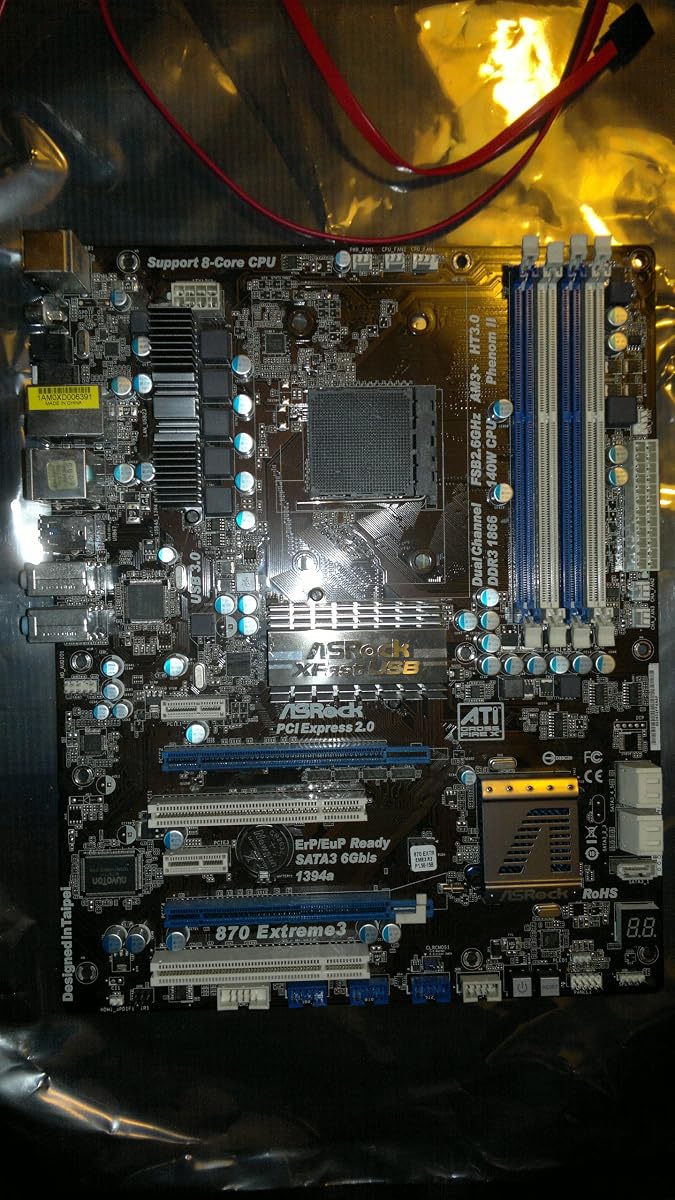
The ASRock 870 EXTREME3 R2.0 provides a reliable mid range option with a strong emphasis on storage and legacy peripheral support like FireWire.
We may earn a commission when you buy through this link, at no additional cost to you.
Its robust power delivery system handles AM3+ CPUs well while the multiple SATA3 ports ensure you can add fast storage devices easily.
Although it does not include M.2 slots the board still delivers solid performance for gaming and productivity using legacy hardware components.
This model is suitable for users who appreciate additional legacy ports and storage connectivity over having the newest storage interfaces available.
With five SATA3 ports and an eSATA3 port you can connect multiple high speed drives ensuring fast access to your data and applications.
Inclusion of FireWire ports makes this board useful for older audio or video equipment that does not use USB or PCIe interfaces.
We may earn a commission when you buy through this link, at no additional cost to you.
The ASRock 970DE3/U3S3 is a functional basic AM3+ board that offers essential modern connectivity features like USB 3.0 and SATA3 at an entry price.
We may earn a commission when you buy through this link, at no additional cost to you.
It supports up to 32GB of DDR3 memory and provides enough expansion slots for a single GPU and a couple of storage drives effectively.
While the chipset is not the latest it remains stable for everyday tasks making it a good choice for general office or home computing needs.
Buyers looking for a straightforward upgrade for an existing case will find this board provides necessary features without unnecessary extras or high cost.
USB 3.0 and SATA3 support allow for faster peripheral and storage connectivity ensuring your system keeps pace with modern device speeds.
A standard ATX form factor makes installation easy in most mid or full tower cases providing plenty of room for airflow and cable management.
We may earn a commission when you buy through this link, at no additional cost to you.
The ASRock 890FX Deluxe4 stands as a high performance option for AM3 users offering a top tier chipset and extensive connectivity for enthusiasts.
We may earn a commission when you buy through this link, at no additional cost to you.
Its support for Quad CrossFireX and multiple USB3.0 ports makes it ideal for users who need robust expansion capabilities within the AM3 ecosystem.
While it uses the older AM3 socket it provides excellent stability and power delivery ensuring reliable performance for demanding applications and games.
This board is recommended for users who have compatible AM3 CPUs and want the best possible features available on that specific platform today.
Extensive USB 3.0 ports and FireWire options allow for connecting a wide variety of high speed peripherals without needing external hubs.
The 890FX chipset provides ample bandwidth for multi GPU setups ensuring your graphics cards can operate at full capacity without bottlenecks.
We may earn a commission when you buy through this link, at no additional cost to you.
Selecting the right AM3 motherboard requires understanding socket compatibility chipset features and connectivity needs to ensure your system runs smoothly.
AM3+ boards support both AM3+ and AM3 CPUs while pure AM3 boards may not support newer FX processors. Always verify your CPU matches the board's socket type to avoid incompatibility issues.
Ensure you check the exact CPU support list before buying to confirm your specific processor model is officially supported by the manufacturer.
Chipsets like 990FX and 970 offer more PCIe lanes and better multi GPU support than 760G or 880G. Choose a chipset that matches your performance needs whether for gaming or general computing.
Higher end chipsets provide better overclocking support and stability which is essential if you plan to push your CPU beyond stock speeds.
Look for boards supporting DDR3 speeds up to 1866MHz or higher for better system responsiveness. Most AM3 boards support dual channel memory which can significantly improve performance.
Check the maximum memory capacity supported and ensure you install matched sticks to utilize dual channel benefits effectively for your workload.
SATA3 ports provide faster speeds than SATA2 so prioritize boards with at least 2 or more SATA3 connectors for your SSDs. M.2 slots are rare but highly beneficial if present.
Having multiple SATA3 ports ensures you can install fast primary drives alongside secondary storage without throttling your performance or data transfer speeds.
USB 3.0 ports are essential for fast external data transfer and peripherals. Boards with USB 3.1 or Type-C are rarer but offer even faster speeds for future proofing your setup.
Ensure you have enough rear USB ports to connect your essential devices without relying heavily on internal headers or hubs.
Check PCIe slot configuration if you plan to use multi GPU setups or add specialized cards. ATX boards generally offer more slots than MicroATX models for better expansion.
Confirm that the slot widths match your GPU requirements for optimal performance especially if using multiple graphics cards in CrossFire or SLI.
High TDP CPUs require robust VRMs to ensure stable operation. Look for boards with solid capacitors and sufficient phases to handle your CPU's power needs without throttling.
Quality power delivery reduces heat and increases longevity which is important for systems running under load for extended periods like gaming or rendering.
Good audio codecs like Realtek ALC892 provide better sound quality which matters for gamers and media users. Gigabit LAN ensures fast network speeds for online gaming and file transfers.
Some boards include advanced audio features like THX TruStudio Pro which can enhance your listening experience without needing an external sound card.
When installing the motherboard ensure you place it on a non conductive surface before mounting it into the case to prevent static damage to components.
Connect all front panel cables carefully according to the manual to avoid short circuits or missing functionality like USB headers or audio jacks.
Regularly update your BIOS using the official ASRock utility to ensure compatibility with newer CPUs and to fix any potential bugs in the firmware.
Yes most ASRock AM3+ motherboards support both AM3+ and AM3 processors. You should still verify the exact CPU support list on the ASRock product page to confirm compatibility before purchasing.
Most AM3 boards do not have native NVMe slots but some models like the 970A-G/3.1 include an M.2 slot that supports PCIe 2.0 x4 which can work with certain NVMe SSDs.
DDR3 1600MHz to 1866MHz is the sweet spot for most AM3 boards. Higher speeds may require overclocking and stability varies by CPU and motherboard quality.
Yes AM3+ boards work fine with Windows 10 although you may need to install drivers manually. Ensure you download the latest chipset and LAN drivers from the ASRock website.
Most boards support AMD CrossFireX. High end chipsets like 990FX support NVIDIA SLI. Check the specific product specifications for exact GPU configuration details.
Use the ASRock Instant Flash utility inside the BIOS or the USB BIOS Flashback feature if available on your model. Always use the correct BIOS version for your CPU socket.
We have reviewed ten top Asrock AM3 motherboards highlighting models like the 970A-G/3.1 for value and the 990FX EXTREME3 for high performance capabilities.
Prioritize storage and USB connectivity along with power delivery if you plan to run demanding workloads or future upgrade components within this legacy platform.
Check current stock and pricing before buying as availability fluctuates for older hardware. Always verify compatibility with your specific CPU and memory to avoid compatibility issues.