
DIGIDRAW K30 Wireless Remote Controller with Dual Dial & 11 Custom Keys
5.0Editor score
Dual dial design
11 custom shortcut keys
Ultra-light 82g weight
Discover the top iPad Drawing Bluetooth Controller options for digital artists. We compare features, battery life, and compatibility to help you choose.
Finding the right iPad Drawing Bluetooth Controller can transform your digital art workflow. These devices offer shortcut access without reaching for a keyboard, keeping your focus on the canvas while improving efficiency and comfort during long sessions.
We compared ten real products based on their connectivity, customization options, battery life, and software compatibility. Our analysis focuses on how well each controller integrates with popular creative apps and supports both left and right-handed users effectively.
Each pick shows specific strengths like dial controls, programmable keys, or ergonomic design tailored for drawing. Note that prices change frequently, so check current listings before buying to ensure you get the best value for your creative needs today.
5.0Editor score

3.4Editor score

4.4Editor score
This side-by-side comparison highlights key specs across all ten models to help you find the best fit for your iPad drawing setup.



The HUION Keydial Mini is a top choice for artists seeking an efficient workflow. With a solid 4.2 rating, it combines 18 shortcut keys and a dial for brush control. Its compact design makes it ideal for iPad setups where space is limited.
We may earn a commission when you buy through this link, at no additional cost to you.
Its standout feature is the Easy-to-use Dial Controller which lets you change brush sizes or navigate timelines with a simple turn. You can set up to three functions per dial and switch between them quickly. The 18 programmable keys allow customization for even complex shortcuts in one tap.
The anti-ghosting performance supports up to 5 keys at once, which is helpful for multi-key shortcuts. While the setting preview function helps you see button mappings, you do need to install the Huion driver to customize shortcuts. This adds a minor setup step but offers flexibility.
It is perfect for users working with Photoshop, Lightroom, or other creative apps on iPad. The 70-hour battery life means you can use it all day without charging. If you value portability and customizable shortcuts, this controller is a strong recommendation.
The dial and keys let you access frequent commands quickly without reaching for a keyboard.
Its thin, one-handed design works for both left and right-handed users on the go.
We may earn a commission when you buy through this link, at no additional cost to you.
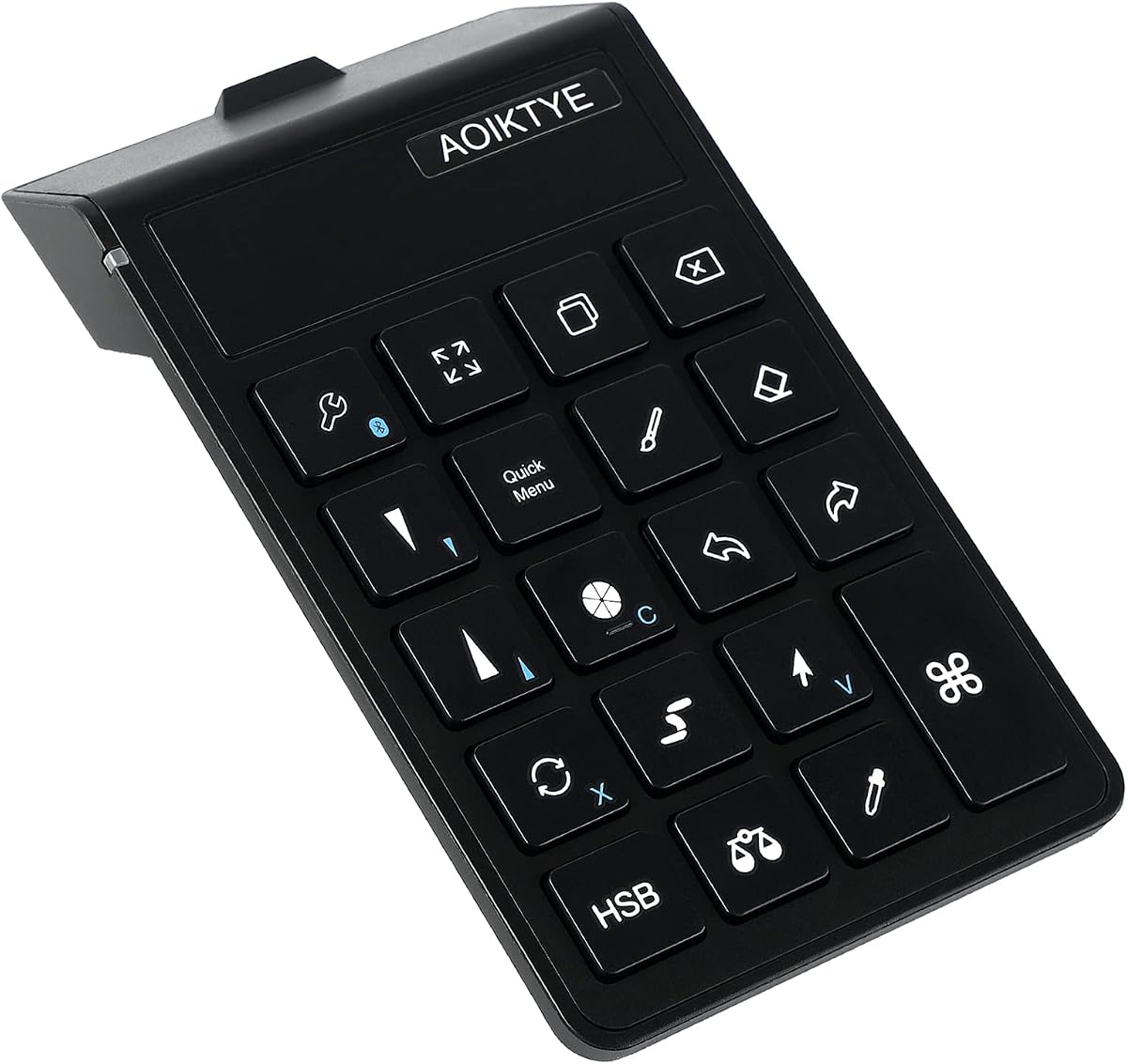
AOIKTYE Wireless Keyboard is built to make Procreate drawing easier. With a 4.5 rating, it offers over 20 shortcut functions including color adjustment and brush size. Its long battery life and wireless design make it a great budget option for iPad users focused on drawing.
We may earn a commission when you buy through this link, at no additional cost to you.
The keyboard improves drawing efficiency by letting you use your right hand to draw while the left hand operates shortcuts. The 22 shortcut keys cover essential actions like undo, cut, and copy. The 2nd generation upgrades place frequent keys in accessible positions for better ergonomics.
A major plus is the 84-hour continuous use battery, which lasts over six months in standby. You charge it via Type-C in two hours. The OTA system upgrade function allows future customizations. However, it is best suited for Procreate and similar painting software.
If you draw often on iPad with Procreate, this keyboard is a practical choice. It helps you focus on creativity without losing time to menus. For those prioritizing value and battery, it stands out as a reliable tool.
The 84-hour battery ensures you can draw all day without worrying about recharging.
Shortcut keys for color and brush size keep your hands on the drawing flow.
We may earn a commission when you buy through this link, at no additional cost to you.
DIGIDRAW K30 stands out with its dual dial and 11 custom keys. It holds a perfect 5.0 rating for its ability to access functions like zoom and layer switch instantly. The ultra-light 82g design makes it comfortable for one-handed use on iPad.
We may earn a commission when you buy through this link, at no additional cost to you.
Its dual dial plus 11 custom shortcut keys let you control brush size and undo without reaching a keyboard. Tactile positioning markers on each key allow blind operation so your eyes stay on the canvas. This tactile feedback helps maintain uninterrupted creative flow during sessions.
The battery lasts up to 40 hours of continuous use with a 10-month standby. You charge it via USB-C. Compatibility covers five systems including Windows and Mac. However, you must download the driver to adjust settings for best performance in apps like Photoshop.
For artists wanting tactile precision and portability, this remote is ideal. The dual dials offer quick adjustments for brush or zoom. If you value lightweight design and customizable control, this controller is a top pick for iPad drawing.
Raised markers on keys let you feel commands without looking away from your art.
Two dials allow simultaneous control over brush size and canvas zoom or rotation.
We may earn a commission when you buy through this link, at no additional cost to you.
The Modded Tablet Controller G8 PLUS offers a unique gaming-inspired design for tablets. With a 5.0 rating, it features Hall Effect sticks and dual motor vibration for precise control. Its magnetic parts allow you to customize the look and function to suit your setup.
We may earn a commission when you buy through this link, at no additional cost to you.
Its new V4 expansion version is stronger and more durable. It fits many iPads and Galaxy Tabs without holders. The 6-axis gyroscope and Hall Effect sticks provide accurate control for games and drawing apps. You can swap magnetic parts to personalize the controller.
While it is great for gaming on tablets, it may need a phone holder if you use it with smaller devices. The 500mAh battery per side supports long sessions. This controller suits users who want a robust, customizable device for tablets and phones.
If you enjoy both gaming and drawing on iPad, this controller is versatile. The Hall Effect sticks ensure smooth movements. For those seeking a modular and powerful option, it is worth considering.
Magnetic interchangeable parts let you adapt the controller to your preferences easily.
A 6-axis gyroscope adds precision for gaming and creative motion controls.
We may earn a commission when you buy through this link, at no additional cost to you.
The XPPen Mini Keydial ACK05 is a versatile shortcut keyboard for drawing. With a 4.3 rating, it offers a dial and customizable express keys. It supports three connection ways including Bluetooth and USB cable, giving you flexibility for different setups.
We may earn a commission when you buy through this link, at no additional cost to you.
Its compact size weighs only 75 g making it easy to hold with one hand. You can customize up to forty shortcuts across four sets. The 1000 mAh battery ensures about 300 hours of continuous work. The anti-ghosting performance lets you control ten keys at once.
The dial rotates 1/24 steps with a clear click sound for zooming or brush adjustments. On iOS devices, you need to download the Shortcut Remote app to set up keys. This adds a step but enables proper use on iPads.
It is suitable for Photoshop, Illustrator, and other creative apps. If you need a compact remote with high customization, this is a solid option. Its battery life and ergonomic design make it a reliable companion for long sessions.
Three ways to connect via Bluetooth, dongle, or cable ensure you stay linked to your device.
Customize up to forty shortcuts across four sets for different apps and tasks.
We may earn a commission when you buy through this link, at no additional cost to you.
The ShanWan Portable Wireless Bluetooth Game Controller supports drawing control. With a 3.4 rating, it connects wirelessly for cable-free use. It supports keyboard and mouse functions which can be useful for productivity tasks on iPad and other tablets.
We may earn a commission when you buy through this link, at no additional cost to you.
Its ergonomic design offers a comfortable grip for extended use. The customizable button mapping lets you assign functions. The precise controls include analog sticks and triggers for accurate performance. It works with many platforms including PC, PS, and iOS devices.
A rechargeable battery ensures long-lasting power for sessions. While it is versatile for gaming and drawing, some users may find the setup involved. It is best for those needing multi-device support and customizable input.
If you need a controller that bridges gaming and creative input, this fits. Its wireless connectivity and support for various apps make it flexible. For users valuing versatility over specialized art features, it is an option.
Wireless support for multiple platforms allows switching between devices easily.
Analog sticks and triggers provide smooth control for detailed drawing tasks.
We may earn a commission when you buy through this link, at no additional cost to you.
TourBox Lite Bluetooth Creative Controller provides wireless creative control. With a 4.4 rating, it offers a refined 8-key layout for intuitive use. Its wireless freedom allows you to use it between home and office setups seamlessly.
We may earn a commission when you buy through this link, at no additional cost to you.
The simpler layout helps beginners avoid memorizing endless shortcuts. Custom combos and assignable functions complete actions in fewer steps. The on-screen HUD shows custom controls in real time. Its ergonomic shape supports long drawing and editing sessions.
It works with Clip Studio Paint, Adobe Photoshop, and more. While the price is higher, the quality and ease of use justify it. You can choose an accessory kit for cable and case. This controller suits users seeking efficiency and comfort.
For creatives wanting a unified approach across apps, this is a strong choice. The wireless design and ergonomic grip make it convenient. If you value simplicity and wide app support, this fits your needs.
The 8-key layout reduces memorization and speeds up your creative workflow.
Bluetooth connection removes cables for a clean workspace and easy travel.
We may earn a commission when you buy through this link, at no additional cost to you.
The TNP iPad Remote Control functions as a media and navigation device. With a 3.6 rating, it includes a trackpad for cursor control on iPad. Its wireless Bluetooth 5.0 connectivity ensures fast speed and range for your setup.
We may earn a commission when you buy through this link, at no additional cost to you.
It supports the iOS home button to switch apps and activate Siri. The multimedia remote features let you control music and videos. It can also serve as a presenter remote for Keynote or PowerPoint presentations.
This device is more suited for navigation than drawing. Its trackpad helps you move cursors without touching the screen. For users needing a media and presenter remote, it is useful. However, it lacks specialized creative controls.
If you need a general remote for iPad navigation and media, this works well. The trackpad adds a desktop-like experience. For drawing specific tasks, it may not offer enough features.
The trackpad allows cursor movement similar to a laptop for precise navigation.
Use it to manage music and video playback while drawing or working.
We may earn a commission when you buy through this link, at no additional cost to you.
Clip Studio Tabmate 2 is designed for Clip Studio Paint users. With a 4.0 rating, it lets you assign frequent operations to buttons for faster production. It supports iPadOS and iOS making it ideal for iPad drawing workflows.
We may earn a commission when you buy through this link, at no additional cost to you.
Its communication method uses Bluetooth Low Energy 5.1 for efficient power use. The device comes with a 12-month license for Clip Studio Paint. This helps new users start creating. It is compatible with many apps across multiple platforms.
You need to buy AA batteries separately. It may not be suitable for users who do not use Clip Studio Paint. For those committed to CSP, this tabmate enhances speed significantly. The handheld design keeps it easy to carry.
If your main software is Clip Studio Paint, this remote offers focused efficiency. The included license adds value. Check compatibility before buying. It is a specialized tool for CSP fans.
Optimized for CSP Ver 3.0 later to boost your workflow speed.
Bluetooth Low Energy ensures long battery life without frequent changes.
We may earn a commission when you buy through this link, at no additional cost to you.
Wacom Intuos Small offers Bluetooth graphic drawing capability. With a 4.4 rating, it uses industry-leading EMR pen technology for precise control. The wireless connection allows you to work on a desk or sofa without cables.
We may earn a commission when you buy through this link, at no additional cost to you.
Its battery-free pen technology feels like pen on paper for natural drawing. Registering the tablet includes software access and training. This helps you get started quickly. The Bluetooth option enables work anywhere with compatible devices.
It works with all software programs for creative tasks. While it is a tablet and not a controller, it connects to iPad setups. If you need reliable performance, Wacom is a trusted brand. The small size makes it portable.
For artists wanting proven quality, this tablet is excellent. The wireless features enhance freedom. Check system requirements for iPad integration. It is a reliable choice for professional work.
Battery-free technology offers precise control without needing recharging.
Bluetooth allows you to draw comfortably in various settings.
We may earn a commission when you buy through this link, at no additional cost to you.
Selecting the right controller depends on your workflow needs and preferred software.
Bluetooth 5.0 offers better speed and range up to 10m. Look for models supporting stable connections with iPad to avoid drop-offs.
Controllers with programmable keys let you map shortcuts for your favorite apps. Check if drivers or apps are needed for setup on iPad.
Long battery life ensures uninterrupted sessions. Aim for models with 40 hours or more of continuous use or rechargeable options.
Comfortable one-handed designs help during long drawing sessions. Look for lightweight models that support both left and right-handed users.
Ensure the controller works with your primary apps like Photoshop or Procreate. Verify system requirements for iPad OS versions.
Dials offer quick access to brush size or zoom. They add a tactile element for fine control without menus.
Check for features like anti-ghosting or Hall Effect sticks for reliable input. Durable materials ensure longevity for daily use.
Compact and lightweight controllers are easier to carry. Consider size if you often work on the go or from different locations.
Keep the controller clean and dry. Store it in a case when traveling to protect keys and prevent dust buildup inside the device.
Many controllers require drivers or apps for full customization on iPad. Some offer basic functions without setup, but custom shortcuts usually need the companion app. Check the product details for specific software requirements.
Most support popular creative apps like Photoshop, Procreate, and Clip Studio Paint. Some are optimized for specific software and may not work with all drawing programs. Verify app compatibility before purchase.
Battery life varies from 40 to 80 hours depending on the model. Rechargeable options with Type-C charging are common. Some offer months of standby time when not in use.
Many models are designed for one-handed use by both left and right-handed users. Look for ergonomic descriptions confirming support for either hand during drawing tasks.
Bluetooth 5.0 models often work up to 10 meters without drop-offs. Ensure your iPad stays within range during active drawing sessions for stable performance.
Most controllers support both iPhone and iPad with iOS or iPadOS. Check compatibility lists for specific phone models if you plan to use it on smaller devices.
Check current listings for up-to-date availability and pricing. Prices may change, so verify details before making your purchase to ensure you get the right tool.