
Lenovo V15 Gen 4
4.5Editor score
MIL-SPEC rugged durability
15.6 inch FHD display
8GB DDR4 RAM
Finding a laptop that stands the test of time requires careful consideration of build quality, performance, and battery life. This guide explores devices engineered to endure years of daily use without compromising on speed or reliability for professionals and students alike.
We compared ten leading models based on their chassis durability, thermal management, component quality, and software support longevity. Our analysis focuses on machines that offer sustained performance, robust connectivity, and resistance to wear and tear in various environments.
Each selection highlights unique strengths for different user needs, from rugged fieldwork to office productivity. Prices and availability change frequently, so verify current details before purchasing to ensure you get the best value for your investment in long-term computing.
4.5Editor score

4.5Editor score

4.2Editor score
As an Amazon Associate we earn from qualifying purchases.
The following comparison table provides a side-by-side overview of the top ten laptops selected for their enduring build quality, reliable performance, and suitability for long-term use in various professional and personal settings.






This HP business laptop offers a robust computing experience designed for extended use and professional tasks. With a 4.5 star rating, it stands out for its durable chassis and reliable performance over time.
We may earn a commission when you buy through this link, at no additional cost to you.
The 17.3 inch FHD display provides ample workspace for multitasking while the AMD Ryzen 5 processor ensures smooth operation during daily workflows. Battery life is notably long allowing you to work uninterrupted throughout the day without frequent charging.
While it is heavier than some ultra portable models the sturdy construction justifies the extra weight for longevity. The numeric keypad is a practical feature for data entry tasks and the inclusion of Office 365 adds immediate value.
Ideal for professionals needing a dependable desktop replacement this laptop balances performance and durability effectively. Its design prioritizes longevity making it a smart investment for those who value a machine that lasts.
The brushed finish and robust build materials ensure resistance to daily wear and tear for years of reliable use.
Features like the numeric keypad and long battery life cater specifically to users who prioritize efficiency and uninterrupted work sessions.
We may earn a commission when you buy through this link, at no additional cost to you.
Dell brings efficiency and clarity with this 16 inch laptop designed for sustained productivity. The 4.4 star rating reflects its reliable performance and user friendly design for everyday tasks.
We may earn a commission when you buy through this link, at no additional cost to you.
The edge to edge clarity of the FHD+ screen with a 16:10 aspect ratio provides more vertical space for documents and spreadsheets. ComfortView Plus reduces blue light to keep eyes comfortable during long work sessions which is crucial for longevity of your vision.
Adaptive thermals help manage heat efficiently ensuring the system remains stable under varying workloads. While the chassis is plastic the overall build quality supports reliable usage and the onsite service adds a layer of long term protection.
This model suits users seeking a balanced mix of display quality and performance without excessive cost. Its focus on eye comfort and thermal management makes it a solid choice for those prioritizing long term usability and health.
ComfortView Plus reduces harmful blue light emissions while preserving color accuracy for comfortable viewing during extended periods.
Built-in adaptive thermals adjust power usage to maintain efficiency and prevent overheating which extends the hardware lifespan.
We may earn a commission when you buy through this link, at no additional cost to you.
The Lenovo V15 Gen 4 combines business features with solid performance for daily operations. Rated 4.3 stars it offers a practical solution for users needing a durable machine for professional environments.
We may earn a commission when you buy through this link, at no additional cost to you.
Powered by the Intel Core i5-13420H processor it handles multiple applications with ease. The inclusion of Windows 11 Pro provides advanced management features ideal for enterprise settings while the numeric keypad aids in efficient data entry.
A dedicated RJ45 port ensures reliable wired connections which is often required in stable office networks. While battery life is average the performance capabilities and port selection make it a practical tool for consistent productivity.
This laptop is best suited for office workers who value connectivity and processing power over ultra portability. Its build and feature set ensure it remains a reliable partner for years of business use without unnecessary compromises.
Windows 11 Pro offers better security and management tools ensuring the device remains compliant and safe for professional use over time.
Ports like RJ45 and HDMI provide versatile connection options for external displays and wired networks without needing adapters.
We may earn a commission when you buy through this link, at no additional cost to you.
Lenovo delivers a reliable business tool with this V15 model that is tested for rugged conditions. Its high 4.7 star rating highlights user satisfaction with its durability and performance capabilities.
We may earn a commission when you buy through this link, at no additional cost to you.
The AMD Ryzen 5 7520U paired with 16GB DDR5 RAM ensures responsive performance for modern applications. Military Grade testing means it can withstand harsh environments making it a top choice for users in demanding settings.
Privacy features like the HD webcam shutter add an extra layer of security for remote work. The versatile connectivity options including USB-C and HDMI allow for flexible setups without needing extra docking stations.
This laptop stands out for its durability and modern memory standards at a competitive price point. It is an excellent choice for those who need a device that can handle physical stress while maintaining strong performance.
MIL-SPEC 810H testing ensures the laptop can survive drops, dust, and extreme temperatures for long term reliability in tough conditions.
DDR5 RAM provides faster data speeds and better energy efficiency compared to previous generations ensuring smoother multitasking.
We may earn a commission when you buy through this link, at no additional cost to you.
The Lenovo ThinkBook 16 Gen 8 represents top tier performance with its latest Intel Core Ultra 7 processor. Rated 4.2 stars it appeals to professionals needing robust power for complex tasks and long term reliability.
We may earn a commission when you buy through this link, at no additional cost to you.
With 32GB DDR5 RAM and a 1TB SSD this machine handles heavy multitasking and large datasets with ease. The AI capabilities of the processor enhance efficiency and battery life ensuring sustained performance throughout your day.
Security features like BitLocker and TPM 2.0 protect sensitive data making it ideal for enterprise use. The Thunderbolt 4 connectivity ensures future proofing for high-speed data transfer and external display support.
This laptop is a premium choice for users who prioritize speed and security above all else. Its high-quality build and ample resources make it a reliable workhorse capable of handling demanding workflows for years.
The integrated AI NPU optimizes workloads and improves battery efficiency for better performance on demanding tasks.
BitLocker encryption and fingerprint readers ensure data remains secure and accessible only to authorized users.
We may earn a commission when you buy through this link, at no additional cost to you.
Lenovo offers a highly accessible business laptop with this V15 Gen 4 model designed for everyday productivity. Its 4.5 star rating indicates strong satisfaction with its balance of price and durability.
We may earn a commission when you buy through this link, at no additional cost to you.
The AMD Ryzen 5 7430U provides efficient performance for daily tasks while MIL-SPEC testing ensures it can handle rough treatment. The 15.6 inch FHD IPS display offers clear visuals suitable for spreadsheets and video conferencing.
Features like Smart Appearance and noise cancellation improve video call quality ensuring professional communication. The use of responsibly sourced materials also appeals to environmentally conscious users looking for sustainable technology.
This laptop is perfect for students or small business owners seeking a durable machine without breaking the bank. Its rugged build and practical features make it a smart long-term investment for basic to moderate computing needs.
Military-grade testing ensures the laptop can withstand drops and harsh conditions for reliable performance in diverse environments.
Smart Appearance and noise cancellation enhance video calls making remote work more effective and comfortable.
We may earn a commission when you buy through this link, at no additional cost to you.
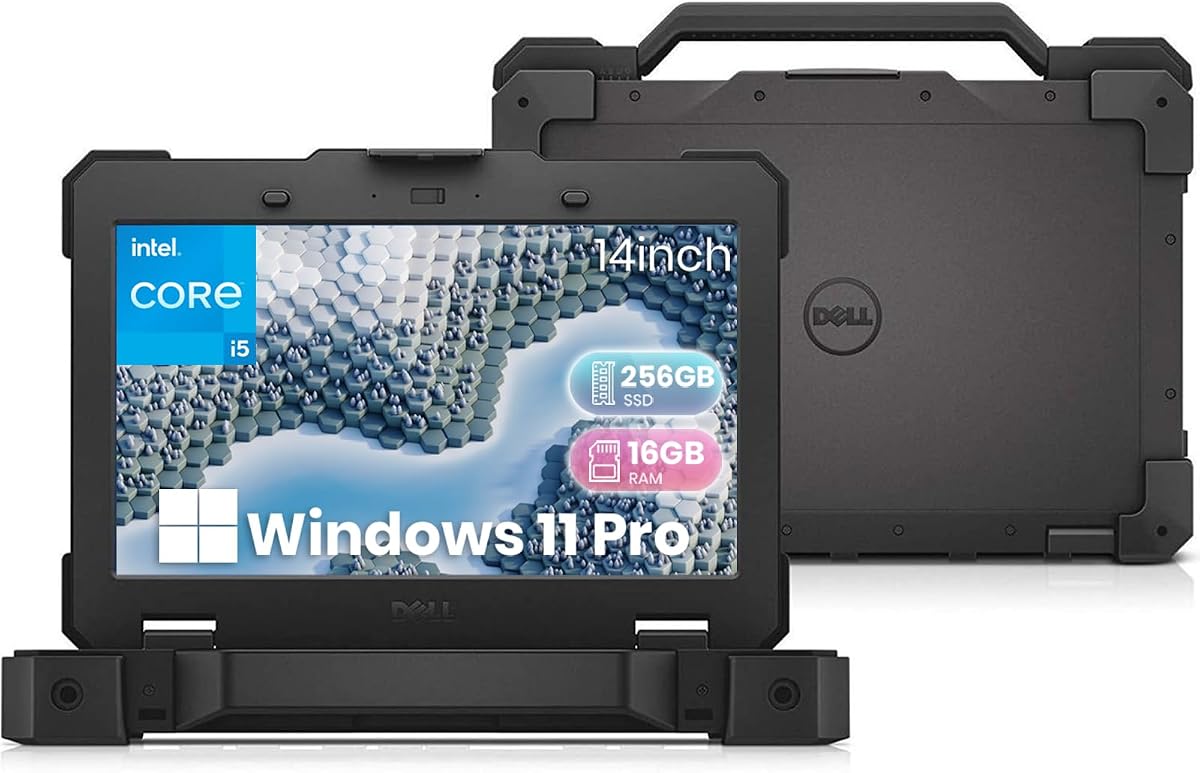
Dell presents a truly rugged solution for industrial environments with this Latitude 5420 model. Its perfect 5.0 star rating underscores its exceptional reliability and build quality for tough conditions.
We may earn a commission when you buy through this link, at no additional cost to you.
Designed to withstand construction sites and field service the reinforced chassis offers unparalleled protection. The 14 inch FHD touchscreen provides outdoor visibility ensuring you can see clearly even in bright sunlight.
Windows 11 Pro preinstalled ensures enterprise-grade security and management tools are available immediately. While the CPU is older the rugged nature and complete connectivity options make it ideal for stable environments where portability is less critical.
This laptop is specifically suited for workers in logistics, construction, or field services. Its focus on durability and environmental resistance makes it the longest lasting option for harsh usage scenarios.
The display technology ensures clear visibility in bright sunlight or harsh jobsite conditions for reliable fieldwork.
USB 3.1, USB-C, and Ethernet ports allow for easy connection of various tools and external devices.
We may earn a commission when you buy through this link, at no additional cost to you.
This renewed Dell Latitude offers a cost-effective entry into rugged computing with a perfect 5.0 star rating. It provides robust protection for industrial use while maintaining a lower price point.
We may earn a commission when you buy through this link, at no additional cost to you.
Engineered to withstand drops, spills, and dust it is designed for challenging environments. The 16GB RAM ensures smooth multitasking even with older hardware components. Legacy ports like VGA and RS-232 allow connection to older industrial equipment without adapters.
As an Amazon Renewed product it has been professionally inspected and tested to ensure quality. The included 90-day service offers confidence in your purchase for a reliable tool that lasts in demanding settings.
Ideal for budget-conscious businesses needing durable hardware this model delivers essential rugged features efficiently. It serves well in warehouses or maintenance roles where protection is key and budget is a primary concern.
Professional inspection ensures the laptop meets high quality standards while providing savings compared to new rugged units.
Multiple legacy ports ensure compatibility with older industrial tools and peripherals without needing extra adapters.
We may earn a commission when you buy through this link, at no additional cost to you.
Lenovo V15 offers exceptional performance with its high RAM and storage configuration. Rated 4.2 stars it targets users who need to run heavy applications without compromising on speed or multitasking ability.
We may earn a commission when you buy through this link, at no additional cost to you.
The 40GB RAM allows for running multiple virtual machines or large datasets simultaneously. The 1TB SSD ensures ample space for extensive project files and data storage. Windows 11 Pro provides necessary enterprise features for professional environments.
While the chassis is standard the internal components deliver power suitable for data analysis or engineering tasks. The inclusion of RJ45 and HDMI ensures you can connect to networks and displays reliably.
This machine is a solid choice for power users seeking high internal specs on a budget. It balances raw performance with practical connectivity making it a long-lasting tool for demanding professional workflows.
High bandwidth RAM ensures smooth multitasking and efficient handling of memory-intensive applications.
Generous storage provides ample space for large files and databases ensuring you never run out of space.
We may earn a commission when you buy through this link, at no additional cost to you.
The ThinkPad L16 delivers dependable performance tailored for business professionals seeking reliability. Its 4.4 star rating highlights its durable design and exceptional value for everyday productivity in corporate settings.
We may earn a commission when you buy through this link, at no additional cost to you.
Engineered to MIL-STD-810H standards it withstands demanding fieldwork and travel conditions efficiently. The battery life of up to 10 hours with fast charging ensures you stay productive throughout the day without interruption.
Customizable RAM and storage options allow you to tailor the device to your specific longevity needs. Thunderbolt 4 connectivity provides future-proofing for high-speed data transfer and external display support.
This laptop is ideal for those needing a balance of enterprise features and everyday usability. Its reliability and security features make it a trustworthy choice for long-term professional use across various industries.
Certified to withstand harsh environments ensuring reliability even during travel or outdoor use.
Ultra-fast data transfer speeds and support for multiple displays enhance workflow efficiency significantly.
We may earn a commission when you buy through this link, at no additional cost to you.
Selecting a laptop for longevity involves evaluating hardware durability, performance lifespan, and support options to ensure your device lasts several years.
Look for laptops with metal chassis or MIL-SPEC ratings to ensure they can withstand daily wear and accidental drops. A sturdy build prevents physical damage that often shortens a laptop's lifespan.
Prioritize models with reinforced hinges and robust ports for maximum physical durability.
Choose a modern multi-core processor paired with at least 16GB of RAM to ensure smooth multitasking as software demands grow. Sufficient memory prevents slowdowns and extends the useful life of the machine.
Opt for 16GB RAM minimum to accommodate future application requirements efficiently.
Always select an SSD over an HDD for faster boot times and better resistance to physical shock. Larger storage capacity reduces the need for external drives which can be prone to failure over time.
A minimum of 512GB SSD is recommended for long-term usability and performance.
Long battery life means fewer charge cycles which preserves the battery health over several years. Efficient power management systems help the device run cooler and extend the life of internal components.
Look for laptops offering at least 8 hours of real-world battery usage.
A high-quality anti-glare display reduces eye strain during long sessions and maintains clarity over years of use. Glass-covered touchscreens or protective coatings prevent scratches that degrade visual quality.
Prioritize FHD displays with anti-glare coatings for sustained visual comfort.
Multiple USB ports including USB-C and HDMI ensure you can connect peripherals without relying on fragile adapters that can break easily. Built-in ports provide stable connections that are less likely to fail.
Ensure the laptop has essential ports to avoid adapter dependency and cable failures.
A comprehensive warranty or onsite service plan ensures you can repair the device quickly if hardware issues arise. Good manufacturer support extends the usable life of your laptop through timely fixes.
Choose models with onsite service options for minimal downtime and longer hardware usability.
Devices that receive regular OS updates stay secure and compatible with new software longer. Modern operating systems like Windows 11 provide better performance optimization and security patches.
Prioritize laptops with confirmed long-term OS support and security update commitments.
Keep your laptop on a hard flat surface to ensure proper airflow and prevent overheating which damages internal components. Avoid using it on soft surfaces like beds or couches where air vents may get blocked.
Clean the screen and keyboard regularly with a microfiber cloth to prevent dust accumulation that can wear out keys or obscure the display. Avoid using harsh chemicals that may damage the finish or coatings.
Avoid letting the battery drain completely to preserve its health and cycle count. Keep your system updated with the latest security patches to ensure long-term software stability and performance.
A laptop lasts longer when it has a sturdy build quality, sufficient RAM, and reliable cooling. Avoiding physical stress and keeping software updated also contributes significantly to longevity.
MIL-SPEC testing ensures the laptop can handle drops, dust, and temperature extremes. This is crucial for devices used in harsh environments as it physically protects internal components.
Upgrading RAM is possible on some models but many modern laptops have soldered memory. Check if the laptop has user-upgradeable slots before purchasing to ensure future performance scaling.
Modern Intel Core Ultra or AMD Ryzen processors offer better efficiency and performance per watt. They run cooler and handle future software updates better than older or lower-end models.
Yes, SSDs have no moving parts and are less prone to physical damage. They also boot faster and last longer under heavy usage compared to traditional hard drives.
Keeping the battery between 20% and 80% charge helps preserve its chemical health. Avoiding constant charging cycles extends the battery's overall lifespan significantly.
We have highlighted ten excellent options ranging from rugged business machines to high-performance workstations. Each pick is designed to stand the test of time with quality construction and reliable performance.
Prioritize durability and performance factors that align with your specific needs whether it is field work or office productivity. Investing in higher quality components now ensures you won't need to replace your device soon.
Remember to check current availability and specifications before purchasing as prices change frequently. Selecting the right model today ensures a smooth productive computing experience for years to come.