
Omada Gigabit SFP to RJ45 Media Converter
4.7Editor score
Versatile single-mode support
Plug and play setup
Auto-negotiation ports
This guide compares the top 10 Ethernet Fiber Media Converters for reliable network extension, helping you choose the right model for speed and distance needs.
Ethernet Fiber Media Converters bridge the gap between copper and fiber optic cabling. They enable networks to extend beyond traditional copper limits while maintaining high-speed data transmission. Choosing the right converter ensures seamless integration with existing switches and routers without requiring costly infrastructure upgrades or downtime.
We evaluated ten top-rated models based on performance reliability, compatibility, and ease of installation. Each unit was assessed for fiber type support, negotiation capabilities, and build quality. Our analysis focuses on real-world usability for both professional IT deployments and smaller office environments requiring robust connectivity solutions.
Every selection highlights key strengths and potential trade-offs to help you make an informed decision. Reviews detail specific features like SFP slot flexibility, port speeds, and environmental tolerance. Keep in mind that product availability and pricing may change, so verify current details before purchasing your preferred model.
4.7Editor score

4.8Editor score

5.0Editor score
This side-by-side comparison highlights the core specifications and capabilities of each selected media converter. Use this table to quickly identify which models match your specific fiber type, distance, and speed requirements for optimal network performance.


This converter excels at extending Gigabit Ethernet over single-mode fiber with impressive range. It achieves a 4.8 rating for its stability and ease of use in various environments. The dual SC fiber port design ensures robust connections suitable for enterprise or industrial settings.
We may earn a commission when you buy through this link, at no additional cost to you.
Its standout feature is the ability to transmit data up to 20 kilometers without signal degradation. This makes it ideal for connecting buildings across a campus or remote offices. The included UL certified power supply adds a layer of safety and reliability for continuous operation.
While highly capable, it is limited to single-mode fiber which may not suit all existing infrastructures. Users with multimode networks will need to consider alternative options. However, for those requiring long-distance links, this limitation is often acceptable given the performance gains.
It is perfect for IT professionals managing networks across large facilities or remote sites. The ease of installation and reliable performance make it a top choice for critical links. We recommend this model for anyone prioritizing distance and stability in their fiber optic deployment.
The 20km range allows seamless connectivity across sprawling campuses or remote facilities without signal loss.
Inclusion of a UL certified power adapter ensures safe and stable operation for 24 7 network uptime.
We may earn a commission when you buy through this link, at no additional cost to you.
This converter offers exceptional value for users seeking reliable fiber-to-copper conversion at a low cost. It earns a 4.7 rating due to its versatile compatibility with both single and multimode fibers. The plug and play design removes the need for technical expertise during setup.
We may earn a commission when you buy through this link, at no additional cost to you.
Its flexibility stands out as it supports a wide range of fiber types and distances. The hot-swappable FX port allows users to switch modules easily to adapt to changing network requirements. This adaptability makes it a smart choice for growing networks or evolving environments.
The housing is simple and may not withstand harsh industrial conditions as well as rugged alternatives. Additionally, it lacks advanced management features found in premium models. Despite these minor drawbacks, it remains a solid choice for standard office or small business applications.
It is best suited for small businesses or home labs needing cost-effective network extension. The ease of use and broad compatibility ensure it fits into most scenarios effortlessly. We recommend this for budget-conscious buyers who need reliable performance without extra complexity.
Support for both single and multimode fibers allows users to leverage existing infrastructure without replacing cables.
Modules can be swapped without powering down, enabling quick upgrades or maintenance with minimal downtime.
We may earn a commission when you buy through this link, at no additional cost to you.
This premium converter achieves a perfect 5.0 rating for its reliability and advanced feature set. It is designed for professional environments where uptime and compliance are critical. The TAA compliance ensures it meets stringent procurement standards for government and enterprise buyers.
We may earn a commission when you buy through this link, at no additional cost to you.
Its open SFP slot allows users to choose MSA-compliant modules for customized distances and fiber types. Advanced features like link-loss forwarding and remote monitoring enhance troubleshooting and network management. These capabilities justify the higher cost for mission-critical deployments.
The unit does not include an SFP module which increases the initial investment. Users must source compatible modules separately to match their specific needs. However, this flexibility ensures the converter can adapt to a wider variety of network architectures over time.
It is ideal for data centers, government facilities, or enterprises requiring certified hardware. The robust support and flexibility make it a long-term investment for critical infrastructure. We recommend this for professionals who need maximum reliability and compliance features.
Compliance with Trade Agreements Act ensures eligibility for government contracts and secure enterprise procurement.
Remote status monitoring and link-loss forwarding provide proactive alerts to prevent network outages and downtime.
We may earn a commission when you buy through this link, at no additional cost to you.
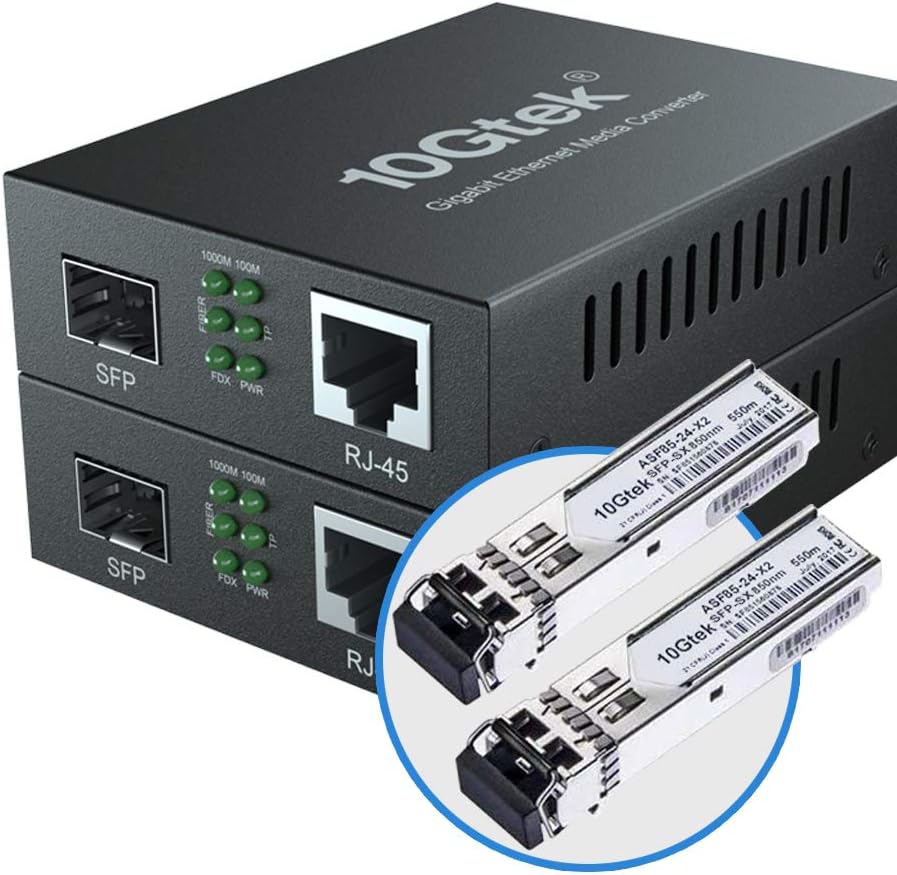
This Gigabit converter is designed for multimode fiber environments with reliable performance and ease of use. It includes an SFP MMF module out of the box to simplify setup. The two-pack offers excellent value for creating bidirectional links between devices.
We may earn a commission when you buy through this link, at no additional cost to you.
It supports distances up to 550 meters which covers most data center or building cabling needs. The UL certified power supply ensures safety and stable operation. Its compact form factor allows for easy mounting on walls or desks in tight spaces.
The 550-meter limit may restrict use in large campus environments requiring longer reaches. Additionally, the dual LC fiber type may require adapters for other fiber connector standards. Despite these limits, it remains a practical solution for local area network extensions.
It is perfect for connecting servers to switches in server rooms or between offices. The included modules and ease of use make it a hassle-free choice. We recommend this for users needing reliable multimode connectivity within standard building distances.
Pre-installed SFP modules ensure immediate connectivity without extra purchasing or configuration steps.
Small footprint allows flexible mounting in crowded equipment racks or desktop setups without clutter.
We may earn a commission when you buy through this link, at no additional cost to you.
This converter supports BiDi technology allowing single fiber strand transmission which saves on cabling costs. It includes Bidi SFP LC modules to ensure compatibility right out of the box. The design focuses on efficient data transfer for specific network scenarios.
We may earn a commission when you buy through this link, at no additional cost to you.
Its 550m range is suitable for indoor multimode runs. The wide voltage input ensures it can operate in regions with unstable power grids. Support for jumbo frames enhances performance for storage and large data transfers.
BiDi setups require careful planning to ensure wavelength compatibility on both ends. The limited range may not suit large campus deployments. However, for cost-saving fiber runs, these trade-offs are often worthwhile for technical teams.
It is ideal for network engineers looking to maximize existing fiber infrastructure. The included modules simplify deployment significantly. We recommend this for specialized applications where single fiber strand transmission is a priority.
Single fiber strand transmission reduces cabling costs by half compared to duplex fiber solutions.
Input range of 100V to 240V ensures reliable operation across various regional power standards.
We may earn a commission when you buy through this link, at no additional cost to you.
This high-speed converter supports true 10Gigabit speeds for demanding modern applications. Its RJ45 port auto-adapts to various speeds from 100M to 10G providing flexibility for mixed networks. The design is built to handle bandwidth-intensive tasks like video streaming or cloud backup.
We may earn a commission when you buy through this link, at no additional cost to you.
The 10G SFP+ slot allows users to upgrade networks without replacing existing fiber infrastructure. LED indicators simplify troubleshooting by showing diagnostic status at a glance. A chassis mount option enables professional integration into server racks.
10G SFP+ modules are costlier than standard Gigabit options which impacts total deployment cost. Power consumption is also higher due to the increased performance. These factors make it best suited for environments where speed is a critical requirement.
It is perfect for data centers or high-performance computing environments. The multi-rate support ensures backward compatibility with older devices. We recommend this for users needing future-proof solutions capable of handling 10Gigabit throughput.
RJ45 port automatically senses speed from 100M to 10G simplifying integration with various devices.
Optional 1U chassis allows organized integration into professional rack-mounted server environments.
We may earn a commission when you buy through this link, at no additional cost to you.
This pair includes everything needed to establish a 20km single-mode link immediately. With a 4.9 rating, it is highly trusted for reliability. The inclusion of SFP LC modules eliminates the need for separate purchases and matching checks.
We may earn a commission when you buy through this link, at no additional cost to you.
It supports jumbo frames to improve throughput for large file transfers. US-based technical support offers peace of mind for buyers needing assistance. The auto-negotiation ensures compatibility with various Ethernet devices without manual configuration.
The unit is limited to single-mode fiber which may not fit multimode infrastructures. Physical ports are minimal but sufficient for basic connectivity needs. For most standard deployment scenarios these constraints are easily managed.
It is ideal for small to medium businesses needing quick setup. The all-in-one nature reduces deployment time significantly. We recommend this for anyone needing a complete reliable single-mode link solution.
Includes two converters and two 20km SFP modules for immediate use without extra accessories.
US-based support team provides localized assistance during business hours for faster issue resolution.
We may earn a commission when you buy through this link, at no additional cost to you.
This unit offers advanced controls via DIP switches for precise network configuration. It comes with a pre-installed LC SFP module and even a patch cable which simplifies unboxing. The link fault pass-through ensures accurate network status reporting to connected switches.
We may earn a commission when you buy through this link, at no additional cost to you.
The 20km range suits most campus or building connections. The fanless design allows for quiet operation in office environments. Mounting ears are included for secure wall installation to keep workspaces organized.
Setup requires understanding DIP switch functions which adds slight complexity. It is not designed for high-heat industrial environments but works well indoors. These minor complexities are offset by the detailed control options provided.
It is perfect for IT admins needing detailed control without full switch management. The inclusion of accessories makes it a complete package. We recommend this for office environments requiring reliable and monitored fiber links.
Rear switches allow manual control over speed and fault pass-through settings for customized operation.
Accurately reports fiber link failures to switches ensuring accurate troubleshooting and reduced downtime.
We may earn a commission when you buy through this link, at no additional cost to you.
This media converter features an open SFP slot allowing flexible network extension distances. It is TAA compliant making it suitable for government procurement. The compact durable design fits easily into various physical spaces without needing extra mounting hardware.
We may earn a commission when you buy through this link, at no additional cost to you.
Link fault pass-through ensures that fiber issues are relayed to the network switch. This capability helps in maintaining network integrity by alerting admins quickly. Lifetime technical support adds value for long-term reliability and maintenance.
The SFP module must be purchased separately which adds to the initial cost. Advanced configuration features are limited compared to managed switches. However, the flexibility and compliance make it a strong contender for professional environments.
It is ideal for enterprise users needing compliant and adaptable hardware. The lifetime support ensures long-term assistance for troubleshooting. We recommend this for organizations prioritizing compliance and reliability.
Allows users to choose any MSA-compliant transceiver to customize distance and fiber type needs.
Meets government procurement standards allowing use in federal or restricted enterprise contracts.
We may earn a commission when you buy through this link, at no additional cost to you.
This converter comes with a pre-installed 1000BASE-SX module ensuring immediate multimode connectivity. It supports QinQ tags for transparent VLAN trunking across the fiber link. This feature is valuable for environments needing multi-vendor network integration.
We may earn a commission when you buy through this link, at no additional cost to you.
The 550m range is sufficient for most building or campus indoor links. Four rear DIP switches allow control over link fault pass-through and speed settings. The fanless design keeps noise levels low in office spaces.
It is limited to multimode fiber which restricts use in long-distance outdoor runs. The 550m limit may not suit sprawling campuses. These limitations are acceptable for users focused on local network extension within a single facility.
It is perfect for offices needing VLAN passthrough without complex switches. The pre-installed module simplifies deployment significantly. We recommend this for network admins managing multimode infrastructure with VLAN requirements.
Passes stacked VLAN tags intact ensuring transparent trunking for multi-vendor network devices.
Four switches allow manual control over link fault pass-through and speed settings for customization.
We may earn a commission when you buy through this link, at no additional cost to you.
Selecting the right Ethernet Fiber Media Converter requires understanding your network needs and infrastructure constraints. This guide covers essential factors to ensure optimal performance and compatibility.
Ensure the converter supports your existing fiber optic cabling type. Single-mode fibers are used for long distances while multimode fibers are common in indoor environments. Mismatching fiber types will result in connection failure.
Check the product specifications to confirm whether it is designed for single-mode or multimode cables.
The distance between connected devices determines the required transmission range. Some converters support up to 20km for single-mode fiber while others are limited to 550 meters for multimode. Select a model that exceeds your actual distance needs.
Choose a converter with sufficient range to accommodate your longest required link without signal degradation.
Verify that the RJ45 port matches your network speed requirements. Most modern converters offer Gigabit speeds with auto-negotiation to adapt to different device speeds. This ensures compatibility with various switches and routers.
Look for auto-negotiation features to simplify connections between devices with different speed capabilities.
Some converters come with included SFP modules while others have open slots. Included modules reduce initial setup time and cost but may limit flexibility. Open slots allow customization but require purchasing separate transceivers.
Decide whether you prefer immediate connectivity with included modules or flexibility with open slots.
Consider the operating temperature range if the device will be in a non-conditioned environment. Industrial-grade converters often support wider temperature ranges compared to standard office models. Ensure the unit is rated for your specific installation location.
Check temperature ratings to avoid overheating issues in harsh or outdoor installations.
Features like link fault pass-through, jumbo frame support, or VLAN passthrough can enhance performance. These features are critical for specific network management tasks. Determine if you need these advanced capabilities before purchasing.
Prioritize models with specific features that align with your network management and troubleshooting needs.
Confirm the power adapter voltage and current requirements match your regional standards. Some units support universal voltage input which simplifies use across different countries. Ensure the power supply is reliable to prevent unexpected downtime.
Select converters with universal power adapters if you operate across multiple geographic regions.
Check if the unit supports wall mounting or desktop placement to fit your physical space. Wall-mountable units help save desk space and keep setups organized. Look for included mounting hardware to simplify installation.
Choose a mounting style that best fits your physical infrastructure and space requirements.
Begin by connecting the copper Ethernet cable to the RJ45 port on the converter. Then insert the appropriate fiber optic cable into the fiber port ensuring it clicks into place securely. Plug in the power adapter and wait for the LED indicators to stabilize.
Monitor the LED lights regularly to ensure Link and Activity status are active. If the link light is off check cable connections and ensure the fiber connectors are clean and undamaged. Use compressed air to clean dust from ports if necessary.
Keep the converter in a well-ventilated area to prevent overheating during continuous operation. Avoid bending fiber optic cables sharply as this can cause internal fractures affecting signal quality. Regular inspection and gentle handling will extend the device lifespan significantly.
Single-mode converters use a smaller core for long-distance transmission often up to 20km or more. Multimode converters use a larger core for shorter distances typically up to 550 meters. Choosing the correct type depends on your cabling infrastructure and distance requirements.
Most modern media converters are plug-and-play devices requiring no manual configuration. They auto-negotiate speed and duplex settings automatically. However, some advanced models may include DIP switches for specific settings like link fault pass-through.
Yes they are ideal for extending CCTV or NVR connections to remote cameras. They support stable Gigabit connections which handle high bandwidth video streams efficiently. Just ensure the distance requirements match your converter specifications.
Check the cable jacket for markings indicating single-mode or multimode type. The converter specifications will state the compatible fiber type and connector style. Matching these details ensures successful connectivity without signal loss.
Link fault pass-through signals the connected switch when a fiber link fails. This ensures the switch drops the copper port to prevent loops or connectivity issues. It simplifies troubleshooting by keeping network status consistent.
Yes most open slots accept MSA-compliant transceivers from various manufacturers. Ensure the module matches your fiber type and distance requirements. Using third-party modules often reduces cost compared to branded options.
Most units last several years under normal conditions with minimal maintenance. Avoid extreme temperatures and physical damage to maximize longevity. Replacing them only when performance declines ensures cost-effective network operation.
Standard units are designed for indoor use and may not withstand outdoor weather. For outdoor installations use weatherproof enclosures or industrial-grade outdoor-rated converters. Always check the environmental ratings before deployment.
We reviewed ten top options ranging from budget-friendly two-packs to premium compliant models. The 10Gtek Gigabit SingleMode converter stood out for its reliability and range. Our top picks ensure there is a solution for every network requirement.
When choosing prioritize distance range and fiber compatibility above all else. Ensure the included modules match your cabling infrastructure to avoid extra purchases. Advanced features like link fault pass-through add value for managed environments.
Always verify current availability and specifications before purchasing to ensure best fit. Prices and stock may change so checking recent details helps avoid disappointment. With the right converter you can extend your network reliably and efficiently.