
Protectli Vault FW4B
4.6Editor score
Fanless silent design
Intel Quad Core CPU
Open source compatible
This guide compares the top firewall appliances for security and performance helping you choose the best network protection device for your needs.
Choosing the right firewall appliance is crucial for securing your network against modern threats. These devices provide essential protection by monitoring and controlling incoming and outgoing traffic based on security rules.
We evaluated ten top-rated firewall appliances based on performance, connectivity, security features, and ease of use. Our analysis covers options for small businesses enterprises enterprises and home labs seeking reliable network defense.
Each pick highlights specific strengths and ideal use cases to help you find the perfect fit. Note that availability and pricing may change over time so verify details before purchasing.
4.6Editor score

4.4Editor score

4.7Editor score
The following table provides a side-by-side comparison of all ten selected firewall appliances highlighting their key specifications and capabilities for informed decision making.


The FortiGate-60F stands out as a top choice for organizations needing robust network security with extensive connectivity options. Its high rating reflects strong performance in real-world deployments across various business environments.
We may earn a commission when you buy through this link, at no additional cost to you.
This appliance delivers superior performance with purpose-built security processor technology enabling industry-leading SSL inspection and SD-WAN functionality. The integration with FortiGuard Labs ensures continuous threat intelligence to mitigate known and unknown threats effectively.
While the hardware unit does not include a security subscription by which is standard for such devices, the flexibility to choose your own support plan is beneficial. Users should be prepared for initial configuration but the management console simplifies ongoing tasks.
Businesses seeking a balance of performance and features should consider this model. It offers enterprise-grade capabilities in a compact form factor suitable for branch offices or mid-sized networks.
The system-on-a-chip acceleration ensures high throughput for IPS and threat protection without compromising speed or efficiency.
Zero Touch Integration with Fortinet's Security Fabric allows for easy deployment and comprehensive network automation visibility.
We may earn a commission when you buy through this link, at no additional cost to you.
Protectli Vault FW4B offers an excellent entry point for those wanting to build a custom firewall solution without breaking the bank. Its compact silent design makes it ideal for home labs or small offices.
We may earn a commission when you buy through this link, at no additional cost to you.
This appliance features an Intel Quad Core Celeron processor with AES-NI hardware support enhancing encryption performance. It supports popular open-source software solutions like pfSense OPNsense and Untangle providing flexibility in security configuration.
Users should note that no operating system is pre-installed meaning you must install your chosen firewall software yourself. Additionally the 8GB RAM may limit complex rule sets but is sufficient for most standard use cases.
This model is perfect for tech-savvy users seeking cost-effective network protection. The US-based support adds confidence for those needing assistance during setup or troubleshooting.
The fanless design ensures quiet operation which is beneficial for office or home environments where noise is a concern.
Compatibility with multiple open-source platforms allows you to tailor the security features to your specific requirements.
We may earn a commission when you buy through this link, at no additional cost to you.
The SonicWall TZ280 delivers high-performance network security with its 2.5 Gbps firewall inspection capacity. This model is designed for small businesses and branches requiring reliable protection against modern threats.
We may earn a commission when you buy through this link, at no additional cost to you.
Its patented Reassembly-Free Deep Packet Inspection engine provides efficient threat prevention and IPSec VPN throughput. The appliance includes 8x1GbE plus 2x1G SFP ports offering versatile connectivity options for various network topologies.
Security services and firmware updates are not included with the hardware unit so purchasing a service subscription is necessary for full protection. This modular approach allows businesses to scale services based on their evolving security needs.
This appliance is well-suited for distributed sites and remote workers requiring secure access. The ability to manage via cloud Network Security Manager simplifies operations for IT teams managing multiple locations.
SonicOS 8 delivers intrusion prevention and gateway anti-malware capabilities ensuring comprehensive defense against various attack vectors.
Zero-touch deploy and manage on-box or via cloud reduces setup time and simplifies initial configuration tasks.
We may earn a commission when you buy through this link, at no additional cost to you.
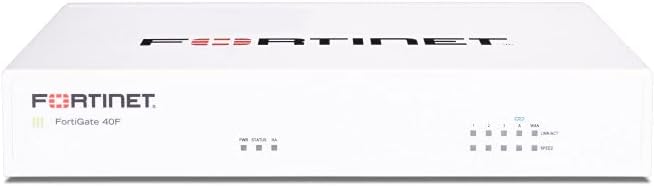
The FortiGate-40F is designed specifically for small to mid-sized businesses and enterprise branch offices where space and noise are considerations. It provides essential security features in a compact desktop form factor.
We may earn a commission when you buy through this link, at no additional cost to you.
Equipped with 5 GE RJ45 ports this model offers essential connectivity for various network configurations. The purpose-built security processor technology ensures industry-leading performance and protection for SSL encrypted traffic.
Integration with Fortinet's AI-powered FortiGuard Labs provides comprehensive cybersecurity against known and unknown threats. The user-friendly management console supports network automation and visibility simplifying ongoing maintenance tasks.
This appliance is ideal for environments needing robust security without the bulk of larger systems. Zero Touch Integration with Fortinet's Security Fabric further streamlines deployment for IT staff.
The 5 GE RJ45 ports including 1 WAN and 4 internal provide flexible configuration options for small networks.
Network automation and visibility features allow administrators to monitor and manage security policies efficiently.
We may earn a commission when you buy through this link, at no additional cost to you.
Ubiquiti Unifi Security Appliance integrates seamlessly with the Unifi Controller providing a unified approach to network management and security. It offers powerful firewall performance suitable for enterprise VoIP and general traffic management.
We may earn a commission when you buy through this link, at no additional cost to you.
Convenient VLAN support and QoS features help prioritize voice traffic and segment network resources effectively. The built-in VPN server ensures secure communications for remote users accessing the network.
This unit includes 3 ports with one management port and slots for Gigabit Ethernet allowing for flexible deployment options. It supports both wall mount and desktop setups making it adaptable to various physical environments.
Users within the Unifi ecosystem will find this appliance complements their existing hardware well. The integration simplifies administration by centralizing controls across the network infrastructure.
The deep integration with Unifi Controller allows for centralized management of security and network settings.
QoS features ensure voice traffic is prioritized maintaining call quality across the network.
We may earn a commission when you buy through this link, at no additional cost to you.
Netgate 1100 comes pre-loaded with pfSense+ software allowing you to get up and running quickly after unboxing. It is designed for business ready security needs with updates included for the product lifetime.
We may earn a commission when you buy through this link, at no additional cost to you.
A dual core ARM Cortex-A53 processor delivers near gigabit routing and over 650 Mbps of firewall throughput for common traffic. The compact form factor and low power draw enable it to run unnoticed on a desktop or wall.
Three 1 GbE switched ports allow you to configure separate WAN LAN and OPT ports for flexible network segmentation. Netgate TAC Lite technical support and a one year hardware warranty provide peace of mind.
This gateway is ideal for those who want a complete out-of-the-box solution without extensive setup. Free help with setup from the Technical Assistance Center is available 24/7/365 for assistance.
Pre-loaded software and included support mean you can deploy the device immediately without additional installations.
Three switched ports allow you to set up separate networks for different traffic types easily.
We may earn a commission when you buy through this link, at no additional cost to you.
The FORTINET FG-100E Network Security Appliance provides robust protection against known exploits malware and malicious websites. It is built to detect unknown attacks and identify thousands of applications for granular control.
We may earn a commission when you buy through this link, at no additional cost to you.
This appliance utilizes advanced security processors to ensure high throughput and efficiency in filtering network traffic. The ability to identify applications allows administrators to enforce policies based on specific app usage.
Users should be aware that full protection features often require active subscriptions to leverage the latest threat intelligence. Proper configuration is key to maximizing the security benefits of this device.
It is well-suited for organizations needing reliable network security with strong threat detection capabilities. The identification of thousands of applications enables detailed visibility into network activity.
The appliance blocks malware and malicious websites ensuring endpoints remain safe from external threats.
Identifying thousands of applications helps enforce policies and monitor usage effectively.
We may earn a commission when you buy through this link, at no additional cost to you.
Palo Alto PAN-PA-220 is a Next Generation Firewall Security Appliance offering 8 ports for versatile connectivity. It is designed to deliver advanced security features in a compact form factor suitable for various deployments.
We may earn a commission when you buy through this link, at no additional cost to you.
This model leverages NextGen firewall technology to provide deep visibility and control over network traffic. The 8-port configuration supports diverse connection needs making it flexible for small to mid-sized networks.
As a new item listing detailed specifications may vary so verifying exact capabilities with the vendor is advisable. It represents the brand's commitment to modern security standards and performance.
Organizations looking for NextGen capabilities in a compact unit may find this appealing. The focus on security and connectivity makes it a candidate for modern network architectures.
NextGen firewall tech ensures deep visibility and control beyond traditional packet inspection methods.
The compact form factor allows for easy placement in offices or server rooms.
We may earn a commission when you buy through this link, at no additional cost to you.
Protectli Vault FW4C offers 2.5 Gigabit Ethernet ports providing higher speed connectivity than traditional Gigabit options. It features an Intel J3710 Pentium Quad Core CPU with AES-NI hardware support for efficient encryption.
We may earn a commission when you buy through this link, at no additional cost to you.
The fanless silent design ensures quiet operation suitable for office environments. It is compatible with popular open-source solutions like pfSense OPNsense and Untangle tested for reliable performance.
This appliance comes without an operating system pre-installed requiring user installation of firewall software. The 4GB RAM may be a constraint for complex configurations but works well for standard setups.
Users seeking 2.5G capabilities in a compact mini PC will appreciate this model. The US-based support adds value for those needing assistance during setup.
Four 2.5 Gigabit Ethernet ports provide faster network speeds than standard Gigabit interfaces.
Hardware tested with popular open-source solutions ensures compatibility and flexibility.
We may earn a commission when you buy through this link, at no additional cost to you.
This bundle includes the FortiGate-60F Firewall Appliance along with 1 year of FortiCare Premium and FortiGuard Unified Threat Protection. It is tailored for medium-sized businesses needing robust security without complex infrastructure.
We may earn a commission when you buy through this link, at no additional cost to you.
Unified Threat Protection secures against advanced online threats with comprehensive web filtering and anti-botnet technologies. The bundle ensures immediate protection upon deployment without additional service setup steps.
FortiCare Premium provides high-quality support and service continuity ensuring assistance when needed. The advanced filtering technologies help safeguard against sophisticated threats effectively.
Businesses looking for an all-inclusive security solution will find value in this package. It simplifies procurement by combining hardware and essential security services into one purchase.
Comprehensive web filtering and anti-botnet technologies secure against advanced online threats effectively.
FortiCare Premium ensures high-quality support and service continuity for ongoing reliability.
We may earn a commission when you buy through this link, at no additional cost to you.
Selecting the right firewall appliance involves evaluating multiple factors including performance requirements, connectivity options, security features, and budget constraints to ensure adequate protection.
Throughput determines how much data the appliance can process without slowing down your network. Look for IPS throughput numbers that match your expected traffic volume to avoid bottlenecks during peak usage.
Choose an appliance with throughput ratings exceeding your peak network traffic to ensure smooth performance and low latency.
The number and type of ports should match your network topology. Ensure there are enough Gigabit or multi-gigabit ports for your WAN and LAN connections plus any SFP slots needed for fiber.
Verify port counts and speeds align with your current and future network expansion plans to avoid early replacement.
Advanced features like intrusion prevention deep packet inspection and SSL decryption are vital for modern threats. Check if the appliance supports these capabilities and whether they require additional subscriptions.
Prioritize appliances offering comprehensive security features like IPS and SSL inspection to protect against evolving threats.
Some appliances come with pre-installed software while others require manual installation. Consider the ease of setup and the availability of firmware updates and security patches over the device lifetime.
Ensure the device supports your preferred firewall software and receives regular updates to maintain security efficacy.
A user-friendly management console simplifies configuration and monitoring. Look for features like cloud management automation and intuitive dashboards that reduce administrative overhead.
Select appliances with intuitive management interfaces to streamline deployment and ongoing maintenance tasks.
Consider both the initial hardware cost and ongoing subscription fees for security services. Some appliances require service plans for full functionality which impacts total cost of ownership.
Calculate total cost of ownership including hardware and required subscriptions to stay within budget while meeting security needs.
Reliable technical support and warranty coverage provide peace of mind. Check if the manufacturer offers 24/7 support and what the warranty terms cover regarding hardware defects.
Opt for appliances backed by solid support options and warranty terms to minimize downtime and troubleshooting issues.
Choose a device that can grow with your organization. Consider appliances with expandable features or the ability to upgrade software capabilities without replacing hardware.
Ensure the appliance can handle future network growth to extend its useful life and protect your investment.
Begin by connecting your firewall appliance between your modem and internal network router. Configure the WAN port to receive your internet connection and the LAN ports to distribute secure traffic to your devices.
Regularly update the firmware to patch vulnerabilities and ensure protection against the latest threats. Schedule routine reviews of firewall rules to maintain effective security policies without unnecessary complexity.
Monitor traffic logs and alerts to detect unusual activity early. Keep the appliance in a well-ventilated area to prevent overheating and ensure optimal performance over time.
Many firewall appliances require a service subscription to activate advanced security features like threat intelligence and firmware updates. Always verify what is included with the hardware before purchasing to plan your budget accordingly.
An appliance is dedicated hardware designed solely for network security offering better performance and reliability for larger networks. Software firewalls run on existing servers or PCs and are often suitable for smaller or home setups.
Several appliances like Protectli and Netgate are compatible with popular open-source solutions such as pfSense and OPNsense. Check compatibility lists before installation to ensure smooth operation and feature support.
Estimate your peak network traffic and choose an appliance with IPS throughput exceeding that amount. This ensures the device handles your load without slowing down internet access or internal transfers.
Yes SSL inspection is crucial as much modern traffic is encrypted. Appliances that support SSL decryption can scan encrypted data for threats ensuring comprehensive security across all communications.
SD-WAN allows flexible routing of traffic across multiple connections such as broadband and cellular. It improves reliability and performance which is beneficial for branch offices and remote locations.
Update firmware as soon as new releases are available to patch security vulnerabilities. Additionally review and adjust firewall rules periodically to adapt to changing network needs and threats.
Most modern firewall appliances include VPN capabilities allowing secure remote access. Verify the specific types such as IPsec or SSL VPN supported to match your remote workforce requirements.
The ten firewall appliances reviewed offer diverse options for various network sizes and security requirements. Each brings unique strengths from high throughput performance to cost-effective open-source compatibility ensuring you find a suitable match.
Prioritize factors such as throughput performance security features and manageability when making your decision. Consider both immediate needs and future growth to ensure long-term satisfaction with your choice.
Remember to verify current availability and pricing as these details can change frequently. Reviewing the latest product listings will help you secure the best value for your network protection investment.