
MSI Z370-A PRO
4.5Editor score
Supports 8th Gen Intel Core
Intel Z370 Express Chipset
4 x DDR4 memory slots
This guide compares the top brands for Z370 motherboards to help you find the best motherboard for your Intel Core build in 2026.
Choosing the right brand for a Z370 motherboard is crucial for ensuring compatibility with your eighth generation Intel Core processor. A quality motherboard provides the foundation for system stability, expandability, and overall performance in your desktop computer build.
We evaluated ten leading motherboards based on their chipset implementation, power delivery systems, connectivity options, and overall build quality. Our analysis focuses on features that matter most to gamers, content creators, and workstation users seeking reliable hardware.
Each selection highlights specific strengths such as overclocking capabilities, audio quality, and thermal management solutions. Please note that availability and pricing fluctuate frequently, so always verify current stock and costs before making your final purchase decision today.
4.5Editor score
4.6Editor score

4.4Editor score
This side-by-side comparison highlights the key specifications and distinguishing features of each motherboard model to help you make an informed decision for your specific computing needs.


The MSI Z370-A PRO is a dependable motherboard designed for users seeking a stable platform for eighth generation Intel Core processors. It holds a strong rating from customers who value reliability over flashy aesthetics.
We may earn a commission when you buy through this link, at no additional cost to you.
Its VR readiness ensures low latency connections essential for virtual reality applications. The board supports up to 64GB of DDR4 memory allowing for substantial multitasking capabilities and future upgrades.
While it lacks advanced RGB features found on gaming boards, its focus on core functionality provides excellent value. Users can expect consistent performance without unnecessary bloat or software dependencies.
This board is ideal for budget conscious builders or those prioritizing stability for workloads. We recommend it for anyone needing a straightforward Z370 base without complex extra features.
The motherboard includes dedicated headers and circuitry optimized for low latency VR headset connections ensuring smooth immersive experiences.
With four DIMM slots supporting up to 64GB you can run memory intensive applications without worrying about hardware bottlenecks.
We may earn a commission when you buy through this link, at no additional cost to you.
The ASUS Prime Z390-P distinguishes itself with six PCIe slots making it exceptionally suited for multi GPU setups often used in cryptocurrency mining. Its design emphasizes raw expandability and connectivity.
We may earn a commission when you buy through this link, at no additional cost to you.
Features like Above 4G Decoding allow the system to access more than 4GB of memory space per device which is crucial for large scale mining operations. The Safe Slot Core technology ensures physical durability under heavy loads.
Fan control is managed through Fanxpert 4 allowing precise adjustments to keep the system cool during intensive operations. This level of thermal management is vital for maintaining stability over long periods.
For users building a multi GPU rig this board offers the physical capacity needed to connect multiple devices simultaneously. It is a specialized tool for those who need maximum slot availability.
With six PCIe slots you can install multiple graphics cards without needing additional riser adapters or bridge connectors in many configurations.
The reinforced PCIe slots prevent physical damage from heavy GPUs ensuring your investment in expansion cards remains secure over time.
We may earn a commission when you buy through this link, at no additional cost to you.
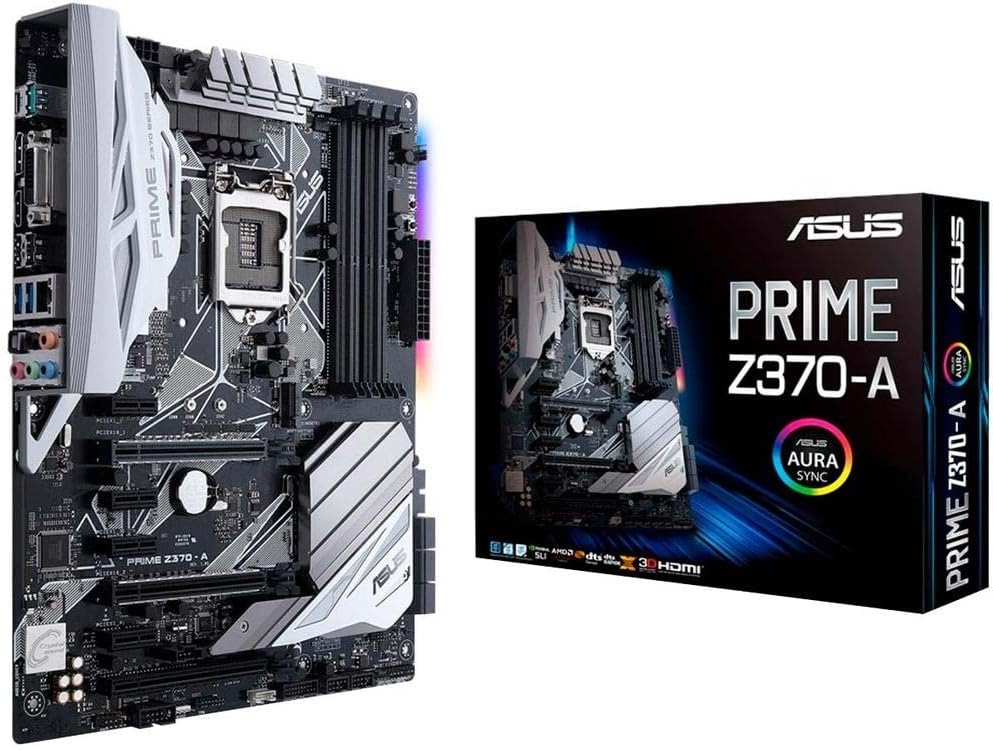
The ASUS Prime Z370-A stands out as a top choice for users requiring versatile connectivity and modern storage solutions. It balances high end features with a professional aesthetic suitable for any build.
We may earn a commission when you buy through this link, at no additional cost to you.
Dual M.2 slots provide fast storage options for operating systems and large games reducing load times significantly. Thunderbolt 3 support adds a future proof connection standard for high bandwidth peripherals.
The 5-Way Optimization feature allows the system to automatically tune settings for better performance without manual intervention. This ensures that both CPU and thermal management are optimized for daily tasks.
If you want a motherboard that excels in speed and connectivity this model delivers consistently. It is an excellent pick for users who value data transfer rates and modern interface standards.
Dual M.2 slots allow you to run multiple NVMe drives simultaneously creating a high performance storage array for your system.
Thunderbolt 3 support means you can connect high speed external storage or video output devices directly to your system efficiently.
We may earn a commission when you buy through this link, at no additional cost to you.
The Gigabyte Z370 AORUS Gaming 7 targets enthusiasts who demand premium audio and extensive storage options. It is built to support heavy gaming rigs with maximum connectivity.
We may earn a commission when you buy through this link, at no additional cost to you.
With three M.2 slots and Thermal Guards you can manage heat from high speed SSDs effectively. This ensures your storage performs at peak levels without throttling during sustained usage.
The ESS Sabre DAC delivers high fidelity audio that enhances the gaming experience. Combined with RGB FUSION lighting you get a visually stunning board that looks great under a case.
This board is perfect for users who want top tier performance and customization. If audio quality and storage expansion are priorities this model offers significant advantages over standard boards.
M.2 Thermal Guards prevent storage devices from overheating ensuring consistent speeds during intense gaming sessions or large file transfers.
The ESS Sabre DAC provides a clear and immersive soundstage making it superior to standard onboard audio for gaming and media.
We may earn a commission when you buy through this link, at no additional cost to you.
The GIGABYTE Z390 UD offers a balance of power delivery and expansion that suits various use cases from general computing to mining. It features a robust digital PWM design for stable power.
We may earn a commission when you buy through this link, at no additional cost to you.
Six PCIe slots provide ample room for expansion cards ensuring you can add hardware as needed. The Smart Fan 5 technology allows precise control over system cooling reducing noise when performance is low.
CEC 2019 readiness helps lower power consumption which can lead to cost savings over time. This makes the board suitable for systems that run continuously or require high efficiency.
For users needing a sturdy board with many slots this model is a solid choice. It provides the reliability needed for 24/7 operations without compromising on essential performance features.
The CEC 2019 support allows the system to enter low power states easily helping you save on electricity bills over time.
Smart Fan 5 uses multiple sensors to adjust fan speeds dynamically keeping the system cool without generating unnecessary noise.
We may earn a commission when you buy through this link, at no additional cost to you.
The ASUS TUF Z370 Plus is built for durability with military grade components designed to withstand tough conditions. It focuses on long term reliability for gaming and daily tasks.
We may earn a commission when you buy through this link, at no additional cost to you.
LANGuard and Safe Slot Core protect your network connections and GPU slots from physical damage or electrical surges. These hardware level safeguards ensure your system remains stable even if power fluctuates.
The 5-year warranty offers peace of mind regarding the lifespan of the product. Users can invest in this board knowing that the manufacturer stands behind its build quality and engineering.
If you prioritize longevity and physical robustness this motherboard is a strong candidate. It is excellent for users who want a no-nonsense board that will last through years of use.
TUF components like chokes and capacitors are tested to military standards ensuring they can handle heat and voltage better than standard parts.
TUF LANGuard uses advanced signal coupling to prevent damage from lightning or electrical surges keeping your network connection reliable.
We may earn a commission when you buy through this link, at no additional cost to you.
The ASUS PRIME Z370-P provides a well rounded set of features suitable for general computing and light gaming. It focuses on connectivity and ease of use.
We may earn a commission when you buy through this link, at no additional cost to you.
Dual M.2 slots and USB 3.1 Gen2 ensure you can connect fast storage and high speed peripherals without bottlenecks. This keeps your system responsive for demanding applications.
Safe Slot Core technology reinforces the PCIe slot to prevent damage from heavy graphics cards. This physical protection adds to the overall reliability of the motherboard.
This board is ideal for users who want a standard platform without complex features. It offers the essential tools needed to build a capable desktop computer easily.
USB 3.1 Gen2 ports provide data transfer speeds of up to 10Gbps ensuring fast file transfers between external devices.
The reinforced PCIe slot withstands the stress of heavy GPUs preventing cracking or loosening over time.
We may earn a commission when you buy through this link, at no additional cost to you.
The Gigabyte Z370 HD3 is designed to offer essential Z370 features without unnecessary complexity. It supports a wide range of DDR4 memory modules for flexibility.
We may earn a commission when you buy through this link, at no additional cost to you.
Integrated Intel LAN provides a stable and reliable network connection for online activities. The HDMI output ensures you can connect to a monitor directly without needing a discrete GPU.
This board includes an M.2 connector for fast NVMe SSDs allowing for quick boot times. It is a practical choice for users who need a standard setup for office or light gaming.
If you want a simple and effective board this model fits the bill. It handles standard tasks well without requiring complex setup or configuration.
The HDMI output allows you to connect directly to high resolution displays making it great for HTPC builds.
Support for standard 4 DIMMs means you can easily upgrade memory capacity as needed without replacing the board.
We may earn a commission when you buy through this link, at no additional cost to you.
The ASRock Z370 EXTREME4 offers excellent connectivity with dual USB 3.1 Gen2 ports including a reversible Type-C option. This helps modern peripherals connect at high speeds.
We may earn a commission when you buy through this link, at no additional cost to you.
Four DDR4 slots provide ample capacity for system memory allowing you to run large applications or virtual machines efficiently. It is a practical choice for multitasking users.
HDMI support ensures compatibility with most modern monitors without needing additional adapters. This simplifies the setup process for a standard desktop environment.
This board is a great option for users looking for fast USB connections without paying a premium. It delivers key modern features at a reasonable value for the performance.
USB 3.1 Gen2 Type-A and Type-C ports ensure your external drives transfer data as fast as their internal controllers allow.
The combination of Type-A and Type-C covers almost all modern device connections making it convenient for all users.
We may earn a commission when you buy through this link, at no additional cost to you.
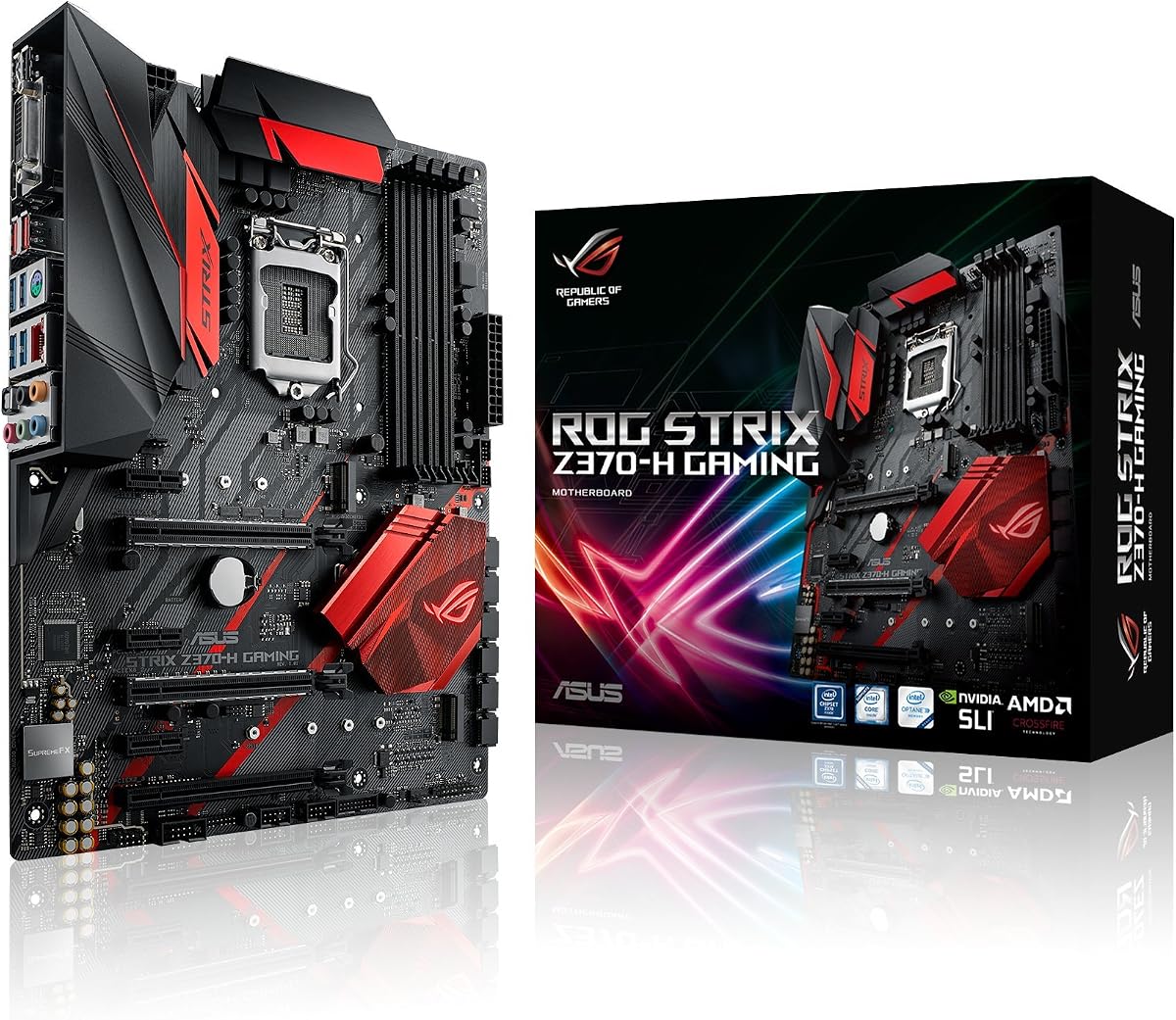
The ASUS ROG Strix Z370-H is tailored for gamers who need high performance and extensive connectivity. It supports up to 64GB of DDR4 memory for heavy multitasking.
We may earn a commission when you buy through this link, at no additional cost to you.
With a wide array of USB ports you can connect multiple peripherals without needing external hubs. This makes it ideal for users with complex setups involving controllers and drives.
The optical S/PDIF out allows for high quality digital audio connection to external DACs or receivers. This ensures that audio quality is preserved when connecting to high end sound systems.
If you want a board with a distinct gaming aesthetic and strong performance this is a good choice. It balances visual appeal with the technical specs needed for modern games.
The optical S/PDIF port connects directly to digital audio equipment allowing lossless audio transfer for immersive sound.
With numerous USB ports you can plug in all your gaming accessories and drives without needing extra hardware.
We may earn a commission when you buy through this link, at no additional cost to you.
Selecting the right Z370 motherboard requires evaluating several technical factors to ensure it meets your specific performance needs and budget constraints.
The Z370 chipset is designed for eighth generation Intel Core processors and offers specific features like overclocking support and PCIe lanes. It is important to verify that the chipset matches your CPU generation to avoid compatibility issues or wasted features.
Always confirm that the motherboard supports your specific processor generation before purchasing.
Memory support determines how much RAM you can install and the maximum speed it can run. Most Z370 boards support up to 64GB of DDR4 memory but speeds can vary based on the motherboard model.
Check the memory capacity and supported speed to ensure it meets your system requirements.
The number and type of PCIe slots dictate how many graphics cards or expansion cards you can add. Some boards offer multiple slots for SLI or CrossFire configurations while others have limited slots.
Ensure the board has enough physical slots for your current and future expansion needs.
Connectivity options include USB ports M.2 slots and network interfaces. Modern boards should offer USB 3.1 Gen2 or faster ports and M.2 slots for NVMe storage to ensure fast data transfer.
Prioritize boards with sufficient USB and M.2 ports to avoid external adapter use.
Audio quality varies significantly between standard and premium models. Higher end boards often include dedicated DACs and amplifiers to provide better sound clarity and immersion for gaming or media.
Look for boards with dedicated audio components if you are an audiophile or gamer.
The network interface on the motherboard affects your internet connection stability and speed. Ethernet controllers from companies like Intel or Killer offer better management tools and lower latency for online activities.
Choose a board with a quality Ethernet controller for stable internet performance.
The form factor determines the physical size of the motherboard and which case it will fit. ATX boards are the standard size but micro ATX options are available for smaller cases.
Verify that the board dimensions match your computer case specifications before buying.
Power delivery systems provide electricity to the CPU and memory ensuring stable performance under load. Quality VRMs and capacitors are essential for overclocking or maintaining stability with high end processors.
Look for robust power designs if you plan to push your CPU to higher speeds.
When installing your motherboard place it on a non conductive surface and align the standoff screws carefully. Use the provided manual to identify the correct headers for USB fan and power connections to avoid short circuits.
Keep the motherboard free from dust and debris by using compressed air periodically. Dust accumulation can lead to poor thermal performance or even electrical shorts if moisture gets involved.
Update the BIOS to the latest version to ensure maximum compatibility and security. Most manufacturers provide tools that allow you to update the firmware using a USB drive without needing an operating system.
While the Z370 was designed for 8th Gen Intel Core processors some manufacturers released BIOS updates that added support for certain 9th Gen CPUs. You must check the specific model support list before attempting to use a 9th Gen processor.
Most Z370 motherboards support up to 64GB of DDR4 memory with four DIMM slots. Some higher end models may support more but 64GB is the standard limit for this chipset generation.
Yes all Z370 motherboards support overclocking of the CPU since the Z370 chipset is an unlocked chipset. However the quality of overclocking support depends on the power delivery system of the specific board model.
No Z370 motherboards only support DDR4 memory modules. DDR3 memory has a different notch position and electrical specification that is physically incompatible with the DDR4 slots on the board.
Entry level Z370 boards usually have one M.2 slot while high end models like the AORUS Gaming 7 may have three. The number of slots depends on the board price tier and intended use case.
Yes many Z370 motherboards include USB 3.1 Gen2 ports offering speeds up to 10Gbps. These ports are often connected to the chipset or specific controllers and improve data transfer rates significantly.
We have reviewed ten top models ranging from budget friendly options to high end gaming boards. Each offers unique strengths in connectivity power delivery and expandability that cater to different user needs.
When choosing a board prioritize factors like memory capacity PCIe slots and USB connectivity based on your primary use case. A well selected motherboard ensures your system runs smoothly for years to come.
Always check current availability and pricing before purchasing as these values change frequently. The right choice will provide a stable foundation for your computing needs without unnecessary cost.