
TP-Link AV600 Powerline Adapter Kit
4.2Editor score
AV600 speeds up to 750 feet
100 Mbps Ethernet port included
Plug and Pair setup process
This guide compares the top ten Ethernet Line Extender solutions for reliable network expansion across homes and offices in October 2026.
Finding the right Ethernet Line Extender is crucial for maintaining a stable and fast network connection throughout your property. Whether you are dealing with thick walls or long distances, these devices help bridge the gap between your router and remote devices effectively.
We have evaluated a wide range of options based on speed, range, compatibility, and ease of installation. Our analysis focuses on how each product performs in real-world scenarios to ensure you get the most reliable extension possible for your specific setup.
Each pick highlights key features and ideal use cases to help you make an informed decision quickly. Please note that availability and pricing can change frequently, so checking the current listings is always recommended before finalizing your purchase today.
4.2Editor score

4.8Editor score
4.4Editor score
The following table provides a side-by-side comparison of all ten selected Ethernet Line Extender products to help you quickly identify the best fit for your network needs.


The StarTech 10/100 Ethernet Extender stands out as the top choice for users needing extreme reach in their network infrastructure. With a rating of 4.8 stars, it offers exceptional reliability for extending connections over distances that standard cabling cannot cover. This unmanaged single-port device is ideal for industrial or large residential settings where physical barriers are significant.
We may earn a commission when you buy through this link, at no additional cost to you.
Its standout quality is the ability to reach up to 0.5 miles using existing copper cabling, which is far beyond the typical 328-foot limit of Ethernet. The device acts as a transparent network layer, meaning it passes VLAN tags, Wake on LAN, and PXE boot signals without modification. This makes it highly versatile for professional environments that rely on specific network configurations.
However, the trade-off is that it operates at 10/100Mbps speeds rather than Gigabit. For most monitoring or sensor applications this is sufficient, but high-bandwidth streaming might be limited. Additionally, both units require mains power, which could complicate installation in remote areas without easy outlet access.
We recommend this extender for IT administrators managing remote surveillance or equipment control where distance is the primary constraint. It is perfect for scenarios like IP video surveillance or remote sensor networks where stability matters more than raw speed. Check the current listing for deployment readiness and power requirements.
This extender can reach up to 0.5 miles or 800 meters, overcoming standard Ethernet limits effortlessly for remote access.
It passes VLAN tags and other protocols unaltered ensuring seamless integration with existing network management tools.
We may earn a commission when you buy through this link, at no additional cost to you.
The TP-Link AV600 Powerline Adapter Kit is an excellent entry-level solution for extending your network through existing electrical wiring. It holds a solid 4.2 star rating and is designed for areas where thick walls block Wi-Fi signals. This kit provides a secure wired connection without the need for new cabling installation.
We may earn a commission when you buy through this link, at no additional cost to you.
Its key strengths lie in its simplicity and compatibility. You can set up the two adapters in minutes by simply plugging them into wall outlets on the same circuit. The power saving mode automatically reduces energy use by up to 85 percent when not in use which is great for efficiency. It works well with other TP-Link powerline adapters for expansion.
A significant limitation is the 100 Mbps port speed which may bottleneck faster internet plans. Also powerline performance can vary based on your home's wiring age and circuit layout. These trade-offs are acceptable for basic web browsing or IoT devices but not for heavy gaming or 4K streaming.
This kit is best suited for users on a tight budget who need a reliable connection for smart home devices or basic office tasks. It is a cost-effective way to bring wired speeds to a bedroom or basement without drilling walls. Verify that your outlets are on the same circuit before purchase.
No software or drivers are needed to configure the adapters making installation quick and user-friendly for everyone.
This kit offers a low-cost alternative to running new cables making it accessible for homeowners with limited budgets.
We may earn a commission when you buy through this link, at no additional cost to you.
The Ethernet Extender Kit VDSL is a premium solution designed for those who need to extend network connections over extraordinary distances. With a rating of 4.4 stars, it improves the standard 328-foot limit up to 7000 feet using existing cabling. This makes it ideal for large estates, farms, or industrial sites.
We may earn a commission when you buy through this link, at no additional cost to you.
Its standout quality is the ability to pass signals through phone cables or CAT5 to CAT8 cables effectively. The kit comes in a pair preset for central and remote locations meaning you get everything needed right out of the box. It requires no driver or software installation which simplifies the process significantly.
The main trade-off is the cost which is higher than typical home powerline adapters. Also ensuring a stable connection requires good quality wiring and proper placement of the units. For the right application though these costs are justified by the performance gains in distance and stability.
We recommend this kit for professional installers or property owners needing to connect remote cameras or computers without running new fiber. It is perfect for VoIP phones or modems located far from the main router. Check your existing cabling quality to ensure maximum performance.
This kit can extend your Ethernet signal up to 7000 feet making it ideal for sprawling properties or large facilities.
It supports both CAT5 to CAT8 and standard phone cables allowing flexibility based on what is already installed.
We may earn a commission when you buy through this link, at no additional cost to you.
The NETGEAR Powerline Adapter Kit PLP2000 is designed for users who demand high-speed internet extension through household electrical wiring. With a 4.2 star rating, it supports Gigabit speeds and is perfect for connecting smart TVs and game consoles. This is not a Wi-Fi device but a dedicated wired extension tool.
We may earn a commission when you buy through this link, at no additional cost to you.
Its key strengths include Homeplug AV2 technology and MIMO with Beamforming which helps direct signals efficiently. The extra plug with noise filtering ensures top performance by blocking interference from other appliances. Setup is straightforward and requires no software installation to get connected quickly.
However, the higher price can be a barrier for some buyers. Also the performance depends on the quality of your home's electrical system which might vary. These factors are acceptable if you need reliable bandwidth for streaming or gaming without Wi-Fi dropouts.
This adapter is best for households with heavy bandwidth needs who want wired speeds in rooms far from the router. It is excellent for 4K streaming and lag-free gaming where stability is paramount. Ensure your outlets are on the same circuit for best results.
With speeds up to 2000 Mbps this adapter handles 4K streaming and gaming with ease and reliability.
MIMO with Beamforming improves coverage by focusing the signal where it is needed most in the home.
We may earn a commission when you buy through this link, at no additional cost to you.
The TP-Link AV1000 Powerline Adapter Kit offers a reliable way to extend your Ethernet connection through electrical wiring. With a 4.2 star rating, it features a nano size design that does not block adjacent outlets. It delivers AV1000 speeds making it suitable for various devices from desktops to smart TVs.
We may earn a commission when you buy through this link, at no additional cost to you.
Its standout qualities include the Gigabit Ethernet port which ensures wired connections are fast enough for modern internet plans. The power saving mode automatically reduces consumption by up to 85 percent when idle. Security is also a priority with advanced integration designed into the device's structure.
One limitation is that adapters must be plugged directly into wall outlets which limits placement flexibility. Also performance may be blocked by AFCI breakers found in newer homes. These are manageable issues if you understand the electrical constraints of your space.
We recommend this kit for users wanting a compact and secure extension solution for multi-story homes. It is great for basements or attics where wiring is difficult. Verify your electrical setup supports powerline technology before purchasing.
The small size of these adapters allows them to fit snugly into wall outlets without blocking adjacent sockets.
Built with secure-by-design principles this kit protects your network data while providing reliable connectivity.
We may earn a commission when you buy through this link, at no additional cost to you.
The TP-Link AV1000 Powerline and Wi-Fi 6 Kit brings together wired extension and wireless coverage for a complete solution. With a 4.1 star rating, it supports AX1500 speeds which are great for modern high-bandwidth devices. This kit is designed to extend connections where routers fail.
We may earn a commission when you buy through this link, at no additional cost to you.
Its key strengths include EasyMesh compatibility and One-click Wi-Fi configuration. You can clone your router's network name and password instantly for seamless whole-home coverage. The Gigabit Ethernet port ensures wired devices still get top speeds alongside wireless ones.
The trade-off is that it requires direct outlet plug-in and no surge protectors. Also Wi-Fi performance depends on the powerline connection quality which varies. This is acceptable if you need both wired and wireless extensions in one box.
This kit is best for homeowners wanting to expand Wi-Fi to dead zones without running new cables. It is ideal for streaming and gaming across a large home. Ensure your outlets are on the same circuit for optimal connectivity.
AX1500 Wi-Fi 6 speeds provide seamless HD streaming and gaming for up to 64 devices at a time.
EasyMesh compatibility allows you to create a unified network that covers your entire home without gaps.
We may earn a commission when you buy through this link, at no additional cost to you.
The TP-Link AV1000 Passthrough Kit offers a practical way to extend both Wi-Fi and Ethernet through existing wiring. It holds a 4.0 star rating and features a passthrough design that lets you plug in other devices. This is useful for maintaining outlet access in powerline locations.
We may earn a commission when you buy through this link, at no additional cost to you.
Its standout quality is the AC1200 Wi-Fi 5 speeds combined with a Gigabit port. You can clone your router's network settings easily to match your whole network. OneMesh support allows you to expand coverage by connecting compatible routers.
A limitation is that it uses Wi-Fi 5 instead of the newer Wi-Fi 6 standard. This might affect speed in dense environments but is still strong for general use. Also like other powerline it needs a clean electrical circuit to work well.
We recommend this for users who need to conserve outlet space while extending coverage. It is great for living rooms or bedrooms where plugs are scarce. Verify compatibility with your current router for Mesh benefits.
The built-in power socket lets you plug other devices in without needing an extra adapter.
OneMesh support allows you to create a unified network that grows with your home's needs.
We may earn a commission when you buy through this link, at no additional cost to you.
The UGREEN Ethernet Coupler 10Gbps is a straightforward tool to join two Ethernet cables into one continuous run. With a high 4.7 star rating, it supports speeds up to 10Gbps and works with most network cables from Cat5 to Cat8. This is perfect for fixing a broken cable or extending reach slightly.
We may earn a commission when you buy through this link, at no additional cost to you.
Its key strength is the PoE support which allows you to power cameras without extra adapters. The stable Z shape design ensures secure data transmission during use. It is a passive device meaning it simply joins wires without electronics.
The limitation is the 328ft total range which is shorter than active extenders. Also it does not regenerate signals so long runs might lose quality. These are acceptable for short fixes or joining two existing cables.
This coupler is best for users needing to connect cameras or extend cable runs quickly. It is great for home or office setups requiring flexible cabling. Check the cable quality to ensure maximum speed performance.
Supports Power over Ethernet so you can connect devices like cameras without extra power supplies.
Works with Cat8 Cat7 and Cat6 cables ensuring it fits most existing network setups easily.
We may earn a commission when you buy through this link, at no additional cost to you.
The Ethernet Range Extender Kit 600m offers a unique solution to extend networks over any two copper conductors. With a 4.6 star rating, it can reach up to 600 meters using existing wiring like alarm or intercom cables. This makes it versatile for industrial or older buildings.
We may earn a commission when you buy through this link, at no additional cost to you.
Its standout quality is the ability to use 2-wire twisted pair or coax. The link stays up even on mixed wire types which is rare for extenders. It acts as a transparent Layer 1 segment allowing VLAN tags and DHCP to pass unaltered.
The trade-off is that both units require mains power and speed drops with distance. This is acceptable for static devices that do not need full Gigabit speeds. Proper mounting is needed since the case is not waterproof for exterior runs.
We recommend this kit for professionals connecting remote sensors or equipment over long distances. It is perfect for facilities with existing wiring where running new cables is too costly. Ensure both ends have power for stable links.
Any two copper conductors work making it possible to use existing wires without new installations.
It passes network traffic like VLANs and DHCP without altering data ensuring compatibility with existing systems.
We may earn a commission when you buy through this link, at no additional cost to you.
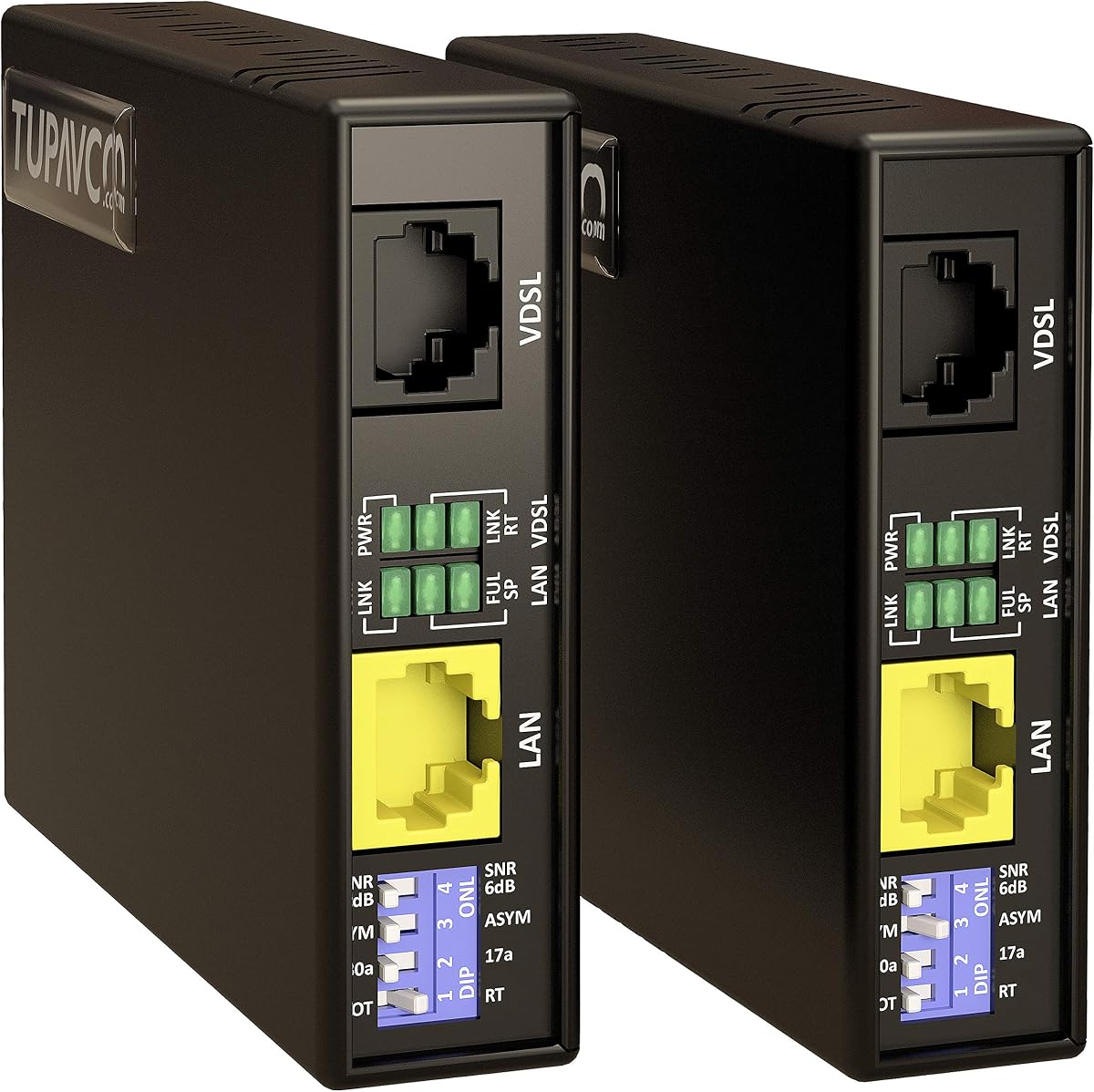
The Ethernet Extender Kit VDSL is designed to push Ethernet reach far beyond normal limits. With a 4.6 star rating, it increases range up to 5000 feet while providing speeds up to 300Mbps. This is a cost-effective way to avoid expensive cable upgrades.
We may earn a commission when you buy through this link, at no additional cost to you.
Its key strengths include the 4-position DIP switch for profile settings and G.INP noise reduction. This maximizes speed by making the signal less sensitive to interference. Setup is simple and ready out of the box with LED indicators for monitoring.
A limitation is that it relies on existing phone or Cat cabling which must be in good condition. Also the speed drops as distance increases compared to active solutions. This is acceptable for remote monitoring or basic office needs.
We recommend this kit for users needing long-range connections without laying new fiber. It is perfect for extending network access to garages or outbuildings. Check your cabling quality for the best performance results.
This kit increases your network cable range up to 5000 feet removing the need for new infrastructure.
G.INP support makes the signal significantly less sensitive to noise ensuring stable speeds over long runs.
We may earn a commission when you buy through this link, at no additional cost to you.
Choosing the right Ethernet Line Extender requires understanding your specific needs regarding distance speed and installation environment. This guide covers the essential factors to help you select the most suitable solution.
Evaluate how far the device needs to reach from your main router. Standard Ethernet cables are limited to 328 feet so extenders are vital for larger spaces. Powerline adapters typically cover up to 750 feet while active VDSL kits can reach over 5000 feet.
Match the extender's maximum range with your actual layout to ensure signal stability at the destination.
Consider the internet speed you need at the extended location. Some extenders offer Gigabit ports while others cap at 100 Mbps or lower. Powerline speeds can vary based on wiring quality so look for models with Gigabit ports for future-proofing.
Choose a speed rating that matches or exceeds your internet plan to avoid bottlenecks at the remote device.
Decide whether you prefer using existing electrical wiring or telephone cables. Powerline adapters use AC outlets while VDSL kits use existing phone or CAT cables. Passive couplers join Ethernet cables directly without needing power at the junction point.
Select the cabling type that matches your current infrastructure to minimize installation effort and cost.
Check if the extender needs mains power at both ends or just one. Some active extenders require adapters for both units which can complicate remote setup. Passive couplers do not need power at all but have limited range.
Ensure you have accessible power outlets at both the start and end points of the connection.
For advanced users check if the device passes VLAN tags and boot protocols. Transparent devices allow network configurations to work seamlessly without reconfiguration. This is critical for business environments with specific network segmentation.
Opt for unmanaged transparent extenders if you need standard Ethernet behavior at the extended end.
Look for Plug and Play models that require no software drivers or complex settings. Many kits come preset for central and remote locations ready to use out of the box. This reduces the time and expertise needed to get connected.
Choose models with intuitive LED indicators to help you verify connections quickly during setup.
Check the casing material and IP rating if the device might be exposed to elements. Some units are indoor rated while others have rugged metal shells for industrial use. Proper housing ensures longevity in various environments.
Select a unit with appropriate protection for the location where it will be mounted or plugged in.
Start by connecting the main unit directly to your router via Ethernet cable and plugging it into a wall outlet. Ensure this outlet is on the same electrical circuit as the second unit for powerline types.
Next plug the remote unit into an outlet near your target device and connect the device via the Ethernet port. Most adapters pair automatically within minutes so wait for LED indicators to show a stable connection.
Avoid using power strips or surge protectors with the extender as they can degrade performance or block the signal. Keep devices away from large appliances like refrigerators to minimize electrical interference.
Most traditional Ethernet Line Extenders do not broadcast Wi-Fi signals themselves but connect devices via cables. However some modern kits combine powerline with a Wi-Fi extender to provide wireless coverage remotely.
Yes but performance may vary depending on the quality of electrical wiring or copper phone cables. Active extenders are often more reliable in older homes than powerline adapters due to stable power.
Standard Ethernet cabling reaches 328 feet but extenders like VDSL kits can reach up to 7000 feet. Passive couplers join cables directly but do not extend beyond the 328-foot limit per segment.
No most Ethernet Line Extenders are Plug and Play and require no driver installation. They ship ready to use with preset configurations so you just connect cables and power.
Yes many extenders include Gigabit ports suitable for consoles that need stable wired connections. Check the speed rating to ensure it supports your internet plan for lag-free gaming.
Only if the unit is rated for outdoor use or placed inside a sealed enclosure. Most indoor units are not waterproof and can be damaged by moisture or extreme temperatures.
We have reviewed the top ten Ethernet Line Extender options to help you expand your network effectively. From long-range VDSL kits to compact powerline adapters there is a solution for every budget and setup.
Prioritize range and speed capabilities based on where you plan to use the device. Active extenders offer the best performance for distance while powerline adapters provide convenience for indoor use.
Prices and availability change regularly so always check current listings before making a final purchase. Selecting the right extender will ensure you have reliable connectivity where you need it most.